How to Track Competitors in Meta Ad Library Automatically [2026 Guide]
By Eric Do Couto
Updated February 5, 2026
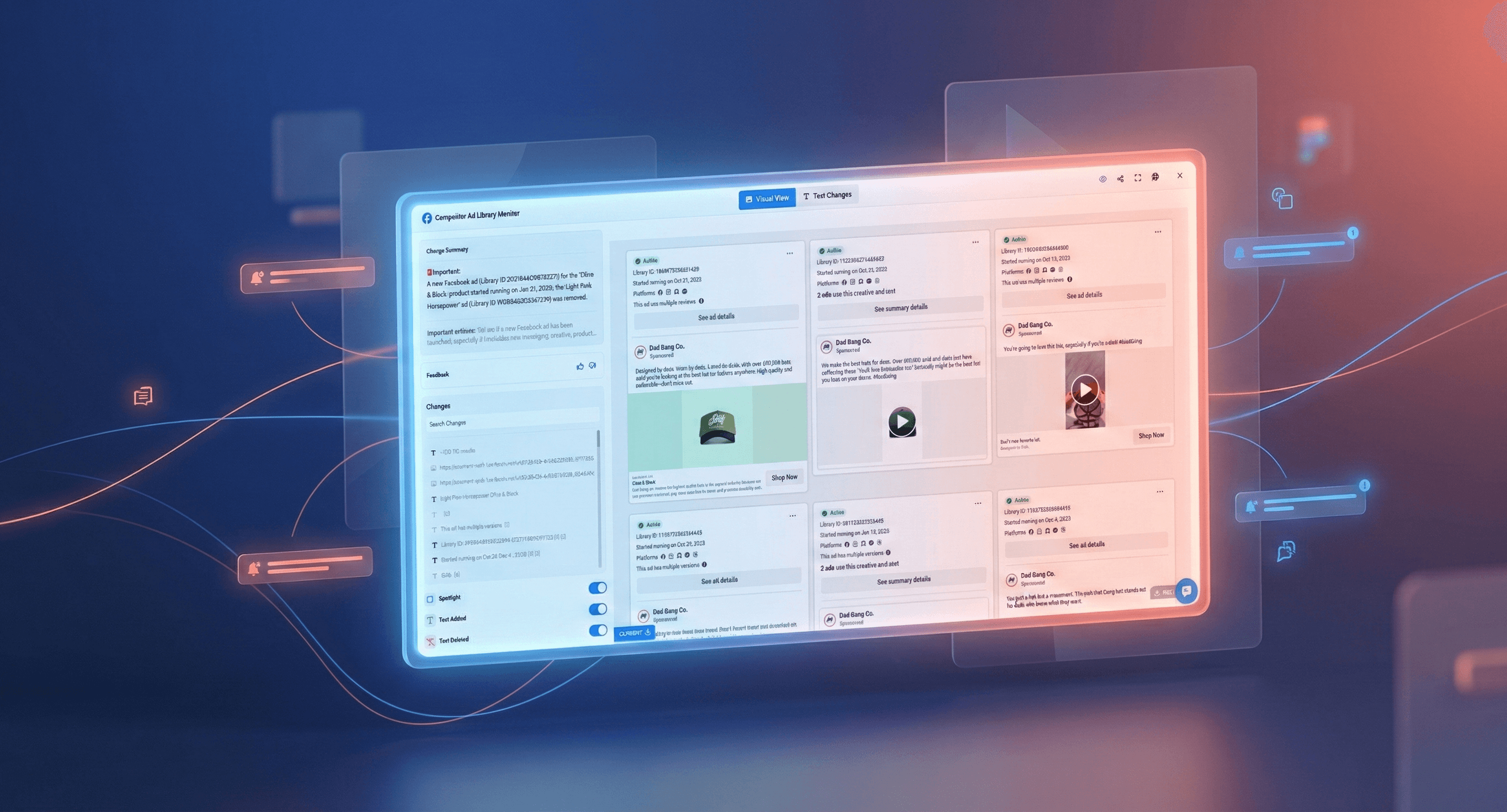
How to Track Competitors in Meta Ad Library Automatically [2026 Guide]
TL;DR: The Meta Ad Library shows every competitor ad running on Facebook and Instagram, but nobody checks it consistently. Automated monitoring turns this free public data into alerts when competitors launch campaigns, change messaging, or run promotions. Set up takes 2 minutes per competitor. Track 3-5 key competitors, identify their best-performing ads, and spot strategic shifts before they saturate the market.
How to Set Up Meta Ad Library Monitoring (5 Steps)
Let's start with the practical workflow. You can have automated competitor ad monitoring running in under 10 minutes.
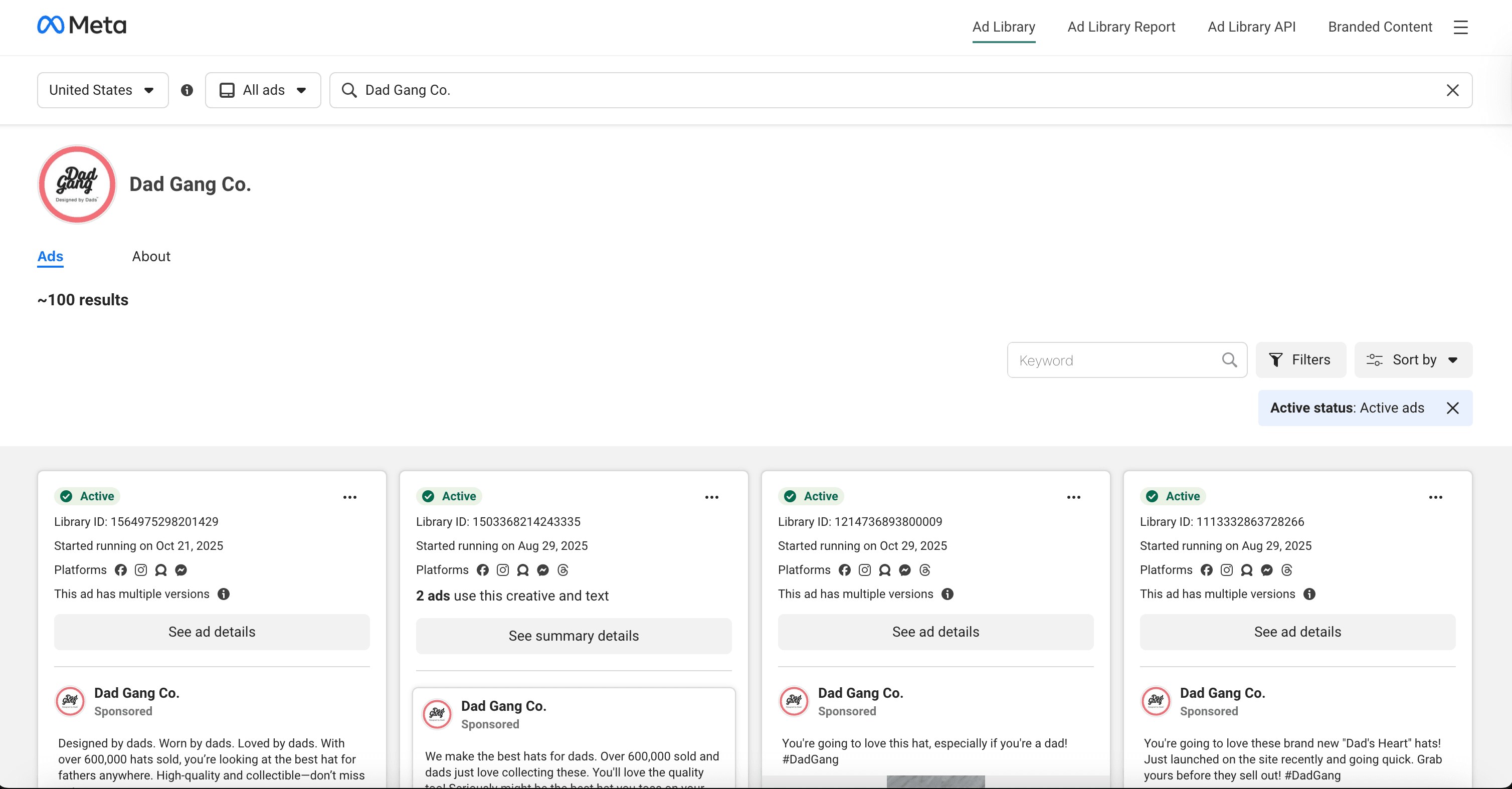
Step 1: Find Your Competitor's Ad Library Page
Navigate to the Meta Ad Library. Search for your competitor's business name. Once you find their profile, click through to view their active ads. Copy the full URL from your browser's address bar. It should look something like:
facebook.com/ads/library/?active_status=all&ad_type=all&country=US&view_all_page_id=XXXXX
Step 2: Create Your Visualping Monitor
Go to Visualping and paste the competitor's Ad Library URL into the monitor creation field. Select your check frequency:
| Business Type | Recommended Frequency | Rationale |
|---|---|---|
| E-commerce / Retail | Every 6 hours | Catch flash sales and promotions quickly |
| B2B / SaaS | Once daily | Campaign cycles are longer |
| Stable / Niche Markets | Twice weekly | Lower ad volume, less urgency |
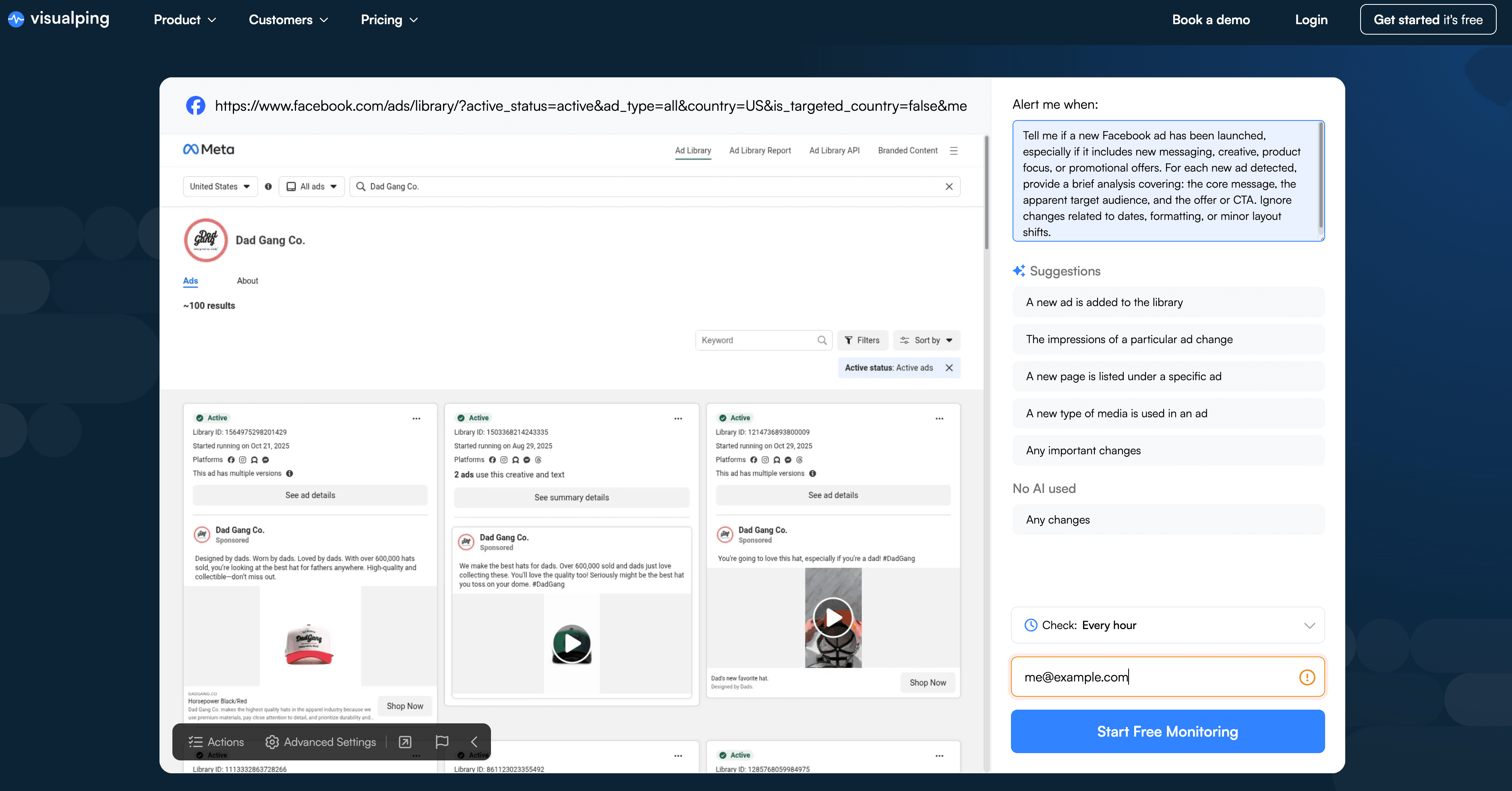
Step 3: Configure the AI Important Definition
This is where automation becomes genuinely useful. Instead of getting alerted every time the page's HTML shifts slightly, you configure the AI to understand what actually matters.
In the "Alert me when" field, paste this prompt:
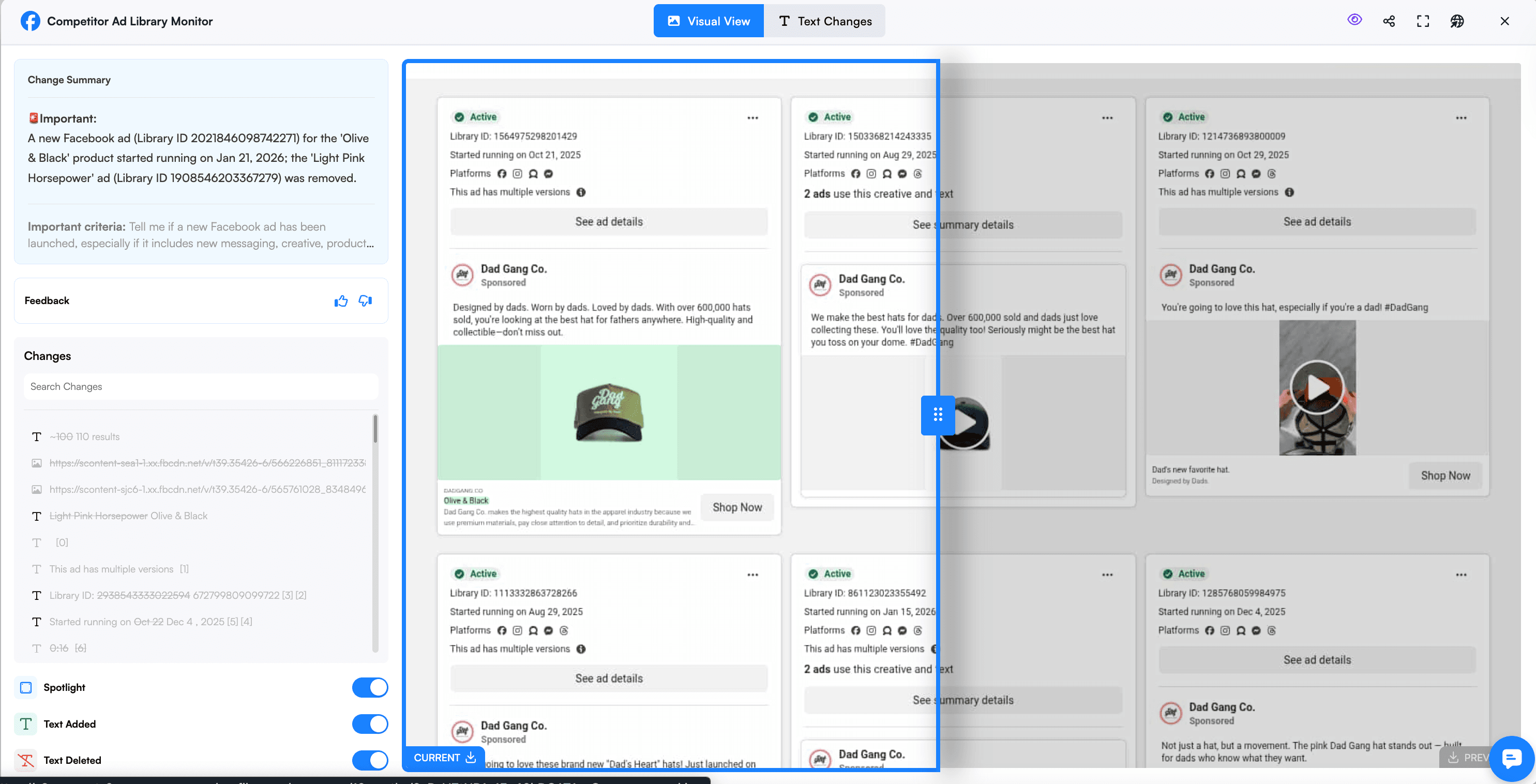
"Tell me if a new Facebook ad has been launched, especially if it includes new messaging, creative, product focus, or promotional offers. For each new ad detected, provide a brief analysis covering: the core message, the apparent target audience, and the offer or CTA. Ignore changes related to dates, formatting, or minor layout shifts."
This prompt does three things. First, it focuses the AI on substantive changes rather than cosmetic updates. Second, it asks for analysis rather than just detection, so your alerts include strategic context. Third, it explicitly tells the system what to ignore, reducing false positives from the Meta Ad Library's dynamic interface elements.
Step 4: Test and Refine
After your first few alerts, review whether the AI is catching the right changes. If you're getting too many notifications about minor updates, refine your prompt to be more specific about what constitutes a "new" ad versus a variation. If you're missing important campaigns, broaden the criteria. The AI learns from your feedback, so the filtering improves over time as you mark alerts as important or not.
Step 5: Repeat for Key Competitors
Once your first monitor is dialed in, clone the setup for 2-4 additional competitors. The exact same AI prompt works across different Ad Library pages, so you're not starting from scratch each time. Most marketing teams find that monitoring 3-5 direct competitors provides comprehensive market visibility without creating information overload.
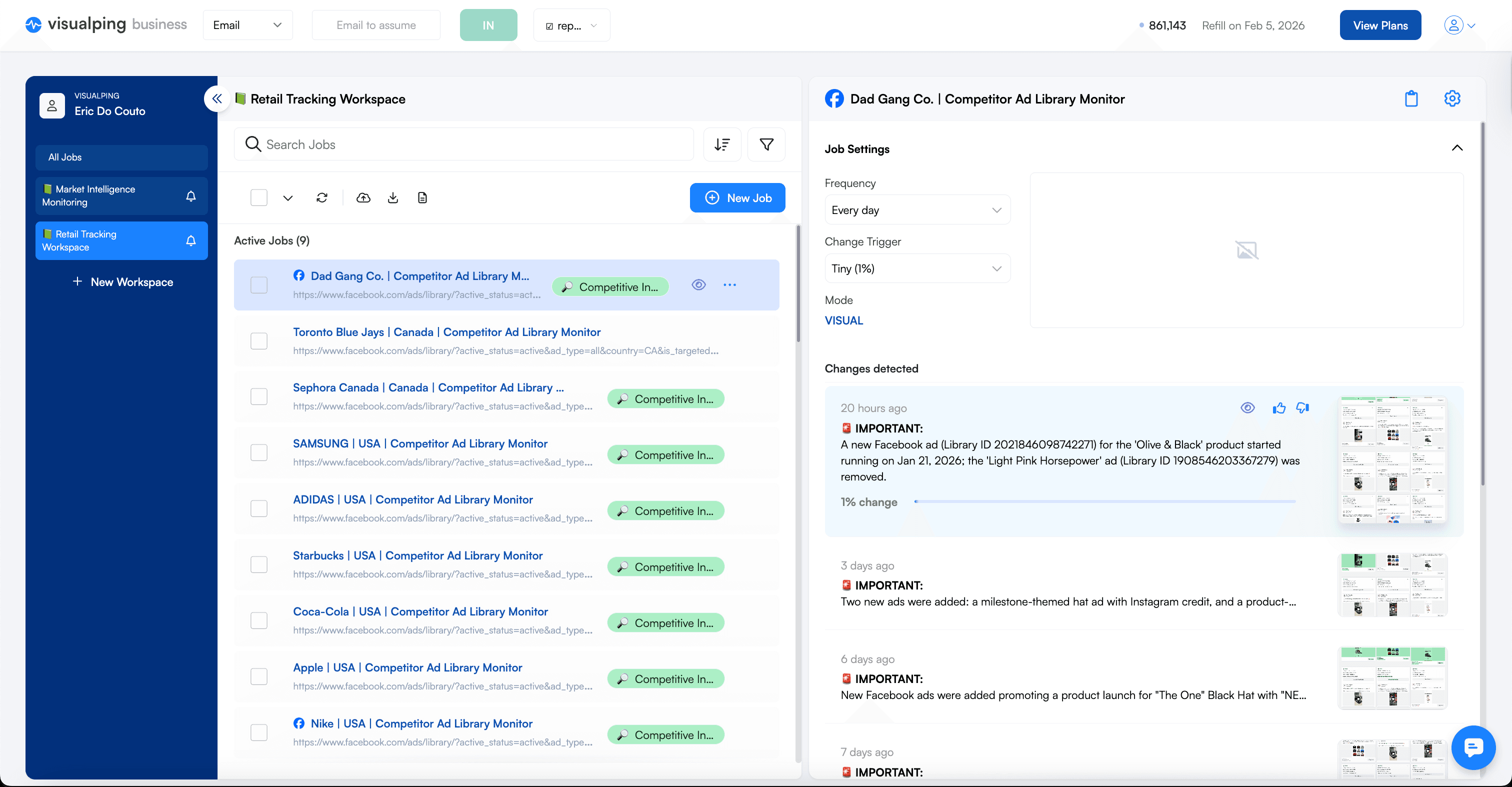
The entire process from finding the URL to having an active monitor takes about 90 seconds per competitor. After the initial setup, the system runs automatically, checking daily and alerting only when your competitors make moves worth knowing about.
Why Automate Meta Ad Library Monitoring?
Every week, your competitors are launching new ad campaigns, testing fresh messaging, and adjusting their promotional strategies. Most of these changes are completely visible in the Meta Ad Library, a public database created by Meta for advertising transparency that shows every active ad from any business running campaigns on Facebook, Instagram, or Meta's other platforms. The information is sitting there, free and accessible, waiting to give you competitive intelligence that could shape your entire paid media strategy.
The problem? Almost nobody checks it consistently.
According to Crayon's State of Competitive Intelligence research, sellers go head-to-head with competitors in 68% of deals, yet less than a third of compete programs engage with sales daily or weekly. The gap between knowing competitive intelligence matters and actually gathering it consistently is where most teams fall short.
Marketing managers know the Meta Ad Library exists. Paid media specialists have the link bookmarked. Competitive intelligence professionals reference it occasionally. But between campaign launches, performance reviews, creative briefings, and budget meetings, manually checking competitor ad activity falls to the bottom of the priority list. By the time you remember to look, your competitor's flash sale has already run its course, their new positioning has saturated the market, and you're left playing catch-up instead of staying ahead.
Why Manual Checks Fail
The Meta Ad Library interface wasn't designed for competitive monitoring. It was built for transparency and public accountability, not strategic surveillance. When you visit a competitor's page, you see their current ads, but you have no context for what changed since your last visit. Did they launch three new campaigns this week, or have those ads been running for months? Is that new creative direction a test, or have they completely pivoted their messaging?
Most marketers check the Ad Library reactively rather than proactively. Someone mentions seeing a competitor's ad, so you go look. You hear about a promotion, so you investigate. You're responding to secondhand information instead of discovering changes yourself.
The checking process itself creates friction. You need to remember which competitors to monitor, navigate to each one's Ad Library page, scan through their active ads looking for anything new, mentally compare what you see to what you remember from last time, and repeat this process weekly or monthly. The marketers who would benefit most from competitor ad monitoring are the ones least likely to do it manually, because they're already stretched thin managing their own campaigns.
Website change detection tools like Visualping were built to solve exactly this problem. Instead of manually checking pages for updates, you configure a monitor once, and the platform automatically checks for you, sending alerts only when meaningful changes occur.
What You Can Track: 5 Competitor Intelligence Use Cases
1. Catching New Campaigns the Moment They Launch
The primary value of automated Meta Ad Library monitoring is speed. When a competitor launches a new campaign, you know about it within hours instead of weeks. This early detection window creates multiple strategic advantages.
First, you can assess their creative direction before the market becomes saturated. If a competitor suddenly shifts from product-focused imagery to lifestyle photography, that signals a positioning change worth understanding. Are they targeting a different demographic? Testing emotional appeals over rational benefits?
Second, you can react to promotional campaigns before they gain momentum. Imagine a competitor launches a surprise 30% off flash sale on Thursday morning. If you're monitoring their ads, you see it by Thursday afternoon. That gives you time to decide whether to match, counter with a different offer, or double down on your differentiation messaging.
Third, you can adjust your own bidding and budget during periods of heavy competitor spend. When you notice a competitor flooding the Ad Library with new variations targeting the same keywords you're bidding on, that's a signal they're ramping up their budget.
2. Decoding Positioning and Messaging Shifts Over Time
Individual ads tell you what a competitor is saying today. Patterns across weeks and months reveal how their strategy is evolving. Automated monitoring creates a historical record that makes these patterns visible in ways manual checking never could.
Consider a competitor who has been running product comparison ads for six months, emphasizing features, specifications, and technical superiority. Then suddenly their new ads focus on customer stories, emotional benefits, and lifestyle aspirations. That's a strategic pivot, likely informed by customer research, brand positioning work, or leadership changes.
Ad variations reveal audience targeting strategies that wouldn't otherwise be visible. If you notice a competitor running the same core offer with slightly different copy, imagery, and value propositions, they're likely testing different audience segments. By studying their ad variations, you can reverse-engineer their segmentation strategy and identify audience gaps they might be missing.
Messaging shifts often precede broader market moves. When a B2B software company starts running ads that emphasize ease of use and speed of implementation instead of enterprise features and security, they're likely preparing to move downmarket. The same principle applies beyond marketing. Journalists tracking companies for news stories use identical monitoring techniques to catch when organizations quietly update their messaging, leadership pages, or public statements.
3. Spotting Promotions and Offers Before They Hit Your Radar
Competitive promotions create immediate pressure on your own conversion rates and customer acquisition costs. If your competitor is running a 25% discount and you're not, prospects will naturally gravitate toward the better deal unless your differentiation is strong enough to overcome the price gap. The faster you know about competitor promotions, the faster you can decide how to respond.
Many promotions appear in ad creative before they show up on landing pages, email campaigns, or social media announcements. Advertisers often test promotional messaging through paid ads to gauge interest before committing to broader marketing pushes. By monitoring the Ad Library, you catch these tests early and get advance warning about offers that might soon escalate into full campaigns.
Seasonal promotional patterns become visible when you track competitor ads over time. If a competitor consistently runs back-to-school promotions in late July, holiday bundles in early November, and New Year deals starting December 26, you can anticipate these patterns and prepare your own counter-programming. This same price monitoring approach works for tracking competitor rate changes across their websites, giving you a complete view of their promotional strategy across channels.
Discount depth and promotional framing also provide competitive intelligence. A competitor offering 20% off suggests moderate pressure to drive conversions. A competitor offering 50% off signals either aggressive inventory clearing, desperate customer acquisition, or possibly financial distress.
4. Identifying Long-Running Winner Ads // And Ads That Get Turned Off
Not all ads perform equally. Some campaigns launch with fanfare and disappear within days. Others run for months, sometimes years, because they're generating consistent results. The ads that persist are the ones worth studying most carefully, because they've proven themselves in the market.
You can see in the Meta Ad Library when an started running manually, but again, unless you're consistently checking, you might miss when a successful ad is turned off. If you've been monitoring a competitor for three months and the same ad keeps appearing in your snapshots week after week, that's a signal it's working.
Long-running ads reveal proven messaging frameworks, value propositions, and creative approaches. If a competitor's "results in 30 days or your money back" guarantee keeps showing up in every campaign variation, that messaging clearly resonates with their audience. These insights aren't speculation or theory. They're battle-tested in the market and validated by continuous spend.
5. Reading Volume Changes as Strategic Signals
The frequency and volume of ad activity also tells a story. A competitor who was running two or three evergreen campaigns suddenly launching fifteen new variations suggests either a major budget increase, a critical growth push, or possibly desperation if their core metrics are declining. Conversely, a competitor who dramatically reduces ad activity might be facing budget cuts, shifting to other channels, or focusing resources on different initiatives.
Building Your Monitoring Workflow
Having the tools doesn't guarantee results if you don't build a system for actually using the intelligence you gather. The most effective approach is to start small, establish consistency, and gradually expand your monitoring as the value becomes clear.
Start with 3-5 key competitors. Ideally a mix of direct competitors who target the same audience and adjacent competitors who serve related needs. Monitoring too many competitors creates information overload and makes it harder to spot meaningful patterns.
Set your monitoring frequency based on how quickly your market moves. E-commerce brands running frequent promotions benefit from checks every few hours during peak seasons. B2B companies with longer sales cycles can often get by with daily monitoring. The goal is catching meaningful changes quickly without generating so many alerts that you start ignoring them. Website monitoring works best when the signal-to-noise ratio stays high.
Establish a weekly review routine. Block 30 minutes on your calendar, pull up your monitoring dashboard, and systematically review what each competitor did this week. Treat competitor ad review the same way you'd treat campaign performance review or creative briefings, as a recurring commitment rather than an occasional activity.
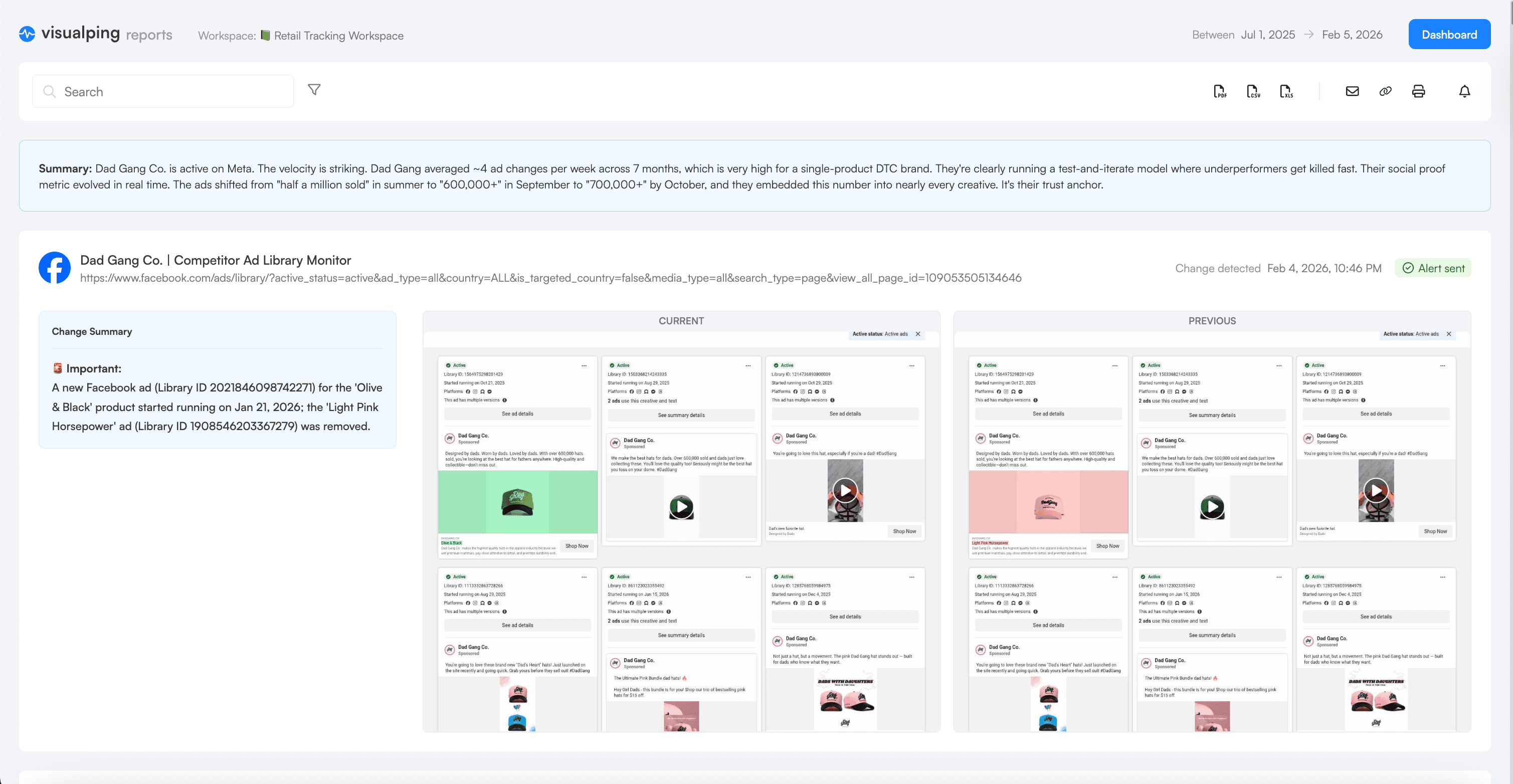
Let automated reports do the heavy lifting. Tools like Visualping's scheduled reports can compile weeks or months of competitor ad changes into a single summary, complete with AI-generated analysis that surfaces the patterns worth paying attention to. Instead of manually logging every change, you get a periodic digest that highlights what shifted, what's new, and what disappeared from a competitor's ad library. Set it to run weekly or monthly and you'll have a running record of competitor activity without the manual upkeep.
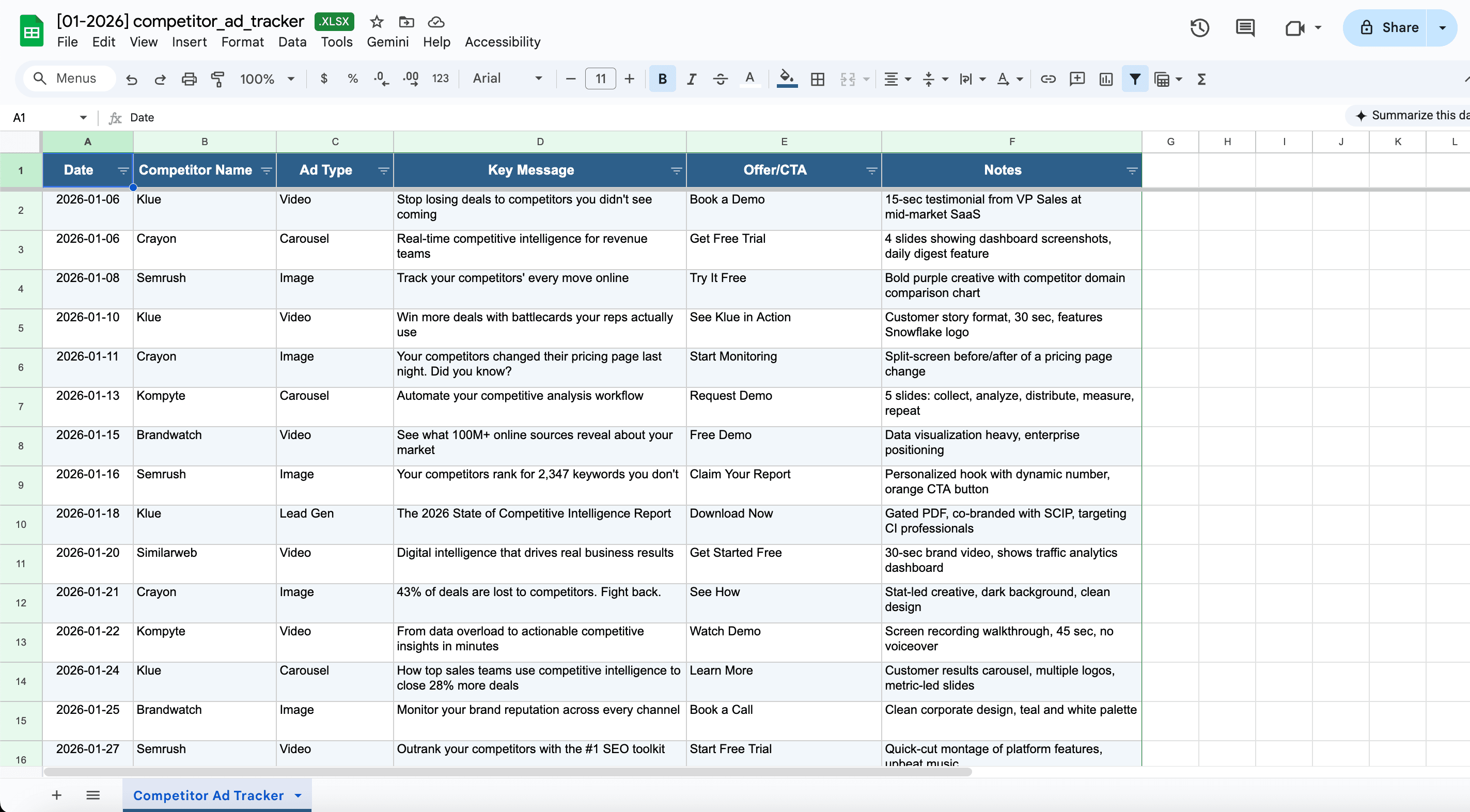
Use the intelligence to inform specific decisions. When planning your next campaign, review what messaging your competitors have been running and consciously decide whether to align with market norms or differentiate. When setting promotional calendars, check whether you'll be running sales during the same weeks as competitors or finding gaps in their promotional schedule. A simple shared spreadsheet can still be useful for logging your own takeaways and flagging the changes that matter most to your team, but the monitoring and pattern recognition should be automated.
Getting Started
The barrier to starting competitor ad monitoring is remarkably low. You don't need expensive competitive intelligence platforms, researcher subscriptions, or specialized tools. You need URLs for competitor Ad Library pages and automated monitoring configured to track them.
Start with your single most important competitor. Navigate to their Meta Ad Library page, copy the URL, and set up your first monitor. Configure it to check daily and use AI filtering to alert only on meaningful changes. Live with this single monitor for two weeks. Review the alerts, see what you learn, and adjust your settings based on what types of changes actually matter for your decision-making.
The Meta Ad Library is public information that your competitors are publishing deliberately. Monitoring it isn't sneaky or underhanded. It's competitive awareness using publicly available data. The only question is whether you'll track this information systematically or continue checking sporadically and missing the patterns that matter.
Most marketing teams spend thousands of dollars monthly on competitive intelligence subscriptions, analyst reports, and research services while completely overlooking free intelligence sitting in the Meta Ad Library. Automated monitoring turns that free resource into structured competitive intelligence that informs campaign planning, creative development, promotional calendars, and positioning strategy.
Disclosure: This article discusses Visualping, a website change detection and monitoring platform. We've covered our own product alongside other monitoring approaches to provide comprehensive guidance on tracking competitor advertising activity.
Related Resources
- Monitor SEC filings for public company competitive intelligence
- AI-powered monitoring for intelligent change detection across any webpage
-
- Do Couto, Eric. "Competitor Price Data Guide." Visualping Blog, 2025.
External Sources
- Meta Transparency Center. "Ad Library Tools." Meta, 2026.
- Crayon. "The State of Competitive Intelligence." Crayon Research, 2025.
Want to monitor the web with AI?
Sign up with Visualping to track web changes with AI and save time, while staying in the know.
Eric Do Couto
Eric Do Couto is Head of Marketing at Visualping, where he leads growth and competitive intelligence strategy. He has over a decade of experience implementing pricing and competitive monitoring systems for SaaS businesses.