Get Notified When Tickets Go on Sale
By Emily Fenton
Updated February 7, 2026
Getting your hands on tickets for that huge event, whether it was the Eras Tour or this year's BTS world tour tickets, can honestly feel like winning the lottery (maybe even better?)
Whether it’s that one artist you’ve followed since high school or a once-in-a-lifetime sports playoff you're dying to see, the hype is very real.
But of course, when those tickets finally drop, they vanish in seconds, leaving us normal folk staring at a "sold out" screen and considering sketchy resellers with 300% markups. Honestly, it's a bit depressing.
That's where Visualping might be able to help you out. With Visualping, you won't have to constantly refresh ticket sale pages or hope for a lucky break.
This powerful tool monitors websites for updates and sends you an alert it detects that ticket sales went live, giving you the upper hand in securing tickets before they sell out.
In this article, we'll go over how to get notified when tickets go on sale, explore the frustrations of missing out, and the benefits of early access.
Why You Need Ticket Alerts
We have all been there. You open the site five minutes late only to find the infamous "Tickets are sold out now. Check back soon" text staring back at you on Ticketmaster.
Your heart drops, and the group chat goes silent. It’s a very specific type of sadness, for those who've been through it.
But it doesn't have to be that way. Getting an alert the instant they go on sale is the secret sauce to give you a fighting chance at snagging tickets.
It gives you that crucial window to clear your schedule, ping your friends, and have your payment info ready. No more frantic, mid-meeting scrambles.
It’s also not just about getting any ticket. It’s about getting the good ones. Early access is the difference between floor seats and being stuck behind a literal concrete pillar in the nosebleeds.
Plus, it's just easier. Instead of stressing the whole day refreshing the ticket page while ignoring your coworkers' Slack messages, you can rest easy knowing Visualping's watching the pge for you.
Once you do get that alert, you grab your card, secure the bag, and get back to your day without the constant stress of checking. That's a real life hack.
The Problem With "Traditional" Ticket Hunting
Let’s be real for a second. For many of us, trying to secure tickets for a show usually involves a mess of open browser tabs and desperate hope.
You’re juggling three different sites, trying to remember if the sale starts at 10:00 AM or 10:30 AM, and praying your Wi-Fi doesn't go out. It’s a high-stress, high-intensity flurry, and if you blink, you lose.
Relying on social media or "word of mouth" is just as risky. By the time an artist posts a "tickets are on sale!" story on Instagram, the queue is already 2,000 people deep.
Following multiple venues and artists on Insta and checking their pages becomes its own chore. Often, those notifications arrive way too late too.
How to Get Notified When Tickets Go on Sale with Visualping
Okay, now for the actual solution: Visualping. Try setting up Visualping alerts on multiple ticketing and venue websites for your event.
Here's a quick guide:
Step 1: Enter the Ticket Page URL in Visualping's Homepage Search Field
Go to the ticket page (Ticketmaster, Eventbrite, or even the venue/event's own site) and grab the URL from your browser.
Head over to the Visualping homepage and paste it into the search bar. You'll see a preview of the page where you can select exactly what you want to keep an eye on.
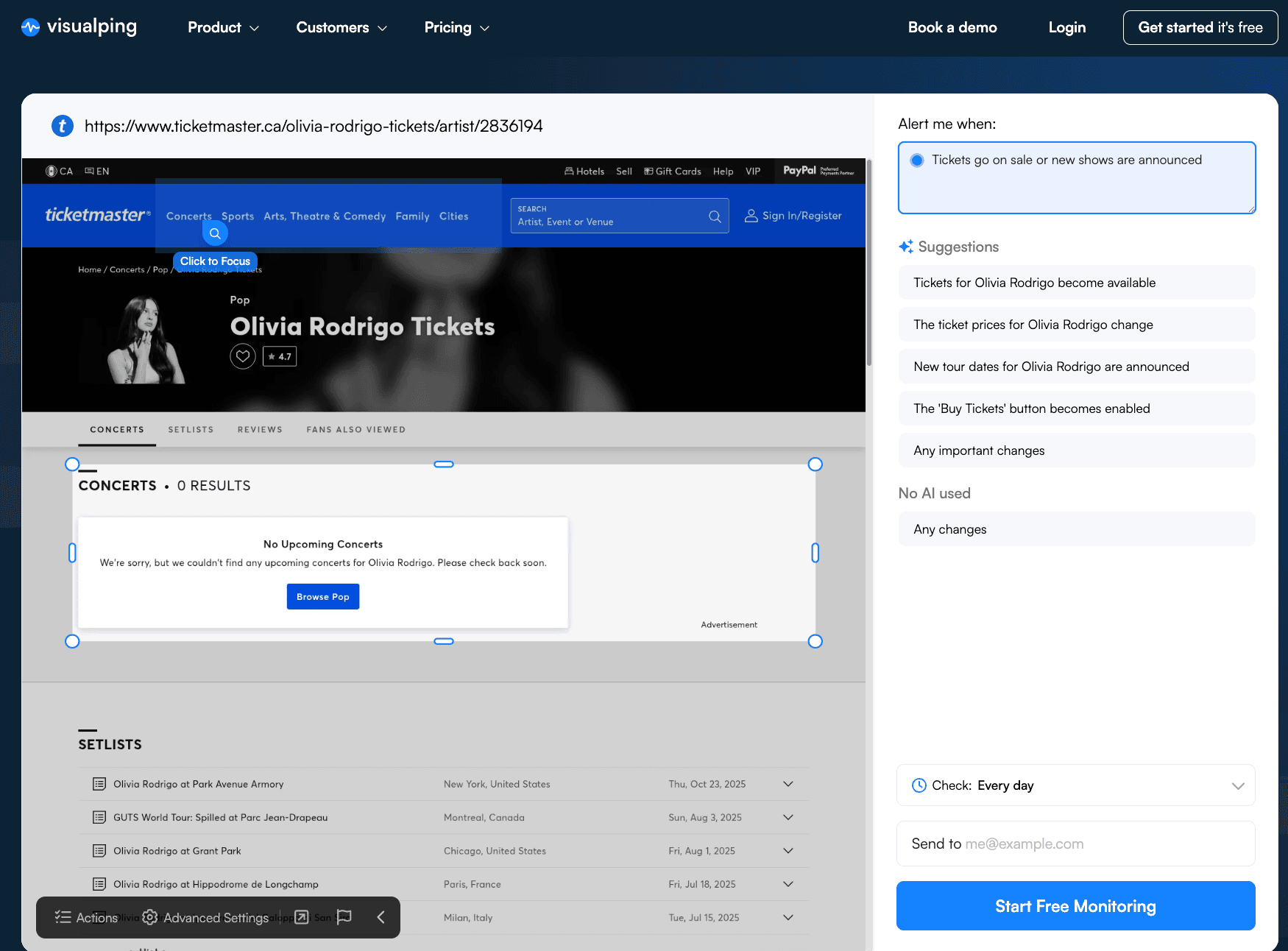
Step 2: Select the Page Section to Monitor and Set AI Criteria
To begin receiving notifications, select the particular area of the page that you want to monitor.
You can also add a specific criteria for you alert like "Alert me when a new show for Los Angeles" is announced.
Step 3: Set the Monitoring Frequency
Set the frequency of checks on this page. For Free plans, you can monitor as often as every hour.
Step 4: Enter Your Email Address for Notifications
Then, just enter an email address that you usually check as Visualping requires it to send you notifications. Once Visualping detects a change that meets your criteria, we'll send you an instant notificaiton.
The Bottom Line on Ticket Drop Alerts
Securing tickets shouldn't feel like a full-time job. Visualping does the heavy lifting for you, so you have the highest chances of seeing your favorite artist.
Sign up for Visualping today to get notified when tickets go on sale, stay ahead of the crowd, and start clearing your calendar for that show you've been waiting for. Your future self (the one actually at the concert) will thank you!
Frequently Asked Questions About Monitoring Ticket Drops
How can I increase my chances of getting tickets during a "drop"? Using automated monitoring like Visualping is your best bet. By checking the page more frequently than you could manually, you ensure you're in the queue the moment it opens.
Can I track multiple ticketing websites at once? Definitely. You can set up multiple jobs in Visualping to monitor various ticket websites simultaneously so you never miss a beat.
Is there a way to get notified of tickets for events that haven't been announced yet? Yes. You can use Visualping to monitor an artist’s official "Tour" page or a venue’s "Upcoming Events" calendar. By tracking these pages for any new text or layout changes, you'll often get an alert the second a new date is added to the schedule. sometimes even before the official social media announcement goes out.
Want to alerts when tickets go on sale?
Sign up with Visualping to get ticket drop alerts so you can catch your favorite aritst
Emily Fenton
Emily was the Product Marketing Manager at Visualping. She has a degree in English Literature and a Masters in Management.
More articles by Emily Fenton