Best Competitor Website Analysis Tools in 2026
By Emily Fenton
Updated February 11, 2026

Disclosure & Editorial Standards
Important Disclosure: This article is written by the Visualping marketing team. Visualping is one of the tools evaluated in this guide, and may benefit if you choose to purchase our product. We encourage you to try our free trial to see if we're a good fit for your competitor website analysis needs, but we do recommend testing multiple tools. Free versions and free trial periods are available for most platforms. Your specific needs may be better served by a competitor.
This disclosure appears prominently because trust and transparency is the foundation of useful content.
Here's the thing about staying competitive in your market: you need to know what your rivals are doing, and more importantly, why they're doing it.
The good news? We're living in an era where you don't have to manually check competitor websites every day.
There's a whole ecosystem of competitor website analysis tools that do the heavy lifting for you, helping you uncover insights about pricing, product launches, and shifts in marketing strategy that you'd otherwise miss.
These tools can show you everything from how your competitors' websites are performing in search to what technologies they're using under the hood.
According to Crayon’s 2023 State of Competitive Intelligence report, 99% of stakeholders consider competitive intelligence at least somewhat important to their success, with 55% calling it "absolutely critical"–a substantial increase from 17% in 2021.
But with dozens of competitor analysis tools on the market, figuring out which one actually fits your needs can feel overwhelming.
Some are built for tracking website traffic, others excel at SEO analysis, and some (like the ones we'll cover) are perfect for monitoring real-time changes to competitor pages.
The key isn't picking the most expensive tool or the one with the most features. It's about matching the right tool to your specific competitive intelligence goals.
A startup trying to understand competitor pricing needs something different than an enterprise SEO team tracking keyword rankings across 50 domains.
In this breakdown, we'll walk through the best competitor website analysis tools for 2026, what makes each one useful, and how to actually analyze a competitor website without spending hours doing it.
How to Analyze a Competitor Website in 5 Steps (Quick Start)
Before we dive into the tools, let's cover the basics. If you're wondering "how do I even start analyzing a competitor's website?", here's a simple framework that takes about 5 minutes per competitor.
Step 1: Identify What You're Tracking
Don't try to monitor everything. Pick 2-3 specific things: pricing changes, new product launches, blog content, or design updates. Being focused here saves you from information overload later.
Step 2: Choose Your Monitoring Pages
Instead of tracking entire websites, focus on high-value pages: home page, specific feature landing pages, pricing page, product pages, about/team page, and their blog or press releases. These pages tell you the most about strategic shifts.
Step 3: Set Up Automated Monitoring
Use competitor monitoring tools (we'll get to these below) to automatically track changes and get instantly alerted when your competitor updates those chosen pages. For what each tool's free tier actually covers, see our comparison of free and paid CI tools by job.
Step 4: Establish Your Review System
How often you review competitor intel depends on your industry. Fast-moving AI SaaS? Weekly. Traditional B2B? Monthly might work. Just don't let insights pile up... they get stale.
Step 5: Document and Share Insights
This is where most teams drop the ball. Create a simple system (even just a Slack channel, Notion, or a shared doc) where you log what you're seeing and what it might mean. Competitive intelligence only works if your team actually uses it.
Why Analyzing Your Competitor's Website Actually Matters
Monitoring competitor websites isn't about copying what everyone else does. It's about understanding the competitive landscape well enough to make smarter decisions for your own business.
Here's an example: when a competitor updates their homepage messaging, that often signals a bigger strategic shift, maybe they're targeting a new audience segment, or responding to feedback they're hearing from customers.
When they adjust pricing, it could indicate they're feeling market pressure, or conversely, that they're doubling down on their premium, enterprise plans.
The challenge is that there are multiple ways to analyze competitor websites, and the approach you take really depends on what questions you're trying to answer.
Want to understand their SEO strategy? You'll need different tools than if you're tracking pricing changes or monitoring their blog content.
Some teams want super granular technical data, like what marketing technologies competitors are using, or a full breakdown of their backlink profile.
Others just need to know when key pages change. Both approaches are valid, it just depends on your competitive intelligence goals.
Let's break down the specific areas worth monitoring on competitor websites:
Homepage Changes Signal Strategic Shifts
When competitors redesign or update their home page, it's rarely just about aesthetics. These changes usually indicate something significant happening behind the scenes.
Watch for updates to:
- Core value propositions and messaging (what they're emphasizing now vs. before)
- Visual branding and design language
- How they're positioning their product or service
- Addition or removal of customer testimonials and case studies
Pricing Page Updates Are A Goldmine For Competitive Intelligence
Monitoring competitor pricing gives businesses a strategic advantage in the marketplace. Changes in pricing often indicate broader shifts in strategy, market positioning, or reactions to economic pressures.
According to a 2024 ProfitWell study, most B2B SaaS companies change their pricing or packaging at least once a year.
When a competitor adjusts their pricing, they're signaling something about their market position, their costs, or pressure they're feeling.
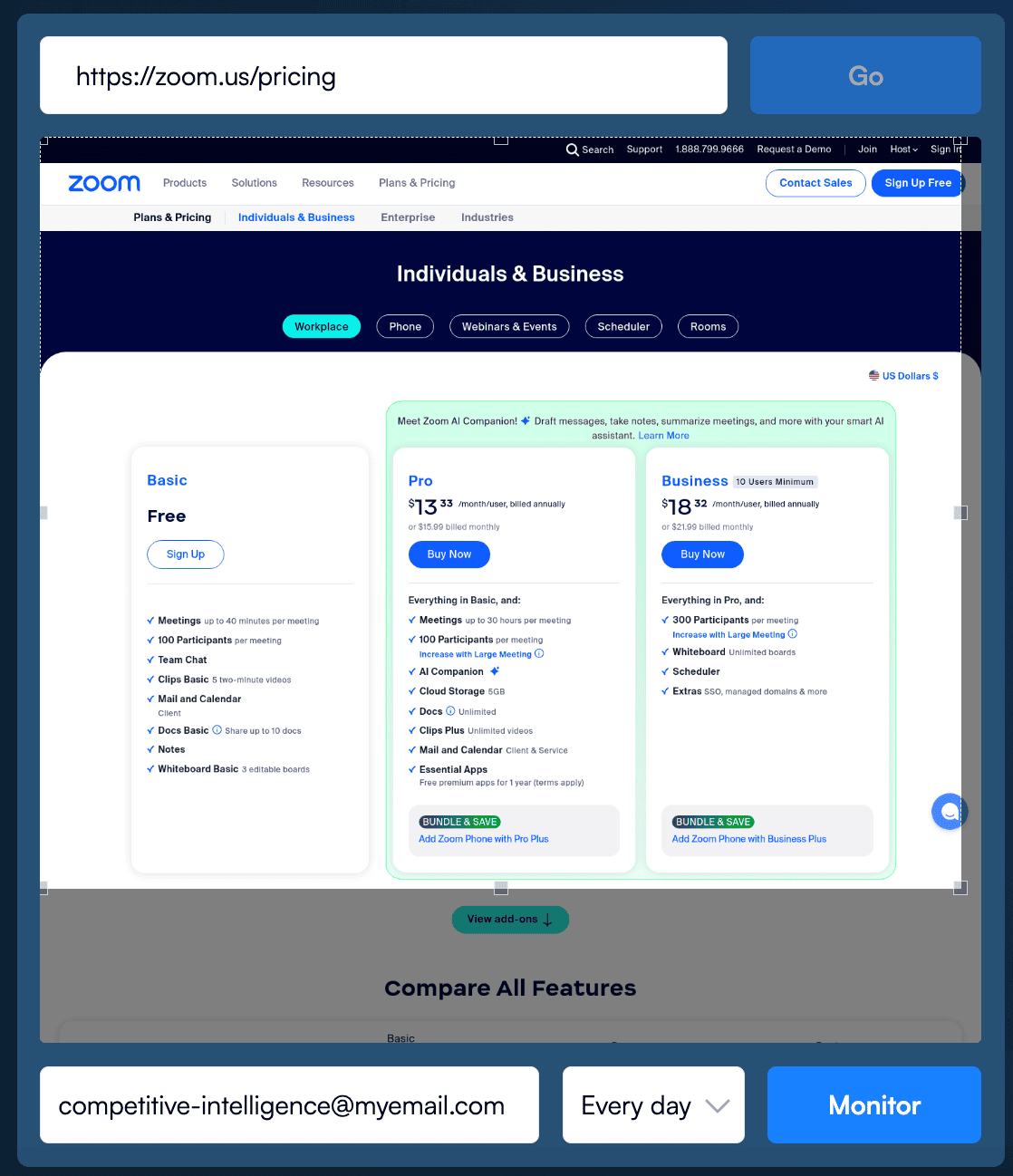
In sales, the pricing page is often one of the most carefully crafted pages on a website, updated only when something significant changes. By keeping track of your competitors’ pricing pages, you can stay informed about important adjustments to their pricing strategies.
These pages are typically packed with information, and manually checking them for any updates can be incredibly time-consuming and inefficient.
An AI page monitoring agent like Visualping can be super handy for automatically monitoring competitor pages for you. Visualping will notify you of any changes so you can save time, while staying in the know.
Yehor Melnykov, CEO and Co-founder of Loio, an AI-driven legal software company, says that AI-driven competitive intelligence tools have made significant changes.
"AI has made competitive intelligence less about gathering and more about synthesizing," he said. "Before, teams spent endless hours collecting raw data. Now, AI handles the collection and surfaces the 'why it matters.'"
He says this shift towards using AI for competitive intelligence efforts helps free up important time for interpretation and decision-making rather than "drowning in spreadsheets."
Navigation Menu Changes Tell You Where they Want Traffic
Updates to a company's navigation signals where they are trying to direct attention to on the website.
These structural modifications to their site often correlate with broader digital marketing initiatives. Businesses may adjust navigation to support PPC campaigns, improve conversion rates, or align with SEO goals.
Try using Visualping’s advanced features to reveal updates to navigation elements and monitor only the specific dropdowns you care about.
Executive Team Page Reveal Strategic Moves
Most companies showcase their leadership team online on their team or executive page. Changes to these pages, such as a key departure or new hire, can signal where competitors are reallocating resources (e.g a new Director of Marketing hire signals increased marketing focus), making strategic investments, or strengthening areas of focus.
Monitoring these updates provides insight into where they see opportunities or have already begun significant initiatives.
Press Release Pages Tell You Where They’re Trying to Stand Out
Press release pages are a no-brainer to monitor. Corporate updates from a press release page can keep you up-to-date on the latest awards, partnerships, product releases, and corporate development activities. You can see the bets your competitor is making, and where they’re trying to stand out.
Importance of Using Automated Website Analysis Tools
Traditional approaches to competitor analysis, which involve manually rechecking competitor websites and recording your observations, are time-consuming and inefficient. There’s also plenty of room for human error, and accidentally missing an important update.
Competitor monitoring and analysis is now a necessity for businesses that want to keep up. To do it efficiently, automated tools have become the industry norm. For AI-specific picks, see the best AI competitor analysis tools.
Alex Vasylenko, Founder of Digital Business Card advises business owners to "start small" with using competitive intelligence tools.
"Don't rush into complex competitive intelligence tools right away, start small and become smart," he said. "Start with data from inside the company and insights from customers to develop a strong base.”
Competitor Website Analysis Tools: Comparison Checklist
| Tool | Best For | Starting Price | Ease of Use |
|---|---|---|---|
| Visualping | Visual changes detection, pricing updates, content monitoring, AI analysis | Free, paid business plans start at $100/mo billed annually | Very Easy |
| Ahrefs | SEO competitive analysis, backlink research | $129/month | Moderate |
| BuiltWith | Technology stack analysis | Free for 1 site, plans start at $295/month | Easy |
| Similarweb | Traffic analysis, audience insights | Custom $$$ | Easy |
| BuzzSumo | Content performance tracking | $199/month | Easy |
| Feedly | Blog monitoring, content aggregation | Enterprise plans are custom | Very Easy |
Here’s our list of the top competitor website analysis tools to use in 2025.
Top Competitor Website Analysis Tools
Visualping
Best for: Tracking Visual Changes and Real-Time Updates
Visualping is a powerful AI solution for staying on top of your competition’s websites.
Visualping is used by more than 2 million people, including teams at 85% of the Fortune 500. On G2, it ranks #1 in Website Change Monitoring and in the top five in Competitive Intelligence, per Visualping's company facts page; G2 restates rankings each reporting period.
It's a competitor monitoring tool that automatically checks web pages for changes.
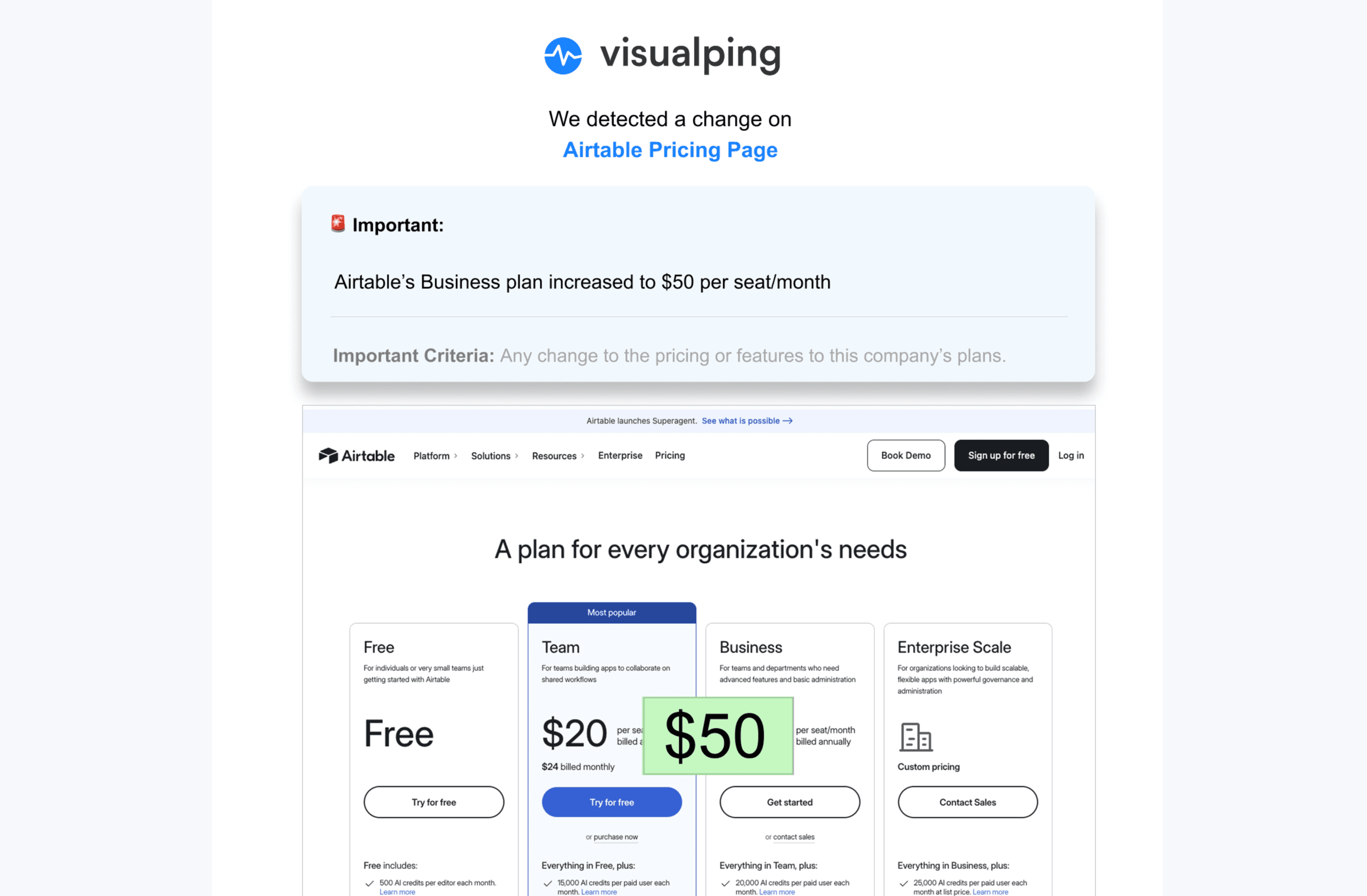
Here's how it works: You add the URLs you want to monitor (pricing pages, homepages, product pages, whatever). Visualping checks them on the schedule you set, could be every 15 minutes for fast-moving stuff, or daily for less critical pages. When it spots a change, you get an email alert with an AI summary (usually 2-3 lines explaining what changed) plus screenshots showing the before/after with changes highlighted.
The screenshot feature is actually really useful if you're trying to understand UX and conversion rate optimization (CRO) strategies. You can literally watch how competitors iterate on their pages, what CTAs they're testing, how they're restructuring content, where they're placing testimonials. It's like getting a free window into their A/B testing process.
And because the alerts include AI summaries, you don't have to decipher what changed, it just tells you "Pricing for Pro plan increased from $99 to $129" or "Added new integration section with 5 partner logos."
What it's actually good for: If you want to monitor specific pages for visual changes, content updates, or pricing adjustments without manually checking them, Visualping is hard to beat. It's particularly useful for teams tracking multiple competitors across multiple pages.
Pricing
Visualping offers several flexible subscription options, starting at $10/month billed annually for the Starter plan, which lets you monitor up to 10 pages. Business plans start at $100/month billed annually for 200 pages and 20,000 checks a month, but specific plan specs can be flexible.
Ahrefs
Best for: SEO Competitive Analysis and Content Gap Research
Ahrefs is the go-to tool if you want to understand how competitors are winning (or losing) in organic search.
You can see exactly how many backlinks a competitor has, which keywords they rank for (and which ones they don't), where they're getting traffic from, and how their search visibility trends over time.'
But Ahrefs isn't just a reporting tool. You can use it to reverse-engineer competitor SEO strategies. See which sites are linking to them, then go after those same links for your own site. Compare your keyword rankings to theirs side-by-side to find opportunities you're missing.
The downside? It's not cheap, and there's definitely a learning curve if you're not already familiar with SEO tools.
What it's actually good for: Teams focused on improving organic search performance and understanding competitor content strategies. If SEO isn't a priority for you, this might be overkill.
Pricing
Plans start at $129/month, which is their basic tier. If you need more features or higher limits, it goes up from there.
BuiltWith
Best for: Identifying Competitor Technology Stacks
BuiltWith is pretty niche, but really useful for specific use cases. It tells you exactly what technologies any website is using: analytics platforms, ad networks, payment processors, CDNs, CMS platforms, you name it.
Why does this matter? A few reasons. If you're trying to understand what marketing tools your competitors use, BuiltWith can show you their entire martech stack. You might discover they're using a niche advertising platform you haven't considered, or that they've recently switched CRM systems (which could indicate scaling up or changing their sales approach).
It's also useful for understanding technical advantages or limitations. If a competitor is using a particular e-commerce platform or CDN, that tells you something about their infrastructure capabilities.
What it's actually good for: Marketing teams trying to understand competitor tool stacks, or technical teams doing competitive research on infrastructure and platforms. Less useful for general business intelligence.
Pricing
Plans with BuiltWith start at $295/month.
Similarweb
Best for: Competitor Traffic Analysis and Audience Insights
Similarweb is where you go when you want to understand competitor website traffic and audience behavior. It's basically like looking under the hood at their analytics (without actually having access to their analytics).
You can see traffic estimates, where visitors are coming from (direct, search, social, referral, paid ads), demographic breakdowns, and even what other sites their audience visits. It's a solid bird's-eye view of the competitive landscape.
The geographic and demographic data is particularly useful if you're trying to understand market positioning. Maybe you assumed a competitor was focused on the US market, but Similarweb shows 60% of their traffic comes from Europe... that changes your competitive assessment pretty significantly.
You can also spot shifts in traffic sources over time. If a competitor suddenly gets a huge spike in referral traffic, they probably just landed a big partnership or press mention. If their paid search traffic drops off, maybe they cut their ad budget or changed strategy.
What it's actually good for: Understanding overall traffic patterns and audience composition.
Pricing
You'll need to request a call with Sales to get their pricing.
BuzzSumo
Best for: Content Performance Analysis and Trending Topics
BuzzSumo is all about content, specifically, figuring out what content performs well in your industry and what your competitors are publishing that gets engagement.
You can search for any topic or domain and see which articles, posts, or pages are getting the most social shares, backlinks, and engagement. It's particularly good for content marketers trying to understand what resonates with their target audience.
The platform shows you trending stories, identifies influencers in your space, surfaces common questions people are asking, and highlights content gaps you could fill.
If you're trying to build a content strategy that's actually informed by what's working (rather than just guessing), BuzzSumo gives you that data.
What it's actually good for: Content teams and SEO folks who need to understand what topics and formats are driving engagement in their industry. If you're not focused on content marketing, this probably isn't essential.
Pricing
The most basic plan is for marketers, with a focus on content creation, starting at $199/month.
Feedly
Best for: Simple Blog Monitoring and Content Aggregation
Feedly is probably the most straightforward tool on this list. It's a content aggregator, basically a modernized RSS reader.
You add feeds from competitor blogs (and industry publications, news sites, whatever), and Feedly collects all the new content in one place. Instead of manually checking 10 different competitor blogs every week, you just check Feedly and see everything in one stream.
It's not fancy, but it works. You'll see when competitors publish new content, what topics they're covering, how their messaging is evolving. It's good for picking up on thematic shifts or new product hints before they're officially announced.
The AI features in the paid tiers can help surface trending topics and prioritize content that's getting traction, which is useful if you're following a lot of sources and don't want to wade through everything.
What it's actually good for: Anyone who wants to keep tabs on competitor blog content without overthinking it. It's simple, effective, and doesn't require training to use.
Pricing
Besides the free option, you can start getting some premium features for just $6/month. If you want an enterprise plan, you'll need to talk to their sales.
Making Sense of It All
Here's the reality: competitor website analysis tools are no longer optional if you're trying to stay competitive in most markets. The businesses that win are the ones that understand what's happening around them and can respond quickly.
That said, you don't need every tool on this list. Start by figuring out what questions you're actually trying to answer:
- Need to track pricing or page changes in real-time? Visualping
- Trying to understand SEO performance and find content opportunities? Ahrefs
- Want to know what technologies competitors use? BuiltWith
- Need traffic and audience data? Similarweb
- Focused on content performance? BuzzSumo
- Just want to follow competitor blogs? Feedly
The worst thing you can do is sign up for tools and then not actually use the data. Many teams pay for expensive competitor analysis subscriptions that just sit there collecting dust.
Better to start with one focused tool that solves a specific problem, use it consistently, and expand from there if needed.
And remember: competitive intelligence is only valuable if it actually informs your decisions. Set up a simple process for reviewing insights (weekly, biweekly, whatever works) and sharing relevant findings with your team. Otherwise it's just expensive voyeurism.
Frequently Asked Questions About Competitor Website Analysis Tools
Why should I analyze my competitors' websites?
Analyzing competitor websites provides valuable intelligence on their pricing, product launches, and marketing strategies. These insights helps you understand market changes and customer preferences, allowing you to make more informed business decisions and stay competitive.
What key areas of a competitor's website are most important to monitor?
There are several key areas to monitor to gain the most strategic insights:
- Home Page: For changes in messaging, branding, and product positioning.
- Pricing Pages: To detect strategic adjustments and stay competitive.
- Navigation Menus: To see where they are trying to direct user traffic.
- Executive Team and Press Release Pages: For clues about new hires, partnerships, and strategic investments.
How do I choose the right competitor analysis tool for my business?
First, define your team’s specific competitive intelligence goals. Different tools specialize in different types of data. For example, some focus on SEO data (Ahrefs), others on website traffic (Similarweb), and some on tracking visual page changes like pricing updates (Visualping). The best approach is to choose the tool that directly aligns with the specific information you need to gather.
How do I analyze a competitor's website? Start by identifying what you want to track (pricing, content, traffic, SEO, etc.), then choose 2-3 high-value pages to monitor like their homepage, pricing page, and key product pages. Use automated tools rather than manual checks, Visualping for page changes, Ahrefs for SEO analysis, or Similarweb for traffic data. Set up a regular review schedule (weekly or monthly) to actually look at the data you're collecting. Most importantly, document insights and share them with your team so the intelligence actually gets used.
Editorial Note
This article was last updated in February 2026. Pricing and features may change. Always verify current information directly with vendors before making purchasing decisions.
Fact-checking methodology:
- Pricing verified via vendor websites and third-party sources where possible
- Feature claims verified via vendor documentation and user reviews
Corrections: If you identify factual errors in this article, please contact press@visualping.io. We are committed to accuracy and will update promptly.
Want to monitor web changes that impact your business?
Sign up with Visualping to get alerted of important updates from anywhere online.
Emily Fenton
Emily was the Product Marketing Manager at Visualping. She has a degree in English Literature and a Masters in Management.
More articles by Emily Fenton