What Is FPDS? The Federal Procurement Data System in 2026
Updated July 1, 2026
The Federal Procurement Data System (FPDS) is the U.S. government's system of record for contract awards: every unclassified federal contract action above the micro-purchase threshold gets reported into it. If you came here after typing fpds.gov into your browser and landing on SAM.gov instead, you found the headline early. GSA decommissioned the FPDS.gov public website and its ezSearch tool on February 24, 2026, and SAM.gov is now the authoritative home for federal contract award data. This guide covers what FPDS is, exactly what moved where, how to search the data now, and how to get alerted when records that matter to you change.
FPDS.gov retired in February 2026; the data moved to SAM.gov
What is the Federal Procurement Data System?
FPDS (formally FPDS-NG, for Next Generation) has been the central repository of federal contract actions since 1978. Contracting officers report every unclassified award, modification, task order, and delivery order above the micro-purchase threshold, which means the system captures far more activity than the award notices agencies choose to publicize. Congress, agencies, and analysts use it for policy and trend analysis; contractors use it for market research, competitor tracking, and recompete planning; and USAspending.gov republishes its award data for the public.
The distinction that trips people up: FPDS is the reporting system, and announcements are a separate, much smaller channel. A $40,000 task order will appear in the contract data without ever getting a press release or an award notice. If you only watch announcements, you see the tip of the iceberg.
What happened to FPDS.gov?
GSA has been folding FPDS into SAM.gov in stages since 2020. The 2026 dates made it final:
| Date | What changed |
|---|---|
| October 2020 | FPDS reports migrated into SAM.gov's Data Bank |
| July 2025 | ezSearch (award search) soft-launched inside SAM.gov |
| February 20, 2026 | eSRS decommissioned; subcontracting reports moved to SAM.gov |
| February 24, 2026 | FPDS.gov public site, login, and ezSearch decommissioned; fpds.gov now redirects to SAM.gov Contracting |
| Later in FY2026 | FPDS ATOM feed retires, replaced by the SAM.gov Contract Awards API |
Those dates come from GSA's decommission bulletin and the official FPDS transition page on SAM.gov. The data model did not change: the access layer moved. Federal users still manage contract award records with their legacy FPDS credentials through SAM.gov's Contracting hub, and one carve-out remains: NASA-specific awards have not transitioned and live in the SAM Data Bank.
If you maintained FPDS bookmarks, saved ezSearch URLs, or scripts hitting the ATOM feed, all three now need replacements. Here is what to use instead.
Where to search federal contract award data now
Your FPDS replacement depends on the job:
| You need... | Use | Account required? |
|---|---|---|
| Keyword and filter search of contract awards | SAM.gov Contracting search with the Contract Awards domain | Yes, free SAM.gov account via Login.gov |
| New award announcements (notices) | SAM.gov Contract Opportunities filtered to Award Notice | No |
| Standard reports (Top 100 contractors, small business goaling) | SAM.gov Data Bank | For some reports |
| Public browsing, dashboards, bulk downloads | USAspending.gov | No |
| Programmatic access (the ATOM feed replacement) | Contract Awards API at open.gsa.gov | API key |
The account requirement is the change that surprises researchers most: full Contract Awards search on SAM.gov sits behind a free Login.gov account. GSA's own guidance for people who prefer not to create one is to use USAspending.gov, where the same award data remains fully public. For lookup workflows matched to the question you are asking, see the government contract search guide.
How to search contract awards on SAM.gov
- Sign in at SAM.gov (any Login.gov account works; you do not need an entity registration to search).
- Open Search and select the Contract Awards domain.
- Filter by keyword, awarding agency, NAICS, set-aside, or legal business name. The rebuilt search supports partial matches, which old ezSearch never did.
- Save useful searches, and copy the full URL from the address bar; SAM.gov encodes your entire query in the link, which matters for the monitoring setup below.
GSA's improvements are real (integrated navigation between opportunities, awards, and subaward reports; picker-style filters), but one thing did not survive the migration: a good way to be notified. Which brings us to the part FPDS never solved either.
 Stop refreshing; let the change come to you
How to get alerts when federal contract data changes
Neither FPDS.gov before the migration nor SAM.gov after it offers real change alerts on search results. The practical fix is to monitor the pages themselves and let the monitor tell you when a new record appears. We tested each of these on live pages while writing this guide.
Watch award notices for your keyword (no account needed). SAM.gov's Contract Opportunities search is public and supports a URL format that encodes an executed search. Run your search, filter the notice type to Award Notice, copy the URL, and paste it into Visualping. One warning from our testing: a hand-typed URL like sam.gov/search/?keywords=cybersecurity renders an empty search form. Use the full URL SAM.gov generates, which includes sfm[simpleSearch][keywordTags] parameters, and the page renders your live results, including the awardee names on each notice.
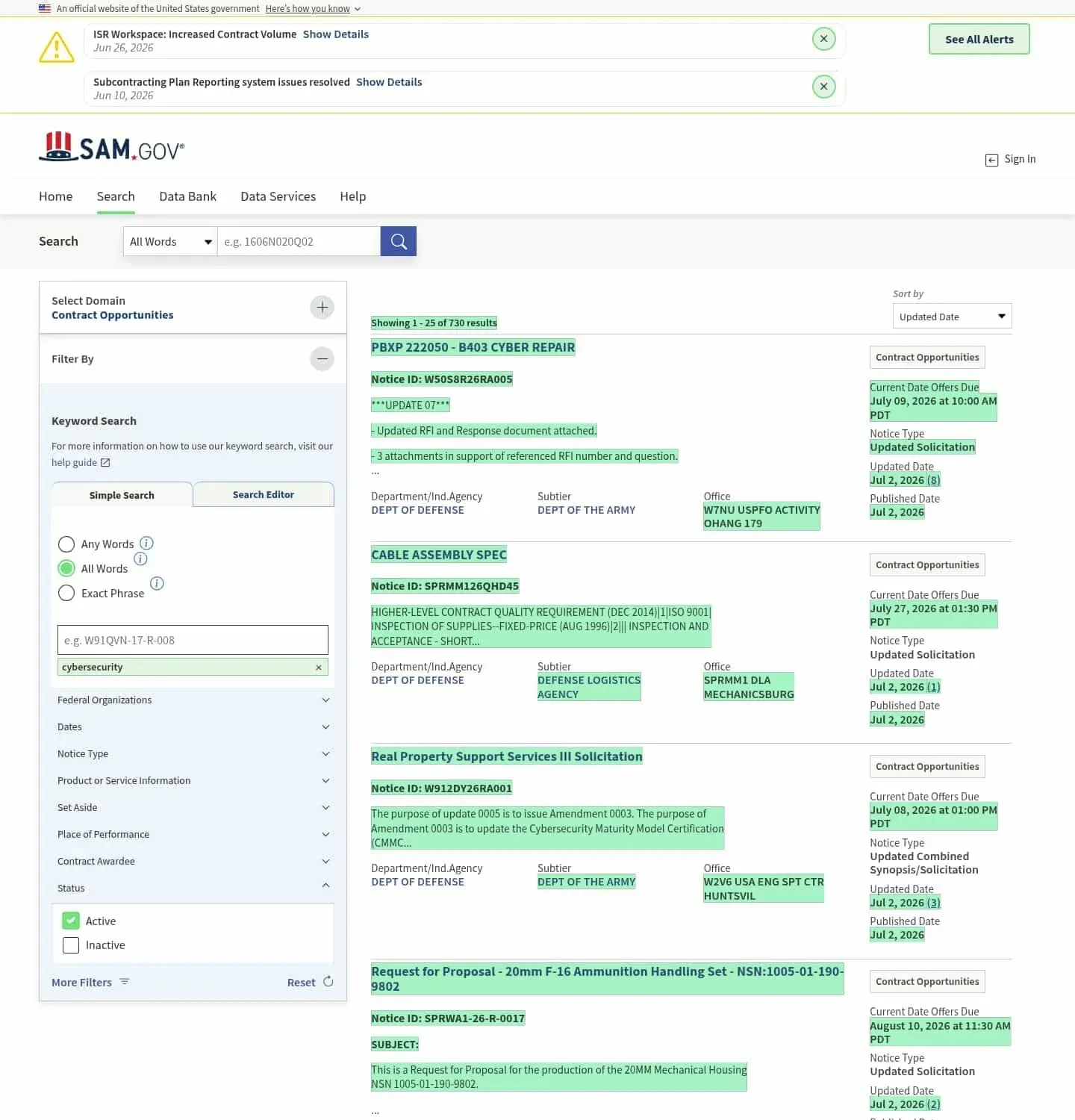 A real check on a SAM.gov search: new notices highlighted in green, July 2026
Watch your saved Contract Awards search. The same copy-the-full-URL trick works inside the Contract Awards domain once you are signed in. For public monitoring without a login, watch the equivalent USAspending page instead. The SAM.gov alerts guide compares the native saved-search notifications with this approach.
Watch USAspending profiles. Agency profiles (for one buyer) and recipient profiles (for one company, such as an incumbent you plan to challenge at recompete) are public, stable URLs. They are heavy JavaScript pages, and they capture cleanly in our testing, award tables and all. Weekly checks match the data's reporting cadence.
Watch the announcement stream. For defense, the Department of War posts every award of $7.5 million or more each business day at 5 p.m. The full playbook for turning these pages into a filtered alert feed, including alert prompts per source, is in our guide to government contract award alerts. For newsroom-style sources, our guide to monitoring government agency pages covers press and announcement pages.
Whichever pages you watch, the alert prompt does the filtering. Visualping AI reads each change, writes a plain-language summary, and applies an importance flag against your prompt, so "Alert me when a new contract award mentions NAICS 541512 or cloud migration" stays quiet until exactly that happens. Checks that turn out to be routine page noise never reach your inbox: in a March 2026 sample across Visualping, only about 11.5% of detected changes were important enough to alert on.
FPDS data vs. USAspending: which should you use?
Both draw from the same well, so pick by task.
Use SAM.gov (FPDS data) when you need granular, contract-level records close to the source: individual actions, modifications, standardized Data Bank reports, and the fields contracting professionals filter by (PSC codes, set-asides, pricing mechanisms).
Use USAspending when you need public access without an account, government-wide views that include grants and loans alongside contracts, dashboards, or bulk downloads. It is also the better monitoring target for company-level tracking, because recipient profiles put a company's entire federal book on one stable URL.
For developers and agent builders, the pairing is the Contract Awards API for SAM.gov data and USAspending's own open API, both free. If your team automates monitoring through tools rather than dashboards, Visualping's REST API is included on every plan, including Free, so award-page monitors can be created and managed programmatically alongside your data pulls.
FAQ: FPDS after the transition
Is FPDS data still publicly available?
Yes. The data was never taken offline: searching it on SAM.gov now requires a free account, and the fully public path is USAspending.gov, which carries the same award data. Standard reports remain in the SAM.gov Data Bank.
Is FPDS free to use?
It always was, and its successors are too. A SAM.gov account, the Data Bank, USAspending, and the Contract Awards API are all free. What costs money is the commercial layer (GovWin IQ, GovTribe, HigherGov, Federal Compass) built on top of this same public data.
How do I access FPDS now?
Go to sam.gov/contracting, or straight to the search at sam.gov/search with the Contract Awards domain selected. Your old FPDS credentials still work for federal award-management functions through the Contracting hub. The fpds.gov domain itself just redirects there.
What replaced the FPDS ATOM feed?
The SAM.gov Contract Awards API, documented at open.gsa.gov. GSA has said the ATOM feed sunsets later in FY2026, so any scripts still consuming it should migrate this year.
How current is the data?
Agencies report contract actions into the system on reporting cycles measured in days, and USAspending refreshes from those reports; Department of Defense data is displayed on a roughly 90-day delay. For same-day intelligence, announcement channels are faster: award notices and the DoD's 5 p.m. daily contracts page usually beat the database record.
Stop refreshing SAM.gov manually. Create a free monitor on your award search or an incumbent's USAspending profile, and find out about the next contract action from your inbox instead.
Want to monitor web changes that impact your business?
Sign up with Visualping to get alerted of important updates from anywhere online.
Eric Do Couto
Eric Do Couto is the Head of Marketing at Visualping. He leads content strategy, growth operations, and brand positioning for website change detection.
More articles by Eric Do Couto