Press Release Monitoring: Track Competitor Newsrooms Without the Noise
By Emily Fenton
Updated October 9, 2026

TL;DR: A competitor's announcement starts on a page the company controls (its newsroom, investor relations site, event pages or leadership page) or on a newswire it pays for. Coverage comes later. Monitor those source pages and write "Alert me when" criteria so Visualping AI flags only acquisitions, launches, executive moves, partnerships and clearances. Then send the team one weekly digest with Visualping Reports.
If your team hears about a competitor's acquisition from a customer, a forwarded link or a trade publication, the news has already reached your deals before it reached you. Press release monitoring fixes the timing by watching the pages where companies publish their own announcements.
This guide is for competitive intelligence (CI), product marketing and comms teams tracking other companies. If you need to measure pickup of your own releases, that's media monitoring, and our roundup of PR and media monitoring tools is the better starting point. For pricing, messaging and site-wide changes, see how to monitor competitor websites.
Start with the move you need to catch:
| You need to know when a competitor... | Watch | Jump to |
|---|---|---|
| Buys, merges with or sells a business | Newsroom, investor relations filings | Acquisition criteria |
| Launches a product or major upgrade | Newsroom, product pages, event agendas | Launch criteria |
| Hires, loses or promotes an executive | Leadership page, board page | Executive move criteria |
| Signs a partner or wins a clearance | Newsroom, partner pages, regulator databases | Partnership and clearance criteria |
| Does any of the above, and the whole team needs to know | All of the above in one briefing | Weekly digest |
Track competitor news where it breaks first
Every announcement has a source. The company publishes an acquisition, a launch or a new CEO itself, usually as a release on its newsroom and on a paid newswire such as PR Newswire or Business Wire. Some also arrive as regulatory filings. Coverage follows later, and only if an editor picks the story up.
Keyword news alerts, RSS readers and industry newsletters sit downstream of that source. They catch coverage. They miss the changes that never become a story: a name removed from a leadership page, a new deck in an investor presentations list, a conference agenda with a session on a product nobody has announced.
The source pages also change often. Visualping's H1 2026 competitor monitoring report covered 14,678 competitor-page monitors run by 8,161 self-serve users from January to June 2026. In that sample, 85.2% of monitors on blog and press pages detected at least one change in six months. Investor relations monitors came in at 91.3%, from a group of fewer than 50, so treat that figure with care. Homepages and top-level pages were still the most watched category, at 38.4% of monitors. If your watchlist is mostly homepages, move some of those monitors to newsroom and investor pages.
Listed competitors add a regulatory clock. US public companies report material events such as completed acquisitions and officer departures on Form 8-K, generally within four business days. The SEC's 2008 guidance on company websites explains when information posted on a company's own site counts as public under Regulation FD. Investor relations pages deserve monitors of their own for that reason.
Which competitor pages to monitor
Press release monitoring for a competitor set covers five page types. Between them, they carry deals, launches, leadership changes, partnerships and clearances. Give each page its own monitor so the alert criteria match what that page publishes. Our list of competitive intelligence sources covers the wider set.
Newsroom and press release pages
The newsroom (usually at /news, /newsroom, /press or /media) lists every release the company publishes. When you set up the monitor, select only the release list so a rotating banner or a cookie notice can't trigger an alert. If the newsroom has category filters, monitor the filtered view for corporate or product news.
Wire services such as PR Newswire and Business Wire list releases by issuing company. If a competitor's newsroom lags the wire, monitor its wire page too.
Investor relations pages
For listed competitors, the investor relations site carries earnings releases, filings, investor presentations and event webcasts. Monitor the press release list and the filings list as two separate monitors.
Investor decks can show a new segment, a reorganized product portfolio or a pipeline slide before the newsroom spells it out. Watch the presentations listing page, where each new deck appears as a new row. Visualping reads PDFs too, but only the first 100 pages of each file, so watch a long annual report through the page that links to it. Our guide to monitoring online PDFs covers the details. For US filers, EDGAR full-text search lets you read and search the filings themselves.
Event and conference pages
In instrument and life sciences markets, launches tend to cluster around trade shows. A competitor's events page, or the exhibitor list and session agenda for a show such as Pittcon or the ASMS conference, can surface a new product name before the press release does. Monitor the events page weekly, and add the agenda pages for the shows that matter most to your market in the months before each one.
Leadership and team pages
A new executive usually gets a release. A departure may not, especially at a private company: the profile just disappears from the leadership page. Monitor the leadership page and the board of directors page weekly. For listed competitors, pair them with the filings monitor, since US filers report officer and director changes on Form 8-K under Item 5.02.
Leadership changes are early strategy signals. A new chief commercial officer who ran a services business at their last company tells you where the sales motion is heading.
Partner, product and regulatory pages
Partner and distributor pages show new resellers, integrations and co-marketing deals. Product catalogue and new product pages show launches as they go live; for release notes and feature-level changes, see our guide to competitor feature release tracking.
Regulatory and quality news pages announce clearances, certifications and recalls. In life sciences, confirm a claimed clearance against the official record, such as the FDA's 510(k) premarket notification database.
Blogs, webinars and case studies are a separate signal about messaging. Competitor content monitoring covers them.
How to set up press release monitoring in Visualping
A working press release tracker is one Visualping monitor per source page, each with criteria written for that page.
- List each competitor's newsroom, investor relations press release and filings pages, events page and leadership page in a spreadsheet. If the list covers more than a handful of competitors, import it in one go with bulk URL monitoring.
- Paste each URL into Visualping and select the area to watch: the release list on a newsroom, the table on a filings page, the profile grid on a leadership page. Leave out headers, footers and carousels. Monitors added in bulk watch the full page, so open each one's settings afterwards and set its area there.
- Set the check frequency. Daily suits most newsrooms and investor relations pages, and weekly suits leadership, partner and events pages. Cloud checks run anywhere from every 2 minutes to once a month, depending on your plan.
- In the "Alert me when" field, describe the moves that matter for that page. The templates in the next section give you a starting point.
- Choose where alerts go. Email and webhook alerts work on every plan. Slack, Microsoft Teams and Discord alerts need a Business plan, as does Visualping Reports.
- Keep the monitors in one competitive intelligence workspace. That keeps the digest focused and makes access easy to share.
Ready to watch your first competitor newsroom? Sign up for Visualping, paste the newsroom URL, select the release list and add your criteria. The first 5 pages are free.
Write Visualping AI alert criteria for the moves that matter
Each time Visualping detects a change, Visualping AI compares the before and after versions of the area you selected and checks them against your criteria. It returns two things: an Important flag (yes or no) and a short summary of what changed. Write criteria as plain sentences that say what counts, what to ignore and what the summary should contain.
Criteria are what keep press release monitoring from becoming one more noisy inbox. In a recent 30-day sample, Visualping detected roughly 16.8 million page changes across about 1.5 million active monitors, and Visualping AI flagged 11.5% of them as Important. The other 88.5% were filtered out before any alert went out. The Important Alerts prompt playbook covers the prompt techniques in more depth. Copy the templates below into the "Alert me when" field and adjust the names and details for your market.
Acquisitions and divestitures
Deal news lands on the newsroom and, for listed competitors, on the investor relations press release page. Use these criteria on both:
Alert me when a new release or filing announces an acquisition, merger, divestiture, spin-off, or a definitive agreement to buy or sell a business, product line or brand.
Ignore event recaps, award news, webinar promotions, and changes to dates or page navigation.
In the summary, name the companies involved, the deal stage (announced, completed or terminated) and any price disclosed.
On a filings monitor, add a line such as "Treat any new 8-K that reports Item 1.01 or Item 2.01 as important." Item 1.01 covers material definitive agreements and Item 2.01 covers completed acquisitions and disposals.
Product launches
A launch can show up on a product page before the release goes out, so run these criteria on the newsroom, the product catalogue and any new products page:
Alert me when a new product, instrument, software release or major upgrade is announced, or when a new product page appears.
Ignore price promotions, minor wording edits, reordered lists and updated copyright years.
In the summary, give the product name, the category it competes in and its main claim in one sentence.
Executive moves
On leadership and board pages, the change that matters is a name or a title:
Alert me when a person is added to or removed from this page, or when anyone's title changes.
Ignore photo swaps, bio edits that keep the same title, and reordered profiles.
In the summary, list who joined, who left and any title changes, with the old and new titles.
Partnerships and regulatory clearances
Partnerships and clearances usually arrive as releases, so one set of criteria covers the newsroom, partner pages and regulatory news pages:
Alert me when a release announces a partnership, distribution agreement, integration or co-marketing deal with another company.
Also alert me when a release announces a regulatory clearance, approval, certification or recall, for example an FDA 510(k) clearance or a CE mark.
In the summary, name the partner or regulator, the product involved and what was agreed or decided.
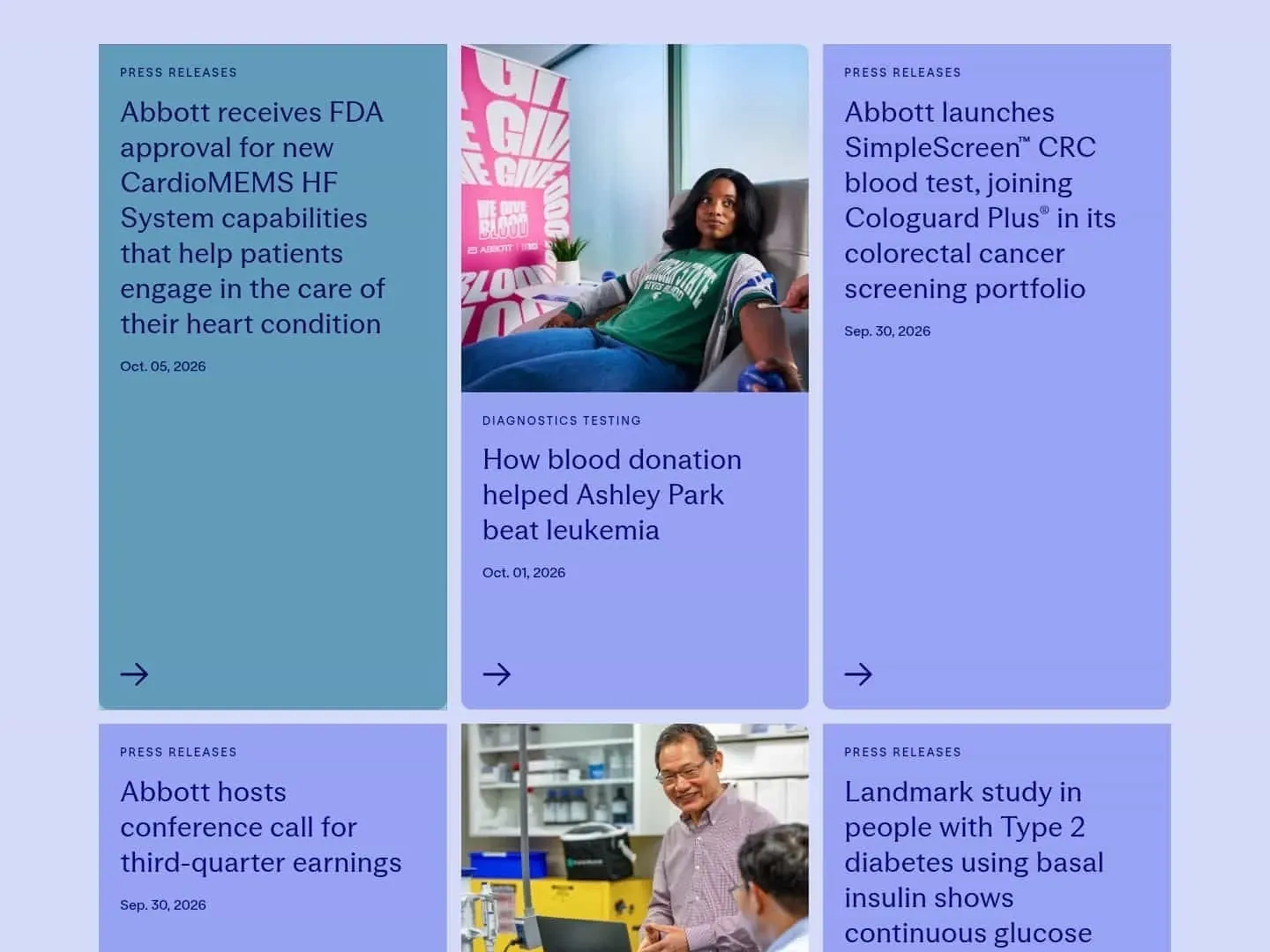
A real Visualping alert: Abbott's newsroom, flagged Important on October 5, 2026. AI reason: "The newly listed press release announces FDA approval of expanded CardioMEMS HF System capabilities, which meets the user's criteria for regulatory approvals."
Tell the AI what to ignore
Negative instructions carry a lot of weight. List the page furniture that changes without meaning anything: cookie banners, rotating hero images, "latest posts" widgets, share price tickers on investor pages and footer dates. Pair that list with a tight area selection and you remove the usual sources of false alerts.
Give new criteria a week before you rely on them. Then read the changes the monitor did not flag in its history. If something important slipped through, add it to the criteria. If routine edits keep getting flagged, add them to the ignore list.
Set up a weekly competitor digest with Visualping Reports
Alerts suit the person who acts on them. Everyone else needs a summary they can read on Monday morning, which is how press release monitoring reaches people who never open an alert. Visualping Reports, included with Business plans, rolls the changes from the monitors you choose into one briefing with an AI-written summary at the top.
- Open the Reports tab in your competitive intelligence workspace and start a new report.
- Tick the newsroom, investor relations, events and leadership monitors in your job list.
- Under "Select what to include in the report," keep Important Changes so the digest carries only changes that met your criteria.
- Turn on Report Summary & Analysis for the written overview, and pick a screenshot layout.
- Set the schedule to weekly and pick a delivery time (for example, Monday at 8 a.m.). Scheduled reports use the timezone in your account settings, so check it there; you can't set a timezone per report.
- Save the schedule. Each week the report goes by email to everyone in the workspace.
Check one setting before you save. With Only show the most recent alert for each page monitored turned on, a page that changed three times appears once. On a newsroom, that can hide an earlier release from the same week. If your digest is mostly newsroom monitors, leave that option off so each release gets its own entry.
To reach people outside the workspace, export the briefing as a PDF, Excel or CSV file. Share links work differently for reports and single changes: a shared report link opens only for someone who logs in and has access to the workspace, while a link to a single change opens without a Visualping account. Visualping's guide to sharing changes and reports covers both. Every report is saved in the History tab. Comments on individual changes record what the team decided ("sent to sales", "no action"), so nobody chases the same change twice.
Already monitoring competitor pages? The Reports setup guide walks through each screen, so your first scheduled digest can go out this Monday.
Build a newsroom monitoring workflow your team will use
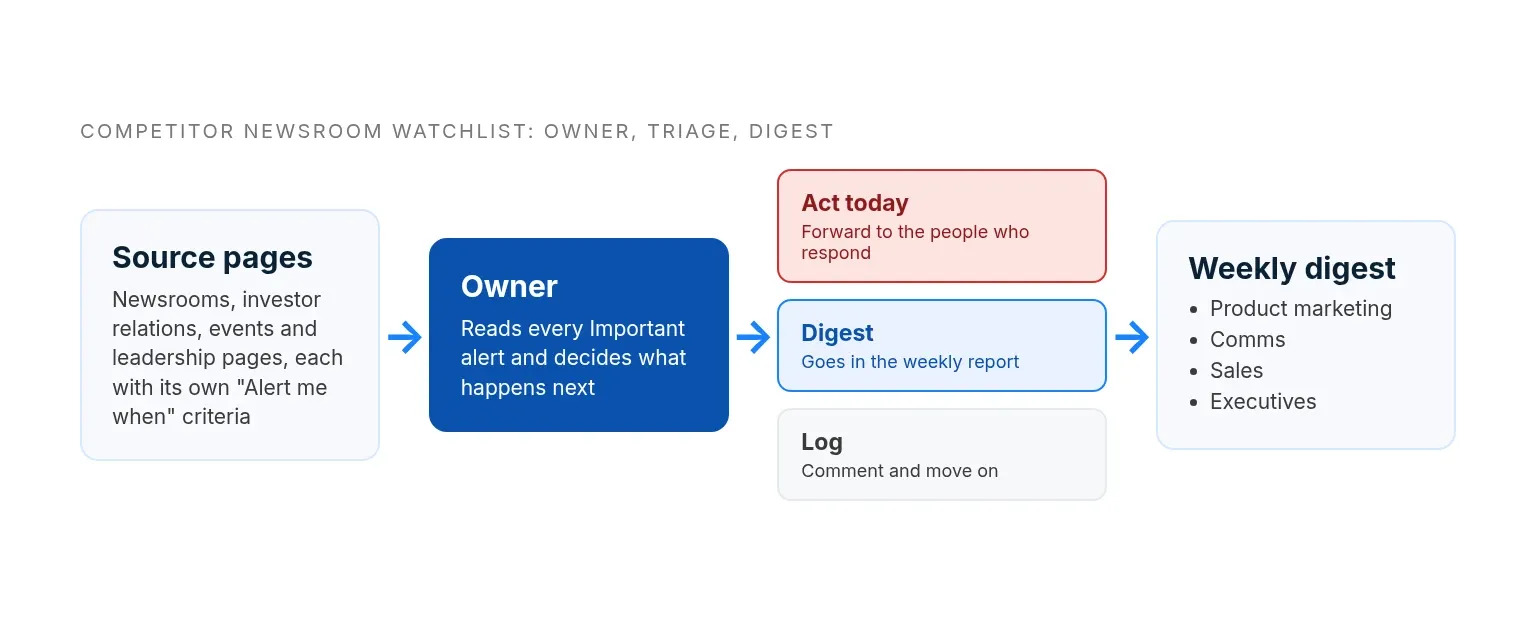
Setting up monitors is mechanical work. Ownership is the hard part: someone has to maintain the list, decide what each alert means and get the news to the people who act on it.
Who owns the watchlist
Give the watchlist one owner, usually the CI analyst or, on a smaller team, a product marketer. The owner adds and retires competitors, keeps the criteria current and reads every Important alert. Name a backup for holidays and launch weeks. Review the list each quarter: drop competitors that stopped mattering, add new entrants and confirm each monitor still points at a live page.
How alerts get triaged
Visualping decides whether a change is Important. The owner decides what happens next, and three standard dispositions keep that decision quick:
| Disposition | Use it when | Example |
|---|---|---|
| Act today | The change affects open deals, a launch or a public statement | A competitor buys your channel partner |
| Digest | The change matters but can wait for the weekly report | A competitor signs a distributor in one of your regions |
| Log | The change is real but needs no action | A competitor adds a distributor in a region you don't sell in |
Send act-today changes straight to the people who own the response. Comment on logged changes in Reports so nobody investigates them twice.
How news reaches product marketing, comms and sales
| Team | What they need | How they get it |
|---|---|---|
| CI owner | Every Important alert, with screenshots | Email, or a dedicated Slack or Teams channel |
| Product marketing | Launches, repositioning, new segments | Weekly digest, plus same-day forwards for launches |
| Comms | Acquisitions, executive moves, regulatory news | Same-day forward; comms decides whether to respond |
| Sales | Anything a customer will raise on a call | Weekly digest summary and updated talk tracks |
| Executives | Deals and leadership changes | Weekly digest summary |
Keep the evidence. Visualping stores the screenshots behind each change for 3 months by default, and Business accounts can extend a monitor to 12 months. That record helps when someone asks when a competitor first announced a product or changed a title.
Example watchlist for a life sciences CI team
The press release monitoring template below suits a CI team at an analytical instrument or life sciences tools company tracking five competitors. Adjust the pages and frequencies to your market.
| Page | Monitors | Check | Criteria focus |
|---|---|---|---|
| Newsroom release list | 5 | Daily | Acquisitions, launches, partnerships, clearances |
| Investor relations press releases and filings | 10 (if all five are listed) | Daily | Deals, results, officer changes on 8-K |
| Product catalogue or new products page | 5 | Daily | New instruments, software releases, discontinued lines |
| Events page | 5 | Weekly | New shows, launch sessions, user meetings |
| Leadership and board pages | 10 | Weekly | Additions, removals, title changes |
| Regulatory or quality news page | 5 | Weekly | Clearances, certifications, recalls |
| Agenda for your two biggest trade shows | 2 | Weekly, in the three months before each show | Competitor sessions and new product names |
That is 42 monitors feeding one weekly digest, so the team reads one briefing instead of 42 alert streams. Pharma and biotech teams can add clinical trial registries and pipeline pages to the same setup; our guide to competitive intelligence in pharma covers those sources.
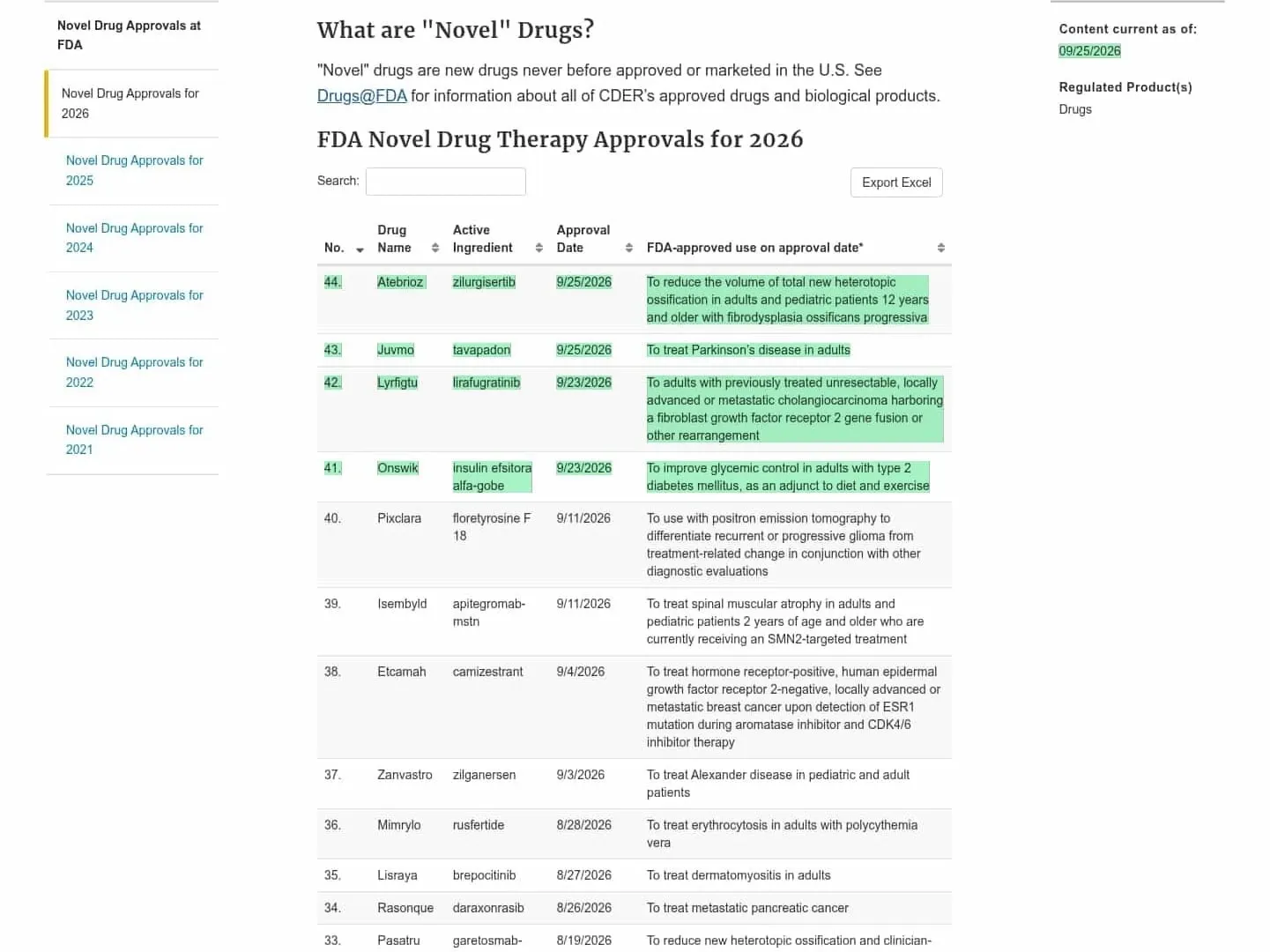
A real Visualping alert: the FDA's novel drug approvals page, flagged Important on September 26, 2026. AI reason: "Per your instruction to alert when a new approval is added, four new novel drug approvals were added to the page: Onswik (insulin efsitora alfa-gobe) approved 9/23/2026; Lyrfigtu (lirafugratinib) approved 9/23/2026; Juvmo (tavapadon) approved 9/25/2026; and Atebrioz (zilurgisertib) approved 9/25/2026."
Where press release monitoring falls short
Page monitoring sees what a company publishes on the pages you watch, and nothing else. Plan around these gaps:
| Gap | What to do |
|---|---|
| Some companies post to a newswire before their own newsroom updates | Monitor the competitor's wire page as well |
| Private companies file no 8-Ks and often have no investor relations site | Lean on the newsroom, leadership and events pages |
| Some release lists only load after a "load more" click or a filter | Use Visualping Actions to click or filter before each check |
| Visualping checks the first 100 pages of a PDF | Watch the page that links to an annual report instead of the file |
| Analyst briefings, customer emails and LinkedIn posts never reach a monitored page | Pair page monitoring with media monitoring and field notes from sales |
| A daily check won't report a release minutes after it posts | Shorten the interval for the pages and weeks where timing matters |
Press release monitoring FAQ
How do I set up company news alerts for a specific competitor?
Monitor the company's newsroom directly, so you get an alert each time it publishes a press release. In Visualping, paste the newsroom URL, select the release list, choose a daily check and add criteria such as "Alert me when a new press release is published." Each new release that meets the criteria triggers an email with an AI summary. For listed companies, add the investor relations press release page too.
How do I track competitor press releases without getting spammed by unrelated news?
A keyword news feed returns every article that mentions the company. The company's own newsroom shows only what the company published, so start there and narrow the monitored area to the release list. Then write criteria that name the moves you care about and the content to ignore. Changes that miss your criteria aren't flagged as Important.
Is Google Alerts enough to track competitor news?
Google Alerts emails you when Google finds new results for your search terms, which makes it useful for coverage and mentions. It won't report a page edit that produces no new search result, such as a name removed from a leadership page or a new row in an investor presentations list. Running both works well: Google Alerts for coverage, press release monitoring for the source pages.
How often should we check competitor newsrooms?
Daily covers most newsrooms and investor relations pages. Check more often in the run-up to a competitor's earnings date or a major trade show, and weekly for leadership, partner and events pages. Cloud checks run from every 2 minutes to once a month, depending on your plan.
What's the difference between press release monitoring and media monitoring?
Press release monitoring, as described here, watches the pages where a company publishes its own news. Media monitoring tracks what news outlets and social channels say about a company, often your own. PR teams measuring pickup of their releases need a media monitoring tool. CI teams watching competitors need press release monitoring.
Can I monitor investor relations pages and SEC filings?
Yes. Monitor the investor relations press release list and the filings list as separate pages, with criteria for the filing types you care about. US-listed companies report events such as acquisitions and officer changes on Form 8-K, generally within four business days, so a filings monitor catches material news even when the company issues no press release.
Can the whole team get the same alerts?
Yes. Email and webhook alerts work on every plan, and Slack, Microsoft Teams and Discord alerts are available on Business plans. For a weekly summary, Visualping Reports sends one briefing to everyone in the workspace.
Sources
Want to monitor web changes that impact your business?
Sign up with Visualping to get alerted of important updates, from anywhere online.
Emily Fenton
Emily was the Product Marketing Manager at Visualping. She has a degree in English Literature and a Masters in Management.
More articles by Emily Fenton