Screenshots as Evidence: How to Capture Pages That Hold Up
Updated August 3, 2026

TL;DR: A screenshot's value as evidence comes from how it was captured, not how it looks. The properties that matter: an automatic timestamp, the visible page URL, full-page context, a consistent capture method, and capture by a neutral system rather than by the person with a stake in the dispute. Automated monitoring produces all five by default, and it captures the page before the content disappears, which is the part manual screenshots usually get wrong. Setup takes a few minutes per page; the walkthrough is below.
This article is general information about documentation practices, not legal advice. Rules of evidence vary by jurisdiction, forum, and case. Nothing here should be construed as legal advice or as a prediction that any capture will be admissible in a particular proceeding. Consult a qualified legal professional for advice on your own situation and planning.
Web pages change faster than most teams document them. Across Visualping's platform in July 2026, 28% of the 34,182 actively monitored pages the AI classifies as legal content changed within 30 days. Government pages moved even faster: 33% of 202,160 monitored pages changed in the same window. If a competitor's claim, a counterfeit listing, or a vendor's terms page matters to a dispute, the version you saw last month may already be gone.
That is the real problem with screenshots as evidence. Most teams take one screenshot, after the fact, on the laptop of the person who needs the evidence to say something. Then the argument starts: When was this taken? What page is it from? What did the rest of the page say? Could it have been edited? A capture workflow answers those questions before anyone asks them.
Why ordinary screenshots get challenged
A manual screenshot is easy to attack, and opposing parties know the script:
- No reliable timestamp. A filename date or a phone gallery date is trivial to change, so it proves little on its own.
- No page context. A cropped image without the URL and surrounding page invites the argument that content was taken out of context.
- An interested party captured it. The person who benefits from the evidence produced the evidence, on their own device, with no documented method.
- Editing is cheap. Image tools make pixel-level alterations easy, so an unexplained gap in custody becomes a credibility problem even when nothing was altered.
- It was captured too late. The most common failure is not a flawed screenshot but a missing one: the page changed before anyone thought to document it.
None of this means manual screenshots are worthless. It means they carry a burden that a documented, automated capture process is designed to remove.
What makes a web capture defensible
Under the U.S. Federal Rules of Evidence, the general authentication standard is Rule 901: the proponent must produce evidence "sufficient to support a finding that the item is what the proponent claims it is." Rule 902 adds categories of self-authenticating records, including, since 2017, certified records generated by an electronic process or system. Other jurisdictions apply their own rules, which is one more reason to involve counsel early.
In practice, five properties do most of the work of supporting authenticity for web captures:
| Property | Why it matters | Manual screenshot | Automated capture |
|---|---|---|---|
| Automatic timestamp | Establishes when the content existed | Filename or gallery date, editable | System-recorded at capture time |
| Visible URL and page identity | Ties the content to a specific source | Often cropped out | Recorded with every capture |
| Full-page context | Counters "taken out of context" arguments | Usually a partial viewport | Full-page capture |
| Consistent, documented method | Supports testimony about how records are made | Ad hoc | Same process on every check |
| Neutral capture system | Blunts the interested-party objection | The claimant's own device | Third-party service captures on schedule |
The fifth property deserves emphasis. A capture produced automatically, on a schedule that was set before the dispute existed, by a system that treats every page the same way, is a fundamentally different artifact from a screenshot taken by the plaintiff the night before filing.
How to set up automated evidence capture
Here is the workflow using Visualping, which captures legal-grade timestamped screenshots on a schedule you set. The same logic applies to any capture system worth using.
Step 1: Monitor the page before you need it. Enter the URL of the page that matters: the competitor claim, the marketplace listing, the vendor terms page, your own site if you are documenting compliance. Evidence capture works best as insurance, started while everything is still normal.
Step 2: Set a capture schedule that matches the risk. Daily is the standard for most documentation workflows; pages tied to active disputes or fast-moving promotions justify hourly or faster. Every check produces a timestamped record whether or not anything changed.
Step 3: Write a plain English alert condition. You will capture everything, but you only want to be interrupted for events that matter. Compliance teams write conditions like the most common ones on our platform: "The terms and conditions are updated," "The terms of service are updated," "The privacy policy is updated." In a March 2026 sample of real alert conditions, 298 were policy and compliance conditions of exactly this kind.
Step 4: Let the record build. Each check adds to the page's change history: full-page screenshots, before and after comparisons, and text-level diffs showing exactly what was added or removed, each entry timestamped. When something changes, you get the alert with the highlighted difference; when nothing changes, the record quietly documents that too.
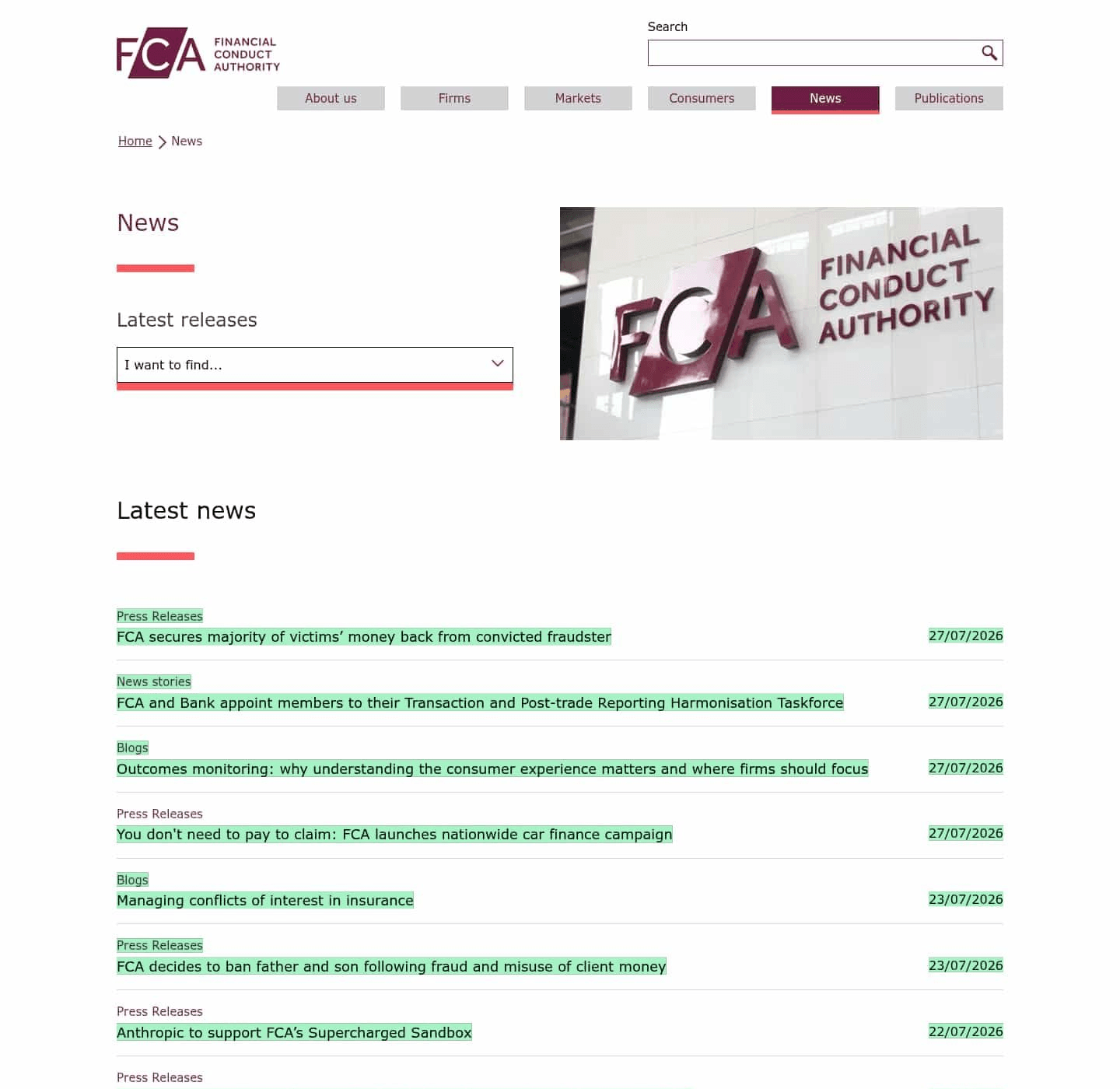
Here is a real capture from one of our own monitors on the UK Financial Conduct Authority's news page, taken the morning of July 28, 2026. The newly published items, including two enforcement announcements, are highlighted; the same check also recorded which older items left the page.
Step 5: Preserve and hand off. When a dispute becomes real, the change history gives your legal team a dated sequence of captures rather than a single contested image. Business plans retain monitoring data for one year; for matters that may run longer, export what you need and preserve it under your team's litigation-hold process, with counsel directing what to keep.
What teams actually document this way
Trademark and counterfeit enforcement. Brand protection teams monitor marketplace listings and infringing domains so that each takedown request ships with dated captures of the listing as it appeared, not as the seller later edits it.
Compliance with changing terms. When a partner, vendor, or platform changes its terms of service or data policy, the before and after versions, with dates, are the record. This is the single most common evidence-style use on our platform, judging by the alert conditions users write, and the reason compliance monitoring teams start with terms pages.
Pricing and MAP violations. Minimum advertised price enforcement lives and dies on timing: the violating price existed on this date, at this URL. Scheduled captures of reseller pages produce that record automatically.
False or expired claims. Promotions that ran past their stated end date, "sale" prices that never changed, product claims that quietly disappeared: all of these are arguments about what a page said on a date. A monitoring history helps answer the factual question.
Your own site. Defacement monitoring and unauthorized-change monitoring produce the same artifact in reverse: a dated record of what your site actually displayed, useful for both security response and demonstrating your own compliance posture.
Where automated monitoring fits, and where it does not
Automated page monitoring is the right tool when the job is continuous documentation: watching pages over time, catching changes, and building a dated history. For litigation-driven, one-time preservation of large sites under formal eDiscovery requirements, dedicated forensic web-archiving services exist that add certification affidavits and full crawl preservation; your counsel will know when the matter demands that. Many teams use both: monitoring as the early-warning and day-to-day record, forensic capture once a specific matter escalates.
FAQ: screenshots as evidence
Are screenshots admissible in court? Sometimes, and it depends on authentication, relevance, and the rules of the specific forum. Courts have admitted screenshots that were properly authenticated, and excluded ones that were not. The general U.S. authentication standard is Rule 901; how it applies to your capture is a question for your lawyer, not for a blog post.
How are website screenshots authenticated? Typically through testimony or certification about how the capture was made: who or what captured it, when, from what URL, and by what process. Records produced by a consistent, documented electronic process are easier to support than one-off images, and Rule 902 provides self-authentication paths for certain certified electronic records.
Are Internet Archive (Wayback Machine) captures accepted? U.S. courts have accepted Wayback Machine captures in a number of cases when they were properly authenticated, often through affidavits from the Internet Archive. The Wayback Machine is a useful backstop for the past; its limitation is coverage, since it may not have crawled the page on the date that matters to you. A monitoring schedule you control removes that gap going forward.
Do I need metadata, or is the image enough? The capture method and its documentation matter more than any single artifact. Timestamps, URL, capture process, and an unbroken record of how the file was stored all contribute. Talk to counsel about what your specific matter requires before you need it.
How long should I keep captures? As long as the underlying risk lives, which is a retention-policy question for your legal team. As a baseline, Visualping Business plans retain monitoring data for one year; anything tied to an active or expected matter should be exported and preserved under counsel's litigation-hold instructions rather than left to any tool's default retention.
Reminder: this FAQ is general information, not legal advice. Consult a qualified legal professional about your own evidence planning.
Related reading
Want to gather Screenshots for Compliance?
Sign up with Visualping for automatic legal and regulatory alerts, from any sources online.
Eric Do Couto
Eric Do Couto is the Head of Marketing at Visualping. He leads content strategy, growth operations, and brand positioning for website change detection.
More articles by Eric Do Couto