11 Online Reputation Monitoring Tools for Business (2026) | Visualping Blog
Updated January 20, 2026

The Visualping Team is the content and product marketing group behind Visualping, a website change monitoring platform used by over 2 million users and 85% of Fortune 500 companies. Our team combines expertise in competitive intelligence, digital marketing, and web monitoring to help businesses stay informed about the changes that matter most. This article was originally written by Emily Fenton and has been updated to reflect current tools, pricing, and industry data.
Disclosure: This article is published by Visualping. Visualping is one of the tools featured in this comparison and is listed among the options below. We have made every effort to provide accurate, balanced information about all tools to help you make an informed decision.
Trustpilot monitors on Visualping check every 24 minutes. Yelp monitors check every 2.8 hours. Google Maps monitors check every 12 hours. That spread tells you something important: the urgency of reputation monitoring depends entirely on who's reading the reviews and how much money is at stake.
According to Capital One Shopping Research, 93% of consumers say online reviews influence their purchasing decisions, and a single negative review can deter up to 30 potential customers (Moz). The conversations about your brand are happening across dozens of platforms simultaneously, and 94% of businesses monitoring review sites only watch one of them.
Monitoring all of that manually isn't realistic. Reputation monitoring tools automate the watching and alert you when something changes, so you can respond before one bad review becomes the first thing a prospect sees. What customers say about your competitors is worth tracking too: it's competitive intelligence that surfaces gaps you can fill.
This guide covers eleven tools at different price points, from free alerting to enterprise review management, with proprietary platform data on how businesses actually use them.
Quick comparison: pricing and key features
| Tool | Starting Price | Best For | Key Strength |
|---|---|---|---|
| Google Alerts | Free | Basic brand mention monitoring | Zero-cost web mention alerts |
| Visualping | Free (paid from $10/mo billed annually) | Website change monitoring | Visual change detection for any web page |
| SentiOne | Custom pricing | Enterprise social listening | AI-powered sentiment analysis in 75+ languages |
| Reputology | $40/seat/mo | Multi-location businesses | Review site aggregation and response |
| Yext | $199/year | Enterprise listings + reviews | Listings management across 200+ directories |
| ReviewPush | $39/mo | Small to midsize businesses | Multi-site review monitoring |
| YouScan | Custom pricing | Visual brand monitoring | AI image recognition for logos in photos |
| BrandMentions | $49/mo | Brand and competitor tracking | Real-time alerts across web and social |
| GatherUp | $99/mo | Local businesses and agencies | Review generation and NPS tracking |
| ReviewsOnMyWebsite | $9/mo | Website review display | Review widgets and automated requests |
| Expert Reputation | Custom pricing | Healthcare providers | Monitoring across 70+ healthcare review sites |
Pricing verified January 2026. Contact vendors for current rates and enterprise options.
Why online reputation monitoring matters in 2026
The data here is worth sitting with. According to BrightLocal's 2025 Local Consumer Review Survey, 71% of consumers regularly read reviews for local businesses, and they spend an average of 13 minutes and 45 seconds reading about 10 reviews before deciding to trust a business. That's before they've visited your website or talked to anyone on your team.
Consumer trust in those reviews has also eroded. In 2020, 79% of consumers trusted online reviews as much as personal recommendations. By 2025 that number had dropped to 42%. Businesses that actively respond to feedback, including negative feedback, hold trust more reliably than those that don't. BrightLocal found that 88% of consumers would use a business that responds to both positive and negative reviews, compared to just 47% who would consider one that stays silent.
Speed matters more than most businesses realize. BrightLocal found that 53% of customers expect responses to negative reviews within a week, and one in three expects a reply within three days. Our own platform data reflects that urgency: across nearly 1,000 active Visualping monitors tracking review platforms like Trustpilot, Yelp, and Google Maps, not a single one uses a daily-or-longer check schedule. Nearly half check at least hourly. The revenue numbers reinforce why: a one-star increase in Yelp ratings correlates with a 5-9% rise in revenue (Harvard Business School), while businesses with 4+ star ratings generate 32% more revenue than those below that threshold (Womply). And these pages change often: across the review site monitors on our platform, nearly 1 in 4 detected a change in the past 30 days.
The urgency also varies by business type. Trustpilot monitors (run overwhelmingly by B2B companies) check pages with a median interval of 24 minutes. Yelp monitors, which skew 95% personal users, check every 2.8 hours. Google Maps monitors sit closer to 12 hours. The difference maps to purchase value: a B2B buyer evaluating enterprise software is conducting research worth hundreds of thousands of dollars. A consumer picking a restaurant for dinner is not. The higher the purchase value, the more a single new review matters, and the faster you need to know about it.
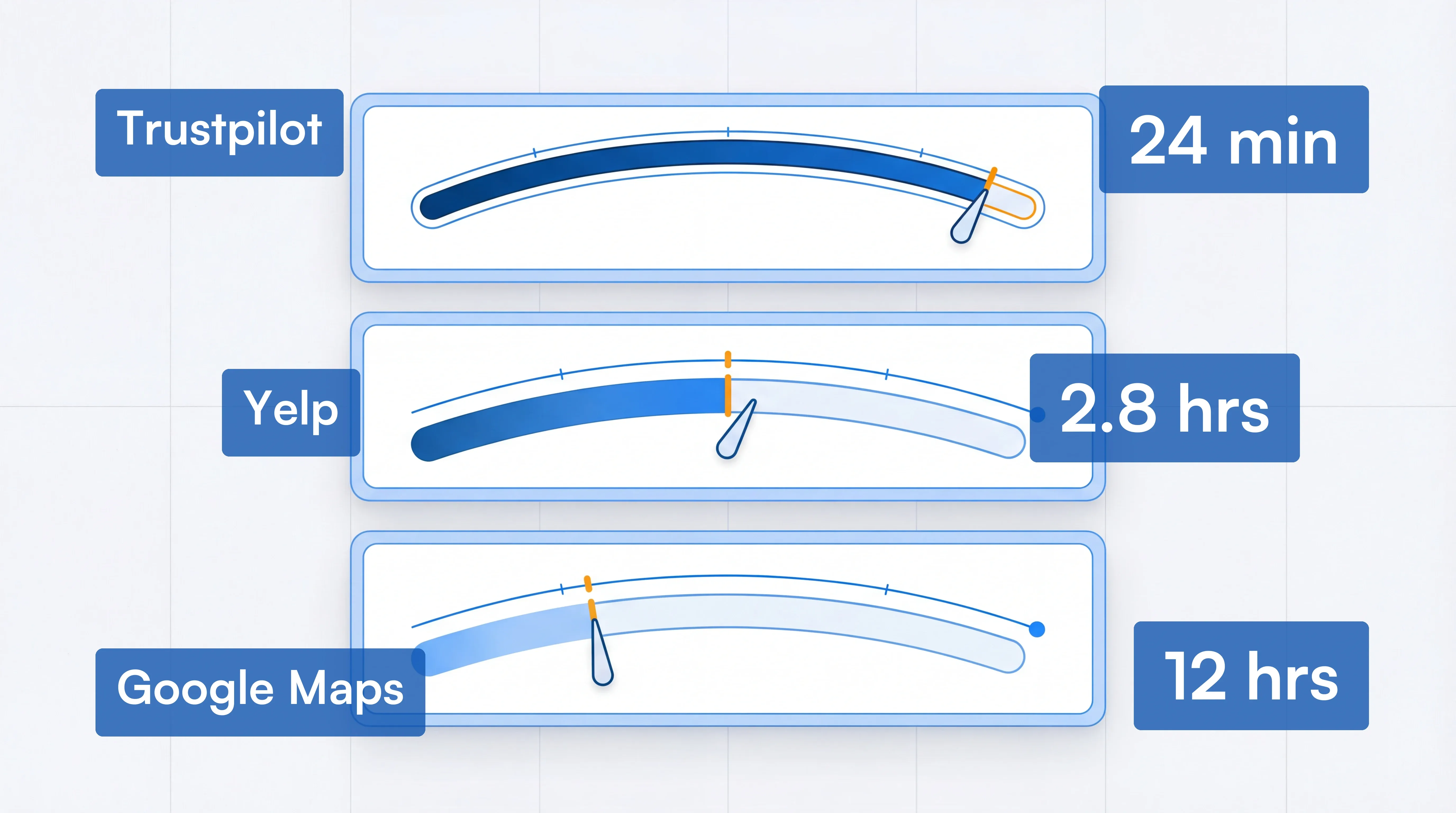 B2B review monitoring runs three times faster than consumer
Which review sites should you monitor?
The review platforms that matter most depend on your industry. Here are the key sites organized by sector.
All Industries:
- Google Business Profile
- Yelp
- Trustpilot
- Better Business Bureau (BBB)
- Apple Maps (via Apple Business Connect)
- iOS App Store / Google Play Store
- Indeed and Glassdoor (employer reviews)
Automotive: CarGurus, DealerRater, Edmunds
Food and Restaurants: Grubhub, OpenTable, DoorDash
Healthcare: Healthgrades, RateMDs, Vitals, WebMD, Zocdoc
Travel and Hospitality: Booking.com, Expedia, TripAdvisor
B2B and Software: G2, Gartner Peer Insights, Capterra, TrustRadius, Software Advice
Emerging Platforms: According to BrightLocal's 2025 research, 76% of US consumers consume video content when looking for review information about local businesses. Platforms like YouTube, TikTok, and Instagram increasingly influence purchasing decisions, particularly among younger consumers.
Go deeper: How to Monitor Facebook Pages | Twitter Monitoring Tool | How to Monitor Your Instagram Competitors
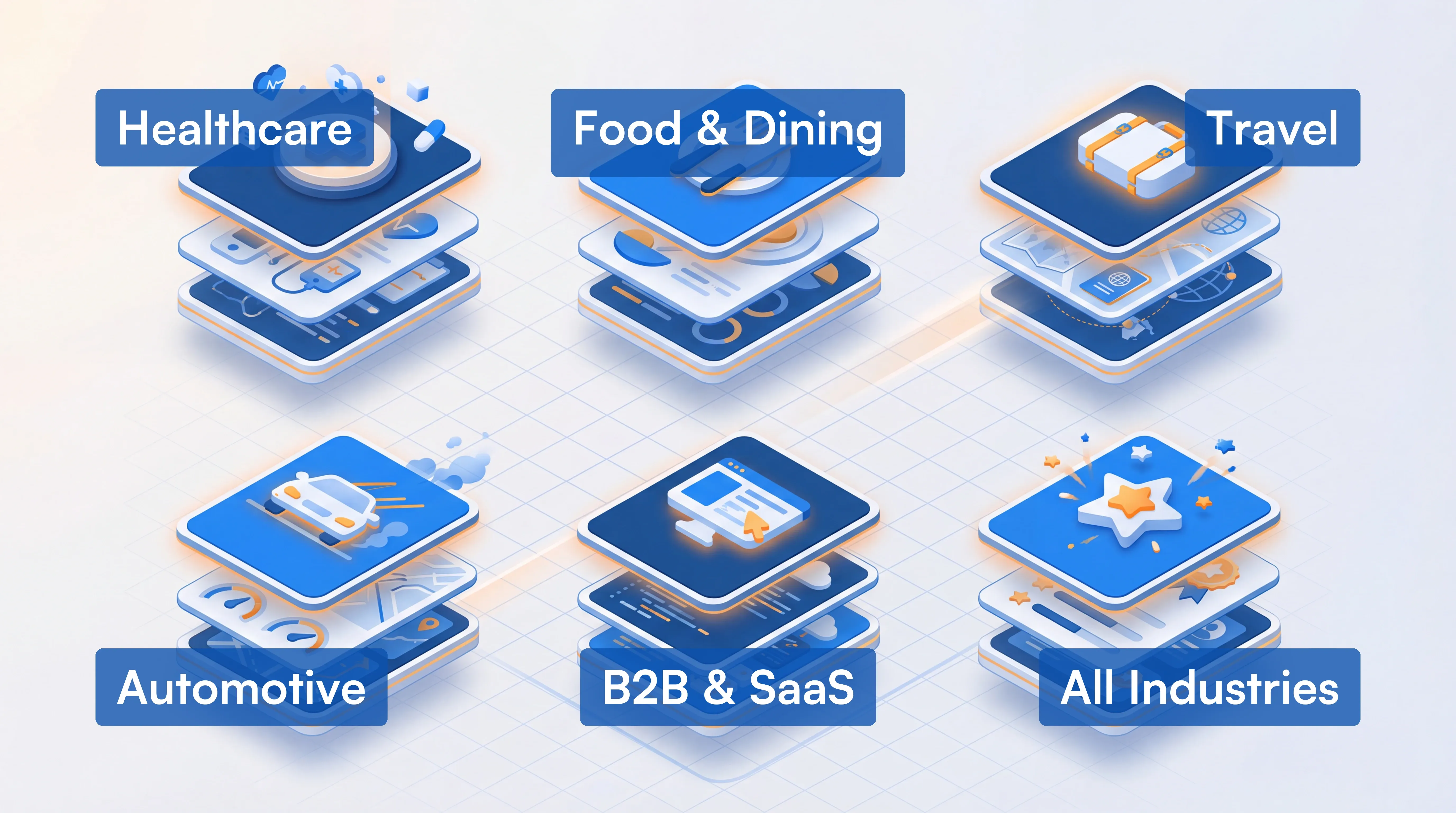 Every industry has its own review ecosystem
11 online reputation monitoring tools
1. Google Alerts (free)
Google Alerts allows you to set up free notifications for your company name or other key phrases related to your business. When Google indexes new content mentioning your specified terms, you receive an email notification.
Key features:
- Monitor brand and company mentions across the web at no cost
- Exclude unwanted mentions using negative keywords
- Create multiple alerts and consolidate via email inbox
Pricing: Free.
Best for: Small businesses or individuals who want basic monitoring at no cost and are willing to filter through general mentions to find reviews.
Limitations: Google Alerts notifies you of all mentions, not just reviews, which can create noise. No sentiment analysis, trend tracking, or direct response capabilities. May miss reviews on sites Google does not index quickly.
2. Visualping
Visualping is a website monitoring tool that tracks visual and text changes on any webpage. While not a traditional reputation management platform, it offers unique capabilities for monitoring online reputation through website change detection.
How it works for reputation monitoring:
Visualping monitors specific pages for changes and sends email alerts with highlighted screenshots showing exactly what changed. For reputation monitoring, this means you can track:
- New reviews appearing on review sites like Yelp, Google, or industry-specific platforms
- Changes to your brand's search engine results pages via SERP monitoring
- Competitor website updates, pricing changes, and new announcements
- News mentions and press coverage
- Social media profile updates
Standout features:
- AI-powered change summaries that explain what changed in plain language
- Customizable monitoring frequency (from daily to every 2 minutes on business plans)
- Visual highlighting that shows exactly where changes occurred on a page
- Support for monitoring pages behind logins with browser extension
Pricing:
- Free plan: 150 checks/month for up to 5 pages
- Starter plan: Starting at $10/month billed annually for 1,000 checks
- Business plans: Starting at $100/month billed annually for 20,000 checks with team features
Setting up Visualping for review monitoring:
- Go to Visualping's homepage and paste the URL of the review page you want to monitor (e.g., your Google Business Profile or Yelp listing). No account required to start.
- Once the page loads in the viewport, select the specific area of the page where new reviews appear.
- Choose your check frequency: every 5 minutes, hourly, daily, or custom intervals depending on your plan.
- Enter the email address where you want to receive alerts and click Start Monitoring.
- Confirm your email and set a password to complete your account. You'll receive highlighted screenshots showing exactly what changed whenever a new review appears.
Best for: Businesses that want to monitor competitor websites, track SERP visibility, and receive alerts when new reviews appear on specific pages. Trustpilot is the most-monitored review platform on Visualping: 380 active monitors, 76% run by business teams, with a median check interval of 24 minutes.
Limitations: Unlike dedicated review management platforms, Visualping doesn't aggregate reviews across sites into a single dashboard or provide direct response capabilities.
3. SentiOne
SentiOne is an AI-powered social listening and customer service automation platform designed for enterprise brands.
How it works:
SentiOne monitors online conversations across social media, news sites, blogs, forums, and review platforms in real-time. Its AI analyzes mentions for sentiment, helping brands understand not just where they're being discussed, but how people feel about them.
Standout features:
- Monitoring in 75+ languages with industry-leading natural language processing (94% accuracy rating according to Papers with Code)
- Conversational AI capabilities with chatbots and voicebots for customer service automation
- Real-time sentiment analysis across millions of mentions
- Direct response capabilities from within the platform
Pricing:
SentiOne offers custom pricing based on business needs. Contact their sales team for quotes on Listen (social monitoring) and Automate (conversational AI) products.
Best for: Enterprise brands managing reputation across multiple markets and languages who also want customer service automation.
Limitations: Pricing is not transparent, and the platform may be more complex than smaller businesses need.
4. Reputology
Reputology is a review monitoring platform designed specifically for multi-location businesses like restaurant chains, hotels, healthcare networks, and retail franchises.
How it works:
Reputology aggregates reviews from major platforms including Google, Facebook, Yelp, TripAdvisor, and industry-specific sites into a single dashboard. It tracks reviews for all your locations and provides analytics to identify patterns and areas for improvement.
Standout features:
- Centralized review monitoring across 100+ review sites
- Location-by-location performance comparison
- Text analytics to identify root causes of positive and negative feedback
- Direct response to Google and Facebook reviews from the platform
- Automated email notifications for new reviews
Company note: Reputology was acquired by ASG Technologies in February 2019 and continues to operate as a standalone product.
Pricing:
- Professional plan: $60/seat/month (up to 3 seats)
- Agency plan: $40/seat/month (for agencies managing multiple clients)
Best for: Multi-location businesses that need to monitor and respond to reviews across many sites and locations from one dashboard.
Limitations: Primarily focused on review monitoring rather than broader social listening or web monitoring.
5. Yext
Yext is primarily known as a business listings management platform, but it also includes review monitoring and response capabilities across more than 200 partner sites.
How it works:
Yext syncs your business information across 200+ directories including Google, Apple Maps, Facebook, and Yelp while monitoring reviews and providing a centralized response dashboard.
Standout features:
- Sync business information across 200+ directories
- Monitor and respond to reviews within the platform
- Automated notifications for incoming reviews
- Analytics dashboard tracking ratings and review volume
- Listings management ensures consistent business information across the web
Pricing:
Yext offers four annual tiers for single locations: Emerging ($199/year), Essential ($449/year), Complete (~$520/year), and Premium ($999/year). The Premium plan includes full review monitoring and website widgets. Enterprise pricing for multi-location businesses is available upon request.
Best for: Multi-location brands that need both listings management and review monitoring in a single platform. Particularly valuable for businesses prioritizing local SEO and consistent directory information.
Limitations: Annual billing required for all plans. Can become expensive for businesses with multiple locations. Review monitoring is part of a larger platform and may be overkill if you only need reviews.
6. ReviewPush
ReviewPush is a cloud-based review monitoring tool designed for small to midsize businesses with multiple locations.
How it works:
ReviewPush collects reviews from sites like Google, Facebook, Foursquare, TripAdvisor, and others into a single dashboard. Users receive email alerts for new reviews and can track performance across locations with multi-level reporting.
Standout features:
- Multi-site monitoring with automatic alerts
- Performance tracking by location, region, or district
- Review response via email
- Missing profile alerts when business listings are incomplete
- Buffer integration for social media coordination
Pricing:
Starting at $39/month with plans scaling based on number of locations monitored.
Best for: Small to midsize businesses, particularly those in hospitality, retail, or food service, that need straightforward review monitoring without enterprise complexity.
Limitations: Limited integrations compared to larger platforms; no social listening beyond review sites.
7. YouScan
YouScan is a social listening platform with industry-leading visual AI capabilities that can identify brand logos and products in images.
How it works:
Beyond traditional text-based monitoring, YouScan's Visual Insights technology uses AI to detect brand logos, products, scenes, and activities in photos shared across social media, even when the brand isn't tagged or mentioned in text.
Standout features:
- Visual Insights: AI-powered image recognition that finds your brand in photos
- Sentiment analysis with trends detection
- Smart alerts for important changes in brand perception
- Virtual AI analyst (Aina) that delivers automated insights
Client base: YouScan serves over 600 customers globally including Nestle, L'Oreal, PepsiCo, Google, Coca-Cola, Samsung, and McDonald's.
Pricing:
Custom pricing based on monitoring needs. Contact YouScan for quotes.
Best for: Consumer brands whose products appear frequently in user-generated photos and videos, such as food and beverage, beauty, fashion, and consumer electronics.
Limitations: Enterprise pricing may be out of reach for smaller businesses; visual monitoring is most valuable for consumer products.
8. BrandMentions
BrandMentions is a brand monitoring and social listening tool that tracks mentions across social media, news, blogs, videos, and the broader web.
How it works:
BrandMentions searches the internet for mentions of your brand, competitors, or any keywords you specify. It provides real-time alerts, sentiment analysis, and competitive intelligence features.
Standout features:
- Real-time alerts for brand mentions across web and social
- Sentiment analysis to gauge positive vs. negative mentions
- Competitor monitoring to track rival brand perception
- Influencer identification within your niche
- White-label reporting (on higher-tier plans)
Pricing:
- New Business: $49/month (1 project, 2 keywords, 3,000 mentions)
- Growing Business: $79/month (3 projects, 7 keywords, 25,000 mentions)
- Company: $299/month (10 projects, 50 keywords, 500,000 mentions, white-label reports)
Best for: Marketing teams that need comprehensive brand and competitor monitoring across the web without enterprise-level complexity or pricing.
Limitations: Historical data access is limited on lower-tier plans; some users report needing to refine keyword filters to reduce irrelevant results.
9. GatherUp
GatherUp (formerly GetFiveStars) is a customer experience and review management platform focused on generating reviews and gathering customer feedback.
How it works:
GatherUp takes a proactive approach to reputation management by helping businesses request and generate reviews through automated email and SMS campaigns. It also monitors existing reviews across major platforms and provides NPS (Net Promoter Score) tracking.
Standout features:
- Automated review request campaigns via email and SMS
- NPS score tracking and customer feedback surveys
- Review monitoring across Google, Facebook, and other platforms
- Website widgets to display reviews and boost conversions
- White-label options for agencies
Company note: GatherUp was acquired by Traject in 2019 and serves both individual businesses and agencies managing multiple client locations.
Pricing:
- Single location: Starting at $99/month
- 5+ locations: $300/month ($60/location)
- 11+ locations: $495/month ($45/location)
Best for: Local businesses and agencies that want to proactively generate more reviews while monitoring their existing reputation.
Limitations: More focused on review generation than comprehensive social listening or web monitoring.
10. ReviewsOnMyWebsite
ReviewsOnMyWebsite is a review management tool focused on collecting, managing, and displaying reviews on your website.
How it works:
The platform monitors reviews from Google, Facebook, Yelp, and TripAdvisor, aggregating them into a central dashboard. It also provides tools to request reviews from customers and display them on your website through customizable widgets.
Standout features:
- Centralized dashboard for managing reviews across platforms
- Automated email and SMS review request campaigns
- Google reviews widget for embedding reviews on your website
- Response management from a single location
Pricing:
Starting at $9/month for basic features, with plans scaling based on review volume and features needed.
Best for: Small businesses that want an affordable way to collect more reviews and display social proof on their website.
Limitations: Less comprehensive monitoring than enterprise tools; focused primarily on major review platforms rather than broader web monitoring.
11. Expert Reputation (formerly EmpathIQ)
Expert Reputation specializes in review management and patient experience software, primarily serving healthcare providers. The platform monitors reviews across 70+ websites where patients and customers leave feedback.
Standout features:
- Review monitoring across 70+ healthcare and general business review sites
- Automated review generation with personalized request links
- Listings management across 50+ directories
- Weekly snapshot reports and real-time email alerts
- Patient experience surveys and feedback collection
Pricing:
Custom pricing based on provider type, number of locations, and feature requirements. Contact their sales team for a quote.
Best for: Healthcare providers including doctors, dentists, clinics, and hospitals that need specialized monitoring of health-focused review platforms like Healthgrades, Vitals, and Zocdoc.
Limitations: Originally healthcare-focused, though now serving broader markets. Custom pricing requires contacting sales.
How to choose the right reputation monitoring tool
A few questions narrow this down quickly.
What's your primary use case?
If you want alerts when new reviews appear on specific pages, Visualping's visual change detection handles that well. If you need a dashboard to respond to reviews without leaving one platform, Reputology, ReviewPush, or Yext are the right category. Social listening across news, blogs, and social media is a different layer entirely: SentiOne, BrandMentions, or YouScan.
What's your budget?
Google Alerts and Visualping's free tier give you monitoring at no cost. ReviewsOnMyWebsite ($9/mo) and ReviewPush ($39/mo) cover the small-business range. Multi-location operations running more than 5 locations will find more value in Reputology or Yext despite the higher price.
What's your industry?
Healthcare providers should start with Expert Reputation (it covers Healthgrades, Vitals, and Zocdoc, which general tools don't). Hospitality and restaurant businesses get strong coverage from Reputology and ReviewPush (both integrate with TripAdvisor and OpenTable). Consumer product brands whose products appear in user-generated photos will get the most value from YouScan's visual AI. B2B and SaaS companies tracking G2, Capterra, and TrustRadius reviews are better served by BrandMentions or Reputology than tools that focus on local search. Capterra monitors on Visualping average 114 lifetime checks per monitor, far more than any other review platform. Software companies treat B2B review monitoring as an ongoing commitment, not a one-time audit.
How many locations do you have?
Single-location businesses can get by with simpler tools. Once you're managing reviews across 5+ locations, the per-location dashboards and team workflows in Reputology, ReviewPush, GatherUp, or Yext start justifying their price.
Decision matrix: score each tool for your needs
Rate the tools that match your use case on the capabilities that matter most. The tool with the highest total for your weighted priorities is your best fit.
| Capability | Google Alerts | Visualping | Reputology | BrandMentions | Expert Reputation |
|---|---|---|---|---|---|
| Review monitoring | 2 | 3 | 5 | 3 | 5 |
| Review response | 1 | 1 | 5 | 2 | 4 |
| Social listening | 2 | 1 | 1 | 4 | 1 |
| Competitor tracking | 2 | 5 | 2 | 5 | 2 |
| Multi-location | 1 | 3 | 5 | 3 | 4 |
| Review generation | 1 | 1 | 2 | 1 | 4 |
| Affordability | 5 | 4 | 2 | 3 | 2 |
Five representative tools shown. Scores reflect core strength relative to category: 5 = best in class, 1 = not designed for that use case. For Yext, ReviewPush, GatherUp, YouScan, SentiOne, and ReviewsOnMyWebsite, see the detailed entries above.
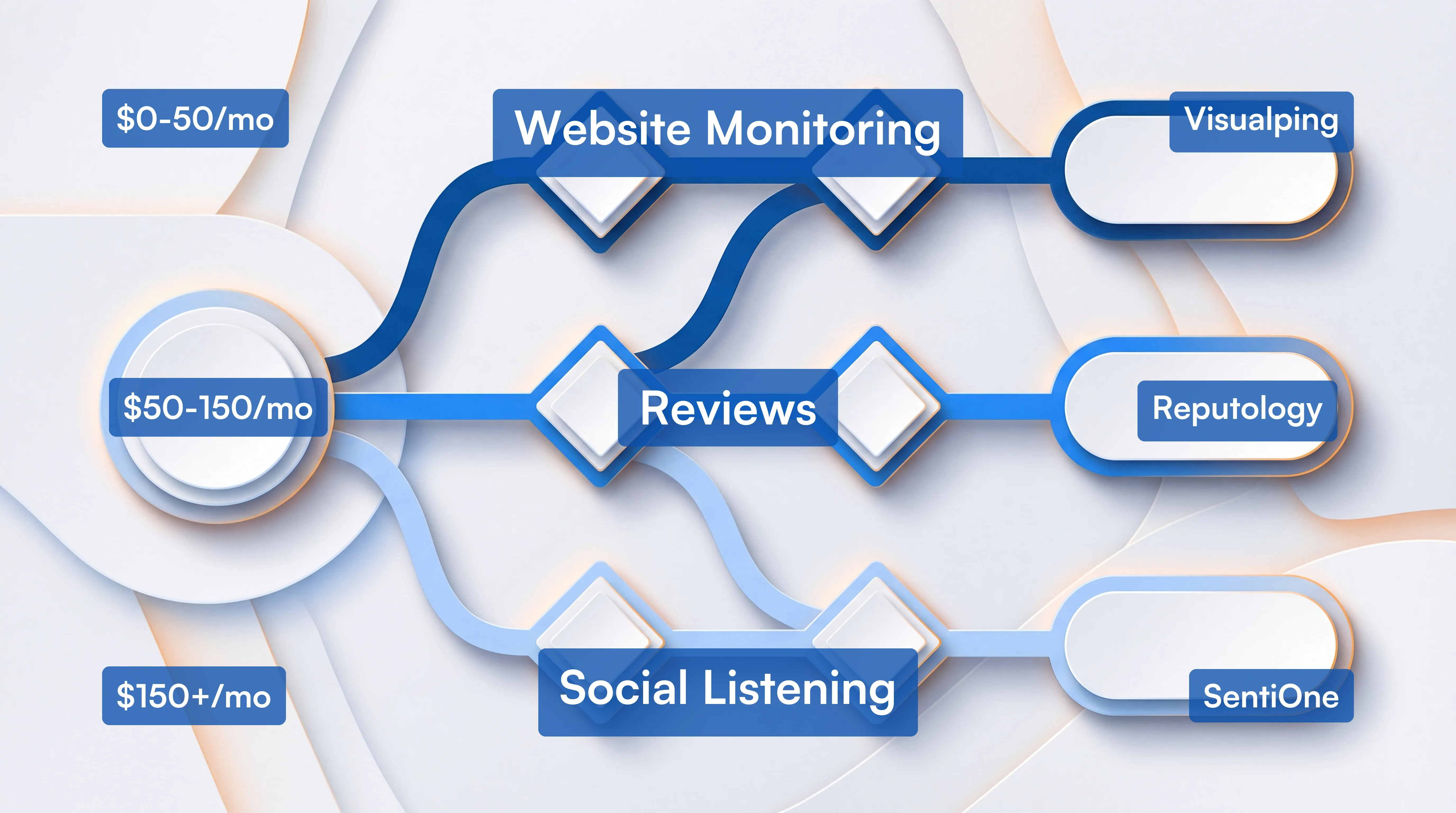 Start with the gap, then match the tool
Combining tools for comprehensive coverage
Many businesses find that no single tool covers all their reputation monitoring needs. A common approach combines:
- A review management platform (like Reputology or GatherUp) for monitoring and responding to reviews
- A social listening tool (like BrandMentions or SentiOne) for broader brand mention tracking
- A website monitoring tool (like Visualping) for tracking competitor changes and SERP visibility
This layered approach provides comprehensive coverage while keeping costs manageable by using specialized tools for their core strengths. For a deeper dive into building your monitoring stack, see our guide to competitive intelligence sources.
Across the businesses monitoring review platforms on Visualping, 94% watch only one site. Most businesses have blind spots on the platforms their competitors are already being reviewed on.
Your first 7 days of reputation monitoring
Once you've picked a tool, here's how to get real value from it in the first week.
Day 1: Set up monitors on your top 3 review platforms. For most businesses, that's Google Business Profile, Yelp, and one industry-specific site (Trustpilot for B2B, TripAdvisor for hospitality, Healthgrades for healthcare). If you're using Visualping, paste each review page URL and select the area where new reviews appear.
Day 2: Add your top 2 competitors' review pages. Monitor the same platforms for your closest competitors through competitive monitoring. When a competitor gets a negative review about something you do well, that's a positioning opportunity.
Day 3: Write 3 response templates. One for positive reviews (personalized thank-you with a specific callback to what they mentioned), one for negative reviews (acknowledge, take responsibility where warranted, offer to make it right), and one for unjustified reviews (professional context without defensiveness). Templates save time; personalizing them saves your reputation.
Day 4: Set up alert routing. Decide who on your team gets notified for what. Negative reviews might go to a manager; positive reviews might go to marketing for social proof. Most tools let you configure email routing or Slack integration.
Day 5: Respond to your 5 most recent reviews. Positive and negative. This builds the habit and shows customers (and Google) that your business is actively engaged. Review engagement also factors into local search rankings.
Day 6: Check your competitor review pages. What are their customers complaining about? What are they praising? Note the patterns. This is competitive intelligence you can act on immediately.
Day 7: Review your first week's data. How many new reviews appeared? How quickly did you respond? Which platforms had the most activity? Set a weekly check-in from here.
Key takeaways
The eleven tools in this guide split into three categories. Free tools (Google Alerts, Visualping's free tier) give you basic alerting without a budget commitment. Monitoring-and-response platforms (Reputology, ReviewPush, Yext, GatherUp, ReviewsOnMyWebsite) aggregate reviews and let you respond without leaving the dashboard. Social listening platforms (SentiOne, BrandMentions, YouScan) track brand mentions across the broader web, including social media, news, and forums beyond review sites. For healthcare, Expert Reputation is the specialist pick covering 70+ health-focused platforms that general tools miss.
Most businesses need a combination of the first two categories. Add the social media monitoring layer if brand mentions outside review sites are part of your exposure.
A monitoring tool handles the watching. The response strategy is yours to own: who on your team handles replies, how quickly, and with what tone. The tools alert you; the response is what shapes how other customers perceive you.
Start by identifying the specific gap: not enough reviews, missing negative feedback, slow response times, or no visibility into competitor reputation. Pick the tool that addresses that gap within your budget, and test before committing. Most platforms offer free trials.
Related Resources
Looking to expand your monitoring capabilities? These guides can help:
- SEO Reputation Management Guide
- Best AI Tools for Competitor Analysis
- How to Monitor LinkedIn Pages
- How to Monitor Facebook Pages
- Reddit Alerts: How to Track Reddit Mentions
- Top Free Competitive Intelligence Tools
Sources and References
- BrightLocal. (2025). Local Consumer Review Survey 2025. https://www.brightlocal.com/research/local-consumer-review-survey/
- Capital One Shopping Research. (2025). Online Review Statistics: Influence on Buying Decisions. https://capitaloneshopping.com/research/online-reviews-statistics/
- DemandSage. (2026). 30 Latest Online Review Statistics 2026. https://www.demandsage.com/online-review-statistics/
- Luca, M. (2016). Reviews, Reputation, and Revenue: The Case of Yelp.com. Harvard Business School Working Paper 12-016.
- Moz. (2018). The Impact of Online Reviews on Purchasing Decisions.
- Trustpilot. (2025). Trust Report 2025. https://corporate.trustpilot.com/trust/trust-report-2025
- Womply. (2019). The Impact of Online Reviews on Small Business Revenue.
Pricing information sourced from vendor websites, G2, Capterra, and TrustRadius in January 2026. Contact vendors directly for current pricing and enterprise options.
Want to monitor web changes that impact your business?
Sign up with Visualping to get alerted of important updates, from anywhere online.
Eric Do Couto
Eric Do Couto is the Head of Marketing at Visualping. He leads content strategy, growth operations, and brand positioning for website change detection.
More articles by Eric Do Couto