How to Get Instant Alerts for Product Recalls
By Emily Fenton
Updated February 5, 2026

How to Monitor Product Recalls in 2026
In a world where product safety is supposedly paramount, it’s honestly surprising how many dangerous items stay on shelves, or in our homes, long after they’ve been flagged.
Staying on top of product recalls is really more about common sense than anything else. For most of us, whether we’re running a business or just looking out for our families, it’s just another practical way to keep daily life running safely and avoid unnecessary risks.
From faulty electronics that might catch fire to contaminated spinach, using discontinued and recalled products can really pose some serious risks.
But with the sheer volume of products we interact with, manually checking for updates is a total drag. It’s time-consuming, and honestly, we usually forget to do it until we see a scary headline.
Importance of Monitoring Product Recalls
The consequences of missing a product recall can be pretty severe.
We aren't just talking about a minor inconvenience. Continuing to use a discontinued product can lead to serious health hazards and, for companies, massive legal liabilities.
By actively monitoring, you’re proactively protecting your circle from harm.
But there’s another layer: brand reputation. If you’re a reseller or a business, your customers' trust is everything. When a business fails to act fast or communicate during a recall, that confidence just evaporates. It leads to lost sales and a reputation that’s hard to rebuild.
Everyday folks also have to deal with "recall fatigue." There are just way too many headlines these days, and we can't possibly stay on top of every single new recall that's published. You need a way to filter the noise so you only get the alerts that actually matter to you.
Why Manual Product Recall Tracking Usually Fails
The old-fashioned ways to track product recalls, like bookmarks or checking the news, just don't work well. Manual searches are a time-sink. Trying to keep up with multiple industries (food, toys, tech) or different regions is basically a full-time job.
Plus, if you’re relying solely on official notifications, you might get the info too late.
Information is often fragmented across a bunch of different government databases, which is overwhelming. This lack of a centralized, easy-to-use product recall update platform is a huge gap in public safety.
Basically, by the time you stumble across a recall notice on your own, you've probably already been using the product for weeks.
How to Monitor Product Recalls with Visualping
Visualping is essentially a "set it and forget it" tool that can do the heavy lifting of monitoring websites for you.
Instead of you visiting the same three government websites every morning, it automatically keeps an eye on them and pings you the second something changes.
It’s one of the easiest ways to set up specific alerts, whether you’re looking for a specific brand of baby food or just want to know if a certain car manufacturer issues a safety notice.
Setting it up takes about two minutes, and once it's done, you don't have to think about it again until an alert hits your inbox.
Here's a quick step-by-step guide on how to set up your first product recall alert with Visualping:
Step 1: Create a Visualping account and paste the URL you want to monitor into your new job
First, sign up for a free Visualping account to start setting up your first alert. Then, go to the page you want to monitor for recalls and copy the URL from the address bar.
Here are some popular U.S. government URLs you can monitor for recalls:
Then, go back to your Visualping account and insert the URL into the provided search field. This will load up a preview of the webpage.
Step 2: Enter an AI criteria for your alert
You can select a section of the page to monitor for changes (such as the table where the recalls are added), or you can enter a specific criteria for your product recall alerts under the "Alert me when" field.
For example, you can instruct Visualping to only alert you about recalls related to sports equipment. Or, if you're a brand or reseller looking to track recalls related to your brand(s), you can enter a criteria like "Alert me when a recall related to "XYZ Company" is published or updated."
Here's an example of an alert criteria for the CPSC website:
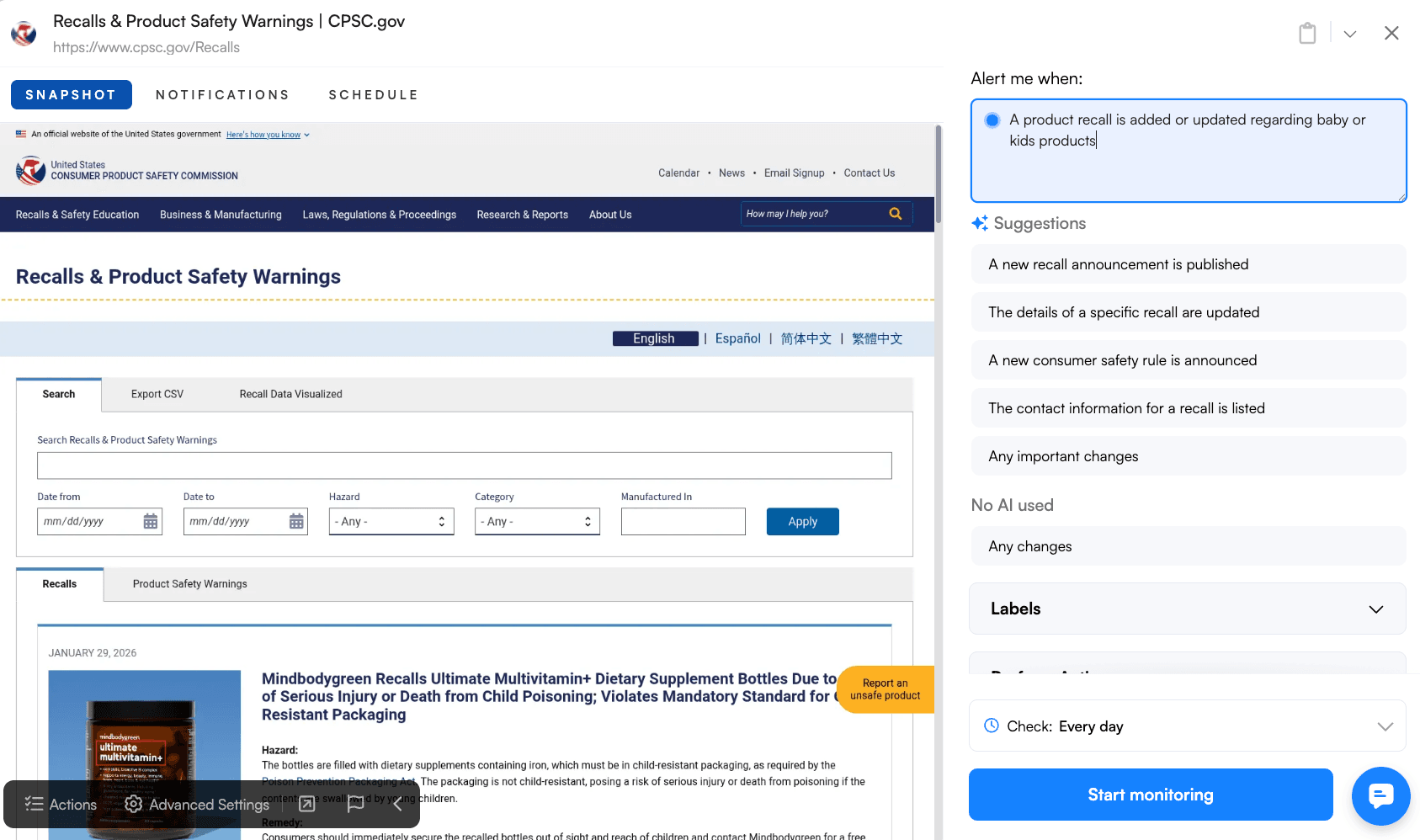
Step 3: Set the monitoring frequency
Next, specify how frequently Visualping should check for changes on the page. The monitoring interval can range from as short as five minutes to as long as a month.
For product recalls, we recommend checking at least every week.
By setting up automated monitors on these URLs, you can stay ahead of the curve without having to constantly refresh your browser.
You don't have to go hunting for the data, the information just comes to you. It’s basically like having a personal assistant whose only job is to make sure nothing in your pantry or your warehouse is secretly on a "do not use" list.
Monitoring Product Recalls with Visualping: The Bottom Line
At the end of the day, keeping an eye on product recalls is just one of those "life admin" tasks that’s easy to ignore until it's too late.
But it really doesn't have to be a chore. By using a more automated approach like Visualping to track product recalls, you can make sure you’re getting the right info at the right time, without having to spend your free time digging through government databases.
Sign up for Visualping here, and make sure your family, or brand, is protected.
Frequently Asked Questions about Tracking Product Recalls
What is the fastest way to get alerted of product recalls?
The quickest way is usually to use a web-monitoring tool like Visualping that scans official government pages (like the FDA or CPSC) every few hours. While you can wait for a manufacturer to email you, that usually happens way after the information has been posted publicly.
How do I track recalls for specific brands or items?
The most efficient way is to set up a monitor on a recall database and use a "keyword" filter. That way, instead of getting an alert for every single recalled item in the country, you only get an email if a specific brand you use, or a product like "laptop battery", is mentioned.
Is there a central place for all product recalls?
Not really, which is the annoying part. Different agencies handle different things: the FDA does food and meds, the CPSC handles household goods, and the USDA covers meat and poultry. Using a tool to watch all three at once is usually your best bet for a "centralized" view.
Want to get instantly alerted for specific product recalls?
Sign up with Visualping to monitor any government recall website.
Emily Fenton
Emily was the Product Marketing Manager at Visualping. She has a degree in English Literature and a Masters in Management.
More articles by Emily Fenton