Vendor Onboarding: The Risk-Led Process + Free Template
Updated April 16, 2026

This article walks through vendor onboarding as a risk-led workflow: the 7-stage process, the document checklist, tool options by company size, and why the post-onboarding monitoring step is where most programs break down.
Most vendor onboarding guides read as a procurement workflow with a security checkbox bolted on the end. The order is wrong. By the time a vendor signs the MSA and gets a PO number, half the meaningful risk decisions have already been made, and the other half never get revisited until something breaks.
Risk-led vendor onboarding flips that sequence. Security, privacy, and compliance checks sit in front of the contract, not behind it. The onboarding package is built around risk, so the assessment produces the contract rather than a signed contract later triggering a questionnaire. And the program treats onboarding as the start of a monitoring relationship, not as a one-time clearance.
This guide is the practical version of that model. It covers what vendor onboarding actually means across procurement, security, and legal, the 7-stage process that holds up at both 30 vendors and 3,000, the document checklist, the software tiers by company size, and the continuous checks most programs skip.
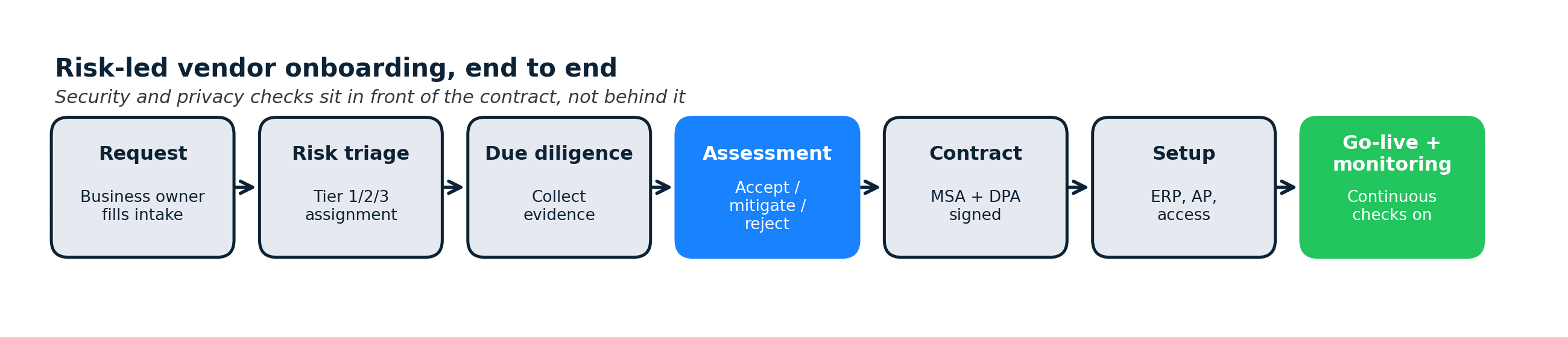
In brief
- Vendor onboarding is the end-to-end process of bringing a new supplier into your systems: intake, risk screening, assessment, contracting, operational setup, and go-live.
- A risk-led flow runs security, privacy, and compliance checks before the contract, not after. This is what separates a TPRM-grade onboarding from a pure procurement flow.
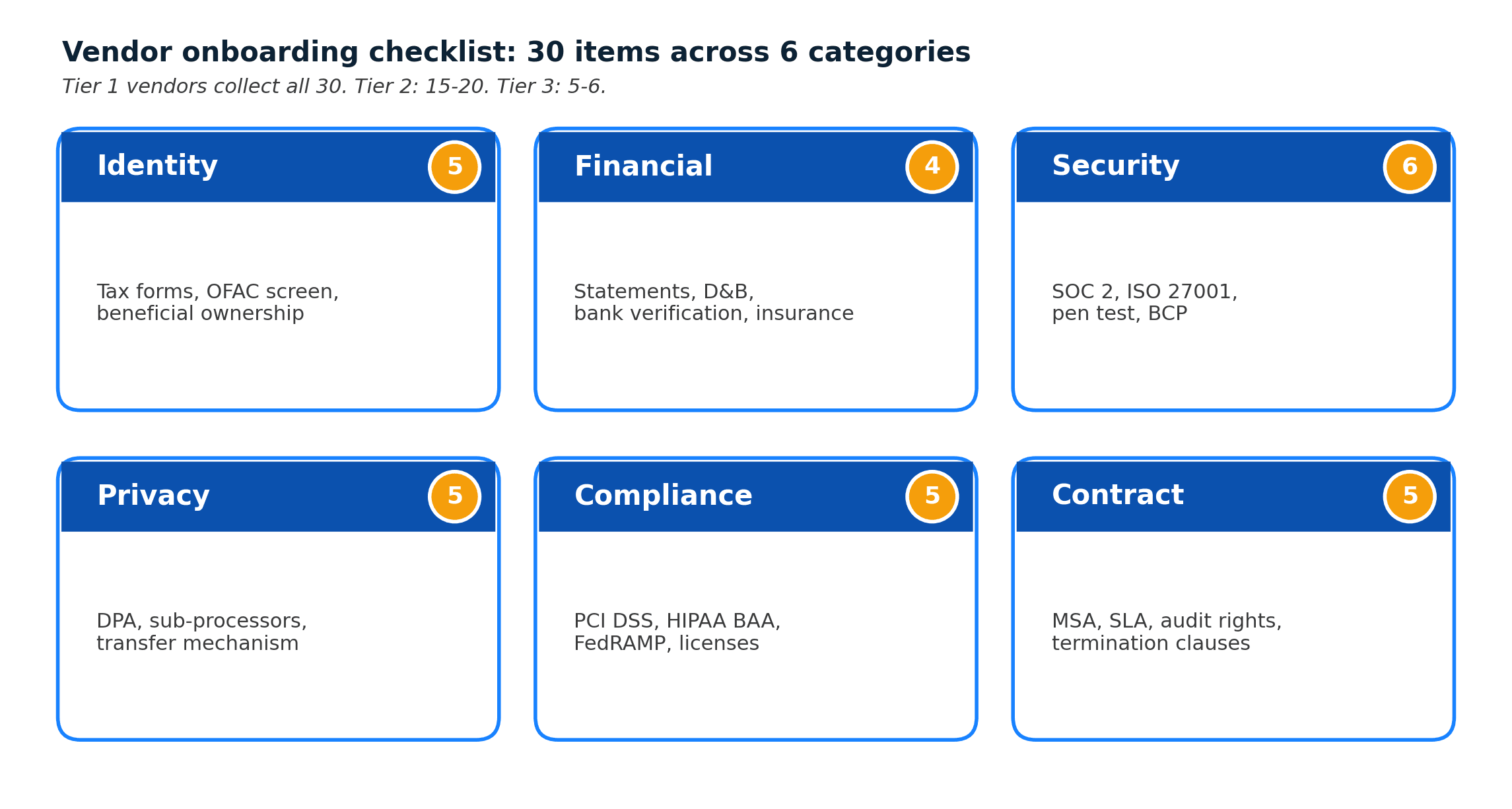
- The document checklist has 30 items across 6 categories: identity, financial, security, privacy, compliance, and contract.
- Realistic tool stacks differ by company size: SMBs can do this in a spreadsheet + shared inbox, mid-market uses dedicated VRM, enterprise runs a GRC platform with workflow automation.
- The onboarding step most programs skip is the handoff to continuous monitoring. The risk picture you capture on day zero decays fast.
What vendor onboarding actually means
Vendor onboarding is the end-to-end process of bringing a new supplier into your systems so they can start delivering goods or services. Depending on where you sit, it looks different:
- Procurement sees it as sourcing, negotiation, and contract execution.
- AP/Finance sees it as vendor master data setup, W-9/W-8 collection, and payment configuration.
- Security and privacy see it as third-party risk due diligence before the vendor touches data.
- Legal sees it as contract negotiation, DPA attachment, and insurance verification.
- IT sees it as provisioning access, SSO enrollment, and integration setup.
When these teams work in parallel without a shared owner, onboarding drags and risk gets lost between handoffs. A risk-led onboarding model names a single coordinator, usually in procurement or TPRM, who runs a defined sequence instead of five parallel mini-processes.
Vendor onboarding vs supplier onboarding
These terms are used interchangeably. Supplier is the older procurement term, more common in manufacturing and retail. Vendor is the SaaS-and-services term, more common in tech and financial services. The process is the same either way.
Where onboarding ends
Most programs end onboarding at "vendor is in the system and has a PO." A risk-led program ends onboarding at "vendor is in the system AND is subscribed to continuous monitoring for their DPA, sub-processor list, and trust center." That extra clause is what keeps risk current after the vendor goes live.
The risk-led vendor onboarding process (7 stages)
This is the process that scales from 30 vendors to 3,000 without structural redesign. Every stage has a clear owner, a clear exit criterion, and a clear artifact.
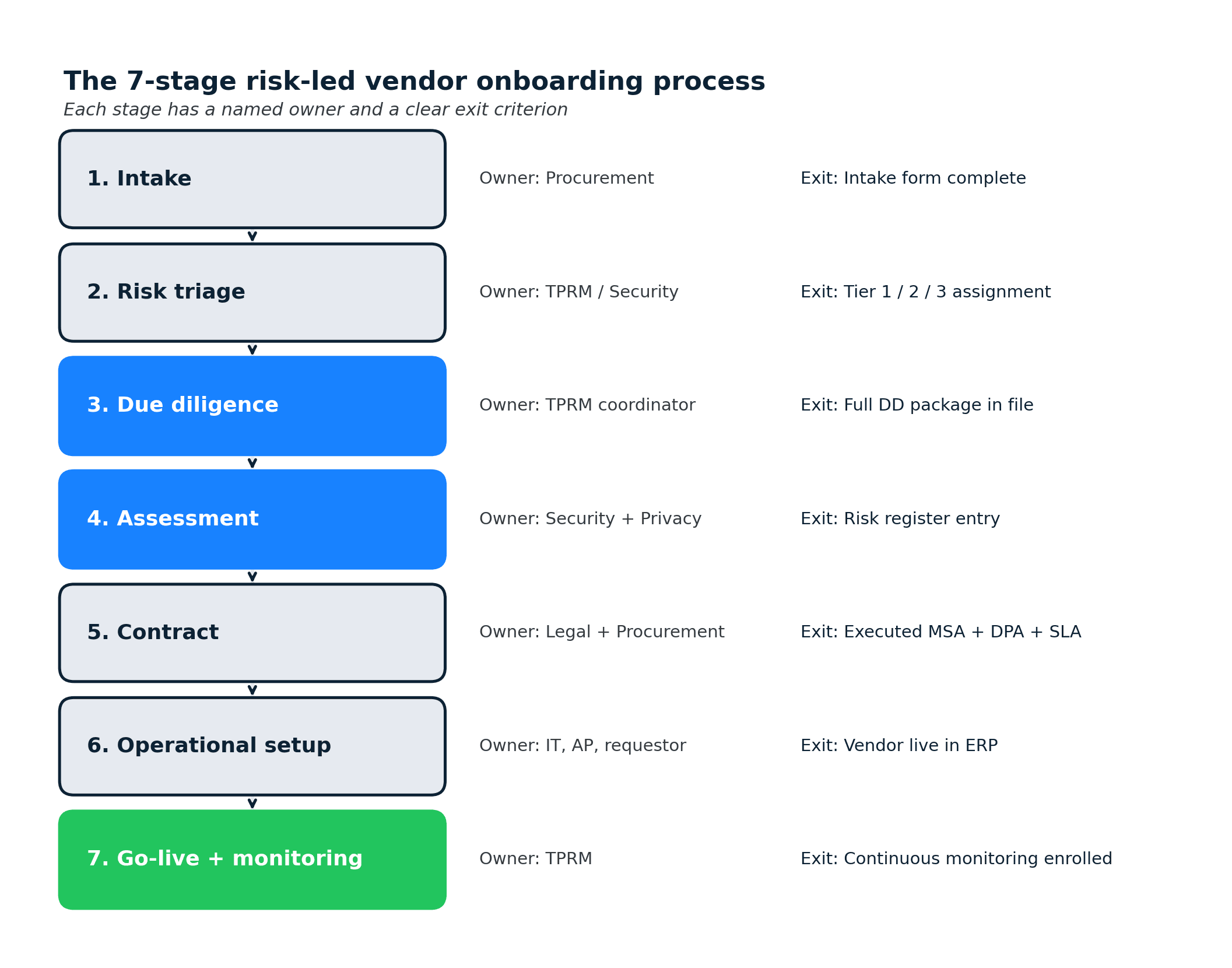
Stage 1: Intake
Owner: procurement. Exit criterion: intake form complete.
A requestor (usually a department head or project lead) fills out an intake form. Good intake forms capture the business case, the data the vendor will touch, the systems they'll integrate with, the expected contract value, and the desired start date. This is the single best place to embed a risk classification: a 5-minute triage questionnaire inside intake filters obviously-low-risk vendors out of the heavyweight process.
Stage 2: Risk triage
Owner: TPRM or security. Exit criterion: vendor assigned to a risk tier.
Triage assigns the vendor to Tier 1 (processes regulated or sensitive data, critical business function), Tier 2 (non-regulated data, important but not critical), or Tier 3 (no data access, commodity service). The downstream due diligence depth tracks the tier. Tier 3 vendors get a 1-page check. Tier 1 vendors get the full package below.
Stage 3: Due diligence
Owner: TPRM coordinator, pulling inputs from security, privacy, legal, and finance. Exit criterion: complete due diligence package in the file system.
Due diligence collects the artifacts the vendor already has (SOC 2 reports, ISO certificates, DPAs, penetration test summaries, insurance certificates, financial statements) rather than asking the vendor to regenerate work. Most mature vendors host these in a trust portal behind an NDA. Pull from there first; only send a custom questionnaire when a gap exists.
The vendor due diligence checklist covers the detailed artifact list. The short version is in the next section of this post.
Stage 4: Risk assessment
Owner: security and privacy. Exit criterion: risk register entry with accepted/mitigated/rejected status.
Assessment evaluates the due diligence package against your control requirements. Common outputs: an accepted risk (documented, moves to contract), a mitigated risk (specific contract clauses or technical controls required), a compensating-control request (the vendor doesn't meet the standard but has a workaround), or a rejection (find a different vendor).
Tier 1 vendors with sensitive data and no SOC 2 Type II get escalated. Tier 1 vendors with SOC 2 Type II and a standard DPA usually move through quickly.
Stage 5: Contract
Owner: legal + procurement. Exit criterion: executed MSA with DPA and SLA.
Contracting attaches the DPA (data protection addendum), the SLA, and any mitigating clauses from Stage 4. Legal redlines. Procurement negotiates commercials. The clock on this stage is often driven by Stage 4's output, so front-loading assessment compresses the whole flow. Post-execution, contract drift (amended DPAs, updated ToS) is why automated ToS monitoring pays back across the vendor lifecycle, not just at renewal.
Stage 6: Operational setup
Owner: IT, AP, and the requesting team. Exit criterion: vendor record live in ERP, access provisioned, payment configured.
Setup is the "make it real" stage: vendor master data in the ERP, W-9/W-8 on file, banking verified (use callback verification to catch invoice fraud), SSO enrolled if the vendor has a user-facing product, integrations configured. This is also where most fraud-prevention controls (dual-approval for vendor banking changes, out-of-band callback verification) get enforced.
Stage 7: Go-live + continuous monitoring
Owner: TPRM. Exit criterion: vendor enrolled in continuous monitoring.
The vendor is now live. The risk picture assembled in Stages 3-4 is frozen in the vendor file. Without continuous monitoring, that picture decays as the vendor updates its sub-processors, amends its DPA, renews (or fails to renew) certifications, and shifts its architecture. Subscribing the vendor's DPA, sub-processor list, and trust center to continuous vendor monitoring keeps the risk register current between formal reviews.
The risk picture you assembled in Stages 3 and 4 starts decaying the day you file it. Sub-processor pages: 67% changed in 90 days across 1,132 active monitors on our platform. Privacy policies: 41% in the same window (n=7,551). Trust centers, where onboarding-era certifications and audit reports live, move even faster: 62% in 90 days (n=295). The assessment captured on day zero is already stale by day 90 if nothing is watching.
The vendor onboarding checklist (6 categories, 30 items)
This is the artifact request list that covers most Tier 1 vendors. For Tier 2 and Tier 3, use a reduced subset proportional to risk.
1. Identity and eligibility (5 items)
- Legal entity name and address
- W-9 (US) or W-8 (foreign) tax forms
- Business registration / certificate of incorporation
- OFAC / sanctions screening result
- Beneficial ownership disclosure if over the contract threshold
2. Financial (4 items)
- Two most recent years of financial statements (audited if available)
- D&B or credit score pull
- Bank account verification (callback confirmed)
- Certificate of insurance naming your company as additional insured
3. Security (6 items)
- SOC 2 Type II report (within the last 12 months)
- ISO/IEC 27001 certificate, if applicable
- Penetration test summary (within the last 12 months)
- Security questionnaire response (SIG Lite or equivalent) for any gap not covered by SOC 2
- Business continuity and disaster recovery plan
- Incident response / breach notification process
4. Privacy (5 items)
- Data Processing Agreement (DPA) signed
- Current sub-processor list
- Data transfer mechanism (SCCs, adequacy decision, or equivalent)
- Privacy policy URL and date of last material update
- Data retention and deletion schedule
5. Compliance (5 items)
- PCI DSS attestation, if the vendor touches cardholder data
- HIPAA BAA executed, if in scope
- Industry-specific attestations (FedRAMP, HITRUST, regional equivalents)
- Regulatory licenses as applicable
- Code of conduct and anti-bribery attestation
6. Contract (5 items)
- Executed MSA
- Service level agreement (SLA) with remedies
- Data protection addendum (DPA) attached
- Termination and data-return clauses
- Audit rights and cooperation clauses
A realistic Tier 1 vendor has all 30 items either collected or explicitly waived with a documented reason. Tier 2 might collect 15-20. Tier 3 might collect 5-6.
Process owners by company size
The same 7-stage process scales across company sizes, but the owners shift.
SMB (under 200 employees)
- Coordinator: office manager, finance lead, or contract ops.
- Triage: manual, gut-feel scoring from the intake form.
- Due diligence: a shared Google Drive folder per vendor.
- Risk assessment: a one-pager attached to the MSA, approved by legal counsel (often fractional).
- Tools: Google Drive, DocuSign, AP software (Bill.com, Ramp), a spreadsheet vendor register.
SMBs rarely need vendor onboarding software. They need a written playbook and a named owner.
Mid-market (200-2,500 employees)
- Coordinator: dedicated TPRM analyst or procurement operations manager.
- Triage: structured intake form in a ticketing tool (ServiceNow, Jira, Airtable).
- Due diligence: dedicated vendor management system or a vendor risk management platform.
- Risk assessment: standardized questionnaire (SIG Lite) and a risk register.
- Tools: Whistic, Venminder, Panorays, or similar for VRM; DocuSign CLM or Ironclad for contracts; ERP for AP setup.
Mid-market is where dedicated vendor onboarding software pays back. The break-even is usually around 30-50 new vendors per quarter.
Enterprise (2,500+ employees)
- Coordinator: a TPRM function reporting into CISO, CPO, or CFO.
- Triage: automated via integrations between intake, CRM, and GRC.
- Due diligence: GRC platform (OneTrust, ProcessUnity, Archer, ServiceNow IRM) with vendor portals and automated evidence collection.
- Risk assessment: tiered SIG questionnaires, continuous monitoring feeds, and board-level reporting on aggregate third-party risk.
- Tools: full GRC stack, ERP, contract lifecycle management, identity management, and a continuous monitoring layer spanning cyber ratings, corporate events, and documentation surfaces.
At enterprise scale, onboarding is a workflow that touches 6-10 systems. Integration is the hard part. The questionnaire is the easy part.
Vendor onboarding software: the three layers
Most programs end up with more than one tool because the space splits into three functions that rarely live in a single product.
Layer 1: Intake and workflow
- Examples: ServiceNow, Jira Service Management, Airtable, Pipefy, Workato.
- Purpose: capture the request, route it through approvals, hand off to downstream systems.
- Signals to evaluate: integration surface (does it call your ERP, HRIS, SSO?), approval routing flexibility, SLA reporting.
Layer 2: Vendor Risk Management (VRM)
- Examples: Whistic, Venminder, Panorays, SecurityScorecard, UpGuard, OneTrust, ProcessUnity.
- Purpose: collect evidence, run questionnaires, score risk, maintain the risk register.
- Signals to evaluate: evidence collection (can it pull directly from a vendor trust portal? Salesforce's public sub-processor page is a good reference example of what "machine-readable vendor evidence" looks like), questionnaire library (SIG, CAIQ, custom), continuous cyber monitoring coverage, integration with your GRC / ERP.
Layer 3: Continuous monitoring
- Examples: cyber ratings (BitSight, SecurityScorecard, UpGuard), news and intelligence (FiscalNote, Moody's Grid), page-level change detection (Visualping, Fluxguard).
- Purpose: detect changes to a vendor's risk posture between formal reviews.
- Signals to evaluate: coverage across cyber / operational / documentation surfaces, alert routing (Slack, Teams, webhook to GRC), false-positive rate, cost per monitored vendor.
Most programs run Layer 1 + Layer 2 and skip Layer 3, which is where the documentation-surface drift happens. Layer 3 is a small line item (often under $500 per month for tier-1 vendor coverage) and compresses the detection-to-remediation time from quarters to days.
Continuous checks vs one-time gates
This is the single most common failure mode in vendor onboarding: treating onboarding as a gate rather than the start of an ongoing relationship.
Examples of the one-time-gate failure:
- Vendor submits SOC 2 Type II in month 1. Report expires in month 13. Nobody notices until the annual review in month 18.
- Vendor adds a new AI inference provider to its sub-processor list in month 4. Privacy team discovers it at the next scheduled DPA review in month 14.
- Vendor's DPA gets amended in month 8 to add a new data-transfer mechanism. Legal doesn't see the amendment until renewal in month 20.
Each of these is detectable in 24 hours with continuous monitoring on the right page. None of them are detectable in advance with a questionnaire.
The fix is a light-touch handoff at the end of Stage 7: add the vendor's DPA, sub-processor list, trust center, and privacy policy to a page-level monitor, route alerts to a shared TPRM channel, and review once a quarter. This is covered in detail in the continuous vendor monitoring guide.
Common failure modes (and what fixes them)
A short catalog of what goes wrong and the minimum intervention that addresses each:
- Onboarding takes 6-8 weeks for routine vendors. Fix: front-load risk triage into intake, so Tier 3 vendors skip the heavyweight flow entirely.
- Security finds out after the contract is signed. Fix: make security a named approver in Stage 2 triage, before the contract drafts.
- Vendor banking changes go through unverified. Fix: require out-of-band callback verification for any banking change, not just initial setup. Applies to Stage 6 and any post-go-live change.
- Sub-processor lists drift without review. Fix: continuous page monitoring on the sub-processor URL, routed to privacy. This is the highest-value single-line control in a TPRM program.
- Insurance certificates expire silently. Fix: monitor the certificate page (or the insurer's issuing portal) for expiration date changes. On our platform, 4,519 active monitors track insurance or certificate-adjacent pages across all use cases, which is the practical scale this control runs at.
- The "risk register" is a spreadsheet that nobody updates. Fix: route continuous monitoring alerts as events that automatically create register entries via a webhook to GRC. These are the same automation workflows that already run the rest of a modern risk function.
Frequently asked questions
What is a vendor onboarding process?
The vendor onboarding process is the sequence of steps that brings a new supplier from initial request to operational go-live. A risk-led version has 7 stages: intake, risk triage, due diligence, risk assessment, contract, operational setup, and go-live with continuous monitoring enrolled. Each stage has a clear owner and exit criterion. The end state is a vendor that is in your ERP, contractually protected, and actively monitored for risk changes.
What are the 4 stages of vendor onboarding?
A compressed 4-stage model maps to intake + triage (combined), due diligence + assessment (combined), contract, and operational setup. Most programs benefit from the 7-stage split because it separates owners cleanly. The 4-stage model is easier to communicate to executives; the 7-stage model is easier to operate.
What is the difference between vendor onboarding and supplier onboarding?
Vendor and supplier onboarding describe the same workflow. Supplier is the traditional procurement term, common in manufacturing, retail, and operations. Vendor is the SaaS and services term. Choose one consistently to avoid confusing documentation.
What does vendor onboarding software do?
Vendor onboarding software automates three things: intake and approval routing, evidence collection from vendors (SOC 2 reports, DPAs, questionnaires), and risk scoring against your control requirements. Mature platforms also push data to your ERP (for vendor master setup) and your GRC (for risk register entries). The space splits into intake/workflow tools, VRM platforms, and continuous monitoring layers.
How long does vendor onboarding take?
For Tier 3 commodity vendors, 2-5 business days is typical. For Tier 1 vendors touching sensitive data, 3-8 weeks is typical, mostly driven by due diligence and contract negotiation. Programs that front-load risk triage and run parallel (not sequential) due diligence tend to compress Tier 1 onboarding to 2-3 weeks.
Who owns vendor onboarding?
The coordinator role sits in procurement, TPRM, or contract operations. The approvers sit in security, privacy, legal, and finance. The executing hands sit in IT, AP, and the requesting team. Named coordinators with defined handoffs outperform "everyone owns it" setups every time.
What is the 3-vendor rule?
The 3-vendor rule is a procurement practice of soliciting bids from at least three qualified vendors before making a selection. It's a sourcing control, not a risk control. It belongs at the front of Stage 1 for categories where price competition matters. For categories where there are only 1-2 realistic vendors (specialized SaaS, regulated industries), the rule is waived with documentation.
For a program-level view of how this piece fits into the broader lifecycle, frameworks, and operating model, see the third-party risk management program overview.
Where to go next
Vendor onboarding is one layer of a broader TPRM program. For the continuous-monitoring handoff, the always-on change-detection playbook covers the post-onboarding step in detail. For the due diligence artifact list, the vendor due diligence checklist goes deeper on Stage 3. For the sub-processor dimension specifically, the sub-processor selection guide covers how to evaluate a new entry before it lands on the vendor's list. And for the broader regulatory-page monitoring context, the full regulatory compliance monitoring workflow covers the adjacent use case beyond vendors.
This article summarizes industry practice for vendor onboarding and the risk controls that most programs embed in it. It is not legal, procurement, or audit advice. Specific regulatory obligations, sourcing rules, and contract language should be reviewed with your program's procurement, legal, and TPRM owners before relying on them.
Want to monitor web changes that impact your business?
Sign up with Visualping to get alerted of important updates from anywhere online.
Eric Do Couto
Eric Do Couto is the Head of Marketing at Visualping. He leads content strategy, growth operations, and brand positioning for website change detection.
More articles by Eric Do Couto