11 Best Vendor Risk Management Software in 2026
Updated April 15, 2026

This guide compares 11 vendor risk management software tools across the 3-layer vendor risk management software market: questionnaire-first VRM/GRC, cyber ratings, and documentation-surface monitoring. Each pick includes what it does well, where it falls short, and who should (and shouldn't) pick it.
Most "best vendor risk management software" articles treat the category as a single market and rank the tools against each other. That framing is wrong. The vendor risk management software market splits into three distinct layers, and the tools in one layer don't meaningfully compete with the tools in another. A cyber ratings platform and a questionnaire-first VRM solve different problems, so one is never a like-for-like swap for the other.
This guide uses that three-layer taxonomy as the starting point for comparing vendor risk management software. Each tool is placed in its actual category, evaluated on the criteria that matter for that category, and paired with real product screenshots so you can see what you're buying before the demo call. Most mature TPRM programs end up running at least two tools from different layers because no single product covers all three well.
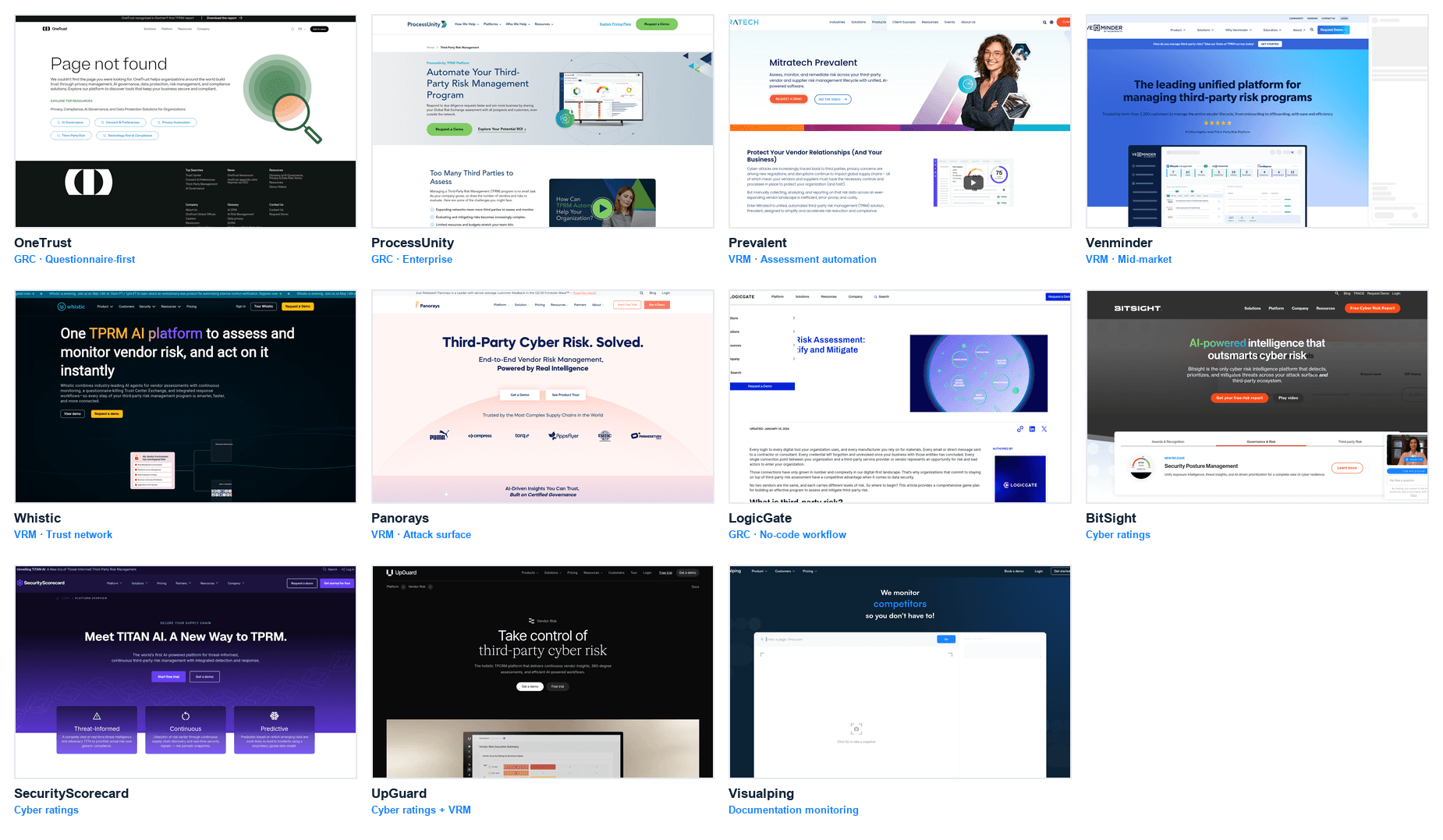
In brief
- The vendor risk management software market splits into three layers (see diagram above): questionnaire-first VRM / GRC (OneTrust, ProcessUnity, Prevalent, Venminder, Whistic, LogicGate), cyber ratings (BitSight, SecurityScorecard, UpGuard), and documentation-surface monitoring (Visualping, Fluxguard).
- Most programs run tools from at least two layers. Single-layer stacks have visible blind spots.
- Price range is wide: free signups on Layer 3, $30k-$250k annual on Layer 2, $100k-$1M+ on Layer 1 for enterprise deployments.
- Picking criteria differ by layer. Don't compare a cyber ratings CSV against a GRC workflow; they solve different problems.
What is vendor risk management software?
Vendor risk management software tracks the risk a company takes on from its vendors and other third parties. The market splits into three layers: questionnaire and GRC platforms that collect evidence, cyber ratings services that score external security posture, and documentation-surface monitors that detect changes on vendor policy pages. Prices range from free signups on the monitoring layer to seven-figure GRC deployments.
How we picked the 11 tools
Three filters. First, the tool has to be in active production use by TPRM teams at named companies (not just a landing page and a form). Second, the vendor has to publicly disclose enough product detail (pricing tier descriptions, feature lists, integration surface) that a buyer can make a short-list decision from the public site. Third, the tool has to sit clearly in one of the three layers below. Generic "all-in-one" claims that end up meaning "shallow everywhere" are cut.
Layer placement uses the dominant product function, not marketing taxonomy. UpGuard, for example, is a cyber ratings platform that has added some VRM workflow on top. It's in Layer 2, not Layer 1, because the ratings engine is what you buy.
Editorial disclosure. Visualping is our product. We're including it in this comparison because it operates in Layer 3 (documentation-surface monitoring), which the other 10 tools on this list don't cover at all. If you're buying a questionnaire-first VRM (Layer 1) or cyber ratings (Layer 2), pick from those layers directly:
- Enterprise-scale questionnaire automation with a mature GRC workflow: OneTrust or ProcessUnity is the stronger pick.
- Continuous cyber ratings across a large vendor portfolio: BitSight or SecurityScorecard is the leader.
- Mid-market VRM with a strong trust-network model: Whistic is a genuinely well-positioned choice.
What Visualping does NOT do: evidence collection, questionnaire workflow, cyber ratings, risk scoring, or GRC-style attestation. It monitors specific vendor pages (DPAs, sub-processor lists, trust centers, privacy policies, ToS, certifications) for changes and routes alerts. It complements Layer 1 and Layer 2 tools; it does not replace them. The Limitations section under each tool, including ours, describes where each one leaks.
The 3-layer VRM market
Understanding which layer a tool sits in matters more than the tool's feature list. A strong Layer 1 tool and a mid-tier Layer 2 tool monitor different signals; they aren't interchangeable.
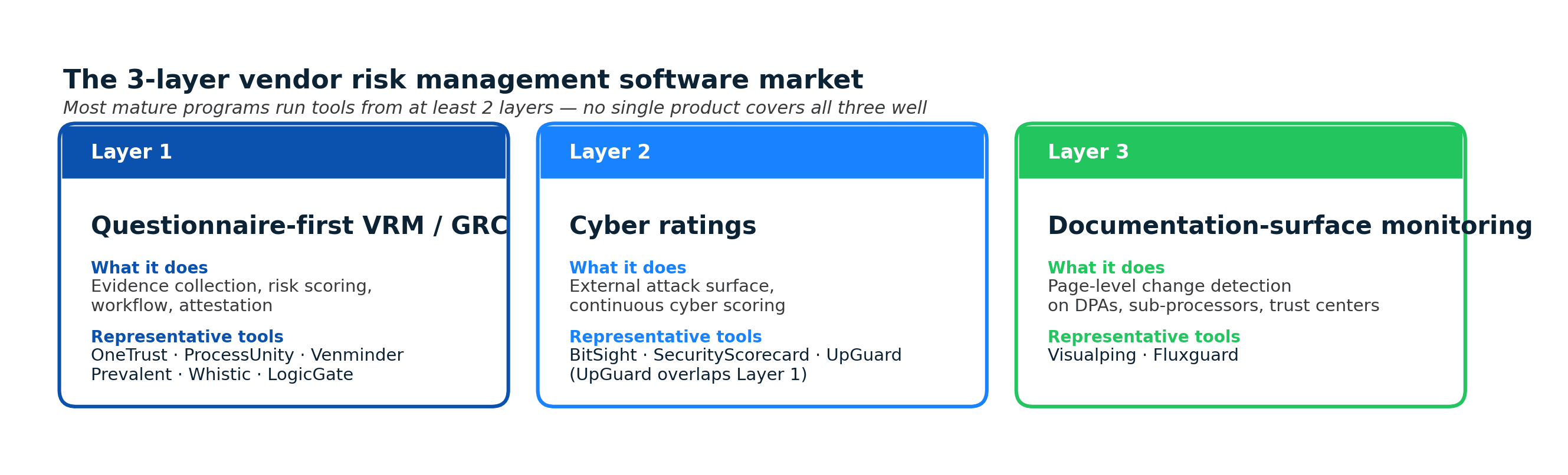
Layer 1: Questionnaire-first VRM / GRC
What it does: collects evidence (SOC 2, ISO, DPAs, insurance), runs structured questionnaires (SIG, CAIQ, custom), scores risk, maintains the risk register, and supports attestation workflows. This is the core of the traditional TPRM program.
Layer 1 is where you spend the most money, hire the most analysts, and take the longest to implement. It's also where the board-level reporting and audit defensibility live.
Layer 2: Cyber ratings
What it does: continuous external measurement of a vendor's cyber posture (open ports, expired certificates, breached credentials on the dark web, supply chain exposure). Produces a score (letter grade or 0-1000) that refreshes frequently without the vendor doing anything.
Layer 2 is the "what we can see from the outside" view. It catches what a vendor isn't telling you, which is complementary to Layer 1's "what the vendor is telling us."
Layer 3: Documentation-surface monitoring
What it does: detects changes to the specific vendor pages that encode risk: DPAs, sub-processor lists, trust centers, privacy policies, ToS, certifications pages. Page-level diff plus alert routing.
Layer 3 is where the drift happens between Layer 1 assessments and the next scheduled review. The continuous vendor monitoring guide covers this layer in more depth.
The 11 best vendor risk management software tools in 2026
The 11 vendor risk management software tools below are placed in layer order. Within a layer, the sequence reflects fit for different buyer profiles, not a universal ranking.
1. OneTrust (Layer 1: Enterprise GRC)
Best for: Enterprise programs that need privacy, security, and TPRM in one platform.
What it does: Third-Party Risk Management module inside a broader GRC platform covering privacy (OneTrust Privacy), security, ethics, and ESG. Evidence collection, questionnaires, risk scoring, automated workflows, board reporting.
Strengths: Broadest cross-function coverage (privacy + security + TPRM), strongest at questionnaire automation at scale, deep integrations across enterprise stack. Named a Leader in Gartner's Magic Quadrant for IT VRM in recent years.
Limitations: Heavy implementation (3-9 months typical), premium pricing (often $150k-$500k+ annually for enterprise), feature depth can be lost in platform breadth. Not appropriate for programs under ~200 tier-1 vendors.
Pricing: Not publicly disclosed; enterprise contracts.
2. Visualping (Layer 3: Documentation monitoring)
Best for: Programs that already have Layer 1 or Layer 2 and need to close the documentation-surface gap cheaply.
What it does: Continuous page-level change detection on specific vendor URLs. Watch a vendor's DPA, sub-processor list, trust center, privacy policy, and certifications pages. When the page changes, an alert fires (email, Slack, Teams, webhook to GRC).
Strengths: Low cost per monitor (free tier, paid tiers from a few dollars per vendor per month), fast setup (minutes per vendor), webhook integration with GRC platforms, AI-summarized alerts. Catches the documentation drift that Layer 1 assessments miss between cycles.
Limitations: Does not run questionnaires, collect evidence, or score risk. Not a VRM replacement. Relies on public vendor pages; if a vendor's DPA lives behind an NDA-only portal, page monitoring won't reach it without extra setup.
Pricing: Free for low-volume, paid tiers starting at $10/month billed annually. See visualping.io/pricing.
3. BitSight (Layer 2: Cyber ratings)
Best for: Large portfolios (300+ vendors) where continuous external cyber scoring is mission-critical.
What it does: Cyber ratings across ~4 million companies globally, updated continuously from external data (compromised systems, botnet infections, expired certificates, patching cadence, breached credentials). Lets you track your vendors' cyber posture without asking them.
Strengths: Largest rated vendor universe, longest historical data series (established 2011), deep integrations with GRC platforms, strong at benchmarking vendors against industry cohorts. Used by regulators and reinsurers, which adds external credibility. Disclosed as a data source in SEC-required third-party cyber risk disclosures at several public registrants.
Limitations: Correlation between BitSight score and actual breach probability has been debated; the rating is a signal, not a prediction. Does not cover documentation-surface changes (DPAs, sub-processor lists). Enterprise pricing.
Pricing: Not publicly disclosed; mid-five to low-six figures annually for mid-portfolio, scaling with vendor count.
4. SecurityScorecard (Layer 2: Cyber ratings)
Best for: Mid-market and enterprise programs wanting cyber ratings with strong phishing and social engineering coverage.
What it does: Cyber security ratings (A-F letter grades across 10 risk categories: network security, DNS health, patching cadence, endpoint security, IP reputation, application security, cubit score, hacker chatter, leaked credentials, social engineering). Continuous external measurement.
Strengths: Category-by-category score transparency (buyers and vendors can see exactly what moved a rating), free read-only tier for your own organization, strong channel partnerships with major GRC platforms.
Limitations: Like all cyber ratings, methodology creates false positives (an expired cert on an unused subdomain can tank a score). Does not cover documentation surface.
Pricing: Free for viewing your own ratings; paid tiers from tens of thousands annually for larger portfolios.
5. UpGuard (Layer 2: Cyber ratings + Layer 1 overlap)
Best for: Mid-market programs wanting cyber ratings plus some VRM questionnaire workflow in one tool.
What it does: Cyber ratings (UpGuard BreachSight) plus a lighter vendor risk module with assessments and remediation tracking (UpGuard Vendor Risk). The main product is the ratings engine; the VRM workflow is bolted on.
Strengths: Cleaner UI than most competitors, strong at breach detection across leaked data and exposed S3 buckets, simpler to deploy than OneTrust or ProcessUnity.
Limitations: VRM workflow depth is lighter than Layer 1 pure-plays (less sophisticated SIG handling, fewer pre-built GRC integrations). Overlap with Layer 1 creates confusion in the sales cycle.
Pricing: Transparent tiering starting around $5,999/year for Starter; mid-five figures for typical mid-market deployment.
6. ProcessUnity (Layer 1: Enterprise GRC)
Best for: Enterprise programs with deep questionnaire workflow requirements and a mature GRC function.
What it does: Third-party risk, IT risk, compliance, policy management, and business continuity in a configurable platform. Strong SIG handling, evidence workflow, and integration with broader enterprise risk.
Strengths: Deep questionnaire configurability, pre-built SIG workflow, strong at attestation cycles, long track record in financial services.
Limitations: UI is dated relative to newer competitors. Implementation is typically long (3-6 months). Pricing is enterprise.
Pricing: Not publicly disclosed; enterprise contracts.
7. Prevalent (Layer 1: VRM + content)
Best for: Mid-market to enterprise programs that benefit from pre-completed vendor profiles (Vendor Intelligence Network).
What it does: Vendor risk management with a network of pre-assessed vendors. Instead of sending a fresh SIG to every vendor, you check whether a Prevalent-maintained profile already exists.
Strengths: Reduces assessment burden on both sides via the vendor intelligence network, strong at procurement-adjacent workflow, good SIG-alignment.
Limitations: The network's value depends on coverage. If your vendors aren't already in the Prevalent network, you're back to standard questionnaire work.
Pricing: Not publicly disclosed; mid-to-high five figures annually is typical.
8. Venminder (Layer 1: Mid-market VRM)
Best for: Mid-market programs, especially in banking and credit union sectors, looking for a VRM tool with pre-built compliance content.
What it does: VRM with built-in questionnaires, evidence review services (outsourced analyst review of vendor SOC 2s), and regulatory content libraries tuned for US banking TPRM obligations (FFIEC, NCUA).
Strengths: Strong content library for banking TPRM, offers managed review services (not just software), good fit for smaller banks and credit unions.
Limitations: Narrower sweet spot than horizontal VRMs; outside banking, feature fit can feel forced. Not as configurable as ProcessUnity or OneTrust at enterprise scale.
Pricing: Not publicly disclosed; mid-five figures annually typical.
9. Whistic (Layer 1: Trust network VRM)
Best for: Mid-market programs that want a modern UI and a two-sided trust network (both reviewing vendors and managing their own security responses).
What it does: VRM with assessment workflows, a Vendor Security Profile (the vendor's side: a maintained profile that customers can request), and AI-assisted response generation. Flips the "vendor responds to questionnaires" model toward "vendor maintains a profile once and shares it."
Strengths: Cleanest UI among Layer 1 tools, strong at reducing back-and-forth by putting vendors and customers in a shared interface, fast to deploy.
Limitations: Network effects depend on your vendors adopting the Whistic profile format. If they haven't, you're running custom questionnaires like any other VRM.
Pricing: Not publicly disclosed; mid-five figures annually typical for buyers; vendors can maintain a profile for free.
10. Panorays (Layer 1: Attack-surface-led VRM)
Best for: Security-led TPRM programs that want external attack surface monitoring integrated into the assessment workflow.
What it does: VRM with built-in external attack surface scanning, automated risk scoring, and questionnaire workflow. Positions the assessment around the attack surface view (similar to cyber ratings but structured as an assessment platform).
Strengths: Strong at combining attack-surface signal with questionnaire workflow in one flow, automation of low-risk vendors, quick time-to-value.
Limitations: Overlap with cyber ratings platforms can make the positioning fuzzy. Customization for complex enterprise workflows is lighter than OneTrust or ProcessUnity.
Pricing: Not publicly disclosed; mid-five figures annually typical.
11. LogicGate (Layer 1: No-code GRC)
Best for: Programs that want a no-code, workflow-first approach to VRM as part of broader GRC.
What it does: No-code GRC platform with Third-Party Risk Management, Enterprise Risk Management, and Policy Management modules. Built around configurable workflows (Risk Cloud) rather than pre-built TPRM templates.
Strengths: Flexible workflow builder for teams that want to encode their specific risk process in software, good for non-standard TPRM approaches, strong integration with Jira-style ticketing patterns.
Limitations: The flexibility requires configuration effort. Pre-built TPRM templates are thinner than ProcessUnity or OneTrust out of the box. Better for teams that know exactly what they want than for teams adopting a mature framework.
Pricing: Not publicly disclosed; five-figure annual contracts typical.
How to pick vendor risk management software: a 5-criterion framework
Use these criteria. In this order.
- Which layer do you actually need? If you don't have a Layer 1 tool yet, start there. If you have Layer 1 but no external continuous signal, add Layer 2. If you have 1 + 2 but the documentation surface keeps surprising you at audit time, add Layer 3.
- Portfolio size. Under 50 tier-1 vendors: a spreadsheet plus a Layer 3 monitor gets you far. 50-500: a mid-market Layer 1 tool (Whistic, Venminder, Panorays) plus cyber ratings. 500+: enterprise GRC (OneTrust, ProcessUnity) plus cyber ratings plus documentation monitoring.
- Industry context. Banking and credit unions benefit from Venminder's regulatory content. Healthcare needs HIPAA-aware workflows. SaaS vendors benefit most from Whistic's trust network. No horizontal tool is optimal across all verticals. Programs aligning to the NIST Cybersecurity Framework 2.0 typically map tool outputs to the GV.SC and ID.SC functions.
- Integration surface. Does it push data to your ERP, identity system, GRC of record, and risk register? Or does it create a new silo? Integration gaps are usually the most expensive long-term cost, not the license fee.
- Evidence collection mechanism. Does the tool pull from vendor trust portals, or does it send custom questionnaires? The former scales; the latter doesn't. The same automation workflows pattern that already runs the rest of your risk function can route collected evidence into your GRC of record.
What most buyers get wrong
Two patterns cover most failed VRM implementations.
Buying a Layer 1 tool and expecting it to cover Layer 2 and Layer 3. A full GRC platform with a TPRM module does not replace cyber ratings or documentation monitoring. It catches what the vendor tells you, not what you can see externally and not what the vendor silently changes. (Salesforce's published sub-processor page is a concrete example of the kind of public-but-changing artifact Layer 1 tools don't monitor.)
Buying cyber ratings and calling the TPRM program done. A letter grade feeds the assessment rather than standing in for it. Programs that skip Layer 1 questionnaire workflow have no defensible documentation when auditors ask how the vendor was evaluated.
The vendor risk assessment guide covers the assessment methodology; the vendor onboarding process covers where the tools plug into the broader flow.
Frequently asked questions
What is the best vendor risk management software?
There is no single best. The VRM software market splits into three layers (questionnaire-first VRM/GRC, cyber ratings, documentation-surface monitoring) and the best tool depends on which layer you need. Enterprise programs typically run OneTrust or ProcessUnity (Layer 1), BitSight or SecurityScorecard (Layer 2), and Visualping or Fluxguard (Layer 3) together. Mid-market programs often start with Whistic, Venminder, or Panorays in Layer 1, add UpGuard for Layer 2, and layer in documentation monitoring as the program matures.
How much does vendor risk management software cost?
Wide range. Layer 3 documentation monitoring starts free and scales to a few hundred dollars per month for tier-1 vendor coverage. Layer 2 cyber ratings typically run $30,000 to $250,000 per year depending on vendor count. Layer 1 VRM ranges from $5,000 per year for SMB tools to $1M+ per year for enterprise GRC platforms. Most mature programs spend 60-75% of their VRM tooling budget on Layer 1.
What is the difference between VRM and TPRM?
TPRM (third-party risk management) is the overall discipline covering all third parties: vendors, contractors, partners, sub-processors. VRM (vendor risk management) is the subset focused specifically on vendors (suppliers of goods or services). In practice the terms are often used interchangeably. Most "VRM software" products also handle broader third-party categories, so the distinction rarely matters at the tooling layer.
Do I need both cyber ratings and VRM?
Most mature programs run both because they answer different questions. Cyber ratings tell you what a vendor's cyber posture looks like from the outside (continuously). VRM tells you what the vendor has attested to (at a point in time) and documents your decision. Running only one leaves a visible gap.
Can I replace VRM software with a spreadsheet?
For programs under ~20 tier-1 vendors, a spreadsheet plus a shared drive plus a lightweight continuous monitoring tool is enough. Above that size, the overhead of manual tracking exceeds the cost of dedicated software. The honest break-even is around 30-50 new tier-1 vendors per quarter.
What is the best free vendor risk management software?
The only meaningful free tier in this space is SecurityScorecard's free self-rating (you can see your own score for no cost) and Visualping's free tier for documentation monitoring. No Layer 1 VRM tool has a meaningful free tier; the category's economics don't support it. Most Layer 1 vendors offer a trial or proof-of-concept.
How long does it take to implement vendor risk management software?
Layer 3 documentation monitoring: minutes to a few hours per vendor. Layer 2 cyber ratings: days (mostly onboarding and integration). Layer 1 VRM: 1-3 months for mid-market, 3-9 months for enterprise GRC platforms. The long tail is integration work, not software configuration.
For a program-level view of how this piece fits into the broader lifecycle, frameworks, and operating model, see the complete guide to third-party risk management.
Where to go next
Tool selection is downstream of program design. The vendor risk assessment guide covers the methodology that any of these tools implement. The continuous vendor monitoring guide covers the Layer 3 playbook specifically. The vendor onboarding process covers where these tools plug into the broader request-to-go-live flow. And for the due-diligence artifact list that feeds into any of these tools, the vendor due diligence checklist covers what to collect. For page-level change detection applied beyond vendor pages, the regulatory compliance monitoring workflow covers the adjacent use case. For the specific sub-processor monitoring workflow, sub-processor selection covers the evaluation step that happens before any tool is involved.
This article summarizes the vendor risk management software market as of 2026. Tool capabilities and pricing change; verify current product detail and pricing with each vendor before purchasing. It is not legal, compliance, or audit advice. Specific tool selection should be reviewed with your program's TPRM, privacy, security, and procurement owners before committing.
Want to monitor web changes that impact your business?
Sign up with Visualping to get alerted of important updates from anywhere online.
Eric Do Couto
Eric Do Couto is the Head of Marketing at Visualping. He leads content strategy, growth operations, and brand positioning for website change detection.
More articles by Eric Do Couto