Patagonia Restock Alerts: Get Notified When Gear Returns
Updated April 16, 2026
By the Visualping research team, analyzing live monitor logs across the Patagonia product catalog since 2024.
Last updated April 2026.
Patagonia restock alerts notify shoppers when sold-out gear returns to patagonia.com or Worn Wear. Patagonia offers a native Notify Me email signup, but the company states that those alerts do not hold inventory or guarantee that the desired size and color will still be available. Visualping watches the product URL on a fixed interval and fires a binary IMPORTANT signal plus a plain-English AI summary the second stock returns. The free tier covers basic monitoring; paid plans add faster check intervals.
Worn Wear deals can sell out within hours
Patagonia makes gear in small batches. No traditional sales. The most popular items (Better Sweater, Nano Puff, Retro-X fleece, Black Hole bags) sell out in specific sizes and colors for weeks or months at a stretch.
If you want a Nano Puff in Medium and your color is gone, the wait begins. Patagonia offers a Notify Me email on the product page, but the company says those alerts do not reserve stock, so popular sizes can sell out again before the email even lands. Their Worn Wear program (used gear at lower prices) is harder still: each piece is unique, and restocks depend on customer trade-ins. Seasonal gear gets pulled from the site entirely when the season ends.
Nearly 400 outdoor shoppers already run 600+ Visualping monitors on Patagonia, tracking gear from the Guidewater Duffel to Black Hole bags and Web Specials across multiple regional stores. Check-frequency tiers sit on the Visualping pricing page.
TL;DR: Patagonia makes gear in small batches and rarely runs sales, so popular sizes (Better Sweater Medium, Nano Puff Forge Grey, Worn Wear one-of-a-kinds) sell out and stay out for weeks. Patagonia's native Notify Me email exists but, per the company's own help center, does not reserve inventory or guarantee the size returns. Visualping watches any patagonia.com or Worn Wear product URL, flags every change with a binary IMPORTANT signal, and includes a plain-English AI summary so shoppers know whether the right size actually returned. The free tier covers basic restock monitoring; paid plans add faster check intervals. Setup takes about two minutes.
Why Patagonia restocks are hard to track
Does Patagonia have a notify-me-when-back-in-stock feature?
Patagonia.com does have a Notify Me email signup on most product pages, and Worn Wear surfaces a similar option for used gear. Patagonia's help center notes a key catch: the email does not hold inventory and does not guarantee the desired size or color will still be in stock by the time the alert arrives. Popular sizes routinely sell out again within minutes of the email going out.
Why does Patagonia gear sell out so quickly?
Patagonia keeps quantities low to cut waste and overproduction, an ethos sharpened after founder Yvon Chouinard transferred company ownership to a climate-focused trust in 2022. Popular items sell out and stay out until the next production run, often weeks or months away. The only way to catch the timing is to watch the page.
Worn Wear inventory is one-of-a-kind pieces
Patagonia's Worn Wear program sells used and refurbished gear at steep discounts. Each item is unique. When a Worn Wear listing sells, it's gone, and new listings appear on no fixed schedule as customers trade in gear. Without a monitor, catching a good Worn Wear deal comes down to luck and a thumb on the refresh key.
Seasonal rotation
Patagonia rotates inventory by season. Winter gear (down jackets, fleece layers) clears out in spring, and summer gear slides into its place. Miss a piece before the swap and the wait can stretch to next year. End-of-season restocks land in small quantities for clearance.
What Visualping data shows about Patagonia restocks
Among ~110 active Patagonia-targeted monitors in our sample over a 90-day window (Jan-Apr 2026), 67% logged at least one detected change, and 38% logged a change in the last 30 days alone. That cadence reflects Patagonia's actual behavior: small, irregular size and color refreshes rather than scheduled drops.
The category mix tells you where shoppers focus attention. In the sample, Black Hole bags and duffels accounted for 16% of monitors, jackets (Torrentshell, parkas, shells) for 14%, and Worn Wear listings for 11%. Web Specials and sale pages drew another 10%, a notable share given Patagonia's reputation for rarely discounting. Iconic items (Nano Puff, Better Sweater, Down Sweater, Retro-X fleece) showed up across 17% of monitors combined, almost always pinned to a specific size and color rather than a generic product page.
Check frequency skews aggressive: 56% of Patagonia monitors in the sample run every 5-60 minutes, and 43% run hourly to daily. Almost nobody sets daily-or-slower checks, which fits the pattern of size-specific waiting (a Medium in Forge Grey that may restock for an hour) rather than casual price-flipping.
Business and team accounts run 18% of these monitors. Some of that volume looks like companies sourcing logo'd Patagonia for swag programs, mixed in with individual shoppers.
How to set up Patagonia restock alerts with Visualping
Step 1: Find the product on patagonia.com
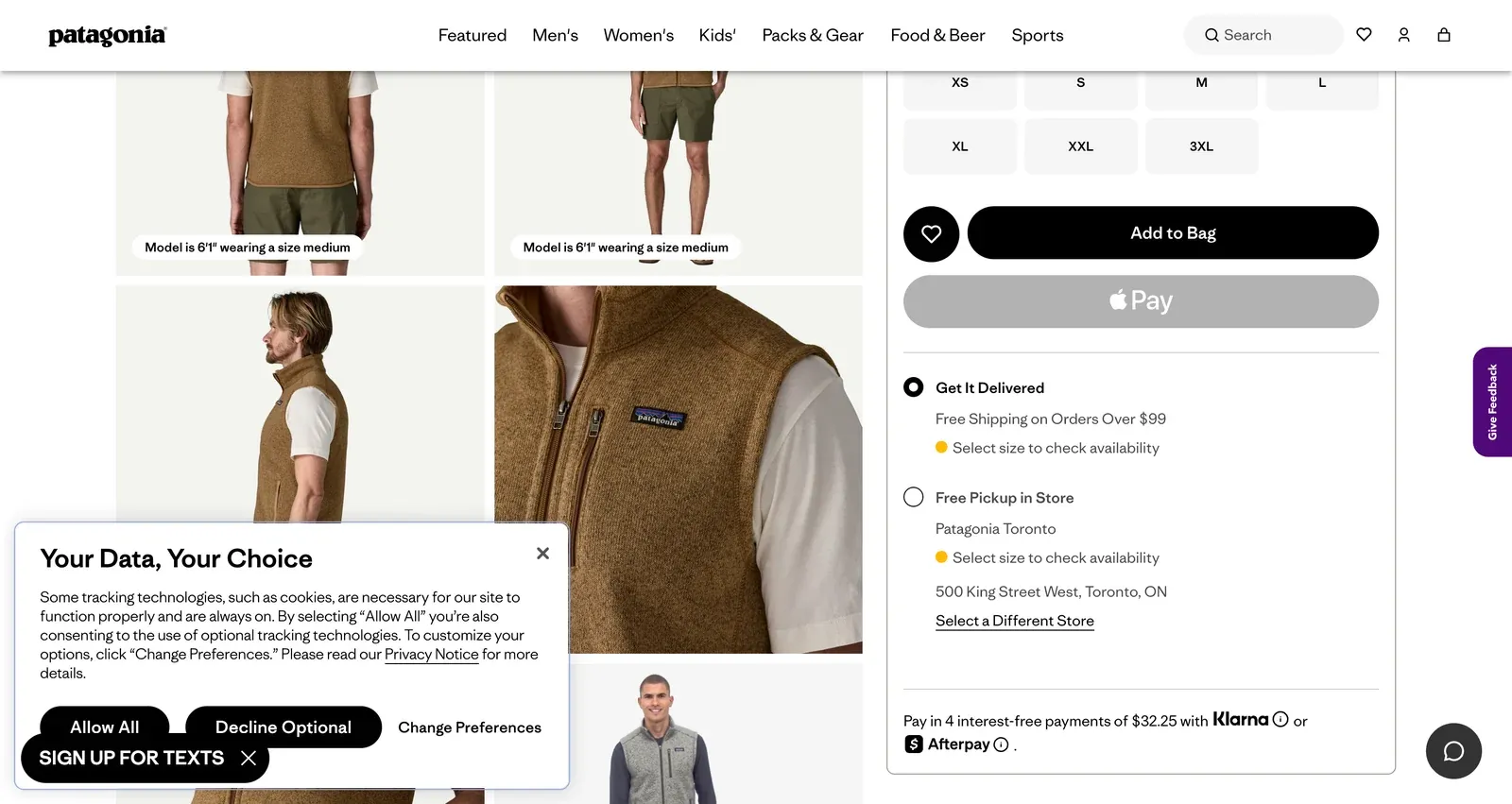
Navigate to the product you want. Select your size and color. Patagonia shows per-variant availability, so this ensures you're monitoring the exact combination you need.
Copy the full URL. Patagonia URLs look like https://www.patagonia.com/product/product-name/12345.html.
For Worn Wear, navigate to wornwear.patagonia.com and find the specific category or search for the product type you want.
Step 2: Paste into Visualping
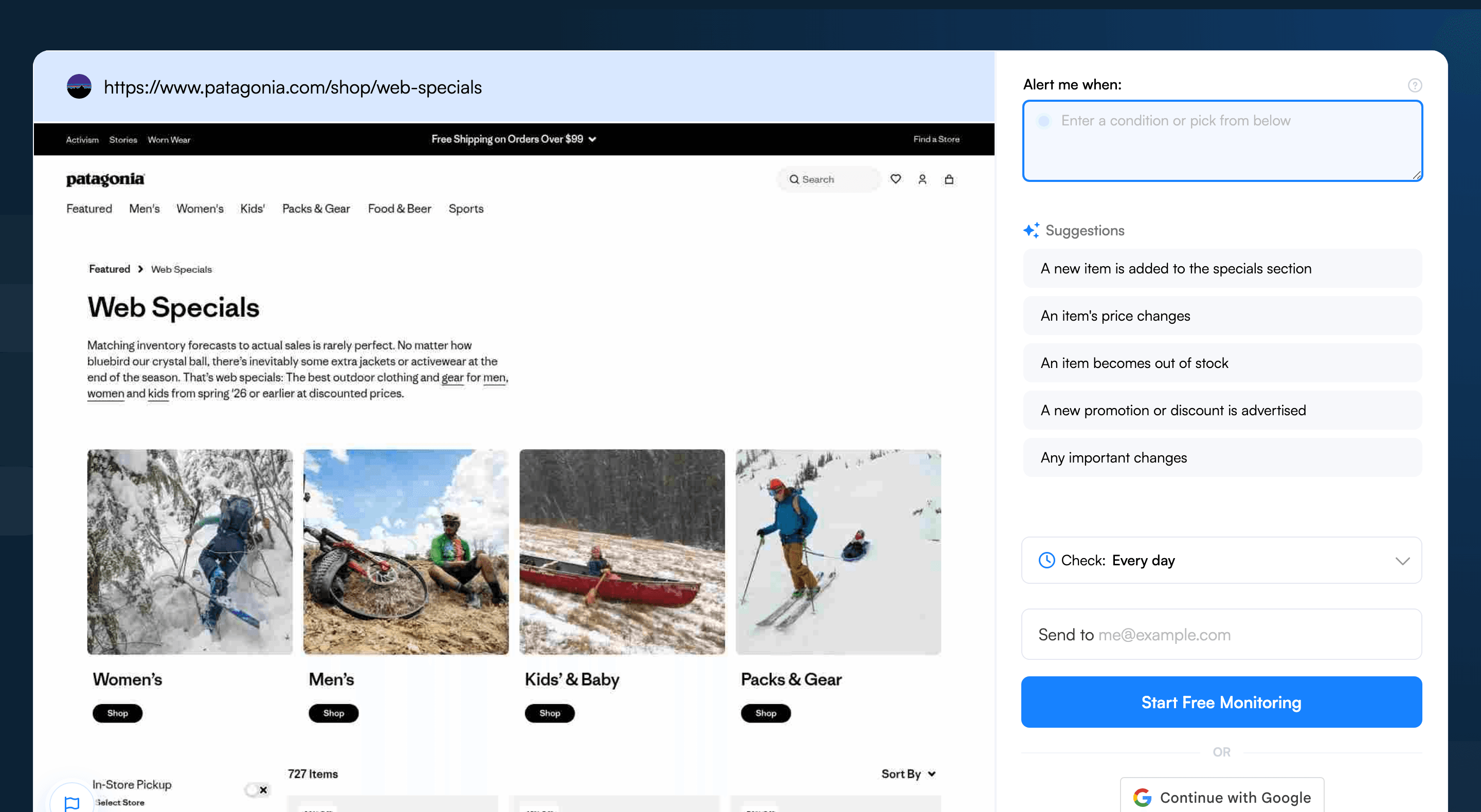
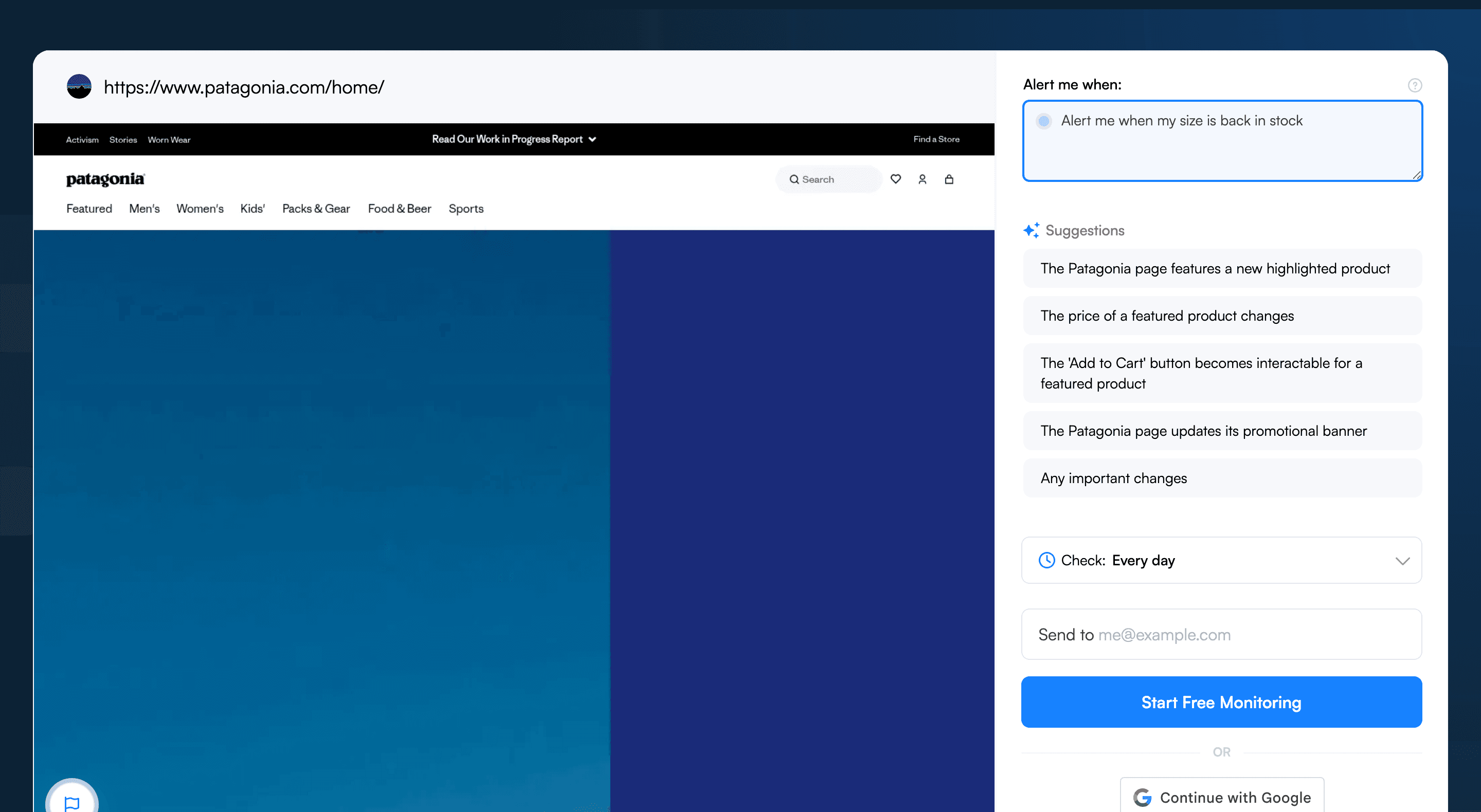
Go to visualping.io and paste the Patagonia URL. Visualping loads a preview of the page and monitors the whole page by default. To focus the alert, drag a box over the size selector, "Add to Cart" button, and availability status, or add an AI criteria like “alert me when my size is back in stock.”
Step 3: Focus on sizes and availability
Adjust the selection to cover:
- The size buttons (showing which sizes are in stock)
- The "Add to Cart" button
- The color swatches (if tracking a specific color)
Exclude the product story section, environmental impact information, and customer reviews. These change occasionally and aren't relevant to stock tracking.
Step 4: Set check frequency
For popular items during peak season (Nano Puff in fall, Better Sweater in winter), set checks to every 30 minutes to 1 hour. Patagonia restocks don't sell out as quickly as hype drops, but popular sizes can go within a day.
For Worn Wear monitoring, set checks to every 15-30 minutes. Unique items sell fast.
Step 5: Add an AI criteria
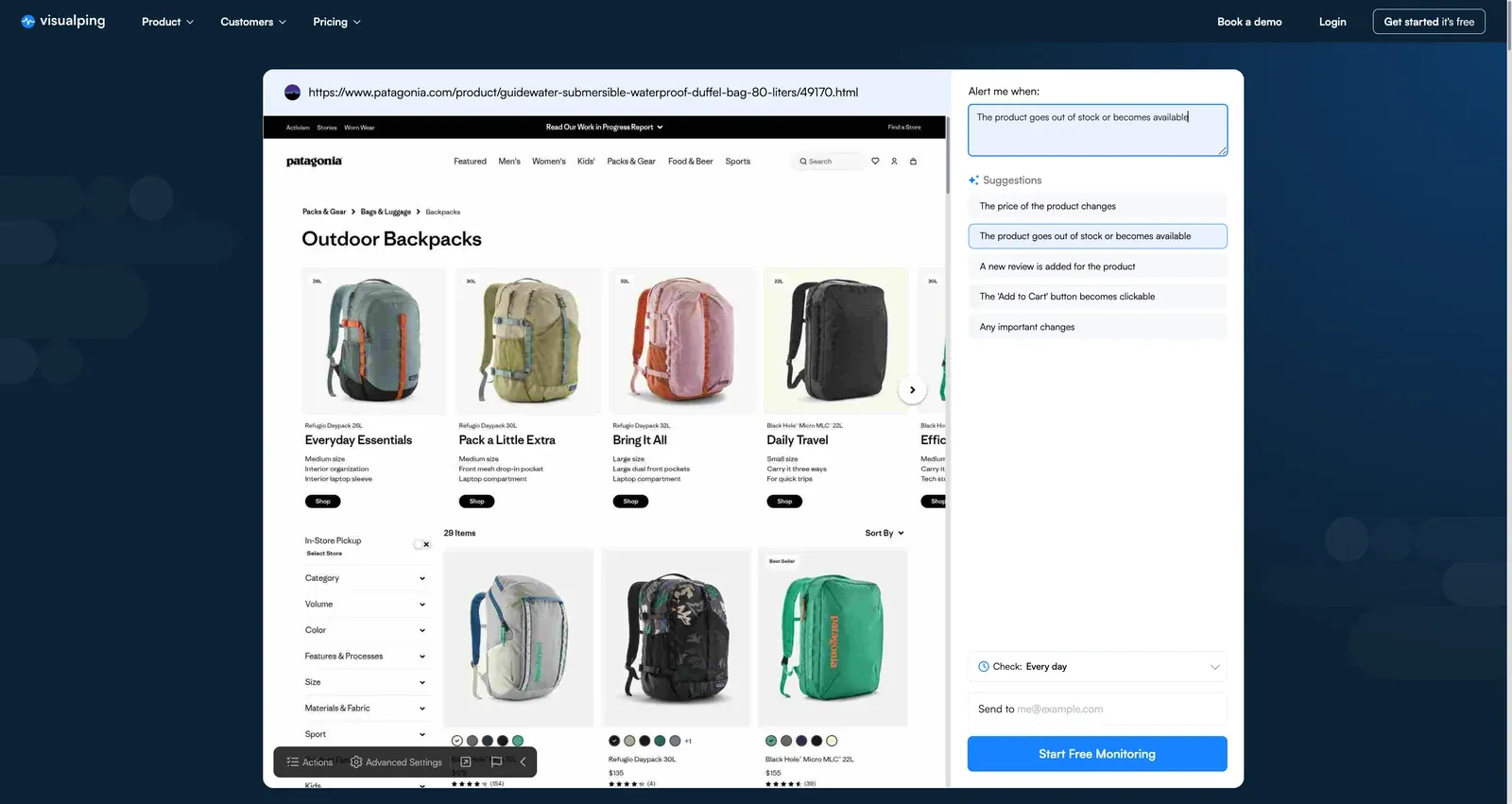
In the "Alert me when" field, enter: "Alert me when my size becomes available or when the Add to Cart button appears for this color." For Worn Wear, try: "Alert me when new listings appear for this product type."
Step 6: Choose notifications
Email works for standard restocks. For Worn Wear deals on popular items (Retro-X fleece, Nano Puff jackets), add SMS. Used pieces are one-of-a-kind and sell fast once listed.
Visualping handles restock monitoring across other retailers too. The same setup works for Nordstrom anniversary sale waitlists, Dyson refurbished restocks, Apple Store in-stock alerts, Coach Outlet bag drops, J.Crew sale-section restocks, Uniqlo limited drops, and the full restock alerts hub.
Pro tips for Patagonia restock tracking
-
Monitor Worn Wear category pages for deals. Instead of pinning one listing, watch the Worn Wear category page for the product type you want (e.g., "Men's Fleece" or "Women's Down Jackets"). Add keyword triggers for the specific model name. The monitor catches new listings the moment they post.
-
Watch for Web Specials. Patagonia's Web Specials section discounts a small set of items, usually products on their way out of the catalog. Monitor the page to catch deals before they sell out. Web Specials are Patagonia's closest thing to a clearance event.
-
Track seasonal transitions. During the season swap (March-April for spring, September-October for fall), retiring items sometimes get a small restock as the new season's gear launches. Monitor target items during those two windows.
-
Set monitors before fall and winter. Patagonia's iconic layers (Better Sweater, Nano Puff, Down Sweater, Retro-X) sell out of popular sizes through fall and winter every year. Wire up monitors in August or September to catch restocks before peak demand hits.
-
Monitor patagonia.com and authorized retailers. Patagonia gear also sells through REI, Backcountry, and other outdoor stores. A size sold out on patagonia.com is sometimes still on the shelf elsewhere. Run parallel monitors on each.
-
Check for Pro member inventory. Shoppers who qualify for Patagonia Pro (outdoor industry, environmental nonprofits, outdoor educators) sometimes find different inventory and pricing on the Pro site. Monitor the Pro site separately for anyone with access.
Frequently asked questions
What is the best way to get notified when Patagonia restocks an item?
The most reliable approach is to monitor the product page directly with a page monitoring agent (also known as a website monitoring tool), because Patagonia.com offers no native back-in-stock alert. Visualping watches any patagonia.com URL (including Worn Wear) and pings shoppers the moment availability flips. Every alert carries a binary IMPORTANT flag plus a plain-English AI summary, so the reader instantly knows if the relevant size and color actually returned. Start a free monitor at visualping.io/sign-up.
Is there a free tool to track Patagonia restocks?
Yes. Visualping offers a free tier that covers basic Patagonia restock monitoring, with daily checks on a small set of product URLs and email alerts when the page changes. That cadence works for less competitive items (older colors, off-season layers, Pro site listings). For Nano Puff and Better Sweater drops in popular sizes, paid plans push checks down to every 5 to 30 minutes. Most shoppers begin on the free plan at visualping.io/sign-up.
Can shoppers monitor multiple Patagonia products for restocks at once?
Yes. Visualping lets a single account set up monitors for any number of product URLs from one dashboard. A typical Patagonia setup mixes a Better Sweater in Medium Forge Grey, a Nano Puff in Black, two Worn Wear category pages, and a Web Specials watch, all pinging the same inbox. The IMPORTANT flag on each alert sorts real restocks from copy edits, so a 10-monitor setup stays manageable.
How fast does Visualping detect a Patagonia restock?
Detection speed equals check frequency. Free monitors run daily; paid monitors run as fast as every 5 minutes. The Patagonia data sample shows 56% of monitors set to every 5 to 60 minutes, which catches most popular-size restocks within an hour of going live. Worn Wear listings, which can sell within minutes, justify the fastest interval available on a shopper's plan.
Why do Patagonia's own back-in-stock notifications miss popular sizes?
Patagonia does send a Notify Me email when an item returns, but the company's own help center spells out that the alert does not hold inventory or guarantee the size and color stays in stock. For high-demand pieces (Nano Puff in Forge Grey, Better Sweater in Medium), the popular variants can sell again within minutes of the email landing. A third-party monitor like Visualping polls the page on the shopper's chosen interval, catches the moment a specific variant flips to available, and sends an alert with an AI summary describing exactly what changed. Start one free at visualping.io/sign-up.
Does Visualping work for Patagonia Worn Wear and baselayer restocks?
Yes for both. Worn Wear listings are one-of-a-kind, so the recommended setup monitors the category page (e.g., Men's Fleece) with a keyword filter for the specific model. Baselayer restocks (Capilene, Merino Air) follow Patagonia's standard variant pattern; pin the monitor to the size and color buttons rather than the full page. For pages behind a Pro login, capture the session cookie when adding the URL so Visualping can read the logged-in inventory.
Gear up without the guesswork
Patagonia's small production runs make every restock count. Visualping checks any product page (new or Worn Wear) every few minutes and fires an alert the second a size flips back. Each alert carries a binary IMPORTANT flag plus an AI summary, so the shopper sorts a real restock from a copy tweak in two seconds.
The first Patagonia restock alert takes under two minutes to set up at visualping.io/sign-up. Free to start.
Want to monitor web changes that impact your business?
Sign up with Visualping to get alerted of important updates from anywhere online.
Eric Do Couto
Eric Do Couto is the Head of Marketing at Visualping. He leads content strategy, growth operations, and brand positioning for website change detection.
More articles by Eric Do Couto