Notify Me When Back in Stock: Set Up Alerts for Any Product
Updated April 16, 2026
One tool tracks restocks across every store
By the Visualping research team, analyzing live monitor logs across 25 retailers and the broader product catalog since 2024.
Last updated April 2026.
A back-in-stock alert notifies a shopper when a sold-out product returns to a retailer's site. The most reliable method is to monitor the product URL with Visualping, which checks the page on a fixed interval and pushes a binary IMPORTANT signal plus a plain-English AI summary the moment stock returns.
The product you want is out of stock, and the retailer's own "notify me" option usually isn't much help.
Most online stores either skip restock alerts entirely or bury them inside slow marketing email queues. By the time the alert lands, the item has sold out a second time.
The pattern repeats whether you're tracking sneakers on Nike's sold-out product help page, Pokemon cards at GameStop, furniture at Costco, or a sale item at Nordstrom. Every retailer handles stock differently, and as Hypebeast's running restock coverage shows, none of them give you a fast, single-purpose "it's back" notification.
Visualping monitors any product page on any website and pings you the moment the availability status changes. As of April 2026, over 100,000 shoppers have set up more than 166,000 retail product monitors on Visualping, with 34,000 actively running right now. One tool. Any store. Real-time alerts.
TL;DR: Online retailers sell out fast and their native back-in-stock emails almost always arrive too late, often after the second sellout. Visualping watches any product URL on any store (Amazon, Nike, Lululemon's "We Made Too Much," Pokemon Center, Costco) and flags every page change with a binary IMPORTANT signal plus a plain-English AI summary so shoppers know whether to act. The free tier covers basic restock monitoring; paid plans add 5-minute checks and SMS alerts for hyped drops. Setup runs about two minutes from URL paste to first alert. Start free at visualping.io/sign-up.
Why retailer "Notify Me" buttons don't work
Most online stores show a "Notify Me When Available" button. It almost never fires fast enough to catch a real restock.
| Problem | Why it happens | How common |
|---|---|---|
| No alert option exists | Many products, sizes, and variants don't show a notify button | Very common (Costco, Nordstrom Rack, many items on Amazon) |
| Alerts arrive late | Batch-processed emails lag 30 min to hours behind actual restock | Universal during sales and high-demand periods |
| No size/variant specificity | Alerts fire for the product, not your specific size or color | Most retailers (Nike, Nordstrom, Zara) |
| Buried in promotional email | Restock alerts mixed with marketing sends | Nearly every retailer |
| One store at a time | Each retailer has its own system; no unified view | Always |
Retailers route these alerts through their marketing funnel, not your urgency. Visualping watches the page itself and fires the second it changes.
How to set up back-in-stock alerts for any product
The same five-minute flow works on Amazon, Target, Walmart, Nike, Costco, Best Buy, Nordstrom, Zara, GameStop, and any other store with a product page.
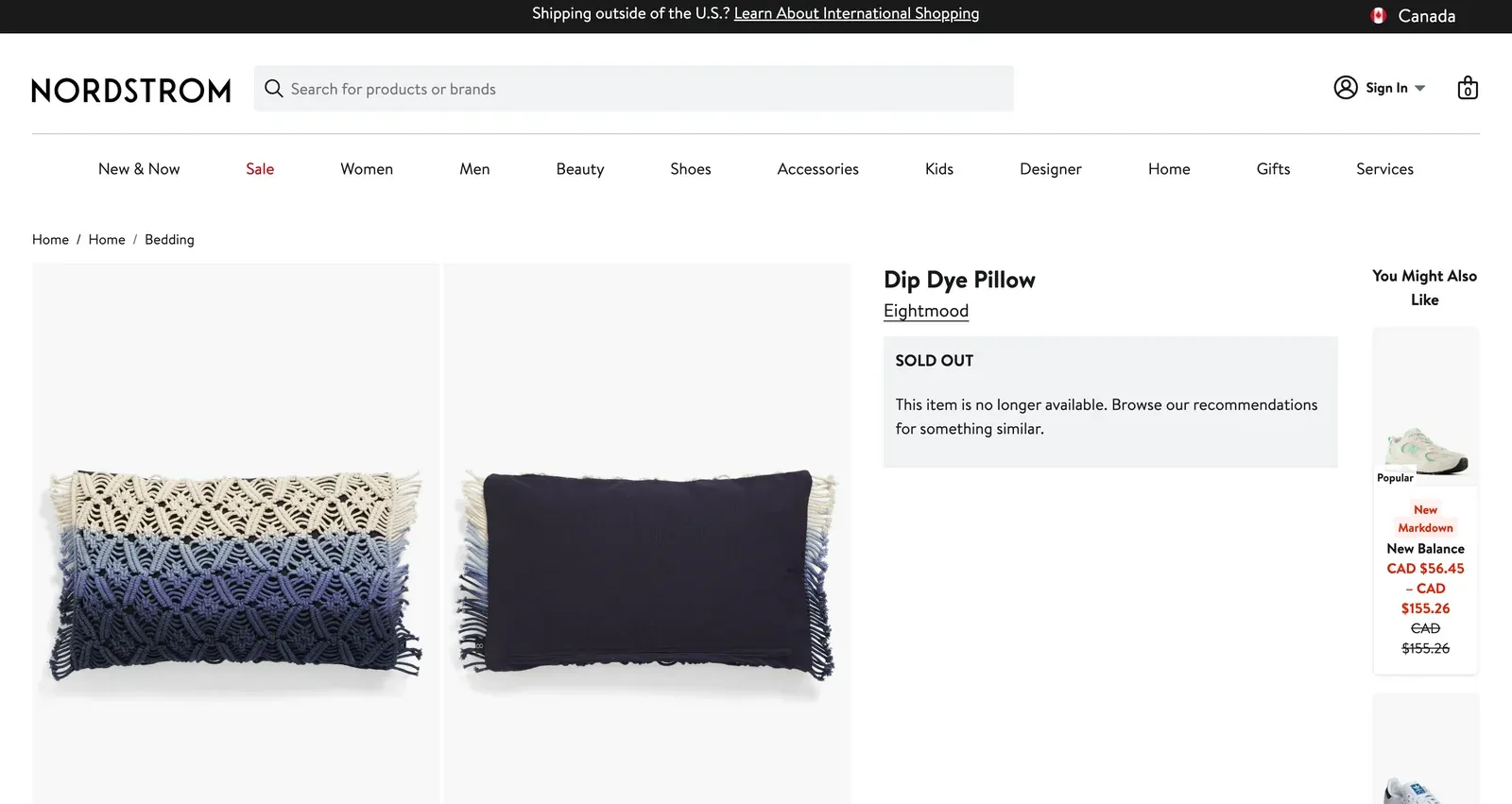
Step 1: Copy the product URL
Open the store and pull up the exact product. Pick the size or color variant first if there is one, then copy the full URL from the address bar.
Step 2: Paste the URL into Visualping
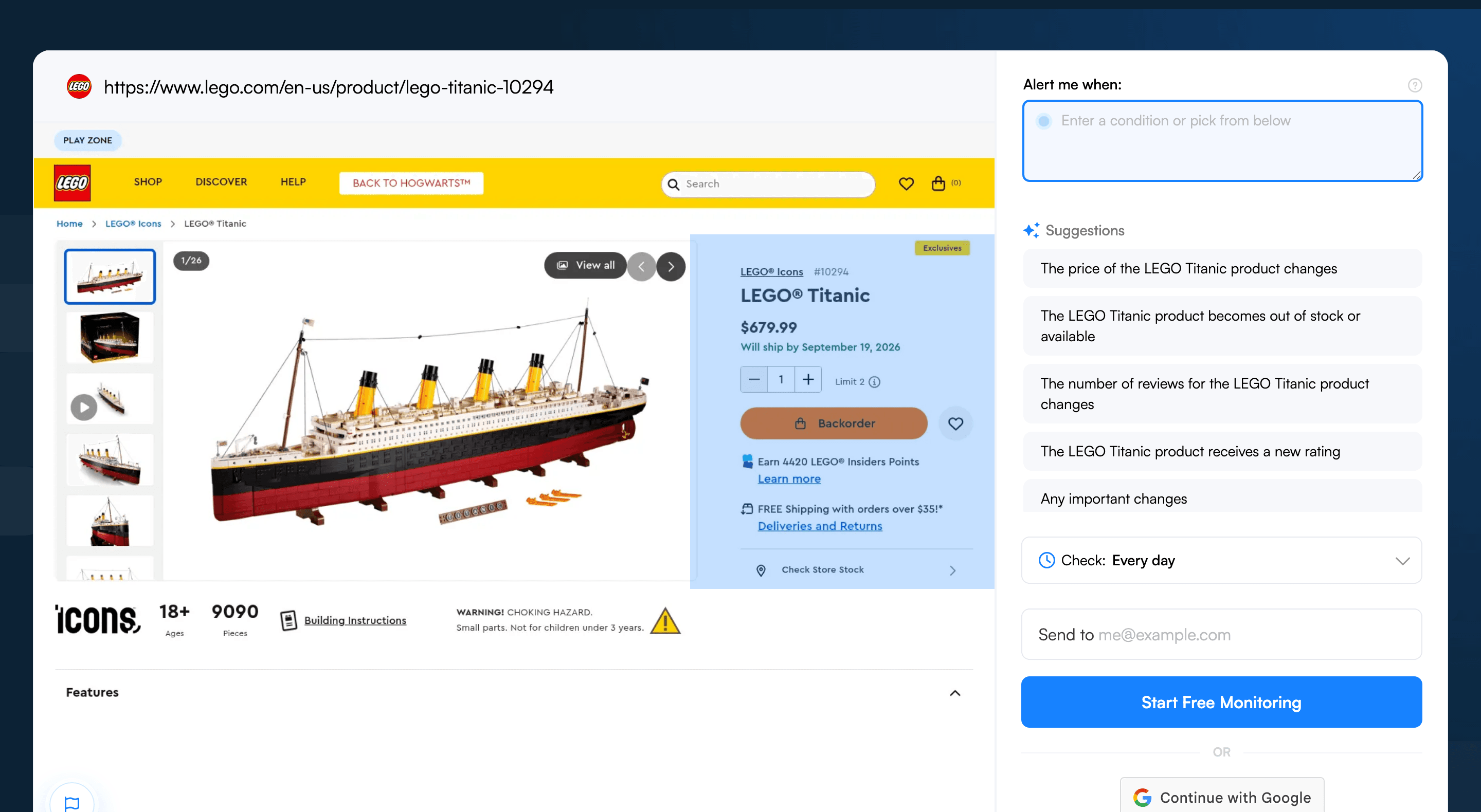
Head to visualping.io and paste the product URL. Visualping loads a preview of the page and monitors the whole page by default. To zero in, drag a box over the "Add to Cart" button, availability text, or price display, or add an AI criteria like “alert me when this item is back in stock” so you only hear about the change that matters.
Step 3: Focus on the availability area
Drag a box on the preview to select the availability area. For accurate alerts, pick only the section that changes when a product flips from sold out to available: the "Add to Cart" or "Add to Bag" button, the availability text ("In Stock," "Sold Out," "Unavailable"), or the size selector grid if a specific size matters.
Skip the full page. Hero images, reviews, and recommendation carousels shift on every visit and fire false alerts.
Step 4: Set how often to check
Match check frequency to urgency.
| Product type | Recommended frequency | Why |
|---|---|---|
| Hyped sneakers, Pokemon cards, limited drops | Every 5 minutes | Sell out in 15-30 min |
| Sale items, popular sizes | Every 15 minutes | Moderate competition |
| Regular retail products | Every 30-60 minutes | Restocks last hours/days |
| Seasonal or low-demand items | Every 6-12 hours | Restocks stay available |
Step 5: Add an AI criteria
In the "Alert me when" field, write a short description of what matters. Examples:
- "Alert me when this product becomes available to purchase."
- "Alert me when Size 10 becomes available."
- "Alert me when the price drops or the item is back in stock"
Visualping's AI reads every change and flags the ones matching that prompt as Important. Banner swaps and fresh reviews still log to the dashboard but stay out of the inbox.
Step 6: Choose how to get notified
Pick the channel that matches the urgency. Email is the default and works for most items. SMS lands fastest and earns its place on hyped drops. Slack keeps shoppers tracking multiple items in one channel. Microsoft Teams covers work-tracked inventory.
For products that vanish in minutes, set SMS as the primary alert and email as backup.
Restock guides for popular retailers
Visualping handles back-in-stock monitoring across every major store. The same setup adapts to H&M fast-fashion drops, Shein flash-sale restocks, Steam Deck refurbished restocks, Uniqlo UT collab releases, Ulta Beauty exclusive launches, StockX live marketplace prices, Patagonia Worn Wear gear, Urban Outfitters vinyl and exclusives, Coach Outlet bag flash sales, J.Crew sale-section restocks, Nordstrom Anniversary Sale waitlists, Dyson refurbished and new launches, and Apple Store launch-day inventory.
What Visualping data shows across retailer restock monitoring
Across the 9 retailers in this guide, three patterns separate fast-cadence drops from slow-burn watchlists. The leaderboard tells you how to set up your own monitor before you paste a URL.
Cadence splits the field cleanly. StockX shoppers run the tightest checks (68% sub-30 minute, sample of 47 monitors all-time), with Urban Outfitters close behind (76% hourly-or-faster across 7,294 lifetime monitors). Patagonia sits in the middle (56% every 5-60 minutes over 90 days). The rest run daily or 1-24 hour checks: H&M 64%, Coach Outlet 71%, Uniqlo 61%, Ulta 80%. Hyped resale and limited drops need 5-15 minute checks. Everything else does fine on hourly or daily.
Page-type intent matters as much as cadence. Most retailers reward SKU-level monitoring (Coach Outlet 89% on /products/, Uniqlo 81% on E-code pages, H&M 74%, J.Crew 67%). Two break the pattern: Urban Outfitters monitors hit category pages roughly seven times more than product pages, and 31% of Ulta monitors sit on a single Beauty World event page. Match your URL granularity to how the retailer merchandises restocks.
The use case is overwhelmingly personal. Coach Outlet and Shein are 100% personal. H&M and J.Crew 93%. Patagonia is the outlier at 18% business, which lines up with corporate swag and team gear. When monitors fire, they fire often: Patagonia logged a change on 67% of pages over 90 days, Uniqlo 53%, Coach Outlet 44%.
Store-by-store restock guides
Visualping has detailed guides for the most popular stores, covering store-specific strategies, restock patterns, and pro tips:
| Store | Guide | Key restock pattern |
|---|---|---|
| Amazon | Amazon In-Stock Alerts | Restocks throughout the day; third-party seller inventory varies independently |
| Target | Target In-Stock Alerts | Midnight-6 AM restocks, Tuesday-Thursday peaks |
| Costco | Costco In-Stock Alerts | No notifications; treasure-hunt model with rotating inventory |
| Best Buy | Best Buy Stock Alerts | Electronics restock in waves; check clearance separately |
| Nike | Nike In-Stock Alerts | Silent restocks, often 7-10 AM ET; size-specific monitoring needed |
| GameStop | GameStop In-Stock Alerts | Pokemon cards sell out in minutes; track category pages too |
| Nordstrom | Nordstrom Restock Alerts | Anniversary Sale restocks in waves; Rack inventory is separate |
| Walmart | Walmart In-Stock Alerts | Online restocks often overnight; in-store varies by location |
| Zara | Zara Restock Alerts | Fast fashion rotation; sizes restock from returns unpredictably |
| Pokemon Center | Pokemon Restock Tracker | Waves around new set launches; monitor pre-orders early |
| Apple | Apple In-Stock Alerts | Launch day inventory replenished in waves; ship dates fluctuate |
| Lego | Lego In-Stock Alerts | Retired sets don't restock; current sets restock monthly |
| Abercrombie | Abercrombie Restock Alerts | Popular sizes restock from returns; sale items rare |
| Old Navy | Old Navy Restock Alerts | Clearance restocks unpredictable; seasonal refreshes |
| American Eagle | American Eagle Restock Alerts | Aerie items restock from returns; popular fits sell out fast |
| H&M | H&M Restock Alerts | Fast fashion rotation; limited collabs sell out in hours |
| Shein | Shein Restock Alerts | Flash sales and trending items go fast; no native alerts |
| Uniqlo | Uniqlo Restock Alerts | UT collabs and core basics restock unpredictably |
| Ulta | Ulta Restock Alerts | Beauty exclusives and 21 Days of Beauty sell fast |
| Dyson | Dyson Restock Alerts | Refurbished deals and new launches sell out quickly |
| StockX | StockX Price Alerts | Live marketplace; prices change by the minute per size |
| Patagonia | Patagonia Restock Alerts | Limited production; Worn Wear deals appear and vanish fast |
| Urban Outfitters | UO Restock Alerts | UO exclusives are limited runs; vinyl sells fast |
| Coach Outlet | Coach Outlet Restock Alerts | Flash sales clear popular bags in hours |
| J.Crew | J.Crew Restock Alerts | Sale stacking drives sellouts; Factory has no alerts |
Don't see your store? Visualping works on any website. Follow the steps above with any product URL.
Want to do this without leaving ChatGPT? Open ChatGPT and type: Visualping, monitor [the URL you want to track]. Our app handles the rest. Open Visualping in ChatGPT →
Advanced: monitor multiple products at once
Tracking restocks across several stores or many products at once needs a little structure.
-
Create a free Visualping account so every monitor runs from one dashboard. Each product appears with current status and recent change history.
-
Group monitors by priority. Hyped drops on 5-minute checks; casual watches on hourly. Alert volume stays sane.
-
Sort by Slack channel. Spin up
#sneaker-restocksand#home-deals, then route Visualping alerts to each. Categories stay sorted without manual triage. -
Prune monthly. Once an item is bought or abandoned, kill the monitor. A clean dashboard means every alert that lands is one worth opening.
Frequently asked questions
What's the best way to get notified when a product restocks?
The most reliable approach is to monitor the product page directly with a page monitoring agent (also known as a website monitoring tool) instead of trusting the retailer's email queue. Visualping watches any product URL across stores like Amazon, Nike, Lululemon, Costco, and Pokemon Center, and flags every change as either IMPORTANT or routine. Each alert ships with a plain-English AI summary so the shopper sees whether the size came back, the price dropped, or only the banner image swapped. Start a free monitor at visualping.io/sign-up.
Is there a free tool to track product restocks?
Yes. Visualping offers a free tier that covers basic restock monitoring with email alerts and a daily check cadence on any product page. Paid plans add faster checks (down to 5 minutes), SMS alerts, more monitors, and Slack or Teams routing. The free plan is enough for casual restock watching on items that take hours or days to sell out. Hyped sneaker drops and limited collabs need a paid tier.
Can shoppers monitor multiple product pages for restocks at once?
Yes. Visualping supports monitoring any number of product URLs from one dashboard. Each monitor runs independently with its own check frequency, alert routing, and AI criteria, which means a high-priority sneaker drop on a 5-minute cadence can run alongside a casual furniture watch on hourly checks. Shoppers tracking many items typically organize monitors by category in Slack channels or Visualping folders. Set up a free account to manage everything in one place.
How fast does Visualping detect a restock?
Detection speed equals the check interval. A 5-minute check catches a restock within 5 minutes; a 30-minute check within 30 minutes. SMS adds the fastest delivery once the change fires. Across the 25 retailers covered in this guide, hyped resale and limited drops need 5-15 minute cadences (StockX shoppers run 68% of monitors sub-30 minutes), while regular retail products work fine on hourly or daily. For Lululemon's "We Made Too Much" sale and similar fast-sellout pages, run 5-15 minute checks.
Why don't retailer back-in-stock emails work reliably?
Native "Notify Me" emails are batch-processed through the retailer's marketing system, which means they often arrive 30 minutes to several hours behind the actual restock. By then the popular sizes are gone. Many products and variants don't even offer the button (Costco, Nordstrom Rack, most Amazon third-party listings). A third-party monitor like Visualping polls the product page directly and fires an alert the moment the page changes, with the binary IMPORTANT flag separating real availability shifts from banner edits.
Does Visualping work for sneakers, vinyl, beauty exclusives, or sale-only pages?
Yes for all of them. Sneakers (Nike, StockX) need size-specific selection before the URL gets pasted plus an AI criteria naming the size. Vinyl and UO exclusives sell from limited runs, so 5-minute checks make sense. Beauty drops (Ulta's 21 Days of Beauty) and sale pages (Lululemon's "We Made Too Much," Coach Outlet flash sales) restock as separate event pages, so monitor the event URL directly. Logged-in pages need cookies captured at setup. Start tracking free at visualping.io/sign-up.
Never miss a restock again
An "Out of Stock" page becomes the starting line. The second the page flips, the alert lands. One tool, any store.
Set up the first back-in-stock alert in under two minutes. Start free at visualping.io/sign-up, or compare paid plan check intervals for hyped drops.
Want to monitor web changes that impact your business?
Sign up with Visualping to get alerted of important updates from anywhere online.
Eric Do Couto
Eric Do Couto is the Head of Marketing at Visualping. He leads content strategy, growth operations, and brand positioning for website change detection.
More articles by Eric Do Couto