Urban Outfitters Restock Alerts: Monitor Availability
Updated October 29, 2026

Product and retailer guidance checked October 28 and 29, 2026. Retailer guidance reflects the US site.
Urban Outfitters restock alerts can help you follow changes to a sold-out item's availability. Start by checking the product page for a waitlist or notification option. You can also use Visualping to check a page on a schedule, compare changes and assess an AI condition. Confirm that the captured page shows the size, color or edition you want; a notification cannot reserve stock.
TL;DR: Visualping can monitor a captured Urban Outfitters page and summarize detected changes. For a specific restock, confirm the product and variant in the preview and write a precise AI condition. Free includes up to 5 pages and 150 checks per month with a 60-minute minimum cloud interval. Personal 1K supports a 15-minute minimum; SMS starts at Personal 5K. Faster checks use the allowance sooner, and delivery is not instantaneous.
Illustration of items you might choose to monitor.
Urban Outfitters sells clothing, home goods, music and other products. Choose the page that answers your question: a product page for a particular item, or a category page for newly listed products.
An exclusivity label alone does not tell you whether an item will return. Check the current product page and any retailer announcement for the item. This guide does not establish a restock schedule or the likelihood of a particular product returning.
Visualping can evaluate a detected page change against your condition and include an important-or-not flag and an AI summary. The capture must expose the relevant availability information. Review the live listing after an alert, because AI interpretation and page access can fail.
Why UO stock tracking is frustrating
Check the product's notification options
Look for a waitlist or notification option on the exact item and variant. The historical product screenshot shown in Step 1 includes Join Waitlist. That example does not establish availability of the feature across the current catalog.
Will a UO exclusive return?
Check the product description and any release information from Urban Outfitters or the brand. Treat a restock as unconfirmed until the retailer provides information or the listing changes.
How fast does Urban Outfitters' sale section turn over?
The sale section lets you browse by category and filter the listings. Use it to discover items, then open a product page to check your size, color and purchase conditions. This guide has no verified turnover interval for the sale section.
Cross-category inventory
Separate a broad category monitor from a monitor for a specific product. A category listing can surface a product without establishing that your size or preferred edition is available.
Choose a product page or category page
For a particular size, color or vinyl edition, start with its product page. For broader discovery, consider the relevant category or sale page and name the product or brand you want in the AI condition.
A URL by itself does not establish the page's category, selected variant or purchase availability. Check the captured content before saving. Each separate monitor uses a page slot and draws checks from your plan's monthly allowance.
How to set up Urban Outfitters restock alerts
Step 1: Find the product on urbanoutfitters.com
Go to the item you want to track and select the size, color or edition. Copy the resulting URL, then confirm the same choice appears in Visualping's preview. A selection made in your browser may need to be repeated with Actions.
Product URLs can use a path such as https://www.urbanoutfitters.com/shop/product-name. This is a URL-shape example, not a live listing.

Historical product-page example. Check the options on the current listing for your selected variant.
Step 2: Paste into Visualping
Create an account or sign in at visualping.io. From the dashboard, click Start monitoring. In the Single tab, paste the UO URL and click Go. Check the loaded preview. If your variant or availability message requires a click, use Actions to repeat that interaction and inspect the updated preview. Configure Actions before selecting an area. Record Actions requires the Visualping Chrome extension; manual Actions are also available.
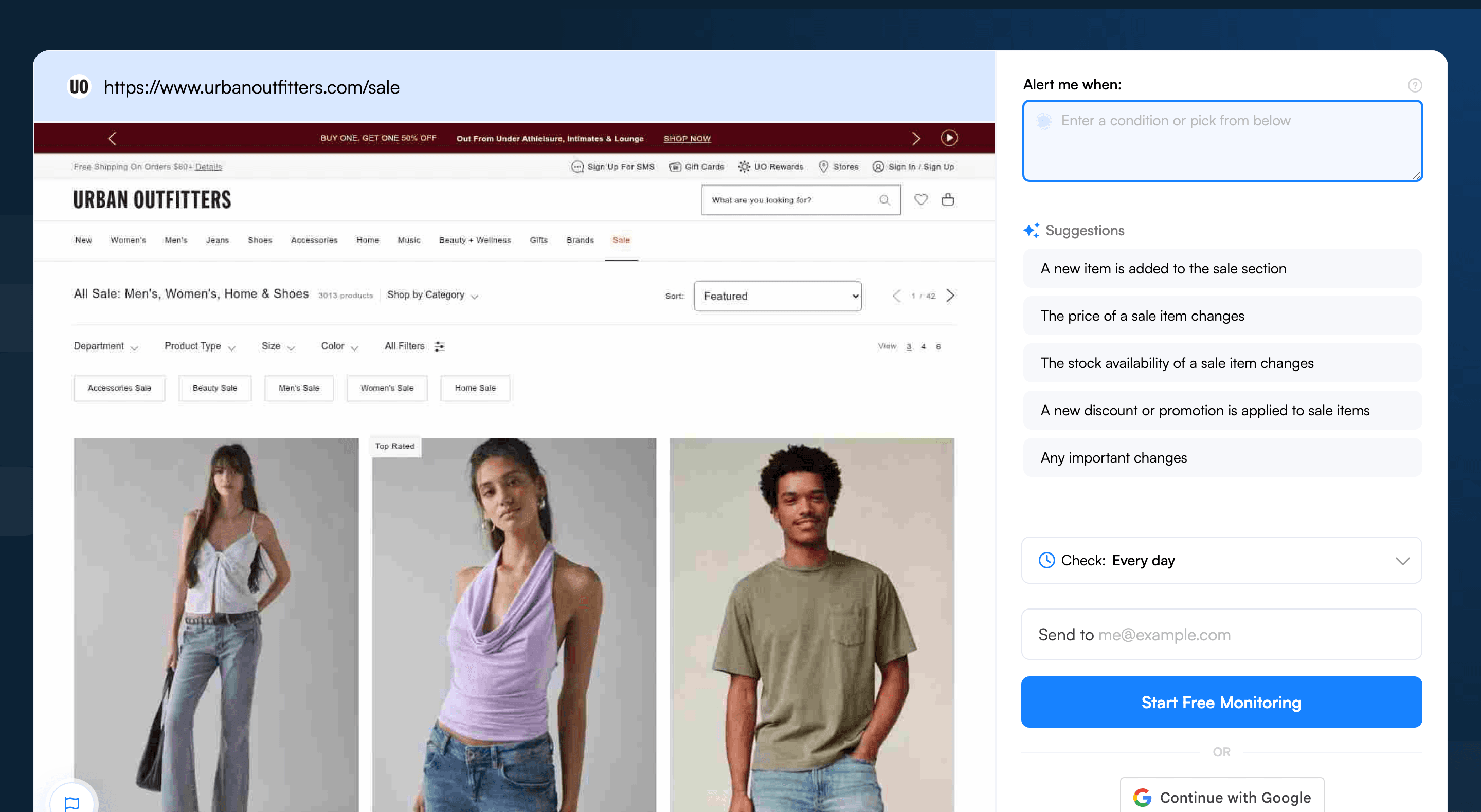
Historical category-page setup. Promotions and product counts shown are past examples; use a product-page preview for a specific variant.
Step 3: Select what to monitor
Full-page monitoring is the default. To focus on one product, click and drag on the loaded preview to draw a rectangle that includes:
- The product name and chosen size, color or edition
- Visible availability text and the relevant purchase button
- The price, if your condition also concerns a price change
Keep unrelated recommendations outside the selected area when possible. Recheck the area after changing Actions or if the page layout changes. A crop reduces scope but does not eliminate irrelevant alerts.
A disabled size button may communicate availability only through styling, such as a gray color or a crossed-out label. AI Mode is the default comparison mode and uses your AI condition to assess changes. It does not alert on style-only changes. If selecting a size reveals an availability message, configure that interaction and verify the resulting text in the preview. If the page exposes no capturable availability change, this setup cannot reliably signal that size's return.
Step 4: Set check frequency
Choose a schedule within your plan's allowance. Free has a 60-minute minimum cloud interval and 150 checks per month shared across up to 5 pages. One hourly monitor uses 24 checks per day, exhausting 150 checks in 6.25 days. Five daily monitors use 150 checks in 30 days and 155 in 31 days, exceeding Free's 150-check allowance in the longer period. Personal 1K supports a 15-minute minimum and Personal 5K a 5-minute minimum, with 1,000 and 5,000 monthly checks respectively.
All cloud monitors share the monthly allowance. Failed checks count, and exhaustion pauses monitoring until the allowance resets or you upgrade. A shorter interval creates more check opportunities, but it does not guarantee a purchase or a delivery deadline.
Step 5: Add an AI condition
In Alert me when, enter a condition. For a hypothetical clothing monitor, write: "Alert me when the selected blue dress in size M shows that it is available to add to bag. Ignore price changes and other products." Replace the item and variant with your own. For a vinyl pressing, name the artist, album and edition. The prompt can assess only what the capture shows.
Confirm Alert me only when the AI condition is met remains enabled after entering the prompt. AI can make mistakes, so compare an alert with the live product page before acting.
Step 6: Set notifications
Click Start monitoring, then check your notification settings and send a test email. Email is available on every plan. SMS starts at Personal 5K. Cloud monitoring continues with your browser closed, but an alert follows a successful scheduled check and does not reserve the item.
Visualping handles restock monitoring across other retailers too. See the same setup adapted for Zara drops, American Eagle restocks, Abercrombie & Fitch alerts, AliExpress products and prices, Lululemon restocks, Hermès Birkins and Kellys, Etsy restock notifications, and the cross-retailer restock alerts hub.
Pro tips for Urban Outfitters restocks
-
Monitor a category for discovery. Choose a relevant listing page and name the brand or product type in your condition. Confirm those details appear in the preview. See restock alerts across other retailers for related setups.
-
Track the sale section separately. The page at
urbanoutfitters.com/saleis a broad listing. Use it to discover products, then check individual pages for your variant. Budget for each additional monitor. -
Check UO Rewards benefits. Urban Outfitters lists early access to sales among UO Rewards benefits. Check the current offer in your account. Member-only content must be visible in the captured preview before you rely on a monitor.
-
Read the return terms. Urban Outfitters' US return policy, checked October 29, 2026, applies a $5 restocking fee to most mailed returns; eligible in-store returns are free. A return policy does not establish when a sold-out item will be restocked.
-
Compare alternatives carefully. Urban Outfitters and Free People are both URBN brands. If you find a similar item elsewhere, compare the brand, style, color and size before treating it as an alternative.
-
Track a particular vinyl edition. Identify the artist, album and pressing on the product page. A music-category monitor can help you notice listings, while the specific product page is the place to verify the edition and current purchase options.
Frequently asked questions
What's the best way to get notified when Urban Outfitters restocks an item?
Check the product page for a native waitlist or notification option. For a separate page monitor, Visualping can check captured availability information on a schedule and assess it against your condition. Confirm the product and variant in the preview, review alerts against the live listing, and start at visualping.io/sign-up.
Is there a free tool to track Urban Outfitters restocks?
Yes. Free includes up to 5 pages and 150 checks per month, with a 60-minute minimum cloud interval. One hourly monitor uses 24 checks per day, so 150 checks cover 6.25 days; failed checks also count. Exhausting the allowance pauses monitoring until it resets or you upgrade. Personal 1K supports a 15-minute minimum, while SMS begins with Personal 5K. Review the allowance as well as the interval at visualping.io/pricing.
Can multiple Urban Outfitters products be monitored for restocks at once?
Yes, within your plan's page and check limits. Give each monitor its own URL, selected area where useful, and condition. A product monitor and a sale-category monitor serve different purposes and each consumes checks. Free permits up to 5 active pages; create an account at visualping.io/sign-up.
How fast does Visualping detect an Urban Outfitters restock?
A page change can be detected at a subsequent successful scheduled check. Your plan sets the available cloud interval and monthly allowance. Page access problems, AI interpretation and notification delivery can affect the result, so a 15-minute setting is not a promise that an alert will arrive within 15 minutes.
Should I use Urban Outfitters' own back-in-stock option?
If the option is available for your selected item, review its terms and sign up if it fits your needs. This guide has not measured Urban Outfitters notification coverage or delivery timing. You can also monitor captured page content with Visualping, subject to the check schedule and capture limits described above.
Does Visualping work for Urban Outfitters vinyl and music drops?
You can try a monitor for a specific vinyl product page or a broader music listing. Verify that the preview captures the artist, album, edition and relevant availability information. Write the condition for that edition, choose a schedule within your allowance, and confirm the live offer before purchasing.
Track the vibe
Start with one product and verify its preview, condition and test notification. If the capture does not expose the availability change you need, adjust the setup before relying on it.
Create a monitor at visualping.io/sign-up and check that its schedule fits your plan's monthly allowance.
Track an Urban Outfitters product page
Confirm the item and variant in the preview, then choose a check schedule and an availability condition.
Eric Do Couto
Eric Do Couto is the Head of Marketing at Visualping. He leads content strategy, growth operations, and brand positioning for website change detection.
More articles by Eric Do Couto