How to Get Real Estate Listing Alerts for New Listings and Price Drops
Updated November 16, 2026

The official way to get real estate listing alerts is a saved search on the listing site itself. Redfin, Realtor.ca, and Zillow can email you when a new listing matches filters you already set. Start there.
What each official alert covers, and where a Visualping page monitor worked in our November 16, 2026 test:
| Site | Official alert | What it emails you | Visualping page monitor |
|---|---|---|---|
| Redfin | Saved Search | New homes that match your search, at the frequency you choose. Favorited homes can send price-change and open-house emails. | Preview loaded listing cards |
| Zillow | Saved Search | New listings, Instant or Daily. Saved homes send status, price and open-house alerts. | Blocked by a press-and-hold check |
| Realtor.ca | Saved search | New listings that match your saved search | Preview loaded listing cards |
| Your agent's MLS | Auto email your agent sets up | New listings, plus status and price changes | No public page to watch |
A page monitor is a backup for those real estate alerts. Visualping checks a public, filtered search page on a schedule and emails you a before-and-after screenshot when the page changes in the way you asked for, such as a new listing or a lower listed price. Its Free plan covers 5 pages. The steps in this post use a Redfin search in the United States and a Realtor.ca search in Canada. Zillow blocked our automated checks, so the only alerts to count on there are Zillow's own.
Start with official saved-search alerts
Create an account on the site you already use, run a filtered search, save it, and choose how you want to be notified. These official real estate listing alerts come straight from the site that holds the listings, so set them up before you add a page monitor.
Redfin alerts
Redfin's help center says the best way to start receiving email alerts about homes of interest is to create a Saved Search after you have an account and are logged in. Search a zip code, city, or school district, optionally draw an area on the map, set your filters, then click the red Save Search button. In the pop-up, name the search and choose how frequently you want to receive email notifications. You can open your saved searches later from your profile icon.
In Notification Settings, you can change the update types and frequency for each saved search. For homes you have favorited, Redfin also lets you choose emails when a price changes or a new open house is added. See How to Create a Saved Search for the full steps on the website and in the apps.
Realtor.ca saved searches
On Realtor.ca, you create an account or sign in to save searches. The site says your account lets you access your saved search criteria, favourite listings, and customized notifications from any device, and that it will let you know when new listings match your saved search.
How to set up Zillow alerts
To set up Zillow alerts for new listings, follow the steps in Zillow's help center:
- Search a neighborhood, city, county, or zip code on Zillow.
- Apply filters such as listing type, price, beds and baths, and home type.
- Click Save Search.
- Sign in, name the search, and set the frequency for updates on new listings that come on the market.
Zillow's own search guide says you can choose Instant alerts, which Zillow sends as soon as a matching home hits the market, a Daily cadence, or no email alerts at all. You can change those Zillow notifications later in your account notification settings.
If you save a specific home with the heart icon, Zillow says you will receive email updates on status changes, price adjustments, or when an open house is scheduled. A Zillow help article updated December 12, 2023 adds a threshold: saved-home alerts go out for price changes of $1,000 or more. The same article says a saved-search email shows limited results, and that a search that is too wide will not generate an email. Its example is every for-sale listing in Seattle. See Saved Searches and Saved Homes, Email types consumers can receive, and How to Use Zillow to Find a Home You'll Love.
Zillow is the one site in our test where a page monitor failed. Visualping's cloud checks (the ones that run on Visualping's servers) repeatedly hit a "Before we continue" press-and-hold check, so a cloud monitor is unreliable on Zillow. Redfin and Realtor.ca both loaded.
MLS listing alerts from your agent
If you are working with a buyer's agent, ask for MLS listing alerts as well. In Matrix, an MLS system used by MLS Now and CRMLS, an agent can save your search as an Auto Email. MLS Now's help center says Matrix emails you a first batch of matching listings and, once you open that welcome email, keeps emailing new listings and listings that have changed in status or price. See Set Up an Auto Email for a Client from MLS Now and How to Create an Auto Email from CRMLS.
When to add a page monitor to your real estate alerts
A page monitor watches the search-results page you can already see in a browser. It adds a new listing alert from that page, an email when a listed price on it changes, and a before-and-after screenshot you can check yourself.
Official emails show a filtered slice of the listings. Zillow's help center, for one, documents three limits: saved-search emails show limited results, a search that is too wide sends nothing, and saved-home price alerts start at changes of $1,000. On a site where the Visualping preview loads, a page monitor compares the whole filtered results page with its previous capture, so a new card or a changed price on any listing shown there counts as a change. That includes listing sites with no alerts of their own.
Use a filtered search URL and sort it so new listings appear first. Tighten the filters you care about, such as price, beds, and property type, so the page shows one kind of home. Before you start monitoring, confirm that the Visualping preview shows the listing cards you care about. A still-loading tile can appear in a preview, so check every card that loaded. Every example page in this post is public, so no login URL goes into the Visualping box.
What we tested on November 16
We ran Visualping previews on three public search pages on November 16, 2026:
- A Redfin zip-code search loaded listing cards beside a map.
- A Realtor.ca new-listings view for Oakville loaded listing cards, with property types mixed together.
- Zillow's search page repeatedly showed a "Before we continue" press-and-hold check in the cloud preview.
We set up the example monitors that day and have not verified their alerts yet. Review your first emails against what you asked for before you depend on a monitor.
We did not test Zillow in Device mode. The Chrome extension's Device mode runs each check in your own browser, the way you load the page yourself, while your computer is on and Chrome is open.
Set up a new listing alert on a search page with Visualping
Use Visualping to set up real estate listing alerts on a filtered search-results page, with an email when a new listing appears or a listed price drops:
- Copy the URL of a public, filtered search page, such as this Redfin search for ZIP code 78704, which shows Sort: Newest. Paste it into the Visualping URL box and click Go. A preview of the page loads.
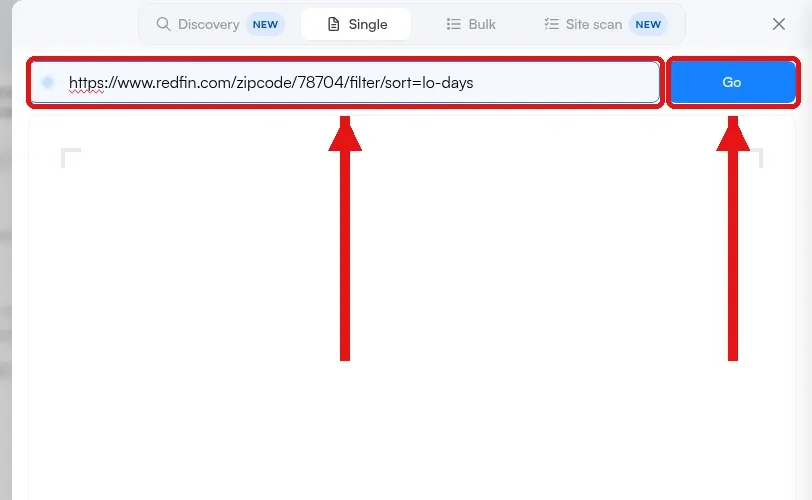 The Visualping URL box and Go button, with a Redfin zip code search URL entered.
- In the Alert me when box, describe the change in plain language or pick an AI suggestion, for example "A new listing appears, or a listed price drops."
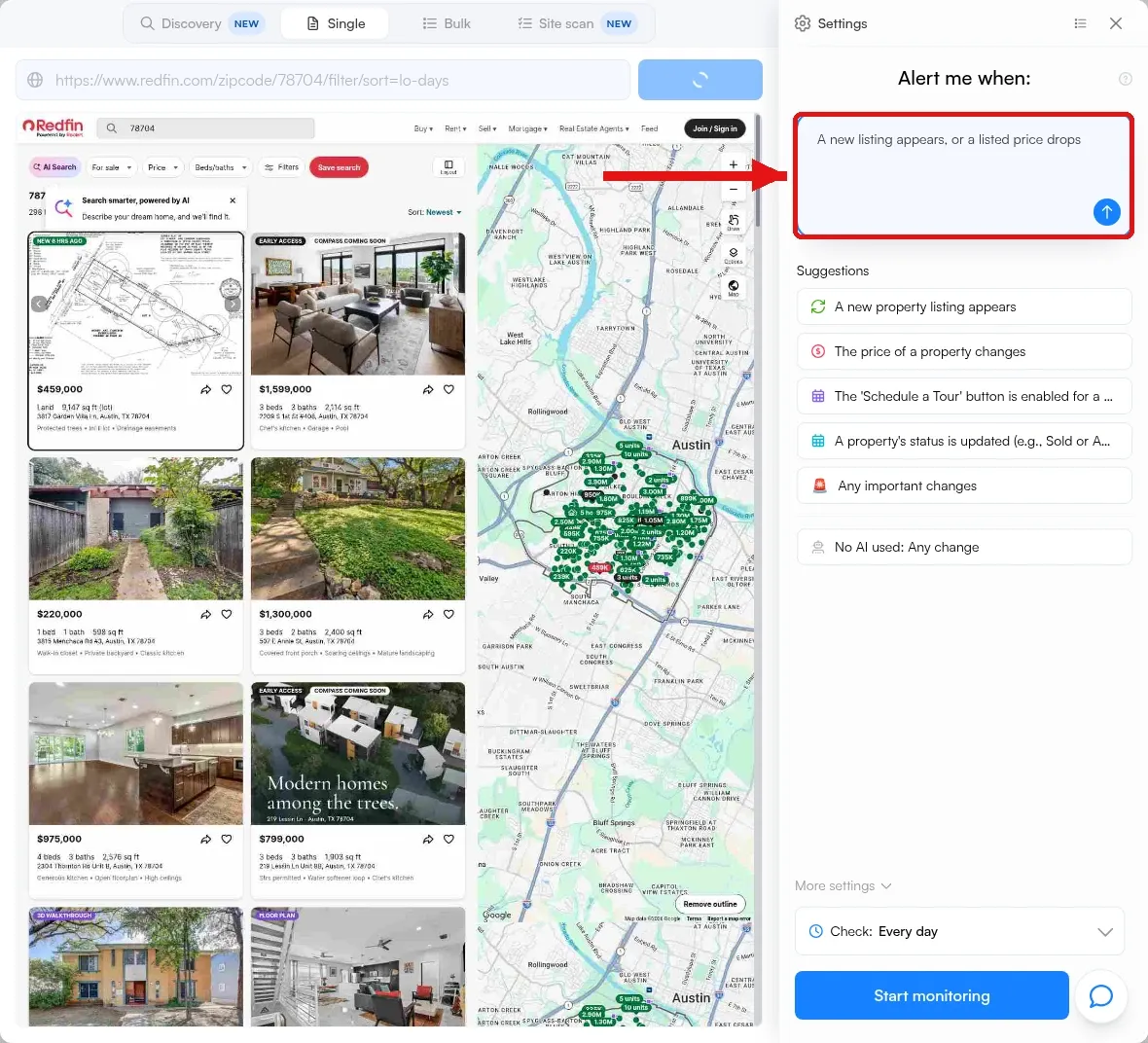 The Alert me when box filled in on a Redfin home search monitor.
- Pick how often Visualping checks the page in the Check dropdown. On the Free plan, every 6 hours works for one search page.
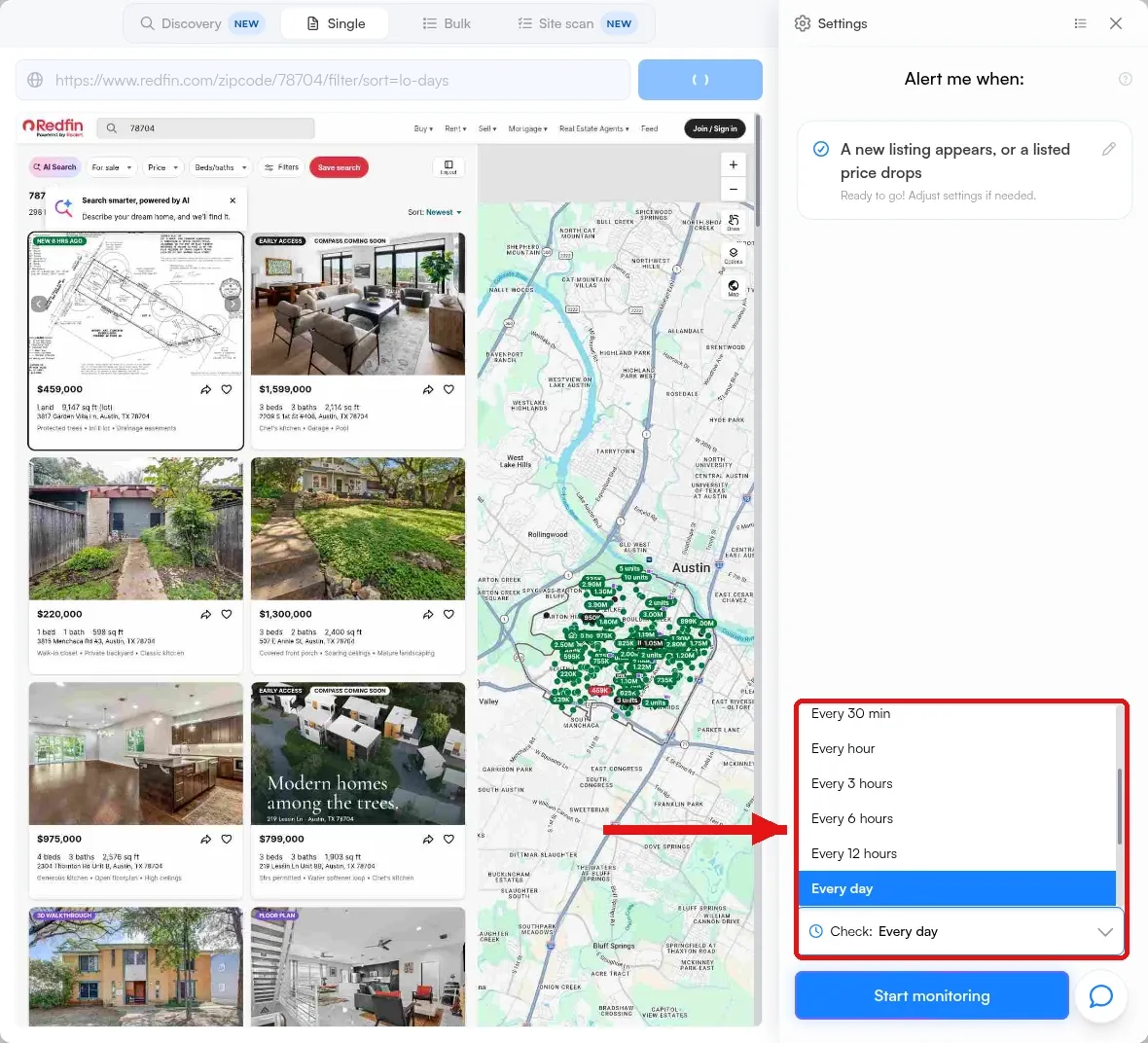 The Check dropdown open to frequency options on a Redfin home search monitor.
- Open More settings, click Notifications to choose where alerts go (email is on by default), then click Start monitoring.
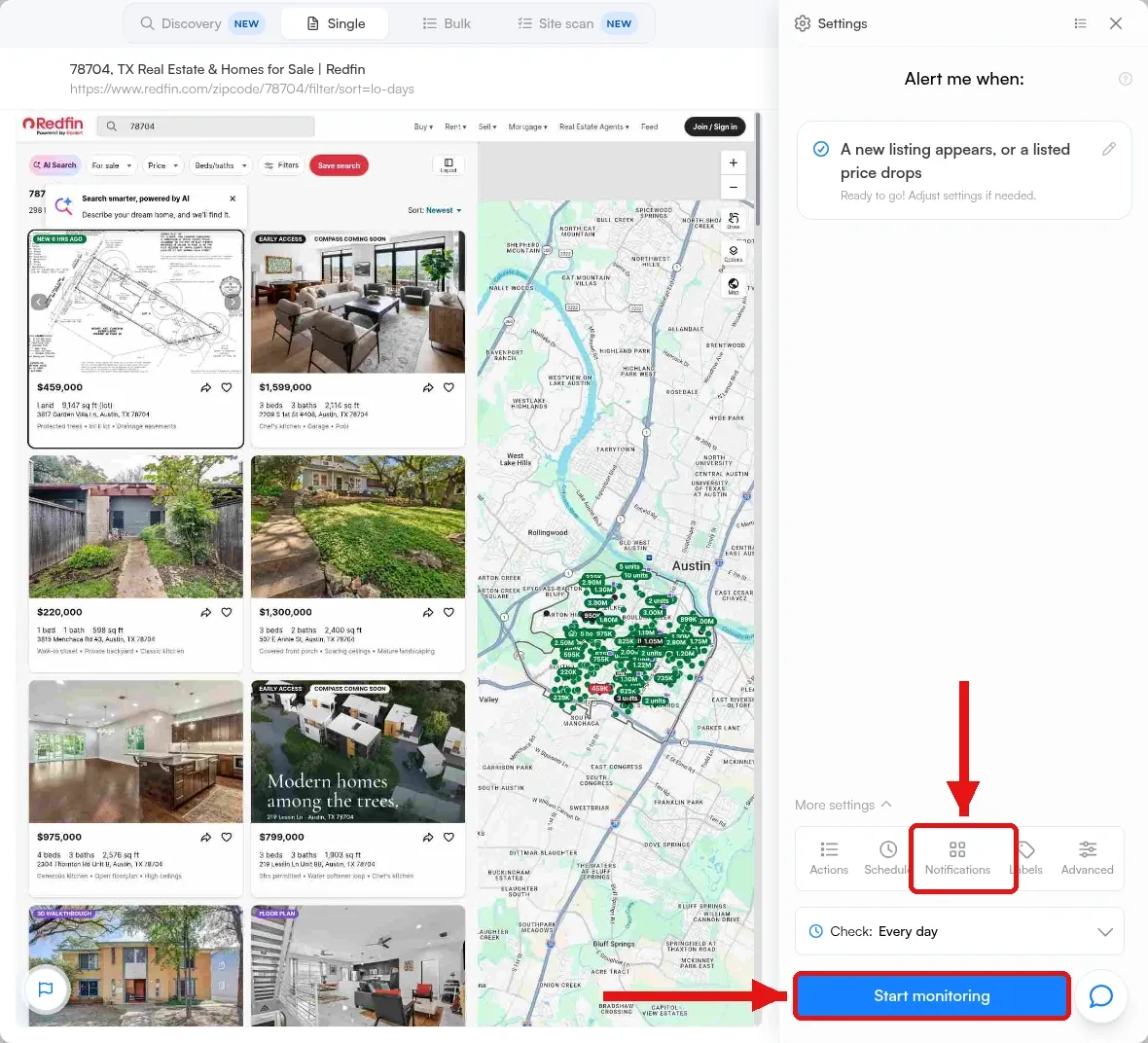 The Notifications tab under More settings, and the Start monitoring button, on a Redfin home search monitor.
- After you create the monitor, open its Notifications to add Telegram, a webhook or RSS, which are all on the Free plan. Text alerts to US and Canadian numbers start on the $25 a month plan, billed annually. Repeat for each search page you want to watch.
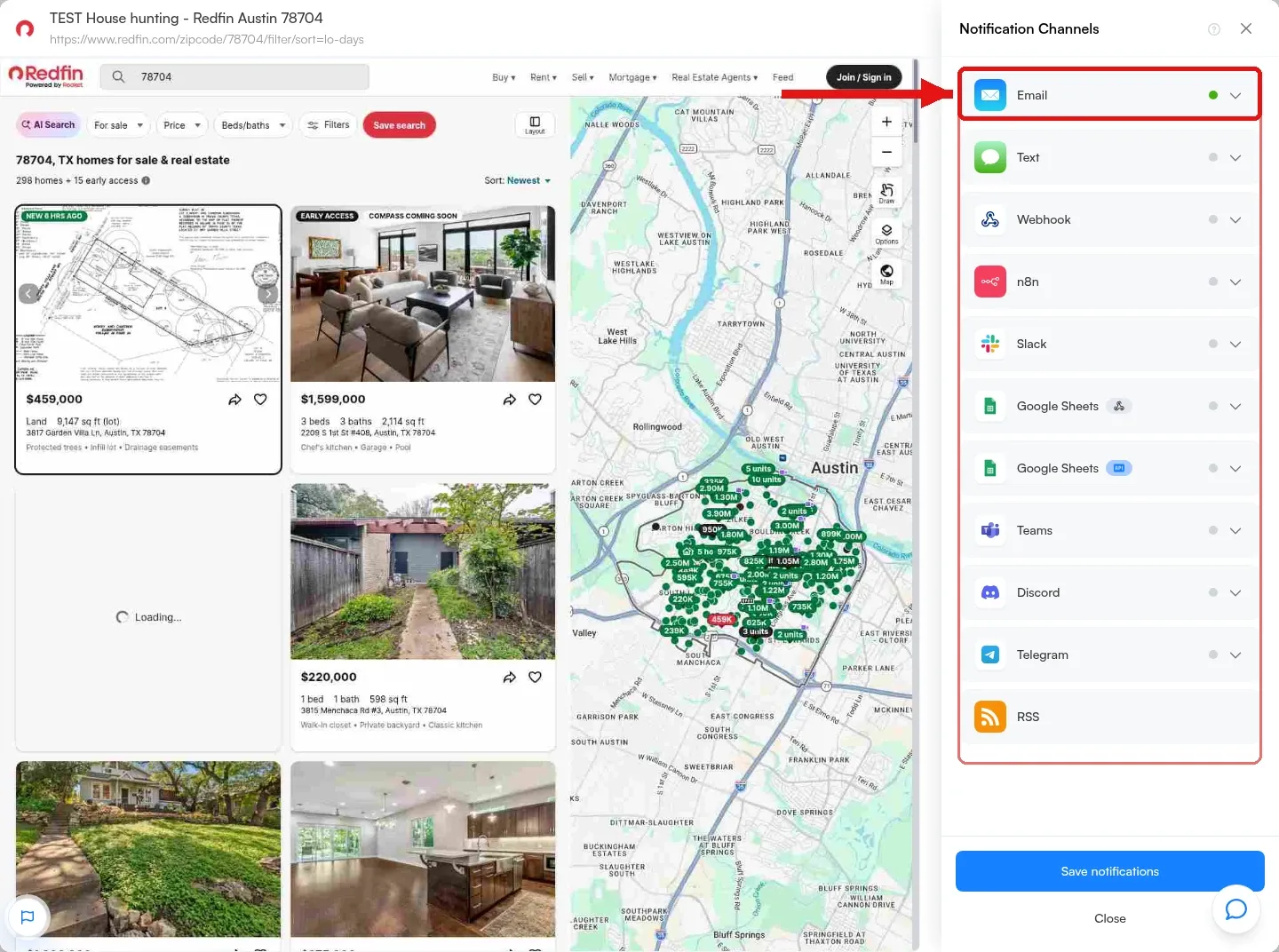 The Notification Channels panel from our test account, with email on. Slack, Teams and Discord are not included on the Free or $10 plans.
Your own filtered search URL works the same way: paste it into the Visualping URL box and start monitoring for free.
How often to check depends on how fast homes move in your search. The Free plan covers 5 pages and 150 checks a month, and checks as often as every hour. Hourly checks on one page use 744 checks in a 31-day month, so on Free, check one page every 6 hours (124 checks) or two pages every 12 hours (124 checks). Paid plans start at $10 a month, billed annually, with 1,000 checks a month and checks as often as every 15 minutes, which covers hourly checks on one search page.
For a Canadian search, use the same steps with a filtered Realtor.ca URL, such as the Oakville new listings view, after you have tightened the filters.
The same steps work on a public rental search page if you want an email when a new apartment appears.
Page monitoring covers a few related jobs too. On a product page it works as price drop tracking software for a retail item. If you are comparing borrowing costs, watch a public mortgage rates page the same way. For a single street, building, or address, Google Alerts emails you when a new page that mentions it appears in Google Search.
Frequently asked questions
How do I get alerts for new real estate listings?
Save a search on the listing site you use. Redfin, Zillow, and Realtor.ca each email you when a new listing matches a saved search, and a buyer's agent can set up an MLS auto email that does the same from the MLS. For a second set of real estate listing alerts on a public search page, add a Visualping monitor.
How often does Zillow send alerts?
As often as you choose when you save the search. Zillow's search guide lists Instant alerts, which go out as soon as a matching home hits the market, and a Daily option. You can also leave email alerts off.
Why am I not getting Zillow notifications?
Zillow's help center gives two causes. Saved-search emails go only to people who chose Daily or Instant alerts for that search, and a search that is too wide will not generate an email. Zillow's example of a search that does send email is for-sale listings in Seattle, WA 98117 between $600,000 and $800,000, so check the alert setting first, then narrow the search to a zip code and a price range.
Should I use official alerts or Visualping?
Use official saved-search alerts first. Add a Visualping monitor if you want a backup email when the public search-results page changes, with a before-and-after you can review.
Can Visualping watch Zillow?
Zillow's press-and-hold check repeatedly blocked Visualping's cloud preview in our November 16, 2026 test, so a cloud monitor is unreliable there. Device mode in the Chrome extension runs checks in your own browser, and we did not test it on Zillow.
Will I get an email for every new listing or price drop?
Not always. A monitor sees only what is visible on the captured page, and a still-loading tile or a site popup can appear in a capture. By default, a new monitor also emails you only when Visualping AI flags a change as important, based on your Alert me when instruction, and each email carries an AI summary of what changed. Changes it leaves out of email still appear in the monitor's timeline. Review the first alerts before you depend on the monitor.
Can I watch more than one city or filter set?
Yes. Use a separate monitor for each filtered search URL. The Free plan covers 5 pages.
Sources
- How to Create a Saved Search, Redfin Customer Service. Retrieved November 16, 2026.
- Notification Settings, Redfin Customer Service. Retrieved November 16, 2026.
- My Saved Searches, Realtor.ca. Retrieved November 16, 2026.
- Saved Searches and Saved Homes, Zillow Help Center. Retrieved November 16, 2026.
- How to Use Zillow to Find a Home You'll Love, Zillow, updated June 17, 2025. Retrieved November 16, 2026.
- Email types consumers can receive, Zillow Help Center, updated December 12, 2023. Retrieved November 16, 2026.
- Set Up an Auto Email for a Client, MLS Now, updated March 12, 2026. Retrieved November 16, 2026.
- Matrix: How to Create an Auto Email, CRMLS Knowledgebase, updated April 15, 2025. Retrieved November 16, 2026.
- Visualping pricing, for plan limits and prices. Retrieved November 16, 2026.
- Visualping preview tests on Redfin, Realtor.ca, and Zillow, November 16, 2026, in a Visualping Business account. Redfin and Realtor.ca search pages produced listing-card previews. Zillow repeatedly showed a press-and-hold "Before we continue" check. Alert quality on the example monitors has not been verified.
- How to Monitor Password-Protected Websites for Changes, Visualping, for Device mode checks that run in your own browser.
Recommended reads
Get notified when a new listing appears
Sign up with Visualping to watch a filtered real estate search page and get an email when a new listing appears or a listed price drops.
Eric Do Couto
Eric Do Couto is the Head of Marketing at Visualping. He leads content strategy, growth operations, and brand positioning for website change detection.
More articles by Eric Do Couto