How to Get Poshmark Price Drop Alerts for Free
By Anika Gupta
Updated July 8, 2024

How to Get Poshmark Price Drop Alerts
Poshmark sends its own price drop alerts, but only to shoppers who liked a listing, and only when the seller cuts the price by 10% or more. To catch smaller cuts, or to watch a listing without liking it, paste the listing URL into Visualping and get an email when the price changes. Both options are free.
Individual sellers set prices on Poshmark, so a drop can happen at any time. Nobody wants to spend an evening reloading listings to catch one.
Visualping tracks changes on a web page (price, stock, new items) and emails you when it finds one. Free accounts check as often as hourly, and checks run as often as every 2 minutes on Personal 10k and Business plans.
How can Visualping help you snag the best deals on Poshmark?
Give Visualping a Poshmark listing URL and it checks that listing on the schedule you pick, then emails you when the price changes.
Can You Set Price Alerts on Poshmark?
Yes, with limits. Checking listings by hand takes time, and you can still miss a drop between visits.
Poshmark has its own Price Drop notifications. If you like an item and the seller drops the price by 10% or more, Poshmark tells you in your news feed, by push notification and by email (turn on "Price Drops" under Notifications in the app). The new price must also be at least 10% below the listing's lowest historical price, and the final price must be at least $10. A seller who trims $3 off a $40 listing triggers nothing.
Visualping covers the gaps. You pick the listing (no like required), set how often Visualping checks it, and get an email for any price change, including cuts under 10%.
The Free plan costs nothing and covers 5 pages and 150 checks a month, enough to check one listing about five times a day.
How to Track Price Drops on Poshmark Items with Visualping
To track a Poshmark price with Visualping, paste the listing URL into the Visualping Homepage and click Go. When the preview loads, write your condition in the “Alert me when” box (for example, “the price drops”), pick a frequency in the “Check:” dropdown, enter your email under “Send to”, and click Start Free Monitoring.
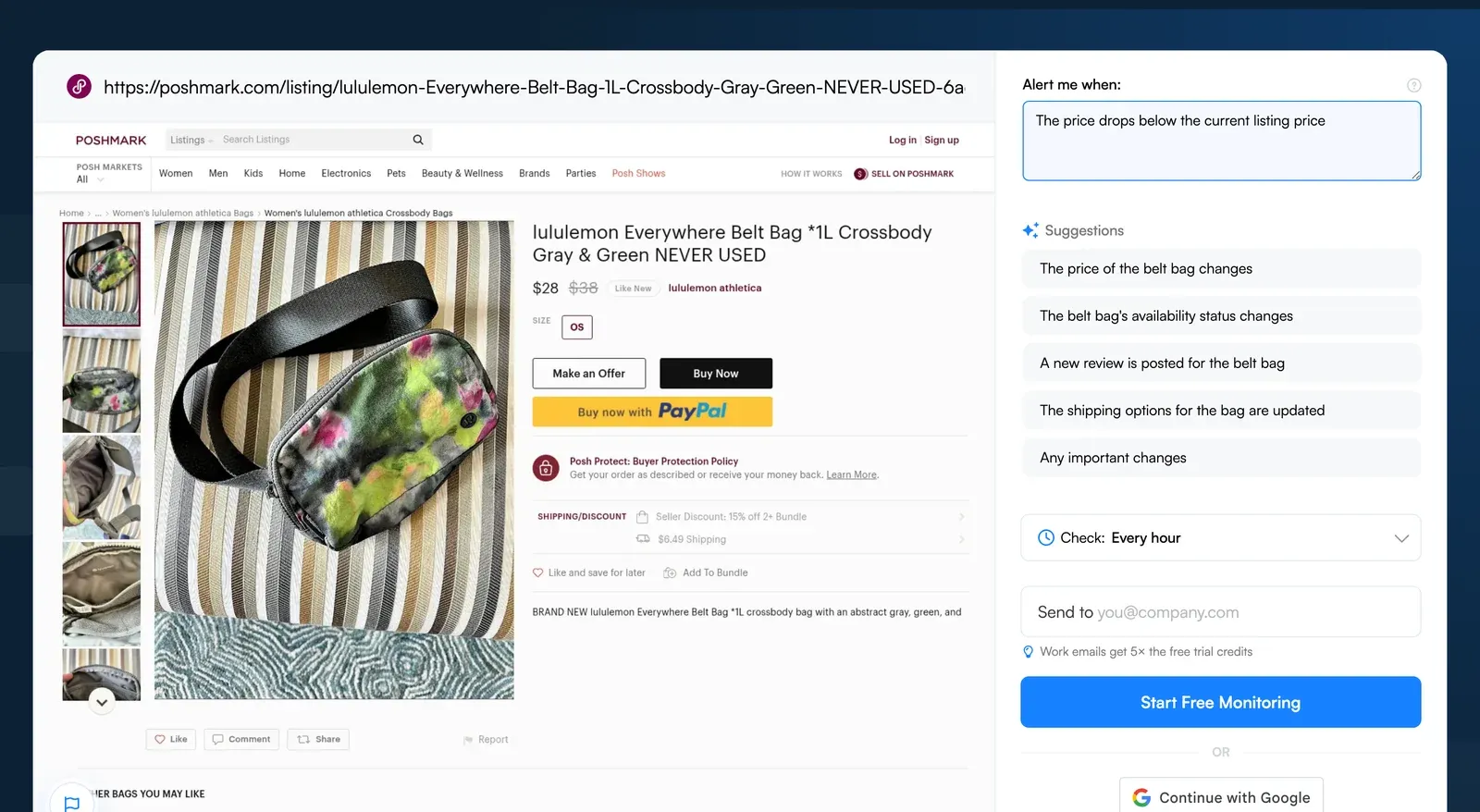
Step-by-Step Breakdown of How To Track Poshmark Price Drops
Step 1: Enter the Poshmark Item URL in Visualping’s Homepage Search Field
Suppose you want to get your hands on this Lululemon Everywhere Belt Bag but are waiting for the price to drop. Copy the URL of the item from the Poshmark website and head to the Visualping Homepage. Paste the URL into the search field and click Go. Visualping loads a preview of the listing.
Step 2: Tell Visualping What to Alert You About
Below the preview, the “Alert me when” box shows AI suggestions. Pick one or write your own, such as “Alert me when the price drops”. New monitors use AI Mode, which checks both how the page looks and what its text says, and uses AI to tell you what changed.
If you would rather match a keyword (for example, the word “sold”), switch the monitor to the legacy Text changes mode in its settings after you create it and add keyword alerts there.
Step 3: Set Monitoring Frequency
In the “Check:” dropdown, choose how often Visualping checks the Lululemon Belt Bag listing. The Free plan checks as often as hourly, Starter every 15 minutes, Personal 5k every 5 minutes, and Personal 10k and Business as often as every 2 minutes. The slowest option is monthly. See the plan details on the pricing page.
Step 4: Provide Email Address for Alerts
Under “Send to”, enter an email address you check often. When a scheduled check finds a change, Visualping emails you an AI summary of what changed. You can add SMS (Personal plans and up), Telegram, webhooks or Zapier (all plans) later in the monitor's settings.
Step 5: Verify your Account
Click "Start Free Monitoring" and follow the prompts to create and verify your account. All your monitors then sit in one dashboard.
Track Poshmark Prices Beyond the 10% Rule
Poshmark's alerts cover 10%-plus drops on items you've liked. Visualping watches any listing you point it at and flags price changes of any size, so you can get the best deal on a rare piece.
The same setup works on bigger retailers like Costco, BestBuy and Walmart.
Get real-time price alerts
Sign up with Visualping to monitor any prices online and get notified of price changes.
Anika Gupta
Anika Gupta is a former Marketing Intern who wrote about competitive intelligence and marketing strategy for the Visualping blog.
More articles by Anika Gupta