How to Track Competitor Ads Across Meta, Google, LinkedIn and TikTok
Updated September 17, 2026
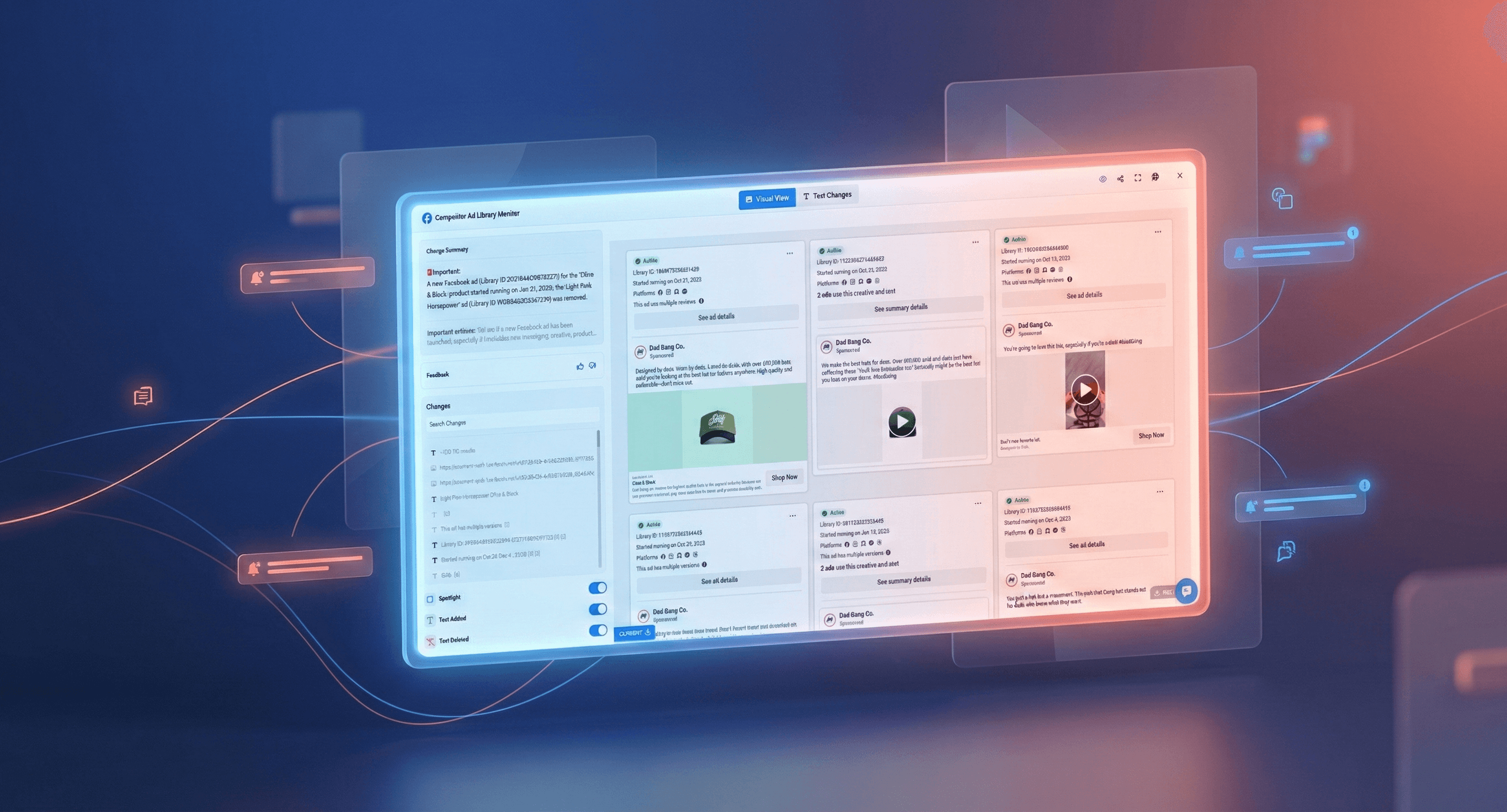
TL;DR: Meta, Google, LinkedIn and TikTok each publish a free, public library of every ad their advertisers are running. Nobody checks them consistently. Put a page monitor on a competitor's library page and you get an alert when they launch a campaign, change messaging, or start a promotion. Setup takes about 90 seconds per competitor per platform. Track 3 to 5 competitors, watch which ads keep running, and you see strategic shifts before they saturate the market.
The four ad libraries worth monitoring
Every major ad platform now runs a public transparency database, built for regulatory accountability rather than for you, but open all the same.
| Library | Covers | Best for | Search by |
|---|---|---|---|
| Meta Ad Library | Facebook, Instagram, Messenger, Audience Network | Ecommerce, DTC, consumer brands | Page name or advertiser |
| Google Ads Transparency Center | Search, YouTube, Display, Shopping | Anyone bidding on your keywords | Advertiser name or domain |
| LinkedIn Ad Library | Sponsored content on LinkedIn | B2B and SaaS competitors | Company page |
| TikTok Commercial Content Library | Ads and branded content, EU plus selected regions | Younger consumer segments | Advertiser or keyword |
Meta is where most teams start, and by a wide margin where most of them stay. On Visualping, Meta Ad Library pages carry roughly eight times more active monitors than Google's Ads Transparency Center and close to twenty times more than LinkedIn's. That ratio says more about habit than about value. If your competitors are B2B, LinkedIn is the library that will tell you something Meta cannot.
The workflow below is written against Meta because it is the one most people need first. The same five steps work on all four, and the section on tracking ads beyond Meta below covers what changes on each.
How to set up Meta Ad Library monitoring
You can have automated competitor ad monitoring running in under 10 minutes.
Step 1: Find your competitor's ad library page
Navigate to the Meta Ad Library. Search for your competitor's business name. Once you find their profile, click through to view their active ads. Copy the full URL from your browser's address bar. It should look something like:
facebook.com/ads/library/?active_status=all&ad_type=all&country=US&view_all_page_id=XXXXX
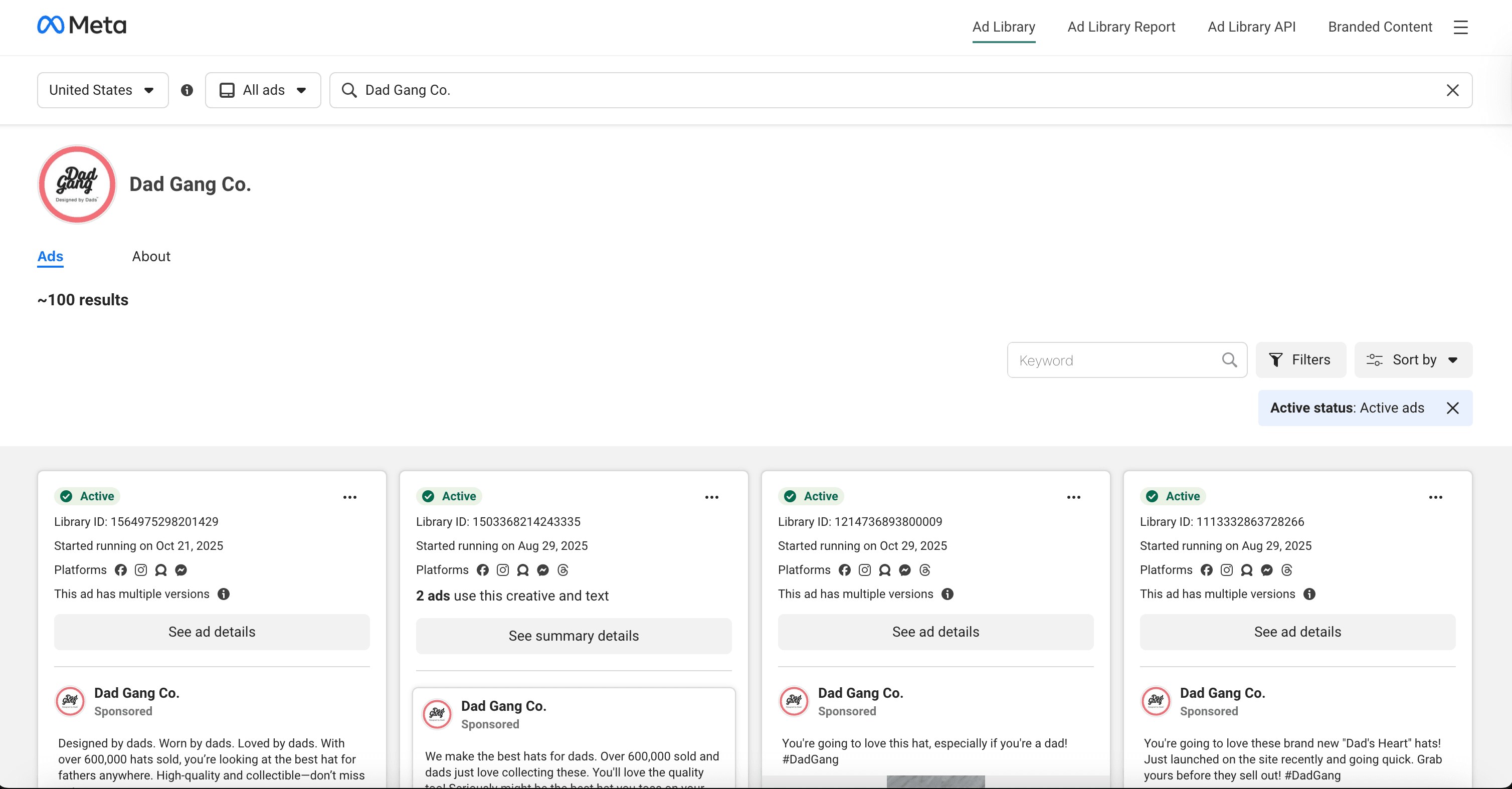
Set the country filter before you copy the URL. It is written into the link, so a monitor on the US view will not tell you what the same competitor is running in Germany. Teams tracking regional launches run one monitor per market.
Step 2: Create your Visualping monitor
Go to Visualping and paste the competitor's Ad Library URL into the monitor creation field. Select your check frequency:
| Business type | Recommended frequency | Rationale |
|---|---|---|
| Ecommerce and retail | Every 6 hours | Catch flash sales and promotions quickly |
| B2B and SaaS | Once daily | Campaign cycles are longer |
| Stable or niche markets | Twice weekly | Lower ad volume, less urgency |
In practice most people pick something slower than they think they need. Of the active Ad Library monitors running on Visualping today, 48% check daily or faster and only 4% check every six hours or faster. Daily is the working norm, and for B2B it is genuinely enough. For ecommerce during a promotional season it is not, because a weekend flash sale can start and finish between two checks.
Step 3: Configure the AI important definition
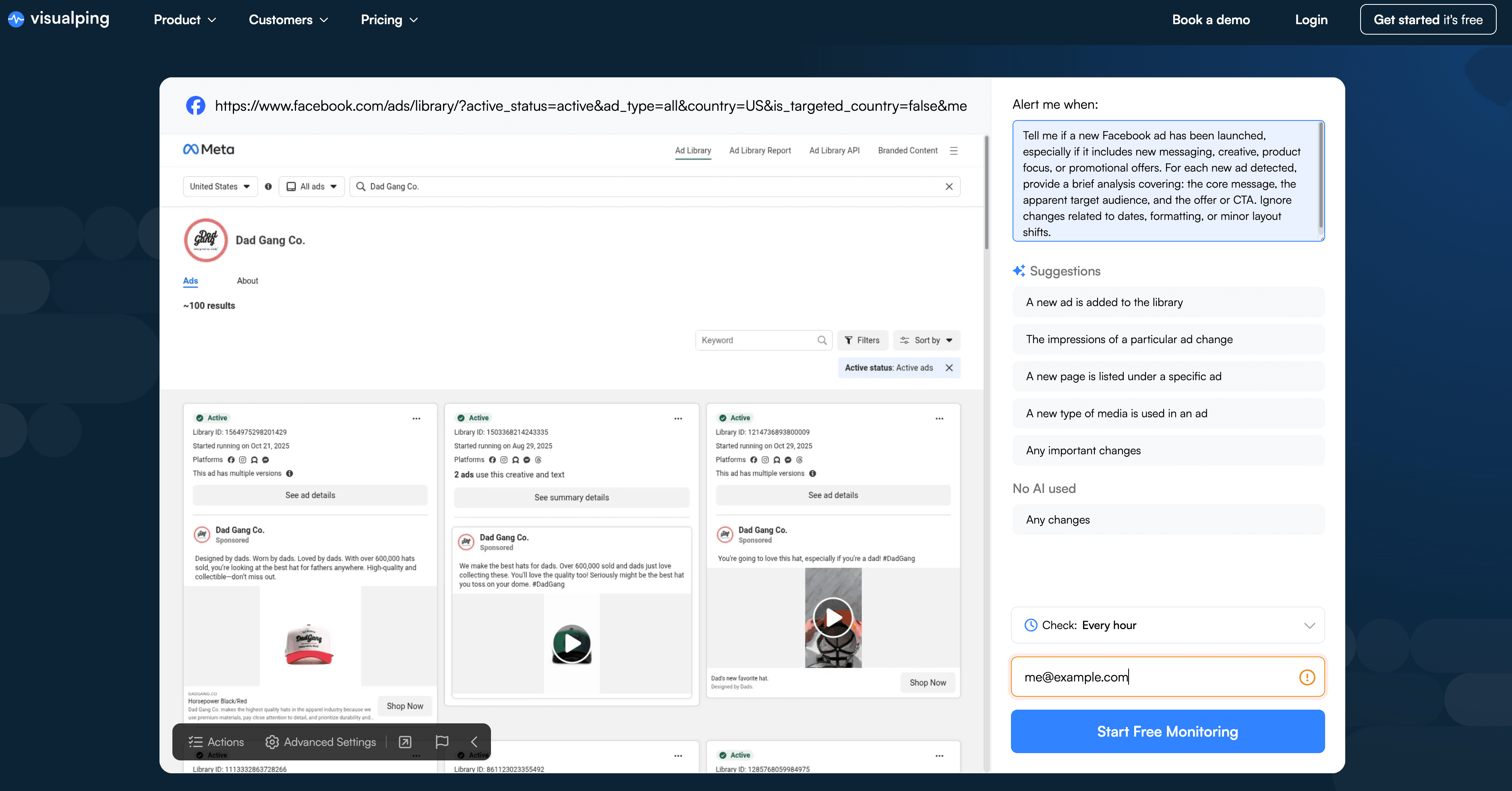
This is where automation becomes genuinely useful. Instead of getting alerted every time the page's HTML shifts slightly, you configure the AI to understand what actually matters.
In the "Alert me when" field, paste this prompt:
"Tell me if a new Facebook ad has been launched, especially if it includes new messaging, creative, product focus, or promotional offers. For each new ad detected, provide a brief analysis covering: the core message, the apparent target audience, and the offer or CTA. Ignore changes related to dates, formatting, or minor layout shifts."
This prompt does three things. First, it focuses the AI on substantive changes rather than cosmetic updates. Second, it asks for analysis rather than just detection, so your alerts include strategic context. Third, it explicitly tells the system what to ignore, reducing false positives from the Meta Ad Library's dynamic interface elements.
Real users keep it much shorter. In a sample of alert conditions written on the platform, the most common one for ad pages was simply "A new ad is added to the library." A one-line condition works fine for detection. The longer prompt above earns its length by adding analysis to every alert, which is what makes the alert readable without opening the page.
Step 4: Test and refine
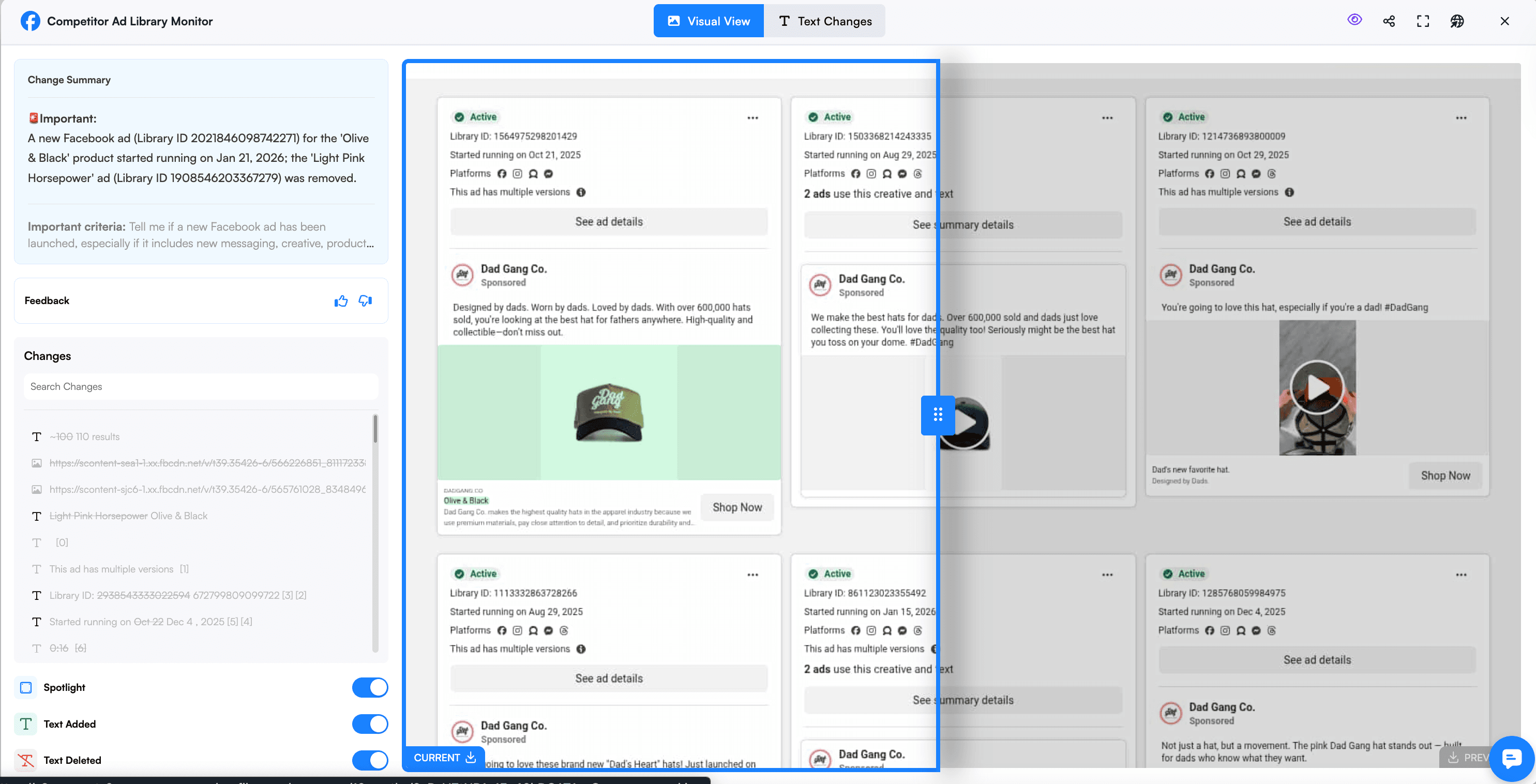
Here is what a real alert from this exact workflow looks like. In early 2026 we ran this setup on Dad Gang, a hat brand that iterates its ads constantly. When new creatives went live, the alert arrived with the additions highlighted in green and this AI summary attached:
"A new 3:05 long-form video ad promotes Dad Gang hats with heavy social proof ('700k+ dads agree') and a Shop Now CTA; the Kid Gang (kids hats) ad was removed."
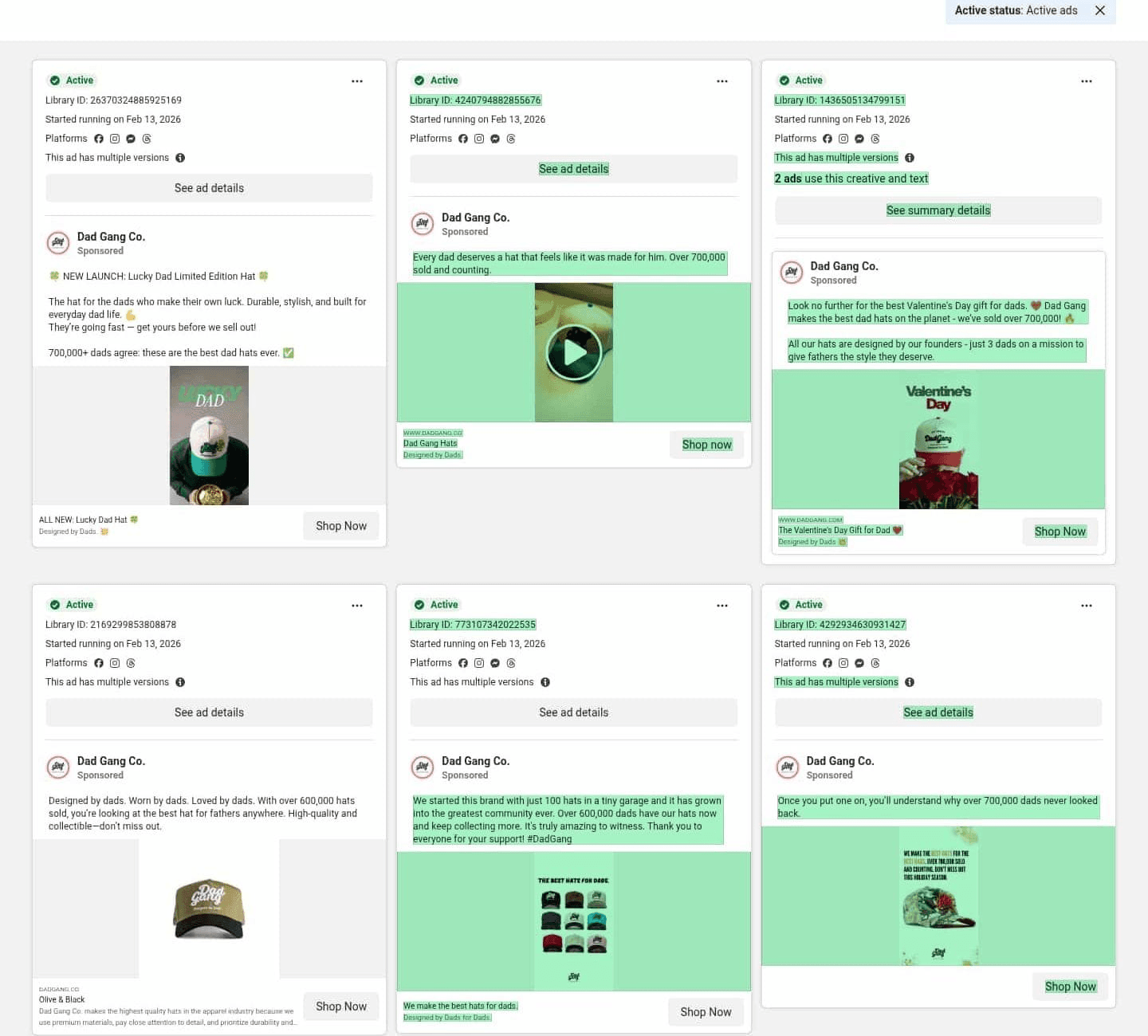
Just as useful is what the monitor stayed quiet about. Over a month of daily checks on that one page, it flagged 17 ad launches and removals and skipped three cosmetic changes (layout shifts, removed date labels) that matched nothing in the prompt. That is the important filter doing its job.
After your first few alerts, check whether the filter is drawing the line where you want it. Too many notifications about minor updates means the prompt needs to be more specific about what counts as a new ad rather than a variation. Missing campaigns means the criteria are too narrow. Edit the condition directly; it takes a sentence.
Step 5: Repeat for key competitors
Once your first monitor is dialed in, clone the setup for 2 to 4 additional competitors. The exact same AI prompt works across different Ad Library pages, so you're not starting from scratch each time. Most marketing teams find that monitoring 3 to 5 direct competitors provides comprehensive market visibility without creating information overload.
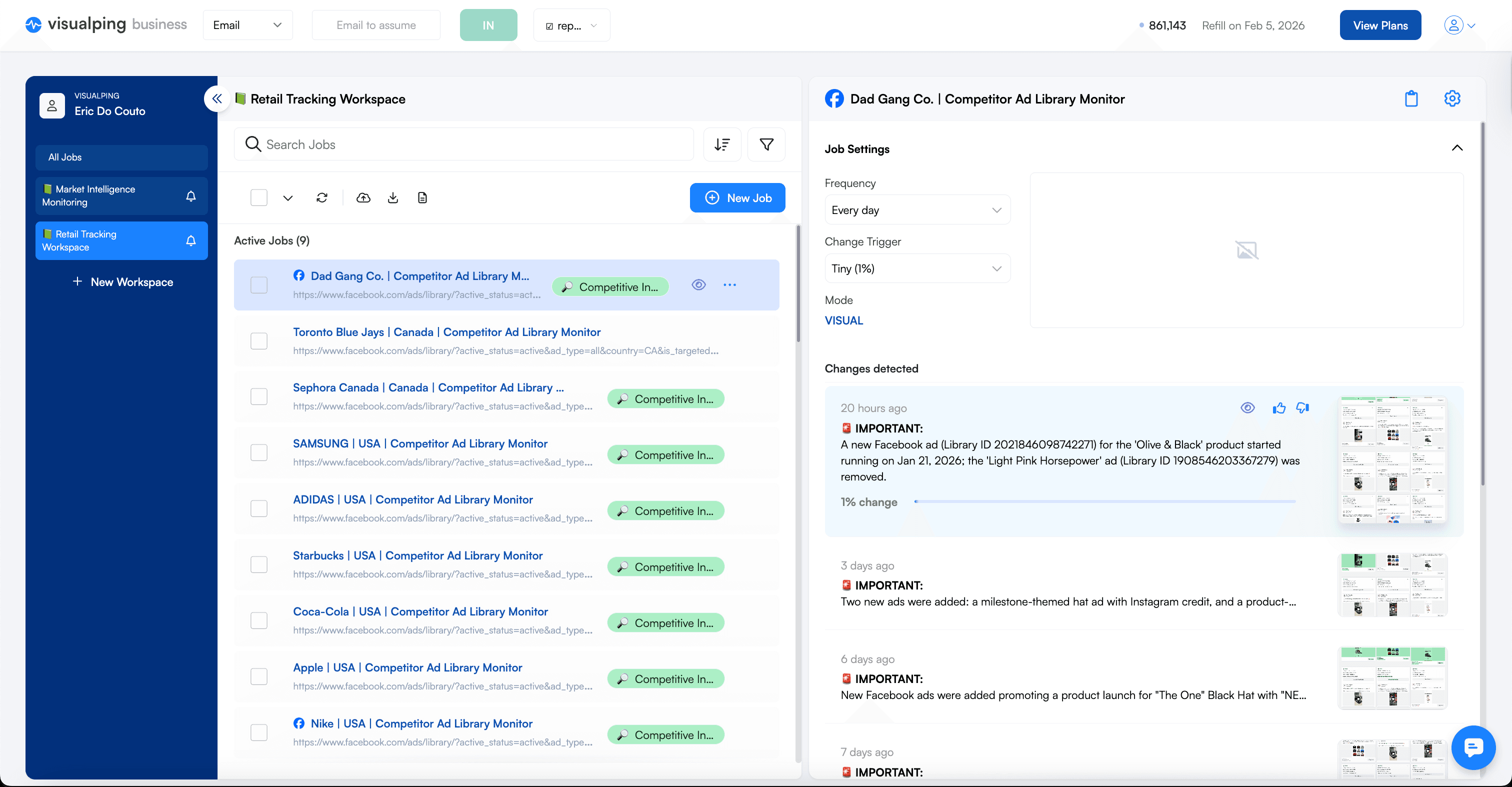
The entire process from finding the URL to having an active monitor takes about 90 seconds per competitor. After the initial setup, the system runs automatically and alerts only when your competitors make moves worth knowing about.
Tracking competitor ads beyond Meta
The workflow above transfers to the other three libraries with small adjustments. Find the competitor's page, copy the URL, paste it into Visualping, and reuse the same "Alert me when" prompt with the platform name swapped in.
Google Ads Transparency Center covers Search, YouTube, Display and Shopping, which makes it the only library that shows you who is bidding against you. Search by advertiser name or domain, then set the format and region filters before copying the URL, the same way you would on Meta. Google shows a date range for each ad, so a monitor here is good at catching the moment a long-running search ad is switched off.
LinkedIn Ad Library is the one B2B teams underuse. It shows sponsored content by company page, including the ad's total impression range by country, which is closer to a spend signal than anything Meta or Google publishes. If your competitors sell to enterprises, this library tells you which personas they are paying to reach.
TikTok Commercial Content Library publishes ads and branded content for the EU and selected other regions. Coverage is narrower than the other three, so check that your competitor appears at all before setting up a monitor.
Watching a competitor across two or three libraries at once is where this stops being a checklist and starts being intelligence. When Meta activity goes quiet and LinkedIn activity triples in the same fortnight, that is budget moving between channels, and single-library tracking misses it entirely. That cross-channel view is what a competitive monitoring program is built on.
Why automate ad library monitoring
Every week, your competitors are launching new campaigns, testing fresh messaging, and adjusting promotions. Most of it is completely visible in the public ad libraries, free and waiting.
The pages move constantly. Across the Meta Ad Library monitors running on Visualping, 72% (122 of 170) recorded a change in the previous 30 days. Competitor ad activity really is that frequent, which is exactly why a monthly manual check tells you almost nothing.
The problem is that almost nobody checks consistently. Crayon's 2026 State of Competitive Intelligence research found sellers going head to head with competitors in 68% of deals, while teams rate their own competitive readiness at 3.8 out of 10, a gap Crayon puts at $2 million to $10 million a year in winnable deals lost.
Marketing managers know the ad libraries exist. Paid media specialists have them bookmarked. But between campaign launches, performance reviews, creative briefings and budget meetings, manually checking competitor ad activity falls to the bottom of the list. By the time you remember to look, the flash sale has run its course and the new positioning has already saturated the market.
Why manual checks fail
The ad library interfaces were not designed for competitive monitoring. They were built for transparency and public accountability. When you visit a competitor's page, you see their current ads with no context for what changed since your last visit. Did they launch three campaigns this week, or have those ads been running for months? Is that new creative direction a test, or a full pivot?
Most marketers check reactively. Someone mentions seeing a competitor's ad, so you go look. You hear about a promotion, so you investigate. You're responding to secondhand information instead of discovering changes yourself.
The checking process itself creates friction. You need to remember which competitors to watch, navigate to each page, scan for anything new, mentally compare it to what you remember from last time, and repeat weekly. The marketers who would benefit most from this are the ones least likely to do it by hand, because they are already stretched thin running their own campaigns.
Page monitoring agents like Visualping were built for exactly this. Configure a monitor once, and the platform checks for you, sending alerts only when something meaningful changes.
What you can track
1. Catching new campaigns the moment they launch
The primary value is speed. When a competitor launches a campaign, you know within hours instead of weeks.
You can assess their creative direction before the market saturates. If a competitor shifts from product-focused imagery to lifestyle photography, that signals a positioning change worth understanding. Are they targeting a different demographic? Testing emotional appeals over rational benefits?
You can react to promotions before they gain momentum. A competitor launches a surprise 30% off flash sale on Thursday morning; if you're monitoring, you see it Thursday afternoon. That gives you time to decide whether to match, counter with a different offer, or double down on differentiation.
And you can adjust your own bidding during periods of heavy competitor spend. A competitor flooding the library with new variations targeting your keywords is a competitor ramping up budget.
2. Decoding positioning and messaging shifts
Individual ads tell you what a competitor is saying today. Patterns across weeks and months reveal how their strategy is evolving. Automated monitoring creates a historical record that makes these patterns visible in a way manual checking never could.
Consider a competitor who has run product comparison ads for six months, emphasizing features, specifications and technical superiority. Then their new ads focus on customer stories, emotional benefits and lifestyle aspirations. That is a strategic pivot, likely informed by customer research, brand positioning work, or leadership changes.
Ad variations also reveal targeting strategy. A competitor running the same core offer with slightly different copy, imagery and value propositions is testing audience segments. Study the variations and you can reverse-engineer their segmentation, including the gaps they are missing.
Messaging shifts often precede broader market moves. When a B2B software company starts running ads that emphasize ease of use and speed of implementation instead of enterprise features and security, they are likely preparing to move downmarket. The same principle applies beyond marketing. Journalists tracking companies for news stories use identical techniques to catch when organizations quietly update their messaging, leadership pages, or public statements.
3. Spotting promotions before they hit your radar
Competitive promotions create immediate pressure on your conversion rates and acquisition costs. If a competitor is running 25% off and you are not, prospects gravitate to the better deal unless your differentiation is strong enough to overcome the gap. The faster you know, the faster you can decide how to respond.
Many promotions appear in ad creative before they show up on landing pages, email campaigns or social announcements. Advertisers often test promotional messaging through paid ads to gauge interest before committing to a broader push. Monitoring the library catches these tests early and gives you advance warning about offers that might escalate into full campaigns.
Seasonal patterns become visible when you track over time. If a competitor consistently runs back-to-school promotions in late July, holiday bundles in early November and New Year deals starting December 26, you can anticipate the pattern and prepare counter-programming. The same price monitoring approach works for tracking competitor rate changes on their website, which gives you their promotional strategy across channels rather than just in ads.
Discount depth is a signal in itself. A competitor offering 20% off suggests moderate pressure to drive conversions. A competitor offering 50% off signals aggressive inventory clearing, expensive customer acquisition, or financial strain.
4. Identifying long-running winners, and the ads that get switched off
Not all ads perform equally. Some launch with fanfare and disappear within days. Others run for months because they are generating consistent results. The ads that persist are the ones worth studying, because they have proven themselves in the market.
The libraries show you when an ad started running, so the launch date is easy to check manually. What is hard to catch by hand is the ending. An ad that has been running for eight months and quietly disappears is telling you something, and you will only notice if you were watching. If you have been monitoring a competitor for three months and the same ad keeps appearing week after week, that is a signal it is working.
Long-running ads reveal proven messaging frameworks, value propositions and creative approaches. If a competitor's "results in 30 days or your money back" guarantee shows up in every campaign variation, that messaging clearly resonates. These are not theories. They are validated by continuous spend.
5. Reading volume changes as strategic signals
The volume of ad activity tells a story on its own. A competitor running two or three evergreen campaigns who suddenly launches fifteen variations is signalling a budget increase, a growth push, or trouble in their core metrics. A competitor who sharply reduces activity might be facing budget cuts, shifting channels, or redirecting resources.
Building your monitoring workflow
Having the tools does not guarantee results if you never build a system for using what you gather. Start small, establish consistency, expand as the value becomes clear.
Start with 3 to 5 key competitors. Ideally a mix of direct competitors targeting the same audience and adjacent ones serving related needs. Monitoring too many creates overload and makes patterns harder to spot.
Set frequency based on how quickly your market moves. Ecommerce brands running frequent promotions benefit from checks every few hours during peak seasons. B2B companies with longer sales cycles can get by with daily. The goal is catching meaningful changes quickly without generating so many alerts that you start ignoring them. Website monitoring works best when the signal-to-noise ratio stays high.
Establish a weekly review routine. Block 30 minutes, pull up the dashboard, and systematically review what each competitor did. Treat it the way you treat campaign performance review, as a recurring commitment rather than an occasional activity.
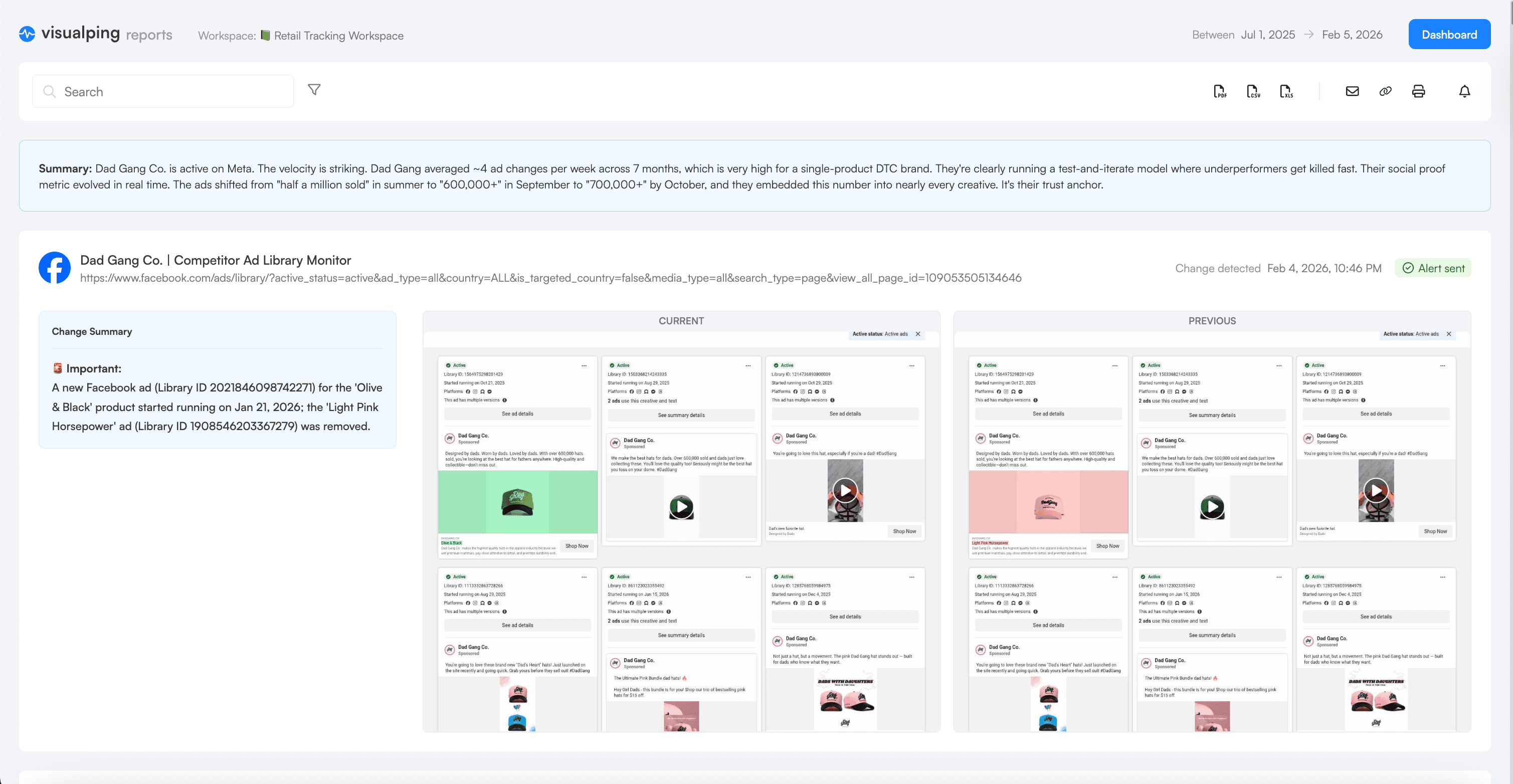
Let automated reports do the heavy lifting. Visualping's scheduled reports compile weeks or months of competitor ad changes into a single summary with AI-generated analysis that surfaces the patterns worth attention. Instead of logging every change manually, you get a periodic digest of what shifted, what is new, and what disappeared. Set it weekly or monthly and you have a running record without the upkeep.
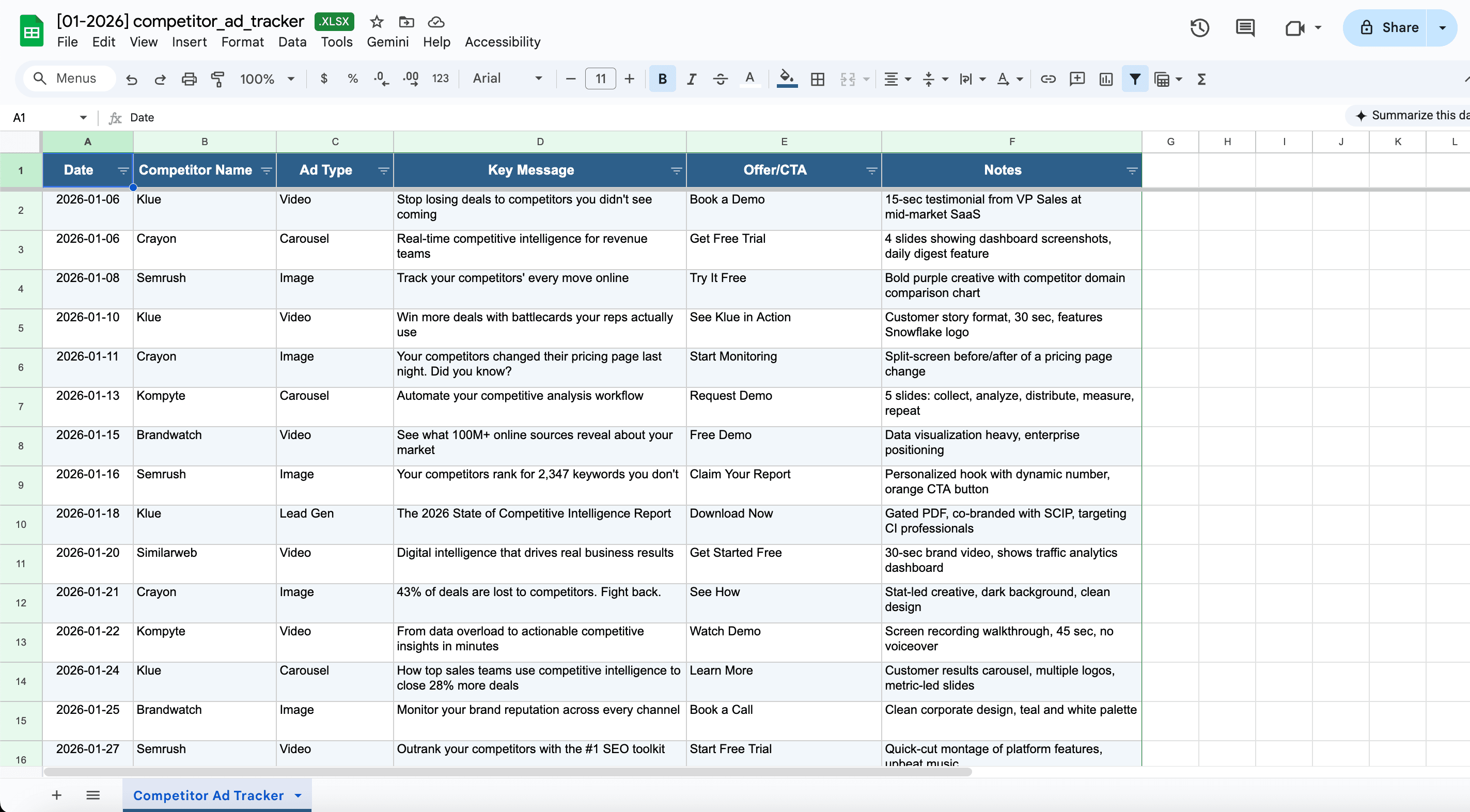
Use the intelligence for specific decisions. When planning your next campaign, review what competitors have been running and consciously decide whether to align with market norms or differentiate. When setting promotional calendars, check whether you will be running sales in the same weeks as competitors or finding gaps in their schedule. A shared spreadsheet is still useful for logging your own takeaways and flagging what matters to the team, but the monitoring and pattern recognition should be automated.
Frequently asked questions
How do you see what ads your competitors are running?
Open the public ad library for the platform: the Meta Ad Library for Facebook and Instagram, the Google Ads Transparency Center for Search, YouTube and Display, the LinkedIn Ad Library for sponsored content, and the TikTok Commercial Content Library where TikTok publishes it. Search the competitor's business name, and every ad they currently have running is listed with its launch date. All four are free and require no account.
How do I track competitor ads automatically?
Copy the URL of the competitor's ad library page and paste it into a page monitoring tool such as Visualping. Set a check frequency, add a plain-language condition like "alert me when a new ad is added," and you get an email when the page changes. Setup takes about 90 seconds per competitor per platform.
Is tracking competitor ads legal?
Yes. The ad libraries are public databases that Meta, Google, LinkedIn and TikTok publish deliberately, under transparency regulations including the EU Digital Services Act. Reading publicly published information is not scraping private data and does not require the competitor's consent.
What is the best tool for tracking competitor ads?
It depends on what you want. Dedicated ad intelligence platforms like Adbeat or SEMrush estimate spend and reach, which the free libraries do not, at prices that start in the hundreds per month. A page monitor gives you change alerts on the libraries themselves for far less, and works on any page rather than only on the platforms a vendor supports. If your question is "what are they running right now and what changed," a monitor answers it. If your question is "how much are they spending," you need an estimation tool.
How often should I check competitor ad libraries?
Daily is the working norm and what most Visualping users pick. Move to every few hours for ecommerce during promotional seasons, when a weekend flash sale can start and end between two daily checks. Twice weekly is enough in slow-moving niches.
Can I track competitor ads in a specific country?
Yes. The ad libraries filter by country and write that filter into the page URL, so a monitor on the US view of a competitor's page tracks only US ads. Set up one monitor per market you care about. This is the most common way teams catch a regional launch before it reaches their own market.
Why did my competitor's ad disappear from the library?
The libraries show active ads by default, so an ad that vanishes has usually been switched off. On Meta you can set the status filter to "all" to include inactive ads and see the full history, which is worth doing when you want to know how long a campaign actually ran.
Getting started
The barrier here is remarkably low. You do not need a competitive intelligence platform, a researcher subscription, or specialised tooling. You need the URLs of competitor ad library pages and something to watch them.
Start with your single most important competitor. Go to their Meta Ad Library page, copy the URL, set up one monitor, check daily, and use AI filtering to alert only on meaningful changes. Live with that one monitor for two weeks. Review what arrives, see what you learn, and adjust based on the kinds of changes that actually inform your decisions. Then add the second competitor, or the same competitor on a second platform.
The ad libraries are public information your competitors are publishing deliberately. Monitoring them is not sneaky. It is competitive awareness using data that was put there to be read. The only question is whether you will track it systematically or keep checking sporadically and missing the patterns.
Most marketing teams spend thousands of dollars monthly on competitive intelligence subscriptions, analyst reports and research services while overlooking free intelligence sitting in four public databases.
Disclosure: This article discusses Visualping, a website change detection and monitoring platform. We've covered our own product alongside other monitoring approaches to provide comprehensive guidance on tracking competitor advertising activity.
Related resources
- Monitor SEC filings for public company competitive intelligence
- AI-powered monitoring for intelligent change detection across any webpage
- Competitor Price Data Guide
External sources
- Meta Transparency Center. "Ad Library Tools." Meta, 2026.
- Crayon. "The 2026 State of Competitive Intelligence." Crayon Research, 2026.
- Google. "Ads Transparency Center." Google, 2026.
- LinkedIn. "LinkedIn Ad Library." LinkedIn, 2026.
Want to monitor the web with AI?
Sign up with Visualping to track web changes with AI and save time, while staying in the know.
Eric Do Couto
Eric Do Couto is the Head of Marketing at Visualping. He leads content strategy, growth operations, and brand positioning for website change detection.
More articles by Eric Do Couto