8 Best Competitor Price Tracking Tools (Free & Paid, 2026)
Updated October 29, 2026

Choose by workflow:
Need Category Tools to evaluate Free plan or evaluation Entry pricing Page-change alerts Change monitoring Visualping, Fluxguard Visualping: 5 pages and 150 checks/month; Fluxguard: estimated 3-site capacity Visualping $14/month billed monthly, or $10/month equivalent billed annually; Fluxguard $110/month billed monthly Catalog tracking and matching Ecommerce price monitors Pricefy, Prisync, Price2Spy Pricefy: 50 SKUs and 5 competitors; the others offer trials Pricefy $49/month; Prisync URL-based plans from $99/month; Price2Spy by quote Managed price data Managed intelligence Skuuudle No free plan listed; request a quote Custom quote Automated repricing Pricing platforms Competera, Omnia Retail No free plans listed; ask about a Competera pilot or an Omnia demo Competera by quote; Omnia single-shop plans from €399/month Prices and documented features checked October 28, 2026. Compare the included products, URLs, check allowances and billing terms rather than the headline price alone.
Jump to the comparison matrix or the scenario guide.
 Eight platforms grouped into four pricing workflows. The artwork is illustrative.
Disclosure & Editorial Standards
This article is written by Eric Do Couto, Head of Marketing at Visualping. Visualping is one of the tools included, so the publisher has a commercial interest. This guide compares public documentation and prices. It does not report a controlled hands-on speed, accuracy or setup-time benchmark. Confirm the selected plan's terms and test representative products before buying. See the limitations and trade-offs.
How We Evaluated
The eight tools cover change monitoring, catalog price monitoring, managed data services and automated repricing. The comparison focuses on documented update schedules, capacity units, matching and repricing features, and public pricing. Vendor performance claims and general usability rankings are not treated as measured results.
Quick Overview
Competitor price tracking ranges from website change monitoring to catalog matching and dynamic repricing. Decide whether you need an alert for a selected page, a comparable price for each product, or a system that changes your own prices.
Not covered here: Commodity pricing, stock tickers and API-level price feeds.
In this guide:
- What is competitor price intelligence?
- Understanding your price tracking needs
- Tool comparison matrix
- When each tool makes sense
- Setup walkthroughs
- Honest limitations and trade-offs
- Best practices
- FAQs
- Summary recommendations
What is competitor price intelligence?
Price tracking records prices and changes from selected sources. Price intelligence adds analysis: how your offer compares, whether an item is the same variant, and whether a change reflects shipping, a promotion or a different seller.
Visualping and Fluxguard monitor page changes. Pricefy, Prisync and Price2Spy provide catalog-oriented price monitoring, with matching or repricing features whose availability depends on the plan or service. Skuuudle offers managed price data and matching. Competera and Omnia offer pricing automation as well as monitoring capabilities, so these categories can overlap.
If your work also includes marketing pages, ad libraries, filings or product launches, see our competitor intelligence tools guide.
Understanding Your Price Tracking Needs
Before comparing tools, figure out what you actually need:
How often do monitored pricing pages trigger change alerts?
A page-change alert does not necessarily mean a price changed. Navigation, product descriptions or other content can also change. Evaluate the source capture and the monitored area before counting an alert as a pricing event.
Plan the schedule around how quickly your team needs to respond and the allowance you can sustain. A quarterly review gives four scheduled observations per year, but it cannot establish what happened between those observations. For broader monitoring, see our competitor intelligence tools guide.
Speed Requirements
Compare check frequency with notification timing. A scheduled monitor can detect a change only after a successful check sees it; a short interval is not a guarantee of an immediate alert.
| Requirement | What to test |
|---|---|
| A time-sensitive promotion | Whether the available interval and monthly budget cover the relevant window |
| Routine price review | Whether the data is fresh enough when the team makes its decision |
| A less frequently reviewed item | Whether a slower schedule still meets the decision deadline |
Catalog Size Considerations
Count products, variants, competitor offers and URLs separately. One product can require several competitor URLs. Check whether the vendor charges for products, monitored URLs, pages, credits or additional matching services. A SKU count alone does not determine which product or tier will work.
Monitoring vs. Repricing
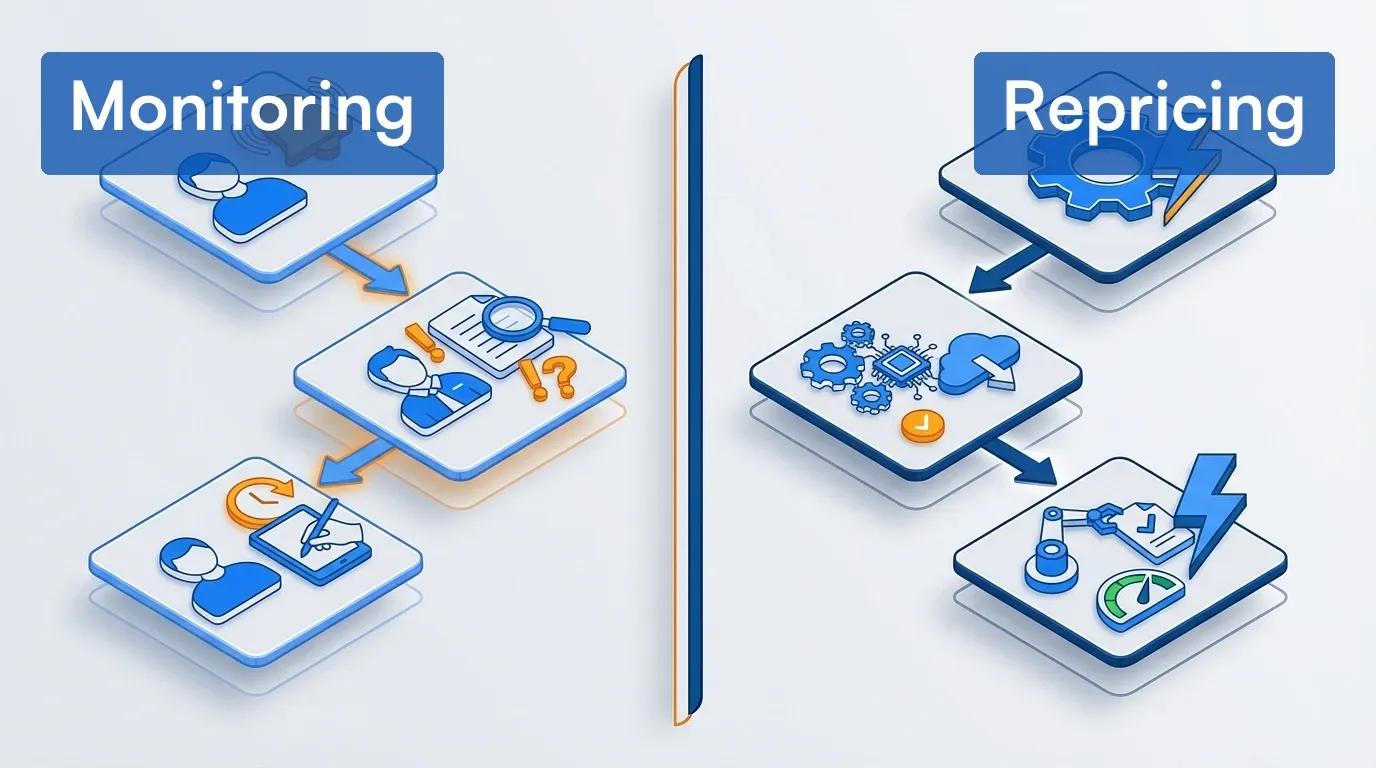 Monitoring supplies information for review; repricing adds a process for changing your own prices.
| Need | Capability to evaluate |
|---|---|
| Observe competitor changes | Monitoring and alerts |
| Review before changing a price | Monitoring plus an assigned decision process |
| Update your prices automatically | A repricing integration with rules, limits and oversight |
Tool Comparison Matrix
Use these groups to shortlist tools. Their capabilities overlap, and a monitoring product's API access does not by itself mean it can reprice your store.
Change monitoring and alert-focused tools
| Tool | Documented focus | Schedule and allowance | Entry paid price |
|---|---|---|---|
| Visualping | Page content changes with before-and-after captures, AI summaries and importance prompts | Cloud minimum 60 minutes on Free; 2 minutes on Personal 10K and Business; monthly checks apply | $14/month billed monthly, or $120/year ($10/month equivalent) |
| Fluxguard | Browser crawling with visual, HTML and text changes | Credit-based; 5-minute checks start on Premium | $110/month billed monthly |
Dedicated ecommerce price monitors
| Tool | Documented focus | Update schedule | Repricing |
|---|---|---|---|
| Pricefy | Product matching and competitor price monitoring | Free once daily; paid twice daily | Pro and above |
| Prisync | URL-based catalog price and availability monitoring | Three updates daily on URL-based plans | Premium and above |
| Price2Spy | Price, marketplace and MAP monitoring | Starter daily change alerts; Premium up to eight checks daily | Separately priced module |
A notification described as instant can still follow scheduled data collection. Ask how detection, processing and delivery timing relate.
Managed intelligence services
| Tool | Documented focus | Commercial scope |
|---|---|---|
| Skuuudle | Managed price monitoring and product matching with human quality control | Quote based on websites, products and collection frequency |
Confirm the refresh schedule, matching review and delivery format in the proposal. Human quality control is a service feature, not a guarantee that every data point is correct.
Enterprise dynamic repricing platforms
| Tool | Documented focus | Pricing |
|---|---|---|
| Competera | Competitive Data plus Adaptive AI and Contextual AI pricing editions | Scope-based quote |
| Omnia Retail | Price monitoring and automated pricing strategies | Single-shop SMB solution from €399/month; enterprise custom |
For more on AI features, see our AI tools for competitor analysis guide.
Pricing Breakdown
| Tool | Free or evaluation option | Paid pricing and scope |
|---|---|---|
| Visualping | 5 pages, 150 monthly checks | Personal 1K: $14/month or $120/year, 10 pages and 1,000 checks/month; Business 20K: $140/month or $1,200/year, 200 pages and 20,000 checks/month |
| Fluxguard | Estimated 3 sites, 1 user, 3 versions per page | Monthly Standard $110; Plus $220; Premium $550 |
| Pricefy | 50 SKUs, 5 competitors, daily updates | Monthly Starter $49/100 SKUs; Pro $99/2,000; Business $189/15,000; Enterprise $499/25,000 |
| Prisync | 14-day trial, no card required | URL-based monthly Professional $99/100 products; Premium $199/1,000; Platinum $399/5,000 |
| Price2Spy | 14-day trial, no card required | Starter, Basic and Premium by quote; extra modules and services cost separately |
| Skuuudle | No free plan listed; request a quote | Custom scope and quote |
| Competera | No free plan listed; ask about a pilot | Custom scope and quote |
| Omnia Retail | No free plan listed; request a demo | Single-shop solution from €399/month; enterprise custom |
Prices checked October 28, 2026. Pricefy annual billing is discounted, but the comparison above uses monthly prices. Prisync also offers channel-based and hybrid plans with different prices and refresh scope; its eligible API access adds 20% to the subscription fee. Fluxguard site counts are credit-based estimates, assuming about 10 pages per site checked daily. Get written terms for custom services.
Free competitor price tracking: what $0 actually gets you
Visualping Free includes 5 pages, 150 shared checks per month, AI summaries, email and webhook options, and API access. The 60-minute minimum cloud interval does not imply enough checks to run every page hourly. Five monitors checked once daily use 150 checks in 30 days and 155 in 31 days, exceeding the Free allowance in a 31-day month even before extra checks. Failed checks also consume the allowance; monitoring pauses after exhaustion until the reset or an upgrade.
Fluxguard Free has an estimated capacity of 3 sites under its daily-crawl assumptions. Pricefy Free includes 50 SKUs against 5 competitors with one update daily and AI matching. Test the pages or products you need and calculate the required usage before assuming a free plan covers them.
Honest Limitations and Trade-offs
- Visualping: You choose the URLs and review the captured changes. It is not a catalog matching or native store repricing system. Its default AI Mode ignores CSS-only styling changes, and AI summaries need review.
- Fluxguard: Site estimates depend on credits and crawl scope. AI summaries start on Plus; webhooks and the fastest five-minute schedule start on Premium.
- Prisync: On URL-based plans, price history and instant email notifications are Platinum features. API access is an additional charge on eligible plans.
- Price2Spy: Repricing, automatching and screenshots are separate modules. Confirm the full configured cost in a quote.
- Pricefy: Once- or twice-daily collection can miss a short-lived price between checks. Dynamic repricing starts on Pro.
- Skuuudle: Confirm the refresh schedule, data-quality process, contract and delivery requirements in its managed-service proposal.
- Competera: Requirements vary by edition. Adaptive AI requires at least three months of transaction history; Contextual AI requires 24 months.
- Omnia Retail: Confirm the included shops, markets, channels and deployment scope rather than treating the advertised entry price as an enterprise quote.
Start with Visualping's free plan to test a selected competitor page and an alert condition before expanding the setup.
When Each Tool Makes Sense
 Choose by workflow, required capacity and review process; the diagram is not a measured ranking.
Scenario 1: You need fast alerts with visual proof
Consider: Visualping or Fluxguard for page-change monitoring.
Visualping provides before-and-after captures, AI summaries and Important or Not Important classifications in email alerts and change entries. Cloud checks can run as often as every two minutes on Personal 10K and Business, within the monthly allowance. Detection and delivery can take longer than the selected interval.
Captures can support MAP monitoring and competitive pricing analysis. Review the captured price, product, seller and timestamp before drawing a conclusion. Fluxguard is another option for visual, HTML and text comparisons; test the features and plan you need. Neither comparison here establishes legal proof or a speed winner.
Scenario 2: You track a product catalog against competitor stores
Consider: Pricefy, Prisync or Price2Spy.
Pricefy includes AI matching on every plan and repricing from Pro. Prisync's URL-based plans track prices and availability, with its dynamic pricing engine from Premium and supplier MAP monitoring from Platinum. Price2Spy Basic adds marketplace monitoring, historical price reports and MAP monitoring; screenshots and repricing are paid modules.
Give each vendor representative identifiers, variants and competitor listings. Compare the resulting matches and exceptions before importing a larger catalog. For selected pricing, promotion or policy pages, a general page monitor may be sufficient.
Scenario 3: You need enterprise repricing with demand modeling
Consider: Competera or Omnia Retail.
Competera offers a pricing engine based on elasticity in Adaptive AI and demand modeling with what-if simulations in Contextual AI. It also offers Competitive Data separately, so it is not restricted to repricing projects. Omnia supports monitoring and pricing strategies with a configurable strategy tree.
Ask the vendor to demonstrate the proposed rules, approval controls, data requirements and rollback process using your catalog. A vendor's forecast-accuracy or revenue claim is not a result established for your business.
Scenario 4: You want managed competitive intelligence
Consider: Skuuudle.
Skuuudle provides managed price data and matching with human quality control. Its pricing page bases a quote on the websites, products and frequency required. Agree the delivery schedule, exception handling, coverage and any integrations in writing. Compare that service scope with the work your team would perform using a self-serve tool; this guide does not establish a cost or speed winner.
Scenario 5: You need technical-grade audits and compliance
Consider: Fluxguard for documented page comparisons and crawling features.
Standard adds area filters, network blocks and form submission behind logins. Plus adds regional proxies, AI summaries and custom prompts. Premium adds AI filtering and webhooks. Monthly prices are $110, $220 and $550 respectively.
Confirm history, export and access requirements for your audit process. A monitoring tool alone does not establish compliance with a regulation.
Scenario 6: General competitive monitoring beyond just pricing
General page monitors can also watch content, feature and policy pages. Use them as one input to competitive monitoring, and check whether a saved capture contains the information you need. Our guide to analyzing competitor websites describes other areas to review.
Setup Walkthrough: Visualping
Step 1: Create an account and choose a plan
Sign up at visualping.io/sign-up. Compare both active-page capacity and monthly checks. Cloud monitoring does not require a browser extension.
Step 2: Add a page and verify the preview
In the dashboard, choose Start monitoring → Single, enter the URL and select Go. Confirm the intended product, variant, seller, region and price appear in the capture. In AI Mode, select the relevant area or use the full page. Include shipping or stock information in the selected area if the alert condition needs it. If it is elsewhere on the same page, enlarge the area or use the full page, then verify that the capture includes it. For a different URL, use another monitor and account for its page slot and checks.
Step 3: Choose a sustainable schedule
Free allows a cloud interval as short as 60 minutes, with 150 checks shared across the account each month. Personal 10K and Business allow two-minute cloud intervals. Choose a supported interval within the allowance and your response needs.
Step 4: Describe important changes
An illustrative prompt for Alert me when:
Alert me when the selected product's displayed price decreases,
its price increases by more than 5%, or its availability changes.
Include shipping changes only when shipping is visible in the monitored area.
Ignore review-count and timestamp updates.
The prompt guides AI classification; it does not guarantee accurate filtering. Confirm Alert me only when the AI condition is met is enabled if you want only matching notifications.
Step 5: Enable notification channels
Email and webhooks are available on every plan. Native Slack requires Business; see the notification guide. Notifications follow detected changes and enabled settings, so do not treat them as instantaneous source updates.
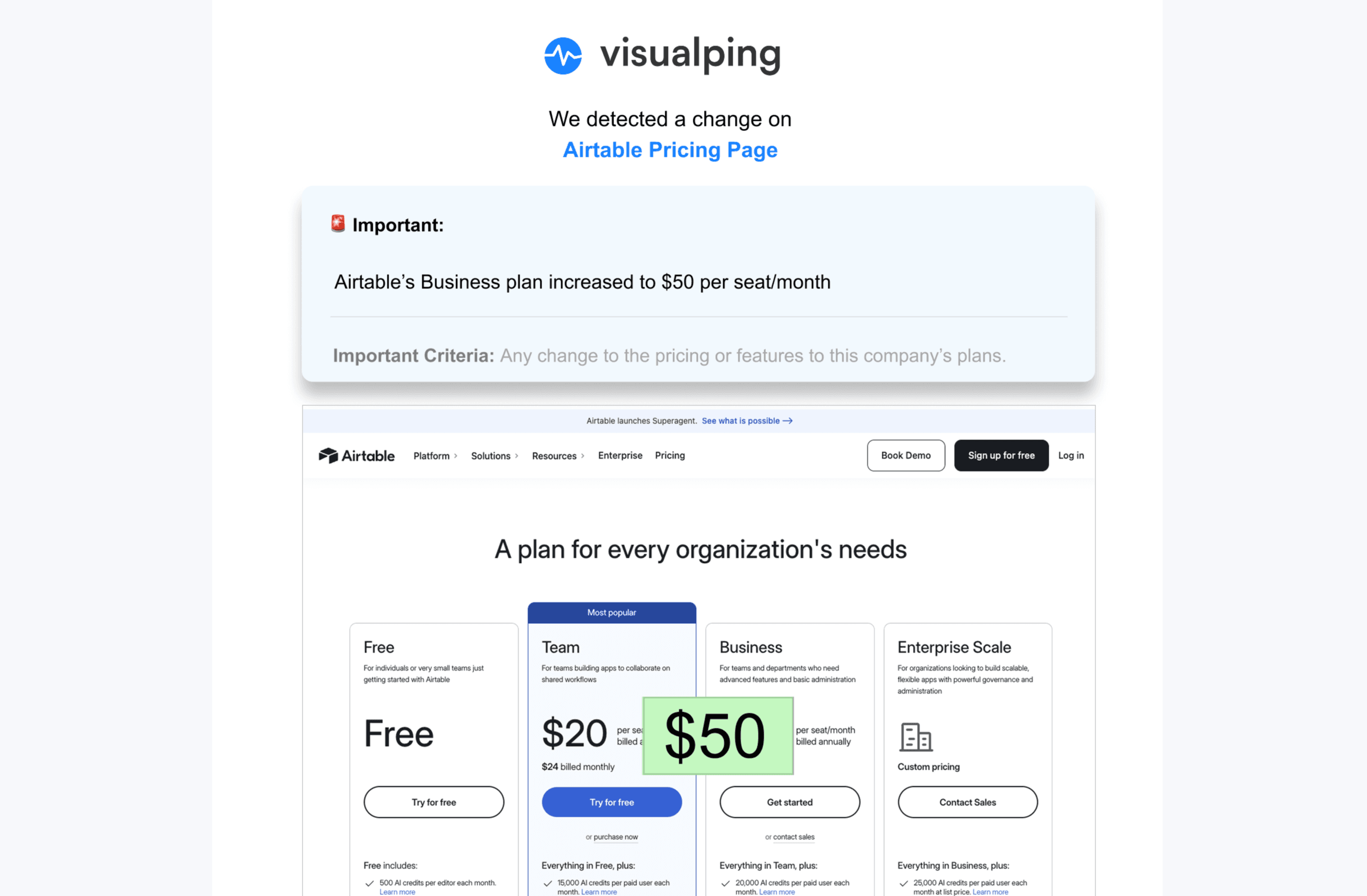
The example below illustrates a fictional Airtable price increase, not a verified historical price or a live alert:
Step 6: Add more URLs with Bulk
Choose Start monitoring → Bulk and paste URLs, optionally paired with titles in a second column. Bulk creation is available on every plan within the active-page limit. Review the common schedule and importance prompt, then verify each new monitor's capture. Use Business labels when you need that organization feature.
Setup Overview: Competera
Use the evaluation to confirm which product and edition matches your requirements:
- Competitive Data: Confirm catalog inputs, product identifiers, matching scope and delivery terms.
- Adaptive AI: The current documentation requires at least three months of transaction history.
- Contextual AI: The current documentation requires 24 months of historical data.
- Deployment: Confirm integrations, decision ownership, pilot criteria, approval controls and the implementation schedule in your proposal.
History requirements differ by edition. Ask Competera to demonstrate the proposed workflow with your own data.
Setup Overview: Omnia Retail
Omnia's pricing page distinguishes a single-shop SMB solution from a custom multi-shop enterprise solution. It lists monitoring, dynamic pricing and ecommerce integrations.
For an evaluation, prepare your product feed, target competitors and markets, pricing constraints, and the people who will review exceptions. Ask for a demonstration of the Pricing Strategy Tree and confirm how a recommendation becomes an approved price update. Agree the feed refresh schedule, supported integrations and rollout process in the proposal.
Best Practices That Actually Work
 Use a review process that connects a detected change to a pricing decision.
The following are editorial practices to evaluate in your workflow, not measured results from customer setups.
1. Match products precisely
Match identifiers where available and check the variant, pack size, condition and seller. Document equivalence rules when products lack the same identifier.
Visualping leaves URL selection to you. Pricefy includes AI matching on every plan; Price2Spy offers automatching and matching services at additional cost; Prisync offers a paid competitor-matching service. Skuuudle includes human quality control in its service. Ask each vendor to show matching errors and corrections on your representative catalog.
2. Monitor the total landed price
Compare the price a relevant buyer would pay: item price, shipping, discounts, membership conditions, quantity and taxes where applicable. A hypothetical item priced $10 higher with free shipping is $5 cheaper overall than the other seller's item with $15 shipping, assuming all other charges are equal. Keep location, currency and purchase conditions consistent.
3. Tier your monitoring cadence
Assign schedules according to the decisions you need to make, then calculate the checks or credits required. A promotion with a short response window may justify more frequent checks; an item reviewed periodically may not.
For MAP monitoring, decide what capture and timestamp evidence the review process requires. Test whether the chosen interval, page access and alert settings provide that evidence. No schedule guarantees capture of every brief change.
4. Create response SOPs
Write a response procedure before sending alerts to a team. For example:
When a relevant competitor price changes:
- Confirm the product, seller, variant and total price.
- Review the capture and current source page.
- Assign the decision to the category owner.
- Check margin and promotion constraints before changing our price.
- Record the action or the reason for taking no action.
In Visualping, native Slack is a Business feature and SMS starts on Personal 5K. Enable the intended destinations and confirm only-important notification settings separately from the importance prompt.
5. Review and refresh quarterly
Quarterly checklist:
- Add new competitors that entered market
- Remove competitors that exited
- Update product URLs (pages change with redesigns)
- Refine monitoring regions
- Review tag/category structure
- Audit alert effectiveness
Visualping's free plan can be used to test selected pages within its allowance. Bulk creation is available on every plan; native Slack requires Business.
Frequently Asked Questions
How accurate is automated price matching?
Assess it on a labeled sample from your own catalog. Review exact matches, wrong matches, unmatched products and ambiguous variants separately. Ask how the vendor defines accuracy and what happens when identifiers are absent. The sources reviewed here do not establish a comparable cross-vendor accuracy score.
Should I monitor marketplaces differently than retailer sites?
Specify the seller, fulfillment method, variant and shipping destination. A displayed offer can change because one of those conditions changes. Confirm any API's authorization and coverage before relying on it for competitor data; access to a seller API does not mean access to every competitor offer.
See our Amazon price tracking and Walmart price tracking guides for page-monitoring considerations.
How do I avoid alert fatigue?
Select the relevant page area, write an importance condition and test it against sample changes. Area selection and AI prompts can help focus a monitor, but confirm only-important delivery is enabled and the required information is visible in the area. Route alerts to an owner who can review them. If you need digests or separate team channels, confirm that feature and its plan requirements.
When do I need full repricing vs. just monitoring?
Use monitoring when people can review the information and make decisions in time. Evaluate automation when you need a system to apply approved pricing rules across your catalog. Test limits, exceptions and rollback before allowing automatic updates.
Compare the total configured cost. Visualping offers a free monitoring plan; Pricefy repricing starts on Pro at $99/month billed monthly; Omnia's single-shop offering starts at €399/month. These are different scopes, not equivalent packages.
Can I monitor competitors legally?
The answer depends on the source, access method, use of the information and applicable law. Public visibility alone does not resolve contract, copyright or privacy questions. Ask counsel to review your particular workflow, especially authenticated access or collection at scale.
Use authorized access, review site terms and avoid bypassing access controls. A robots.txt policy is a crawler instruction, not legal permission. Our web scraping guide provides further context.
How do I track competitor prices for free?
Visualping Free offers 5 pages and 150 shared monthly checks. Fluxguard Free has an estimated three-site capacity under its credit assumptions. Pricefy Free tracks 50 SKUs against 5 competitors with daily updates. Each requires a separate capacity and schedule calculation.
Google Alerts sends notifications when matching new results appear in Google Search. It serves a different purpose from repeatedly checking a selected product page for price edits.
What's the difference between price tracking and competitive intelligence?
Price tracking focuses on prices and related offers. Competitive intelligence can also examine product launches, hiring, marketing, policies and other evidence. Use price data as one input; a changed price alone does not establish a competitor's strategy or your return on monitoring.
How often should I check competitor prices?
Work backward from the decision deadline, then test the source and budget. Choose an interval that the tool supports and that the allowance can sustain. Review the schedule when promotions or priorities change; industry labels alone do not establish a necessary cadence. See the best practices section.
Related reading
- MAP Pricing Compliance: Key Strategies for Retail Success
- Retailer Price Monitoring Guide
- How to Conduct a Competitive Pricing Analysis
- How to Monitor Executive Leadership Changes
- Monitoring Competitor Facebook and Instagram Ad Libraries: How...
- Best Intent Data Providers for B2B Teams in 2026
- The 4 Types of B2B Intent Data (and the One Most Teams Miss)
- Competitor Monitoring Study 2026: What 12,000 Tracking Jobs Re...
Summary Recommendations
| Need | Tools to evaluate | Main question |
|---|---|---|
| Selected page-change alerts | Visualping, Fluxguard | Does the capture and alert identify the change you need? |
| Catalog price matching | Pricefy, Prisync, Price2Spy | Are the products and variants matched correctly? |
| Managed collection and matching | Skuuudle | What coverage, review and delivery are included? |
| Pricing automation | Competera, Omnia Retail | How are rules, approvals, exceptions and rollback handled? |
Test a representative page or catalog sample before committing. Our free price tracker guide explains how to start a monitoring workflow.
Contact: LinkedIn | press@visualping.io
Want to monitor web changes that impact your business?
Sign up with Visualping to monitor selected pages and receive alerts based on your settings.
Eric Do Couto
Eric Do Couto is the Head of Marketing at Visualping. He leads content strategy, growth operations, and brand positioning for website change detection.
More articles by Eric Do Couto