Best Buy Black Friday Deal Alerts: TVs, Laptops, Apple (2026)
By Emily Fenton
Updated July 3, 2026
Black Friday 2026 falls on Friday, November 27, and Best Buy will start rolling out deals weeks before that. The pages are already moving: in a sample of more than 4,400 active Best Buy page monitors on Visualping, 42% detected at least one change in the past 30 days. That was midsummer, the quiet season. In November, prices, stock labels, and deal banners on popular products can change several times a day.
This guide shows you how to layer Best Buy's app notifications with Visualping page monitoring so you catch the exact price drops, restocks, and doorbusters you care about (specific TVs, laptop configs, Apple gear) before they sell out.
Set up both alert layers in about five minutes
Two tools cover each other's blind spots:
- Install the Best Buy app and turn on push notifications in Settings. Save your target products so app promos reach you.
- Create a Visualping monitor for each product URL you actually plan to buy. Visualping watches the page itself and alerts you when the price, stock status, or promo badge changes.
- Keep email as your default alert channel. If you coordinate buys with family or a group chat, webhooks and Zapier work on every plan.
Best Buy often updates product pages with no announcement. The app tells you about the promotions Best Buy wants to push. Visualping tells you what changed on the page you care about, which is where the signal lives during doorbuster hours.
Why one alert source loses you the deal
Doorbusters can vanish in minutes. The Best Buy app covers broad promos and saved items, but push notifications lag and get buried under everything else on your lock screen. Visualping watches the exact page element you select, so a $300 cut on the specific 65-inch OLED you want triggers its own alert. Run both and you have a backup when either misses.
How to set up Visualping on a Best Buy product page
- Copy the product URL for the exact model you want: a specific TV, a laptop config, an AirPods listing.
- Paste it into the monitor field at Visualping.io, or create a free account first so your monitors save to a dashboard.
- Select the area to watch. Highlight the price and "Add to Cart" section only. Monitoring the whole page catches review counts and recommendation carousels you don't care about.
- Set the check frequency. Deal hunters run tight schedules: among sampled retail-site monitors on Visualping, nearly a third (31%) check hourly or faster, and 97% check at least once a day. The free plan includes 150 cloud checks across 5 pages per month, plus unlimited local monitors that run from your own device, which covers a short list checked daily. For 5-minute checks on doorbuster pages during peak week, you'll want the Personal plan at $25 per month.
- Write your alert condition in plain language: "Alert me when the price drops below $800" or "Alert me when this is back in stock." Visualping AI reads every detected change against your condition and flags the ones that match as IMPORTANT. Each alert also arrives with an AI summary of what changed, so you can tell a real price cut from a reshuffled promo banner without opening the page.
- Turn on the "Only alert me when the condition is met" filter. During Black Friday week, this is the difference between three useful alerts and forty noisy ones.
- Pick your channels. Email works on every plan. Business plans add native Slack, Microsoft Teams, and Google Sheets integrations, plus bulk import if you're loading a long SKU list. API keys and webhooks come with every plan, including Free, if you want alerts piped into a spreadsheet or an SMS tool.
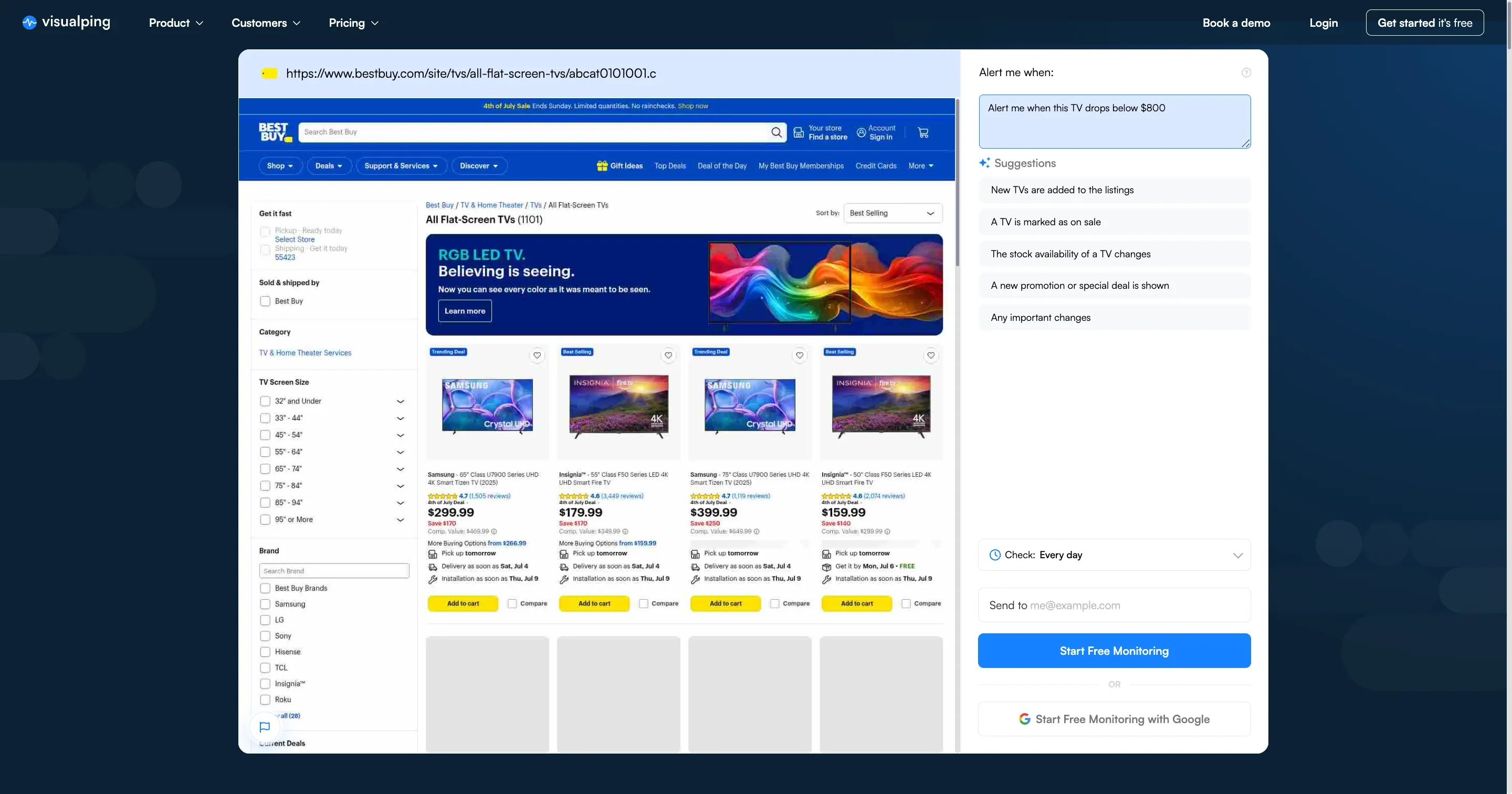 An hourly check catches a doorbuster while it is still in stock
One more trick: monitor the bundle and open-box listings alongside the base model. The deepest effective price on a TV often shows up as an open-box unit that never gets promoted.
When Best Buy deals actually drop in 2026
Black Friday is November 27 and Cyber Monday is November 30, but Best Buy treats the whole month as deal season. Expect early access sales from the first week of November, weekly doorbusters through the month, and price changes landing overnight and in the early morning.
 Arm the alerts before Thanksgiving dinner, not after
November is also when everyone else gets organized. In a six-month Visualping sample spanning last holiday season, November was the biggest month for new retail-deal monitors: 2,271 distinct users set them up that month, 26% more than in October. Build your shortlist in late October and your monitors are watching before the crowd shows up. The same monitors keep working when the sale rolls into Best Buy Cyber Monday deals three days later.
Category playbooks: TVs, laptops, Apple, audio
TVs: the bundle page hides the best price
Track the model pages on your shortlist (LG C-series OLED, Samsung QLED, Sony Bravia), then add monitors on the bundle and open-box listings for the same sets. A TV-plus-soundbar bundle or open-box unit often beats the headline doorbuster price. A useful condition: "Alert me when this TV drops below $1,000."
Laptops: specific configs drop first
Monitor exact SKU pages across ASUS, Lenovo, MSI, HP, and MacBook models, and watch config variants (RAM and storage) separately. Prices frequently drop on one build days before the rest of the line follows.
Apple: early promos are the pattern
AirPods and Apple Watch deals tend to land before Black Friday itself, so start those monitors early. iPad bundles (Pencil, keyboard) and last-generation MacBooks usually take the deepest cuts of the Apple lineup.
Audio: restocks matter as much as price
Popular Sony, Bose, and Beats models sell out and reappear throughout November. Set a restock condition ("Alert me when this shows Add to Cart") alongside your price alert. Our guide to tracking product availability covers restock setups in more detail.
Price match, returns, and membership perks
Best Buy usually excludes doorbusters and limited-time promos from price matching, though it costs nothing to ask. The more useful lever is the extended holiday return window: buy early at a good price, keep your monitor running, and if the price falls further you can request an adjustment or rebuy at the lower number. My Best Buy Plus and Total memberships add early access to some sales, which pairs well with monitors on the products you've shortlisted.
Best Buy or Amazon for Black Friday electronics?
Best Buy regularly matches or beats Amazon on TVs, laptops, and premium audio, and store pickup lets you lock inventory instead of gambling on shipping cutoffs. Amazon wins on breadth. If you're chasing electronics, watch both: set monitors on the Amazon listing and the Best Buy listing for the same model and let the alerts settle it. The same setup works for Best Buy price tracking year-round, once the holiday rush ends.
Which alert method actually wins?
| Method | Speed | Coverage | Setup time | Best for |
|---|---|---|---|---|
| Best Buy app push | Fast | Saved items and broad promos | 1 min | Casual monitoring |
| Email newsletters | Slow | Weekly roundups | 1 to 2 min | Background awareness |
| Visualping page monitoring | Minutes from the change | Any product, variant, or bundle page | 2 to 3 min | Doorbusters, restocks, exact price thresholds |
Use all three. Let the app cover storewide promos while Visualping watches the exact SKUs you plan to buy.
FAQ: Best Buy Black Friday deal alerts
What's the fastest way to get Best Buy Black Friday alerts in 2026? Turn on Best Buy app push notifications, then add a Visualping monitor to each product page you care about. The app covers storewide promos; Visualping catches price and stock changes on your exact SKUs, usually within minutes.
Can Visualping tell me when a product is back in stock? Yes. It detects page changes like "Sold Out" flipping to "Add to Cart." Select the price and cart area, then set a condition like "Alert me when this is back in stock." We cover Best Buy stock alerts in a separate guide.
How much monitoring is free? The free plan includes 150 cloud checks across 5 pages per month, plus unlimited local monitors that run from your device. That handles a small shortlist checked daily. Paid plans with more pages and faster checks start at $10 per month.
Does the same setup work for Cyber Monday? Yes. Cyber Monday 2026 is November 30, and your monitors keep running straight through it. Many of the online-only deals that weekend show up as page changes before any email announces them.
Get your alerts ready before November 27
Setup takes minutes, so add your first monitor now: create your free Visualping account, paste in a Best Buy product URL, and write the condition you actually care about ("Alert me when this drops below $500"). When the November wave starts, your deals will find you by email, while everyone else hears about theirs from the group chat.
Get real-time price alerts
Sign up with Visualping to monitor any prices online and get notified of price changes.
Emily Fenton
Emily was the Product Marketing Manager at Visualping. She has a degree in English Literature and a Masters in Management.
More articles by Emily Fenton