How to Monitor SEC Filings: Get Real-Time EDGAR Alerts for Investors and Analysts
Updated September 10, 2026

 Disclosure: This guide is published by Visualping. As the creator of the page monitoring agent (also known as a website monitoring tool) discussed in this article, we have a commercial interest in readers finding value in our product. We believe our tool provides genuine value for SEC filing monitoring, and we have worked to present alternatives fairly, but readers should evaluate all options independently based on their specific needs.
Why SEC filing speed matters
Market-moving SEC filings demonstrate the value of fast information access every trading day. When material 8-K disclosures appear on EDGAR, sophisticated traders and analysts with automated monitoring systems often act before the news reaches mainstream financial media, sometimes capturing significant price movements in the process. Executive departures, failed clinical trials, acquisition announcements, and cybersecurity incidents all flow through EDGAR first.
This information asymmetry plays out daily across thousands of SEC filings. The difference between catching a material disclosure in minutes versus hours can translate directly into investment returns, competitive advantage, or compliance risk.
The challenge is scale. The SEC's EDGAR system processes filings continuously throughout each business day, with volume concentrated around quarterly reporting deadlines and market close. Manual checking is impractical. The native RSS feeds are limited and do not cover all filing types. Most professionals either pay for expensive terminal subscriptions or accept that they will miss critical disclosures.
Important Notice: This content is for informational purposes only and does not constitute investment, legal, or financial advice. SEC filings contain important information that may affect investment decisions, but monitoring tools are not a substitute for professional financial guidance. Consult with a qualified financial advisor before making investment decisions based on SEC filing information.
Example scenario: Consider a compliance officer at a regional asset manager who sets up monitoring for their portfolio companies. When one holding files an unexpected 8-K disclosing executive turnover, the alert arrives within minutes of the filing appearing on EDGAR. This gives the team time to review their position sizing with full context before the next trading session, rather than reacting to headlines the following morning.
This guide walks through how to set up SEC filing monitoring using both free and paid methods, with emphasis on getting actionable alerts rather than information overload. (Selling to public companies rather than investing in them? See turning SEC filings into sales signals.)
Understanding SEC filing types worth monitoring
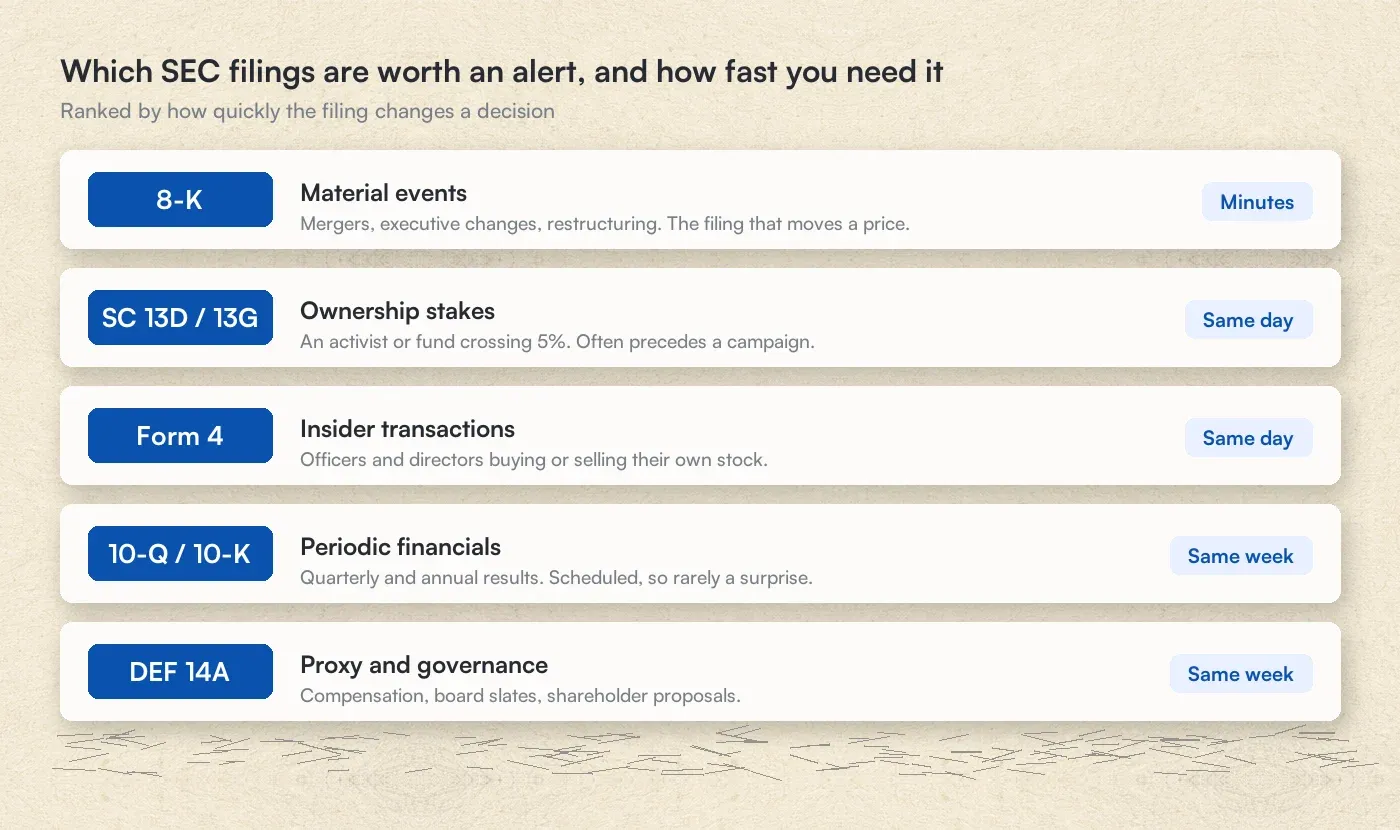 Which SEC filings are worth an alert, and how fast you need it
Not all SEC filings deserve your attention. Before setting up monitoring, it helps to understand which filing types signal material information and which are routine administrative updates.
Material event filings (highest priority)
Form 8-K filings report unscheduled material events that shareholders need to know about. According to SEC regulations, these include executive departures, mergers and acquisitions, bankruptcy filings, cybersecurity incidents, and changes to financial guidance. Companies must file 8-Ks within four business days of a triggering event, though many file the same day to meet market disclosure expectations. The SEC's Investor.gov website confirms that companies generally have four business days to file a Form 8-K for events that trigger the filing requirement. Because 8-Ks often contain market-moving information and appear without warning, they represent the highest-priority filing type for most monitoring use cases.
Periodic financial filings
Form 10-K (annual reports) and Form 10-Q (quarterly reports) contain comprehensive financial statements and management discussion. While the timing of these filings is generally predictable based on earnings calendars, monitoring ensures you catch them immediately upon publication rather than waiting for news coverage or analyst summaries.
Ownership and insider activity
Form 13-F filings reveal institutional holdings on a quarterly basis. According to the SEC's official Form 13-F documentation and the SEC's Frequently Asked Questions About Form 13F, hedge funds and asset managers with over $100 million in qualifying assets must disclose their positions within 45 days of quarter-end. These filings offer a window into how sophisticated investors are positioning their portfolios.
Form 4 filings report insider transactions. When executives, directors, or major shareholders buy or sell company stock, they must file within two business days. According to the SEC's investor bulletin on insider transactions, Form 4 must be filed within two business days following the transaction date. Insider buying, in particular, often signals management confidence.
Schedule 13D and 13G filings disclose when an investor acquires more than 5% of a company's shares. Per SEC press release 2023-219, the deadline to file a Schedule 13D is now five business days after crossing the 5% ownership threshold, following rule amendments adopted in October 2023. A 13D filing, which requires disclosure of investment intentions, often precedes activist campaigns or takeover attempts.
Proxy and governance
DEF 14A proxy statements contain executive compensation details, board nominations, and shareholder proposals. For competitive intelligence purposes, proxy statements reveal how competitors structure incentives and what governance issues they face.
Registration statements
Form S-1 filings accompany initial public offerings and contain detailed business descriptions, risk factors, and financials for companies preparing to go public. Form S-3 and S-4 filings cover secondary offerings and M&A registrations respectively.
Native SEC EDGAR monitoring options
The SEC provides several free tools for accessing filings. Understanding their capabilities and limitations helps contextualize why dedicated monitoring tools exist.
EDGAR company search
Every US based public company has a dedicated EDGAR page listing all their filings. You can search by company name, ticker symbol, or CIK (Central Index Key) number at the SEC EDGAR Company Search. The limitation is obvious: this requires manual checking. There is no alert functionality built into the search interface.
EDGAR full-text search
The SEC offers full-text search across all filings, allowing you to find documents mentioning specific keywords, phrases, or topics. This is useful for research but lacks any alerting capability. You cannot set up notifications when new filings match your search criteria.
EDGAR RSS feeds
The SEC provides RSS feeds for company-specific filings and certain filing types. You can subscribe to these feeds through an RSS reader to receive updates. However, the feeds have several limitations:
- Not all filing types are supported in RSS format
- No summarization or context to help you understand what matters
- Feeds occasionally experience delays during high-volume periods
- Raw filing information without context about significance or materiality
These free options work for casual monitoring. For professionals who need comprehensive coverage, faster alerts, and context about what changed, dedicated monitoring tools provide significant advantages.
How to monitor SEC filings with Visualping
Visualping monitors any webpage for changes and sends alerts when updates occur. For SEC filing monitoring, this means you can track any EDGAR page, not just the filing types supported by RSS feeds.
What you receive when a filing is published
When a new filing appears on a monitored EDGAR page, you receive an email containing:
-
An AI-generated summary explaining the filing type and its key contents in two to three sentences. For an 8-K, this might read: "Form 8-K filed reporting entry into a material definitive agreement. The company has signed a $200M credit facility with JPMorgan Chase. Agreement includes standard covenants and a 5-year term."
-
A screenshot of the EDGAR page with the new filing highlighted, so you can see exactly what changed
-
A direct link to view the full filing on the SEC website
This combination lets you triage filings quickly. Most alerts take 10 seconds to review. Material disclosures that warrant deeper reading are immediately obvious.
Why Visualping works for SEC filing monitoring
Several features make Visualping particularly suited to this use case:
- Monitor any EDGAR page regardless of filing type, whereas RSS feeds only cover certain categories
- AI-generated summaries provide immediate context without requiring you to open every document
- Customizable check frequencies range from daily monitoring on the free tier down to 5-minute intervals on paid plans
- Folder organization and Slack integration streamline workflows for teams tracking multiple companies
Method 1: monitor a company's complete filing history
This approach tracks all filings from a specific company, alerting you whenever any new document is published.
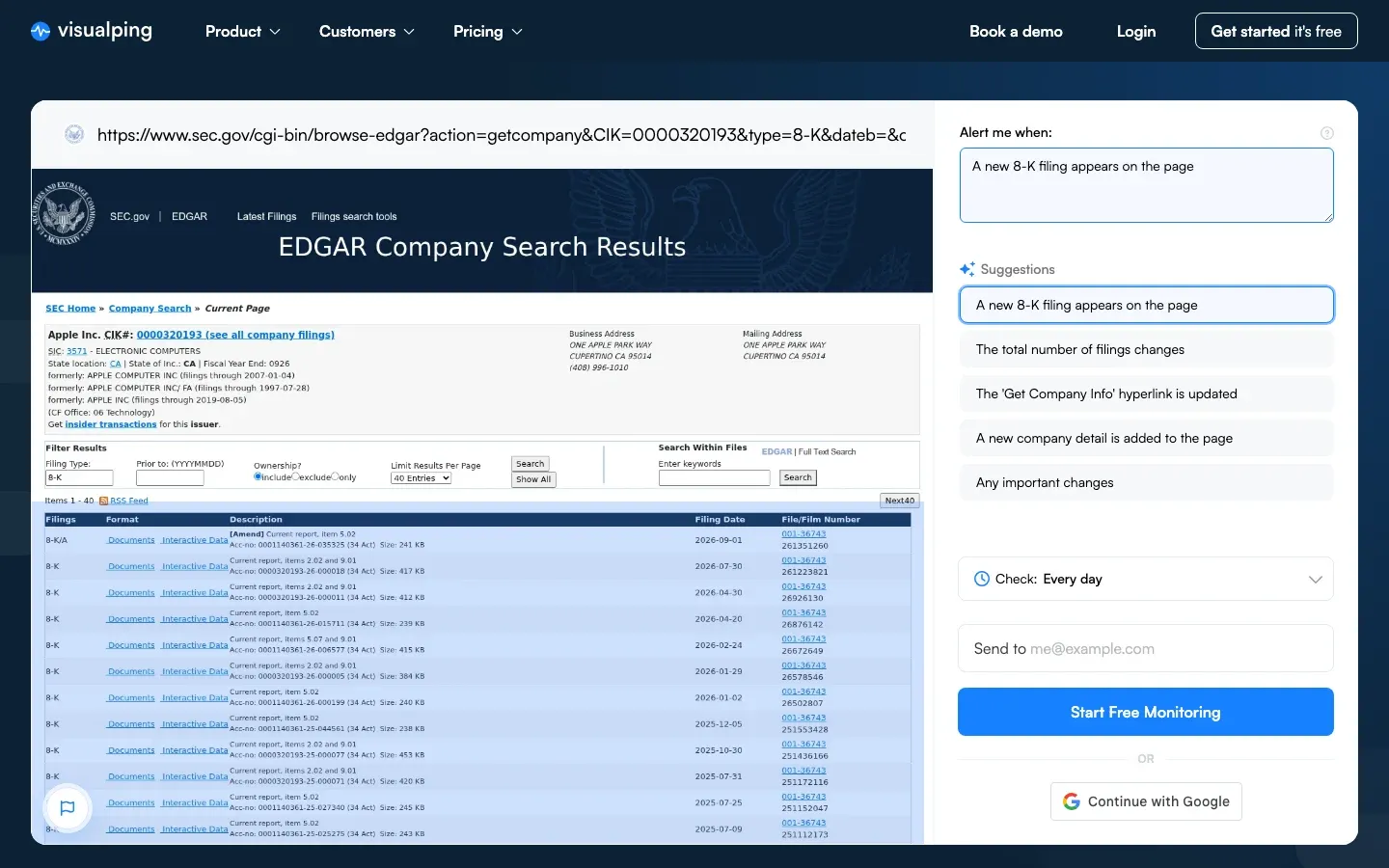 Monitoring an EDGAR filing list: the condition fires when a new 8-K appears
Step 1: Find the company's EDGAR page. Navigate to the SEC EDGAR website and search for your target company by name, ticker, or CIK number. Click through to their filings page. The URL will follow this format:
https://www.sec.gov/cgi-bin/browse-edgar?action=getcompany&CIK=0000320193&type=&dateb=&owner=include&count=40
Note: EDGAR URLs can vary depending on how you navigate to a page. Always verify your monitored URL shows the expected filings before relying on alerts.
Step 2: Set up monitoring in Visualping. Copy the EDGAR URL and paste it into the search field on Visualping's homepage. The page will load in the preview window. Use your cursor to select the area containing the filing list. This tells Visualping to focus on changes within that specific region rather than monitoring the entire page.
Step 3: Configure AI alerts. In the "Alert me when" field, describe what you are looking for in plain language. For comprehensive monitoring, enter: "A new filing has been added to this list." For more targeted alerts, try: "Alert me when an 8-K or Form 4 is filed" or "Notify me of any filing related to executive changes or acquisitions."
Step 4: Set your check frequency. Choose how often Visualping should check the page for changes. For active monitoring during market hours, 15 to 30 minute intervals work well. For less time-sensitive tracking, daily checks may suffice.
Step 5: Review your alerts. When a new filing appears, you will receive an email with the summary, screenshot, and link described above. Most users find they can process 10-20 alerts per day in under five minutes total.
Method 2: monitor specific filing types across multiple companies
Investment professionals often need to track the same filing type across a portfolio of companies. For example, a fund manager might want alerts whenever any company in their watchlist files a 13-F, or a compliance officer might need to track 8-K filings across all portfolio holdings.
Start by creating a dedicated workspace in Visualping for this monitoring category, such as "13-F Monitoring" or "Portfolio 8-K Alerts." Then set up individual monitors for each company's EDGAR page, using consistent alert criteria across all of them. The workspace structure keeps alerts organized and allows you to adjust settings in bulk if needed.
For more on organizing large-scale monitoring projects, see Visualping for Business: Work in Teams and at Scale.
Method 3: monitor for keywords within filings
EDGAR's full-text search allows you to find filings containing specific terms. By monitoring the search results page, you can receive alerts whenever new filings match your keyword criteria.
This approach is powerful for tracking topics across all public companies, not just a predefined watchlist. Examples include:
- Monitoring for all filings mentioning "cybersecurity incident" or "material weakness"
- Tracking filings that reference a specific competitor, product, or technology
- Watching for disclosures related to regulatory actions or litigation
To set this up, perform your search on EDGAR's full-text search page and copy the results URL. Paste this URL into Visualping, select the search results area, and configure your alert preferences. When new filings match your search terms, they will appear in the results and trigger an alert.
Tip: Combine company-specific monitoring (Method 1) with keyword monitoring (Method 3) to catch both expected filings from your coverage universe and unexpected filings that mention topics you care about.
SEC filing monitoring setup by use case
Different roles require different monitoring configurations. Here are recommended setups for common use cases.
For equity research analysts
What to monitor: EDGAR pages for all companies in your coverage universe, focusing on 10-K, 10-Q, and 8-K filings.
Recommended frequency: Every 15 minutes during market hours. You can reduce to hourly for after-hours monitoring.
Alert configuration: "Notify me of any new filing, and flag 8-K filings as important."
Organization: Create folders by sector or coverage tier to prioritize alerts from your most important names.
For competitive intelligence teams
What to monitor: Competitor filings with emphasis on proxy statements (executive compensation, governance), 8-Ks (strategic moves, leadership changes), and S-1 filings (new market entrants).
Recommended frequency: Every 30 minutes. CI use cases rarely require the fastest possible alerts.
Alert configuration: "Alert me when filings mention acquisitions, new products, executive changes, or restructuring."
For more comprehensive monitoring strategies, see The Complete Guide to Competitive Intelligence Sources.
For M&A professionals
What to monitor: Schedule 13D filings (activist stakes), 8-K M&A announcements, S-4 registration statements, and tender offer filings.
Recommended frequency: Every 15 minutes. M&A-related filings often move stock prices quickly.
Keyword monitoring: Set up EDGAR full-text search monitors for terms like "merger," "acquisition," "tender offer," and "going private."
For compliance officers
What to monitor: Your own company's filings (to verify publication) and SEC comment letters or correspondence.
Recommended frequency: Hourly checks are typically sufficient for compliance verification.
Use case: Confirm that filings were published correctly and on schedule. Monitor for any SEC correspondence that requires response.
For more on regulatory monitoring, see What is Regulatory Intelligence and Compliance?
For individual investors
What to monitor: Companies in your personal portfolio, focusing on 8-K filings and Form 4 insider transactions.
Recommended frequency: Daily monitoring on Visualping's free tier is sufficient for most individual investors.
Focus on: Material events (8-K) and insider activity (Form 4), which provide the most actionable signals for portfolio management.
Integrating SEC filing alerts into your workflow
Slack and teams integration
Investment teams can route SEC filing alerts to dedicated Slack or Microsoft Teams channels. This ensures the right people see relevant filings immediately, without alerts getting buried in individual email inboxes.
Setup example: Create a channel called #sec-filings-urgent for 8-K and 13D alerts, and a separate #sec-filings-routine for 10-K, 10-Q, and proxy filings. Configure Visualping to route alerts based on filing type. Portfolio managers monitor the urgent channel; analysts review the routine channel during their morning research block.
Combining with other intelligence sources
SEC filing monitoring is most powerful when combined with other information sources. Consider pairing your EDGAR monitoring with:
- Press release tracking on company investor relations pages
- Earnings calendar monitoring to anticipate 10-K and 10-Q timing
- Patent filing alerts for technology companies
- Competitor website monitoring for broader competitive intelligence
This multi-source approach provides comprehensive coverage of material developments.
Building automated workflows with Zapier and n8n
While receiving SEC filing alerts via email or Slack is valuable, the real power emerges when you connect those alerts to automated workflows. Visualping offers native integrations with both Zapier and n8n that transform website change detection into triggers for complex business processes.
Why workflow automation matters for SEC filing monitoring
Manual alert processing creates bottlenecks. When a material 8-K arrives, someone needs to read it, extract key information, update relevant systems, and notify stakeholders. During earnings season or periods of high market volatility, this manual process can delay critical decisions.
Automated workflows eliminate these bottlenecks by:
- Routing different filing types to specialized processing pipelines
- Extracting structured data from unstructured filings using AI
- Updating databases, CRMs, and research platforms without human intervention
- Triggering conditional actions based on filing content or metadata
- Creating audit trails for compliance and governance purposes
Native Zapier integration
Visualping's native Zapier integration (currently in public beta) connects SEC filing alerts to over 8,000 applications. When Visualping detects a new filing on an EDGAR page you're monitoring, that detection event becomes a trigger that can initiate actions across your entire business software stack.
Available trigger data includes:
url: The monitored EDGAR page URLdatetime: Timestamp of change detectionchange: Percentage of page content changedsummarizer: AI-generated summary of what changedview_changes: Link to visual comparisonhtml_current: Link to current page snapshot
Practical SEC monitoring workflows with Zapier:
Compliance documentation workflow: When a portfolio company files an 8-K, automatically create a record in Airtable or Google Sheets with the filing date, company name, filing type, and AI summary. Tag the record by materiality level. This creates an automatic compliance log without manual data entry.
Research team notification workflow: Route Form 4 insider transaction alerts to a dedicated Slack channel for your research analysts. Include the AI summary directly in the Slack message so analysts can quickly assess whether the transaction warrants deeper investigation. Use Zapier's filter steps to only trigger on changes flagged as "Important" by Visualping's AI.
CRM integration workflow: When a target company on your prospect list files a material disclosure, automatically create a task in Salesforce or HubSpot for the assigned account executive. Include context about what changed so the rep can reach out with relevant, timely information.
Email digest workflow: For less time-sensitive monitoring, aggregate multiple filing alerts into a formatted email summary using Zapier's Digest feature. Send a daily or weekly recap of all SEC filings detected across your watchlist.
Setup time: Most Zapier workflows can be configured in under 10 minutes using the visual workflow builder. No coding required.
Native n8n integration
For teams that need more control, self-hosting capability, or AI-powered processing within their workflows, n8n offers a powerful alternative. Visualping maintains a verified trigger node that integrates directly with the n8n workflow automation platform.
Why choose n8n over Zapier for SEC monitoring:
- Self-hosted option: Deploy on your own infrastructure for complete data control. Critical for firms with strict data governance requirements.
- Native AI nodes: Build LLM-powered analysis directly into your workflow using OpenAI, Anthropic, or self-hosted Ollama models.
- JavaScript/Python support: Add custom code for complex parsing, calculations, or conditional logic.
- No per-execution pricing: n8n's pricing model is based on workflows, not individual executions, which can be more economical for high-volume monitoring.
- Open source: Inspect and modify the integration code if needed.
Example: SEC Form 4 to Slack with AI Analysis
Visualping published a detailed workflow template for SEC Form 4 alerts that demonstrates the full potential of the n8n integration:
- Trigger: Visualping detects a new filing on a company's EDGAR page and sends a webhook to n8n
- Fetch: n8n retrieves the full filing document from the SEC
- Parse: Extract structured data including CIK, accession number, reporting owner, and transaction details
- Analyze: Pass the filing text to an LLM for sentiment analysis and key insight extraction
- Format: Structure the output as a clean Slack message with actionable information
- Deliver: Post to your designated Slack channel with the AI-generated summary
The same pattern works for 8-K, 10-Q, S-1, 13D, or any other SEC filing type. Point Visualping at the relevant EDGAR page and reuse the workflow logic. Sales teams can push the same alerts a step further, into CRM tasks and outreach angles, with SEC filing monitoring automation.
Compliance note: When building automated systems that access SEC EDGAR, include a descriptive User-Agent header with contact information in your HTTP requests. This aligns with the SEC's fair access guidelines and helps ensure reliable access.
Webhook integration for custom systems
Both Zapier and n8n connections work through Visualping's webhook capability. If you use a different automation platform or need to connect directly to custom software, you can configure webhooks manually.
Supported platforms via webhooks:
- Microsoft Power Automate
- Make (formerly Integromat)
- Integrately
- Workato
- Custom applications via HTTP POST
Webhook payload structure:
Visualping sends a JSON payload containing all relevant metadata about the detected change. Key fields include job identifiers, workspace information, URLs for previous and current snapshots, change percentage, AI summary, and direct links to view the comparison. Your receiving system can parse this payload and route it to appropriate downstream processes.
Architecture patterns for scale
For teams monitoring large numbers of companies or requiring sophisticated analysis, consider these architectural approaches:
Hub and spoke pattern: Create one Visualping job per CIK (company identifier) and route all webhooks to a single n8n or Zapier workflow. Tag outputs by company for filtering and aggregation.
Deduplication layer: Store the last processed accession number in a database or Google Sheet. Skip processing for filings you've already handled. This prevents duplicate alerts if a filing appears in multiple monitoring jobs.
Data warehouse integration: Send parsed filing data to PostgreSQL, BigQuery, or another data warehouse for historical analysis. Track insider trading patterns, disclosure trends, or filing timing across your coverage universe over time.
Tiered alerting: Route different filing types to different urgency levels. 8-Ks with cybersecurity disclosures might trigger immediate push notifications, while routine amendments go to a daily digest.
For more integration options and technical documentation, see the Visualping integrations page.
Common pitfalls and how to avoid them
Monitoring the wrong url
EDGAR URLs can be confusing. Some pages use CIK numbers, others use ticker symbols, and the URL structure varies depending on how you navigate to a page. The SEC also periodically updates its systems, which may affect URL structures. Always verify that your monitored page shows the filings you expect before relying on alerts. Load the URL in a fresh browser window to confirm.
Alert fatigue from over-monitoring
If you receive too many alerts, you will start ignoring them and risk missing important filings. The solution is to use AI filtering effectively. Configure specific alert criteria that match your actual information needs rather than monitoring everything. Focus on material filing types like 8-K and Form 4 rather than routine amendments.
Missing filings due to EDGAR processing delays
The SEC processes filings throughout the business day, but there is no guaranteed timing. A filing submitted at 2pm might not appear on EDGAR until 4pm or later, depending on the processing queue. Do not assume all filings appear by market close. Set your monitoring frequency appropriately to catch filings whenever they are published.
Not accounting for amendments
Amended filings (10-K/A, 8-K/A) sometimes contain material changes from the original. An 8-K/A might correct or expand upon an initial disclosure in ways that affect investment decisions. Make sure your monitoring captures amended filings, not just original submissions.
EDGAR maintenance windows
The SEC schedules periodic maintenance for the EDGAR system, typically during non-business hours. During these windows, filings may not be accessible. Plan your monitoring strategy to account for these occasional interruptions.
Comparison with alternative SEC filing monitoring tools
Several tools serve the SEC filing monitoring use case. The right choice depends on your existing infrastructure, budget, and specific requirements.
| Feature | Visualping | Bloomberg Terminal | SEC RSS | AlphaSense |
|---|---|---|---|---|
| Annual cost | $120-$600/user | $28,000-$32,000/user | Free | $10,000-$20,000+/user |
| AI summaries | Yes | Limited | No | Yes |
| Custom alerts | Yes | Yes | Limited | Yes |
| Monitor any EDGAR page | Yes | No | No | No |
| Minimum check frequency | 30 seconds [Enterprise] | Real-time | Varies | A few minutes (Per AlphaSense help center) |
| Setup time | 5 minutes | Existing subscription | 30 min | Sales process |
| Non-SEC monitoring | Yes | Limited | No | Limited |
Pricing Notes:
- Visualping pricing based on Personal and Business plans, ranging from $10-$50/month depending on features and check volume. Free tier available with limited checks. See the Visualping pricing page for current details.
- Bloomberg Terminal pricing: According to NeuGroup's October 2024 report, monthly charges for clients with more than one Terminal rose to $2,360/month ($28,320/year) and single-user terminals cost approximately $31,980/year as of January 2025, following a 6.5% price increase linked to weighted global inflation.
- AlphaSense operates on enterprise pricing with annual contracts. Range reflects typical per-seat annual costs; enterprise deals vary significantly based on team size and feature access. Contact AlphaSense for current pricing.
When to choose Bloomberg or Refinitiv: You already have a terminal subscription and need real-time filing alerts integrated with your existing workflow. The marginal cost is zero since you are already paying for the terminal.
When to choose Visualping: You need flexibility beyond what terminal feeds cover. This includes monitoring specific EDGAR pages that standard feeds miss, wanting AI summaries rather than raw filing data, extending monitoring to competitor websites and other non-SEC sources, or building a monitoring system without terminal-level costs. Teams that need 15-minute alerts rather than real-time will find Visualping significantly more cost-effective.
When to choose native SEC RSS: Budget option for casual monitoring where missing occasional filings is acceptable and you do not need summarization.
When to choose AlphaSense: You need document search and analysis capabilities beyond simple monitoring. AlphaSense offers deeper research functionality alongside alerts, including access to equity research, expert transcripts, and advanced AI search across millions of documents. The platform is particularly strong for competitive intelligence and analyst research workflows, but requires significant investment and sales conversations to implement.
Frequently asked questions
How quickly do alerts actually arrive after a filing is published?
Alerts arrive based on your configured check frequency. If you set 15-minute checks, you will receive an alert within 15 minutes of a filing appearing on EDGAR. The filing itself may appear on EDGAR 30-60 minutes after submission to the SEC, depending on their processing queue. For true real-time requirements measured in seconds, Bloomberg or direct SEC data feeds are more appropriate.
Does this work for foreign companies that file with the SEC?
Yes. If a company files on EDGAR, regardless of where they are headquartered, you can monitor their filings. This includes foreign private issuers filing Form 20-F annual reports and 6-K current reports.
Can I monitor multiple companies on the free tier?
Visualping's free tier allows monitoring of up to five pages with daily checks and up to 150 checks per month. For most individual investors, this covers a core portfolio. Professional use cases typically require a paid plan for more pages and faster check frequencies.
What if I need real-time alerts, not 5-minute delays?
For true real-time requirements (high-frequency trading, arbitrage strategies), Bloomberg or direct SEC data feeds are more appropriate. Visualping is designed for users who need timely alerts measured in minutes, not milliseconds.
Can I monitor for specific text within filings, not just new filings?
Yes, using Method 3 (keyword monitoring via EDGAR full-text search). However, this monitors for new filings containing your keywords, not changes within existing filings.
How do I handle filing amendments?
Amended filings (designated with /A suffix, such as 10-K/A) appear as new entries on a company's EDGAR page. If you are monitoring the company's filing page, you will receive alerts for amendments just as you would for original filings. The AI summary will typically note when a filing is an amendment.
Can I access my alert history?
Visualping maintains a history of detected changes and sent alerts within your dashboard. You can review past alerts to track what filings you have been notified about over time.
Does Visualping offer mobile notifications?
Alerts are delivered primarily via email, which you can access on mobile devices. For team accounts, integration with Slack or Microsoft Teams provides mobile push notification capabilities through those platforms.
Set up your first filing monitor
SEC filings contain some of the most valuable public information available to investors, analysts, and business strategists. The challenge has never been accessing this information, which is freely available on EDGAR, but rather catching it quickly enough to act on it.
Automated monitoring solves this problem. Whether you are tracking a handful of portfolio companies or conducting comprehensive competitive intelligence across an industry, the right setup ensures you never miss a material disclosure.
Start with your highest-priority company. If you are an investor, that is your largest holding. If you are in competitive intelligence, it is your top competitor. If you are in compliance, it is your own company.
Here is how to set up your first SEC filing monitor in under two minutes:
- Copy this URL for Apple's EDGAR page as an example:
https://www.sec.gov/cgi-bin/browse-edgar?action=getcompany&CIK=0000320193&type=&dateb=&owner=include&count=40 - Go to visualping.io and paste the URL
- Select the filing list area
- Set your alert criteria to "Notify me when a new 8-K is filed"
- Choose your check frequency
You will receive your first alert the next time that company files with the SEC. From there, expand to cover additional companies and filing types based on your specific needs.
Related resources
Want to monitor the web with AI?
Sign up with Visualping to track web changes with AI and save time, while staying in the know.
Eric Do Couto
Eric Do Couto is the Head of Marketing at Visualping. He leads content strategy, growth operations, and brand positioning for website change detection.
More articles by Eric Do Couto