PCI DSS 4.0.1 Section 11.6.1: How Website Change Detection Supports Compliance | Visualping Blog
Updated January 22, 2026

Reviewed for Accuracy: Technical content verified against PCI DSS v4.0.1 requirements and PCI Security Standards Council guidance
Disclosure: This article is published by Visualping. While we have made every effort to provide accurate information about PCI DSS requirements, readers should be aware that Visualping has a commercial interest in the page monitoring agent (also known as a website monitoring tool) discussed. We encourage readers to evaluate multiple compliance approaches and consult with a Qualified Security Assessor (QSA) when making compliance decisions.
PCI DSS 4.0.1 Section 11.6.1 requires organizations to detect unauthorized changes on payment pages to prevent web-skimming attacks. This requirement became mandatory on March 31, 2025, and poses a practical challenge for compliance teams: how can you continuously monitor e-commerce payment pages for tampering without overwhelming resources?
This guide explains what Section 11.6.1 requires, how it relates to the companion Requirement 6.4.3, and how website change detection tools like Visualping can help organizations meet the change detection component of this requirement.
Understanding PCI DSS 4.0.1 Section 11.6.1 Requirements
PCI DSS 4.0.1 Section 11.6.1 focuses on detecting and responding to unauthorized changes on payment pages. The requirement mandates that organizations deploy a change-and-tamper-detection mechanism to alert personnel to unauthorized modifications in the payment page's content or security elements.
This includes monitoring changes to critical HTTP headers and any script or content on the payment page as received by the consumer's browser. The goal is to ensure that malicious code (such as e-commerce skimming scripts) cannot be added to a checkout or payment page without triggering a timely alert, and that protective scripts or headers are not removed without notice.
Key points of Section 11.6.1:
Organizations must monitor their payment pages at least weekly (every seven days, or more frequently based on risk analysis) for unauthorized changes. If a change is detected that could affect cardholder data security, such as a new suspicious JavaScript snippet or a removed Content Security Policy (CSP) header, an alert should be generated promptly so staff can respond.
In practice, PCI 11.6.1 mandates proactive, continuous surveillance of your payment page's content for signs of tampering. This requirement was introduced to combat Magecart-style attacks (web skimmers) and ensure businesses are not blindsided by silent modifications to their payment sites.
How Requirements 6.4.3 and 11.6.1 Work Together
The PCI Security Standards Council addresses payment page security through two complementary requirements that organizations typically implement together. Understanding this relationship is essential for complete compliance.
Requirement 6.4.3 (Script Management) focuses on prevention and control:
- Maintaining an inventory of all scripts on payment pages
- Documenting business justification for each script
- Verifying script integrity through methods like Subresource Integrity (SRI)
- Implementing authorization workflows for script changes
Requirement 11.6.1 (Change Detection) focuses on detection and response:
- Detecting unauthorized modifications to payment page content
- Monitoring HTTP headers and scripts as received by consumer browsers
- Alerting personnel to changes at least weekly (or per risk analysis)
- Enabling timely response to potential tampering
The PCI SSC's guidance document "Payment Page Security and Preventing E-Skimming" addresses both requirements together because they serve different but complementary purposes. Requirement 6.4.3 ensures scripts are properly managed and authorized, while 11.6.1 provides the detection mechanism to catch unauthorized changes that bypass preventive controls.
Organizations should ensure their compliance strategy addresses both script management (6.4.3) and change detection (11.6.1). Some purpose-built PCI compliance tools address both requirements in a single solution, while others, including general-purpose website defacement monitoring tools, focus primarily on the detection component.
Challenges in Meeting 11.6.1 Compliance
Implementing Section 11.6.1 can be challenging because it extends beyond traditional server security into the client-side environment (the user's browser). Common hurdles include:
Dynamic Content and Third-Party Scripts: Modern payment pages often pull content and scripts from multiple sources including payment gateways, analytics platforms, and tag managers. Changes can occur at any time, sometimes by third parties, making it difficult to distinguish between malicious and authorized modifications. Traditional file-integrity monitoring tools may miss changes that happen in the browser context.
Manual Monitoring is Not Feasible: The requirement calls for frequent (at least weekly) checks of page content and headers. Manually reviewing the payment page's HTML and JavaScript every week is error-prone and time-consuming. Compliance teams need automation to handle this task consistently.
Ensuring Timely Alerts: Detecting a change is not enough; you must be alerted in time to respond. A delay in discovering a malicious change could lead to a cardholder data breach. The difference between finding an issue immediately versus days later can have significant financial and reputational impacts.
False Positives vs. Missed Changes: Tuning monitoring to catch security-relevant changes without overwhelming the team with alerts for every minor edit requires careful configuration. A compliance solution needs to distinguish, or allow tuning for, changes that matter for security.
Technical Integration and Overhead: Some approaches to 11.6.1 compliance involve adding custom scripts to pages or implementing complex Content Security Policy reporting. These can require development effort and may impact site performance.
Approaches to 11.6.1 Compliance
Organizations have several options for meeting Section 11.6.1 requirements. The PCI standard does not mandate a specific technology, only that you achieve the outcome of detecting unauthorized changes and alerting personnel.
Purpose-Built PCI Compliance Tools: Solutions specifically designed for PCI DSS 4.0.1, often offering integrated coverage of both 6.4.3 and 11.6.1. These tools typically provide automated script inventory, authorization workflows, and real-time tamper detection. Examples include Feroot, Reflectiz, and Jscrambler.
Page Monitoring Agents: General-purpose tools that can be configured for payment page monitoring. These solutions detect changes to page content, scripts, and headers, providing alerts when modifications occur. Visualping falls into this category.
Content Security Policy (CSP) Monitoring: Using CSP reporting to detect unauthorized script execution. This approach requires careful configuration and ongoing management but can provide real-time protection.
Custom-Built Solutions: Organizations with development resources may build internal monitoring using integrity checks, logging, and alerting systems.
Each approach has trade-offs in terms of cost, implementation complexity, detection speed, and coverage. We recommend evaluating multiple options based on your organization's specific requirements, technical environment, and compliance timeline.
Using Visualping for PCI DSS 4.0.1 Section 11.6.1
Visualping is a website change detection and alerting service that can be configured as a change-detection mechanism for PCI 11.6.1 compliance. Here's how Visualping addresses the change detection requirement:
Automated Payment Page Monitoring: Visualping can monitor your e-commerce payment pages and checkout forms for any changes. You provide the URL of the page (or multiple pages, including those hosted by third-party payment processors or iframes), and Visualping regularly loads the page and captures its content. This approach aligns with PCI 11.6.1's intention of evaluating the page "as received by the consumer browser."
Configurable Check Frequency: With Visualping, you can configure how frequently the page is checked. For PCI compliance, most teams choose at least weekly scans to meet the "at least once every seven days" rule. However, Visualping allows for shorter intervals if desired, including daily checks or multiple times per day for high-security environments. Scheduling flexibility means you can tailor monitoring frequency based on your risk analysis.
Comprehensive Change Detection: Visualping can be configured to monitor underlying HTML and detect code changes, including JavaScript. When it loads your payment page, any new script tag, altered JavaScript file, or modified HTML element will be captured. You can also configure monitoring to track HTTP headers using custom scripts. This provides coverage for detecting security-impacting changes to the page.
Multi-Channel Notifications: When a change is detected, Visualping sends notifications to your designated recipients via email, SMS, Slack, Microsoft Teams, webhooks, or API. The alert includes a snapshot of the page highlighting exactly what changed, allowing your team to quickly assess whether the change is benign or suspicious.
Noise Reduction with Targeted Monitoring: Visualping offers features to target specific areas of a webpage or filter out changes that don't matter for compliance. For instance, if your payment page has a banner that changes frequently (unrelated to payment security), you can configure Visualping to ignore that section. Visualping AI can help flag whether a change seems significant, reducing alert fatigue.
No Code Changes Required: Unlike some compliance solutions that require embedding custom scripts or implementing CSP report URIs, Visualping operates externally as a cloud-based service. You can set up monitoring via its web interface without installing software on your servers or injecting JavaScript into your pages.
Change History and Audit Trail: Visualping maintains a history of changes detected on your pages, including what changed. This serves as documentation for PCI compliance, demonstrating that you have been continuously monitoring payment pages and have alerts configured for changes.
Understanding Visualping's Role and Limitations
Visualping is a general-purpose page monitoring agent that can be configured for PCI 11.6.1 compliance monitoring. Here's an honest assessment of where it excels and where organizations may need complementary solutions:
Where Visualping Excels:
- Detecting changes to payment page content, scripts, and HTTP headers
- Providing visual comparisons showing exactly what changed
- Flexible scheduling (weekly, daily, or more frequent checks)
- Multi-channel alerting through various platforms
- No code changes required for deployment
- Maintaining an audit trail of detected changes
Considerations and Limitations:
- Manual Configuration Required: Unlike purpose-built PCI tools, Visualping requires manual setup to define monitoring scope. Organizations must identify which page elements are security-relevant.
- Detection Without Authorization Verification: Visualping shows what changed but cannot determine whether a change was authorized. Security teams must review alerts to distinguish between planned updates and potential attacks.
- Requirement 6.4.3 Not Directly Addressed: Visualping does not provide script inventory management, authorization workflows, or integrity verification features required by Requirement 6.4.3. Organizations need separate processes or tools for that requirement.
- Alert Management: Dynamic payment pages with frequent legitimate changes may generate alerts requiring triage. Organizations should configure monitoring carefully to minimize false positives.
When Visualping May Be a Good Fit:
- Organizations with relatively stable payment pages
- Teams comfortable managing baselines and reviewing alerts
- Businesses seeking a cost-effective solution for the 11.6.1 change detection component
- Organizations that will pair Visualping with other tools or processes for complete compliance
When to Consider Purpose-Built Alternatives:
- Complex payment environments with many third-party scripts
- Organizations needing automated script inventory and authorization (6.4.3)
- Teams requiring real-time detection rather than scheduled checks
- Businesses preferring an all-in-one solution for both 6.4.3 and 11.6.1
Implementing Visualping for PCI 11.6.1 Compliance
If Visualping is the right fit for your organization's change detection needs, here's how to implement it for Section 11.6.1:
Step 1: Identify Your Payment Pages
List all pages where cardholder data entry or payment processing occurs. This includes the main payment page (checkout page) and any payment-related iframes or third-party hosted payment forms that the customer's browser loads. PCI 11.6.1 applies to content "as received by the consumer browser," so if your payment page is an iframe from a processor, monitor the parent page and coordinate with the processor on their monitoring approach.
Step 2: Set Up Monitoring Jobs
In the Visualping dashboard, create a monitoring job for each identified page. Enter the URL and use Visualping's advanced actions to extract page code for monitoring. For enterprise deployments, your account manager can help configure optimal settings.
Give each job a clear name (e.g., "Checkout Page - Production") for easy tracking. If authentication is required to view the page, Visualping offers options to handle login sessions.
Step 3: Configure Check Frequency
Set the check interval for each job. At minimum, choose weekly (every 7 days) to meet the requirement. Many organizations opt for daily checks, which exceeds compliance requirements and provides faster detection. The frequency can be adjusted based on experience and changing risk factors.
Step 4: Add Script Actions for Code and Header Monitoring
To monitor inline code and HTTP headers (critical for PCI compliance), add 'Script' actions in the Visualping dashboard under 'Perform Actions.'
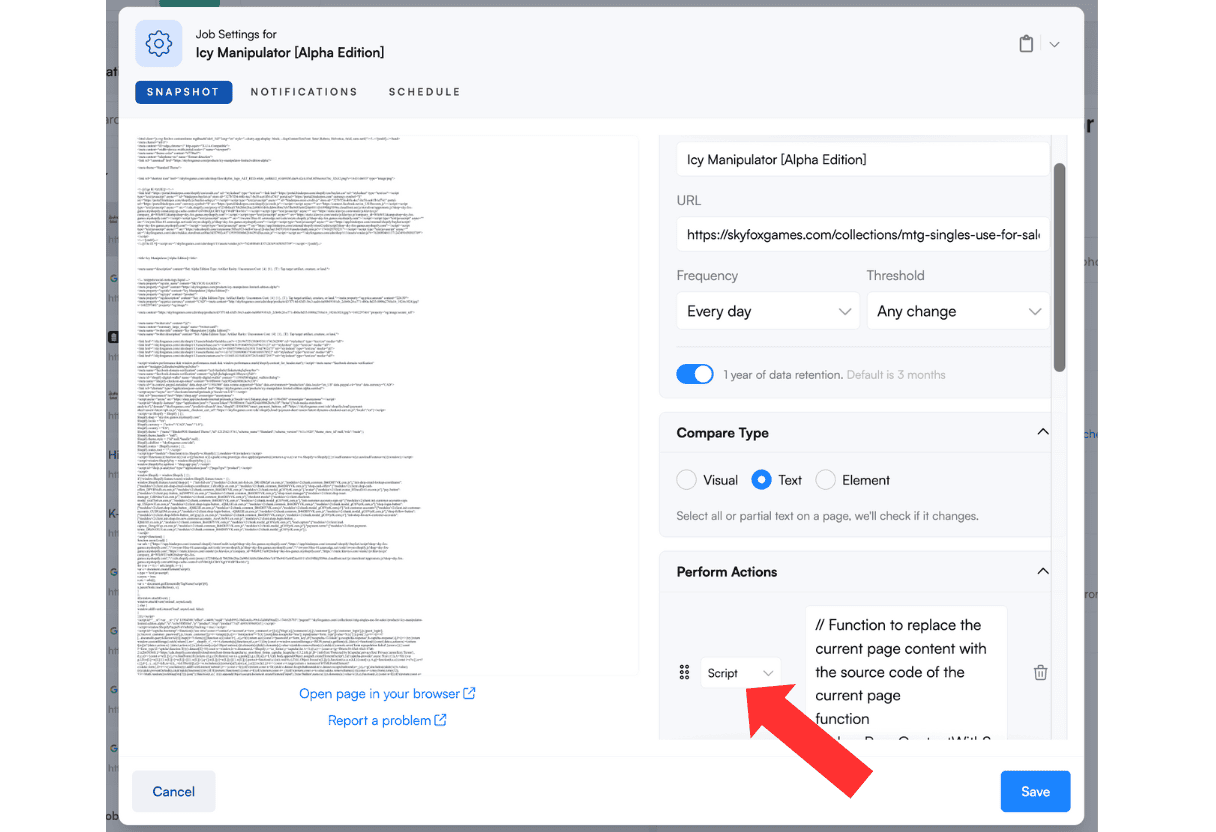
To Display Inline Code:
Use this script to capture the page's source code:
function replacePageContentWithSourceCode() {
  var htmlSourceCode = document.documentElement.outerHTML;
  var sourceCodeContainer = document.createElement('div');
  sourceCodeContainer.setAttribute('id', 'sourceCodeContainer');
  sourceCodeContainer.innerText = htmlSourceCode;
  document.documentElement.innerHTML = '<!DOCTYPE html>' +
    '<html lang="en">' +
    '<head>' +
    '<meta charset="UTF-8">' +
    '<meta name="viewport" content="width=device-width, initial-scale=1.0">' +
    '<title>Source Code Container</title>' +
    '</head>' +
    '<body>' +
    '<div>' + sourceCodeContainer.outerHTML + '</div>' +
    '</body>' +
    '</html>';
}
replacePageContentWithSourceCode();
To Extract HTTP Headers:
Use this script to monitor security-relevant HTTP headers:
fetch(window.location.href, {
  method: 'GET',
  headers: {
    'Accept': 'application/json',
  }
})
  .then(response => {
    document.body.innerHTML = '';
    if (!response.ok) {
      throw new Error('Network response was not ok');
    }
    const headers = [...response.headers.entries()];
    const filteredHeaders = headers.filter(([key, value]) =>
      key.toLowerCase() !== 'date' && key.toLowerCase() !== 'expires'
    );
    let headersHTML = '<h3>Response Headers</h3><ul>';
    filteredHeaders.forEach(([key, value]) => {
      headersHTML += `<li><strong>${key}</strong>: ${value}</li>`;
    });
    headersHTML += '</ul>';
    document.body.innerHTML = headersHTML;
  })
  .catch(error => {
    document.body.innerHTML = '';
    document.body.innerHTML = `<p style="color: red;">Error: ${error.message}</p>`;
    console.error('Error fetching data:', error);
  });
Step 5: Set Up Alerts and Recipients
Specify who should be notified when a change is detected. Add email addresses for relevant team members (compliance officer, security analyst, IT manager). If you use Slack or Teams, configure the integration so alerts post to a dedicated channel. Ensure at least one method reaches your incident response personnel. Test the notification setup by triggering a known change.
Step 6: Baseline and Document Known Content
When you start monitoring, Visualping compares against the current state as a baseline. Document what's supposed to be on the page (approved scripts and content). This helps you quickly verify whether alerts indicate expected changes or potential issues. Ensure your development team communicates when they legitimately update the payment page.
Best Practices for PCI DSS Section 11.6.1
Respond to Alerts Promptly: Define an internal process for responding to alerts. Having a change detection tool is necessary but not sufficient for PCI DSS compliance. You also need an incident response plan.
For example, your process might be: When an alert is received, the security analyst on duty immediately reviews the Visualping snapshot to identify the change. If suspicious (unauthorized script or change), they isolate the code, block it if possible (take the page offline or revert to a known good state), and escalate to the incident response team. The compliance officer documents the event, findings, and actions taken as evidence of due diligence.
Document Everything: Keep records of alerts and your responses. A simple spreadsheet or ticketing system entries work well, for example: "On Sept 1, 2025, Visualping alerted a change in checkout.js - investigated, determined to be planned update, marked as resolved." This demonstrates to assessors that you actively use your monitoring tool and have response processes in place.
Refine Your Monitoring Over Time: Adjust Visualping settings based on experience. If your marketing team updates a banner weekly causing benign alerts, use Visualping's ignore filters to skip that section. Stay updated with new features that may enhance your compliance monitoring.
Coordinate with Development: Ensure your development and deployment teams communicate planned changes to payment pages. This reduces false positives and helps distinguish authorized updates from potential attacks.
Consider Complementary Controls: While Visualping addresses the change detection component of 11.6.1, consider additional measures for defense in depth. Content Security Policy (CSP) and Subresource Integrity (SRI) can provide preventive controls, while Visualping provides detection. Using multiple layers of security strengthens your overall posture.
Demonstrating Compliance to Assessors
During a PCI DSS audit or assessment, you'll need to demonstrate two things: that you have a mechanism to detect changes (the technical solution), and that you have processes to respond to and manage alerts (the operational procedure).
With Visualping, you can show the assessor your configured monitoring jobs for payment pages, including the URLs being monitored, the frequency settings, and how alerts are generated. You should also have documentation of alerts that occurred and how they were addressed.
Visualping's change history logs serve as evidence. You can pull up records of changes detected over the assessment period. If no unauthorized changes occurred, that demonstrates your monitoring is active. If changes did occur, your documentation should show they were reviewed and resolved appropriately.
Explicitly mention in your PCI documentation that Visualping is used to meet Requirement 11.6.1 by monitoring payment page content and alerting on changes. This makes it clear to the assessor that the control is covered.
Strengthening Your Overall PCI Compliance Posture
While Section 11.6.1 is the focus of this guide, website change detection can support broader compliance and security objectives. Organizations use compliance monitoring tools to watch for unauthorized changes across their web properties, from regulatory changes affecting their industry to modifications on partner and vendor sites.
For e-commerce businesses, integrating payment page monitoring into your overall security program creates a more unified approach to web security. The same monitoring capabilities that help with PCI compliance can also detect website defacement, catch visual regressions during deployments, and monitor third-party dependencies.
FAQ: PCI DSS 4.0.1 Section 11.6.1
What is PCI DSS 4.0.1 Section 11.6.1?
PCI DSS 4.0.1 Section 11.6.1 is a requirement in the Payment Card Industry Data Security Standard that mandates e-commerce businesses detect and alert on unauthorized changes to their payment pages. It requires deploying a change-detection mechanism to monitor payment page content and HTTP headers (as delivered to customers' browsers) at least weekly. The goal is to catch malicious JavaScript injections (such as Magecart attacks) or removal of security controls on payment pages and alert responsible personnel so they can respond. This requirement became mandatory on March 31, 2025.
Why is Section 11.6.1 important for e-commerce security?
Section 11.6.1 addresses a growing threat vector: the client side of web applications. Attackers have found ways to inject malicious code into the front end, for example by compromising third-party scripts that payment pages load. This malicious code can skim credit card details in real time, even if your backend is secure. Section 11.6.1 forces organizations to watch for these changes, catching potential breaches in progress rather than discovering them weeks or months later.
How does Requirement 11.6.1 relate to Requirement 6.4.3?
The PCI Security Standards Council pairs these requirements in their guidance because they serve complementary purposes. Requirement 6.4.3 focuses on script management, including maintaining inventories, documenting justifications, and verifying integrity. Requirement 11.6.1 focuses on detecting when unauthorized changes occur. Together, they provide both preventive controls (6.4.3) and detective controls (11.6.1) for payment page security. Organizations need to address both requirements.
What types of tools can help meet Section 11.6.1?
Organizations have several options: purpose-built PCI compliance tools that often address both 6.4.3 and 11.6.1, page monitoring agents like Visualping that can be configured for payment page monitoring, Content Security Policy (CSP) monitoring solutions, and custom-built internal tools. The PCI standard does not mandate a specific technology, only that you achieve the outcome of detecting unauthorized changes and alerting personnel.
Do I need to add code to my website to use Visualping for 11.6.1?
No. Visualping works externally by scanning your web page from the cloud (like a user visiting your site). You configure monitoring through its online interface without adding code to your website. This external approach aligns with PCI's guidance that entities should detect unexpected changes without requiring significant modifications to their existing infrastructure.
How often should I check payment pages for changes?
PCI DSS 11.6.1 requires evaluation at least once every seven days (weekly). Many organizations choose more frequent checks, such as daily, for better security. The appropriate frequency depends on your risk assessment, how often your page legitimately changes, and how quickly you need to detect potential issues. PCI allows more frequent checks based on targeted risk analysis.
Can Visualping completely replace other security measures for 11.6.1?
Visualping provides the core change detection functionality that 11.6.1 requires and can fulfill the change detection component of the requirement. However, it does not address Requirement 6.4.3 (script inventory and authorization), and organizations should consider defense-in-depth approaches. Using Visualping alongside Content Security Policy (CSP), Subresource Integrity (SRI), and other security controls provides stronger overall protection than any single tool alone.
How do I demonstrate compliance with 11.6.1 using Visualping during an audit?
Show your assessor the configured monitoring jobs for payment pages, including URLs, check frequency, and alert settings. Provide documentation of alerts received and how they were addressed, using Visualping's change history logs as evidence. Maintain records showing that alerts were reviewed, investigated, and resolved. Explicitly document in your PCI compliance materials that Visualping is used to meet Requirement 11.6.1.
What should I do if Visualping detects an unexpected change?
Follow your incident response plan. Review the Visualping snapshot to understand what changed. If the change is suspicious (unauthorized script, modified form fields, removed security headers), take immediate action: isolate the change, potentially take the page offline or revert to a known good state, and escalate to your security team. Document everything for compliance purposes. If the change was authorized (planned deployment), note it in your records and mark the alert as resolved.
Ready to explore payment page monitoring for your organization?
Contact Visualping to discuss your compliance needs, or start a free trial to see how website change detection works. For enterprise requirements including dedicated support and custom configurations, explore our enterprise solutions.
References and Resources:
- PCI Security Standards Council: Document Library
- PCI SSC Information Supplement: "Payment Page Security and Preventing E-Skimming - Guidance for PCI DSS Requirements 6.4.3 and 11.6.1"
- PCI SSC Blog: New Guidance for E-commerce Security Requirements
Related reading
- Screenshots as Evidence: Automate Website Captures for Legal D...
- Website Defacement Monitoring in 2026: What You Need to Know
- Domain Monitoring: The Complete Guide for 2026
- Website Monitoring for Journalists: Why the Audit Trail Matter...
- Cost of Website Defacement: Key Factors and Financial Impact
- What is Magecart? How E-Commerce Web Skimming Attacks Work | V...
Want to be sure a web page is always compliant?
"Sign up with Visualping to detect issues from any web page – before your business is on the line.
Eric Do Couto
Eric Do Couto is the Head of Marketing at Visualping. He leads content strategy, growth operations, and brand positioning for website change detection.
More articles by Eric Do Couto