Q3 2026 Release Recap, Visualping Assistant, Health Dashboard, and More
By Kayla Zhu
Updated October 1, 2026

Happy October! It's officially Q4 2026, which means we're taking another look back at what we shipped last quarter.
In Q3 2026, we launched the Visualping assistant, launched our Health dashboard feature across every account, shipped a native Google Sheets integration, rebuilt how error alerts work, and made some major upgrades to our Chrome extension.
We also opened bulk editing to every plan, including Free, made notifications easier to route and test, and added a run of smaller improvements to Reports and change review.
Here's everything that's new.
Meet the Visualping assistant
Launched August 24, 2026 | Every account, in beta
The Visualping assistant is an AI chat panel inside the dashboard. It answers product questions and can create and configure monitors from a plain-language description, so "check this page every hour and email me if the price changes" becomes a working monitor without touching the settings form.
It picked up more capabilities through September. It can now record page actions such as logins and clicks, confirm a monitor's first check, and change where a monitor sends its alerts, including turning email and SMS on or off, switching on Telegram, and setting Slack channels by name. It also stays on topic: ask it something unrelated to monitoring and it will offer to watch a relevant page instead of answering.
The same tools are available to any AI assistant connected through the Visualping MCP server, so what the in-app assistant can do, your own assistant can do too.
Learn more about the Visualping assistant →
Know how your monitors are really doing
Launched August 17, 2026 | Every plan, including Free
The Health dashboard at Account > Health is a single view of every monitor you run. It shows checks run with a success rate, alerts sent, reports generated, and estimated monthly check consumption for the period you pick.
A checks-per-day chart groups each day into successful checks that sent an alert, successful checks, and failed checks, so a bad day stands out.
Underneath, the Failing monitors panel lists every monitor that is currently erroring, why, and when it last failed, with a View link straight to the monitor. A schedule histogram shows what is due to run in the next 24 hours.
Read the Health dashboard announcement →
Log every change to Google Sheets
Launched September 21, 2026 | Business plans
Visualping now writes detected changes straight into a Google Sheet you choose, with no Zapier or webhook setup in between. Every change becomes a new row with the date and time, the monitor name and URL, the percentage of the page that changed, the Visualping AI summary, the text added and removed, any labels and keyword matches, and a link to the before-and-after comparison. Visualping writes the header row for you, so an empty tab is enough to start.
Set it up from a monitor's Notifications panel: choose the Google Sheets option with the API icon, sign in with Google once, and pick a spreadsheet and tab. One sheet can collect changes from as many monitors as you like, and a colleague can share a sheet at the Organization scope so the rest of the team selects it from a dropdown.
Read the full Google Sheets announcement →
Alert on Error, so you know when your monitors aren't working
Announced September 17, 2026 | Every plan
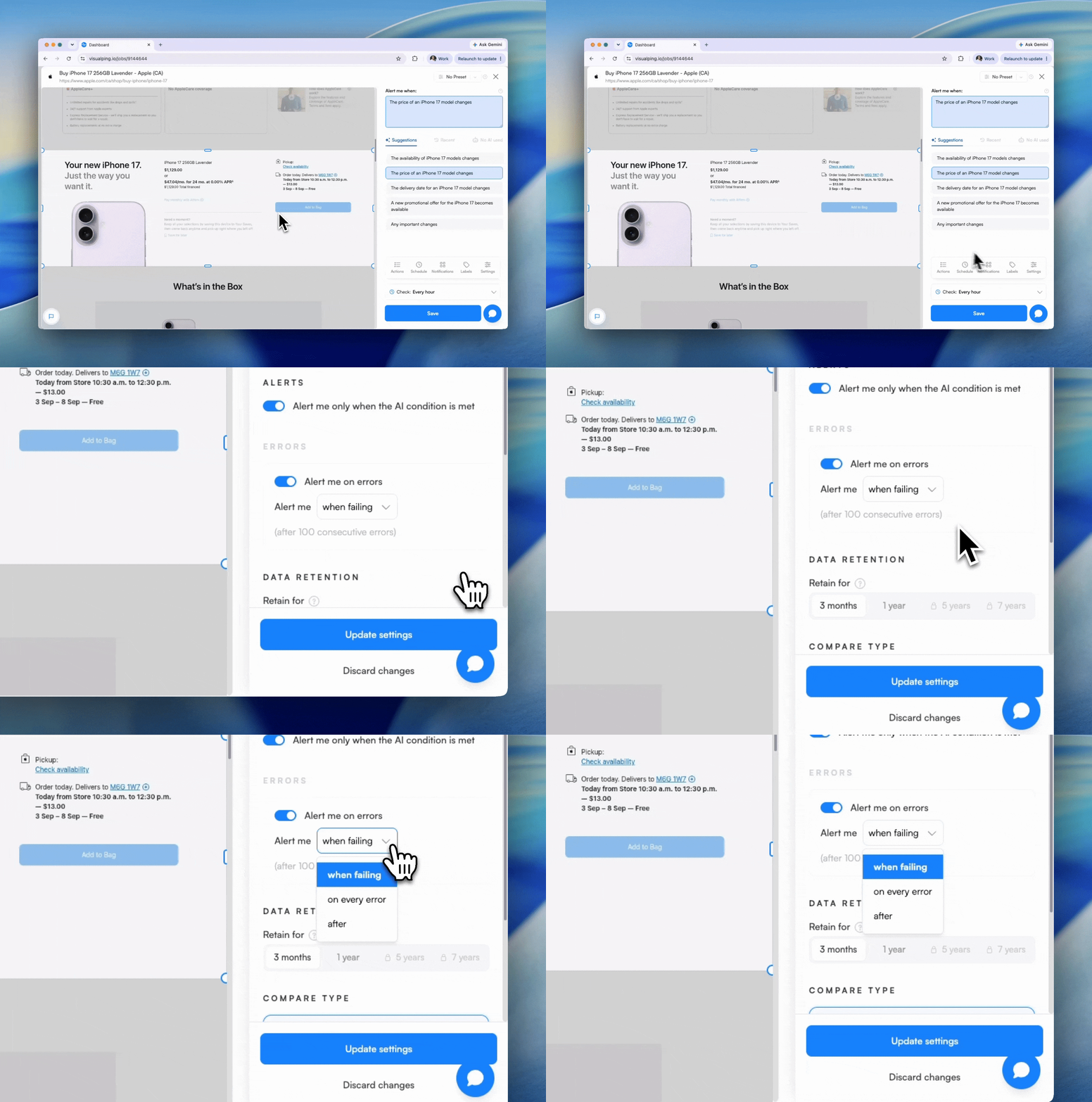
Visualping now emails you when a page stops working, whether it has gone down, moved, or started blocking checks. Before this quarter, the default waited for 100 consecutive errors regardless of how often the monitor ran, which meant a daily monitor could fail for three months before anyone heard about it.
The default is now a length of time rather than a fixed count. A monitor checking hourly or faster alerts after 24 hours of continuous failure, a daily monitor after a week, and slower monitors on a scale up to 60 days. Once a monitor is broken, alerts back off instead of repeating forever, so a page that is down for weeks sends a handful of emails rather than one per threshold. If you would rather hear about every error, or none at all, both options are in the monitor's settings.
Read the Alert on Error announcement →
A smarter Chrome extension
Launched August 4, 2026 | Every plan, including Free
The Visualping Chrome extension now records what you do on a page, including clicks, scrolls, logins, and navigation, and saves those steps as monitor actions. That makes pages behind a login or a few clicks much easier to monitor. The extension can also turn the page you are on into a cloud monitor in one click, with Visualping AI choosing the settings, and local checks run faster than before.
Get the Visualping Chrome extension → | Read the announcement →
New features for Reports
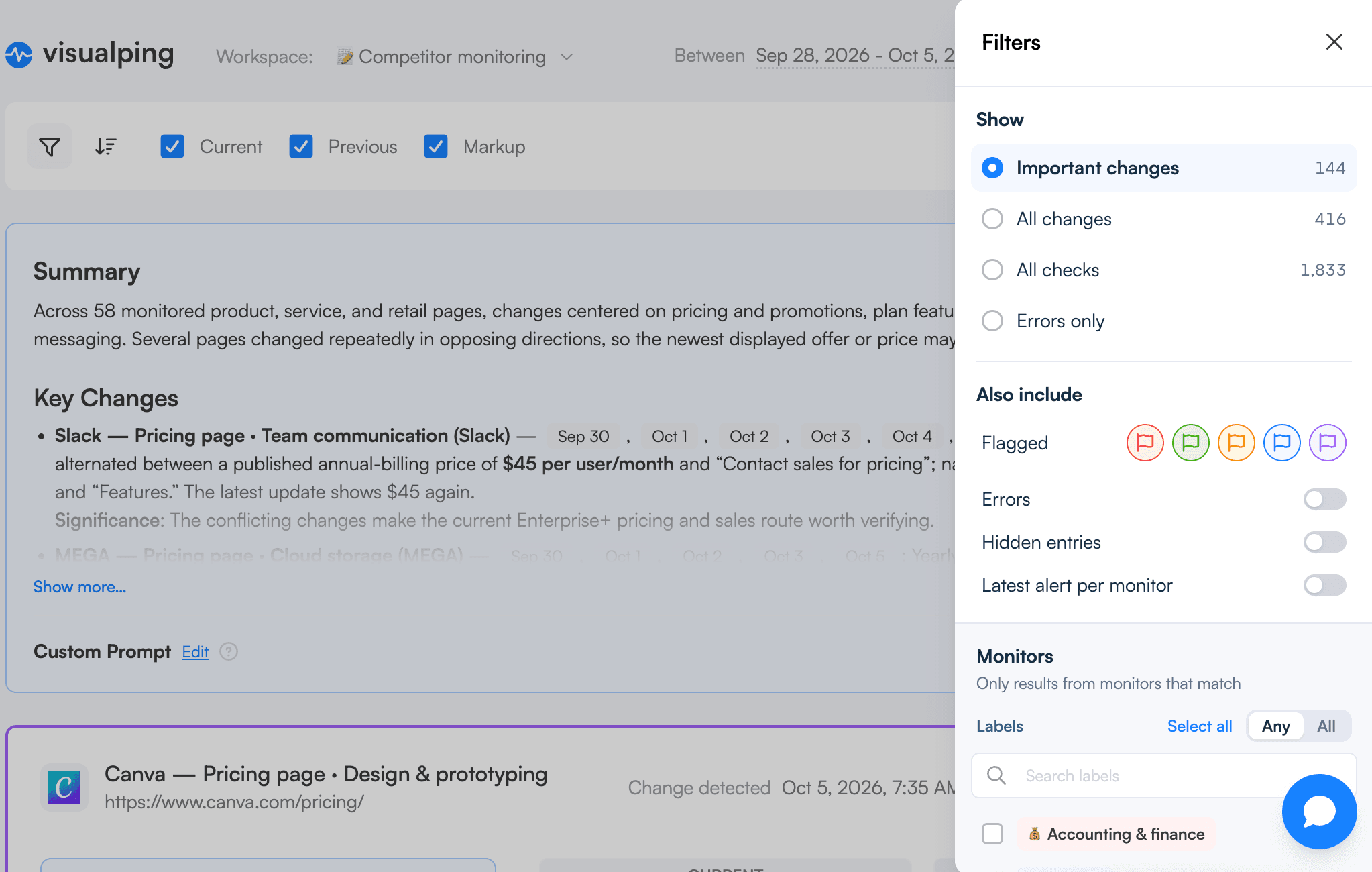
Shipped July through September 2026 | Reports is included with Business plans
Share a report in seconds. Saved reports now have share links. A dashboard link needs a Visualping login; CSV, Excel, and HTML links do not, so you can hand a report to someone outside the workspace.
Zoom in on any screenshot inside a report to read small text or check a detail.
Flags in five colours. Flags now come in red, green, yellow, blue, and purple, and Reports can be filtered by colour, so a team can use each colour for a different kind of change.
Hide the changes you do not need. Hidden changes drop out of reports by default and nothing is deleted. Flag and hide actions now appear in the change sidebar alongside comments, in order, so the team can see who flagged or hid what and when. The Flagged filter on the Reports page was reworked to match.
No more catch-up reports. A new report schedule no longer sends an immediate report covering the period before you created it. The first report arrives at the first scheduled time.
Read the full Reports roundup →
Notifications that go everywhere they need to
Shipped July through September 2026
Three changes made notification setup faster and more predictable.
Send the same alert to every tool that needs it. As of September 15, on Business plans, a monitor can now have up to five destinations for each of Microsoft Teams, webhook, n8n, Discord, and Google Sheets, so one change can post to a team channel, hit an automation, and land in a spreadsheet at once. Pasting a valid destination URL switches that row on automatically.
Send yourself a sample alert. The Email and Text rows in a monitor's notification settings gained a test button that sends the alert you would actually receive, rendered from the production template with the monitor's own before-and-after screenshots when it has run. The Slack app and Telegram test buttons now post a properly formatted sample alert too.
Fewer false "connect failed" messages. Connecting Slack or Telegram used to report a failure while the connection had in fact gone through. That is fixed.
Managing many monitors at once
Shipped August and September 2026
Bulk editing is now on every plan. Multi-select on the monitor list, and the bulk actions that go with it, used to be a Business feature. As of September 11 they work on Personal and Free plans too, so you can pause, run, delete, or change settings for many monitors in one go.
Find failing monitors faster. The monitor list gained a new filter panel with a Failing filter, so you can pull up every monitor that needs attention without opening the Health dashboard.
See monitor status at a glance. Every monitor in the list now has a status dot: green when it is checking as expected, red when it has failed several checks in a row, and grey when it is paused. Hover a dot to see the status.
Export opens in a side panel instead of a modal, so you keep your place in the list.
A few more updates
- Change summaries in the format you want. Visualping AI summaries render markdown, and you can ask for a specific format, such as a table, in your alert criteria.
- Markdown pages render properly. Pages served as markdown are now rendered as formatted documents before comparison, so a README or a docs page is monitored the way it reads, not as raw syntax.
- Half-hour schedule windows. The advanced schedule timeline now selects 30-minute slots, so a 9:30 start stays at 9:30.
- Longer Timeline. A monitor's Timeline now reaches back as far as its retention period instead of a fixed window.
Under the hood
Every monitor moved to a new rendering engine based on Chrome 152 in early September. Monitors are also being moved in stages to drift-free scheduling, which runs checks at fixed times instead of sliding a little later on each run; if your check times shifted slightly this quarter, that is why. Google Sheets delivery gained durable delivery tracking so rows are not missed or duplicated when Google is slow.
What's next
The pattern this quarter was putting change data where you already work, whether that is a spreadsheet, a chat tool, or an AI assistant, and making it easier to see when monitoring itself needs attention.
Expect more along the same lines. To stay updated, follow us on LinkedIn or watch the What's New feed in your dashboard.
FAQ
Is the Visualping assistant available on my plan? Yes. The assistant is open to every signed-in account on every plan, and is still labelled Beta while it picks up more capabilities.
Do I need to turn on the Health dashboard? No. Go to Account > Health in your Visualping account. It reads from your existing monitors, and any workspace member can open it.
Which plans include the Google Sheets integration? The native Google Sheets integration is available on Business plans. Free, Starter, and Personal plans can still send change data to Google Sheets through webhooks and Zapier, which every plan includes.
Did my error alert settings change? If you were using the default, yes. The default threshold now scales with how often the monitor checks, so slower monitors alert sooner than before. Monitors set to alert on every error, or never, are unchanged.
Do I need a Business plan to bulk edit monitors? No. Since September 11, 2026, multi-select and bulk editing also work on Personal and Free plans.
Want to monitor web changes that impact your business?
Sign up with Visualping to get alerted of important updates from anywhere online.
Kayla Zhu
Kayla is the Public Relations Specialist at Visualping and manager of Visualping's Journalist Program. She manages Visualping's media relations, content marketing, and social media.
More articles by Kayla Zhu