How Visualping Uses AI to Monitor Web Changes
Updated April 12, 2026

Visualping AI is the intelligence layer built into every Visualping account. When Visualping detects a change on a monitored web page, AI reads the change, writes a clear summary explaining what happened (in English by default, or in any language you specify), and classifies whether the change is important based on criteria you define. AI summaries and importance classification are included on all plans, including free accounts.
Below: what each AI feature does, what changed with the 2026 model upgrades, and how teams configure prompts to filter noise. For prompt-writing specifics, see How Visualping AI filters noise and flags what matters.
What happens when Visualping detects a change
Four things happen in sequence every time Visualping checks a page:
1. Capture. Visualping's headless browser loads the page and takes a full screenshot. This captures everything a real browser renders, including JavaScript-heavy content, dynamically loaded elements, and single-page applications. If you've selected text mode, Visualping also extracts the page text separately.
2. Compare. The new capture is compared against the previous version. For visual monitoring, this is computer-vision-based screenshot comparison that identifies pixel-level differences. For text monitoring, it's a structured text diff that isolates added, removed, and modified content. You can also select specific page regions to monitor, ignoring headers, footers, rotating ads, or any area that generates noise.
3. Summarize. AI reads the before and after versions and writes a plain-language description of what changed. Instead of "43 pixels changed in region X," you get "The monthly subscription price increased from $29 to $39" or "A new product variant was added to the catalog." This summary appears in your alert email, your dashboard, the webhook payload (summarizer field), and in Reports.
What the AI reads. The input depends on your monitoring mode. In text mode, the AI processes the structured text diff: the exact words added, removed, and changed. In visual mode, it processes the screenshot and describes visual differences. In All mode, it gets both. The AI also receives the full context of the surrounding page, not just the changed section, so it can describe changes in relation to where they appear ("the price in the Enterprise tier changed" rather than "a number changed"). This is why prompts that reference specific page elements ("hero section," "pricing table," "compliance deadline") work well: the AI sees that context.
4. Classify. If you've written a custom prompt (what Visualping calls an Important Alert), AI evaluates the change against your criteria and makes a binary decision: important or not. Important changes trigger your full notification stack (email, SMS, Slack, webhook). Non-important changes are still captured, logged, and accessible in your dashboard. They just stay quiet.
This four-step pipeline runs on every check, for every monitor, on every plan.
AI summaries: every change explained in your language
Every time Visualping detects a difference between two captures, AI generates a summary describing the change in context. You don't need to configure anything. Summaries appear automatically.
A few examples of what summaries look like in practice:
- On a competitor's pricing page: "The Enterprise plan price changed from $499/mo to $399/mo. The annual discount increased from 15% to 20%. No changes to feature inclusions."
- On a regulatory filing: "A new paragraph was added to Section 4.2 regarding data retention requirements. The compliance deadline was changed from June 30 to September 15."
- On a job board: "Three new senior engineering positions were posted: Staff Backend Engineer, Principal ML Engineer, and VP of Engineering. All are listed as remote-eligible."
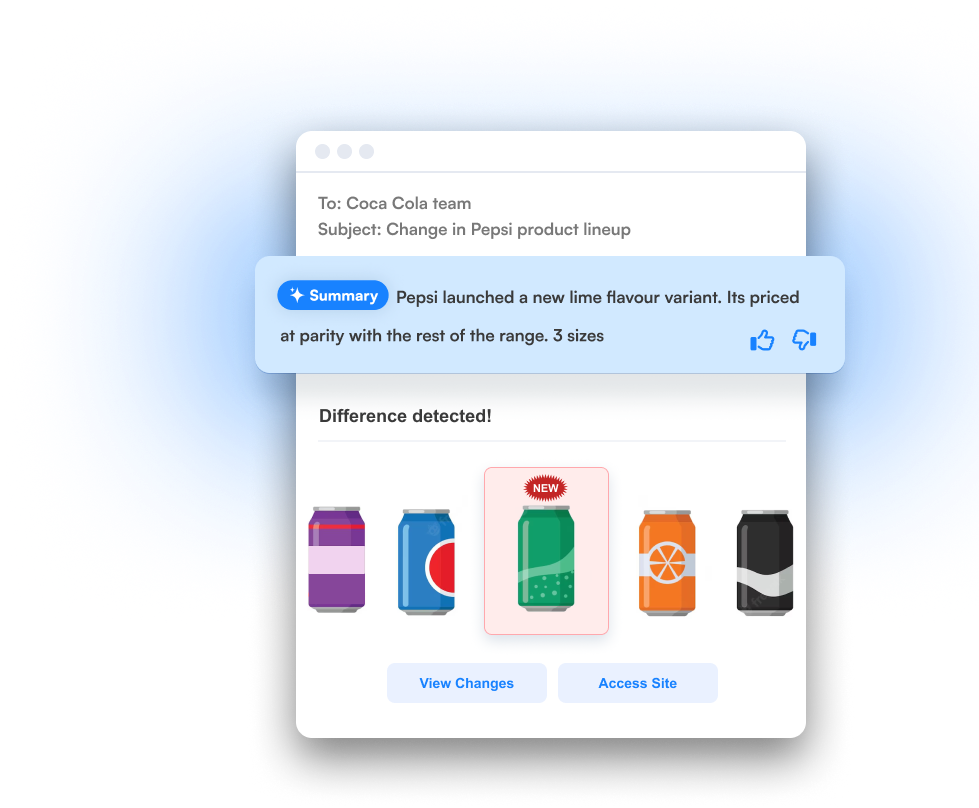
Summaries add the most value on text-heavy pages where changes can be subtle but consequential: legal disclaimers, terms of service, pricing tables, policy documents, product specifications.
2026 model upgrade. In Q1 2026, Visualping upgraded the AI models powering summaries. The practical effect: fewer false positives, especially on pages that change often for cosmetic reasons. Banner rotations, footer date updates, cookie consent popup variations, and other layout noise that used to trigger confusing summaries are now handled with more precision. The AI also handles complex prompt instructions better (more on that in the next section).
AI summaries are available on every plan, including free accounts. Solutions-tier customers get access to upgraded models that produce more detailed summaries and analysis. (For a third-party take, TechRadar's 2025 review called Visualping's monitoring "world-class" and highlighted the alert customization options.)
Summaries in any language
AI summaries default to English, but you control the output language. Include a language instruction in your monitoring prompt ("Summarize all changes in French," "Resumir los cambios en español," or "変更内容を日本語で要約してください") and every alert summary for that monitor arrives in your chosen language.
Useful when your team works in one language but monitors websites in another. A compliance team in Toronto tracking regulatory pages from France's AMF gets change summaries in English. A product team in Tokyo monitoring U.S. competitor pricing pages gets summaries in Japanese. The AI reads the source page in whatever language it's written in and delivers the summary in whatever language you need.
You set the language per monitor, so different monitors can summarize in different languages. No account-wide setting needed.
Where summaries are strongest
AI summaries are most precise on pages with structured, text-heavy content: pricing tables, terms of service, regulatory filings, product specifications, job listings. These pages have clear semantic elements the AI can identify and describe with specificity. A pricing change, a new compliance deadline, a modified contract clause: these produce summaries that read like a human analyst wrote them.
Where to set expectations
Pages with primarily visual changes (image swaps, design refreshes, layout rearrangements with no text change) produce less specific summaries. The AI can describe what changed at the layout level ("the hero image was replaced," "the page layout shifted") but won't interpret the meaning of a visual change the way it can with text. If you're monitoring for visual changes on design-heavy pages, the side-by-side screenshot comparison in your alert will often tell you more than the summary.
Pages that change frequently for cosmetic reasons (rotating ads, dynamic timestamps, session-specific content) can generate noise if you're not using element mode or All mode to exclude those regions. The Q1 2026 model upgrade reduced this significantly, but targeting a specific page region still produces the cleanest results.
Over 7,500 users have rated AI summaries on our platform. We use that feedback to improve model performance over time. If a summary misses the mark, the thumbs-down button in your alert helps us get better.
Important Alerts: AI that filters the noise
Not every web change deserves a notification. A timestamp refresh, a rotating banner, or a footer copyright update shouldn't interrupt your morning. Important Alerts solve this.
You write a natural-language prompt that defines what matters to you. When Visualping detects a change, AI reads it and checks it against your prompt. Match? You get notified. No match? The change is still captured and logged, but your phone stays quiet.
This is a binary classification, not a score. The AI decides yes or no, then tags the alert accordingly. The important field in your webhook payload carries this classification, so your Zapier zaps, n8n workflows, and Slack channels can route alerts based on whether the AI flagged them.
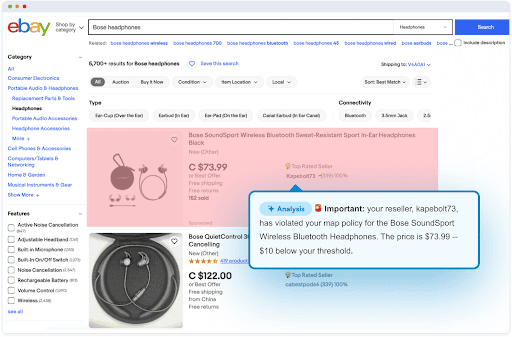
Across our platform, AI classifies roughly 87% of detected changes as non-critical. That's the noise that never reaches your inbox when you configure a prompt. The remaining 13% trigger notifications because they matched what you defined as important.
Prompt examples that work
Strong prompts name specific elements rather than describing categories. For the technique-level playbook (roles, structured output, few-shot, conditional logic, Actions), see our Important Alerts prompt engineering guide.
Examples:
- Pricing monitoring: "Flag any price change on listed products, including changes to discount percentages, bundle pricing, or subscription tier costs."
- Compliance: "Important only if approval status changes, new enforcement actions are posted, or compliance deadlines are added or modified."
- Competitor tracking: "Alert me when pricing changes, new features are announced, or messaging on the hero section changes. Ignore footer updates, banner rotations, and cookie notices."
- Multilingual monitoring: "Summarize all changes in German. Flag as important any price change, new product listing, or change to shipping terms."
That last example highlights what changed with the Q1 2026 model upgrade. Earlier versions of the AI could handle straightforward prompts well but sometimes struggled with compound instructions that included both what to flag and what to ignore. The upgraded models parse these multi-criteria prompts more reliably.
For a comprehensive prompt-writing guide with examples across eight use cases, see How Visualping AI filters noise and flags what matters.
Important Alerts are available on all plans, including free accounts. Over 650,000 active monitors on our platform run custom AI prompts today.
What people use prompts for
The three largest prompt categories on our platform, by share of active monitors:
- Real estate and listings (23% of custom prompts): tracking rental price changes, new listings, property status updates
- Compliance and regulatory (21%): monitoring policy revisions, enforcement actions, filing deadlines
- Pricing intelligence (18%): flagging competitor price changes, discount adjustments, tier restructuring
Other categories include financial and investment monitoring, product release tracking, job board watching, and availability/uptime alerts.
Auto-suggested prompts
Not sure what prompt to write? During job setup, Visualping AI scans the page you're monitoring and recommends a prompt tailored to that content. A pricing page gets a price-focused suggestion. A job board gets a new-posting suggestion. A regulatory page gets a compliance-focused suggestion.
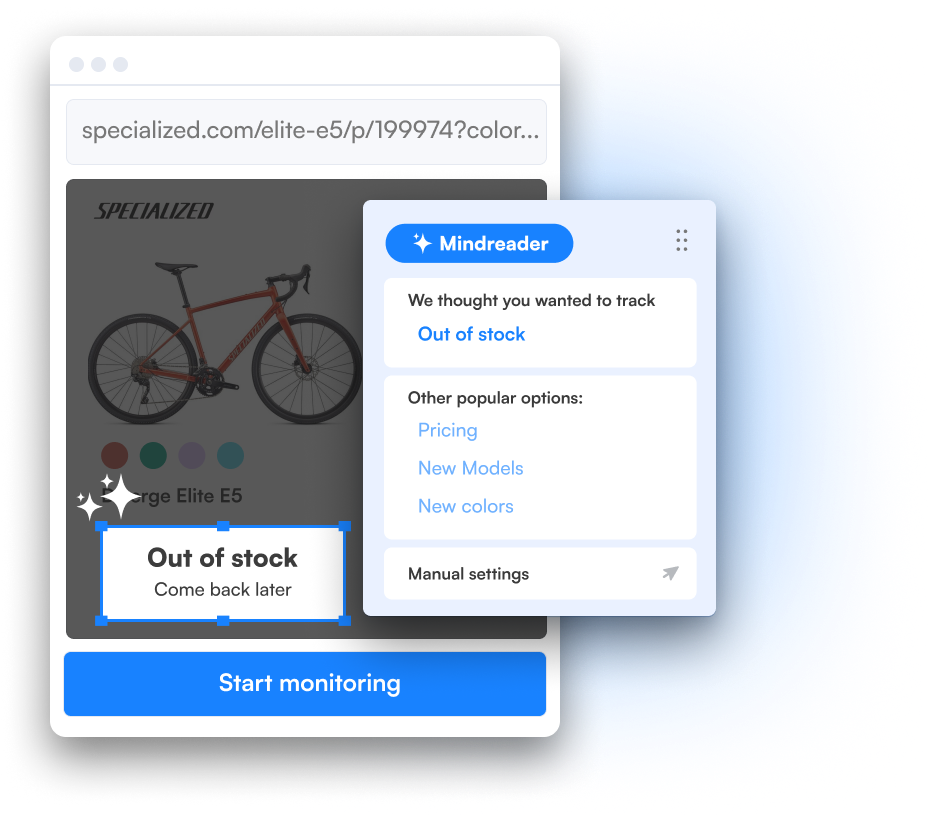
You can accept the suggestion, modify it, or write your own from scratch.
Every change is logged, even the ones that stay quiet
When the AI classifies a change as not important, it doesn't disappear. Every change, whether the AI flagged it or not, is captured in your dashboard with a full before-and-after comparison, the AI summary, and the importance classification.
Open any monitoring job in your dashboard and you'll see the full change history. Important changes are tagged. Non-important changes sit right alongside them, just without the notification.
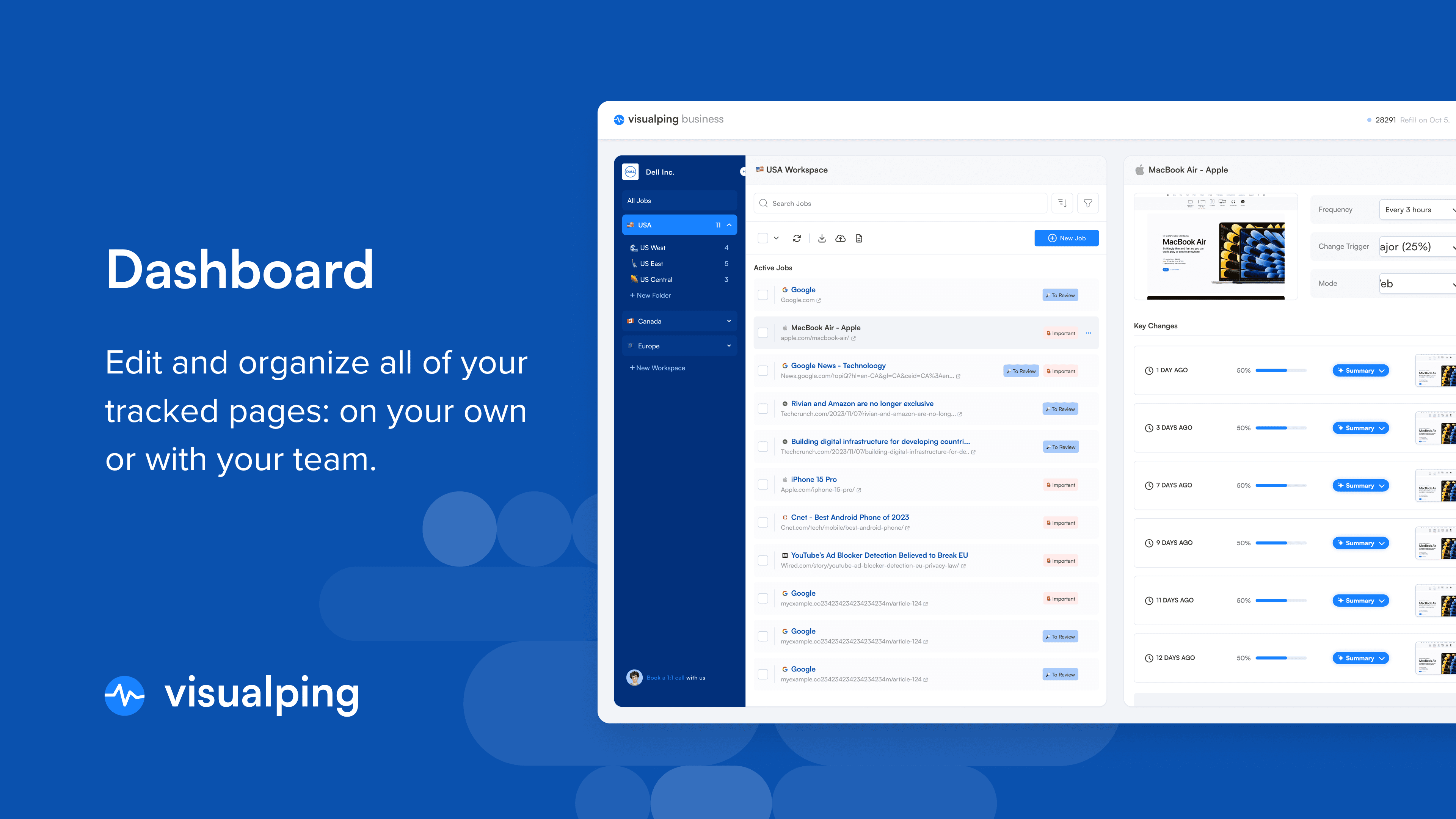 You can scroll through everything the AI decided to keep quiet about and check whether it got the call right.
This matters most in the first week after you write a new prompt. Review the non-important changes to make sure your criteria are catching what they should. If the AI let something through that you actually cared about, tighten the prompt. Nearly 6 in 10 prompted monitors on our platform are refined after initial setup. Prompts are living instructions, not set-and-forget.
For teams that need a consolidated audit trail, Visualping Reports can include both important and non-important changes in a single briefing, giving you the full picture in one document.
Reports: AI that summarizes everything at once
Launched March 2026. Individual alerts tell you one page changed. Reports tells you what changed across everything you're watching. It combines every change across your selected monitors into a single AI-written briefing delivered on your schedule.
You choose which monitoring jobs to include and set a date range (or schedule recurring reports daily, weekly, or custom). Visualping's AI reviews every detected change within that window and writes an executive summary at the top, highlighting the most significant shifts. Below the summary: individual change entries, each with its own AI description, importance classification, and side-by-side screenshots.
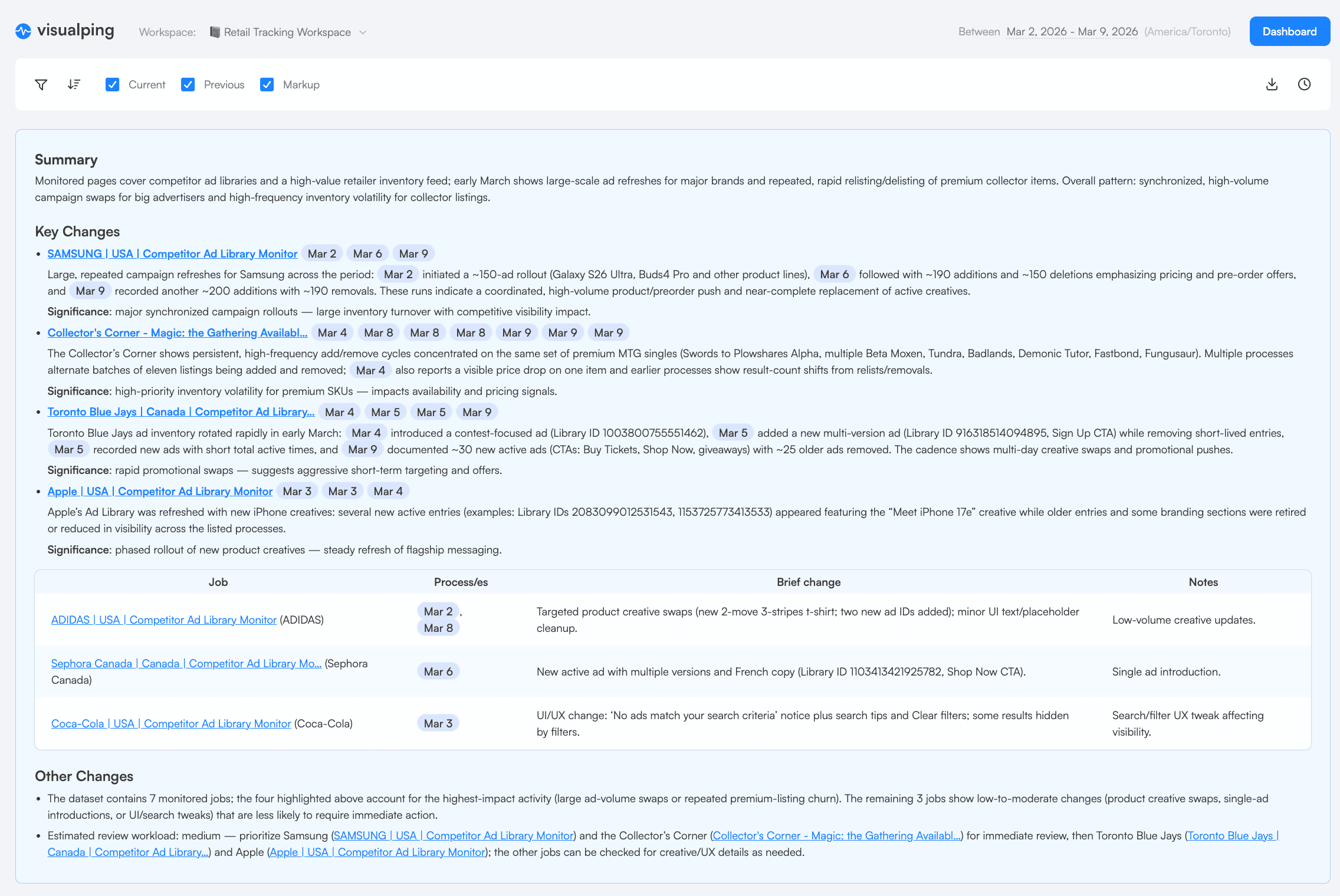
Reports serve teams who track dozens or hundreds of pages and need the consolidated view. A product marketer monitoring 50 competitor pages with AI-powered competitor analysis tools opens one report on Monday morning instead of processing 50 separate alerts. A compliance team tracking regulatory filings across agencies gets a weekly digest with the AI doing the first-pass triage.
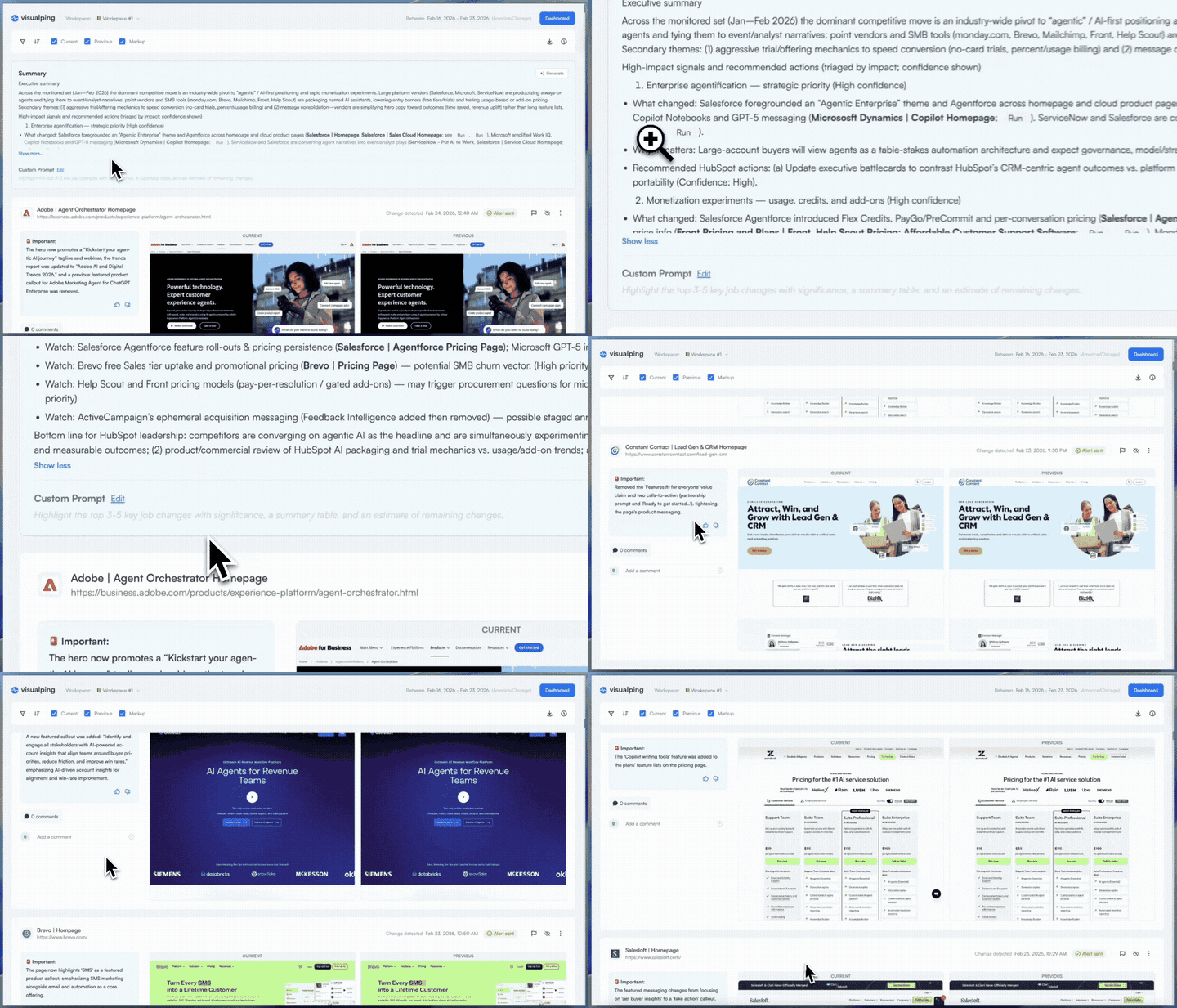
Reports are included with all Business plans. You can export them as PDF, Excel, or CSV, share a link, or email them to people who don't have Visualping accounts.
For a detailed walkthrough, see Introducing Visualping Reports and the Reports guide.
Four monitoring modes, one AI layer
Visualping gives you four ways to monitor website changes. The AI layer (summaries + classification) works across all four.
Visual mode captures a screenshot and compares it pixel-by-pixel using computer vision. This catches layout changes, image swaps, and design shifts that are visible on the page but might not change the underlying text. A competitor rearranges their pricing table without changing any numbers? Visual mode catches it. (Text mode wouldn't.)
Text mode extracts the text content from the page and runs a structured diff. This is more precise for tracking specific text changes (pricing, product descriptions, legal language) and produces cleaner summaries because the AI is working with text, not pixels.
Element mode lets you draw a box around the specific region of the page you care about. Rotating banners, sidebar ads, social feeds, cookie popups: all ignored. The AI only sees what's inside your selection.
All mode combines visual and text monitoring in one. Select an area visually, and Visualping will check for both visual differences and all of the text within the area when looking for changes. This catches everything in one monitor: layout shifts, image swaps, and text edits.
All mode is the recommended default for most use cases. You can also use the individual modes when you need to focus on only visual or only text changes. The AI summary adapts to whichever mode you choose.
Train the AI with feedback
Every alert includes a thumbs-up or thumbs-down option. Rate an alert, and the AI adjusts its understanding of what matters for that specific monitoring job. Over time, summaries and importance classifications sharpen based on your feedback.
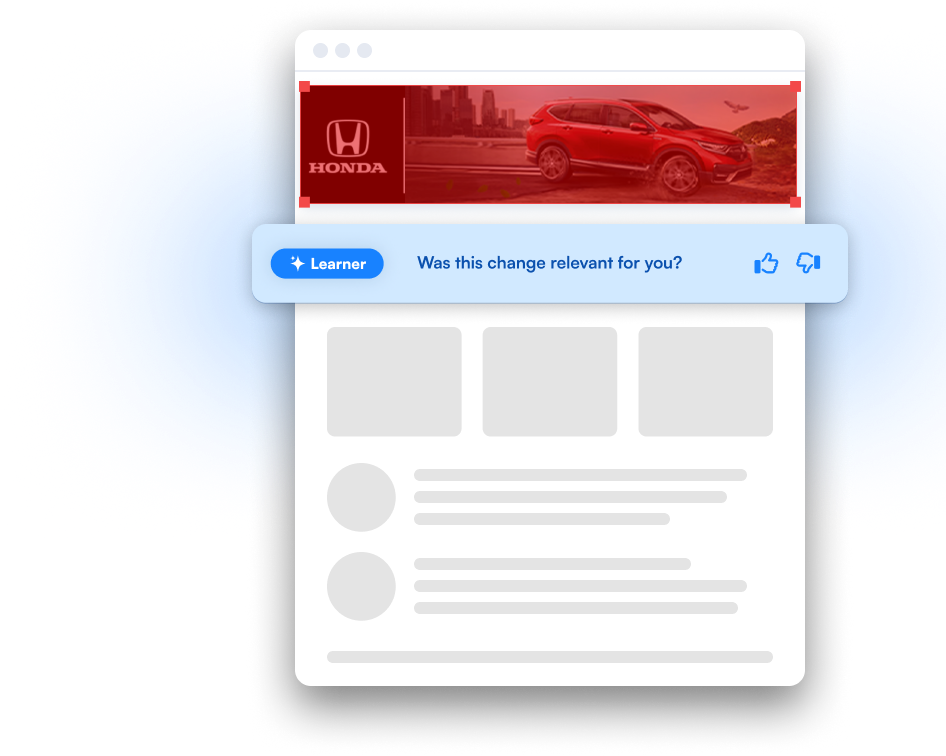
This feedback loop is available to Solutions-tier customers.
Solutions tier: premium AI capabilities
For organizations with advanced monitoring needs, the Solutions tier adds features beyond what's included on standard plans:
- Upgraded LLM. Access to more powerful language models that produce richer, more detailed summaries and analysis.
- Visual Analyzer. All Visualping accounts include visual analysis: AI reads visual changes and describes them in plain language. The Solutions-tier Visual Analyzer goes deeper, with more detailed image-level analysis for tracking design changes, ad creative rotations, or brand compliance across websites. Example: "The hero banner was replaced with a holiday promotion featuring a 30% discount badge."
- Prompt engineering. Visualping's team works with you to craft and optimize prompts for your specific use cases and monitoring workflows.
- Advanced gated data monitoring. All plans support Actions, pre-configured steps that enter usernames and passwords to access pages behind logins. The Solutions tier extends this to complex authentication layers, custom session management, and IP-restricted environments.
- Custom data structure and output. Tailor how change data is structured and delivered to fit your existing workflows and systems.
Solutions pricing starts at $3,000/year. Contact the Solutions team for details.
Where AI data goes after the alert
The AI output doesn't stop at your inbox. The webhook payload includes the summarizer field (the plain-language summary) and the important field (the binary classification), so any system that receives webhook data can act on what the AI found.
- Zapier/n8n: Route important changes to Slack and archive non-important ones in a Google Sheet for weekly review.
- Slack/Teams: Get channel notifications only for changes the AI flagged as important. Reduce channel noise without missing real signals.
- API: Pull change data programmatically with AI summaries included. Build dashboards, feed data into BI tools, or trigger custom workflows.
- Google Sheets: Auto-log every change with its AI summary and importance classification. Build a change history without manual data entry.
All plans (including free) support webhooks, which connect to Zapier and thousands of other tools. Every plan, including Free, includes API access. Business plans add native Slack, Teams, n8n, and Google Sheets integrations plus team features.
What an alert looks like
Here's what actually arrives when Visualping detects a change on a page you're monitoring.
The email. The subject line tells you the page name and whether the AI flagged the change as important. Inside: the AI-generated summary at the top explaining what changed in plain language, followed by a side-by-side screenshot comparison showing the before and after. You get the full picture without clicking through to the dashboard.
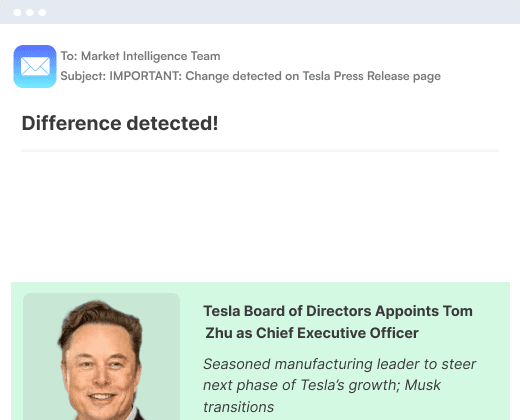
The dashboard. Click through from the email and you see the full change record: the AI summary, the importance classification, the exact timestamp, the before-and-after screenshots at full resolution, and the raw text diff if you're in text or All mode. Every past change for that job is listed below, so you can trace the full history of what's happened on that page.
The webhook payload. For automation workflows, the JSON payload includes the summarizer field (the AI summary text) and the important field (true/false). Wire these into Zapier, n8n, Slack, or any system that accepts webhooks. Route important changes to your team's attention and log the rest for review.
One compliance officer on a prospect call told us she set up 340 monitoring alerts in a single afternoon and replaced a manual process that cost her team six hours a week. When asked what convinced her, she said: "This is what we want. This is what we want."
Frequently asked questions
Does Visualping use AI? Yes. Every Visualping alert includes an AI-generated plain-language summary of what changed and a binary importance classification. These features are built into all plans, including free accounts. You don't need to configure or enable AI. It's on by default.
How does Visualping's AI filter false positives? Two mechanisms. First, AI summaries help you understand changes instantly, so irrelevant changes take seconds to dismiss instead of minutes. Second, Important Alerts let you write a natural-language prompt defining what matters. The AI evaluates every change against your prompt and only sends notifications for matches. Non-matching changes are captured but stay silent. Important Alerts keep non-critical changes out of your inbox. You define what matters, and the AI filters everything else. In Q1 2026, Visualping upgraded its AI models to better handle cosmetic page changes (banner rotations, footer updates, cookie popups) that previously caused noise.
Is Visualping just a screenshot comparison tool? No. Visualping offers four monitoring modes: visual (screenshot comparison using computer vision), text (structured text diffing), element (region-specific monitoring), and all (combined visual and text on your selected region). All four include AI-powered summaries and importance classification. The AI reads the actual content change, not just the pixels, and explains what happened in plain language (English by default, or in any language you choose). Visualping is rated #1 in website change monitoring on G2 with 4.7 stars across 300+ reviews. For a broader comparison of page monitoring agents, see our tools guide.
Do I need the Business plan to use AI features? No. AI summaries, Important Alerts, and visual analysis are available on all plans, including the free tier. API access is included on every plan, including Free; Personal plans ($10–$50/month) add more monitors and capacity. The Business plan ($100/month) adds native Slack, Teams, n8n, and Google Sheets integrations plus team features. The Solutions tier ($3,000+/year) adds upgraded AI models, the advanced Visual Analyzer, prompt engineering, and complex gated data configuration.
What's included in Visualping's free plan? Five monitored pages, 150 checks per month, hourly check frequency, AI summaries on every alert, and Important Alerts with custom prompts. Free users get the full AI pipeline: every detected change is summarized in plain language and classified against your prompt criteria. Email and webhook alerts are also included (webhooks enable Zapier connections on the free tier). The main constraints are page count and check frequency. If you need more than 5 pages or faster checks, paid plans start at $10/month billed annually.
How often can Visualping check for changes? Every 2 minutes at the fastest, available on Personal $50/month and all Business plans. Other options: every 5 minutes ($25/month), every 15 minutes ($10/month), or every 60 minutes (free). You can also set longer intervals for pages that don't need frequent checks: every 3 hours, 6 hours, daily, weekly, or monthly. Frequency is configurable per monitor, so time-sensitive pages (competitor pricing, regulatory filings) can run on a fast cadence while stable pages check less often.
Can Visualping monitor pages behind a login? Yes. All plans support Actions: pre-configured steps that enter usernames and passwords to access pages behind basic logins. You set these up during job creation and Visualping's browser executes the login steps before each check. For complex authentication (multi-factor, custom session management, IP restrictions), the Solutions tier ($3,000+/year) provides hands-on configuration by Visualping's team.
What data does the AI include in webhooks?
The webhook payload includes a summarizer field (the AI-generated plain-language change summary) and an important field (binary classification based on your prompt). Both are available on all plans.
How does Visualping handle JavaScript-rendered pages? Visualping uses a headless browser to load pages, which renders JavaScript, executes client-side code, and captures the fully-loaded page state. Dynamic content, single-page applications, and JS-heavy frameworks are supported.
Can I get AI summaries in a language other than English? Yes. Include a language instruction in your monitoring prompt (e.g., "Summarize changes in Spanish") and AI summaries for that monitor will arrive in your specified language. This works for both the change summary and the Important Alert classification. You set the language per monitor, so you can have different monitors summarizing in different languages. The AI reads the source page in its original language and produces the summary in whichever language you request.
Get started
AI summaries and Important Alerts are built into every Visualping account. If you have an account, you're already using them. To get more out of AI-powered monitoring:
- Write a custom prompt on your highest-priority monitors. Define what matters, and let the AI filter everything else.
- Try auto-suggested prompts during job setup if you're not sure where to start.
- Create a Report if you monitor more than a few pages and want one consolidated briefing instead of individual alerts.
- New to Visualping? Start with our guide to monitoring a web page with AI.
For enterprise needs (Visual Analyzer, gated data, custom integrations), contact the Solutions team.
Want to monitor web changes that impact your business?
Sign up with Visualping to get alerted of important updates, from anywhere online.
Eric Do Couto
Eric Do Couto is the Head of Marketing at Visualping. He leads content strategy, growth operations, and brand positioning for website change detection.
More articles by Eric Do Couto