When Do American Eagle and Aerie Restock Online?
By Anika Gupta
Updated October 21, 2026

When Does American Eagle Restock Online?
American Eagle does not publish an online restock schedule. When a size sells out on ae.com, the product page shows a Notify Me button, and AE’s confirmation says it will email you when your size is back in stock, “usually within two weeks.” So a two-week return is typical, not guaranteed. Aerie works the same way: aerie.com redirects to ae.com, and Aerie products use the same product pages.
If you want more than a size alert, Visualping can watch the whole product page for a restock or a price drop.
Visualping is a website monitoring tool that checks American Eagle product pages on your schedule and emails you when an item you want is available again.
Why Do I Need Visualping to Check for Restocked American Eagle Products?
You could check the product page by hand every day, but AE does not say which day a size will return, and a popular size can sell out again before your next visit.
American Eagle’s Notify Me button tracks one size of one item and emails you when that size is back in stock. With Visualping, you choose how often the page gets checked and write your own alert condition, so the same monitor can flag a restock or a price drop.
The Free plan checks as often as hourly, and paid plans start at $10/month billed annually with checks as often as every 15 minutes. Each alert email flags whether the change is important and includes an AI summary of what changed on the page.
The Free plan monitors up to 5 pages with 150 checks a month, at no cost.
How to Track Out of Stock Products on American Eagle
To track when products are coming back in stock at American Eagle, paste the American Eagle product URL into the Visualping Homepage. Then type what you want to hear about in the “Alert me when” box, pick a frequency from the “Check:” dropdown, and enter your email in the “Send to” field.
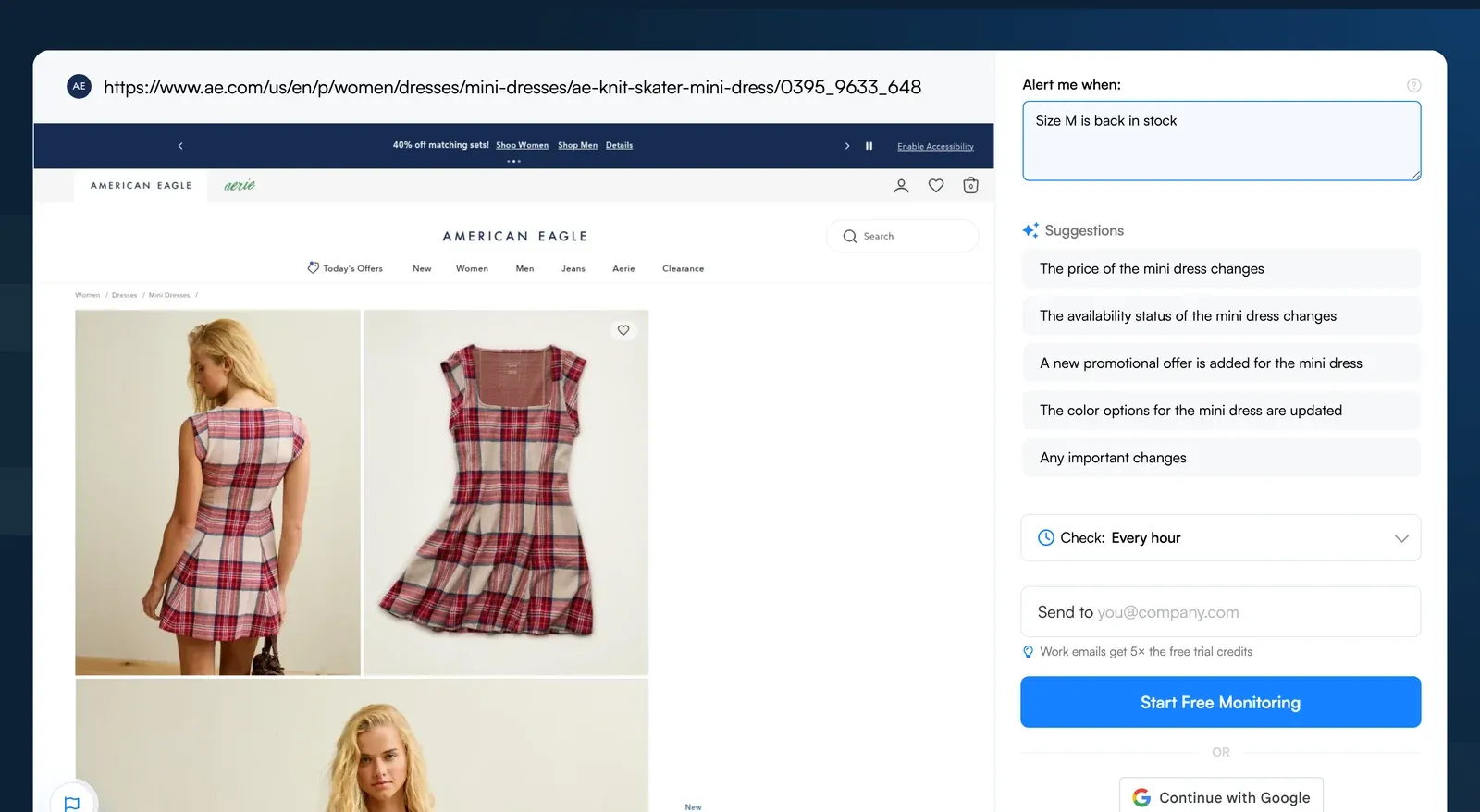
Step-by-Step Breakdown of How to Track Out of Stock Products on American Eagle
Step 1: Paste the American Eagle Product URL into Visualping’s Homepage Search Bar
Say the dress you have wanted for months is sold out in your size. Copy the dress URL from ae.com and paste it into the URL box on the Visualping Homepage, then click Go. A preview of the product page loads.
Step 2: Tell Visualping What to Alert You About
In the “Alert me when” box under the preview, describe the change you care about, such as “Alert me when size M is back in stock” or “Alert me when the price drops.” You can also click one of the AI suggestions. New monitors use AI Mode, which checks both how the page looks and what its text says. If you would rather match exact keywords like “back in stock,” switch the monitor to Text changes mode in the app after you sign up.
Step 3: Set Monitoring Frequency
Use the “Check:” dropdown to pick how often Visualping looks at the page. The Free plan checks as often as hourly, and its 150 monthly checks cover one page checked about five times a day. Need faster checks? Paid plans start at $10/month billed annually and check as often as every 15 minutes.
Step 4: Provide Notification Email Address
Enter the email address you check most in the “Send to” field. Visualping emails you when the page changes in a way that matches your alert condition.
Step 5: Verify Your Account
Almost there! Click “Start Free Monitoring” and follow the next steps to set up and verify your Visualping account. You then get a dashboard that lists all your monitors.
Always Stay Up to Date with American Eagle Restocks
One free Visualping account can watch up to 5 product pages, so you can track a few AE and Aerie items side by side.
You can also track restocked products on other websites such as Adidas, Lego, and more.
Want to get back in stock alerts?
Sign up with Visualping to get back in stock alerts for any product you've got your eye on.
Anika Gupta
Anika Gupta is a former Marketing Intern who wrote about competitive intelligence and marketing strategy for the Visualping blog.
More articles by Anika Gupta