Apple In-Stock Alerts: iPhone & Mac Restock Tracker
Updated September 21, 2026
Quick summary: Apple Store restock alerts notify shoppers when sold-out items return. The most reliable method is to monitor the product URL with Visualping, which checks the page on a regular interval and sends you an alert with before-and-after screenshots the moment stock returns. The free plan covers basic monitoring, paid plans add faster check intervals, and setup takes about two minutes from a free Visualping account.
Apple's iPhone and iPad sit at the top of the mobile market, and every model revision pulls in a new round of buyers.
High demand makes the latest iPhone or iPad hard to grab on launch day. Lines form outside flagship stores before sunrise, and outlets like MacRumors track shipping windows and supply tightness for each new iPhone Pro launch.
As of September 21, 2026, the iPhone 18 Pro and iPhone 18 Pro Max have been on sale for three days, and Apple's own store already quotes delivery windows several weeks out on popular configurations. The foldable iPhone Duo opens for pre-order on October 16. Online or in a brick-and-mortar store, shoppers end up refreshing the page over and over to see whether the right configuration is back in stock.
For shoppers who would rather skip the manual refresh, the fastest way to catch an Apple restock is Visualping.
This guide answers the most common questions about Apple restock practices, shows what our own monitors caught during iPhone 18 Pro launch week, and walks through a step-by-step tutorial for getting notified the moment Apple restocks.
What's the best time to check Apple Store inventory?
Most shoppers refresh the product page or call the store, hunting for hot configurations on the Apple Certified Refurbished store. A faster route is page-change monitoring.
Visualping sends a notification the second a tracked Apple product is relisted. It is a free tool that watches any webpage for changes, including product listings on any online retail site.
How to get Apple restock notifications
Waiting on a new iPhone, Mac, or Watch eats hours of refresh time. A page-change monitor pulls those hours back and pushes price change notifications on the same SKU.
Visualping pings the reader the moment Apple stock comes back. It works for phones, tablets, and accessories without anyone reloading apple.com on a loop.
Visualping watches a chosen page on a fixed cadence, from every two minutes to every few weeks. The moment a product listing changes, the alert lands in the reader's inbox with a link straight to the page, ready for checkout.
Across the Apple Store catalog, Visualping covers iPhone configurators, MacBook builds, Watch bands, and AirPods, sending back-in-stock notifications in a few steps.
Step 1: Copy the product page URL from Apple.com, paste it into Visualping
To track Apple Store product listings with Visualping, the reader first needs the URL of the item's page.
Visualping's free plan covers five pages and 150 checks a month. Picking the right URL is the most important step in catching an alert the moment a product hits stock. Sometimes that means tracking more than one page.
Some ideas for the iPhone 18 Pro and iPhone Duo hunt:
- Apple puts the whole configuration in the URL. A page like apple.com/shop/buy-iphone/iphone-18-pro/6.9-inch-display-256gb-burgundy-unlocked loads the exact Pro Max build with its delivery estimate and pickup status, so no clicking is needed. Swap the display size, storage, color, and carrier in the URL to build the page you want.
- Watch a hub page like apple.com/shop/buy-iphone and use Visualping AI to flag the alert only when a specific tile changes, such as the iPhone Duo tile switching from "Pre-order 10.16" to "Buy".
- Watch the Apple Certified Refurbished iPhone page and set the alert for a model that is not listed yet, such as the iPhone 17 Pro.
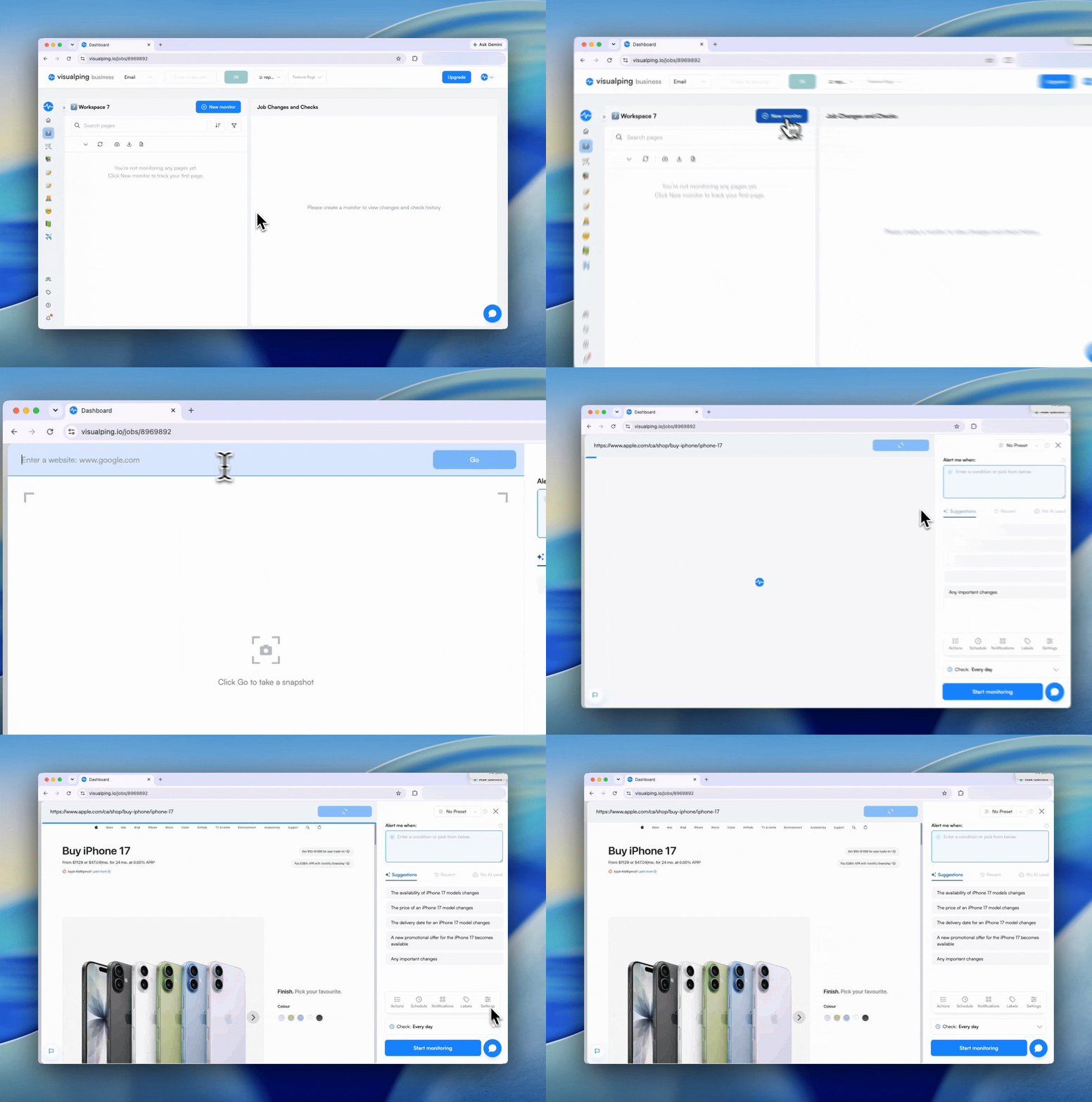
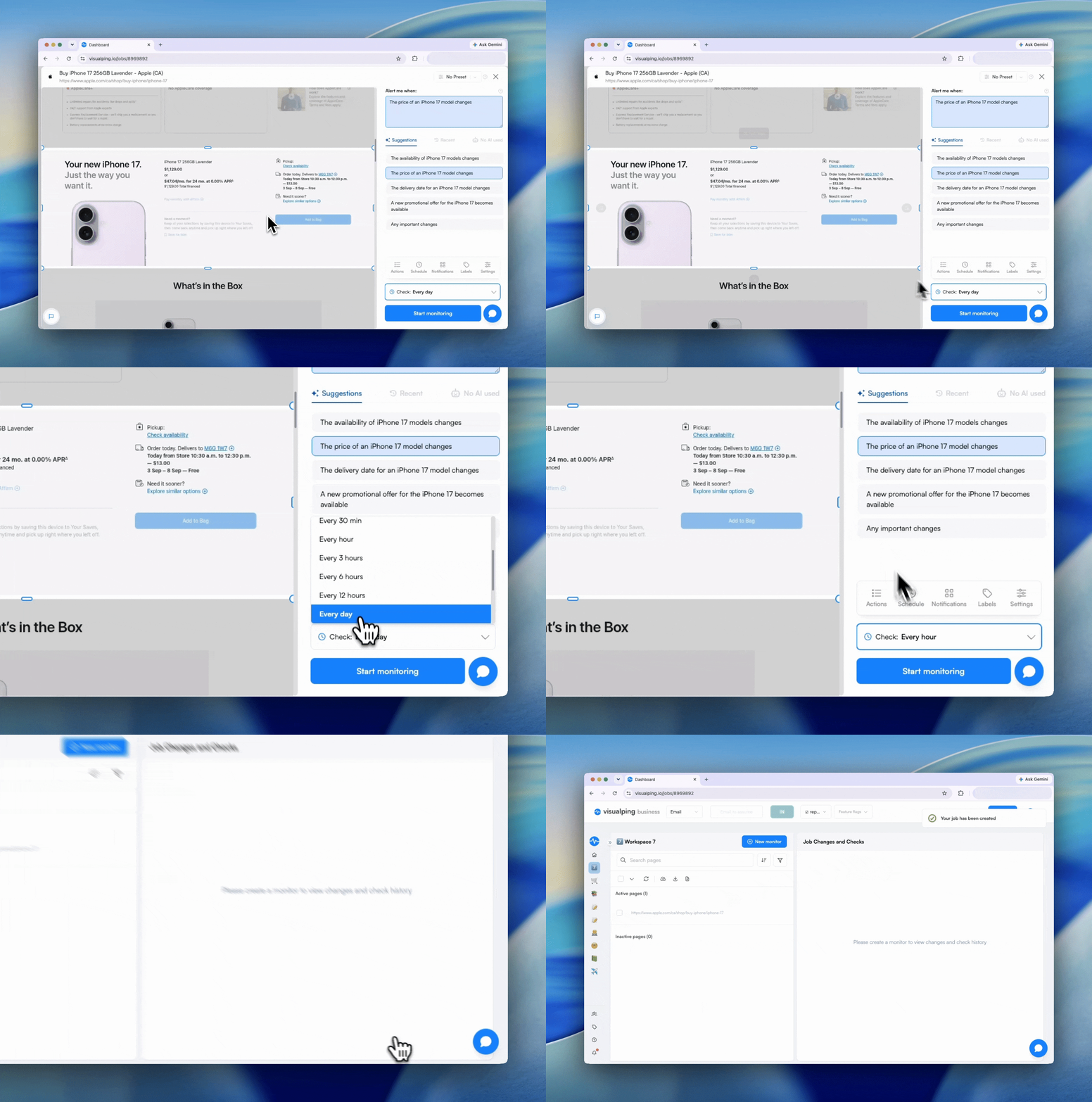
In your Visualping dashboard, press "New monitor" and then paste the chosen URL. Press "Go" and wait a few seconds for the preview to load.
Step 2: Add actions to select specific features
Once the page has loaded, you may need to select certain features on the product page, such as color, storage, and AppleCare options, to access specific pricing and shipping details. Apple's per-configuration URLs skip this step, but retailer pages at Walmart and Best Buy keep color and storage as on-page swatches, so you need actions there.
Good news: Visualping can add actions on a page, such as clicking, typing, and scrolling, when you set up a monitor.
Tip: We suggest downloading our free Chrome extension so that you can "Record actions" on the page.
To select specific features on the page, go to the bottom of the menu and click "Actions" then use the "Add action" or "Record action" feature to select specific elements of the page right on the preview screen.

Step 3: Pick the exact area of the Apple product page that should trigger an alert
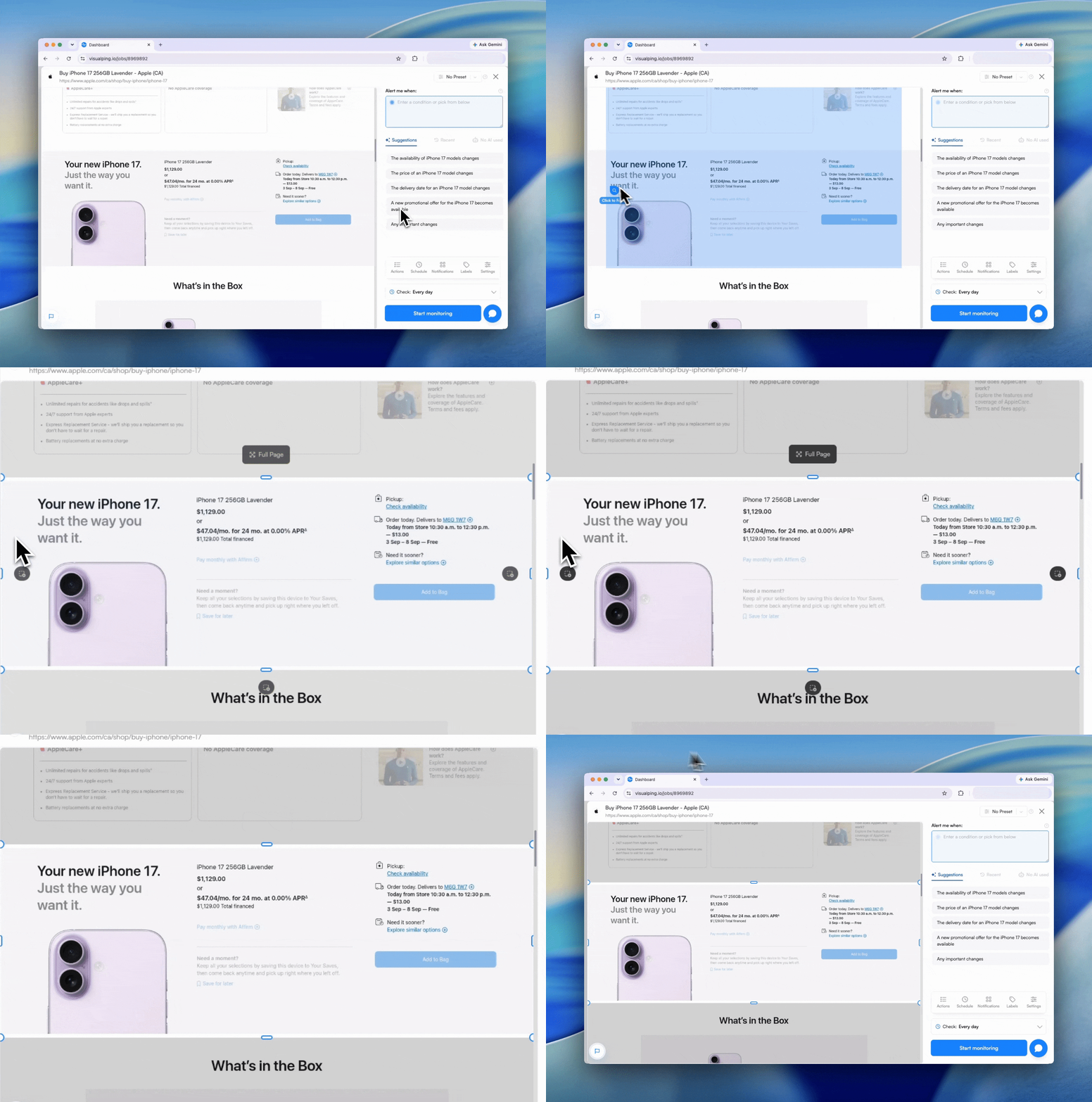
Click and drag on the preview to select the region of the page that you want to monitor, most likely the section containing the pricing and stock details.
Visualping watches only that box for changes. This is helpful if you don't want to be notified of other small changes on the page.
Step 4: Set an AI criteria for the alert
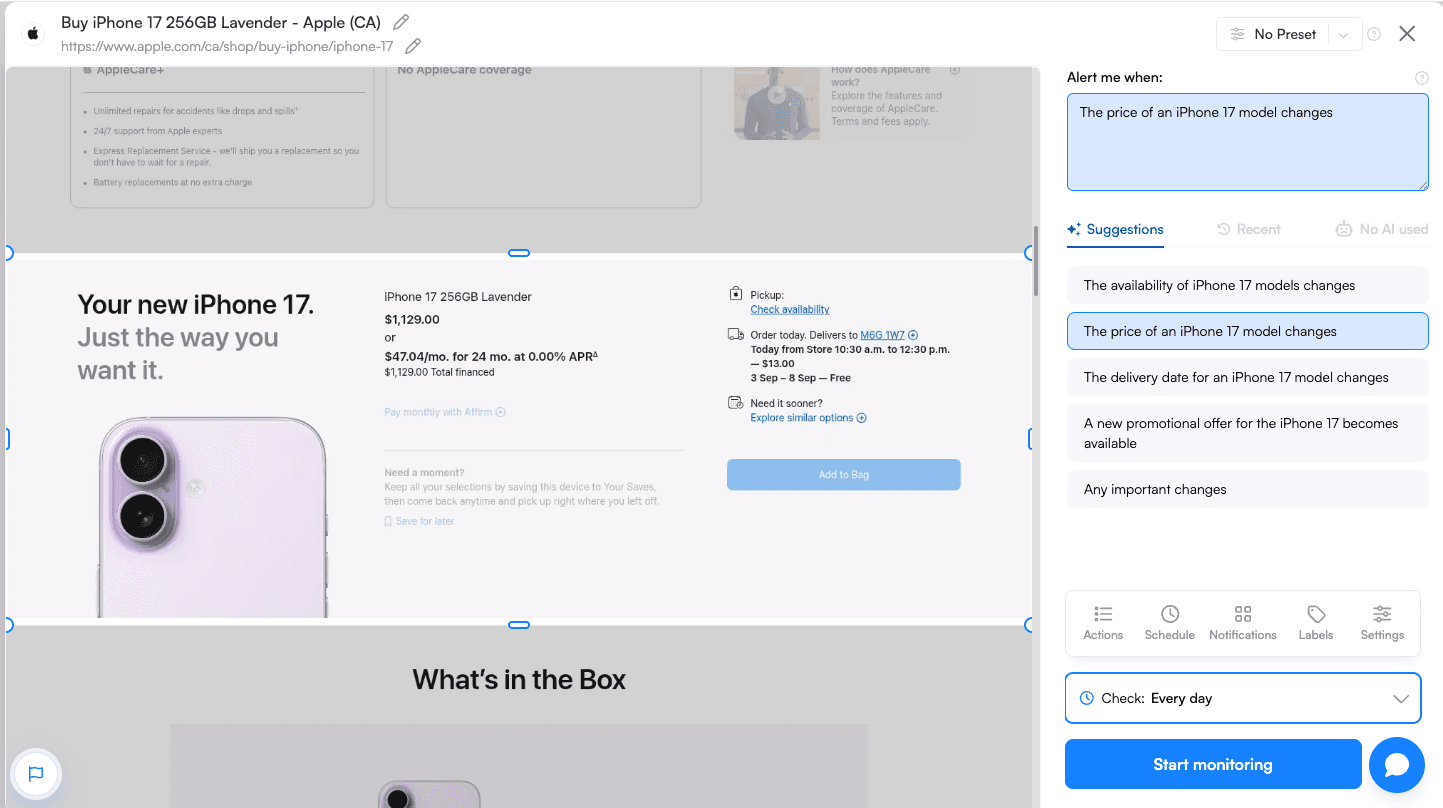
In the "Alert me when" box, type in a criteria for the alert, or select a suggestion from the list.
It can be as simple as "The price of this product drops" or something more specific like "The delivery estimate for this iPhone 18 Pro Max moves earlier than October 13" or "Pickup becomes available at my Apple Store."
Step 5: Decide how often Visualping should check the page, and then start monitoring!
Pick a check interval that matches the urgency of the drop. Options run from every hour on our Free plan, which includes 150 checks a month, to every few weeks.
Check frequency goes down to as often as every two minutes on our paid plans.
Then, just click "Start monitoring" and your Apple in-stock alert is created!
Want to do this without leaving ChatGPT? Open ChatGPT and type: Visualping, monitor [the URL you want to track]. Our app handles the rest. Open Visualping in ChatGPT →
Comparing ways to learn about Apple restocks
| Method | Works For | Effort | Speed to Learn About Stock | Downsides | Best Use |
|---|---|---|---|---|---|
| Manual refresh | Any Apple page | High | Slow | Easy to miss short windows | Low-stakes browsing |
| Apple Pickup checker | Store pickup | Med | Med | Limited to pickup radius; timing varies | Local pickup hunts |
| Carrier pages (AT&T/Rogers/etc.) | Phones | Med | Med | Plans/locks; fragmented | Alternative channels |
| Authorized resellers | Multiple categories | Med | Med | Varies by retailer; pages differ | Extra inventory options |
| Visualping (page monitoring) | Any Apple product or pickup page | Low | Fast | None inherent; set smart frequency | Primary method, catch fast flips |
Visualping handles restock monitoring across other retailers too. See the same setup adapted for Nordstrom anniversary sale waitlists, Coach Outlet bag drops, Dyson refurbished restocks, StockX sneaker drops, Ulta Beauty product launches, Patagonia gear restocks, and the full restock alerts hub.
What the iPhone 18 Pro launch looks like so far
Apple announced the iPhone 18 Pro and iPhone 18 Pro Max on September 9, alongside its first foldable, the iPhone Duo. Pre-orders for the Pro models opened on Saturday, September 12, and the phones reached stores on Friday, September 18. There is no base iPhone 18 this fall. The iPhone Duo opens for pre-order on October 16 at 5 a.m. Pacific and ships October 23, priced from $1,999 to $3,199.
The launch did not follow the usual script. AppleInsider noted that no configuration showed a shipping delay half an hour after pre-orders opened. Two days later the picture had flipped. MacRumors reported that every iPhone 18 Pro Max color and storage option in the US store had slipped to October 6 to 13, and Tom's Guide tracked the same slide at the carriers, with T-Mobile's 1TB Pro pushed to November 4.
We set up Visualping monitors on the iPhone 18 Pro pages at Apple, Best Buy, Walmart, Amazon, Verizon, AT&T, and T-Mobile ahead of launch, each checking hourly. Here is what they show as of September 21:
- Apple's own store keeps slipping. On September 17 the 256GB Burgundy iPhone 18 Pro Max quoted October 9 to 16 for delivery. By September 21 it read October 13 to 20, with pickup listed as currently unavailable at the Seattle store we set as the pickup location.
- Walmart sold through colors first. On launch morning three of the four AT&T Pro Max colors showed out of stock. Black came back over the weekend. Burgundy and Silver are still out, and so is the 2TB option.
- Amazon had one listing, and it is gone. The only iPhone 18 Pro on Amazon was a third-party seller at $1,439, which is $240 over Apple's price. It dropped from seven units to one on launch day, sold out over the weekend, and the product page no longer loads the listing at all.
- The refurbished store has not moved yet. Apple Certified Refurbished still lists only iPhone 15 and iPhone 16 models. The moment the first iPhone 16 Pro or iPhone 17 appears there, the monitor fires.
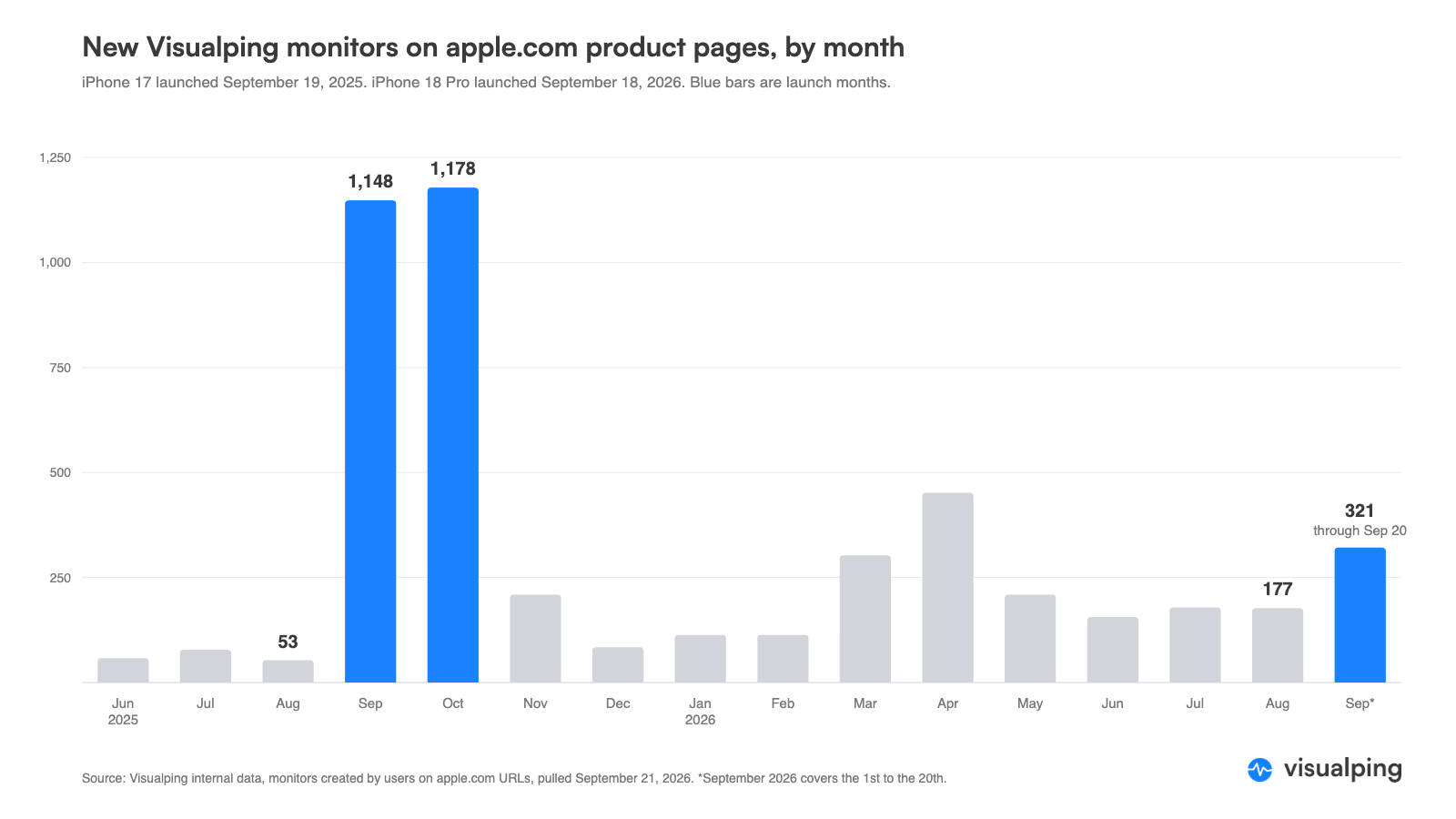
Our users tell the same story. In the eight weeks before Apple's event, about 26 people a week set up a new iPhone monitor on Visualping. The week of the September 9 event, that rose to 71. In launch week, September 14 to 20, it hit 159, six times the summer pace, and the single busiest day was Sunday, September 20, two days after the phones went on sale. Last year the peak came the week after the iPhone 17 launch, at 455 new iPhone watchers in one week, so this year's number is likely still climbing.
Across all Apple product pages, users created 321 monitors in the first 20 days of September, against 177 in all of August. More than 9,600 people have used Visualping to watch an apple.com page, and 2,457 of those monitors are active right now. The most-watched single iPhone URL since the event is not a new phone at all (it is Apple's Certified Refurbished iPhone page).
FAQ
What's the best way to get notified when Apple restocks an item?
The most reliable approach is to monitor the Apple product page directly with a page monitoring agent (also known as a website monitoring tool). Visualping watches the exact URL where the Add to Bag or Available for Pickup state lives and pings the reader the second that section changes. Every alert carries an AI summary and before-and-after screenshots, so the reader can tell at a glance whether the change is a real restock or a layout tweak. Start a free monitor.
Is there a free tool to track Apple restocks?
Yes. Visualping's free tier covers Apple restock monitoring across up to five product pages with 150 checks a month, which works out to about one check a day per page, or hourly checks on a single page for most of a week. That cadence works for slow-moving SKUs and refurbished inventory. For new iPhone, Mac, or Apple Watch launches where stock can flip in minutes, paid Visualping plans drop the check interval to every 15, 5, or 2 minutes depending on the tier. The free plan is enough to get started.
Can I monitor multiple Apple products for restocks at once?
Yes. Visualping lets the user set up monitors for multiple Apple product URLs from one dashboard (five pages on the free plan, more on paid plans), including iPhone configurations, MacBook builds, Apple Watch bands, AirPods, and store-pickup pages for specific zip codes. Each monitor runs on its own schedule and sends its own alert with an AI summary and before-and-after screenshots, so a launch-day watcher can run ten monitors in parallel without confusion.
How fast does Visualping detect an Apple restock?
On paid plans the check interval can be set as low as two minutes on the higher tiers and every 5 or 15 minutes on the entry tiers, so a restock is typically surfaced within minutes of the page changing. On the free plan, the 150-check monthly budget works out to about one daily check per page across five pages, which is sufficient for refurbished inventory or low-demand colors but too slow for launch-day SKUs. Apple's own restock email often arrives hours late, after the configuration has already sold out a second time.
Why don't Apple's own back-in-stock notifications work reliably?
Apple's native back-in-stock email is sent in a single batch after inventory is loaded, so thousands of subscribers receive the same alert at the same moment and the popular configurations sell out in seconds. The email also covers a limited set of products and rarely includes refurbished listings or specific store-pickup zip codes. A third-party monitor like Visualping polls the page directly on a chosen interval and alerts the reader without waiting for Apple's batch send. Free signup here.
Does Visualping work for a specific MacBook configuration or the Apple refurbished store?
Yes. The Visualping monitor can target the exact apple.com configurator URL for a specific MacBook chip, RAM, and storage build, or any apple.com/shop/refurbished listing page. Selecting only the availability area of the page filters out unrelated changes, and the AI summary states whether the watched configuration is now in stock. The refurbished iPhone page is the most-watched single iPhone URL among Visualping users since the September 9 event, ahead of any iPhone 18 Pro configurator page. For pickup-availability pages tied to a zip code, the monitor follows the same logged-out URL the reader uses.
When Does Apple Update Their Inventory Online?
Apple's digital inventory is usually updated once per day as soon as product shipments arrive and items have been restocked. From there, product listings are updated by Apple on the Apple Store website. The digital inventory update process occurs sometime in the early morning, typically around 6 a.m.
What Day of the Week Do Apple Stores Restock?
Apple restocks generally occur daily in brick-and-mortar stores, but it isn't always guaranteed that the product you want will be a part of a shipment or made available again any time soon. In any case, shipments that arrive usually go on sale relatively quickly, often before the next business day.
How Often Does the Apple Store Receive Shipments?
Apple Store shipments arrive throughout the week, every day except Sunday, ensuring most products are restocked within a convenient window. However, it isn't guaranteed that any particular item will be shipped out within a specific period, which makes it harder to track popular or rare products.
Do Apple Stores Restock Every Day?
Although Apple Stores receive shipments every day, it takes time for out-of-stock items, like the latest iPhone, to be replaced.
Apple Store inventory can shift through the week, so a visit on Monday and a return trip on Friday often reveal a completely different lineup of products on the shelves.
Stay on top of Apple Store restocks with Visualping
For shoppers tired of losing the latest Apple products to a sold-out badge, page-change tracking closes the gap. Visualping watches any web page on autopilot.
Apple or any other major retailer, Visualping fires in-stock alerts on rare or hot items. The second a tracked page changes, the alert lands in the reader's inbox, ready for a quick check and a buy decision.
For coverage across the Apple Store catalog and other retailers, including back-in-stock alerts, Visualping handles it. Start a free Visualping monitor and catch the next Apple restock, or the iPhone Duo pre-order, the minute it hits.
Want to get back in stock alerts?
Sign up with Visualping to get back in stock alerts for any product you've got your eye on.
Eric Do Couto
Eric Do Couto is the Head of Marketing at Visualping. He leads content strategy, growth operations, and brand positioning for website change detection.
More articles by Eric Do Couto