How to Monitor RFPs Automatically | RFP Alert Software for Government Bids 2026 | Visualping Blog
Updated August 27, 2026
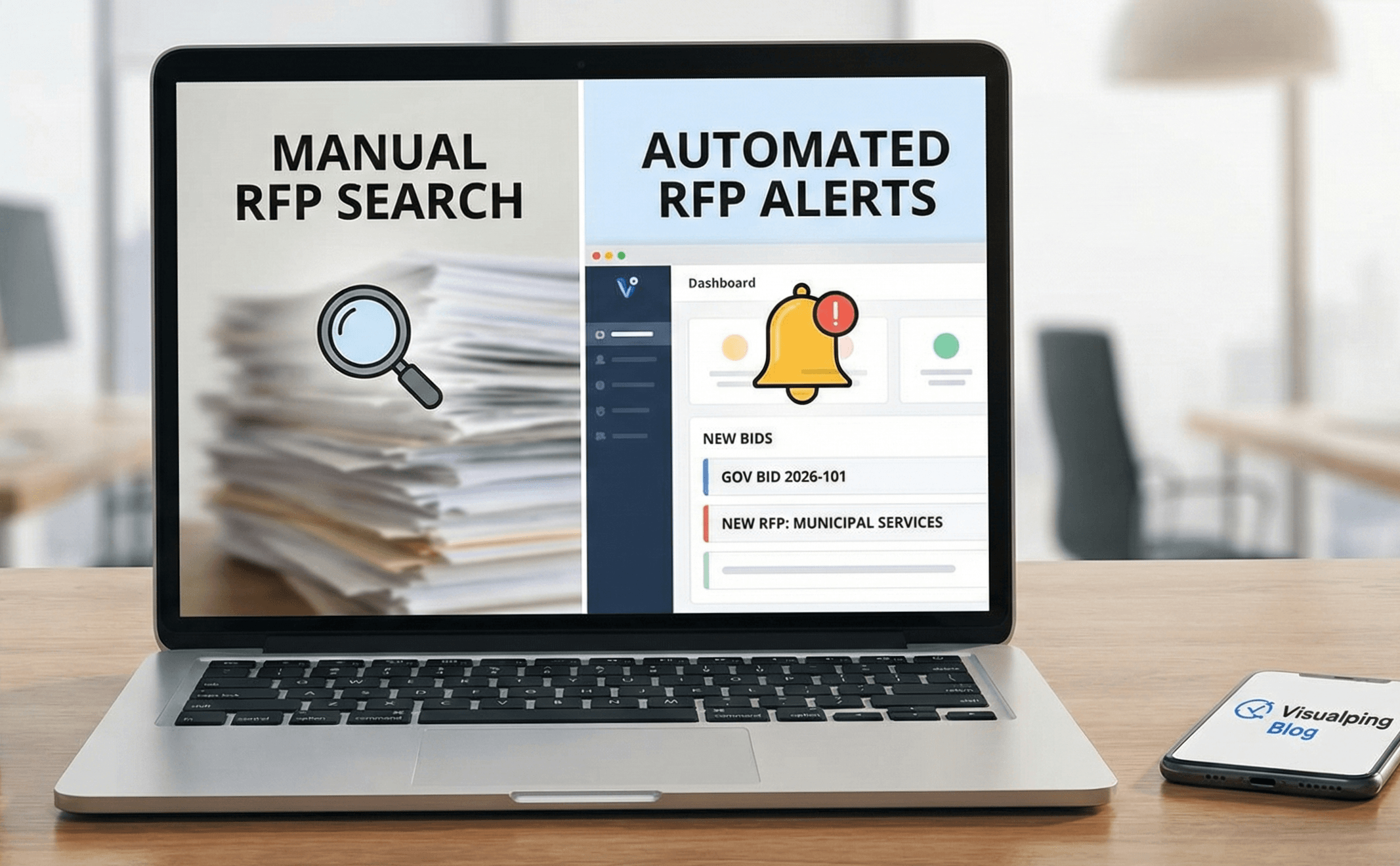
Manually monitoring request for proposal (RFP) pages is tedious and time consuming. Save time and earn an unfair advantage by using automation software to be the first to respond to new requests for proposals.
In this guide:
- Why speed wins RFPs
- What 12,000 procurement monitors reveal
- Set up RFP monitoring step by step
- Filter by NAICS code, keyword and geography
- Catch amendments, deadline changes and awards
- Four alert presets for your bid team
- Monitor pages behind a login
- FAQ
Manually Monitoring RFPs: Important, but So Tedious
Knowing when new requests for proposals (RFPs) are issued, or when an existing contract is up for renewal, is vital for many construction and industrial companies. Entire teams are assembled to bid for and win contracts to secure new business opportunities.
A request for proposal is what companies and government agencies issue when seeking a service provider or vendor to work with. Competitive bidding of the vendors' outsourced services ensues, and companies evaluate the strengths and weaknesses of the vendors in relation to a project.
The grind of manually checking RFP pages is all too familiar for companies whose business relies on responding to RFPs. You cannot win opportunities you never see.
And if your existing contract is up for renewal, many businesses are required to reapply for public RFPs, despite already having been elected as the chosen vendor. Heads will roll if a deadline for renewal is overlooked.
The Hidden Truth: Time Matters
Here is an important, and often overlooked, metric: time matters.
Requests for proposals come with a deadline and, obvious as it sounds, bidding on time is the first compliance test. According to federal acquisition regulations, government agencies must allow at least 30 days for proposal submissions on contracts exceeding the simplified acquisition threshold, with 45 days required for research and development projects.
Some businesses aggregate the submissions together to process them all at the same time. A late proposal looks unprofessional at best, and at worst gets systematically rejected. In fact, over 50% of first-time government bids are rejected due to non-compliance with basic RFP guidelines.
In practice, many teams review submissions on a rolling basis to spread the effort, which means early offers get seen first and read fresh. A proposal that arrives in the deadline crush competes for a tired reviewer's attention.
According to Loopio's 2026 RFP Response Trends & Benchmarks Report, teams win an average of 39% of the RFPs they answer, and winning teams spend about 35 hours per response, two hours more than the global average. RFPs drive 30 to 40% of total company revenue for many organizations, a benchmark that has held steady since 2019.
Put simply, it is important to frequently check for new requests to ensure your company outpaces competitors by submitting early responses.
RFPs are available to anyone and, by nature, it is a competitive process. Automate the page-checking so your team's hours go where they win contracts: composing quality proposals and scoring early RFP submissions.
 Early submissions get seen first and read fresh
Take Advantage of Website Monitoring Services Like Visualping
What if you could check for new requests for proposals far more often, without adding headcount? That is what automation does here: a bot monitors the requests for proposals an employee might forget, a notification lands the moment a municipality or client issues an RFP, and the same setup flags existing contracts coming up for renewal.
You can do all that by automating your RFP monitoring with change detection tools like Visualping.
Visualping is an easy to use and free website monitoring service that can send you notifications whenever a municipality or client issues a new RFP.
Unlike manually refreshing pages or setting calendar reminders to check for updates, Visualping automatically monitors RFP pages at intervals you choose and alerts you the moment something changes. The broader shift toward automation in procurement is accelerating: according to Loopio's 2026 research, 69% of teams now use RFP software or proposal management tools, and adoption has climbed every year they've measured it.
The feature that matters most for RFP monitoring is Visualping's AI capability. You can tell Visualping, in plain language, exactly what you care about, such as "alert me when a new construction bid is posted" or "notify me of RFPs with deadlines in the next 60 days." Visualping then filters out the noise and only notifies you when a change matches your intent.
This frees your team to focus on what actually wins contracts: crafting quality proposals and submitting early.
For example, the City of Denver's Bidding Opportunities page provides interested construction companies the ability to pinpoint tenders and other procurement opportunities.
With Visualping, you can monitor their list of continuously updating projects, from local library renovations to bridge construction services, and the corresponding deadlines, which update several times each month.
The same setup works on any procurement portal. Teams use it on SAM.gov contract opportunity searches at the federal level, and on state portals like Cal eProcure and TX SmartBuy. They also point it at the purchasing pages of counties, cities, and school districts, universities, transit agencies, and hospital systems: the long tail of public buyers that aggregator databases often cover late or not at all. If a portal publishes solicitations on a web page, you can monitor it.
What Bid Teams Actually Monitor: Visualping Platform Data
As of August 2026, teams run about 12,000 active RFP and procurement monitors on Visualping, spread across roughly 1,400 organizations. These pages churn constantly: 42% of those monitors caught at least one change in the past 30 days. Another 1,500+ monitors watch international tender portals. A few patterns from that data are worth borrowing:
- SAM.gov is the most-watched procurement site by number of teams, followed by bid aggregators like BidNet Direct, DemandStar, and PublicPurchase, and eProcurement platforms like Jaggaer, OpenGov Procurement, and PlanetBids.
- Teams monitor aggregators even when those platforms send their own alert emails. Procurement teams tell us the built-in notifications on eProcurement platforms can miss changes or arrive late, so they layer independent monitoring on top for the solicitations they can't afford to lose.
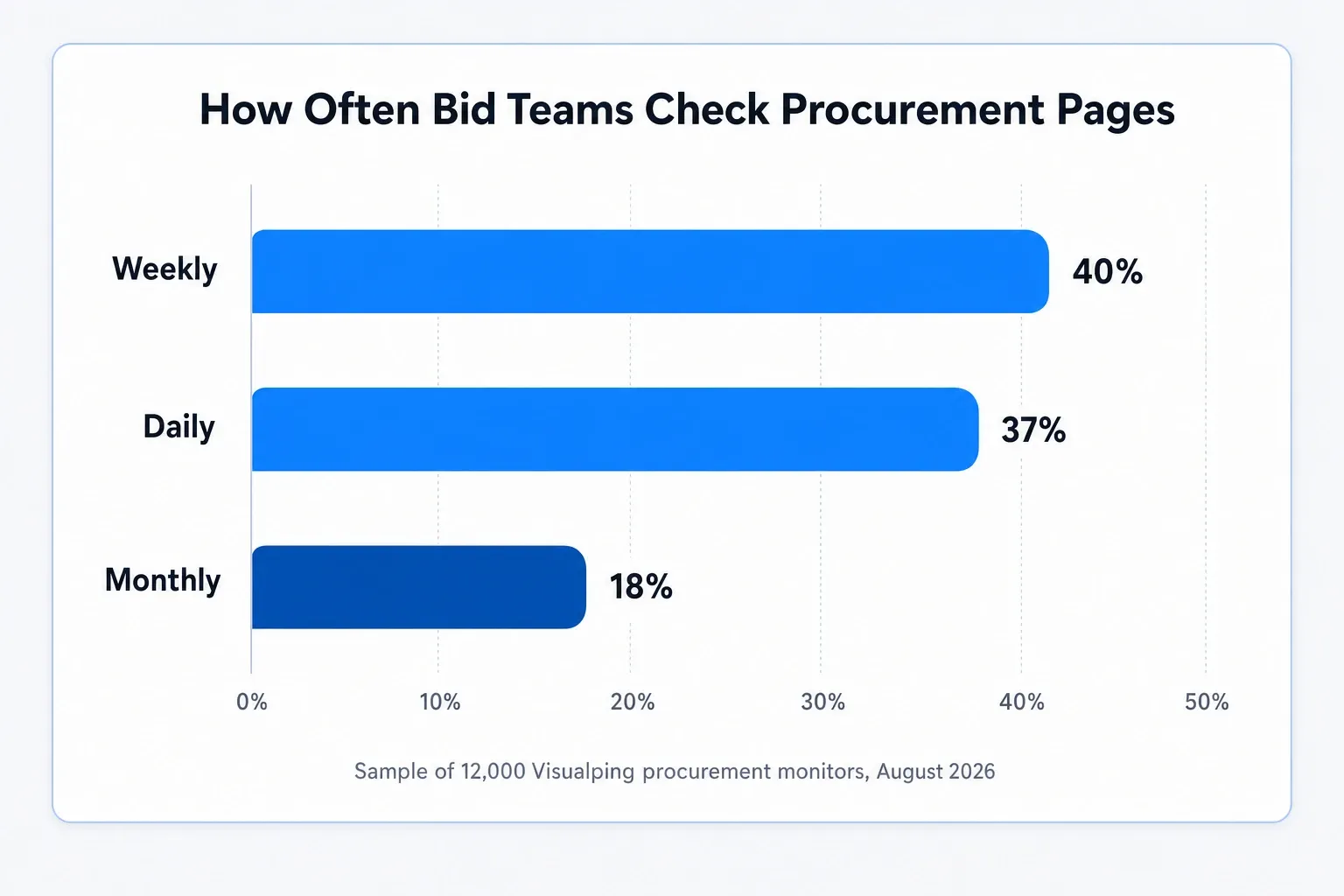
- Weekly and daily checks dominate discovery pages. Roughly 4 in 5 procurement monitors in that sample run at one of those two cadences, which matches how often portals post new opportunities. Teams step up the frequency on the detail pages of active pursuits, where a same-day amendment or deadline change matters.
- Single-agency pages earn dedicated monitors too. The Defense Innovation Unit's solicitations page alone is watched by 25 different teams.
When there is a change to the request for proposal page, Visualping will automatically send you an email alert with an AI-generated summary of what changed and a highlighted screenshot showing exactly where the update occurred. No more scanning entire pages to figure out what is different.
Even better, you can tell Visualping what matters to you. Set up an "alert me when" prompt like "new RFPs for engineering services" or "deadline changes on existing bids," and Visualping will flag those alerts as Important so you know which notifications need your immediate attention.
How to Use Visualping to Monitor Requests for Proposals
Here are the simple steps to stay on top of your request for proposal monitoring:
Step 1: Copy and paste the URL of the RFP page you wish to monitor into the search field on Visualping's home page. Click Go.
Step 2: Visualping will load a preview of the page. Select the area you want to monitor, or let Visualping's AI automatically detect the most relevant section.
Step 3: Tell Visualping what matters to you. In the "Alert me when" field, describe in plain language what changes you care about. For example:
- "A new RFP is posted"
- "Any bid related to construction or infrastructure"
- "A new solicitation mentions NAICS 236220 or general construction"
- "Deadline changes on existing proposals"
- "RFPs with submission dates in the next 30 days"
This is the step that turns a simple change detector into a filter that understands your intent.
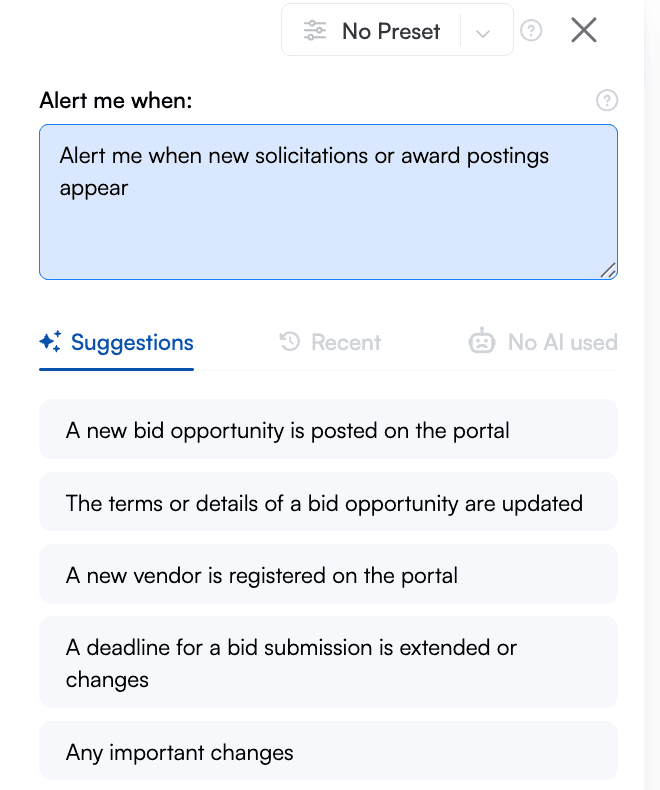
Step 4: Choose your monitoring frequency. For active RFP pages, every hour or every 6 hours is recommended. For less frequently updated pages, daily checks work well.
Step 5: Enter the email you wish to use to receive change notifications.
Step 6: Enable Important Alerts filtering (optional but recommended). When enabled, you will only receive notifications when a change matches your "alert me when" criteria. This eliminates noise from minor page updates like footer changes, cookie notices, or date formatting adjustments.
Step 7: Name your monitor with something descriptive (for example, "Denver City RFPs" or "State DOT Bids").
Step 8: Click to create your monitor. After verifying your email, you will have access to your dashboard where you can manage all your RFP monitors in one place.
Understanding Your Alerts
When Visualping detects a change that matches your intent, you will receive an alert containing:
- Important flag: If the change matches your "alert me when" criteria, the subject line will be marked "Important" so you can prioritize it
- AI summary: A short plain-language explanation of what changed, such as "A new RFP for highway maintenance services was posted with a deadline of March 15, 2026"
- Visual diff: A highlighted screenshot showing exactly what was added (green) or removed (red)
- Direct link: One click takes you to the actual page to review the full details
You skip the what-changed hunt and go straight to the pursue-or-pass decision.
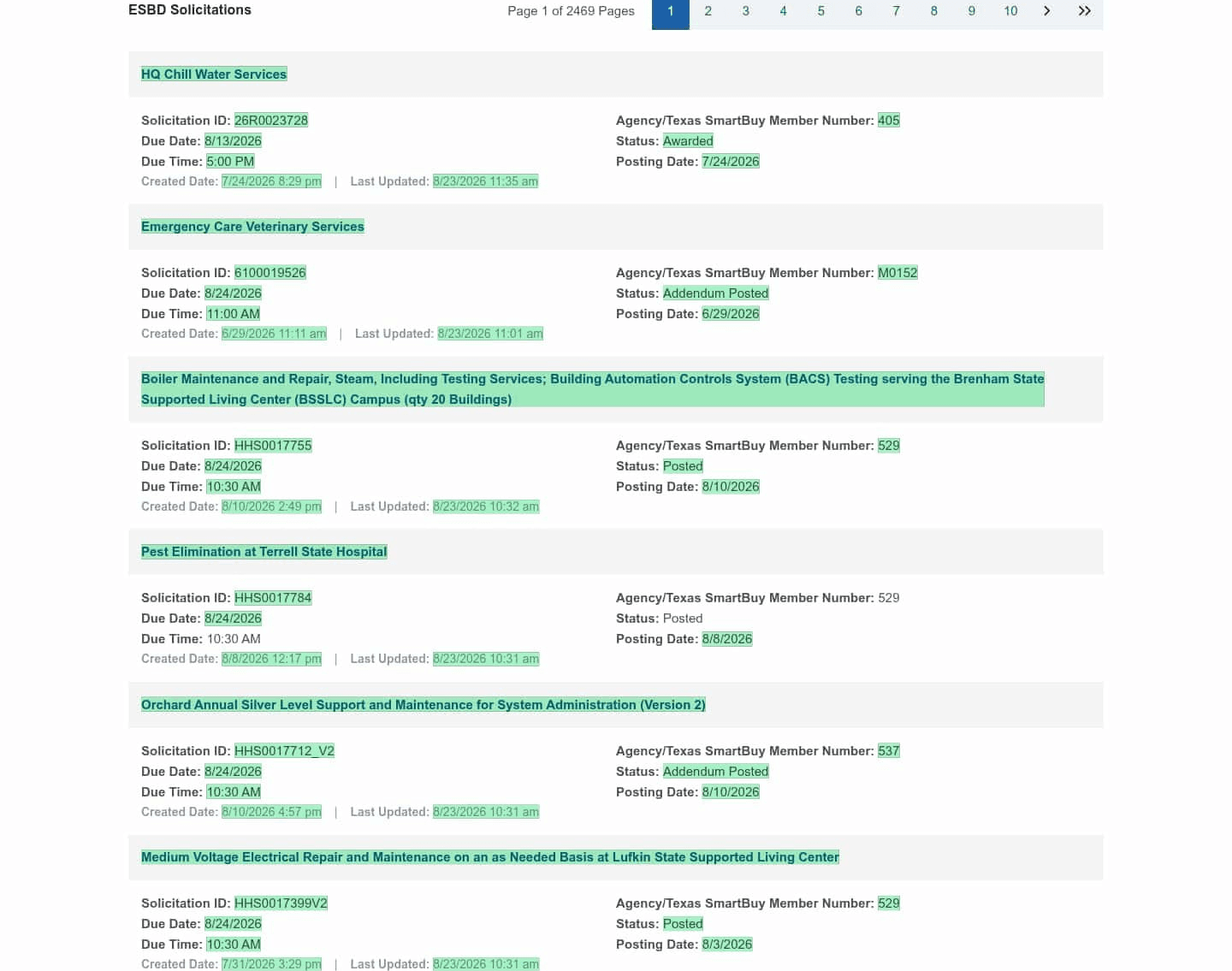
Here's a real alert from a Visualping monitor watching the Texas SmartBuy ESBD solicitations page. The monitor checks daily with the prompt "Alert me when new solicitations or award postings appear." On August 23, 2026, it flagged this change Important, with the AI summary reading:
Important: Texas ESBD Solicitations · August 23, 2026
The ESBD listings were updated with multiple new solicitation entries and award/addendum notices, including HQ Chill Water Services (26R0023728) marked Awarded, Emergency Care Veterinary Services (6100019526) with an addendum, and several HHS facility maintenance and FY27 procurement postings (e.g., HHS0017755, HHS0017784, HHS0017712_V2).
One alert covers three lifecycle events: new postings, an award, and an addendum on an active solicitation. Solicitation numbers land in the summary itself, so a bid team can triage without opening the portal, and the before/after screenshot below highlights exactly which rows changed.
 The filtering works in the other direction too: a monitor on BC Bid's opportunity page logs the portal's scheduled-maintenance banners without flagging them Important, because a maintenance notice isn't a solicitation.
Filter RFPs by NAICS Code, Keyword, and Geography
Most bid teams don't want every solicitation a portal posts. They want the ones in their trade, their codes, and their territory. With Visualping, that filtering happens in two places:
Geography comes from the portals you choose. Monitoring the Denver purchasing page means Denver opportunities. A regional contractor might monitor five county portals and two transit agencies; a national team might pair SAM.gov searches with the state portals in each region they serve. Each monitor is one page, so your coverage map is exactly the list of portals you set up.
NAICS codes and keywords go in the "alert me when" prompt. Because Visualping AI reads the actual text of the change, you can filter with prompts like:
- "A new RFP is posted with NAICS code 541511, 541512, or any IT services classification"
- "A solicitation mentions HVAC, mechanical, or plumbing work"
- "A new opportunity is posted for Riverside County or the Inland Empire"
Anything that doesn't match stays out of your inbox. This is how one monitor on a busy portal becomes a filtered feed for your specific trade instead of a firehose.
Monitor RFP Amendments, Deadline Changes, and Award Notices
New postings are only the start of the lifecycle. Bid teams get burned most often by what happens after the RFP goes up:
Amendments and addenda. Agencies routinely amend active solicitations: revised scopes, new question-and-answer documents, changed evaluation criteria. Many require you to acknowledge each addendum in your submission, and missing one can disqualify an otherwise winning bid. Monitor the solicitation detail page with a prompt like "an amendment, addendum, or revised document is posted."
Deadline changes. Submission dates move in both directions. An extension buys you time you didn't know you had; a shortened window can kill a bid you were pacing toward. A "the submission deadline changes" prompt on each active pursuit means the calendar in your proposal tracker never silently drifts from the portal.
Award notices. When the award posts, you want to know who won, at what value, and when the contract comes up for recompete, whether you bid or not. Monitor the portal's award or results tab, and for federal awards, the Federal Procurement Data System records every contract action. Our guide to government contract award alerts covers protest windows and recompete timing in detail.
RFP Alert Presets for Your Bid Team
Putting it all together, a complete setup for one procurement portal is a repeatable recipe: the portal URL, plus a shared bid-team email, plus four presets.
Point each monitor's notifications at a shared address like bids@yourcompany.com (or a Slack channel) so alerts reach the whole capture team instead of one person's inbox. Then cover the lifecycle with four "alert me when" prompts:
- New RFP: "A new RFP or solicitation is posted matching [your NAICS codes or keywords]"
- Amendment: "An amendment, addendum, or Q&A document is added to an active solicitation"
- Deadline: "A submission deadline is changed or extended"
- Award: "An award notice or intent to award is posted"
Bid teams already write prompts like these. In a sample of about 54,000 custom alert prompts clustered by meaning, 880 were tender and RFP conditions. The most common phrasings track these presets almost word for word: "A new tender is published," "A new bid opportunity is posted," "A new RFP is posted."
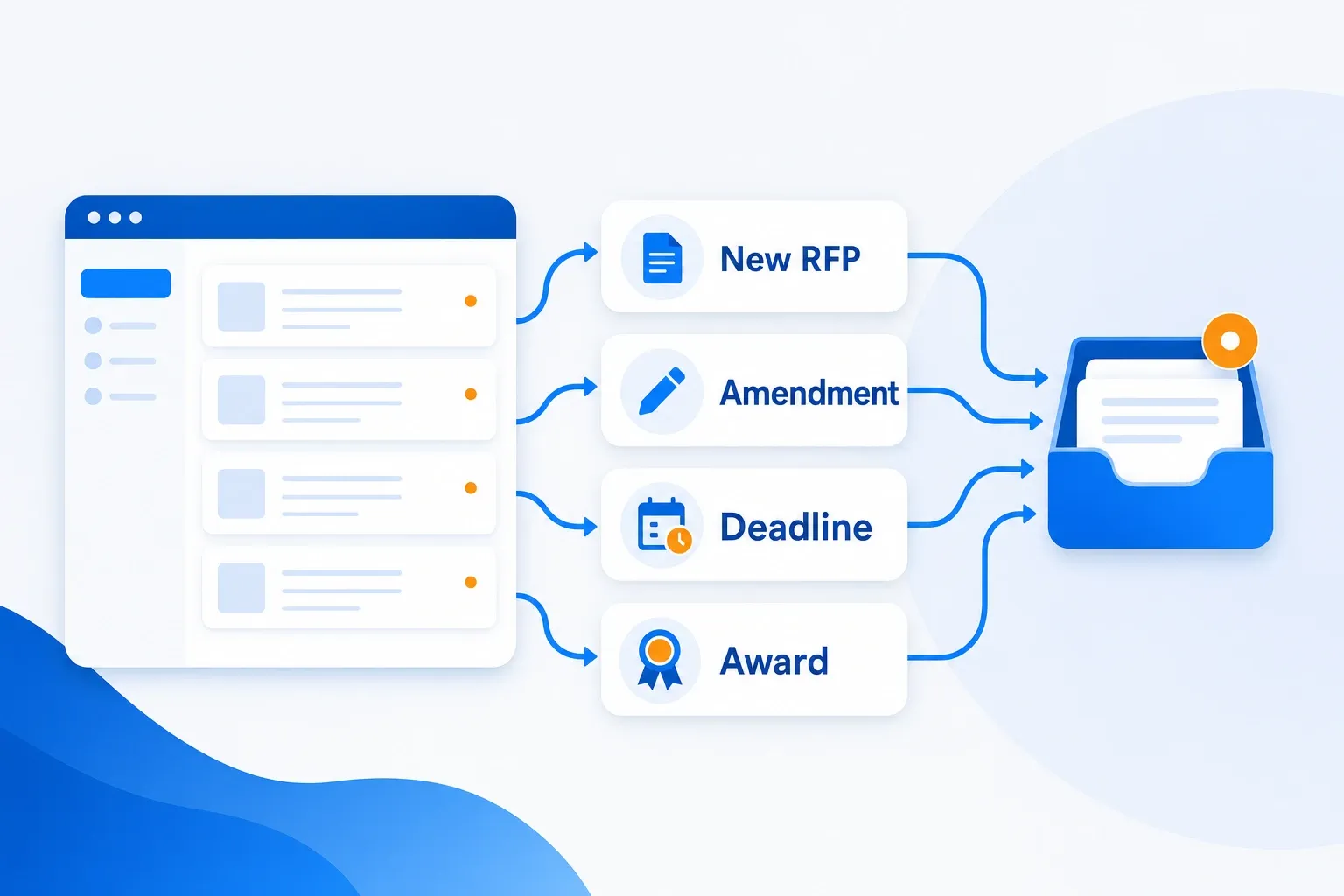 One portal, four prompts, full lifecycle coverage
Set the new-RFP preset on the portal's main solicitations page, and the amendment and deadline presets on the detail pages of bids you're actively pursuing. When an alert lands, the Important flag and AI summary tell your team in one glance whether it's a new opportunity, a compliance item, or intelligence on a competitor's win.
How to Track a Page Behind a Login Form
Some RFP pages require the user to first log in to a portal. To monitor a password-protected page with Visualping, use our element selector (the white arrow) to instruct the crawler to type in your login information into the username/email and password forms. Then you use the element selector again to click the Enter button (or Submit, Login, etc.) to instruct the crawler to log in before it checks for page changes.
For a more detailed description of the step-by-step process, check out our post How to Monitor Password Protected Websites using Visualping.
Step 1: Head over to Visualping in your web browser. Copy and paste the URL of the login-protected webpage you wish to monitor and click GO.
Step 2: The Advanced section of Visualping will appear. To see more options, click the downwards arrow beside Perform actions.
Step 3: Under Click, select Type in the dropdown options. Type your username or email, whichever you normally use to access the password-protected page, in the field that reads "Words to Type". Then click the element selector and use it to click the webpage element of the username/email form up above in the screenshot area.
Step 4: Next, click + Add action to add another action for the crawler. Under Click, select Type in the dropdown options. This time, type your password in the field that reads "Words to type". Then, to instruct the crawler to type your password into the password form, select the element selector, and use it to click the webpage element of the password form above in the screenshot area.
Step 5: Lastly, instruct the crawler to click Enter (or Submit, Log In, etc.) before it monitors the request for proposal page for changes. Select + Add action one last time. Under Click, select Click in the dropdown options. Use the element selector to click the Enter button.
Once you see the resulting page in the screenshot area, continue with the standard setup: add your "alert me when" prompt to define what matters, choose the frequency of checks, and enter your email under Send notifications to.
After confirming your email, Visualping will prompt you to create a password so you can return to your dashboard at your convenience.
Integrate with Your Team's Workflow
Visualping integrates with the tools your team already uses:
- Slack Integration: Get RFP alerts directly in your team's Slack channel
- Microsoft Teams: Receive notifications in Teams for immediate team visibility
- Google Sheets: Automatically log all changes to a spreadsheet for tracking and reporting
- Webhooks and API: Connect to your existing procurement management systems
These integrations ensure your entire team stays informed about new RFP opportunities without relying on a single person to check emails.
FAQ: RFP Monitoring
How often should you check RFP pages?
Match the cadence to the page. In an August 2026 sample of about 12,000 procurement monitors on Visualping, roughly 4 in 5 check weekly or daily; daily is the safer default for discovery pages that post new solicitations through the week. On the detail page of a bid you are actively pursuing, step up to hourly or every 6 hours so a same-day amendment or deadline change reaches you in time to act.
Can you monitor a SAM.gov search instead of the whole site?
Yes. Run your filtered search (keywords, NAICS codes, set-asides), then monitor the results page URL. The monitor watches that filtered slice of SAM.gov, and a prompt like "a new contract opportunity appears in the search results" keeps count updates and pagination shuffles out of your inbox. Our SAM.gov alerts guide covers what the native saved-search emails miss.
Does RFP monitoring work on portals that require a login?
For standard username-and-password portals, yes: the page actions described above type your credentials and sign in before every check. Portals behind two-factor authentication or single sign-on are better handled with the Visualping browser extension, and complex custom logins are the kind of setup the Solutions team builds for customers.
What does the "Important" flag on an alert mean?
Every Visualping change alert carries a binary Important flag: Important when the change matches your "alert me when" prompt, not Important when it does not. Turn on Important-only notifications and routine page noise, like banners and date formatting, never reaches your inbox, while the full change history stays in your dashboard.
Is there a free plan for RFP monitoring?
Yes. Visualping's free plan monitors up to 5 pages, enough for a state portal plus a few agency pages, and includes the AI summaries and Important-flag filtering described in this guide. Paid plans start at $10 a month billed annually ($14 month-to-month) for more pages and faster checks.
Get Started with RFP Monitoring
You are now equipped to monitor requests for proposals and receive alerts of changes to these pages. Visualping will send notifications to your inbox when changes occur on the RFP pages, and AI will help you focus on the opportunities that matter most.
You can also explore Visualping for Business, where dedicated assistance and training help you automate your website change monitoring at scale. Business plans add team seats and Slack, Microsoft Teams and Google Sheets integrations. Bulk import works on every plan.
View Visualping pricing to find the plan that fits your RFP monitoring needs, or start for free with up to 5 pages monitored.
Happy monitoring!
Related Resources:
- What Is FPDS? The Federal Procurement Data System in 2026
- How to Monitor Website Changes
- Legislative Tracking and Monitoring
- Regulatory Compliance: How to Monitor Changes
- Top AI Website Monitoring Tools
- Visualping Chrome Extension
Related reading
Never miss an RFP, amendment, or award
Monitor any procurement portal and get alerts at your bid team's email. Free to start.
Eric Do Couto
Eric Do Couto is the Head of Marketing at Visualping. He leads content strategy, growth operations, and brand positioning for website change detection.
More articles by Eric Do Couto