How to Track Regulatory Changes Across Multiple Websites in 2026
Updated September 29, 2026

Disclosure: This article is published by Visualping. We provide regulatory monitoring solutions and may benefit if you choose our product. We've drawn from real-world experience helping compliance teams monitor dozens or even hundreds of regulatory sources simultaneously. For UK firms, that often starts with monitoring FCA website changes. We encourage you to try our free trial to see how automated multi-site monitoring can transform your compliance workflow.
If you work in compliance, you already know the sinking feeling that comes with realizing you missed something important.
Maybe it was an FDA guidance update that affects your product category. Or a state-level environmental regulation that changed while you were focused on federal rules. Or an industry standard revision that somehow slipped through the cracks despite your best efforts to stay current.
The problem isn't that you're not trying hard enough. The problem is that regulatory information lives on hundreds of different websites, all updating on their own schedules. The email and RSS alerts that do exist, like the Federal Register's agency subscriptions, cover formal publications and miss quiet edits to guidance pages.
And checking all those sources manually every day is not sustainable, no matter how dedicated your compliance team is.
This is where effective regulatory monitoring for tracking multiple websites becomes essential: systematically monitoring every regulatory website that matters to your business, whether that's five sources or fifty, and getting alerts when anything important changes.
Why Tracking Multiple Regulatory Websites Is So Challenging (And Why It Matters)
The regulatory landscape is spread across many sources, and federal rules are only one of them.
You've got federal agencies like FDA, EPA, SEC, OSHA, and FTC, each maintaining their own websites with different structures and update calendars.
Then there are state-level regulators, which matter a lot if you operate across multiple states. International regulatory bodies if you do business globally. Industry associations that publish standards and guidance. Professional licensing boards. The list keeps growing.
And here's the thing: these sources don't coordinate with each other. The FDA might update critical guidance on a Friday afternoon. A state environmental agency might post new requirements with a 30-day comment period on a Tuesday morning.
An international regulator might publish enforcement actions that signal a shift in priorities. All of this happens on different schedules, on different websites, with different notification systems (if any notification system exists at all).
For compliance professionals trying to stay on top of all of this manually, it's overwhelming. You bookmark dozens of pages. You set calendar reminders to check high-priority sources weekly. You subscribe to whatever email lists exist, though half of them send too many irrelevant updates and the other half don't actually alert you when pages change. Something important always gets missed.
The consequences of missing regulatory changes aren't trivial. In some industries, failure to comply with new regulations can mean fines, legal liability, operational shutdowns, or loss of licenses.
Even if the penalties aren't severe, there's the reputational damage that comes from being out of compliance, a stain that can take years to recover from.
What makes regulatory monitoring for tracking multiple websites particularly challenging is that not all regulatory sources are created equal. Some need to be checked daily because they update frequently and the changes are time-sensitive.
Others might only update monthly or quarterly. Some sources publish changes in obvious ways, like a new PDF appears in a list. Others make subtle modifications to existing guidance that are easy to miss if you're just glancing at the page.
Your regulatory monitoring approach needs to account for all these variables while remaining practical for a compliance team that's probably already stretched thin. The real challenge is monitoring those sources consistently, reliably, and efficiently once you know what they are.
What You Need to Track Multiple Regulatory Websites
Let's be real here. Manually checking 50 regulatory websites every day isn't sustainable, no matter how detailed your checklists are.
You need systematic, automated monitoring. Here's what actually matters:
- Multi-site tracking that scales Your monitoring solution needs to handle dozens of different regulatory websites without exponentially more work. If setting up the 50th monitor is as easy as setting up the first one, you're good.
Ideally, the tool should allow you to import hundreds of URLs at once via a bulk upload feature, saving you from the tedious process of manual entry. In Visualping, bulk import works on every plan, including Free, up to your plan's page limit.
The test: Can you launch a comprehensive monitoring project for an entire industry list in a single afternoon? If your tool supports bulk actions and quick setup, you can keep up. If not, you'll always be playing catch-up.
-
Configurable check frequency Critical agencies that update frequently might need hourly checks. Sources that update monthly might only need daily monitoring. Being able to set check frequency individually for each source lets you allocate attention appropriately across your entire portfolio.
-
Documentation and audit trail For compliance purposes, you need to prove you're monitoring relevant sources and document when changes occurred. Your system should maintain records of what was checked, when, and what changes were detected, ideally with before-and-after versions so you can see exactly what changed.
How to Set Up Multi-Site Regulatory Monitoring
Here's how to actually implement this in a way that works for real compliance teams:
- Map your regulatory universe first
Before you can monitor effectively, list out every regulatory source relevant to your business. This might include Federal agencies (FDA, EPA, SEC, OSHA, FTC), state-level bodies in jurisdictions where you operate, international regulators if you're global, industry associations and standards bodies. Healthcare providers also need the Medicare contractor sites for every region where they bill.
Prioritize this list. Flag your highest-priority sources, a.k.a the ones where missing an update creates immediate compliance risk. Start with your top 10-15, get those working smoothly, then systematically add more.
Don't try to monitor everything on day one. That's overwhelming and likely to fail.
- Choose the right tool
For regulatory monitoring across multiple websites, you need a tool designed for this use case. Visualping is one great option for regulatory monitoring.
Visualping can automatically track changes across hundreds of regulatory sources and use AI-powered criteria to alert you only when specific, relevant compliance updates occur.
Setting up a new Visualping alert takes four steps:
- Paste the URL of the regulation page you want to monitor
- Use the visual selector to highlight the specific section you want to monitor, or set an AI criteria such as "Alert me when a new recall is added to this page, or information about an existing recall changes"
- Set your check frequency (as often as every 2 minutes on Personal 10k and Business plans, or as rarely as once a month)
- Select how you want to be alerted (email and webhooks on every plan, SMS on Personal 5k and up, Slack and Microsoft Teams on Business plans) - Here's an example of what an alert might look like below:
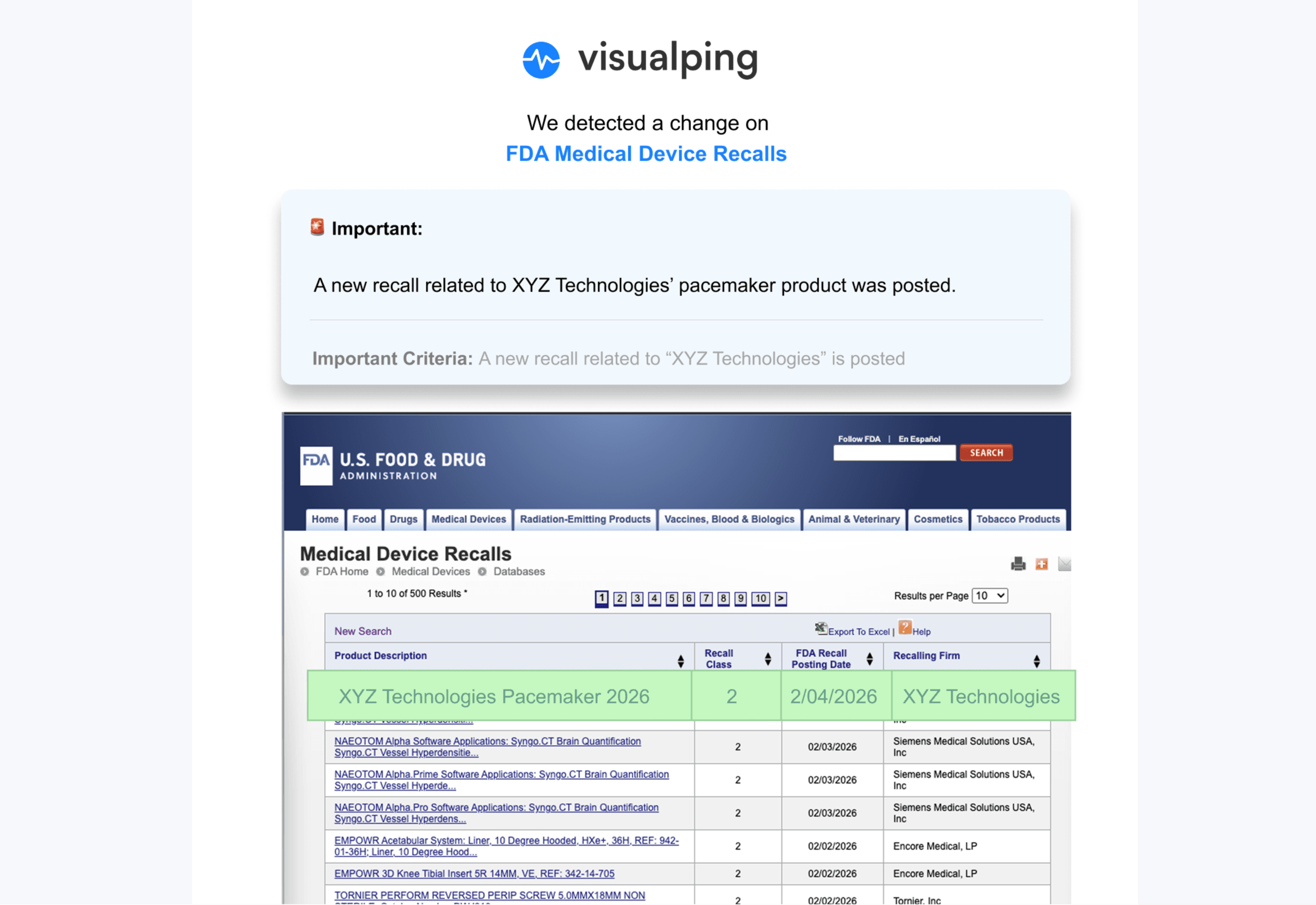
Illustrative mockup: XYZ Technologies is a fictional company, and its recall row was added to a screenshot of FDA's Medical Device Recalls database.
No coding, no complex configuration, no IT support needed. This simplicity makes it practical to monitor 50+ regulatory sources without a dedicated technical team. Business plans cover 200 pages or more.
When changes are detected, you get alerts with visual comparisons showing exactly what changed. Visualping AI adds a plain-language summary of what changed, so you can immediately assess whether it requires urgent action.
Set up monitors strategically
Don't monitor homepages, that's too broad. Identify specific pages within each regulatory website that publish the information you need: guidance documents pages, new regulations listings, enforcement actions, news sections, policy statements, meeting calendars.
Set up separate monitors for each distinct page or section. For a single agency, you might have 3-5 different monitors covering different content types. Use the visual selector to focus on just the part that changes when new content is published, usually a table, list, or specific content section.
Configure check frequencies based on update schedules, and how important these updates are:
- Hourly or more: Critical pages with time-sensitive updates
- Daily: Most important sources that update regularly
- Weekly: Sources that update less frequently
- Monthly: Low-priority or rarely-changing sources
Organize for team efficiency
With 30+ monitors running, organization matters. Use Visualping's labels (a Business plan feature) to group monitors by regulatory body, jurisdiction, business unit, or priority level.
This makes it easy to review monitors for a specific agency, ensure you're covering all state-level sources, or audit your program. For alert routing, point each monitor's notifications at the right team's Slack or Microsoft Teams channel (Business plans) or a webhook: FDA alerts to your medical device team, environmental alerts to operations, and so on.
Build response workflows
Establish clear workflows before rolling out your regulatory monitoring program:
Here are some questions to ask to start building out your workflow:
- Who reviews alerts from each source?
- What's the initial assessment process?
- How do you escalate significant changes?
- Where do you document changes and responses?
- How do you track implementation of required changes?
These workflows don't need to be complicated, but they need to exist. Otherwise effective monitoring doesn't translate into effective compliance management.
The Bottom Line: Multi-Site Regulatory Monitoring Is a Must-Have, Not a Nice-to-Have
Even in 2025, a record-low year for federal rulemaking, agencies issued 2,441 final rules, which means tracking regulatory websites manually is no longer going to be a (smart) way to go about your compliance monitoring.
Even the most dedicated compliance team can’t be everywhere at once, and missing just one update can lead to costly fines or legal headaches.
Automating how you track multiple regulatory websites is the only way to move from a reactive scramble to a proactive strategy. It’s the difference between finding out a law changed after you've already broken it and being ready for that change when it's announced.
If you're currently doing regulatory monitoring manually or if you're worried about gaps in your coverage, try out Visualping.
Set up alerts for your highest-priority regulatory sources and see how Visualping's automated multi-site tracking can transform your compliance workflow.
Frequently Asked Questions About Regulatory Monitoring for Multiple Websites
How many regulatory websites can I realistically monitor at once?
With automated tools, you can monitor way more than you'd think, dozens, hundreds, even thousands of sites is totally manageable. Technology capacity is rarely the constraint (Visualping can monitor thousands of pages on Business plans with extra pages or on custom Solutions plans). The real limit is your team's ability to respond to the alerts you're generating.
I'd recommend starting with your 10-15 highest-priority sources, making sure your alert response workflows are solid, then gradually expanding. On Visualping, the median business workspace that watches government websites monitors 9 of their pages. About 1 in 5 (22%) monitor 21 to 100, and about 1 in 6 (16%) monitor more than 100 (Visualping data, September 2026).
The key is building up gradually so you're not overwhelmed. Add sources in batches, make sure your team can handle the alert volume, then add more.
What happens if a regulatory website goes down or becomes temporarily unavailable?
Good monitoring tools handle this gracefully. If a website is temporarily unavailable when a scheduled check happens, the tool will try again at the next scheduled interval rather than sending false alerts about "changes."
With Visualping specifically, a failed check is logged as an error and doesn't count as a change. If a page keeps failing (by default, for 24 hours on hourly checks or 7 days on daily checks), you get an error alert about the access issue, and you can choose to get one on every failed check instead. This lets you know there's a problem accessing that source, but it doesn't flood you with fake change notifications.
For mission-critical regulatory sources, this is important. You want to know if a site is down, but you don't want server issues to trigger your compliance response workflows.
Can monitoring tools track changes within PDF documents, not just web pages?
Yes, though this varies by tool. Many regulatory agencies publish guidance as PDFs rather than HTML pages, so PDF monitoring capability is pretty essential for regulatory monitoring.
Visualping can monitor both web pages and PDF documents on a web page. If a regulatory agency updates a PDF guidance document, you'll get alerted to the change. You can also monitor index pages that link to PDFs. When new PDFs are added to the list, you'll get notified. Several state agencies post annual medical record copy fee schedules this way, as a PDF behind a link.
For really detailed PDF monitoring (tracking changes within large PDF documents), you might need more specialized tools, but for most regulatory monitoring purposes, detecting when a PDF is updated or when new PDFs are published is sufficient.
What if I'm monitoring regulatory sources in multiple languages or countries?
Visualping can monitor websites in any language. You can even instruct Visualping AI to summarize the changes in a different language within the "Alert me when" prompt!
For international regulatory monitoring, the main consideration is check frequency and timing. If you're based in North America but monitoring European regulatory sites, consider when those sites are most likely to be updated (during European business hours) and schedule your checks accordingly.
You might also want to route alerts for different jurisdictions to team members who are familiar with those regulatory systems or speak the relevant languages.
Do I need IT or technical resources to set up regulatory monitoring?
Not with tools designed for business users. Visualping is built so compliance professionals and legal teams can use it directly, without IT support or technical expertise.
If you can copy/paste a URL and click on parts of a webpage, and enter an AI criteria, you can set up Visualping alerts. It's intentionally simple because compliance teams need to be able to manage their own monitoring without depending on technical resources.
That said, if you want to do more advanced integrations (like feeding monitoring alerts into another internal system via webhooks), you might want IT involvement. But for basic multi-site regulatory monitoring, non-technical compliance professionals can absolutely handle the setup and management.
Protect your site from defacement today
Get instant alerts when unauthorized changes occur on your website with Visualping's powerful monitoring tools. Start today!
Eric Do Couto
Eric Do Couto is the Head of Marketing at Visualping. He leads content strategy, growth operations, and brand positioning for website change detection.
More articles by Eric Do Couto