Understanding Visualping's Pricing: What You Get and Why
Updated April 12, 2026

If you've searched for Visualping pricing, you've probably seen the criticism: "$140 a month for Slack integration?" or "I could set up a cron job on EC2 for less." Those complaints are real, and some of the frustration behind them is fair.
What those comments leave out is what you're actually buying when you pay for managed website monitoring, and when the price makes sense (or doesn't). This post breaks down every plan, compares managed monitoring against building your own, and shares real platform data on what business teams pay per monitor.
If Visualping isn't the right fit for your use case, we'll say so.
What's in each plan
Visualping has four tiers.
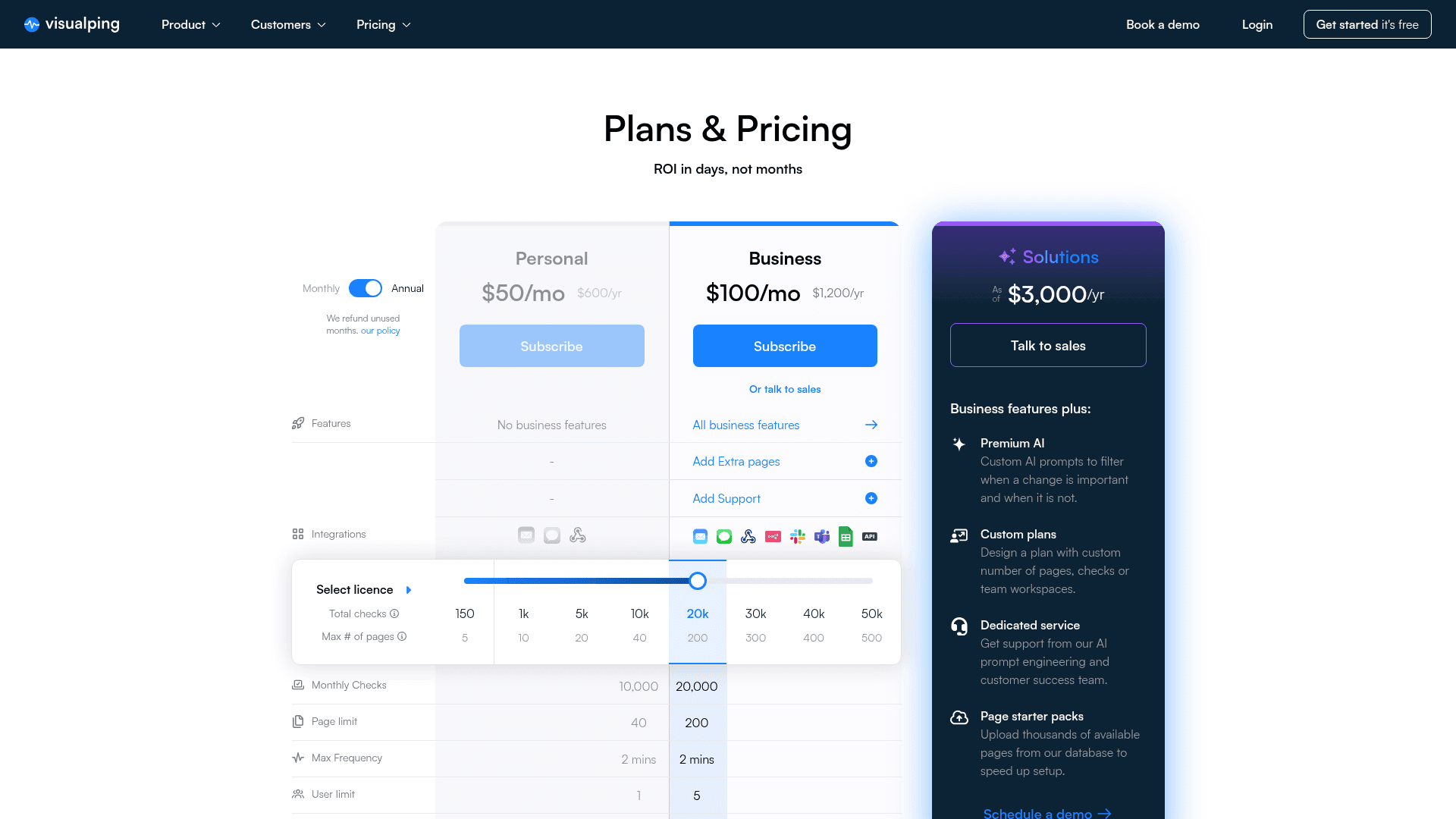
Free Plan Five monitored pages, 150 checks per month, and a minimum check interval of 60 minutes. Every alert includes AI-powered summaries and the binary IMPORTANT flag that classifies whether a change matters to you. The free plan is designed for individual users tracking a handful of pages.
Personal Plans (from $10/month) Starting at 1,000 checks per month with up to 10 monitored pages and shorter check intervals. You get the same AI capabilities as every other tier, plus more capacity to monitor pages that change frequently.
Business Plans (from $100/month) This is where the pricing conversation gets heated, so let's be specific. Business plans start at $100/month billed annually and include 20,000 checks, 200 monitored pages, and team features: shared workspaces, Slack and Microsoft Teams integrations, and priority support. API access, webhooks, and Zapier are available on every plan, including Free. Higher Business tiers scale check volume and page counts further.
Native team integrations (shared workspaces, Slack, and Teams) are gated to Business because they require team permission systems and dedicated infrastructure. API access, webhooks, and Zapier, by contrast, are available on every plan, including Free. These aren't features that can be enabled with a config toggle.
Solutions (Custom Pricing) For organizations monitoring hundreds or thousands of pages with custom AI prompts, priority processing, and dedicated support. Solutions customers get access to more powerful language models for analyzing dense documents, plus Visual Analyzer for image-based changes.
What you're actually paying for
The pricing page lists checks, pages, and features. But the real cost structure comes from what runs behind every monitored page.
Managed Infrastructure
Every Visualping check triggers a request from one of several global monitoring nodes. The system handles JavaScript rendering, anti-bot challenges, cookie consent dialogs, and page load timing. When a page uses Cloudflare protection or requires authentication, the monitoring infrastructure adapts.
That adaptation isn't automatic and forgotten. Visualping's engineering team actively works (within whitehat, ethical boundaries) to stay ahead of the blockers that commonly impede monitoring jobs: new bot-detection patterns, changes to WAF behavior, evolving CAPTCHA systems. This is ongoing engineering work that a DIY setup would need to replicate independently.
In a sample of 1.8 million active monitors on the platform (April 2026), nearly 30% check at sub-hourly intervals, as frequently as every five minutes. That's more than 500,000 monitors running continuous checks throughout the day, each requiring compute, bandwidth, and storage.
AI Processing on Every Alert
Every change event, on every plan including free, runs through Visualping's AI layer. The system generates a plain-English summary of what changed and a binary IMPORTANT classification that tells you whether the change matches your monitoring criteria. AI is the baseline, included on every plan.
The AI models aren't static. Visualping's engineering team continuously tests output quality against internal datasets and improves both monitoring jobs and AI summaries based on real-world results. Solutions-tier customers can train the AI directly with thumbs-up and thumbs-down ratings on each alert, sharpening importance classifications for their specific monitoring jobs over time. That feedback, combined with the engineering team's own quality testing, feeds back into the models that serve every tier.
Four monitoring modes
Visualping offers four ways to watch a page. Visual mode compares screenshots with pixel-level analysis and configurable sensitivity. Text mode extracts and compares actual text content, ignoring layout shifts. Element mode targets specific page sections (a price field, a status indicator, a table row) while ignoring everything else. And All mode combines all three approaches on every check, catching changes regardless of how they manifest.
All mode is the recommended default. Each mode has different infrastructure requirements: text extraction needs HTML parsing and content normalization, element monitoring requires DOM targeting and selector stability across page updates, and visual comparison runs pixel-level analysis. All mode runs the full stack on every check.
Reliability and Uptime
Monitoring tools that go offline defeat their own purpose. Visualping operates redundant infrastructure across multiple regions, handles retries for transient failures, and tracks error counts per monitor. When a check fails, the system retries before alerting you, reducing false positives from network issues rather than passing every glitch through as a change.
The real cost of building your own
The most common pricing objection sounds like this: "I could set up a cron job on an EC2 instance for $5 a month and do the same thing."
That's technically true for the simplest case: checking whether a single static HTML page changed. But it leaves out quite a lot.
Setup and Maintenance Time
A basic change detection script takes a few hours to build. A production-grade system that handles JavaScript rendering, anti-bot protections, content normalization, retry logic, alert routing, and a dashboard takes weeks. Then it needs ongoing maintenance: dependency updates, server patching, monitoring the monitor.
If your engineering time costs $75-150 per hour (the BLS reports a $63/hour median for software developers before benefits and overhead), the setup cost alone exceeds a year of Visualping's Business plan. And you haven't built AI-powered change summaries, team workspaces, or Slack integration yet.
Scaling Complexity
Monitoring 5 pages on a cron job is straightforward. Monitoring 50 pages at 5-minute intervals requires queue management, concurrency control, rate limiting (to avoid getting blocked by target sites), and storage for change history. At 200 pages, you're building infrastructure.
Among sampled business workspaces on the Visualping platform, nearly 4 in 10 run 21 or more active monitors, and about 1 in 6 track more than 100 pages. Teams tend to start with a handful of monitors and expand as they find more pages worth tracking. A cron job that worked fine for 5 pages starts to crack at 50.
Anti-Bot and JavaScript Challenges
Modern websites fight automated requests. Cloudflare, Akamai, and other WAF providers block requests that look like scrapers. A homegrown monitoring tool needs rotating proxies, browser fingerprinting, CAPTCHA handling, or headless browser infrastructure to access many production websites reliably. Pages behind login walls add another layer of complexity. These are hard engineering problems with ongoing cost.
Alert Intelligence
The DIY approach gives you "something changed." Visualping gives you "the competitor's enterprise pricing tier increased by 15%, and this change is IMPORTANT based on your monitoring criteria." The AI processing layer interprets changes, not just detects them. That distinction is the reason most teams stop building their own.
An Honest TCO Comparison
| Cost Factor | DIY (EC2 + Scripts) | Visualping Business |
|---|---|---|
| Monthly infrastructure | $10-50 | Included |
| Engineering setup (one-time) | 40-100 hours | 0 |
| Ongoing maintenance | 5-10 hours/month | 0 |
| AI change summaries | Build or buy separately | Included |
| Team features | Build yourself | Included |
| Anti-bot handling | Significant effort | Included |
| Effective monthly cost | $500-2,000+ (including eng time) | $100-300 |
The cron job is cheaper only if your time is free.
What business teams actually pay per monitor
The best way to judge pricing is to look at what teams actually get for the money. These numbers come from a sample of Visualping workspaces, April 2026.
Monitor Density
In a sample of over 3,100 business workspaces, the average team runs about 350 active monitors. At that density, a Business plan's per-monitor cost drops below 50 cents each per month. Even workspaces with 20 monitors pay around $5 per monitored page, which covers continuous checks, AI summaries, and team access.
Use Case Breadth
When users create an account, they tell us why they're monitoring. Across a sample of 390,000 users who answered, 14 distinct monitoring categories emerge: from price tracking and competitive intelligence to regulatory compliance, academic research, job market monitoring, stock tracking, and software release notes.
Each of those content types has different rendering, extraction, and comparison requirements. Ecommerce product pages behave differently from government regulatory filings, which behave differently from JavaScript-heavy web applications. The platform absorbs that complexity. Your team doesn't have to.
Business vs. Personal Usage
About 60% of active monitors on the platform belong to team or business accounts. At this level, monitoring is a shared workflow: teams split pages across members, route alerts to different Slack channels by topic, and manage everything from a single dashboard.
Change Velocity
Roughly 1 in 3 monitored pages detected at least one change in the past 30 days. The web moves faster than most teams expect. Pricing pages update quarterly. Regulatory documents change without announcement. Competitor product pages shift weekly. If you're checking manually, you're checking too late.
Go deeper: Competitive monitoring with Visualping | Regulatory and compliance monitoring
When Visualping is the right fit (and when it isn't)
Visualping works well for:
- Teams monitoring 10 or more pages who need shared workspaces and integrated alerts
- Workflows where AI-powered change summaries save time over reviewing raw diffs
- Organizations tracking pages behind JavaScript rendering, login walls, or anti-bot protection
- Use cases where reliability matters: compliance, competitive intelligence, pricing, regulatory monitoring
- Non-technical users who need monitoring without writing code (the browser extension sets up monitors in two clicks)
Consider alternatives if:
- You're monitoring a single page and don't need AI summaries or integrations. The free plan handles this, or a simple script may be enough
- Your team has dedicated engineering capacity to build and maintain monitoring infrastructure, and you need deep customization that a SaaS product can't provide
- You need to monitor file types Visualping doesn't support (PDFs, Excel files, RSS feeds). The self-serve product focuses on web pages
- Your budget is under $10/month and you need more than 5 pages. Open-source tools like self-hosted change detection projects serve this segment well
We'd rather lose a signup today than deal with a frustrated user in three months.
Frequently asked questions
Is Visualping expensive?
It depends on what you're comparing against. For a single personal monitor, the free plan costs nothing. For a team running dozens of monitors with AI summaries and Slack alerts, Business plans start at $100/month, which works out to a few dollars per monitored page. Compared to the engineering time required to build and maintain equivalent functionality in-house, managed monitoring typically costs less. Compared to checking pages manually, the time savings alone justify the price for most professional use cases.
Why does the Business plan cost more than Personal?
Business plans include team workspaces, native integrations (Slack, Teams, n8n, Google Sheets), higher check volumes, and priority support. API access, webhook delivery, and Zapier are available on every plan, including Free; API usage draws on your plan's normal check quota, with no separate API credit limit. The integrations in particular require persistent server-side infrastructure that operates continuously, not just when checks run.
Can I use Visualping for free?
Yes. The free plan includes 5 monitored pages, 150 checks per month, and full access to AI summaries and IMPORTANT alerts. It's a genuine free tier, not a trial. Many users monitor a few important pages on the free plan indefinitely.
What happens if I need more checks than my plan allows?
You can upgrade your plan at any time. Check usage resets monthly. If you consistently need more capacity, moving to the next tier is usually more cost-effective than paying for overages.
How does Visualping pricing compare to other monitoring tools?
Page monitoring agents (also known as website monitoring tools) range from free open-source projects to enterprise platforms costing thousands per month. Visualping sits in the middle: more capable and reliable than free tools, more accessible than enterprise-only solutions. The AI processing layer (summaries and IMPORTANT flags on every alert) is included at every tier, which distinguishes it from tools that charge separately for intelligence features. Visit the pricing page for current plan details.
Want to monitor web changes that impact your business?
Sign up with Visualping to get alerted of important updates from anywhere online.
Eric Do Couto
Eric Do Couto is the Head of Marketing at Visualping. He leads content strategy, growth operations, and brand positioning for website change detection.
More articles by Eric Do Couto