Set Up a Black Friday Deal Tracker With Price and Stock Alerts
By Emily Fenton
Updated October 8, 2025
TL;DR: Black Friday 2026 is Friday, November 27, and Cyber Monday is November 30. To get deal alerts, paste a product page into Visualping, type what you want in "Alert me when" (for example, "the price drops below $500 or it's back in stock"), pick how often to check, and add your email. The Free plan covers 5 pages with email alerts. Start now so you have a few weeks of prices to compare.
Set up price and stock alerts across Amazon, Walmart, Best Buy and Target in a few minutes, and stop refreshing product pages to catch a drop.
Quick Start (30 Seconds)
- Copy the exact product page URL (e.g., a TV on Amazon).
- Paste it into the box on the Visualping homepage and click Go.
- Type your condition in the "Alert me when" box: "the price drops below $500 or the item is back in stock." To watch a sale page instead, try "new products are added to the sale."
- Pick a frequency under "Check:" and enter your email under "Send to."
- Click Start Free Monitoring. Repeat for the same product at Walmart, Best Buy and Target.
Why a Black Friday Deal Tracker Beats Manual Checking
- Speed: Lightning deals and doorbusters can disappear in minutes.
- Coverage: Monitor any retailer page from a single dashboard.
- Precision: Write a condition like "the price drops below $300" so you only hear about drops that matter.
- Less stress: No more refreshing. Visualping pings you when it matters.
If you also need restock alerts (for fast-selling items), see:
If you want pure price tracking, read:
When to Start (and How to Pace Your Alerts)
Black Friday 2026 is Friday, November 27, and Cyber Monday is November 30, but the deals run for weeks. The useful window starts in October and runs through Cyber Monday.
- October to mid-November: Seed monitors for target items and check them daily or hourly. Daily checks on 5 pages fit the Free plan's 150 checks a month. One page checked hourly uses about 720 checks a month, so hourly monitoring for the whole season needs a paid plan.
- Black Friday week (November 23 to 30, 2026): Speed up your must-buy items: every 15 minutes on Personal 1K, every 5 minutes on Personal 5K, or as often as every 2 minutes on Personal 10K and Business plans. Faster checks burn through your allowance (every 5 minutes is 288 checks a day per page), so save them for items you plan to buy.
- After Cyber Monday: Keep alerts on. Clearance markdowns can still hit new lows.
For complementary planning, bookmark:
Alert Methods Compared
| Method | Best For | Pros | Considerations |
|---|---|---|---|
| Push (mobile/desktop) | Flash sales | Instant, hard to miss | Allow notifications; fine-tune rules |
| Email alerts | Detailed review | Searchable, easy to triage | Slight delay vs push |
| SMS | Mission-critical buys | Works even on weak data | Keep volume low |
| Retailer apps | Single-store superfans | Early access & exclusives | Requires juggling multiple apps |
| Visualping page monitoring | Multi-retailer tracking | Works on any product URL; "Alert me when" conditions; change highlights | Write a specific condition per page |
Retailer Playbooks (What to Monitor)
Amazon
- Track the price block, “In Stock” text, and model-specific ASINs.
- For broader coverage, add monitors on Deals modules.
- Related resources: Amazon Black Friday 2026 dates and deals and Amazon In-Stock Alerts
Walmart
- Monitor Price, Delivery modules, and Walmart+ early access banners. In 2026, Walmart's Black Friday Deals event runs November 23 to 29, and Walmart+ members get early access to some deal drops.
- See: Walmart Black Friday 2026 dates, hours and deal alerts and Walmart Price Tracking
Best Buy
- Watch the product price, open-box availability, and My Best Buy Plus and Total member offers. Best Buy's 2026 Black Friday sale runs November 19 to 28, with new doorbusters each week of November.
- Guide: Best Buy Black Friday Deals Alerts and Best Buy Price Tracking
Target
- Monitor the product page price and Target's Black Friday deals page for gift card offers, which Target ran during its 2025 Black Friday weeks.
- Pair with Buy Online, Pick Up In Store (BOPIS) for same-day wins.
- Guide: Target Black Friday 2026 dates, hours and deals
Home Depot and Lowe's
- Watch tool and appliance product pages for the price, and each store's Black Friday deals page for new drops.
- Guides: Home Depot Black Friday and Lowe's Black Friday
Brand and department stores
- Watch the brand's own product pages for price drops and sale prices.
- Guides: Apple, Nike, LEGO, Old Navy and Zara Black Friday guides
- More guides: Macy's, Coach, American Eagle and Aerie, Bath & Body Works and Ulta
Set Up Visualping (Step-by-Step)
Visualping checks any webpage on the schedule you pick and emails you when the change you described happens. Email, webhooks and Telegram work on every plan, including Free. SMS starts on Personal 5K (US and Canada numbers).
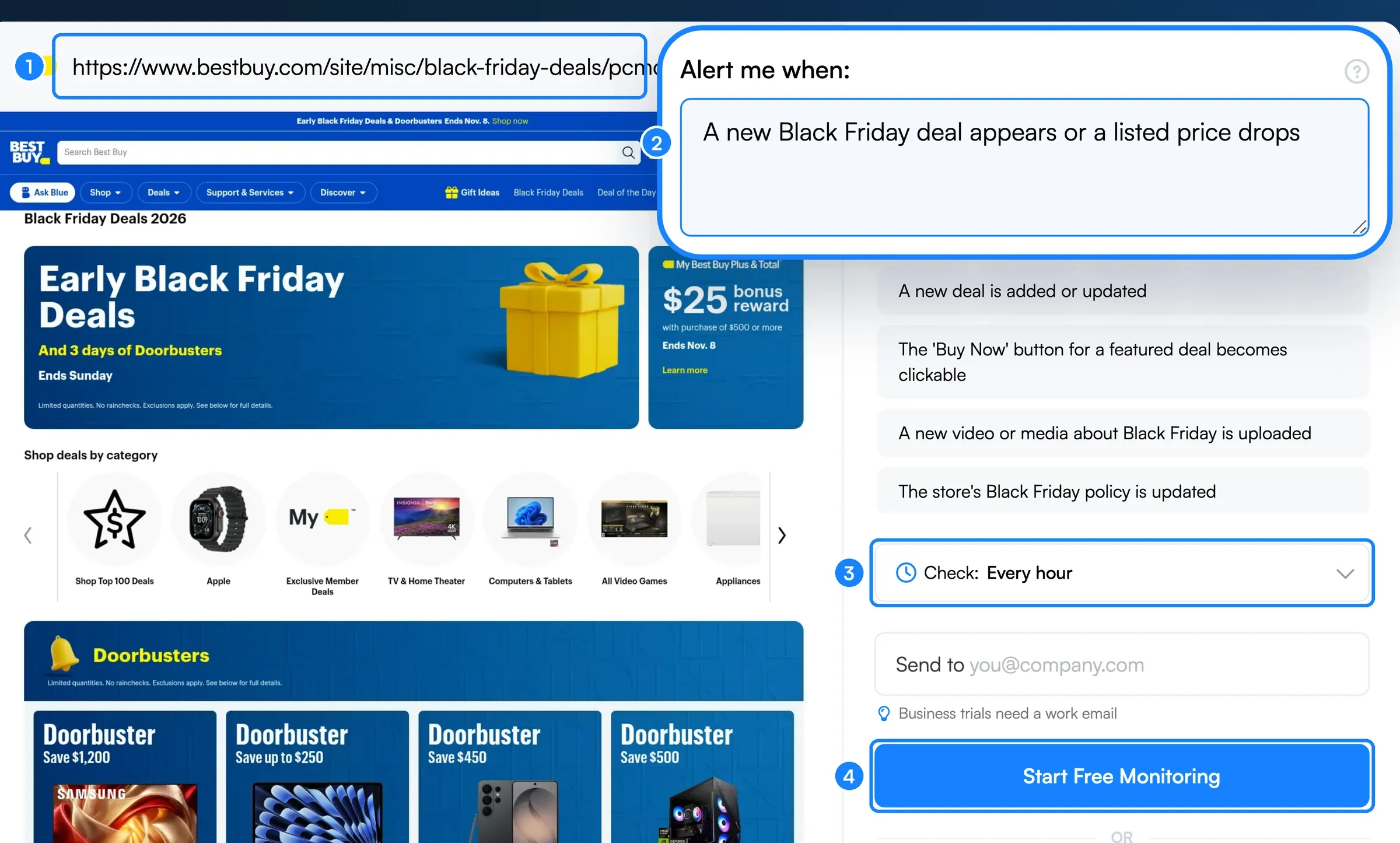 Setting up a monitor on Best Buy's Black Friday deals page from the Visualping homepage.
- Paste the product URL into the box on the Visualping homepage and click Go. A preview of the page loads.
- Describe the deal in "Alert me when": for example, "the price drops below $800" or "the item changes to In Stock." You can also pick one of the AI suggestions.
- Pick a frequency from "Check:": daily or hourly through mid-November, faster during Black Friday week. Personal 1K checks as often as every 15 minutes, Personal 5K every 5 minutes, and Personal 10K and Business as often as every 2 minutes.
- Enter your email under "Send to" and click Start Free Monitoring. For must-buy items, add SMS in the monitor's notification settings (Personal 5K and up, US and Canada numbers).
- Name each monitor with the model and store (e.g., "65-inch OLED, Amazon") so alerts are easy to scan.
- Repeat for the Walmart, Best Buy and Target pages for the same model.
- Triage smart: Filter Visualping emails into a “Deals” label to stay focused.
-
Need a deeper primer? Read:
Price-History & Verification Tips (Avoid Fake “Was $X” Anchors)
Visualping tracked daily prices from October 1 through Cyber Monday 2025. Of the 1,659 products with a Black Friday price, one in three (33%) had been cheaper earlier in the season, and those deals averaged 37% above the product's lowest price since October 1. Travel and Games & Hobbies had the highest share of these deals, at 43%.
- Confirm exact model/SKU (panel type, year, storage).
- Check historical lows before pulling the trigger.
- Evaluate the true total (shipping, taxes, membership fees, gift cards, returns).
- If two offers tie, choose better returns and faster shipping.
Frequently Asked Questions
Can one Black Friday deal tracker cover Amazon, Walmart, Best Buy and Target?
Yes. Use Visualping to monitor product pages across Amazon, Walmart, Best Buy, and Target from one place, with a price or stock condition on each. Add one retailer app only if you’re loyal to that store.
Should I use price alerts or restock alerts?
Both. Set a price target for known good deals and a restock (“In Stock”) alert for high-demand items that sell out quickly. One "Alert me when" condition can cover both: "the price drops below $300 or the item is back in stock."
When should I start?
Ideally in October, so you have a few weeks of prices to compare. If it's already November, start today. Black Friday 2026 is November 27 and Cyber Monday is November 30. Check daily or hourly at first, then speed up during Black Friday week (as often as every 2 minutes on Personal 10K and Business plans).
Are early deals as good as Black Friday?
Often, yes. In Visualping's 2025 price tracking, one in three Black Friday deals had been cheaper earlier in the season. Monitor the price from October and buy when it reaches your target.
Which categories typically see the biggest cuts?
In the 2025 holiday season, Adobe Analytics found the deepest online discounts in electronics (30.9% off list price), toys (29.6%) and apparel (25.1%). Always verify the exact model year/spec before you pounce.
Put This Into Action (Free)
- Create your first Visualping monitor now (free) and add your top 5 products.
- Layer price + in-stock alerts across Amazon, Walmart, Best Buy, Target.
- Keep alerts active through Cyber Monday and the week after for post-event lows.
More guides to help you win the season:
Emily Fenton
Emily was the Product Marketing Manager at Visualping. She has a degree in English Literature and a Masters in Management.
More articles by Emily Fenton