How to Search the FDA 510(k) Database and Track Competitors
Updated November 12, 2026
TL;DR: FDA's 510(k) and PMA databases are free to search by product code, applicant, device name or record number, but their search results can't be bookmarked. To follow a competitor, watch FDA pages that keep a fixed URL: a PMA record, which lists every supplement, and the product-code TPLC page filtered to one manufacturer. Visualping checks each page daily and emails you when a new supplement or 510(k) number appears. Four pages fit the Free plan.
The FDA 510(k) database is the public record of 510(k) premarket notifications going back to 1976, and its sibling, the PMA database, holds every premarket approval and PMA supplement. Regulatory affairs teams use them to find predicate devices. Competitive intelligence and product teams use them to see what a competitor cleared last quarter. This guide covers how to search both databases, how to read the records, and how to get an alert when a device record or a competitor's list of clearances changes.
Which FDA device database answers your question?
FDA keeps several device databases, and each one answers a different question. Pick the database first, and the search gets much shorter.
| Your question | Where to look | What to search by |
|---|---|---|
| Which device can I cite as a predicate? | 510(k) database | Product code, then decision date |
| What has a competitor cleared? | 510(k) database, or the TPLC page for one product code | Applicant name, or manufacturer within a product code |
| What changed on an approved Class III device? | PMA database | PMA number, then the supplements list |
| Which product code and class fits my device? | Product classification database | Device name |
| What adverse events were reported? | MAUDE | Brand name or product code |
| I need every record in a spreadsheet | Downloadable 510(k) files or openFDA | Bulk download or API query |
If you only need to look up one clearance, the fastest 510(k) lookup is the record number. Type the K number (for example K193355) into the 510(k) Number field and FDA returns that single record.
What the FDA 510(k) database contains
A 510(k) is a premarket submission that shows a device is substantially equivalent to a device already on the US market, which FDA calls the predicate. FDA's premarket notification page explains the standard. When FDA agrees, it issues a 510(k) clearance. Use that verb carefully, because a 510(k) device is "cleared," while a PMA device is "approved."
Every cleared submission gets a record in the 510(k) database with a K number. A record shows:
- Device classification name, device name and the classification product code (three letters, such as GEI for electrosurgical cutting and coagulation devices)
- Applicant and correspondent, the second often being a regulatory consultant who filed for the manufacturer
- Regulation number, review panel and medical specialty
- Date received, decision date and decision
- Submission type (Traditional, Special or Abbreviated) and whether a third party reviewed it
- A link to the 510(k) summary or 510(k) statement
- Flags for combination products and for an authorized Predetermined Change Control Plan (PCCP)
The decision field uses FDA codes. The most common is SESE ("Substantially Equivalent"), and the search form lists variants such as SESK for kits, SESD for devices with a drug and SESP when postmarket surveillance is required.
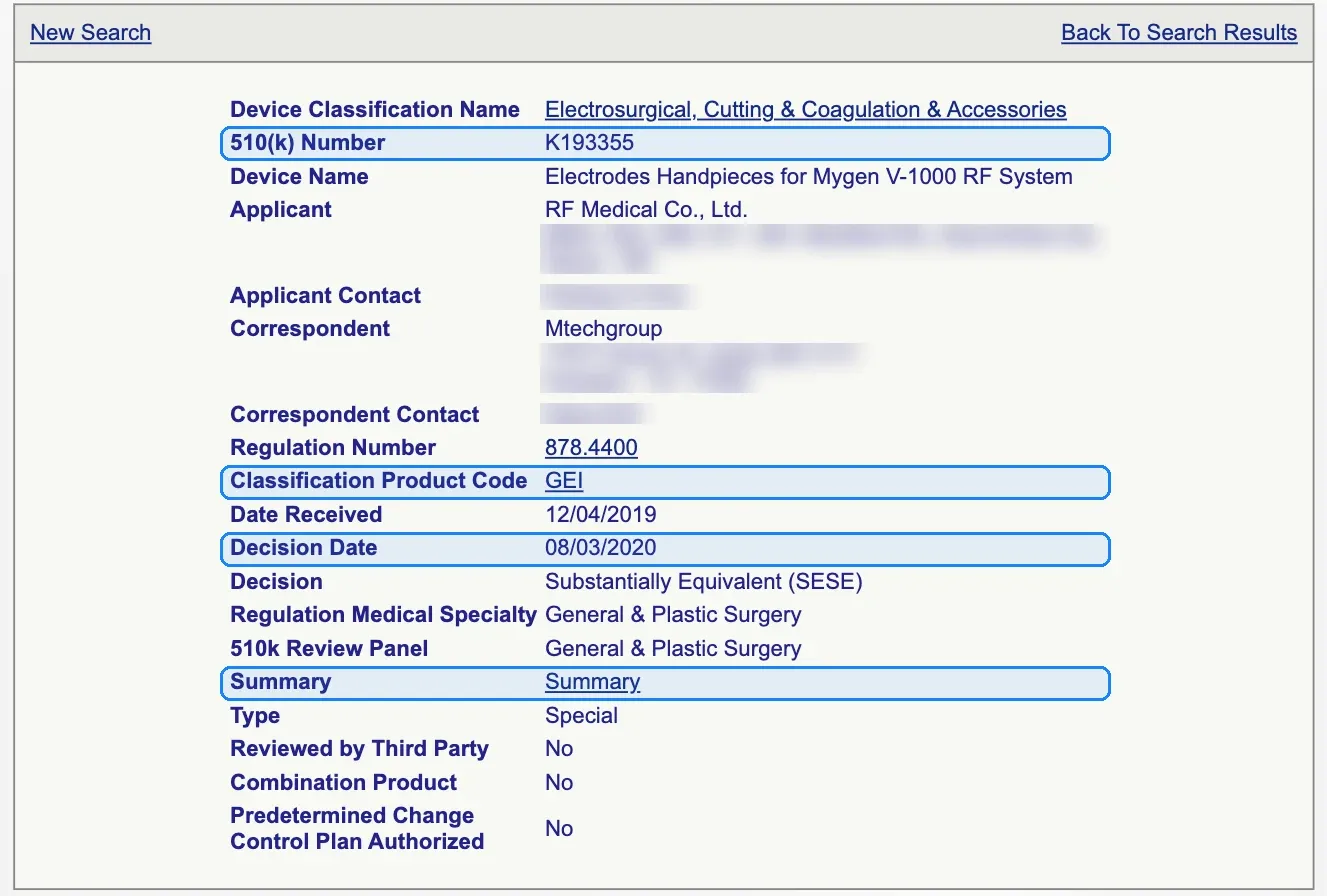 A 510(k) record (K193355). The 510(k) number, product code, decision date and Summary link are the fields most teams need. Source: FDA. Individual contact names are blurred.
How to search the 510(k) database
The 510(k) search form has more than a dozen fields. Most searches need three of them.
- Start with the product code. Search by device name and you get every naming variant manufacturers chose. Search by product code and you get every device FDA classified the same way. If you don't know the code, look up the device name in the product classification database first. The classification record gives you the product code, device class, regulation number and the usual submission type.
- Add a decision date range. Enter dates in the Decision Date fields to limit results to, say, the last three years. Predicates cleared recently tend to reflect current FDA expectations and recognized standards (this is a judgment call, so check with your regulatory lead).
- Sort by decision date, descending. The Sort by menu offers decision date, device name, applicant name and 510(k) number. Newest first is the most useful view for both predicate and competitor research.
The other fields narrow things further. Applicant Name finds a company's clearances. Type separates Traditional, Special and Abbreviated 510(k)s. Panel limits results to one review panel, such as Cardiovascular or Orthopedic. Checkboxes filter for combination products, in vitro diagnostic products, third-party reviews, clinical trials, PCCP authorization and redacted FOIA 510(k)s.
Know one quirk before you build a process around this form. The 510(k) and PMA search forms submit their queries by POST, so a results page has no URL of its own. We tested this on November 10, 2026: a link that carries search terms in the address (for example pmn.cfm?start_search=1&Applicant=...) opens the empty search form in a normal browser. You can't bookmark, share or monitor a saved 510(k) search. You can bookmark single records and product-code pages, which is why the tracking setup later in this guide uses those.
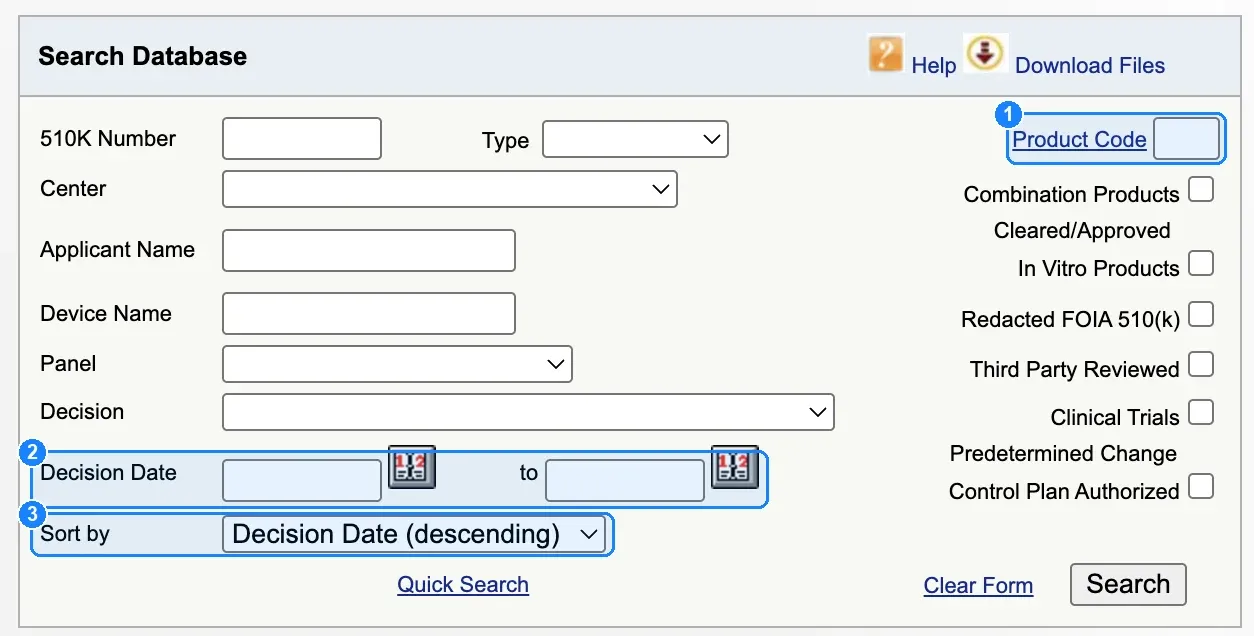 The 510(k) database search form: (1) Product Code, (2) Decision Date range, (3) Sort by, set to newest decisions first. Source: FDA.
How to find a predicate device
Predicate research is the most common reason regulatory teams open the 510(k) database. A practical workflow:
- Find your device's product code in the product classification database.
- Search the 510(k) database by that product code, sorted by decision date, newest first.
- Open the records whose device names and intended uses look closest to yours.
- Open the 510(k) summary PDF on each record. Under 21 CFR 807.92, a 510(k) summary must identify the legally marketed device the submitter claims equivalence to. That gives you the predicate's predicate, so you can trace a chain back.
- Before you settle on a predicate, check the product code's TPLC page for recalls and search MAUDE for adverse event reports on that device.
Some records link a 510(k) statement instead of a summary. A statement means the submitter chose to provide safety and effectiveness information on request instead of publishing a summary, so you will need to ask the applicant or file a FOIA request for the details.
How to check a competitor's 510(k) clearances
Search the Applicant Name field for the competitor and sort by decision date, descending. Two habits make the results more complete. First, run the search for every legal entity the competitor files under, since subsidiaries and acquired companies often keep their own names in FDA records. Second, look at the Correspondent field on the competitor's records. If the same consultant files for them every time, that name tells you who to watch for in a new product category.
How to search the FDA PMA database
Premarket approval (PMA) is FDA's review for most Class III devices, the highest-risk class. The openFDA PMA documentation gives the reason: for Class III devices, FDA has determined that general and special controls alone can't assure safety and effectiveness. The FDA PMA database holds both original approvals (P numbers, such as P180043) and their supplements (the same number with an S suffix, such as P180043S008).
The PMA search form lets you search by Applicant, Product Code, Device (the trade name), Decision Date, PMA Number, Expedited Review, Docket Number, Advisory Committee, Supplement Type and Center, with checkboxes for IVD products, combination products and PCCP authorization. Sort by Decision Date (Descending) to see the newest decisions first.
The Supplement Type menu makes the PMA database far more useful for competitive work than its 510(k) counterpart. Set it to "Originals Only" to see new approvals. Set it to "Panel Track" to see supplements for significant design changes or new indications. Leave it blank to see everything.
How to read a PMA record and its supplements
Open an original PMA record and you see the device, applicant, PMA number, decision date, product code, advisory committee and links to the approval order, the Summary of Safety and Effectiveness Data (SSED) and labeling. The bottom of the record holds the line to track: Supplements, followed by a link for each supplement number.
Take P180043, the therascreen FGFR RGQ RT-PCR Kit, approved April 12, 2019. On November 10, 2026, its record listed supplements S001 to S003 and S005 to S010. The record itself warns that the device "has supplements" and that the description or indication "may have changed." The labeling on the original record is the version from the original approval. To see what changed, you open the supplements.
Each supplement record shows a Supplement Type, a Supplement Reason and an Approval Order Statement. S008, decided December 6, 2024, is a "Normal 180 Day Track" supplement with the reason "Labeling Change - Indications/instructions/shelf life/tradename." Its approval statement describes a shelf-life extension and a new storage condition for one kit component. A competitive intelligence team needs that detail, and it only appears on the supplement record.
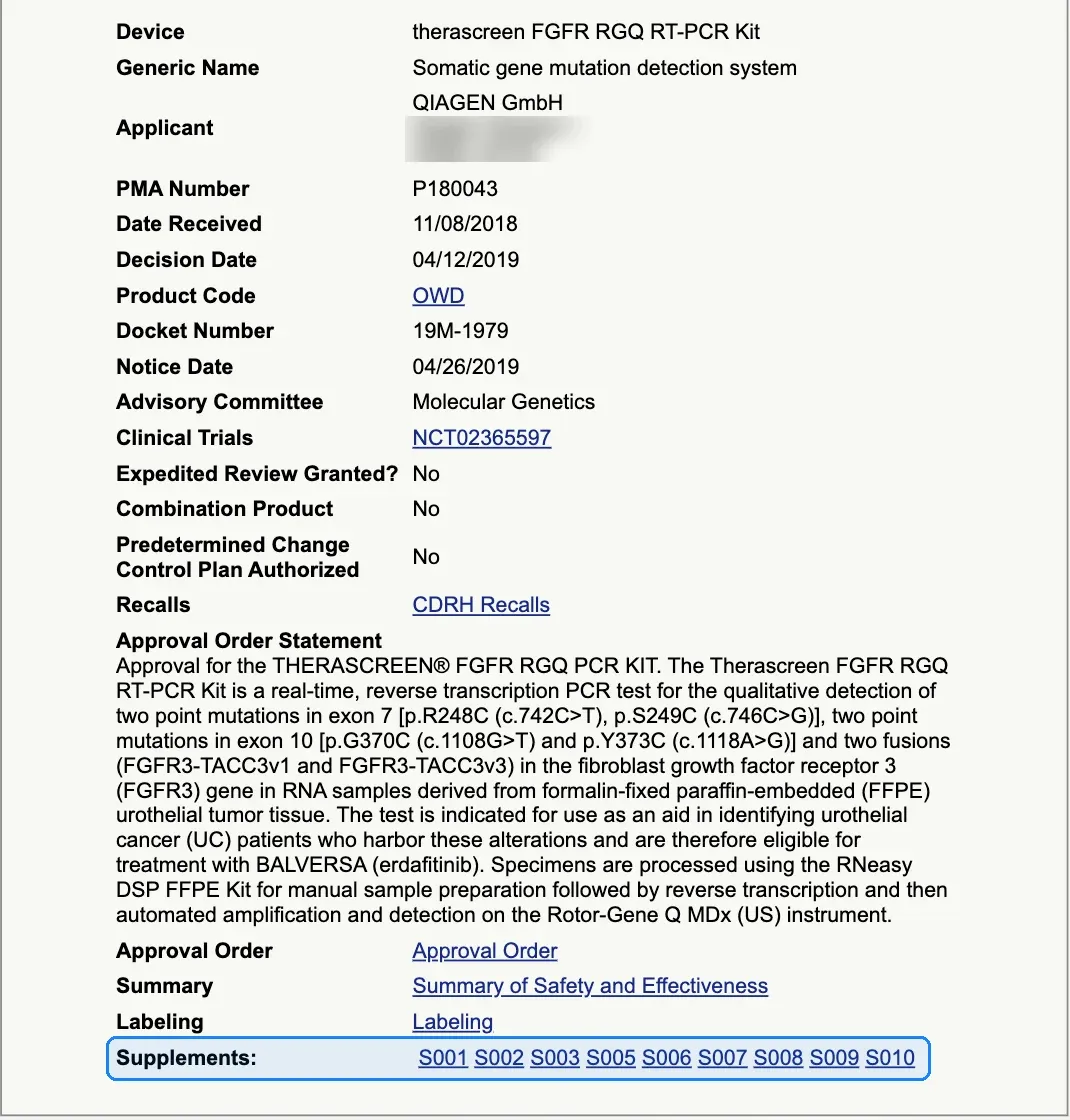 PMA P180043's record. New supplements are added to the highlighted Supplements line, which is the change worth watching. Source: FDA.
PMA supplement types
FDA's PMA supplements and amendments page lists the main types, and the type tells you how big the change was:
| Supplement type | What it covers (per FDA) |
|---|---|
| Panel-track supplement | A significant change in design or performance, or a new indication for use; usually needs substantial clinical data |
| 180-day supplement | Significant changes to components, materials, design, specification, software, color additives or labeling |
| Real-time supplement | Minor changes to design, software, sterilization or labeling, reviewed in a meeting with FDA |
| Special PMA supplement (changes being effected) | Labeling and manufacturing changes that improve safety, which may take effect before FDA approves the supplement |
| 30-day notice and 135-day supplement | Changes to manufacturing methods or processes |
| Manufacturing site change supplement | Moving manufacturing to a different facility |
A new panel-track supplement on a competitor's device often signals a new indication. A run of 30-day notices usually means manufacturing work. Both are worth knowing about the week they appear.
PMA vs 510(k)
The two pathways differ in risk class, evidence standard and how later changes show up in FDA's databases.
| 510(k) | PMA | |
|---|---|---|
| Typical device class | Most Class II, some Class I | Most Class III |
| Standard | Substantially equivalent to a legally marketed predicate | Reasonable assurance of safety and effectiveness |
| FDA decision | Clearance | Approval |
| Record number | K number (K193355) | P number (P180043), supplements add S001, S002... |
| How later changes appear | A significant change in design, components, manufacturing method or intended use can require a new 510(k) under 21 CFR 807.81(a)(3), which gets a new K number | A PMA supplement listed on the original PMA record |
| Where to search | 510(k) database | PMA database |
A third pathway, De Novo, covers novel low-to-moderate-risk devices with no predicate, and it has its own database. Once FDA grants a De Novo request, later devices of that type can use it as a 510(k) predicate.
The difference in the last two rows decides how you track each pathway. A PMA device collects its history on one page, so one record covers the device's whole life. A 510(k) device's changes arrive as new K numbers, so you track 510(k)s at the level of the competitor or the product code.
What FDA already offers for updates
FDA publishes several ways to keep up with device data, and each one covers a specific need.
- The CDRH Industry email list sends updates on new or updated content related to industry. Sign up through "Subscribe to CDRH Industry" in the footer of FDA's 510(k) Clearances page. It covers the whole device industry, with no filter by company, product code or device.
- The openFDA APIs serve 510(k), PMA and adverse event data as JSON. Their documentation lists the 510(k) and PMA endpoints as updated monthly, and the openFDA status page showed both last refreshed on November 2, 2026. If your team writes code, you can query these endpoints by applicant or product code and build your own alerts.
- The downloadable files are zipped 510(k) files and a PMA file. FDA replaces them monthly, usually on the 5th.
- MAUDE is the adverse event database. FDA updates MAUDE every month with reports received through the last day of the previous month, and it holds the last ten years of reports.
Without custom code, none of these sends an alert when one specific device record or one competitor's list of clearances changes. A page monitor covers that case.
How to get alerts when a device record changes
Visualping checks a web page on a schedule and emails you when it changes. For FDA device data, the pages to watch are the ones with stable URLs: single PMA records and product-code TPLC pages.
Watch a PMA record for new supplements
- Open the PMA record in FDA's PMA database and copy its URL from the address bar. It looks like
https://www.accessdata.fda.gov/scripts/cdrh/cfdocs/cfPMA/pma.cfm?id=P180043. - Paste the URL into Visualping and click Go.
- In Alert me when, write the condition in plain words: "a new supplement number is added to the Supplements list."
- Set the check frequency to daily. FDA record pages don't change by the minute, and a daily check uses about 30 checks a month per page.
- Enter your email and click Start monitoring.
The "Alert me when" condition matters on FDA pages. Every page on accessdata.fda.gov carries a "Page Last Updated" date in its footer (it read 11/09/2026 when we checked on November 10). A monitor without a condition can flag that date as a change. With a condition, Visualping AI reads each change and only alerts you when it matches what you asked for. AI conditions are available on every plan, including Free.
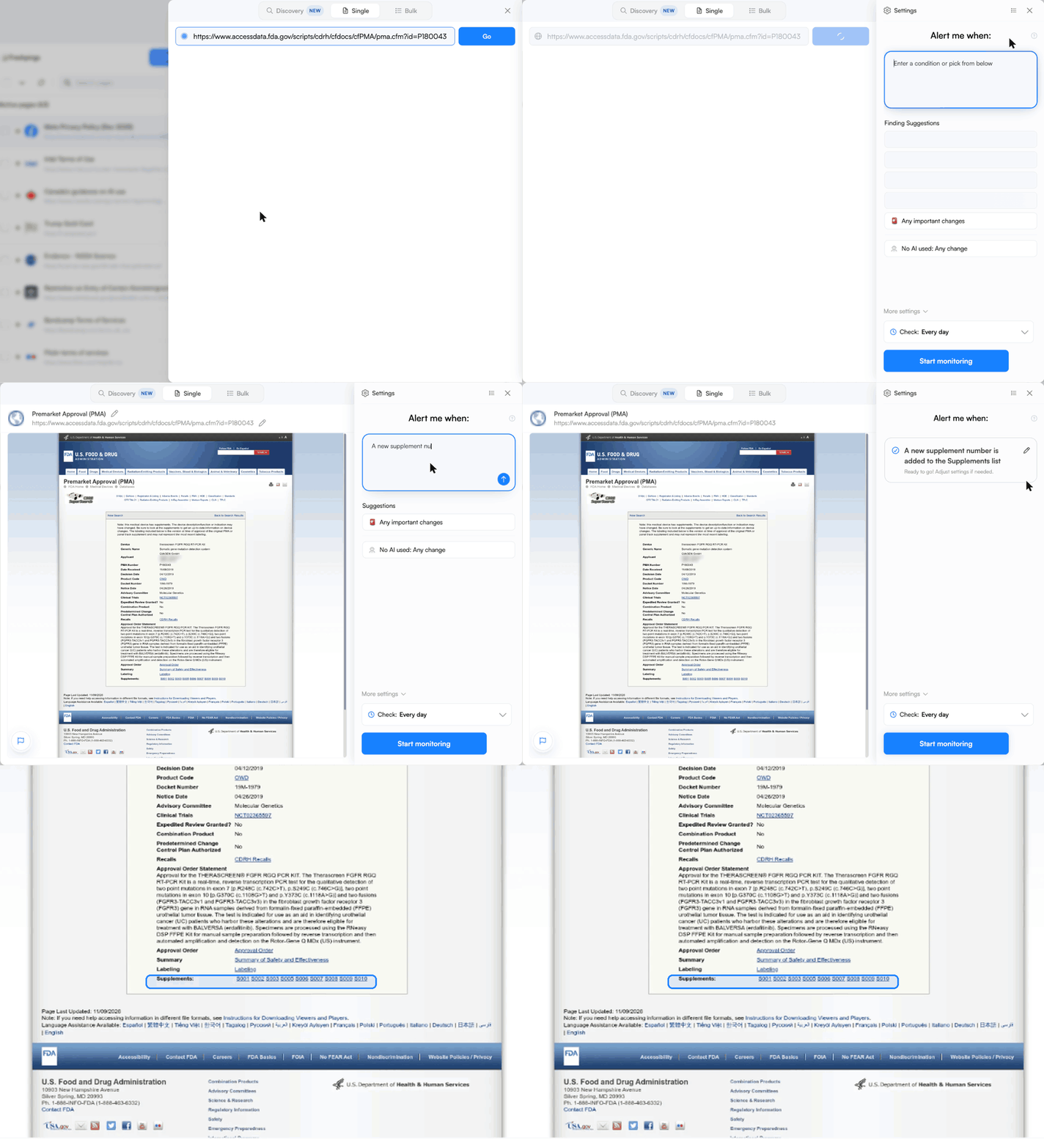 Paste the PMA record URL, let the preview load, describe the change you care about in "Alert me when," and apply it. The daily check is the default.
Watch a competitor's 510(k) clearances by product code
Since saved 510(k) searches don't keep a URL, use FDA's Total Product Life Cycle (TPLC) page instead. Each product code has one, and it loads from a normal link. The page lists premarket reviews by manufacturer, plus recalls for that product code.
- Open
https://www.accessdata.fda.gov/scripts/cdrh/cfdocs/cfTPLC/tplc.cfm?id=followed by the three-letter product code (for exampleid=GEI). - Find the competitor under Premarket Reviews and click its name. The list expands to show that manufacturer's 510(k) numbers and device names, and the address bar now holds a URL filtered to that manufacturer.
- Copy that URL into Visualping and set the condition: "a new 510(k) number is listed for [competitor name]."
We tested a manufacturer-filtered TPLC URL in a real browser on November 10, 2026. It loaded the expanded list directly, showing nine K numbers for that manufacturer under product code GEI, from K150637 to K260522. One monitor per competitor per product code covers every new clearance in that category.
If you want every new clearance in a category, regardless of who filed it, monitor the product-code TPLC page without the manufacturer filter and use the condition "a new manufacturer appears or a manufacturer's premarket review count increases."
Ready to watch a competitor's PMA? Paste the PMA record URL into Visualping, add a supplement condition and set a daily check. The Free plan covers four records checked daily.
Long PDFs: approval orders, SSEDs and labeling
PMA records link to PDFs for the approval order, the SSED and labeling, and 510(k) records link to the summary PDF. Visualping can monitor a PDF URL directly, with one limit to know: it reads the first 100 pages of a PDF. For long documents, switch the monitor's compare mode to Text. Text mode warns you when a document runs past 100 pages, and it compares the words themselves, so a changed sentence in an indication statement shows up in the diff. For more on PDF setups, see our guide to monitoring online PDFs.
Where alerts can go
Email alerts, webhooks and the Visualping API come with every plan, including Free. Business plans add native Slack, Microsoft Teams and Google Sheets integrations, which suits a team that logs every competitor supplement in a shared tracker. The Free plan includes 150 checks a month across 5 pages, so four FDA records checked daily fit inside it. Faster checks, down to every 2 minutes, come with the Personal 10K and Business plans, though FDA's device databases rarely justify more than a daily check.
How many teams already monitor FDA device records
In November 2026, about 30 Visualping customers had live monitors on FDA 510(k) and PMA database pages. (Live means the monitor ran in the last 31 days; Visualping's own staff accounts are excluded.) Twenty-four of those customers run 96 monitors on single device record pages, an average of four records per customer. That pattern matches the advice above: teams watch a short list of specific competitor records instead of trying to watch the whole database.
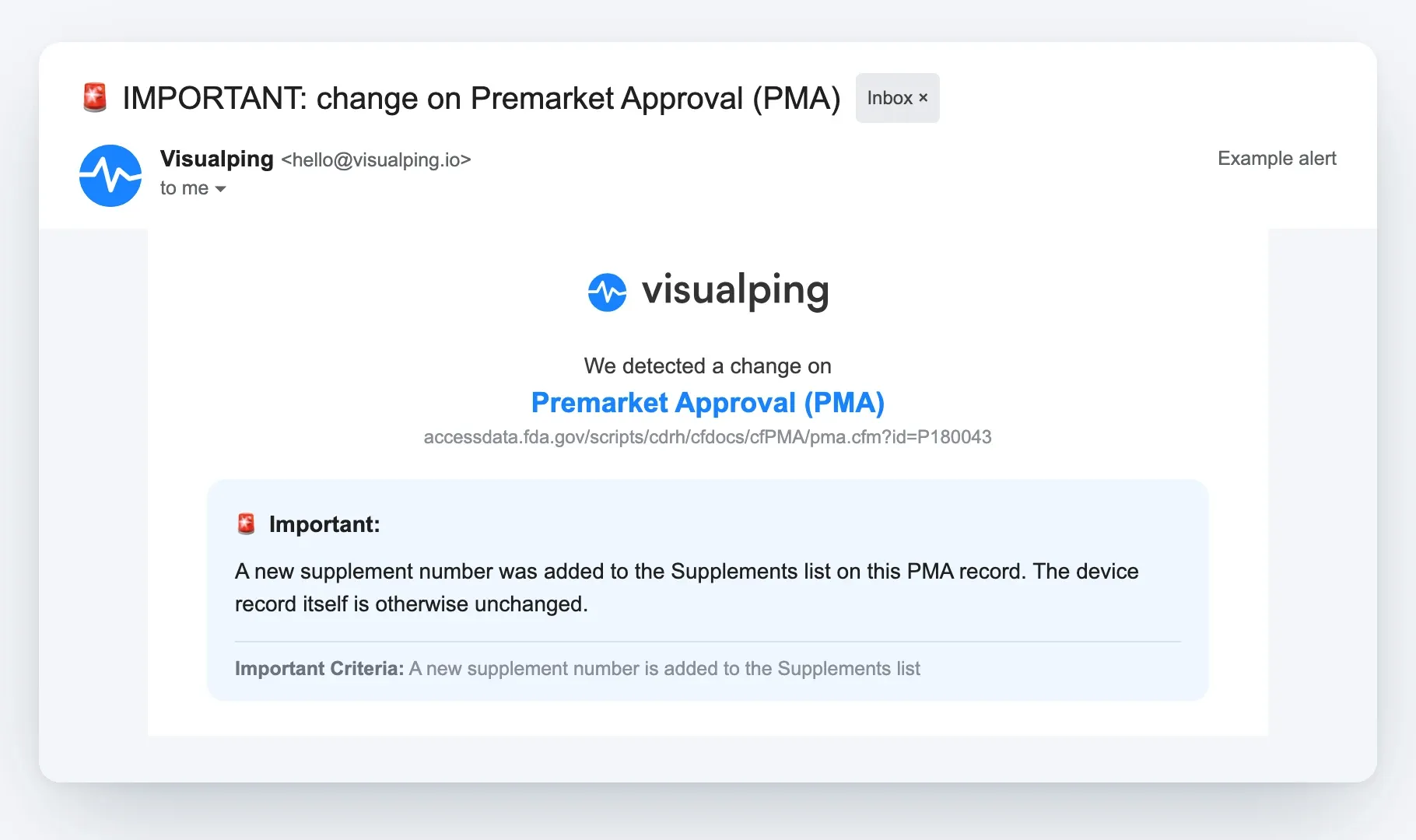 An example of the alert that condition produces: the AI summary says what changed, and the criteria line shows why it was flagged Important.
Five mistakes that cause missed changes
- Bookmarking a search results page. The 510(k) and PMA forms submit by POST, so the URL in your address bar after a search opens a blank form. Use record pages or TPLC pages.
- Watching only the original PMA record's PDFs. The labeling linked on an original PMA record is the version from the original approval. New indications show up in supplements.
- Searching one applicant name. Competitors often file under subsidiaries or acquired company names. Search each one.
- Monitoring without a condition. The "Page Last Updated" footer on FDA's database pages can change when the record itself hasn't. An "Alert me when" condition keeps alerts to the changes you care about.
- Expecting a 510(k) record to change. A cleared 510(k) record rarely changes after FDA posts it. A competitor's next move on a 510(k) device shows up as a new K number, so watch the manufacturer's TPLC list for that product code.
For the enforcement side of the same competitors, our guide to FDA warning letter tracking covers warning letters and Form 483s. For the wider program, see regulatory intelligence in the pharmaceutical industry.
FDA 510(k) database FAQ
Is the FDA 510(k) database free?
Yes. The 510(k), PMA, De Novo, classification, TPLC and MAUDE databases are public and need no account. openFDA's APIs are free too.
How do I do a 510(k) lookup by number?
Enter the K number in the 510(k) Number field of the search form and click Search. You can also open a record directly by adding the number to the URL: https://www.accessdata.fda.gov/scripts/cdrh/cfdocs/cfpmn/pmn.cfm?ID=K193355.
What does 510(k) clearance mean?
It means FDA found the device substantially equivalent to a legally marketed predicate device, so it can be marketed in the US. FDA "clears" 510(k) devices and "approves" PMA devices, and the two words are not interchangeable in regulatory writing.
How often is the FDA 510(k) database updated?
FDA's search page doesn't state a refresh schedule (we checked on November 10, 2026). FDA replaces the downloadable 510(k) files monthly, usually on the 5th. openFDA's documentation lists its 510(k) endpoint as updated monthly, and its status page showed a November 2, 2026 refresh.
Can I see the full 510(k) submission?
The database links to the 510(k) summary or statement, and the search form has a "Redacted FOIA 510(k)" filter. For a submission that isn't posted, you can file a request through FDA's Freedom of Information Act process. FDA may withhold confidential commercial information.
What is a PMA supplement?
A PMA supplement is a request to change a device that already has premarket approval, such as a new indication, a design change, a labeling change or a new manufacturing site. Each supplement gets its own record with an S number, and the original PMA record lists all of them.
Is there an API for the FDA 510(k) database?
Yes. openFDA offers a 510(k) API and a PMA API that return JSON. They suit teams that can write and maintain code. For alerts on a few specific records without code, a page monitor on the record URL is simpler.
About this guide
The Visualping team wrote this guide for regulatory affairs, competitive intelligence and product teams at medical device companies. We checked every FDA, openFDA and eCFR page linked here on November 10, 2026, and tested the search-form and TPLC URLs in a real browser the same day. Monitor counts come from Visualping's own platform data. This guide explains where FDA publishes device records and how to follow them. It is not regulatory advice, and your regulatory team should make the call on predicate selection and submission strategy.
Want to monitor web changes that impact your business?
Sign up with Visualping to get alerted of important updates from anywhere online.
Eric Do Couto
Eric Do Couto is the Head of Marketing at Visualping. He leads content strategy, growth operations, and brand positioning for website change detection.
More articles by Eric Do Couto