How to Get Notified When a Class Opens Up, Grades Are Posted, or Registration Starts
Updated November 16, 2026

A closed class can open a seat with little warning. Refreshing the schedule page is a poor way to catch it, and the school's official notice can arrive late or not at all.
Visualping watches a public class schedule page and emails you when the text changes, so you can get notified when a class opens up. The same setup also works on a public school calendar if you want an alert for when grades come out or when class registration opens.
You do not need a page built for one university. Any public schedule or calendar you can open without signing in will do. The examples below use University of Washington pages only to show what that looks like in practice.
How to get notified when a class opens up
Look for your school's public class schedule or course offerings page, not a login-only search tool. The useful pages show whether a section is Open or Closed, and often a filled count against the seat limit. That is the URL to watch if a section is full, you are already on the class waitlist, or you want to know when a new section appears.
Schools usually publish their own steps for how to waitlist a class. Use that official process first. A page-change alert is a backup when the official waitlist notice is late or missing, or when the listing is simply marked Closed and you want to know the moment it opens.
UW is one public example. Its Time Schedule View for current and future quarters requires a UW NetID. The public Course Offerings View does not. A department page such as Computer Science & Engineering for Winter 2027 lists each section's status and enrollment against the limit, as Open or Closed next to a filled/limit count. UW says this public view is updated daily. If your school hides seat counts on the public page, watch it anyway for new sections or time changes, and treat any login-only tool as a second step (see below).
When do grades come out, and how to get an alert
When do grades come out at your school? That answer usually starts on the academic calendar, not in the grade portal. Those are two different pages.
A public academic calendar can tell you when faculty grades are due and the first day grades are posted to the transcript. That date is useful, but it is not the same as seeing your own grade. The grade usually appears in a student or parent portal such as Canvas, PowerSchool, Infinite Campus, or a campus portal like MyUW, and those pages almost always require a login.
Prefer the public calendar for the posting date. If you later decide to watch a portal you can already sign in to, use Visualping's documented login options rather than pasting a login URL into the homepage box and hoping the preview shows your grades.
When does class registration open
When does class registration open at your school? That date usually lives on a public academic calendar or registration-dates page, along with add and drop deadlines.
Put a monitor on the current-year calendar. In Alert me when, describe the change you want, for example "a registration period or grade posting date changes." If your school posts a new year as a separate URL, also watch the calendar index so you get a notice when the next year's page appears.
The University of Washington 2026-2027 Academic Calendar is a public example. For Winter 2027, Registration Period I for continuing students runs from November 5 to 22, 2026. For Autumn 2026, the calendar lists December 23, 2026 as the first day grades posted to the transcript and GPAs are available on MyUW. Your school will have its own dates. UW also keeps a calendar index of current and upcoming years.
How to set up class opening alerts with Visualping
Use Visualping to watch a public class schedule page and get an email when a section opens or a seat becomes available:
- Copy the URL of a public class schedule page, such as UW Computer Science & Engineering for Winter 2027. Paste it into the Visualping URL box and click Go. A preview of the page loads.
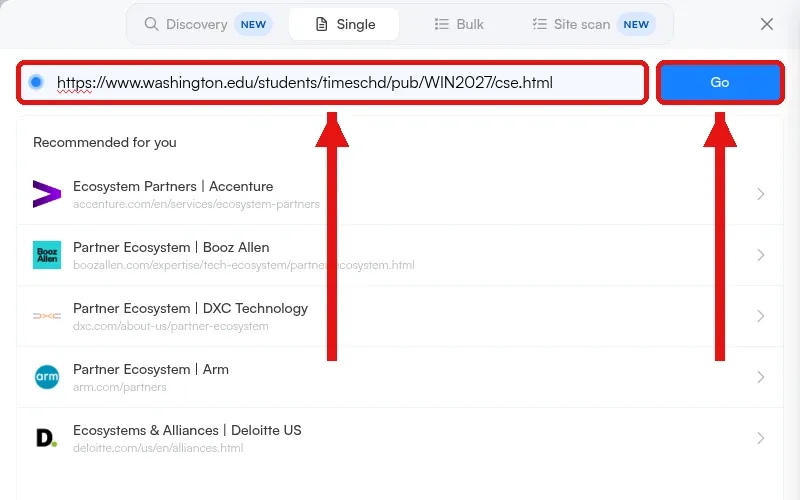 The Visualping URL box and Go button, with the UW CSE Winter 2027 Course Offerings URL entered.
- In the Alert me when box, describe the change in plain language or pick an AI suggestion, for example "a class section changes from Closed to Open or a seat opens up."
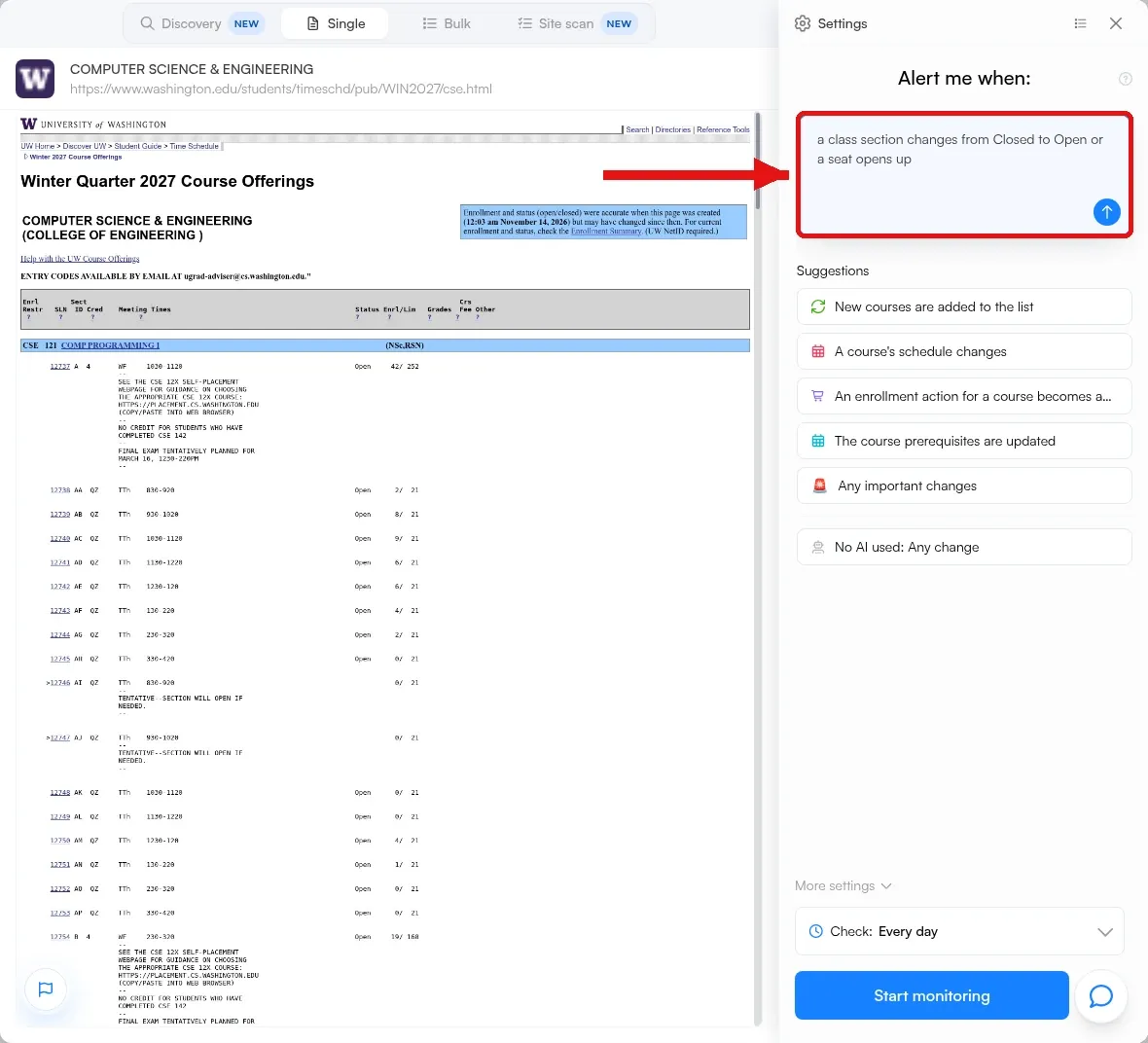 The Alert me when box filled in on a UW CSE course offerings monitor.
- Pick how often Visualping checks the page in the Check dropdown.
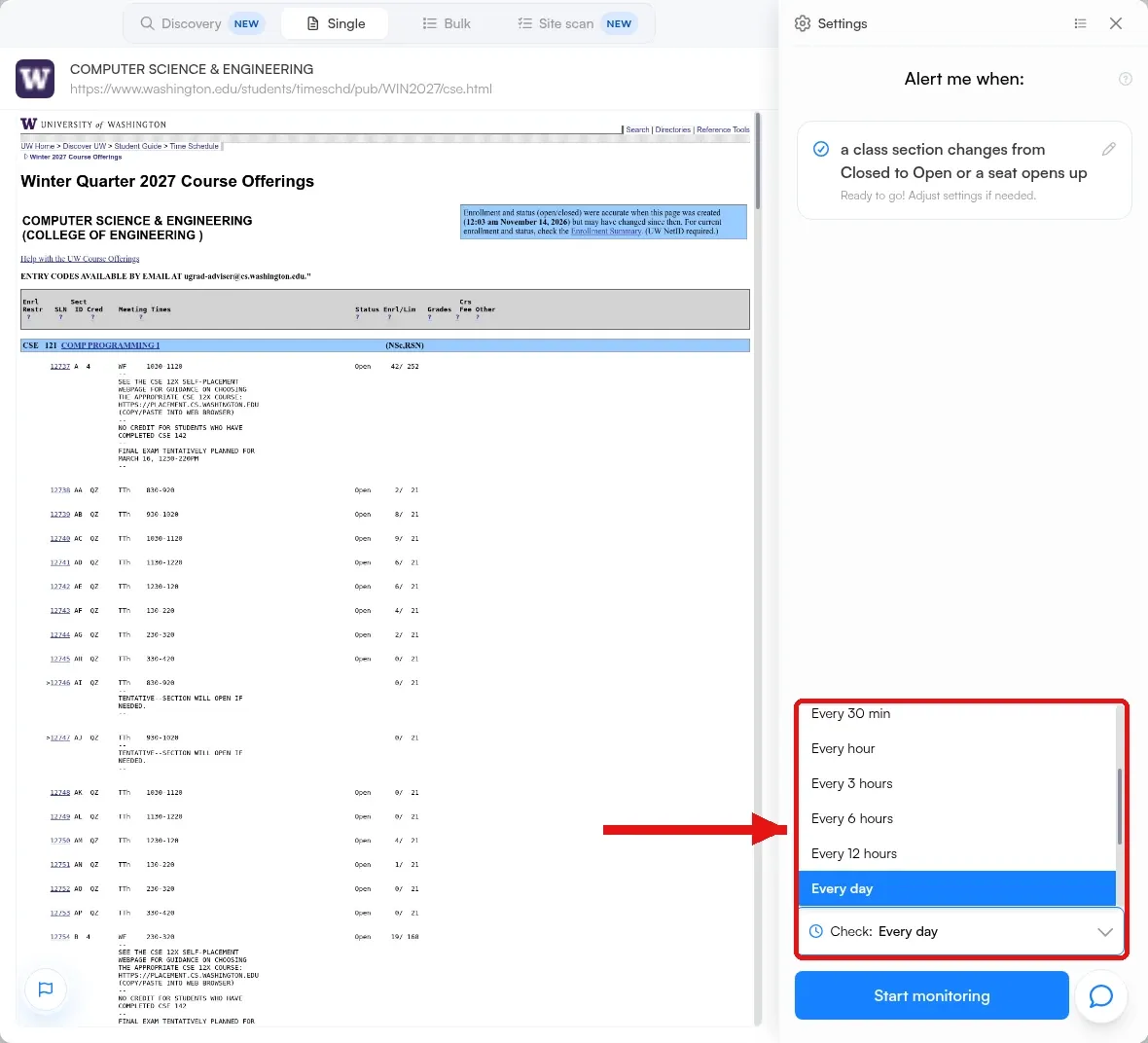 The Check dropdown open to frequency options on a UW CSE course offerings monitor.
- Open More settings, click Notifications to choose where alerts go (email is on by default), then click Start monitoring.
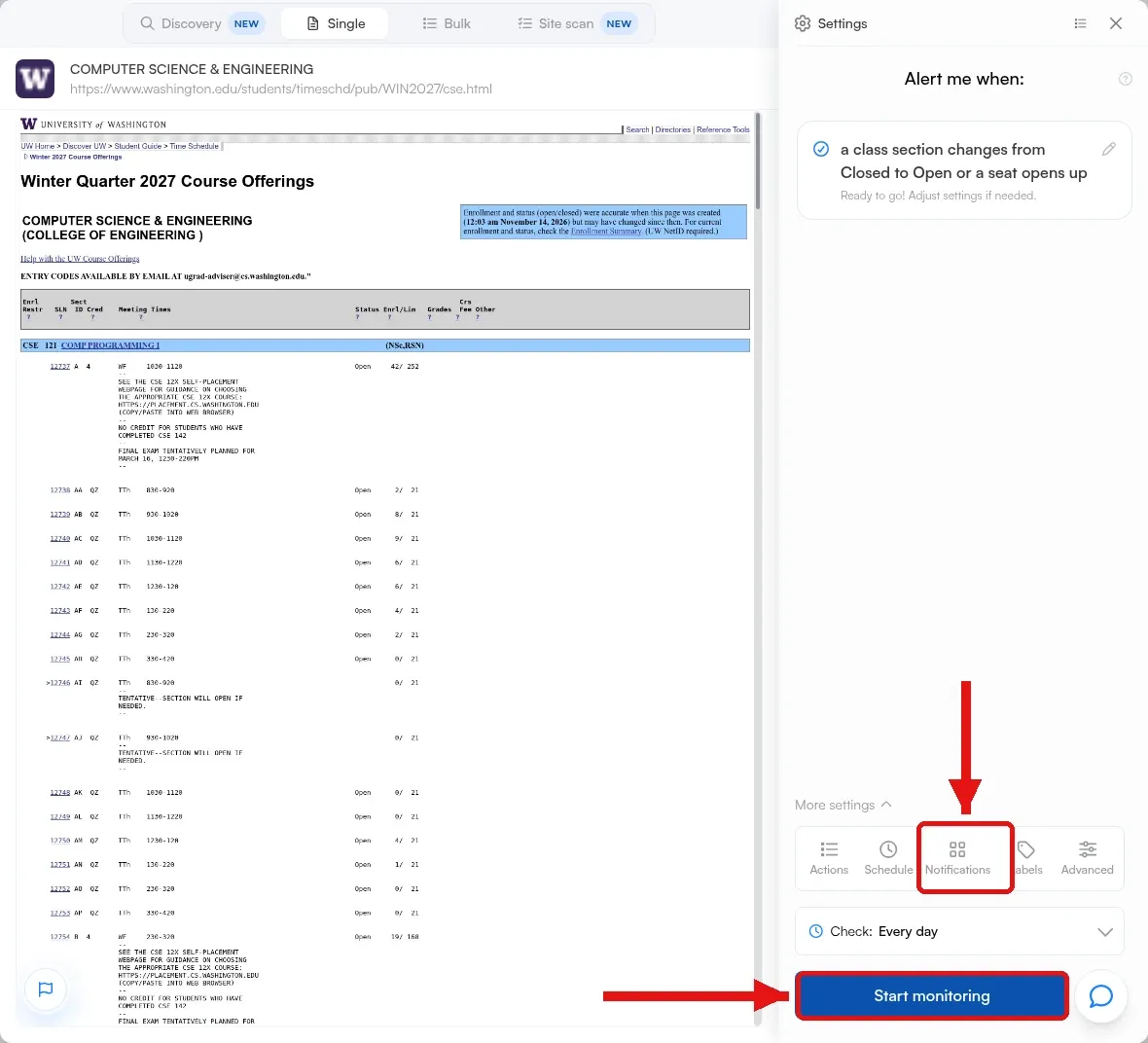 The Notifications tab under More settings, and the Start monitoring button, on a UW CSE course offerings monitor.
- After the monitor is created, open its Notifications to add channels such as text, Slack, Teams, Discord, Telegram, a webhook or RSS. Repeat for each class schedule or calendar page you want to watch.
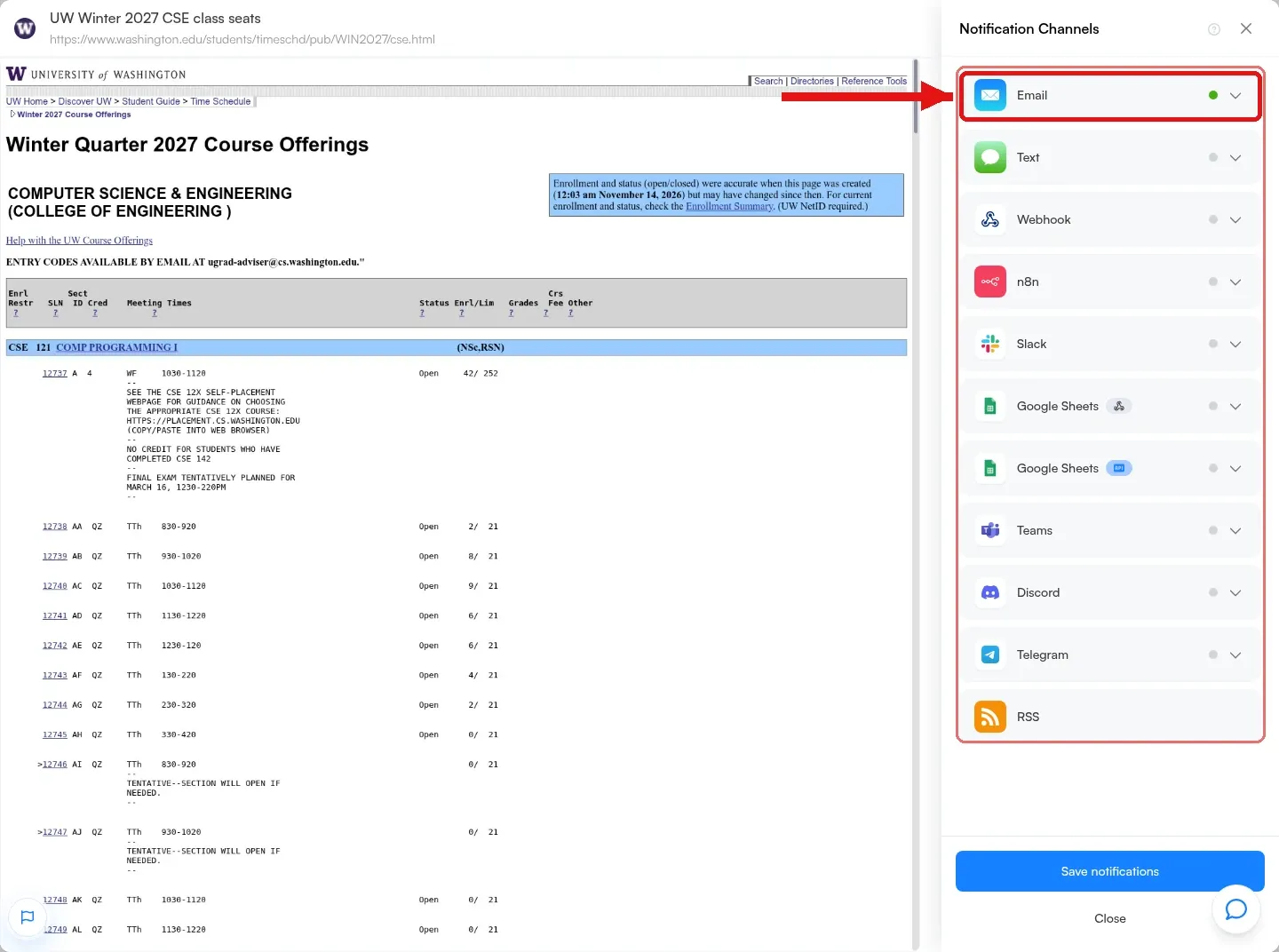 The Notification Channels panel, with email on and options to add text, Slack, Teams, Discord, Telegram, a webhook or RSS.
When the page changes, the email includes an AI summary of what changed, the highlighted text, and a screenshot. Open the monitor in your Visualping dashboard if you want a closer look. To watch registration or grade posting dates, use the same steps on a public calendar page and change the Alert me when text to match that page.
If the page you need sits behind a school login
Some class-search tools and most grade portals only load after you sign in. Visualping can still help, but the homepage preview of a login page will not show your seat list or your grades.
For a standard username and password form, Actions can type those details, click the sign-in button, and wait for the page to load before Visualping takes a snapshot. Visualping's help center walks through the same flow in Can I monitor a password-protected page?. If the school uses two-factor authentication or single sign-on, use Device mode in the Visualping Chrome extension instead. Device mode checks the page in your already signed-in browser, so those checks run while Chrome is open on your computer.
Sessions expire, and not every campus portal allows automated sign-in. Confirm that the Visualping preview shows the seats or grades you care about before you rely on the monitor. When a public class schedule or calendar already publishes the status or the date, use that page first.
FAQs about class, grade, and registration alerts
Will this work if I am on a class waitlist?
Yes, if a public schedule page shows the section's Open or Closed status, a waitlist flag, or the enrollment count. Stay in the official waitlist process, then point a Visualping monitor at that section's page and describe the change in Alert me when. If seat status is visible only after you log in, see the login section above.
Can Visualping tell me my actual grade as soon as it is posted?
Only if you monitor the page where the grade is displayed and Visualping can load that page during a check. For most students, that is a login-protected portal. A public academic calendar can still alert you when the school's posted date or policy changes, including the first day grades posted to the transcript.
Do I need a different monitor for each class?
Yes. Create one monitor per URL you want to watch: each course or department schedule page, plus the academic calendar if you are also tracking registration dates. That keeps the alert tied to the change you care about.
Is this only for college students?
No. Parents can use the same steps on a public K-12 or college class list or calendar. Parent and student grade portals are still usually behind a login.
Stay ahead of open seats, posted grades, and registration dates
The step-by-step setup above walks through how to watch a public school page and get an email when:
- A closed section opens or a seat becomes available
- The school updates the first day grades are posted
- Registration dates or add and drop deadlines change
If you are also tracking financial aid, the same approach works on scholarship pages. See How to Get Scholarships Alerts with Visualping. Students who later want alerts on a company's careers page can follow How to Get Job Alerts From Any Company's Careers Page.
Sources
- UW Computer Science & Engineering course offerings, Winter 2027
- UW Seattle Course Offerings, Winter Quarter 2027
- University of Washington Seattle Schedule of Classes
- University of Washington 2026-2027 Academic Calendar
- University of Washington Academic Calendars
- How to Monitor Pages Behind Forms and Logins with Actions
- How to Monitor Password-Protected Websites for Changes
- Can I monitor a password-protected page? (Visualping Help Center)
Recommended Reads
Get notified when a class opens up
Sign up with Visualping to watch a public class schedule page and get an email when a section changes from Closed to Open or a seat becomes available.
Eric Do Couto
Eric Do Couto is the Head of Marketing at Visualping. He leads content strategy, growth operations, and brand positioning for website change detection.
More articles by Eric Do Couto