How to Track Regulatory Changes Across Multiple Websites in 2026
Updated October 29, 2026

Disclosure: This article is published by Visualping. We provide regulatory monitoring software and may benefit if you choose our product. The workflow below combines source selection, scheduled checks and human review. For UK firms, it can include monitoring FCA website changes.
Regulatory monitoring starts with knowing which sources affect your organization. Relevant information can appear in agency guidance, rulemaking notices, enforcement pages, licensing-board updates and standards documents.
Official subscriptions are useful starting points. The Federal Register's subscription options include published documents and public-inspection filings, with agency, topic and saved-search filters. Those subscriptions have a defined scope; they do not monitor arbitrary edits across every agency website.
For pages outside those feeds, a website monitor can check selected content on a schedule and flag detected changes for review. Your source list, capture configuration and response process determine what that workflow covers.
Why Tracking Multiple Regulatory Websites Is So Challenging (And Why It Matters)
The regulatory landscape spans federal agencies, state and local authorities, international bodies and standards organizations. Relevant sources depend on your products, activities and jurisdictions. Professional licensing boards, for example, may matter to a healthcare organization alongside federal guidance.
Different sources publish information in different forms. A new document may appear in an index, an existing guidance page may be revised, or a PDF may be replaced at the same URL. Each case calls for a different capture target.
Define what you need to observe and how quickly your team needs to review it. An alert records a detected change; it does not determine whether a rule applies to you or whether your organization complies. Assign that assessment to someone who understands the relevant obligations.
What You Need to Track Multiple Regulatory Websites
Evaluate these requirements against your own source list:
- Multi-site tracking that scales
Check both active-monitor capacity and the monthly check allowance. Visualping supports bulk URL creation on every plan, including Free, within the plan's active-monitor limit. Bulk creation reduces repeated URL entry, but each resulting monitor still needs a suitable target and configuration.
- Configurable check frequency
Set an interval for each monitor based on how soon a detected update needs review and how many checks you can allocate. A selectable minimum interval does not mean the monthly allowance will support that interval across all monitors.
For example, five monitors checked once daily use 150 checks over 30 days and 155 over 31 days. Visualping's Free allowance is 150 checks per month. Failed checks also consume checks, and monitoring pauses when the allowance runs out until it resets or you upgrade.
- Documentation and audit trail
Keep the source URL, check time, captured content, detected differences and your team's review decision. A check time establishes when the monitor observed a version, rather than the exact moment the publisher edited it. Confirm the required retention and export format for your own records process. Visualping keeps three months of history by default and one year on Business accounts.
How to Set Up Multi-Site Regulatory Monitoring
- Map your regulatory universe first
List the sources relevant to your business and record why each belongs. Consider federal, state and local agencies, international regulators, standards bodies and professional boards. Healthcare providers may also need Medicare contractor sites for the jurisdictions where they bill.
Start with your highest-priority sources, verify the captures and establish who will review alerts before expanding. A domain name alone is not enough: inspect the actual page and distinguish binding rules from guidance, consultations, news and other content. FederalRegister.gov is an informational web edition; its documents link to the official legal edition on govinfo.gov.
In a Visualping snapshot taken on October 29, 2026 at 04:18 UTC, 171 eligible external workspaces had at least one active saved monitor on one of five selected website hosts: fda.gov, sec.gov, federalregister.gov, fca.org.uk and eur-lex.europa.eu. Only those exact hosts and their www forms were counted. Other subdomains, such as accessdata.fda.gov, were excluded. Of those 171 workspaces, 33 (19.3%) had active saved monitors on at least two of the five hosts. Each workspace counted once. Only existing, nondeleted workspace owners were eligible. Internal workspaces and inactive, deleted, spider-flagged or automatically created monitors were excluded; monitors with custom schedules were included. This measures saved configurations on those five hosts, not successful captures, coverage of all regulators or compliance results. When planning your own list, distinguish how many sources you need from how many pages within each source you need to watch.
- Choose the right tool
Visualping supports scheduled monitoring of selected regulatory pages. Default AI Mode compares captured content, with optional area selection; CSS-only styling changes do not trigger alerts. An optional prompt guides whether a detected change is classified as Important. Review the resulting summaries and captures against the source.
To create a monitor:
- Paste the URL and inspect the loaded preview.
- Monitor the whole page or select one area containing the relevant content. Optionally add a prompt such as “Alert me when a new recall is added or an existing recall changes.” Area selection and the prompt can be used together.
- Choose a check interval within your plan and monthly check budget. Cloud checks can run as often as every two minutes on Personal 10K and Business plans. Free has a 60-minute minimum cloud interval.
- Enable your chosen notification channels. Email and webhooks are available on all plans, SMS starts at Personal 5K, and native Slack and Microsoft Teams require Business. To limit delivery to Important changes, confirm that “Alert me only when the AI condition is met” is enabled.
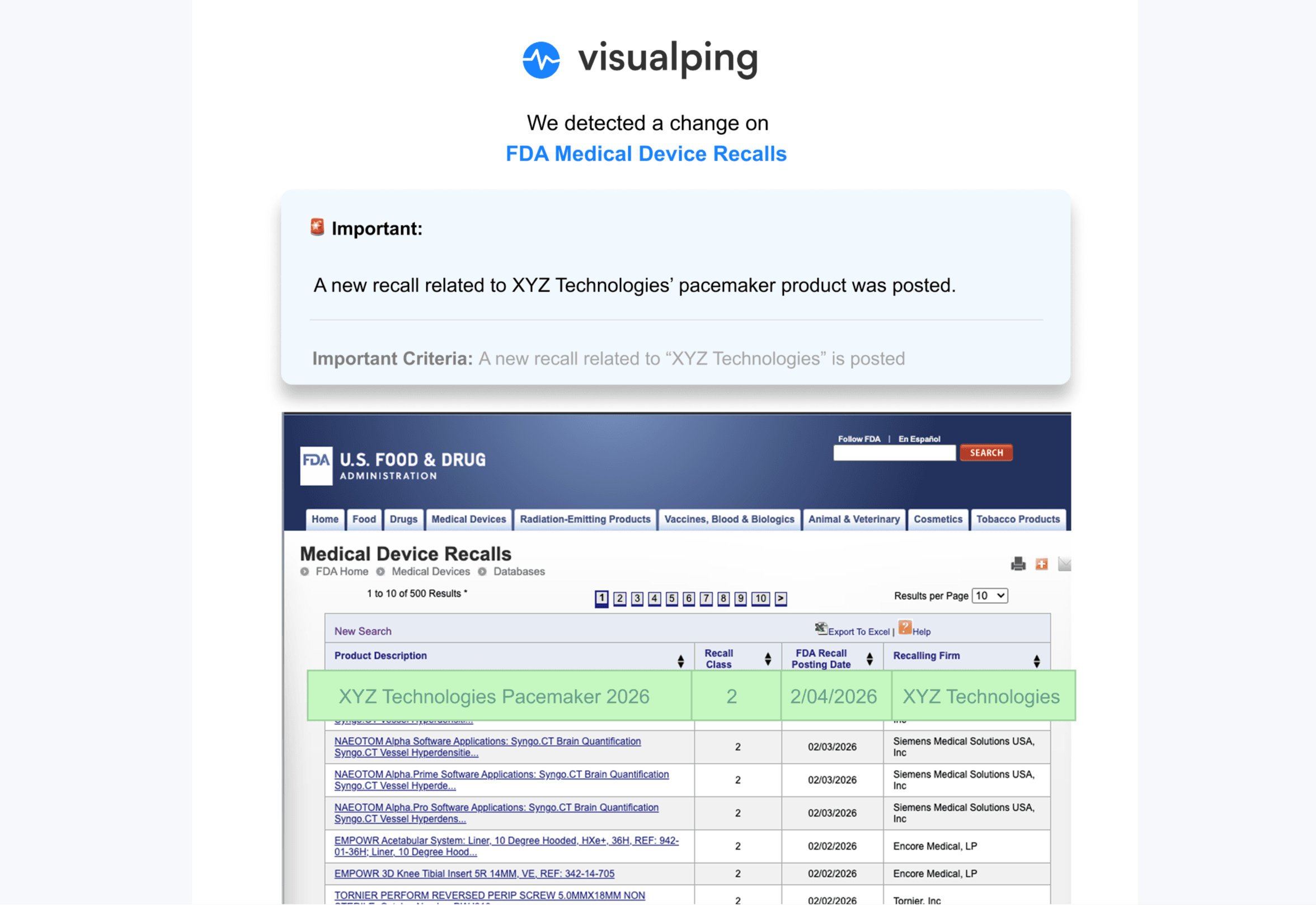
Illustrative mockup: XYZ Technologies is a fictional company, and its recall row was added to a screenshot of FDA's Medical Device Recalls database. This is an example of alert content, not a real recall or a current interface walkthrough.
Basic public pages can often be configured without code. Pages that require a login, form submission, scrolling or other interaction may need Actions, troubleshooting or technical assistance. Business 20K includes 200 active monitors sharing 20,000 monthly checks; that capacity is separate from the selected interval.
Change emails include before-and-after images and an AI summary. Use them to identify what needs review, then confirm the source content and its implications.
Set up monitors strategically
Choose the pages that publish the information you need: guidance indexes, rulemaking listings, enforcement actions, policy statements or calendars. A single agency may require several targets. Use separate monitors when you need separate pages or areas; one monitor can have one selected area.
For a PDF updated at a stable URL, monitor the PDF directly. For newly published documents with changing URLs, monitor the index that lists them. A listing check can miss a replaced PDF if the visible link text and listing stay unchanged.
Select intervals according to review needs, rather than assuming every regulator publishes on a predictable schedule. After a website redesign or repeated errors, revisit the capture target and configuration.
Organize for team efficiency
Business labels can group monitors by source, jurisdiction, business unit or priority. Route alerts to the responsible team's Slack or Microsoft Teams channel on Business, or use a webhook on any plan. Test the route and assign a backup reviewer.
Build response workflows
Decide who reviews each source, how they assess relevance, when they escalate an update and where they record decisions. Track required follow-up separately from the alert itself. A detected change is the beginning of that review, not confirmation that the obligation has been addressed.
Build monitoring into a review workflow
CEI's 2026 report counts 2,441 final federal rules issued in 2025. That national total is context, rather than a measure of how many rules apply to your organization or how often a particular website needs checking.
Combine official subscriptions with checks of the pages your team has selected. Validate the captured content, assign reviewers and preserve the records you need. To try Visualping, start with a relevant page and confirm its first capture before expanding your watchlist.
Frequently Asked Questions About Regulatory Monitoring for Multiple Websites
How many regulatory websites can I realistically monitor at once?
Plan for active monitors and monthly checks separately. Visualping's Free plan allows five active monitors; Business 20K includes 200. Additional-page options and custom Solutions plans are available, but each monitored page still consumes checks when it runs. Choose a watchlist your team can review and expand after validating the captures and alert routing.
What happens if a regulatory website goes down or becomes temporarily unavailable?
Visualping logs failed checks as errors by default. Its documented default error-alert threshold is 24 consecutive failures for hourly checks and seven for daily checks. You can choose “On every error” instead. Notification preferences can affect delivery.
The optional “Monitor error page” setting changes this behavior: HTTP error or bot-check pages can be compared and their differences can trigger change alerts. It is off by default and unavailable for PDF monitors. Timeouts and empty responses still fail. Review error records so an inaccessible source does not quietly become a gap in your monitoring.
Can monitoring tools track changes within PDF documents, not just web pages?
Visualping supports direct PDF URLs, with monitoring limited to the first 100 pages. Confirm that the relevant content is included in the captured output, especially for long regulatory documents. A PDF monitor is separate from an index-page monitor: changes inside an existing PDF may leave its listing unchanged. An index monitor can help identify newly listed files with different URLs. Some medical record copy-fee schedules are published as linked PDFs; inspect the source format before choosing the target.
What if I'm monitoring regulatory sources in multiple languages or countries?
You can use Visualping on non-English content and request a particular summary language in the “Alert me when” prompt. Verify important summaries against the original text and use a reviewer familiar with the relevant language and regulatory system. Select a schedule around your response needs, without assuming the website updates only during local business hours.
Do I need IT or technical resources to set up regulatory monitoring?
Basic setup involves entering a URL, inspecting its preview and choosing settings. More complex pages or integrations may need Actions, support or technical help. Test the specific sources you intend to monitor before deciding how much assistance the rollout requires.
Monitor selected regulatory pages
Track selected regulatory pages on a schedule and review detected changes alongside your compliance workflow.
Eric Do Couto
Eric Do Couto is the Head of Marketing at Visualping. He leads content strategy, growth operations, and brand positioning for website change detection.
More articles by Eric Do Couto