How to Track Medicare Administrative Contractor Updates
Updated September 29, 2026

Medicare administrative contractor updates don't arrive in one place. Each of the seven companies that run Medicare's regional contracts publishes its own local coverage determinations (LCDs), billing and coding articles, medical review notices and claim-issue logs, on its own website, in its own format. If your organization bills in more than one jurisdiction, keeping up means watching dozens of pages across several sites, and knowing which changes are worth a meeting.
This guide lays out a tracking system for revenue-cycle and billing teams. It covers which MAC pages to watch, how often they actually change, and how to route the changes that matter to the person who owns them. For the federal layer (CMS rules, the Federal Register and CMS manuals), see our companion guide on Medicare and Medicaid policy changes.
This article describes monitoring workflows. It is not billing, coding or legal advice. Always confirm coverage and billing requirements against the current document on your MAC's website or the Medicare Coverage Database.
Where to start in this guide:
| If you need to... | Start here |
|---|---|
| Build a watch list from scratch | The 5-step tracking system, then the priority table |
| Find which MAC covers your state | The state-by-state MAC table |
| Cut alert noise on monitors you already run | Writing "Alert me when" prompts |
| Size the workload | MAC page change data |
| Catch LCD comment deadlines | The LCD timeline and reconsideration |
 Seven contractors publish their updates on seven different websites
What a Medicare administrative contractor publishes
A Medicare administrative contractor (MAC) is a private company that CMS contracts to process Medicare fee-for-service claims for a defined region, called a jurisdiction. According to CMS, there are 12 A/B MACs, which handle Part A and Part B claims, and four DME MACs, which handle durable medical equipment, orthotics, prosthetics and supplies claims. Four of the A/B MACs also process home health and hospice (HH+H) claims, and those HH+H areas don't line up with the A/B jurisdiction borders.
MACs replaced an older setup. From 1966, Part A fiscal intermediaries and Part B carriers processed Medicare claims. Section 911 of the Medicare Modernization Act of 2003 directed CMS to replace them with A/B MACs, awarded under federal acquisition rules. The MAC statute requires each contract to be competed again at least once every 10 years.
A MAC's job goes well past paying claims. According to CMS's overview of what a MAC does, MACs enroll providers, audit institutional cost reports and handle redeterminations, the first level of appeal. They also answer provider inquiries, educate providers on billing, write LCDs and review medical records for selected claims. For a revenue-cycle team, the pages that matter fall into five groups:
- Local coverage determinations (LCDs): Rules on whether a service is reasonable and necessary within that contractor's jurisdiction. LCD document IDs start with "L" (for example, L33947), and proposed LCDs start with "DL".
- Billing and coding articles: The companion documents that list the codes, modifiers and documentation that go with an LCD. Their IDs start with "A". The standard article text in the Medicare Coverage Database describes them as guidance that helps providers "in submitting correct claims for payment."
- Medical review notices: Targeted Probe and Educate (TPE) topic lists, service-specific review announcements and medical review activity logs.
- Claim-issue and system alerts: Open claim issues, claim payment alerts, production alerts and system status pages. These are where a MAC tells you a claim edit is misfiring and what to do while it's fixed.
- News, education and listserv archives: Latest-updates feeds, event calendars and republished CMS items such as MLN Matters articles.
 LCDs, billing articles, review notices, claim alerts and news
MAC jurisdictions and who runs them
This table follows the CMS LCD jurisdiction listing, checked on September 28, 2026. CMS re-competes each MAC contract, so check the CMS page before you build your list.
| Contractor | A/B MAC jurisdictions | DME MAC | HH+H |
|---|---|---|---|
| Noridian Healthcare Solutions | JE, JF | JA, JD | |
| Palmetto GBA | JJ, JM | JM | |
| CGS Administrators | J15 | JB, JC | J15 |
| Novitas Solutions | JH, JL | ||
| First Coast Service Options | JN | ||
| Wisconsin Physicians Service (WPS) | J5, J8 | ||
| Wellpoint Federal (formerly NGS) | J6, JK | J6, JK |
A multi-state provider rarely deals with one MAC. An organization with sites in California, Texas, Florida, Ohio and Pennsylvania, for example, would usually bill Part A and Part B claims through four different contractors (Noridian, Novitas, First Coast and CGS). Each one keeps its own LCD library, alert log and TPE page.
Which MAC covers each state
Use this table to map your footprint. It tells you whose Medicare administrative contractor updates you need to watch for each site. For the DME MAC column, look up the state of the beneficiary's permanent address rather than your site. The HH+H column is the contractor for home health and hospice claims. We checked every row against the CMS LCD jurisdiction listing and against the A/B, DME and HH+H maps and the MACs-by-state list on CMS's Who are the MACs page. Those maps date from March 2023 and still show the NGS name, but every jurisdiction on them matches the current listing. Last verified: September 28, 2026.
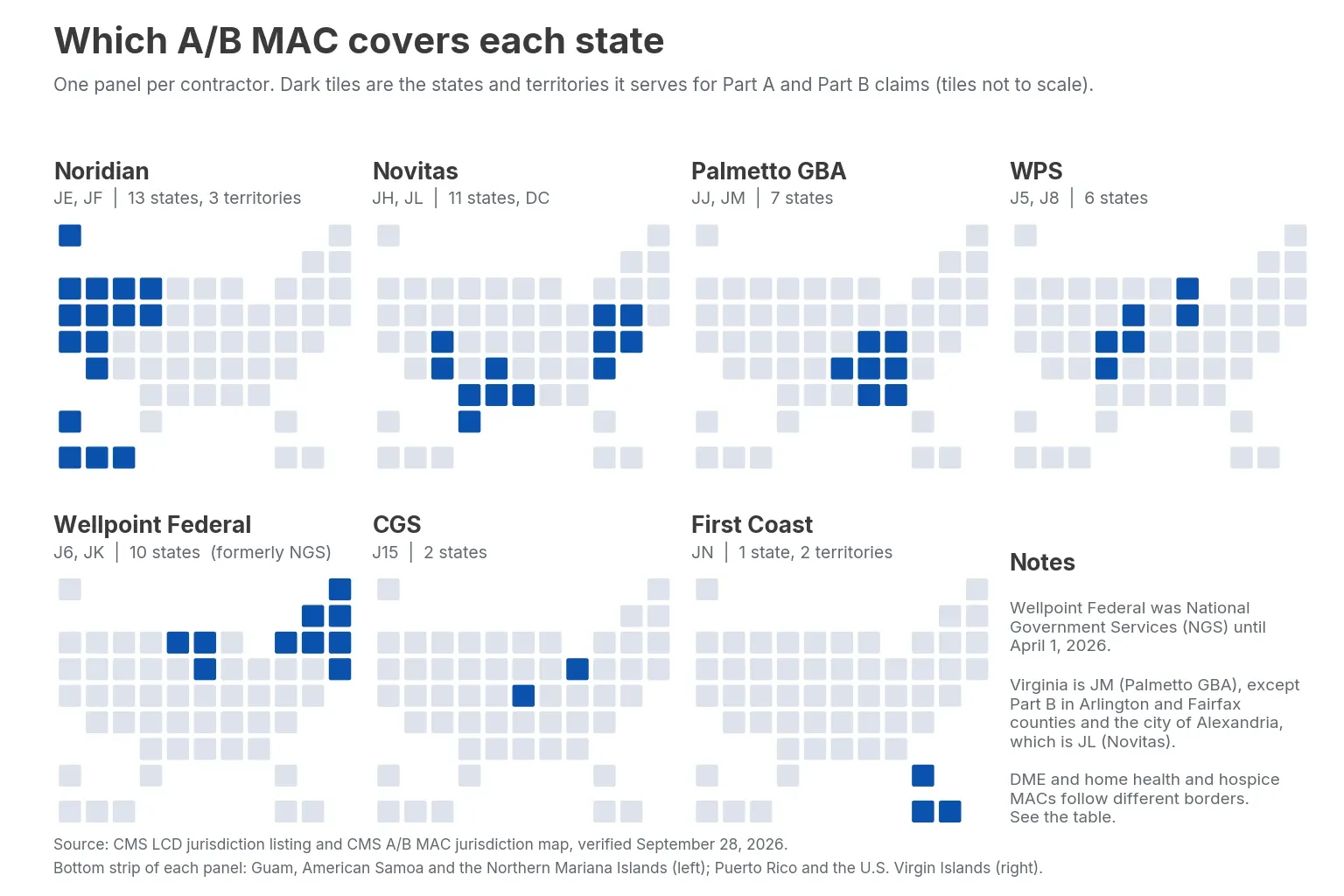 Seven contractors split the 12 A/B jurisdictions
| State or territory | A/B MAC | DME MAC | HH+H MAC |
|---|---|---|---|
| Alabama | JJ: Palmetto GBA | JC: CGS | JM: Palmetto GBA |
| Alaska | JF: Noridian | JD: Noridian | J6: Wellpoint Federal (formerly NGS) |
| American Samoa | JE: Noridian | JD: Noridian | J6: Wellpoint Federal (formerly NGS) |
| Arizona | JF: Noridian | JD: Noridian | J6: Wellpoint Federal (formerly NGS) |
| Arkansas | JH: Novitas | JC: CGS | JM: Palmetto GBA |
| California | JE: Noridian | JD: Noridian | J6: Wellpoint Federal (formerly NGS) |
| Colorado | JH: Novitas | JC: CGS | J15: CGS |
| Connecticut | JK: Wellpoint Federal (formerly NGS) | JA: Noridian | JK: Wellpoint Federal (formerly NGS) |
| Delaware | JL: Novitas | JA: Noridian | J15: CGS |
| District of Columbia | JL: Novitas | JA: Noridian | J15: CGS |
| Florida | JN: First Coast | JC: CGS | JM: Palmetto GBA |
| Georgia | JJ: Palmetto GBA | JC: CGS | JM: Palmetto GBA |
| Guam | JE: Noridian | JD: Noridian | J6: Wellpoint Federal (formerly NGS) |
| Hawaii | JE: Noridian | JD: Noridian | J6: Wellpoint Federal (formerly NGS) |
| Idaho | JF: Noridian | JD: Noridian | J6: Wellpoint Federal (formerly NGS) |
| Illinois | J6: Wellpoint Federal (formerly NGS) | JB: CGS | JM: Palmetto GBA |
| Indiana | J8: WPS | JB: CGS | JM: Palmetto GBA |
| Iowa | J5: WPS | JD: Noridian | J15: CGS |
| Kansas | J5: WPS | JD: Noridian | J15: CGS |
| Kentucky | J15: CGS | JB: CGS | JM: Palmetto GBA |
| Louisiana | JH: Novitas | JC: CGS | JM: Palmetto GBA |
| Maine | JK: Wellpoint Federal (formerly NGS) | JA: Noridian | JK: Wellpoint Federal (formerly NGS) |
| Maryland | JL: Novitas | JA: Noridian | J15: CGS |
| Massachusetts | JK: Wellpoint Federal (formerly NGS) | JA: Noridian | JK: Wellpoint Federal (formerly NGS) |
| Michigan | J8: WPS | JB: CGS | J6: Wellpoint Federal (formerly NGS) |
| Minnesota | J6: Wellpoint Federal (formerly NGS) | JB: CGS | J6: Wellpoint Federal (formerly NGS) |
| Mississippi | JH: Novitas | JC: CGS | JM: Palmetto GBA |
| Missouri | J5: WPS | JD: Noridian | J15: CGS |
| Montana | JF: Noridian | JD: Noridian | J15: CGS |
| Nebraska | J5: WPS | JD: Noridian | J15: CGS |
| Nevada | JE: Noridian | JD: Noridian | J6: Wellpoint Federal (formerly NGS) |
| New Hampshire | JK: Wellpoint Federal (formerly NGS) | JA: Noridian | JK: Wellpoint Federal (formerly NGS) |
| New Jersey | JL: Novitas | JA: Noridian | J6: Wellpoint Federal (formerly NGS) |
| New Mexico | JH: Novitas | JC: CGS | JM: Palmetto GBA |
| New York | JK: Wellpoint Federal (formerly NGS) | JA: Noridian | J6: Wellpoint Federal (formerly NGS) |
| North Carolina | JM: Palmetto GBA | JC: CGS | JM: Palmetto GBA |
| North Dakota | JF: Noridian | JD: Noridian | J15: CGS |
| Northern Mariana Islands | JE: Noridian | JD: Noridian | J6: Wellpoint Federal (formerly NGS) |
| Ohio | J15: CGS | JB: CGS | JM: Palmetto GBA |
| Oklahoma | JH: Novitas | JC: CGS | JM: Palmetto GBA |
| Oregon | JF: Noridian | JD: Noridian | J6: Wellpoint Federal (formerly NGS) |
| Pennsylvania | JL: Novitas | JA: Noridian | J15: CGS |
| Puerto Rico | JN: First Coast | JC: CGS | J6: Wellpoint Federal (formerly NGS) |
| Rhode Island | JK: Wellpoint Federal (formerly NGS) | JA: Noridian | JK: Wellpoint Federal (formerly NGS) |
| South Carolina | JM: Palmetto GBA | JC: CGS | JM: Palmetto GBA |
| South Dakota | JF: Noridian | JD: Noridian | J15: CGS |
| Tennessee | JJ: Palmetto GBA | JC: CGS | JM: Palmetto GBA |
| Texas | JH: Novitas | JC: CGS | JM: Palmetto GBA |
| Utah | JF: Noridian | JD: Noridian | J15: CGS |
| Vermont | JK: Wellpoint Federal (formerly NGS) | JA: Noridian | JK: Wellpoint Federal (formerly NGS) |
| Virgin Islands | JN: First Coast | JC: CGS | J6: Wellpoint Federal (formerly NGS) |
| Virginia | JM: Palmetto GBA (Part B in Arlington County, Fairfax County and the city of Alexandria: JL, Novitas) | JC: CGS | J15: CGS |
| Washington | JF: Noridian | JD: Noridian | J6: Wellpoint Federal (formerly NGS) |
| West Virginia | JM: Palmetto GBA | JC: CGS | J15: CGS |
| Wisconsin | J6: Wellpoint Federal (formerly NGS) | JB: CGS | J6: Wellpoint Federal (formerly NGS) |
| Wyoming | JF: Noridian | JD: Noridian | J15: CGS |
When a MAC contract is re-awarded
Contract awards are the rarest Medicare administrative contractor updates, and they decide which company runs your jurisdiction. CMS posts them on its MAC "What's New" page. Each jurisdiction also has its own CMS page listing the award date, the awardee, the anticipated contract end date and the implementation status. CMS links each award notice on SAM.gov, the federal source behind government contract award alerts. Two A/B contracts were mid-implementation when we checked on September 28, 2026:
- Jurisdiction H (Arkansas, Colorado, Louisiana, Mississippi, New Mexico, Oklahoma and Texas): on June 24, 2026, CMS announced it had awarded the contract to Novitas Solutions, the incumbent. The JH page lists implementation as in progress, with an anticipated end date of May 2033.
- Jurisdiction F: CMS re-awarded the contract to Noridian, the incumbent, on August 19, 2025. Because Noridian already holds it, CMS expects few if any disruptions.
These pages can lag. When we checked, the Jurisdiction 8 page still showed an anticipated end date of October 2025 next to a status of fully implemented, while CMS's current listing still names WPS for J8. The JF page lists its new end date as "TBD." Treat a stale date as a prompt to confirm the current term with the MAC or on SAM.gov.
A name change can also trip up searches. National Government Services, which holds J6 and JK, became Wellpoint Federal on April 1, 2026, and the company says its contracts continue uninterrupted. CMS's LCD listing now shows Wellpoint Federal, while the J6 and JK award pages still name National Government Services, so search for both names.
Add the CMS "What's New" page and the jurisdiction page for each of your MACs to your watch list. If a contract ever moves to a different company, every monitor on the old contractor's website will need a new URL.
How often MAC pages change: 93 days of monitoring data
To size the workload of tracking Medicare administrative contractor updates, we pulled anonymized Visualping data on monitors that watch the seven MAC websites. We left out Visualping's own internal accounts and the one provider whose watch list is described below. That leaves 185 live monitors held by 24 accounts. Of the 177 that completed at least one check in the 30 days to September 28, 2026, 95 logged at least one detected change, or about half.
One account holds nearly two-thirds of these monitors and checks almost all of them monthly. Without it, about 8 in 10 of the remaining 64 monitors changed in the same 30 days. Most of those 64 are checked daily, which gives them more chances to catch short-lived edits. The two groups are checked at different frequencies, so the gap says little about which kinds of pages change more. Treat "about half" as the conservative figure.
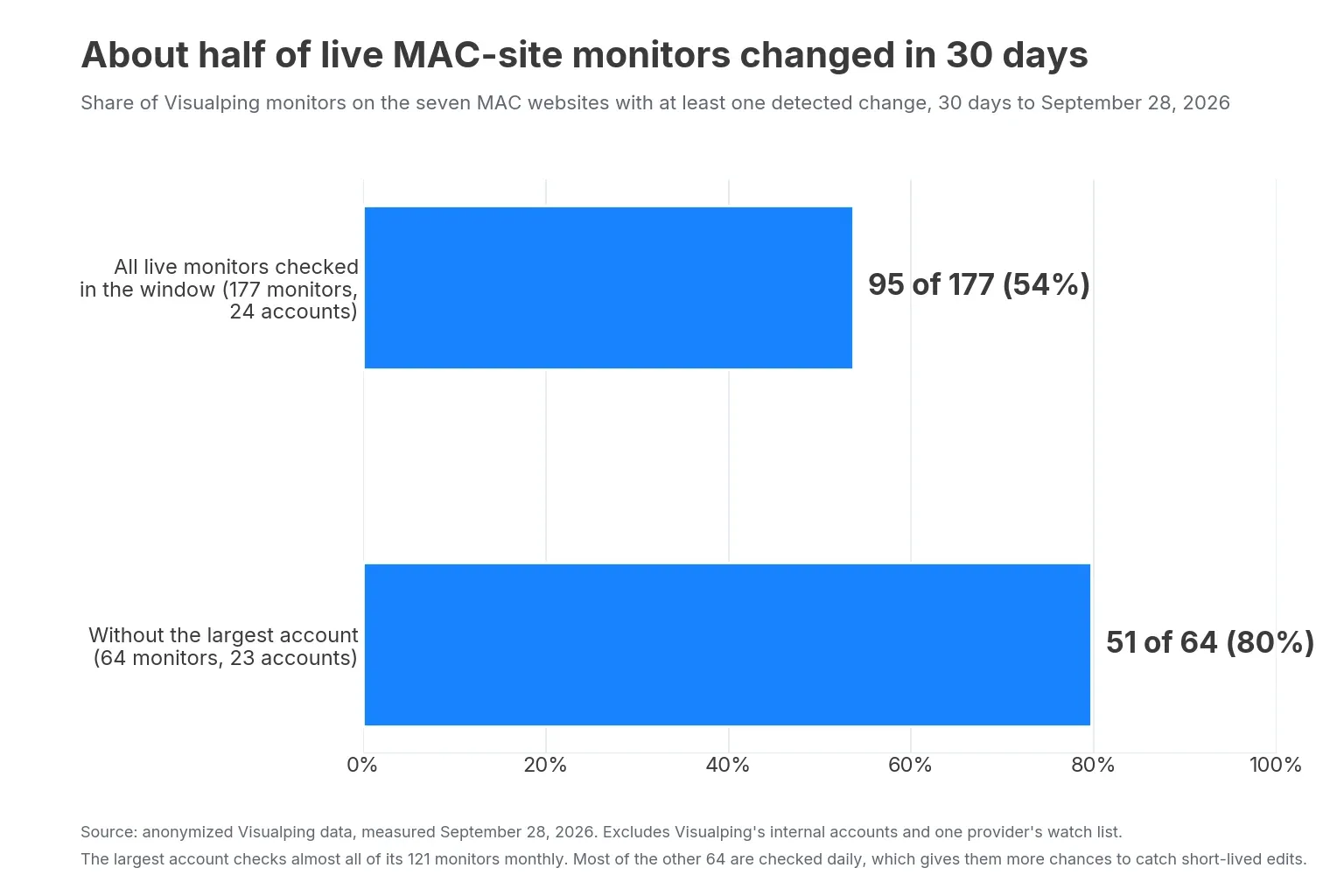 About half of monitored MAC pages changed in 30 days
One provider's watch list, as an illustration
A single watch list shows what this looks like page by page. A large multi-state healthcare provider monitors about 60 MAC pages with Visualping, a mix of LCD and billing-article pages, claim-alert pages, TPE and medical-review pages, and contact pages. We looked at its run history from late June to September 28, 2026, about 93 days. Because it's one organization's list, read the numbers as one team's experience.
- More than 9 in 10 of the pages had at least one detected change in those 93 days.
- The median page logged 3 detected changes. Most of these pages are checked monthly, and a monthly check can't show how many times a page changed in between, so 3 is a floor. At that pace, the floor for a typical page is about 12 changes a year.
- A little over half of the pages had at least one change that Visualping AI flagged Important against the account's "Alert me when" prompt. Across the whole list, about one detected change in five got the Important flag. The rest were real text changes that didn't match what the prompt asked about.
- One or two of the MAC URLs on the original list now return a "page not found" error. MAC sites get reorganized, and a bookmarked URL can stop working without anyone noticing.
Read these numbers with the caveats attached. "Detected change" counts any text change on the monitored part of the page, including small edits that aren't policy revisions. Both windows are short, and check frequency shapes the counts: a page checked daily can register more changes than the same page checked monthly.
Where tracking MAC updates breaks down
MACs publish a lot of information. The trouble is that seven contractors publish it in seven formats, on sites that change shape.
Every site is built differently
Noridian splits content by jurisdiction and claim type in the URL path. Novitas runs a portal-style site where you switch between jurisdictions and between Part A and Part B before you reach the page you need. The Medicare Coverage Database and some MAC sites show a CPT license agreement before they display LCD or article text that contains codes. A monitor can click through that agreement with pre-check Actions.
LCDs move on a timeline you can see coming
A new or substantially revised LCD follows a fixed sequence, set out in the Medicare Program Integrity Manual, Chapter 13:
- The MAC publishes a proposed LCD in the Medicare Coverage Database (MCD).
- It holds an open meeting on the proposal and posts the agenda on its website at least two weeks ahead.
- The public gets at least 45 calendar days to comment in writing.
- The MAC publishes the final LCD together with a Response to Comments article.
- A notice period of at least 45 calendar days follows. Unless it's extended, the LCD takes effect on day 46.
The manual also requires MACs to finalize or retire a proposed LCD within 365 days. A few kinds of revision skip the full process: typo fixes, revisions that carry out an administrative law judge's decision in an LCD challenge, and updates that only reflect a change elsewhere. That last group covers a new statute, regulation, CMS ruling, national coverage determination, CMS manual provision, payment policy or DME HCPCS code. A change that goes through the full process gives you at least 90 days between the proposed LCD and its effective date. That warning only helps if your regulatory change monitoring covers the proposed-LCD and open-meeting pages.
Billing and coding articles move on a different rhythm. Chapter 13 moved CPT and ICD-10-CM codes out of LCDs and into these articles. A code added to or deleted from an article can change what gets paid while the LCD itself stays the same.
The annual ICD-10-CM update shows the gap. In September 2026, WPS revised its coronary CT angiography billing article to replace the cardiomyopathy codes I42.0 and I42.8 with five new, more specific codes, effective October 1, 2026. The revision note says it was posted September 24, while the MCD dates the new version September 17, so the lead time was one to two weeks. Palmetto GBA's article got the same cardiomyopathy change plus one more code swap. A separate revision added six symptom and abnormal-finding codes, and Palmetto's revision note makes it retroactive to dates of service from September 1, even though the MCD lists the new version as effective October 1. Neither company's LCD for the service (L35121 and L33423) has been revised since 2025.
The annual ICD-10-CM update takes effect on October 1, so check your top billing articles daily from mid-September into early October. A prompt such as "Alert me when an ICD-10 code is added to or deleted from this article" keeps those alerts focused.
You can ask a MAC to change an LCD
Chapter 13 also sets out an LCD reconsideration process. A beneficiary who lives or gets care in the jurisdiction, or a provider or other interested party doing business there, can ask the MAC to revise a final, effective LCD. The request has to be in writing, name the language to add or delete, and include new evidence. The MAC decides within 60 calendar days whether the request is valid. If it is, the MAC either opens the LCD under the full process above or puts it on a waiting list.
The process is available only for final, effective LCDs, so it doesn't cover proposed or retired LCDs, national coverage determinations, or billing and coding articles. Each MAC must post its reconsideration process and submission instructions on its website. If your organization or specialty society has a request in, watch that LCD's MCD page and the MAC's proposed-LCD page for the reopening.
Claim-issue logs are short-lived
An open claim issue may be posted, updated with a workaround and resolved within a few weeks. If nobody looks during that window, the first sign may be a batch of denials. Commercial and Medicare Advantage plans change their rules the same way; see our guide to tracking prior authorization changes.
On April 21, 2025, for example, Noridian's JE Part B site posted an issue in which Medicare Secondary Payer claims had been rejected in error. The entry said a system update on April 22 meant claims received from that date wouldn't be affected. It was then updated on four dates in under two months:
- May 12: the April 22 update hadn't fixed the problem, and affected claims were being held.
- May 29: another system update was expected on June 9.
- June 16: that update was in, and all held claims had been released.
- June 18: Noridian had started mass adjustments on June 17.
The entry's "Provider/Supplier Action Required" line reads "None." Three of the updates still changed what was happening to affected claims, which were held, then released, then adjusted.
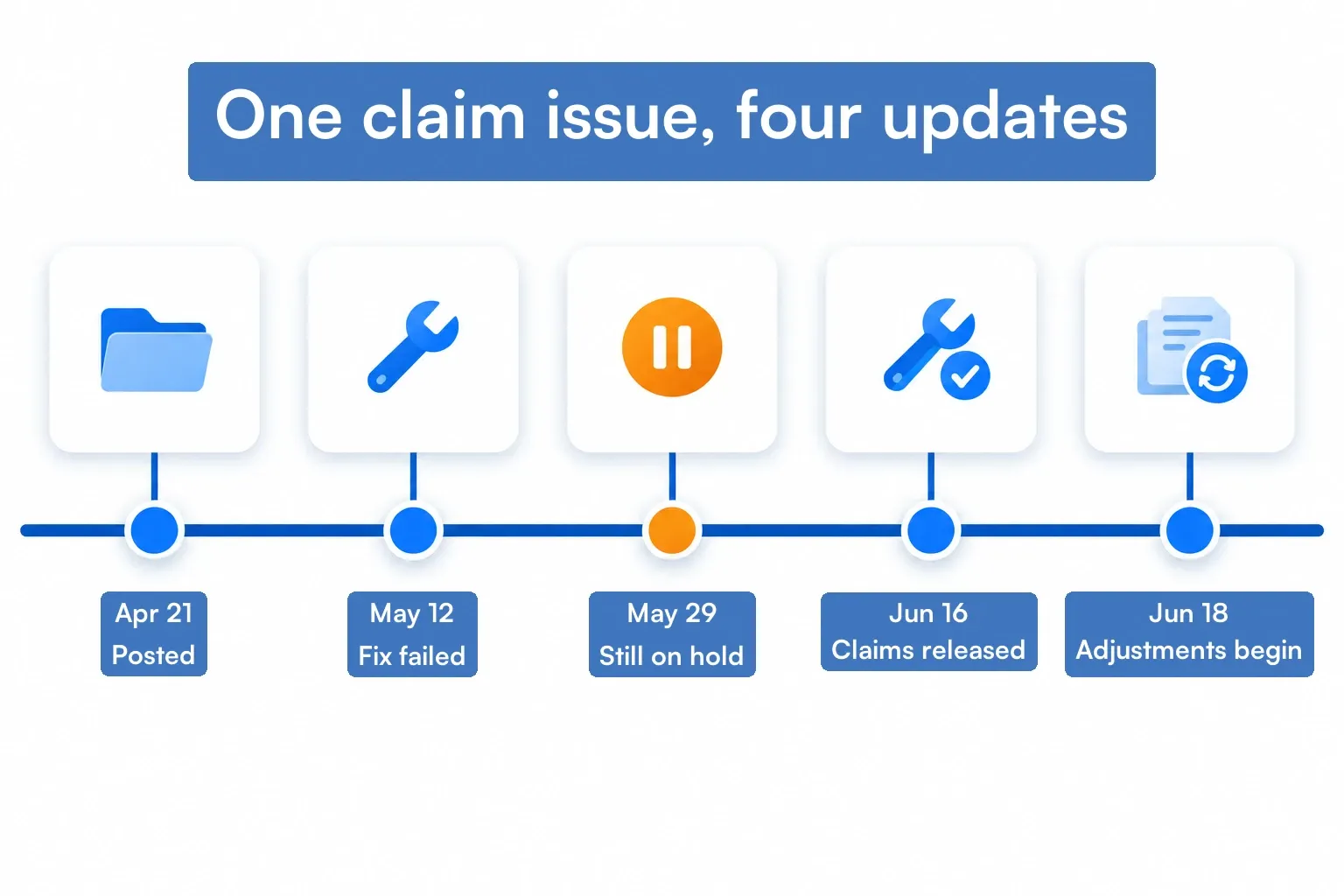 One claim-issue entry, four updates in two months
Some issues show up at several MACs at once because they start in a shared claims system. From April 17 to April 28, 2026, the 2% sequestration reduction was taken twice on various claims processed through the Fiscal Intermediary Shared System, which handles Part A claims. First Coast and Novitas both posted it with the same instructions: check the remittance advice, where the extra deduction shows in the "Pre Pay Adj" field.
Novitas posted on June 3 that adjustments were going out in smaller batches, and on August 19 that all of them had been released. Its log now marks the issue closed. As of September 29, 2026, First Coast had also marked the issue Closed, and its entry carried updates dated May 5, June 3 and August 19. The entry still sat under the page's "Open issues: Part A" heading, and its "Last updated" column read 4/29/2026. Nothing in that column showed the three later updates, so watch the full text of every log you rely on.
Claims holds start with CMS, then land on MAC pages
MACs act on CMS instructions, and some updates that stop payment outright start at CMS. When certain legislative payment provisions are about to expire, CMS directs all MACs to put a temporary hold on the affected claims. According to a CMS MLN Connects special edition, that hold typically lasts up to 10 business days. Providers can keep submitting claims, but payment isn't released until the hold lifts. If your team already tracks federal legislation, an expiring extender is the cue to watch for a hold notice.
In fall 2025 the hold ran longer. Several provisions lapsed on October 1, 2025, and on October 15 CMS told MACs to keep holding physician fee schedule, ground ambulance and federally qualified health center (FQHC) claims with dates of service from October 1. An October 21 update lifted that hold but kept some telehealth claims on hold, along with acute Hospital Care at Home claims. In November, CMS returned part of the held telehealth claims to providers to resubmit. A biller who checked for Medicare administrative contractor updates once a month would have missed most of those steps.
Email listservs cover part of it
MACs run email listservs, and you should subscribe to the ones for your jurisdictions. Listserv emails often bundle many items into one message, they depend on who's on the distribution list, and they won't tell you when a specific billing article you rely on gets a new revision. A page monitor covers that gap, and Visualping AI summarizes what changed in the alert itself.
A 5-step system for tracking Medicare administrative contractor updates
Step 1: Map your footprint to jurisdictions
List every state where you bill Medicare fee-for-service, then map each to its A/B MAC, DME MAC and HH+H MAC using the state table above or the CMS jurisdiction list. Note which contractors you share across states. Two states under the same MAC (Texas and Oklahoma under Novitas JH, for example) usually share one set of LCDs and one alert log.
Step 2: Pick the documents that drive your revenue
You don't need every LCD. Start from the services that make up most of your Medicare billing. Find the LCDs and billing and coding articles that apply to them in the Medicare Coverage Database, then note the document ID for each jurisdiction.
The same topic has different IDs in different jurisdictions. Coronary CT angiography, for example, is L33947 at CGS, L35121 at WPS and L33423 at Palmetto GBA. The rules differ too. The CGS policy lists chest pain or shortness of breath after a prior bypass or coronary stent as a covered indication. The WPS and Palmetto policies don't mention stents at all.
For Medicare administrative contractor updates, the MCD and the MACs' own websites overlap, but they aren't the same source:
- The MCD's Local Coverage "What's New" report lists articles, LCDs and proposed LCDs updated in a given week. You can filter it by contractor and look back about a year. MCD data refreshes weekly, so treat the report as a weekly cross-check on the pages you monitor directly.
- The MCD's Proposed LCDs report shows each proposal's status (in comment, comments ended, in notice, final issued) with its comment and notice period dates.
- Any individual LCD or article in the MCD has a Subscribe option, and your subscription list flags when a newer version exists.
- The MAC's own site carries what the MCD doesn't: open-meeting agendas and recordings, reconsideration instructions, claim-issue logs, TPE topics, system status and listserv archives.
Chapter 13 requires MACs to publish all proposed and final LCDs and their related articles in the MCD, so the MCD is the record. The MAC's site is where the surrounding activity happens.
Step 3: Add the operational pages
For each MAC you use, add:
- The open claim issues or claim payment alerts page for each claim type you bill
- The system status or production alerts page
- The TPE topics page and any medical review activity log
- The latest updates or news page for your jurisdiction and claim type
These pages update in place, often several times while an issue is open, so they're where a monitoring setup earns its keep.
Step 4: Add the CMS pages MACs implement
MACs carry out CMS instructions, so the federal pages belong in the same system. CMS's 2026 transmittals page lists each change request (CR) with its implementation date and, where one exists, the related MLN Matters article. For providers that bill lab tests, the upstream signal is a transmittal such as the October 2026 quarterly update to the Clinical Laboratory Fee Schedule. That one is CR 14569, issued August 24, 2026, with MLN Matters article MM14569. The MAC's claim-issue page then shows whether claims under the new rates are processing correctly.
Monitor the current year's page. The parent Transmittals page doesn't list individual transmittals, so a monitor there won't fire when CMS issues a new change request. Each January, move the monitor to the new year's page once CMS creates it. MLN Matters articles are the companion signal. They're CMS's provider-facing explainers, such as MM14569 for the lab fee schedule update. The transmittals list names the related MLN Matters article in each change request's row as plain text, and the link to the article is on the transmittal's own page.
The same approach works for other federal sources your team follows. Our guide to government agency news and guidance covers agency newsrooms and resource pages.
Step 5: Assign an owner and a response rule to each page
A change alert only helps if someone knows what to do with it. This is the working core of regulatory change management. For each monitored page, write down:
- Owner: the analyst responsible for that jurisdiction or document
- Trigger: what kind of change needs action (a new code in a billing article, a new TPE topic, a claim issue that affects your bill type)
- Response: who gets told, and where it gets logged (billing edits, registration, appeals, clinical documentation)
This is also where you decide what doesn't deserve an interruption. A new phone number on a contact page can wait for the weekly review.
 Every monitored page needs an owner and a response rule
Sending one alert to several teammates takes a Business workspace, where alert settings apply to everyone in the workspace. On any plan, a webhook can pass each alert to a ticketing system or a Zapier workflow.
If your team may need the before-and-after record later, check how long it's kept. Visualping keeps the screenshots and page captures behind each change for three months by default. Business accounts can keep them for 12 months per monitor, and the longer window covers only captures made after you change the setting. Our guide to screenshots as evidence covers what makes a capture hold up.
Ready to try this on your own MAC pages? Start with five pages free, such as the claim-issue log and one billing article for your largest jurisdiction.
Setting up page monitoring in Visualping
Watch the part of the page that matters
Point a monitor at the claim-issue table or the body of a billing article instead of the whole page with its menus and banners. Fewer alerts fire for layout changes nobody needs to read.
On Medicare Coverage Database pages, use the document URL without a "ver=" parameter. The plain URL opens the newest version, including one that isn't in effect yet, while a URL with "ver=" stays pinned to one version and never shows the next revision. MCD pages also have Expand All and Collapse All controls, so if the code table or revision history you need sits in a collapsed section, an Action can click Expand All before each check.
Use Actions to click through selectors and agreements
Many MAC pages only show content after you pick a jurisdiction, choose Part A or Part B, or accept a CPT license agreement. Visualping Actions run before each check and click through those steps, so the monitor captures the same content your analyst would see. Actions are available on every plan, including Free.
 Actions click through selectors so each check sees the real content
Tell Visualping AI what you care about
Write an "Alert me when" prompt in plain language. A billing team might write: "Alert me when a new claim issue is posted that affects Part A outpatient claims, or when an existing issue gets a new workaround." Every detected change comes with an AI summary of what changed and a binary Important flag based on your prompt. Your team triages from the email and opens only the pages that need a closer look.
For more examples, see our playbook for writing Important-alert prompts.
Cover PDFs and send alerts where the team works
Some MAC materials and CMS transmittals are published as PDFs. Visualping can monitor online PDFs for text changes, which covers attachments that don't have their own HTML page. Visualping checks only the first 100 pages of each PDF, and in AI and Visual mode it doesn't flag the pages it skips, so for a long manual, monitor the chapter or the page that lists it.
Email alerts and webhooks work on every plan, and the Visualping API (also on all plans) lets you pull changes into a tracker or ticketing system. Alerts in Slack, Microsoft Teams, Discord, Google Chat or Google Sheets need a Business plan.
For more on managing many regulator sites at once, see our guide to tracking multiple regulatory websites.
Check for broken monitors
MAC URLs change, so check the Health Dashboard for failing monitors every week. Visualping emails you once a page has kept failing, and the wait depends on the check interval. On a daily monitor that's after 7 days of failed checks, on a weekly one after 21 days and on a monthly one after 60 days. These failure emails are on by default on every plan. Each failed check also counts against your plan's checks, and a monitor pointed at a page that now returns a 404 needs a new URL.
No monitoring setup catches everything. Pages get restructured, PDFs get replaced under new file names, and some updates only go out by email. Treat page monitoring as one layer of your regulatory compliance monitoring, next to your MAC listserv subscriptions and your own denial trend reporting.
Which pages to monitor first
If you're starting from nothing, this order gets the most coverage for the least setup:
| Priority | Page type | Why | Suggested check frequency |
|---|---|---|---|
| 1 | Open claim issues / claim payment alerts | Updated in place while an issue is open; most direct link to denials | Daily |
| 2 | System status / production alerts | Outages and processing holds | Daily |
| 3 | Billing and coding articles for your top services | Code and documentation changes | Weekly (daily from mid-September into early October) |
| 4 | TPE topics and medical review logs | Early sign of review activity on your services | Weekly |
| 5 | Proposed LCDs and open-meeting agendas | The 45-day comment window is your chance to shape a rule | Weekly |
| 6 | Final LCDs for your top services | Coverage rule changes | Weekly |
| 7 | Jurisdiction news / latest updates | Catch-all for everything else | Daily or weekly |
| 8 | CMS MAC "What's New" page and your MACs' jurisdiction pages | Contract re-awards and transitions | Monthly |
Frequently asked questions
How many Medicare administrative contractors are there?
CMS lists 12 A/B MACs and four DME MACs, run by seven companies: Noridian, Palmetto GBA, CGS, Novitas, First Coast, WPS and Wellpoint Federal (formerly NGS), which took its new name on April 1, 2026. Four A/B MACs also handle home health and hospice claims. See the state table above or the CMS "Who are the MACs" page for current maps.
What's the difference between an LCD and a billing and coding article?
An LCD states whether a service is considered reasonable and necessary in a MAC's jurisdiction. The billing and coding article that goes with it lists the codes, modifiers and documentation needed to bill that service correctly. Both are published in the Medicare Coverage Database and on the MAC's own site. A national coverage determination (NCD) is different again: CMS issues it and it applies everywhere, while an LCD applies only in the jurisdiction of the MAC that wrote it. CMS notes that most Medicare coverage decisions are made locally by the MACs.
How do I find my Medicare administrative contractor?
Start with the state where you furnish services, then look it up in the state table above, on the CMS MAC jurisdiction list or in the CMS "Who are the MACs" maps. CMS publishes separate A/B, HH+H and DME MAC maps, plus a MACs-by-state list. Check the A/B MAC, the DME MAC and, if you bill home health or hospice, the HH+H MAC separately. The four HH+H areas don't match the A/B jurisdictions of the MACs that run them.
The claim type decides which MAC gets the claim. Under the Medicare Claims Processing Manual, Chapter 1, physician fee schedule services go to the A/B MAC for the payment locality where the service was furnished. The locality is set by ZIP code. Claims for durable medical equipment, prosthetics, orthotics and supplies (DMEPOS) go to the DME MAC for the beneficiary's permanent address, which is where they live for more than six months of the year.
What's the difference between CMS and a MAC?
CMS sets national Medicare policy through rules, manuals, national coverage determinations and the change requests it sends out as transmittals. MACs carry out those instructions for their jurisdiction: they process claims, run medical review and write the local coverage determinations for their region.
What is a TPE audit?
Targeted Probe and Educate is a MAC medical review program. According to CMS, MACs use data analysis to pick providers with high claim error rates or unusual billing, and services with high national error rates. CMS's one-page TPE overview and the Program Integrity Manual, Chapter 3, describe a traditional TPE cycle this way:
- You get a letter from your MAC, which then reviews 20 to 40 of your claims and supporting medical records.
- If claims are denied, you're offered a one-on-one education session, then at least 45 days to improve before the next round.
- There can be up to two more rounds. If you're compliant, you won't be reviewed again on that topic for at least a year, although CMS notes that MACs may review again if your billing changes significantly.
- Problems that don't improve after three rounds are referred to CMS. Next steps may include 100 percent prepayment review, extrapolation or referral to a Recovery Auditor.
The MAC collects the records through additional documentation requests (ADRs), each with its own deadline. The CGS DME MAC TPE page, for example, asks for the documents within 45 days. A Low Biller Probe and Educate variant reviews fewer than 20 claims per round. CMS's TPE Q&As have more detail.
Some MACs list their active TPE topics on a page separate from their TPE overview. Novitas's topics page and First Coast's topics page each list the current review topics. The CGS page above explains the process without a topic list. Monitor the topics page itself, and check that the topic list appears on the page you monitor before you add it to your compliance monitoring routine.
Can I ask a MAC to change an LCD?
Yes, through the LCD reconsideration process in Program Integrity Manual Chapter 13. Beneficiaries who live or get care in the jurisdiction, and providers or other interested parties doing business there, can ask the MAC to revise a final, effective LCD. The request must be written, name the exact language to change and include new evidence. The MAC has 60 calendar days to decide whether the request is valid.
How do I know when a proposed LCD is open for comment?
Check your MAC's proposed-LCD page and the MCD's Proposed LCDs report, which lists each proposal's comment period dates. The comment period runs at least 45 calendar days. Monitoring both pages means you hear about a proposal while its comment window is still open.
Where are CMS transmittals published?
CMS lists transmittals by year on its transmittals pages, with the change request number, implementation date and any related MLN Matters article. MACs then implement those instructions and often republish them on their news pages. Monitor the current year's page rather than the parent Transmittals page, which doesn't list individual transmittals.
Do MAC email listservs replace page monitoring?
They complement it. Listservs are good for the Medicare administrative contractor updates a MAC chooses to send. Page monitoring covers revisions to specific documents, claim-issue logs that update in place, and pages that move or break.
Start by monitoring one jurisdiction
You don't need to track Medicare administrative contractor updates from all seven contractors on day one. Pick your largest jurisdiction, set up monitors on its claim-issue log, alert page and top two billing articles, and give each one an owner. Once that routine works, copy it to the next MAC.
Then connect it to the federal side with our guide to Medicare and Medicaid policy changes, or see how Visualping supports broader regulatory intelligence programs.
State Medicaid programs post policy and billing changes on their own sites, not through a MAC. Our 50-state directory of Medicaid provider bulletin pages shows where each state posts them.
Create a free Visualping account and monitor your first five pages free.
Want to monitor web changes that impact your business?
Sign up with Visualping to get alerted of important updates from anywhere online.
Eric Do Couto
Eric Do Couto is the Head of Marketing at Visualping. He leads content strategy, growth operations, and brand positioning for website change detection.
More articles by Eric Do Couto