27 Competitive Intelligence Sources Worth Monitoring
Updated June 11, 2026


Competitive intelligence sources are the public places where competitor data shows up. They fall into two groups. Primary sources are pages a competitor controls, like pricing, product, careers, legal and investor relations pages. Third-party sources are outside its control, like review sites, job boards, SEC and patent filings, app stores and social profiles. For most teams, the pricing page is the best place to start.
Your competitor restructured their pricing last month. They added a usage-based tier, killed their free plan, and moved their enterprise CTA above the fold. Your sales team found out from a prospect who asked why your product cost more. That conversation happened 11 days after the change.
This gap is common. In conversations with hundreds of prospects, we hear the same pattern: competitive research happens quarterly at best, manually.
One prospect told us directly: "Part of my competition research reports involves going to our competitors' websites and seeing if there's been any changes. But I really only do that quarterly. I try to visit monthly, but..." The rest of that sentence trails off the way it always does.
Meanwhile, 15,028 Visualping users told us during onboarding that competitive intelligence is their primary reason for monitoring websites. Another 28,000+ users monitor three or more distinct domains, a pattern that usually points to competitive tracking, even when people don't label it that way.
This guide covers the 27 competitive intelligence sources that matter most, organized by where the data comes from and backed by real usage data from our platform. Each source includes what to watch, how to set up automated monitoring, and the actual monitor count from Visualping users doing this today. For a data-first view of which of these sources people actually watch (and which changed most in the first half of 2026), see our competitor monitoring report.
Key takeaways
- 27 competitive intelligence sources organized into Primary (competitor-owned) and Third-Party (external)
- Every source includes real monitor volume data from Visualping's platform
- Pricing pages account for 7,700+ active monitors, and 43% of them detect a change within 30 days
- Business teams own 76% of pricing page monitors, a sign that CI usually sits with a team
- You can automate monitoring for most of these sources with competitive intelligence tools
Quick start by available time
| Time available | Action | Coverage |
|---|---|---|
| 15 minutes | Monitor your top 3 competitors' pricing pages | About 43% of monitored pricing pages change within 30 days |
| 1 hour | Add product, homepage, and careers pages | Covers four high-value primary sources |
| 1 day | Build the full 27-source stack | Complete competitive coverage across all categories |
How to use this guide
The 27 sources are split into two groups: Primary sources come directly from your competitor's own digital presence. Third-party sources come from external platforms where competitor data surfaces. Each entry includes a VP Platform Data callout showing how many Visualping users actively monitor that source type.
For the full picture on what competitive intelligence is and how the process works, start there. For day-to-day tracking tactics, see our competitor tracking guide. This guide on competitive intelligence sources sits between those two: it tells you where to look.
Primary intelligence sources: your competitor's own channels
These are the pages your competitors control directly. Changes here are intentional and often reflect strategic decisions made weeks or months earlier. Primary competitive intelligence sources tend to produce the highest-signal, most actionable insights. These pages are also where a rival's competitive advantage examples leave public evidence, which is what makes them worth the watch.
VP Platform Data rows throughout this post are an April 2026 snapshot of active monitors on Visualping.
1. Product and feature pages
Intelligence value: Very High | Monitoring frequency: Weekly | Automatable: Yes
VP Platform Data: 148,410 active monitors | 71% business-owned | 47,856 changes detected in 30 days
Product pages are a competitor's roadmap, published in plain sight. A new feature page means they built something. A removed feature page means they killed something. A renamed capability means they're repositioning.
This is the single largest category of competitive intelligence source monitoring on our platform. For a deeper read on what to extract from product page changes, see our competitor website monitoring guide.
What to monitor:
- New feature announcements and capability descriptions
- Feature page removals (deprecation or pivot)
- Language changes (how they describe what they do)
- Comparison pages (who they position against, and how)
- Integration and partner pages
- API documentation changes (technical direction indicator)
How to set it up:
- Monitor each competitor's main product/features page
- Keep the default AI Mode to catch layout and screenshot changes
- Set check frequency to daily
- For API docs, monitor the changelog or version page specifically
2. Blog, news, and press pages
Intelligence value: Medium-High | Monitoring frequency: Weekly | Automatable: Yes
VP Platform Data: 59,231 active monitors | 67% business-owned | 22,927 changes detected in 30 days
What a competitor writes about tells you what they're selling and to whom. A sudden series on "enterprise compliance" means they're moving upmarket. A shift from product tutorials to industry thought leadership means they're repositioning. Blog content is a lagging indicator of strategy but a leading indicator of marketing spend. Pair this with broader content monitoring fundamentals for full editorial coverage.
What to monitor:
- Publishing frequency and cadence changes
- Topic patterns and content themes (what keywords they're targeting)
- Author diversity (internal vs. guest contributors)
- Content format shifts (articles to videos, podcasts, webinars)
- Gated content (whitepapers, reports indicate lead-gen priorities)
How to set it up:
- Monitor the competitor's blog index page (catches new posts)
- Monitor their RSS feed URL if available (see Source #24)
- Switch to Text changes mode (the legacy mode, set in the monitor's settings after you create it) to catch new article titles and descriptions
- Set frequency to daily
3. About, team, and leadership pages
Intelligence value: High | Monitoring frequency: Weekly | Automatable: Yes
VP Platform Data: 40,302 active monitors | 63% business-owned | 10,855 changes detected in 30 days
Executive changes are leading indicators. A new Chief Revenue Officer means the sales motion is about to change. A VP of International means geographic expansion. A wave of AI engineering hires tells you the product roadmap before any press release does. Our deep dive on executive leadership changes covers the extraction patterns that matter.
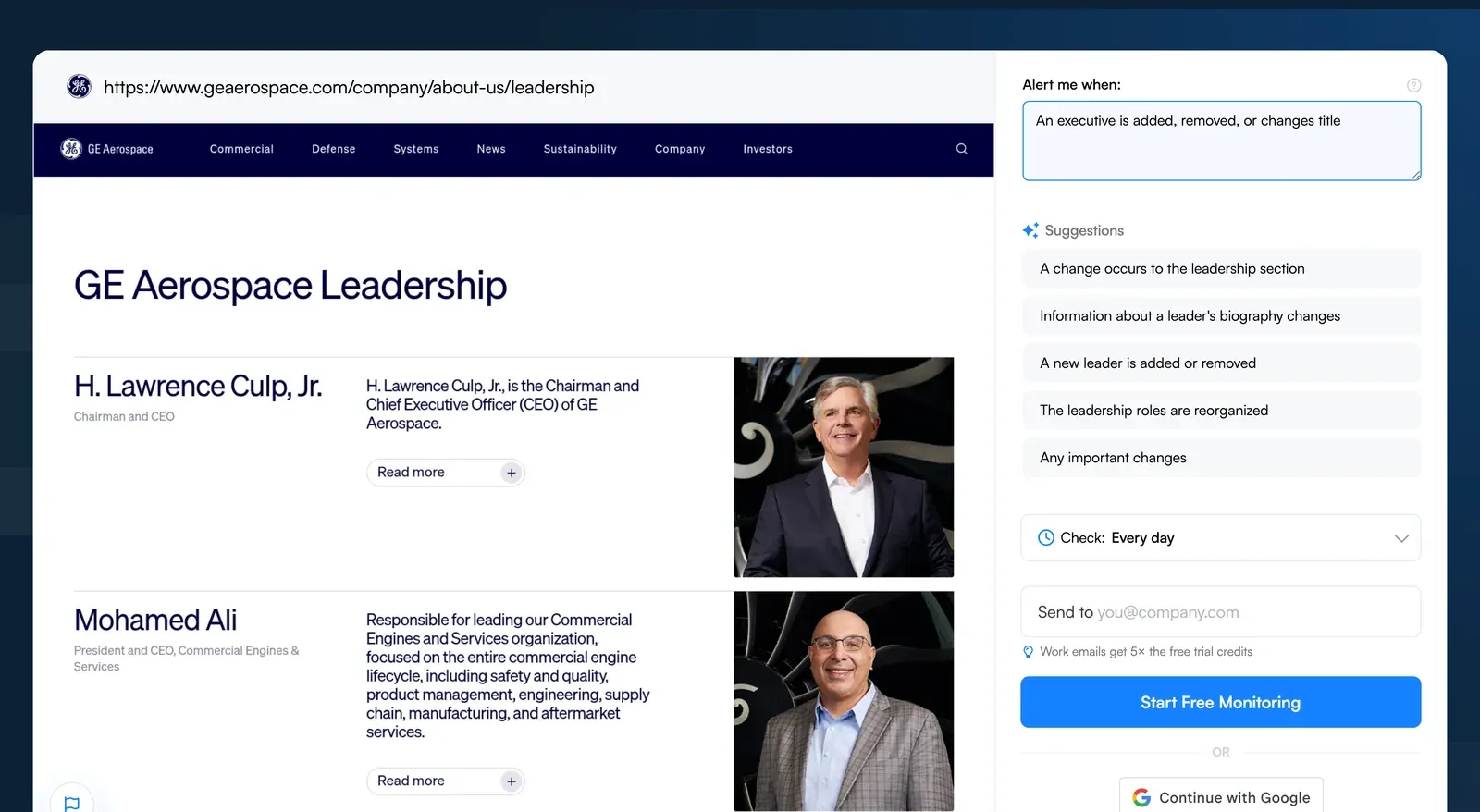
What to monitor:
- New executive hires (C-suite, VP-level)
- Departures of key leaders
- Title changes suggesting reorganization
- Advisory board additions
- Office location additions or closures
How to set it up:
- Monitor /about, /team, or /leadership pages
- Use Text changes mode to catch name and title changes
- Set frequency to weekly (these pages change less frequently)
4. Legal, terms, and privacy pages
Intelligence value: High | Monitoring frequency: Weekly | Automatable: Yes
VP Platform Data: 27,897 active monitors | 82% business-owned | 7,541 changes detected in 30 days
This is the sleeper competitive intelligence source most guides skip. Terms of service, privacy policies, and legal pages change when something material shifts: a new market entry (GDPR compliance = European expansion), a new data practice (updated privacy policy = new product feature touching user data), or a regulatory response. The 82% business ownership rate here is second only to sitemaps (86%), a clear signal that legal monitoring is a professional function.
What to monitor:
- Terms of service updates (pricing model changes, liability shifts)
- Privacy policy revisions (new data practices, new jurisdictions)
- Cookie consent changes (compliance with new regulations)
- Acceptable use policy updates (signals product scope changes)
- GDPR/CCPA compliance language (geographic expansion signals)
How to set it up:
- Monitor /terms, /privacy, /legal, and /tos pages
- Use Text changes mode (catches every word change, which matters for legal docs)
- Set frequency to weekly
- Read the added and removed text in each alert to spot additions vs. removals quickly
5. Careers and hiring pages
Intelligence value: High | Monitoring frequency: Weekly | Automatable: Yes
VP Platform Data: 20,835 active monitors | 16% business-owned | 9,101 changes detected in 30 days
Hiring pages list the exact skills and roles a company is investing in. Ten new "AI/ML Engineer" postings tell you more about a product roadmap than any blog post. The relatively low business ownership rate here (16%) suggests many individuals track job pages for personal career research, but the absolute volume confirms this as a widely used competitive intelligence source. For tracking third-party listings (LinkedIn, Indeed, niche boards), the same setup applies as in our job alerts workflow.
What to monitor:
- Job posting volume and department distribution
- Specific role requirements (what technologies, what markets)
- New office locations
- Seniority distribution (hiring leaders vs. individual contributors)
- Department growth patterns over time
How to set it up:
- Monitor /careers or /jobs pages for new postings
- Use Text changes mode to catch title and description changes
- Set frequency to weekly
- Also check third-party job boards (see Source #23)
6. Conversion pages (signup, demo, contact)
Intelligence value: Medium-High | Monitoring frequency: Weekly | Automatable: Yes
VP Platform Data: 17,919 active monitors | 62% business-owned | 3,933 changes detected in 30 days
Conversion pages reflect A/B testing results and funnel optimization. When a competitor reduces form fields, they're optimizing for volume. When they add a "talk to sales" gate, they're moving upmarket. Social proof changes (new customer logos, updated user counts) signal growth milestones. For limited-time offers and discount-page tracking specifically, see our competitor tracking guide.
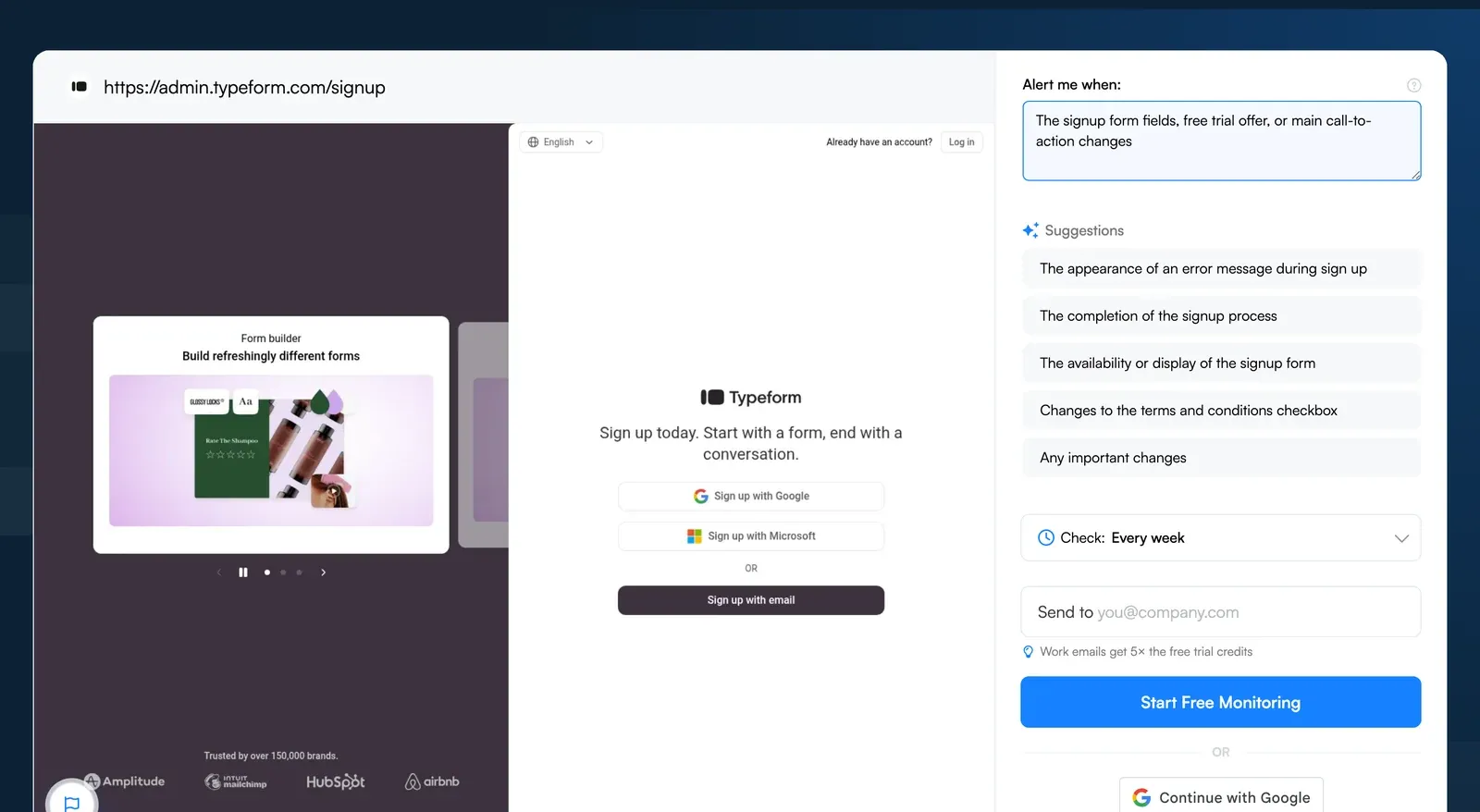
What to monitor:
- Form field changes (fewer fields = optimizing for conversion)
- Social proof elements (testimonials, customer counts, logos)
- Trust indicators (security badges, guarantees)
- CTA messaging and button placement
- Free trial vs. demo vs. contact routing changes
How to set it up:
- Monitor /signup, /register, /demo, and /contact pages
- Keep the default AI Mode to catch layout changes alongside copy changes
- Set frequency to weekly
7. API documentation and changelogs
Intelligence value: Medium-High | Monitoring frequency: Weekly | Automatable: Yes
VP Platform Data: 14,409 active monitors | 50% business-owned | 6,162 changes detected in 30 days
API docs and changelogs are the most honest pages on any competitor's site. Marketing copy gets polished. Changelogs get written by engineers. New endpoints, deprecated features, rate limit changes, and version bumps all show up here before they show up in a press release.
The 50/50 business-personal split suggests both technical teams and individual developers watch these.
What to monitor:
- New API endpoints or capabilities
- Deprecated features and sunset timelines
- Rate limit or pricing tier changes
- SDK version bumps and language support
- Changelog frequency (release velocity proxy)
How to set it up:
- Monitor /api, /docs, /changelog, or /release-notes pages
- Use Text changes mode for changelogs (catches every line)
- Set frequency to daily (changelogs update often)
8. Pricing and packaging pages
Intelligence value: Very High | Monitoring frequency: Daily | Automatable: Yes
VP Platform Data: 7,732 active monitors | 76% business-owned | 3,453 changes detected in 30 days (43% change rate)
Pricing pages are the richest competitive intelligence source per page. A pricing restructure tells you more about a competitor's strategy in one page than a month of blog posts. The 76% business ownership and 43% monthly change rate make this one of the most actively monitored and most frequently changing source types on the platform.
What to monitor:
- Tier names, pricing amounts, and billing frequency
- Feature allocation across tiers (what moved up or down)
- Free plan changes (added, removed, restricted)
- CTA copy and page layout
- Annual vs. monthly pricing gaps
- Enterprise/custom pricing CTAs and language
How to set it up:
- Go to visualping.io and paste your competitor's pricing URL
- Click Go and wait for the page preview to load
- In "Alert me when", describe the change that matters, for example "a price, plan name or plan feature changes"
- Under "Check:", pick every 6 hours for most competitors (every hour for fast-moving SaaS). Free includes 150 checks a month, so 3 pricing pages at every 6 hours (about 360 checks) need Starter or above
- Under "Send to", enter your email and click Start Free Monitoring. Every alert includes an AI summary of what changed, on every plan including Free
For a deeper look at price tracking tools and techniques, see our competitor price tracking guide. For a broader view of how to analyze a competitor's website, start there.
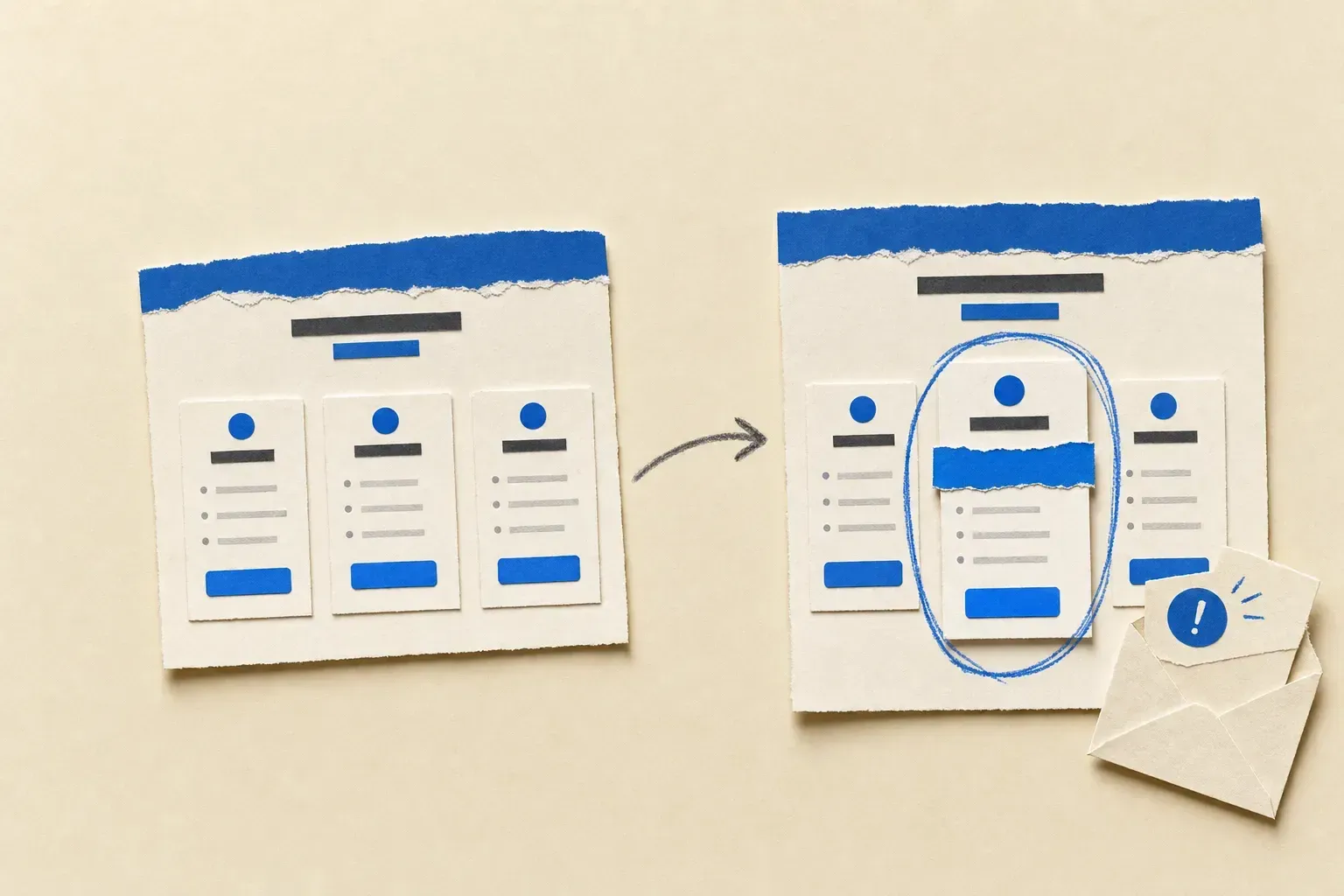 Automated monitoring flags a pricing change on its next scheduled check
9. Investor relations pages
Intelligence value: High (public companies) | Monitoring frequency: Weekly | Automatable: Yes
VP Platform Data: 7,032 active monitors | 78% business-owned | 2,906 changes detected in 30 days
Investor relations pages contain intelligence you can't get anywhere else: revenue figures, growth rates, customer counts, geographic breakdowns, and risk disclosures. The 78% business ownership rate confirms this is a professional research function. Even for private competitors, watching where they post investor-facing content can reveal fundraising timelines.
What to monitor:
- Earnings call transcripts and investor presentations
- Quarterly/annual report publications
- Guidance updates and revised forecasts
- New investor FAQ entries
- Board composition changes
How to set it up:
- Monitor /investor, /ir, or investor relations landing pages
- Use Text changes mode to catch new document listings
- Set frequency to weekly (with daily during earnings season)
10. Events and webinar pages
Intelligence value: Medium | Monitoring frequency: Weekly | Automatable: Yes
VP Platform Data: 6,336 active monitors | 24% business-owned | 2,330 changes detected in 30 days
Where a competitor shows up physically (or virtually) tells you where they're spending. A competitor sponsoring three fintech conferences in a quarter is making a market bet. Booth size, speaking topics, and which events they skip are all data points.
What to monitor:
- Upcoming event listings and webinar schedules
- Event-specific landing pages and promotions
- Webinar topics and frequency (reveals thought leadership focus)
- Post-event content (presentations, recap posts)
How to set it up:
- Monitor /events, /webinars, or /resources pages
- Set frequency to weekly
- Set Google Alerts for "[Competitor name] + conference/webinar/event"
11. Homepage and core messaging
Intelligence value: High | Monitoring frequency: Weekly | Automatable: Yes
Nobody redesigns a homepage for fun. When a competitor rewrites their hero copy, swaps their tagline, or moves their primary CTA, months of internal strategy work are showing up on the page. Catching it early gives you time to respond before the market adjusts. For a deeper read on what to extract from messaging changes, see our competitor website analysis guide.
What to monitor:
- Hero headline and subheadline copy
- Primary CTA text and placement
- Social proof (customer logos, stats, testimonials)
- Navigation structure changes (new or removed menu items)
- Target audience language shifts
How to set it up:
- Monitor the homepage URL in AI Mode (catches design + copy changes)
- Set frequency to every 12 hours
- In "Alert me when", name what matters, for example "the hero headline, tagline or main call-to-action changes"
12. Navigation and site architecture
Intelligence value: Medium-High | Monitoring frequency: Weekly | Automatable: Yes
Navigation changes reveal how competitors want visitors to experience their site and which areas they consider most important. A new top-level menu item for "Enterprise" means they're segmenting their audience. A removed "Pricing" link means they're gating it behind sales.
What to monitor:
- New menu items or categories
- Removed or consolidated sections
- Dropdown structure changes
- Featured link prominence
- Footer link changes (often updated separately from main nav)
How to set it up:
- Monitor the homepage or any page with the main navigation
- Keep the default AI Mode to catch layout shifts in nav elements
- Set frequency to weekly
13. Sitemap files
Intelligence value: Medium | Monitoring frequency: Bi-weekly | Automatable: Yes
VP Platform Data: 3,390 active monitors | 86% business-owned | 1,220 changes detected in 30 days
Sitemaps are an underrated competitive intelligence source. The 86% business ownership rate (the highest of any source category) shows that the people monitoring sitemaps know exactly what they're looking for: new pages before they're publicly linked, removed pages that signal product or content changes, and structural patterns that reveal content strategy. SEO teams pair this with SEO competitor tools for SERP-level insight.
What to monitor:
- New URL entries (reveals unreleased pages, new products, new content)
- Removed URLs (signals deprecation or restructuring)
- URL pattern changes (new subdirectories = new product lines)
- Sitemap count changes (new sitemaps = significant site expansion)
How to set it up:
- Monitor
competitor.com/sitemap.xmlin Text changes mode - Set frequency to bi-weekly
- For large sites, monitor individual sitemap index files
14. Partners and integrations pages
Intelligence value: Medium | Monitoring frequency: Bi-weekly | Automatable: Yes
VP Platform Data: 1,395 active monitors | 79% business-owned | 409 changes detected in 30 days
New partnerships tell you which markets and use cases a competitor is betting on. A Salesforce integration signals enterprise sales ambitions. A Shopify partnership means ecommerce expansion. The 79% business ownership rate points to strategy teams doing this work.
What to monitor:
- New integration announcements
- Partner directory additions or removals
- "Built with" or "Powered by" badge changes
- Technology partner tier changes
- Marketplace listing updates
How to set it up:
- Monitor /partners, /integrations, or /marketplace pages
- Keep the default AI Mode, which reads both the page text and how it looks, so new partner logos and descriptions both register
- Set frequency to bi-weekly
15. Robots.txt
Intelligence value: Medium | Monitoring frequency: Bi-weekly | Automatable: Yes
VP Platform Data: 458 active monitors | 6 changes detected in 30 days
The robots.txt file, located at any website's root directory, provides technical insight into site structure and content organization. Disallowed directories may reveal staging environments, unreleased products, or internal tools. According to Search Engine Land's guide on robots.txt, the disallowed sections sometimes reveal areas competitors want to keep from search indexing.
What to monitor:
- New disallowed directories (may reveal upcoming features)
- Sitemap file locations
- Changes to crawling permissions
- Staging environment references
How to set it up:
- Monitor
competitor.com/robots.txtin Text changes mode - Set frequency to bi-weekly (these change slowly)
16. Technology stack
Intelligence value: Medium | Monitoring frequency: Monthly | Automatable: Partially
Technology stack changes (visible via BuiltWith or Wappalyzer) tell you where engineering money is going. A switch from Google Analytics to Mixpanel suggests a product-led growth pivot. Adding Marketo signals a marketing automation investment.
What to monitor:
- Analytics and tracking tool changes
- Marketing automation platform switches
- CRM and sales tool adoption
- CDN and infrastructure changes
- A/B testing tool additions
How to set it up:
- Use BuiltWith for periodic tech stack profiles
- Save each competitor's BuiltWith or Wappalyzer profile and compare it against the next lookup
- Check quarterly (tech stacks change slowly)
17. SEC and financial filings
Intelligence value: High (public companies) | Monitoring frequency: Weekly | Automatable: Yes
VP Platform Data: 979 active monitors | 55% business-owned | 403 changes detected in 30 days
For public competitors, SEC filings contain intelligence you can't find anywhere else: revenue breakdowns, growth rates, customer concentration, geographic expansion, and risk factors. 10-K annual reports, 10-Q quarterly filings, and 8-K event disclosures are competitive intelligence sources that reward careful readers.
Key platforms:
- SEC EDGAR for US public filings
- Google Patents for patent searches
- USPTO Trademark Search for trademark filings (it replaced TESS in November 2023)
How to set it up:
- Monitor competitor pages on SEC EDGAR
- Set up Visualping monitors on investor relations pages (Source #9)
- For private companies, monitor state business registration pages
18. Patent filings
Intelligence value: Medium-High | Monitoring frequency: Monthly | Automatable: Yes
VP Platform Data: 304 active monitors | 96 changes detected in 30 days
Patent applications telegraph R&D direction months before any product announcement. Trademark filings reveal new product names or brand expansions before launch. These are competitive intelligence sources that reward patience: the signal is infrequent but high-value.
What to monitor:
- New patent applications in relevant technology areas
- Trademark filings (new product or brand names)
- Patent grant notifications
- Continuation and divisional filings (deepening investment in a technology area)
How to set it up:
- Monitor competitor pages on Google Patents
- Search USPTO Trademark Search by owner name each month for new trademark filings
- Check monthly
19. Press releases
Intelligence value: Medium-High | Monitoring frequency: Daily | Automatable: Yes
Press releases are curated narratives: what a competitor wants you to know, framed exactly how they want you to hear it. That's useful intelligence in itself (the framing tells you as much as the content). Partnerships, fundraising rounds, product launches, and executive appointments all flow through press channels first. Set up a press release tracker for each competitor to catch these on the day they drop.
What to monitor:
- New press releases (via competitor newsroom pages)
- Funding announcements (growth trajectory, burn rate implications)
- Partnership and integration announcements
- Executive commentary and interviews
- Award submissions and wins
How to set it up:
- Monitor the competitor's /press or /newsroom page with Visualping
- Set up Google Alerts for competitor brand names
- Set frequency to daily for press pages
20. Media coverage and mentions
Intelligence value: Medium | Monitoring frequency: Daily | Automatable: Partially
Third-party media coverage adds the analysis and reaction that press releases deliberately omit. Industry analyst reports, journalist investigations, and opinion pieces provide context and credibility assessments that a company's own communications never will.
What to monitor:
- Industry analyst mentions and reports (Gartner, Forrester, IDC)
- Journalist coverage and feature articles
- Podcast appearances and interview content
- YouTube reviews and demonstrations
- Conference keynote coverage
How to set it up:
- Set up Google Alerts for competitor brand names + key product names
- Monitor relevant industry publication pages
- Check weekly or use daily Google Alerts
Third-party intelligence sources: external perspectives
These competitive intelligence sources live outside your competitor's control. Review sites, social platforms, government databases, and community forums contain data your competitors don't control. That independence makes them especially valuable for triangulating claims against reality.
21. Social media profiles
Intelligence value: Medium | Monitoring frequency: Weekly | Automatable: Partially
VP Platform Data: 36,033 active monitors | 43% business-owned | 6,120 changes detected in 30 days
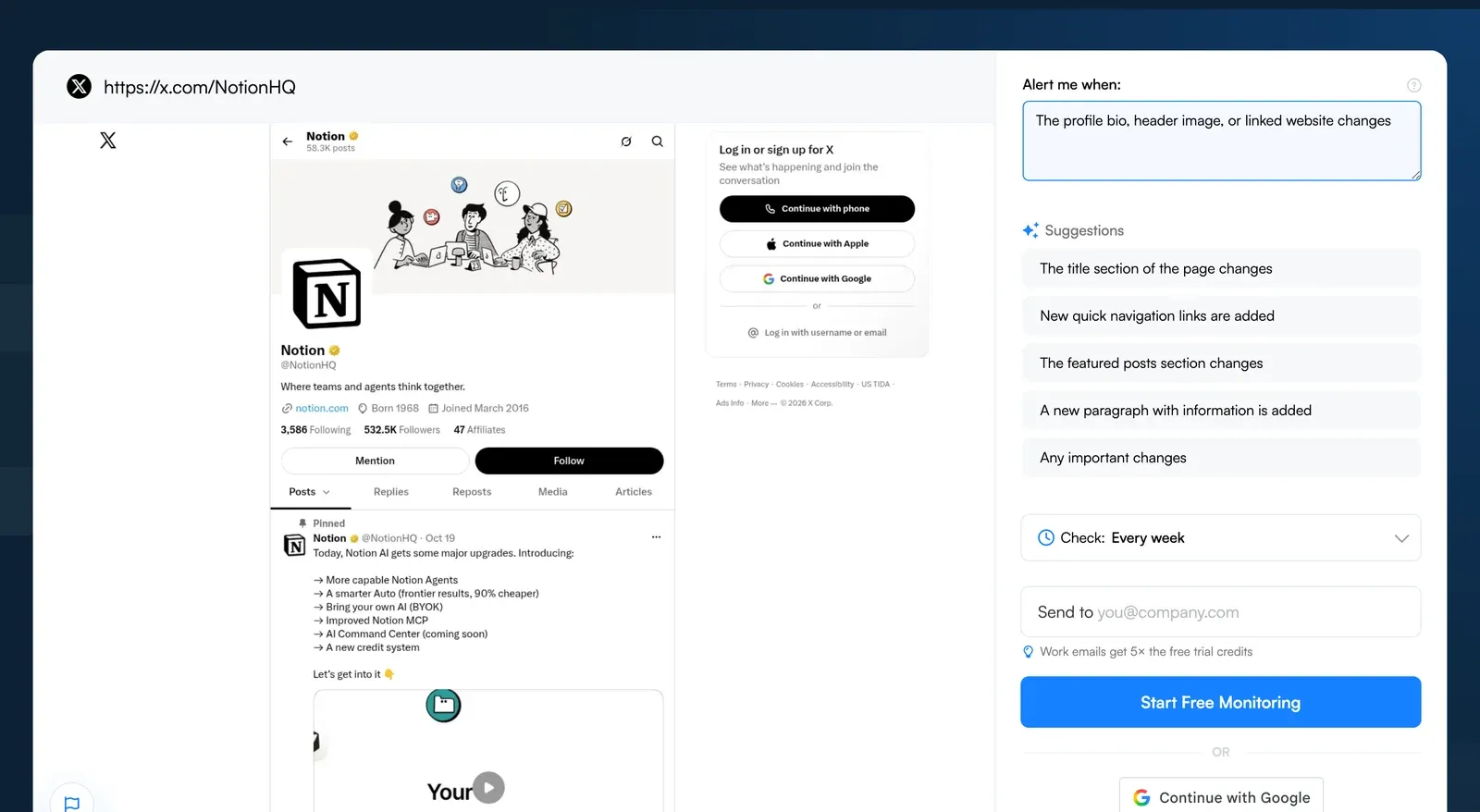
Social profiles change less often than websites, which makes the changes more meaningful when they happen. A LinkedIn bio rewrite often accompanies a broader repositioning. And ad libraries (Meta, LinkedIn) are underused: you can see exactly what messaging a competitor is paying to put in front of their audience.
What to monitor:
- Bio and description text changes
- Profile and cover image updates
- Linked content (websites, landing pages)
- Ad creative via ad transparency libraries (Meta Ad Library, LinkedIn Ad Library)
- Content themes and posting cadence
How to set it up:
- Monitor competitor LinkedIn "About" sections and X/Twitter bios
- Use Visualping's default AI Mode on social profile pages
- Check ad libraries monthly for creative and messaging angles
For Instagram-specific competitive monitoring, see our Instagram competitor monitoring guide.
22. Third-party review sites
Intelligence value: High | Monitoring frequency: Weekly | Automatable: Yes
VP Platform Data: 410 active monitors | 72% business-owned | 111 changes detected in 30 days
Review platforms provide unfiltered customer sentiment. These reviews often mention competitor comparisons directly, giving you intelligence on positioning gaps and product weaknesses. The low absolute monitor count doesn't reflect the value: many teams track reviews through the platforms' own alert systems rather than website monitoring.
What to monitor:
- Overall rating trends (improving or declining)
- Recent review sentiment and recurring themes
- Commonly praised features (what the market values)
- Recurring complaints (potential openings for you)
- Competitive comparison mentions in reviews
Key platforms:
- B2B Software: G2, Capterra, TrustRadius
- Consumer: Trustpilot, Consumer Affairs
- Local Services: Yelp, Google Business Profile
How to set it up:
- Monitor each competitor's review page on your most relevant platform
- Use Text changes mode to detect new reviews and rating changes
- Set frequency to weekly
23. Job boards (third-party)
Intelligence value: Medium | Monitoring frequency: Monthly | Automatable: Partially
Third-party job boards (Indeed, LinkedIn Jobs, Glassdoor) expose hiring urgency that a competitor's own careers page may understate. Glassdoor also provides company ratings, salary data, and interview process reviews.
What to monitor:
- Posting volume across platforms
- Role types and seniority distribution
- Salary range data (where publicly listed)
- Glassdoor company ratings and review trends
- Interview process reviews (reveals internal culture)
How to set it up:
- Monitor competitor company pages on Indeed, LinkedIn, and Glassdoor
- Check monthly for patterns
- Use Text changes mode on Glassdoor review pages
24. RSS feeds
Intelligence value: Medium | Monitoring frequency: Daily | Automatable: Yes
VP Platform Data: 1,772 active monitors | 33% business-owned | 672 changes detected in 30 days
RSS feeds provide structured updates without the noise of full page monitoring. Many competitor blogs, press sections, and product update pages publish RSS feeds, and a feed lists each new item as soon as it goes live, so your next check picks it up.
What to monitor:
- New blog post titles and summaries
- Product update announcements
- Press release publications
- Podcast episode releases
How to set it up:
- Find the RSS feed URL (usually
/feed,/rss, or linked in page source) - Monitor the feed URL with Visualping in Text changes mode
- Set frequency to daily
25. App store listings
Intelligence value: Medium | Monitoring frequency: Weekly | Automatable: Yes
VP Platform Data: 2,376 active monitors | 49% business-owned | 290 changes detected in 30 days
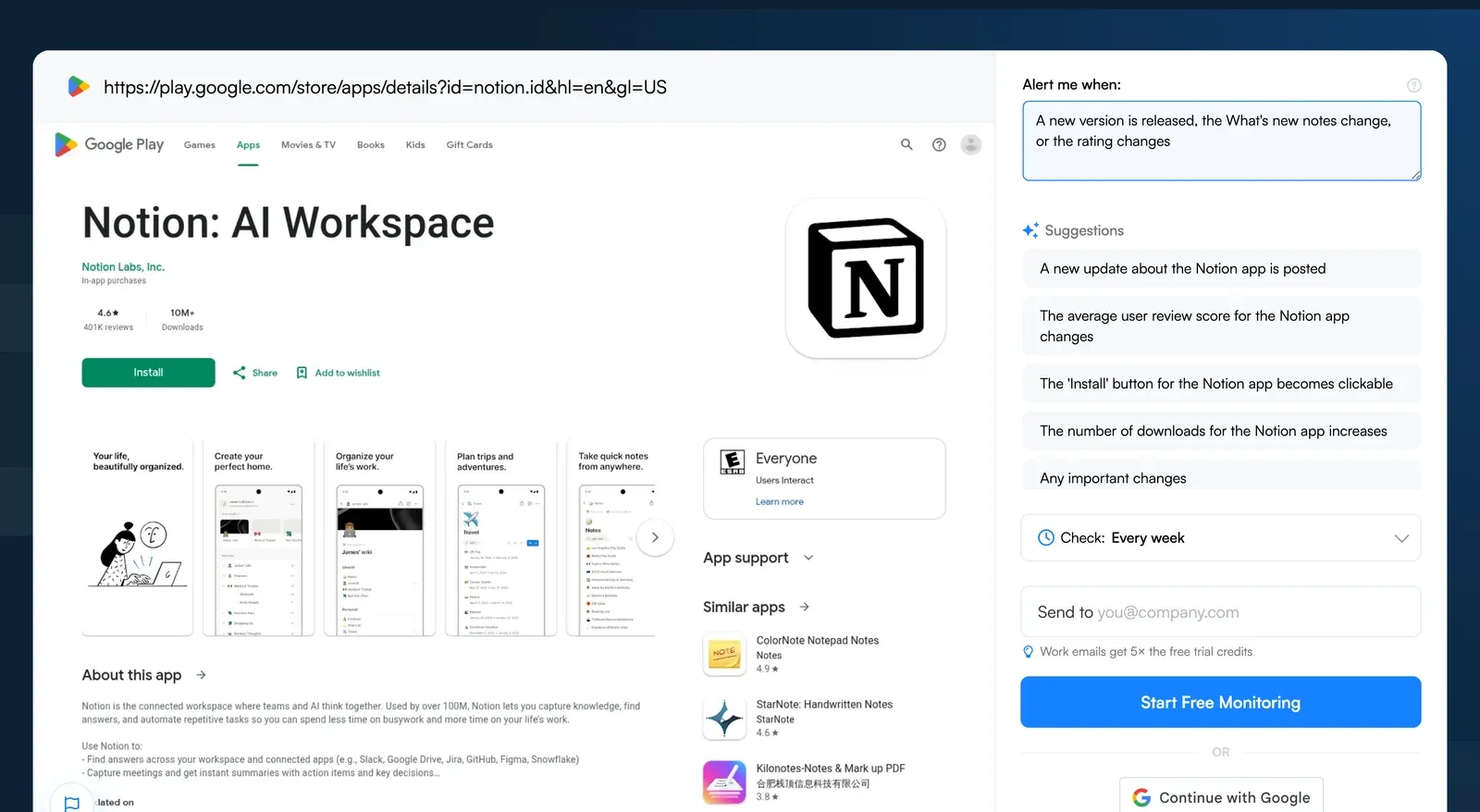
For competitors with mobile applications, app store listings reveal product updates and user feedback. Version release frequency shows development velocity. Update notes preview features before they're marketed. Rating trends indicate product-market fit.
What to monitor:
- Version release frequency
- Update notes and new features
- User ratings and review trends
- Screenshot and description changes
- "What's New" section updates
How to set it up:
- Monitor competitor app store listing pages (Apple App Store, Google Play Store)
- Use the default AI Mode (catches screenshot and layout changes)
- Set frequency to weekly
26. Wikipedia
Intelligence value: Low-Medium | Monitoring frequency: Bi-weekly | Automatable: Yes
VP Platform Data: 2,065 active monitors | 46% business-owned | 1,231 changes detected in 30 days
Wikipedia entries provide curated company histories and notable events. The high change count (1,231 changes across 2,065 monitored Wikipedia pages in 30 days) reflects the platform's active editing community. Edits to a competitor's Wikipedia page often surface controversies, leadership changes, and acquisition activity.
What to monitor:
- Company information updates
- Controversy or criticism sections
- Recent edit activity
- Citation additions (may reference new reports or coverage)
How to set it up:
- Monitor the competitor's Wikipedia page
- Use Text changes mode to catch edit changes
- Set frequency to bi-weekly
27. Industry forums, communities, and alternative sources
Intelligence value: Varies | Monitoring frequency: Monthly | Automatable: Partially
These remaining competitive intelligence sources fill gaps the sources above miss. They're less structured but can surface intelligence that formal channels don't carry.
What to monitor:
- Industry forums and communities: Reddit, Quora, Stack Overflow, and niche industry forums where customers discuss competitor products candidly
- Academic and research publications: For deep-tech competitors, conference proceedings and research papers reveal technical direction
- Government databases: Contract awards, regulatory submissions, and licensing databases (especially for B2G competitors)
- Trade association memberships: Membership directories reveal industry positioning and investment priorities
- Podcast and webinar directories: Appearance frequency and topic selection reveal thought leadership strategy
- Conference sponsorship directories: Sponsor lists from major industry events reveal market investment bets
How to set it up:
- Set Google Alerts for competitor brand names + relevant community platforms
- Monitor industry subreddits and forums manually (monthly)
- Check government contract databases quarterly (for US federal awards, SAM.gov, which took over FPDS contract search in February 2026)
Prioritization matrix: where to start your CI program
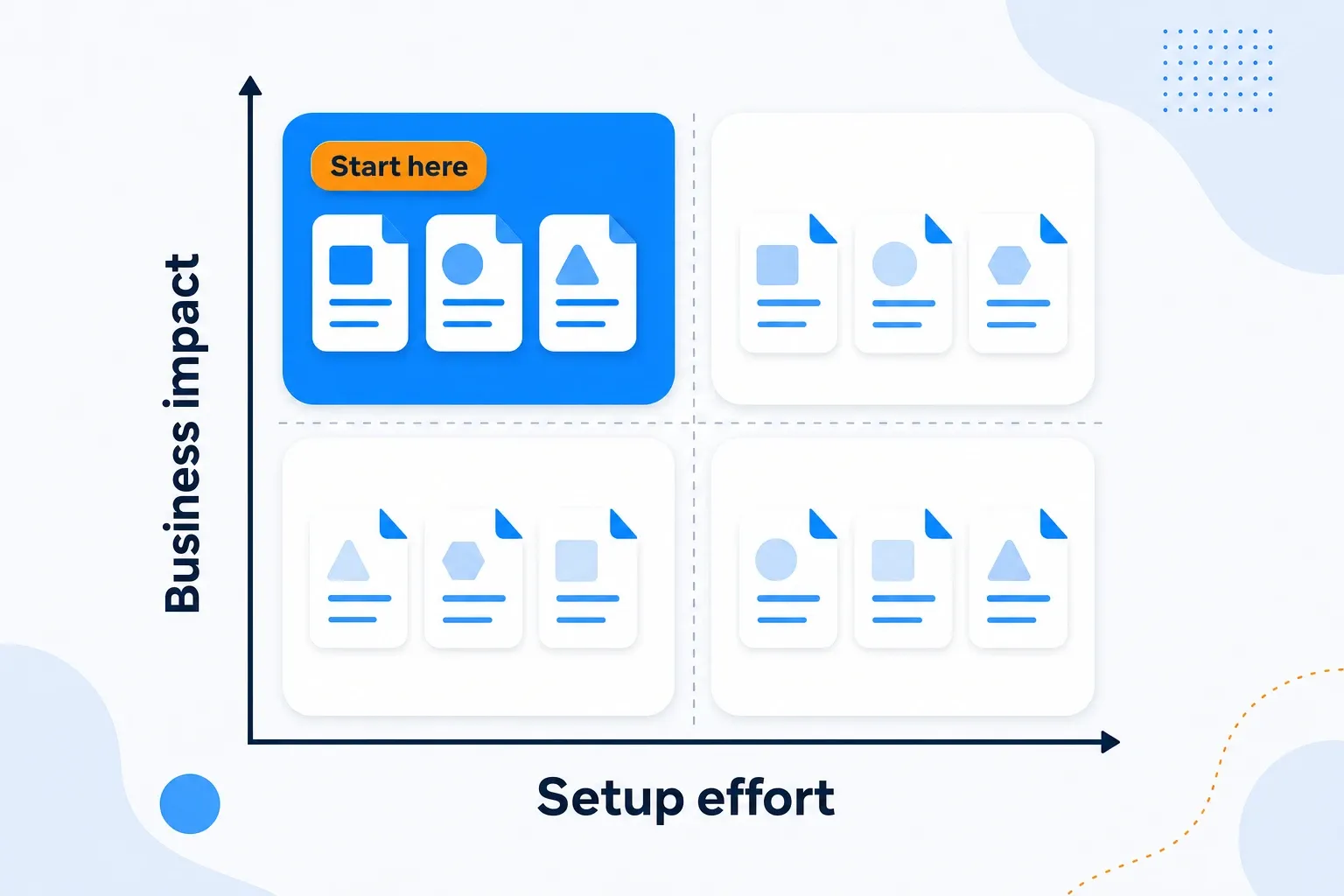 Prioritize CI sources by business impact and setup effort
Not every competitive intelligence source deserves equal investment. Use this matrix to match sources to your team size and urgency:
| Source | Monitors on VP | Business impact | Setup effort |
|---|---|---|---|
| Product/feature pages | 148,410 | Very High | Low (10 min) |
| Blog/news/press | 59,231 | Medium-High | Low (10 min) |
| About/team/leadership | 40,302 | High | Low (10 min) |
| Social media profiles | 36,033 | Medium | Medium (20 min) |
| Legal/terms/privacy | 27,897 | High | Low (10 min) |
| Careers/hiring | 20,835 | High | Low (10 min) |
| Conversion pages | 17,919 | Medium-High | Low (10 min) |
| API/docs/changelog | 14,409 | Medium-High | Low (10 min) |
| Pricing/packaging | 7,732 | Very High | Low (10 min) |
| Investor relations | 7,032 | High | Low (10 min) |
| Events/webinars | 6,336 | Medium | Medium (20 min) |
| Sitemap files | 3,390 | Medium | Low (5 min) |
| App stores | 2,376 | Medium | Low (10 min) |
| Wikipedia | 2,065 | Low-Medium | Low (5 min) |
| RSS feeds | 1,772 | Medium | Low (5 min) |
| Partners/integrations | 1,395 | Medium | Low (10 min) |
| SEC/EDGAR filings | 979 | High | Medium (30 min) |
| Robots.txt | 458 | Medium | Low (5 min) |
| Review sites | 410 | High | Low (10 min) |
| Patent databases | 304 | Medium-High | Medium (30 min) |
If you have 15 minutes: Set up competitive monitoring for your top 3 competitors' pricing pages. On our platform, about 43% of monitored pricing pages change within 30 days.
If you have an hour: Add product pages, homepages, and careers pages for 3-5 competitors. You now cover four of the highest-value source categories.
If you have a day: Build the full stack across all 27 competitive intelligence sources for your primary competitive set. Pair Visualping with Google Alerts and one SEO tool for maximum coverage.
Turning 27 sources into one briefing
Monitoring 27 competitive intelligence sources across 5 competitors can mean dozens of change alerts a week. Collecting changes is the easy part. Reading and acting on them is where most CI programs stall.
This is what Visualping Reports solves. Reports consolidates detected changes from all your monitored sources into a single briefing with AI-generated analysis, visual diffs, and team annotations. Generate a report on demand (before a board meeting, after a competitor launch, whenever you need a snapshot) or schedule recurring delivery so the briefing shows up automatically. Either way, you get a structured digest instead of scattered alerts. See how Visualping Reports works for the full feature breakdown.
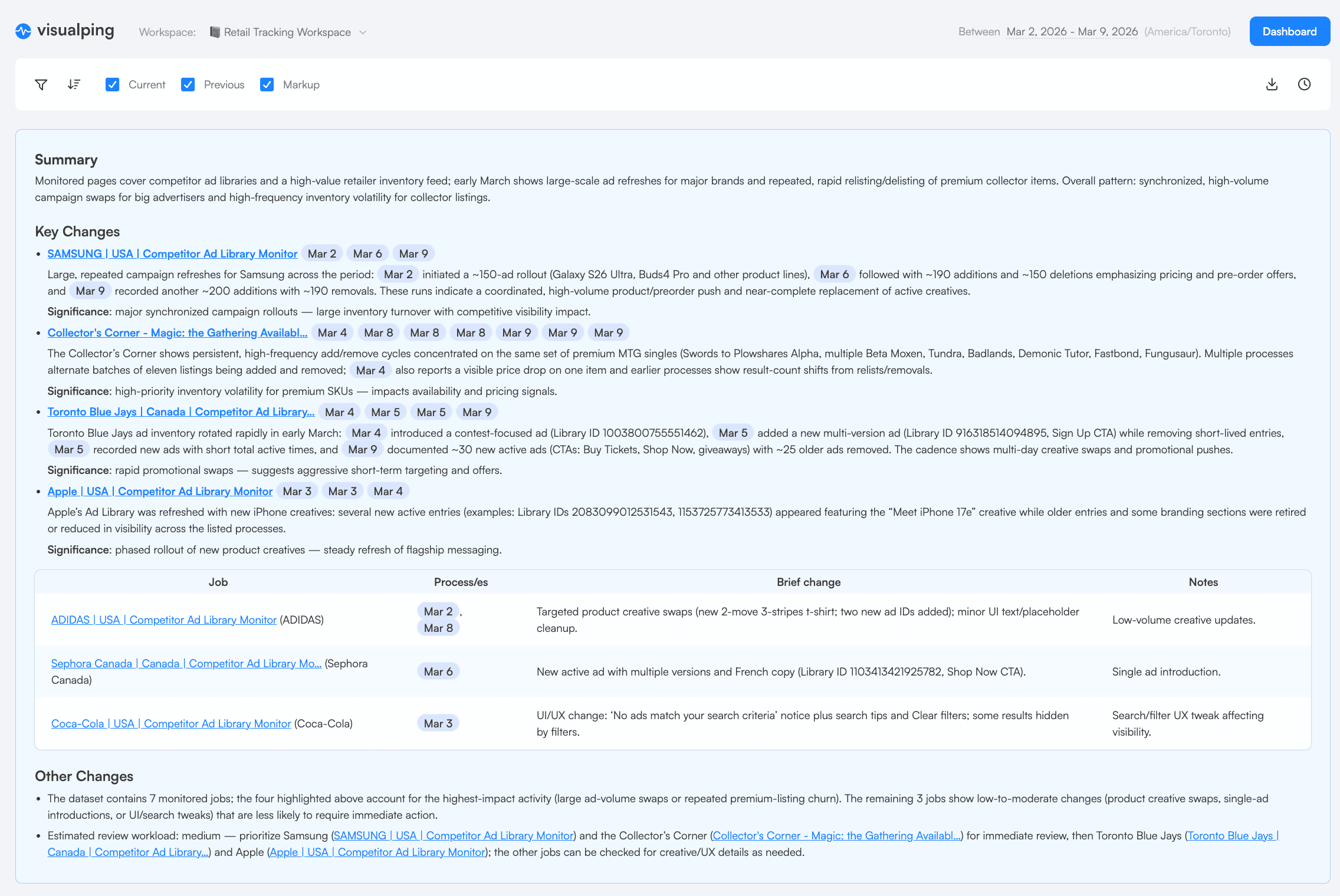 A real Visualping Report with AI-generated summary synthesizing patterns across competitor changes
How it works
- Select which monitoring jobs to include (scope by competitor, source type, or label)
- Set a date range or schedule recurring delivery (daily, weekly or monthly)
- Toggle "Report Summary & Analysis" for AI synthesis
- Reports generates a consolidated briefing with every detected change, organized by source
The AI summary synthesizes patterns across changes. For example: "Competitor X updated pricing on Tuesday and removed their free tier on Thursday, suggesting a monetization push." That's the analysis layer that turns raw change alerts into competitive intelligence.
On demand or on a schedule
Need a competitive snapshot before a quarterly review? Generate one on demand. Want a standing Friday briefing for the sales team? Schedule it once and every workspace member, plus org admins, gets it by email with a summary of recent changes. Anyone who doesn't want it can opt out without stopping it for the rest. The same filters apply each time, so there's nothing to redo after setup.
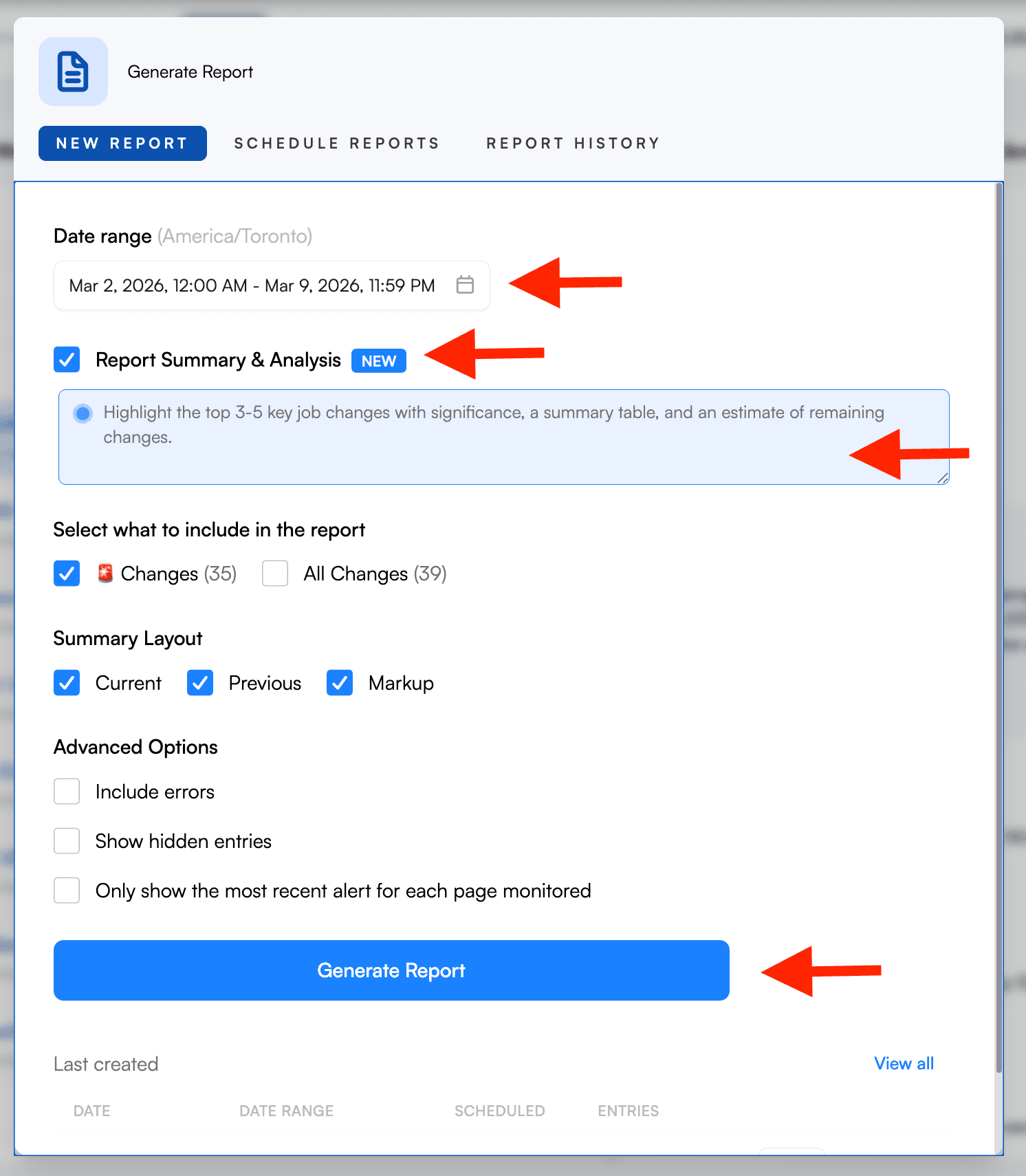 Configure once: select sources, set the schedule, toggle AI analysis
For compliance teams, Reports doubles as an audit trail. Each change entry carries a timestamp, visual diff, and space for team annotations ("Reviewed, no regulatory impact" or "Escalated to legal"). The Report History tab lists reports from the past 365 days, and generated files stay downloadable for 180 days.
What this costs vs. the alternative
Enterprise CI platforms typically cost five figures a year. Vendr's purchase data puts Klue, for example, at about $16,000 to $44,000 a year. Visualping Reports is included with Business plans, from $1,200 a year ($100 a month billed annually, or $140 month to month). For teams whose competitive intelligence comes mostly from the web (pricing pages, product updates, hiring signals, messaging shifts), Reports covers the workflow at a fraction of the cost.
For a deeper look at Reports workflows, see our guides to setting up Reports and 5 Reports workflows that save hours weekly.
Ethical and legal boundaries for competitive intelligence
All 27 sources in this guide use publicly available information. The Strategic Consortium of Intelligence Professionals (SCIP) publishes a Code of Ethics for competitive intelligence practitioners. It asks members to comply with all applicable laws, disclose their identity and organization before interviews, and avoid conflicts of interest. In practice, that comes down to four working rules:
- Use only public information. Never access protected systems, impersonate individuals, or obtain confidential information through deception.
- Maintain transparency. Accurately disclose your identity and organization when gathering information through conversations.
- Respect intellectual property. Monitor and analyze competitor content, but don't reproduce copyrighted material.
- Avoid conflicts of interest. Don't pressure employees hired from competitors to reveal information covered by NDAs.
The front page test: Before any CI activity, ask whether you'd be comfortable if it were reported publicly. If not, reconsider.
For a deeper look at building a CI program with proper governance, see our competitive intelligence guide.
Start monitoring your competitive intelligence sources today
You can set up automated monitoring for most of the 27 competitive intelligence sources in this guide using Visualping's free plan (5 pages, no credit card required). Most users start with pricing pages and expand from there.
The 15,000+ users who chose competitive intelligence as their monitoring reason started the same way: pick 3 competitors, monitor their pricing pages, and expand from there. Across our platform, three out of four monitored pages eventually detect a change (74.9% of 1.6 million active monitors). You already know your competitors' pages will change. The only variable is how many days pass before you find out.
Start monitoring competitor pages for free
Frequently asked questions
How many competitive intelligence sources should I monitor?
Start with 3-5 competitive intelligence sources for your top 3 competitors. That's 9-15 total monitors. Expand based on which sources produce the most actionable signals for your industry. On our platform, the most active CI users monitor 5+ distinct competitor domains across multiple source types.
How often should I review competitive intelligence?
Match review cadence to source velocity. Pricing and product pages warrant daily attention (43% of pricing pages change monthly). Leadership, hiring, and technical signals can be reviewed weekly. Financial filings and patents need monthly checks. Automate collection; reserve human time for analysis.
What's the difference between competitive intelligence sources and tools?
Competitive intelligence sources are where the data comes from (pricing pages, SEC filings, review sites). Tools are what you use to collect and analyze that intelligence (Visualping for website monitoring, Semrush for SEO tracking, or an enterprise CI platform). This guide focuses on sources. For tool comparisons, see our competitive intelligence tools and competitor website analysis tools guides.
Can I do competitive intelligence ethically?
Yes. Every source in this guide uses publicly available information. The SCIP Code of Ethics provides clear boundaries. The key principle: if the information is publicly accessible and you're not misrepresenting yourself to obtain it, you're operating ethically. For more context, see our full competitive intelligence guide.
What are the sources of competitive analysis?
Sources of competitive analysis split into external and internal. External sources are competitors' own public surfaces (the 27 in this guide: pricing pages, careers pages, filings, reviews, and the rest) plus third-party data like analyst reports. Internal sources are your own win/loss notes, sales call records, and support tickets, where competitors appear in your customers' words. Strong CI programs pair both: external sources show what competitors say, internal sources show what happens in deals.
What's the ROI of competitive intelligence?
The return shows up as earlier decisions: a competitor's price change spotted the week it ships instead of the quarter after. PMs who invest in AI-driven tools for product management tend to build more systematic intelligence workflows overall. The people who take CI seriously tend to be the people whose organizations invest the most in tooling.
Want to monitor web changes that impact your business?
Sign up with Visualping to get alerted of important updates from anywhere online.
Eric Do Couto
Eric Do Couto is the Head of Marketing at Visualping. He leads content strategy, growth operations, and brand positioning for website change detection.
More articles by Eric Do Couto