State Legislative Tracking Tool for Bills and Hearings
By Emily Fenton
Updated November 18, 2024

State legislative tracking means watching the official pages where bills, hearing schedules and agency rules are posted, and getting an alert when they change. Visualping does this for any public web page. Paste a state legislature, Congress or agency URL, describe what matters in the "Alert me when" box, and get an email with an AI summary of each change. The Free plan covers 5 pages.
It works alongside free official alerts, such as Congress.gov's bill and saved-search email alerts (a free Congress.gov account is required), and covers the state legislature, agency and court pages those alerts don't reach.
Introduction
Legal and regulatory change moves fast, and there is a lot of it. One moment, you’re up to date on the latest laws and regulations in your focus area. But, in the next, new interpretations of bills, amended regulatory requirements or court precedents uproot everything you thought you knew.
Hopefully, you’re already aware of the changes before a client mentions it to you – rather than getting caught off guard, and having them catch on to the fact you didn’t know.
The right legislative tracking tool keeps you current on changing legislation and regulations, so the advice you give clients reflects the latest version.
Take the finance industry, for example. Thomson Reuters Regulatory Intelligence alone has logged more than 56,000 regulatory alerts in a single year (its 2019 count), drawn from over 1,000 regulatory bodies. Most of these updates can be found on the internet, on websites belonging to regulatory bodies, government agencies, courts and every other sort of authority.
But, while the internet is rich with this continuously evolving information, it’s also tricky to keep up with.
Of course, you’re already doing lots to stay current in your practice area. Your firm likely pays for expensive databases and AI legal research tools that promise to notify you of important changes. Maybe you’ve joined a professional association that hosts seminars, courses and educational events. You likely discuss with colleagues the latest developments.
But staying up-to-date on every legal and regulatory update you need to know – especially the specific, niche pieces of information – requires more than just working your network, and relying on databases that, ultimately, are limited in the legal and regulatory content they provide. What are you to do when your client or team requires you to keep up with the latest in a very specific industry area, or application of legal practice?
Even more, what if you’re required to know about these updates as soon as they occur online? Manually rechecking a web page, or a database, several times a day is tedious, time-consuming and ineffective. Databases can also be slow to publish updates after the source page changes.
That’s why a legislative tracking tool that can monitor any web page belongs in your research setup. It saves hours of manual rechecking and gets the latest version in front of your team and clients sooner.
A Legislative Tracking Tool for Any State or Federal Page
This article covers a few low-cost ways to stay up to date automatically when legal and regulatory pages change, without relying on the grapevine, expensive software or seminars.
The first among these techniques is a legislative and regulatory tracking tool that notifies you of the exact changes you need, from any source on the web, with checks as often as every 2 minutes on Personal 10k and Business plans.
Visualping
Visualping is an AI web monitoring tool that’s commonly used as legislative tracking software.
It automatically monitors web pages for changes. When a change is detected on a page you're tracking, you receive an email alert with a short AI-generated summary of the change and a screenshot of the page with the changes highlighted.
Visualping has more than 2 million users, including teams at 85% of Fortune 500 companies and the world’s top 25 law firms. It’s a simple, low-cost way to keep your knowledge current in legal and regulatory work.
Stay on Top of the Specifics, Wherever They Are Online
Visualping allows you to track any web pages you want, from anywhere on the internet. You can set the legislative tracking tool to monitor any specific information on legislative websites.
You can use it for bill tracking, and to get updates on hearings and debate, for example. You can use the legislative tracking tool to stay on top of information from any hard-to-find web sources – that only you know to check. You can even get notified of changes to PDFs (Visualping reads the first 100 pages of a PDF).
A short list of the right pages plus automated monitoring keeps you on top of the developments that matter to your team.
Automatically Keep Your Knowledge Up-to-Date
Instead of manually refreshing pages for updates that may or may not occur at that time, legislative tracking tools, like Visualping do the work for you. It saves time, and you hear about an update on the first check after it goes live.
How Does it Work?
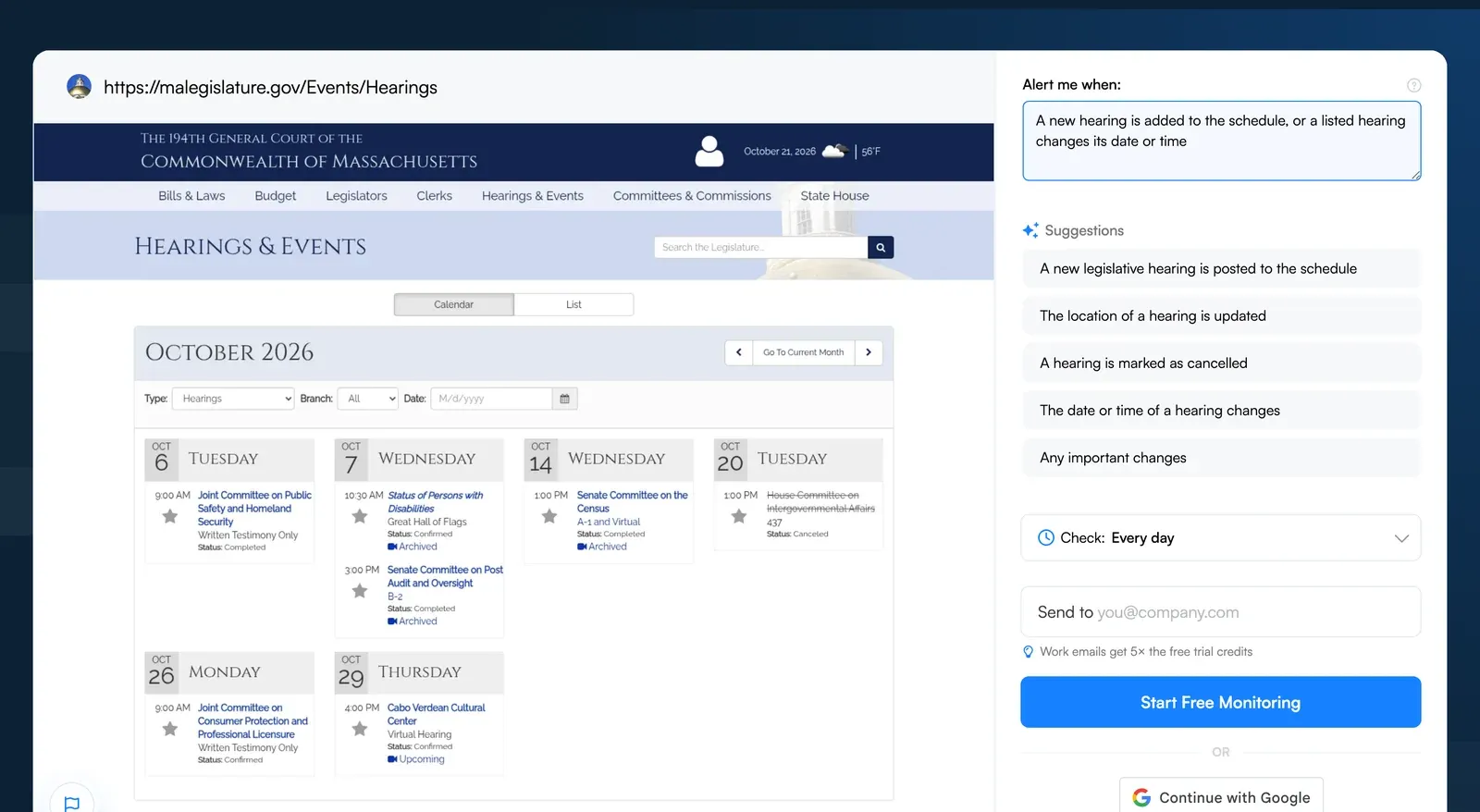
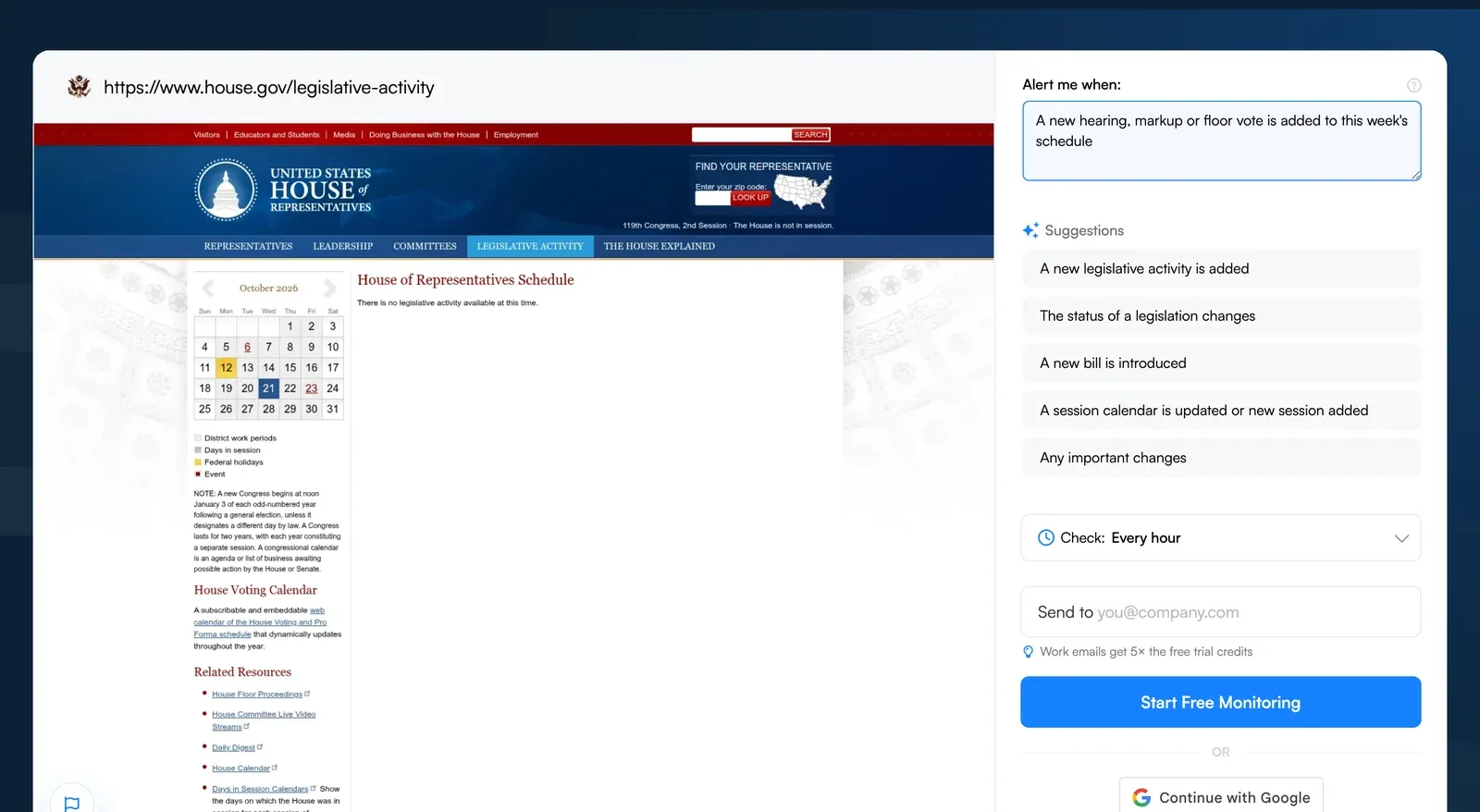
Go to Visualping, paste the URL of the page you want to track and click Go. When the preview loads, describe what you care about in the "Alert me when" box (or pick one of the AI suggestions), choose how often to check in the "Check:" dropdown, enter your email under "Send to" and click Start Free Monitoring.
Visualping can check a page as often as every 2 minutes on Personal 10k and Business plans (every 5 minutes on Personal 5k, every 15 on Starter), so you hear about urgent changes soon after they go live. Keeping pace with urgent and time-sensitive changes doesn’t have to involve laboriously rechecking websites several times a day.
Which legislative and regulatory pages should you monitor?
Here are examples of the kinds of pages legal knowledge professionals monitor with Visualping. No matter your legal practice area, there is surely a page or two (or perhaps a few dozen) that you could monitor to stay in the know:
Legislative Updates
- House of Representatives Hearing Schedule
- Senate Floor Proceedings
- Canadian Parliament Bill Progress (LEGISinfo)
- Massachusetts Legislature Hearings and Events
- 2026 State Legislative Session Calendar (NCSL)
Regulatory Updates
- HHS Press Room
- Canadian Immigration (IRCC) Program Delivery Updates
- GDPR Enforcement Tracker
- Northern Territory EPA (Australia) Open Consultations
- Federal Reserve Board Interpretations
- Federal Register Documents on Public Inspection
Judicial Updates
- State Court Opinions and Orders
- Regional Court Daily Law Lists
- District Court Standing Orders
- State Government Business Permits
By allowing you to monitor any primary information sources, Visualping is a legislative tracking tool that’s an accessible alternative for staying on top of exactly what you need, from anywhere on the internet.
Customize Your Monitoring for Filtered, Intelligent Alerts
New monitors run in AI Mode, so the main filter is the "Alert me when" prompt. Describe what matters (for example, "a new hearing is added for the Judiciary Committee") and Visualping alerts you only when a change matches it.
If you need exact-match alerts, Visualping also has keyword alerts on monitors set to the legacy Text changes mode (configured in the app), which notify you only when specific words, phrases or numbers are added or removed.
If you would rather not set this up yourself, Business teams can add a paid support package with onboarding and a dedicated account manager, and on custom Solutions plans Visualping's team can set up and manage monitors for you.
For more information on how Visualping can support your legal and regulatory monitoring efforts, contact Visualping's team – they’d be happy to help.
Additional Legislative Tracking Methods
1. Social Media Accounts
Billions of people use social media, and past the memes and hashtags it is also a useful way to follow regulatory changes.
Many regulatory agencies, for example, run active social media accounts. They use social media to share information about their activities, and important policy updates.
If you’re already scrolling through social media feeds on a regular basis, following these pages is an easy way to stay on top of regulatory changes.
To start you off, below is a list of some agency accounts you may want to follow:
- USDA: X (Twitter)
- DOT: X (Twitter)
- OSHA: X (Twitter)
- EPA: X (Twitter) | other active accounts
- FDA: X (Twitter)
JD Supra (@JDSupra on X) is another good source of regulatory news and updates. Whatever your niche, look for the experts on X.
After following these accounts, tap the bell icon on the profiles you care about most to turn on post notifications. Allow X to send notifications to your phone, and new agency posts reach you as they go out.
2. Newsletters, Blogs and RSS Feeds
Blogs and feeds are still a good source of regulatory intelligence. Just as you might seek out the agencies and experts on Twitter, see what they offer on their own websites. For example, some regulatory agencies publish their own journals, newsletters and blogs, such as OSHA's twice-monthly QuickTakes newsletter. As well as briefing you on important industry trends, many of these resources include important legislative changes and regulatory news.
Of course, many legal experts also post their perspectives and opinions on their blogs. Check out Justia or the Lexblog open archive for two large directories.
Once you’ve identified all the sites you want to follow, you have a few options for staying up to date with their postings. Your chosen approach will depend on whether you want to get alerts in your email inbox, or in a separate location.
If you’re fine with getting updates in your inbox, simply look for a newsletter sign-up option on the blog. If one isn’t offered, Visualping can monitor the blog's post list and email you when a new post appears.
If you’d rather not add clutter to your email, RSS feeds are a handy way to stay up to date with blogs. I suggest using Feedly to subscribe to any number of feeds. If a site offers an email newsletter but no RSS feed, Kill the Newsletter turns the newsletter into a feed. Every Visualping monitor also has its own RSS feed of detected changes (shown in the app on Business plans and available through the API on every plan).
Whatever your approach, signing up for these resources is another great way to keep regulatory updates coming your way. You’ll see new regulations as they’re announced and can decide which ones need a closer read. With some strong curation, regularly glancing through a stack of subject lines in your inbox or your Feedly will help you stay attuned to valuable information that you might not have known to look for.
Final Thoughts: Legislative Tracking Can Seem like a Lot, but Not with the Right Combination of Tools
The legal and regulatory environment continuously evolves. In heavily regulated industries, keeping ahead of new bills, amended regulations and court precedents is one of the legal profession’s hardest jobs.
With the help of these legislative tracking strategies, legal professionals can more easily keep up with the updates that require their attention.
And, with Visualping, you can stay on top of the exact legal and regulatory changes that require your attention, from anywhere on the web, with checks as often as every 2 minutes on Personal 10k and Business plans.
Contact their sales team for more information on how the tool can supplement your research today.
Get the latest legal knowledge
Sign up with Visualping for automatic legal and regulatory alerts, from any sources online.
Emily Fenton
Emily was the Product Marketing Manager at Visualping. She has a degree in English Literature and a Masters in Management.
More articles by Emily Fenton