Shein Restock Alerts for Sold-Out Items and Sizes
Updated October 21, 2026
By the Visualping research team, analyzing live monitor logs across the Shein product catalog since 2024.
Last updated October 2026.
Shein restock alerts tell you when a sold-out item or size comes back, or when its price drops. The most reliable method is to monitor the product page with Visualping. It checks the page on a schedule you pick, and when stock returns it sends you a plain-English AI summary of what changed, flagged as important. Shein adds new styles every day and brings popular items back in waves, so a monitor on the exact product URL catches the return. The Free plan covers up to 5 pages; paid plans start at $10/month billed annually and check as often as every 15 minutes.
TL;DR: Viral Shein items can sell out fast, and Shein's own "Remind Me" option isn't offered on every product. Visualping watches any Shein product URL directly, flags the changes that matter as important, and sends a plain-English AI summary so you know whether to act. The Free plan covers basic restock monitoring. Paid plans add faster checks from $10/month and SMS alerts from $25/month, both billed annually. Setup takes about two minutes from any product page on shein.com.
 Shein moves fast and so should your alerts
Shein drops thousands of new styles a day (between 2,000 and 10,000 in late 2021, per a Rest of World investigation cited by TIME). Each new item starts as a small batch of 50 to 100 pieces and only moves to bigger production runs once it sells, so trending pieces vanish fast and the winners tend to come back. A dress that blew up on TikTok or a $4 basics set can sell out before you finish checking out.
Shein's "Remind Me" button shows up on some sold-out items and not others. When a reminder does arrive, it lands in the same inbox as Shein's daily promo emails, where it's easy to miss.
Visualping watches any Shein product page directly and alerts you on the first check after availability changes. See the broader back-in-stock guide for retailer-by-retailer guidance.
Why Shein's "Remind Me" falls short
Why doesn't Shein's "Remind Me" button appear on every product?
The "Remind Me" button shows up on some out-of-stock products and not others, popular items included, with no pattern Shein explains. Size-specific stockouts are the hardest to catch: your size is gone, but the page still reads "available" because other sizes are in stock.
How late do Shein restock emails arrive?
Shein doesn't publish how quickly its restock reminders go out, and when one arrives it competes with the day's promo emails. For items that sell out in under an hour, any delay means the alert lands after the window has closed.
Extreme product turnover
Shein runs on ultra-fast fashion. Some items are limited-run; once gone, they're swapped for lookalike styles instead of restocked. Other popular items cycle back in waves. Without watching the page, there's no way to tell which path a given product will take.
Wishlist doesn't alert you
Adding an item to your Shein wishlist saves it for later. Wishlist is a bookmark, nothing more. There's no notification when the item comes back in stock, so you still have to check manually.
How to set up Shein restock alerts with Visualping
Step 1: Copy the Shein product URL
Go to shein.com and open the product page you want to track. Pick the color you want first (on Shein, each color usually has its own product page). Copy the full URL from your browser. You'll name your size in the alert condition in Step 5.
Shein URLs look like https://www.shein.com/Product-Name-p-12345678.html.
Step 2: Paste into Visualping
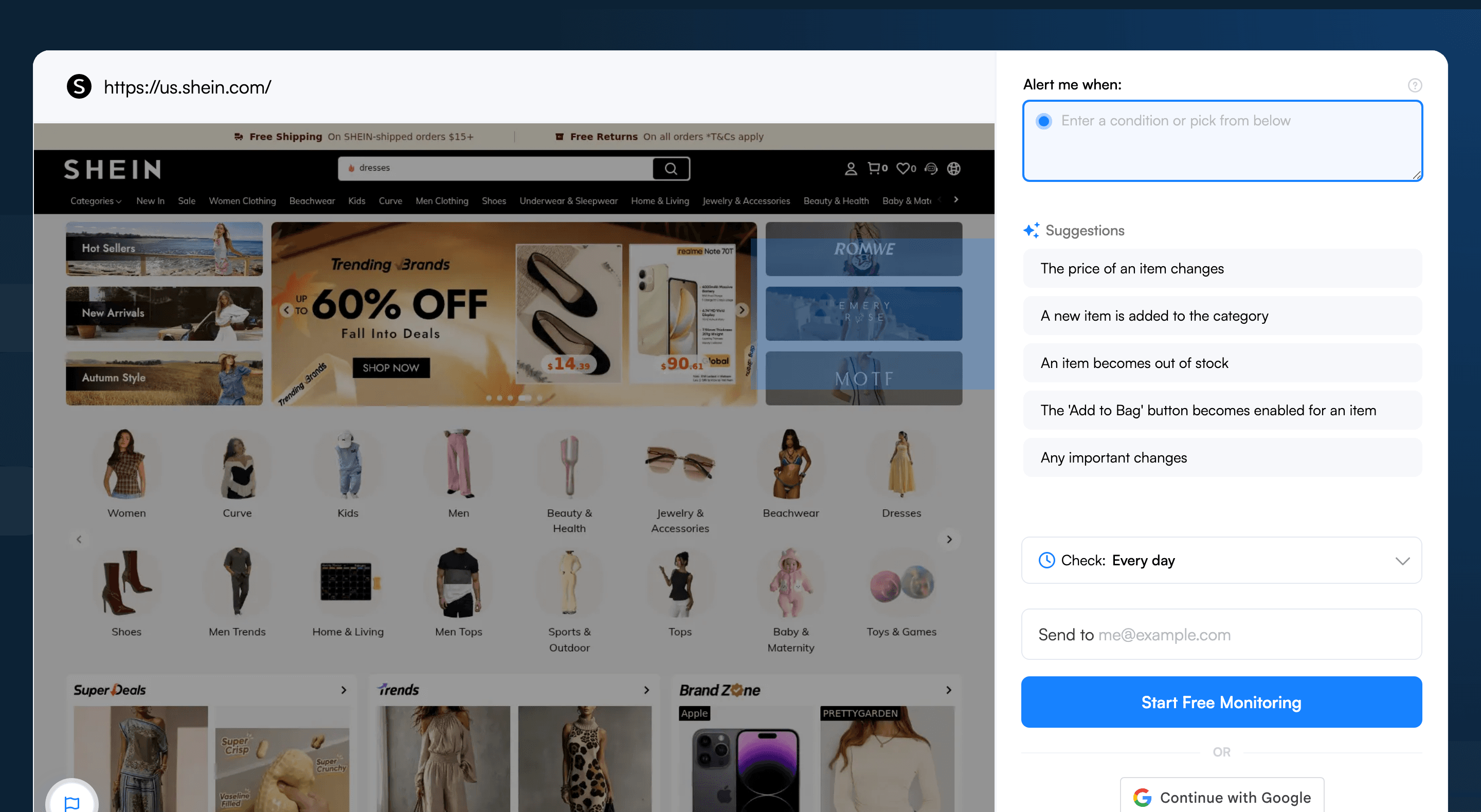
Go to visualping.io, paste the Shein URL, and click Go. Visualping loads a preview of the page and watches the whole page in AI Mode. Next to the preview, the "Alert me when" box offers AI suggestions such as "The 'Add to Bag' button becomes enabled for an item." Pick one or write your own condition (Step 5 has a Shein-specific one), so you only hear about the change that matters.
Step 3: Focus the alert on availability
AI Mode watches the whole page, so your "Alert me when" condition does the focusing. For Shein pages, write it around:
- The size buttons (showing which sizes are available vs. sold out)
- The "Add to Cart" or "Add to Bag" button
- The price and discount display (handy for catching flash sale restocks)
Leave the "You May Also Like" section, customer reviews, and outfit recommendations out of your condition. Shein refreshes those sections constantly, and a condition tied to your size and the Add to Bag button tells the AI to ignore them.
Step 4: Set check frequency
Pick a frequency from the "Check:" dropdown (it starts on Every day). For trending items and flash sales, check every 15 minutes on Personal 1K ($10/month billed annually) or every 5 minutes on Personal 5K ($25/month billed annually), both paid plans. The Free plan allows checks as often as hourly, but its 150 checks a month cover about 5 pages checked daily. Fast checks also burn through your monthly allowance (one page every 15 minutes uses about 2,900 checks a month), so speed up for the days around a drop and slow back down after. Viral Shein products can restock and sell out again inside an hour or two. For items you're watching casually, once a day is fine.
Step 5: Write your "Alert me when" condition
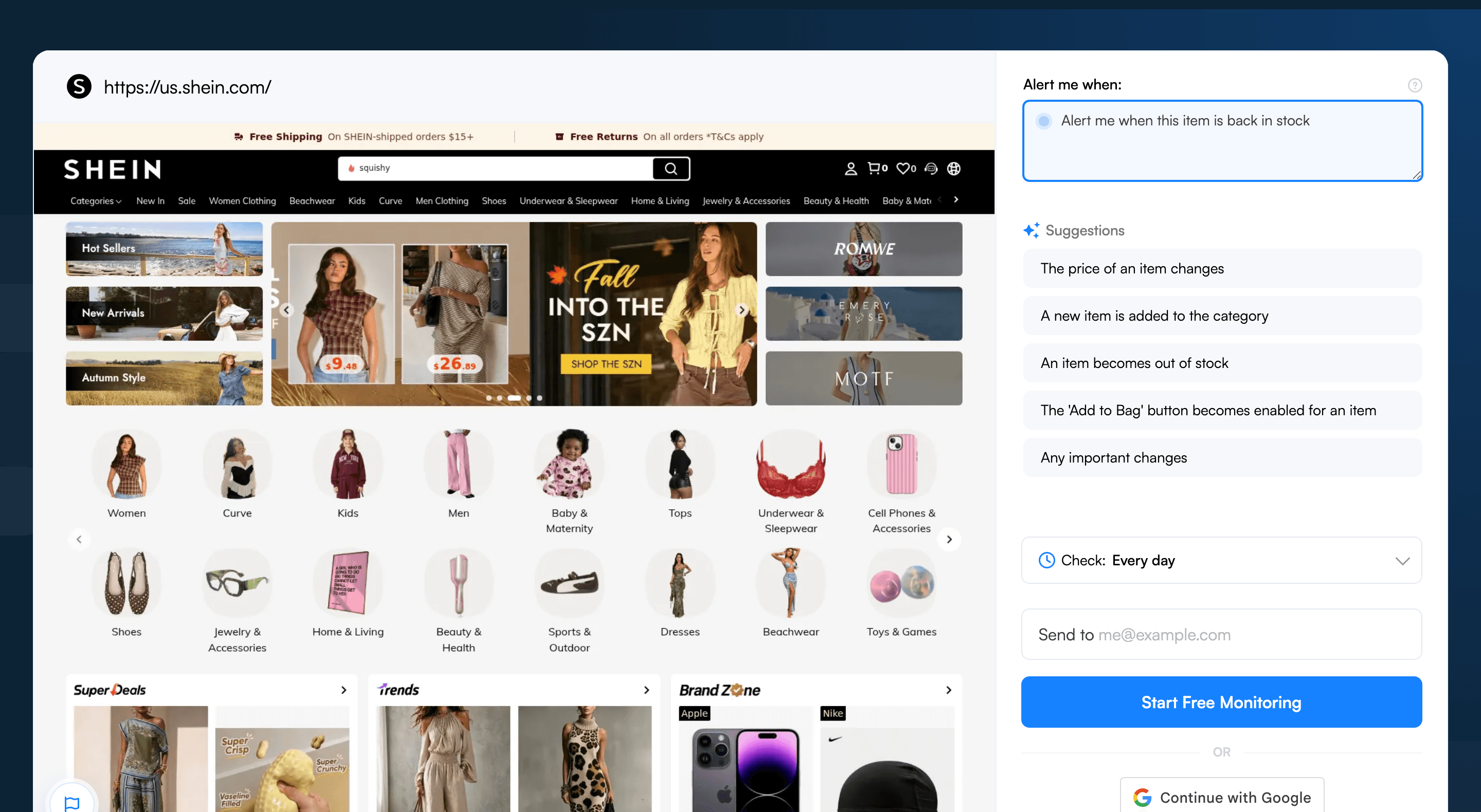
In the "Alert me when" box, write a condition that names your size, for example: "Size M becomes available or the Add to Bag button is enabled for size M." This filters out Shein's constant page changes (new review photos, updated shipping estimates) so you only see actual restocks.
Step 6: Enable SMS for viral drops
For items selling out fast, add SMS text alerts (Personal plans and up) in your notification settings. An email can sit unread for an hour, and a text usually gets seen sooner.
Visualping handles restock monitoring across other retailers too. See the same setup adapted for Zara restock alerts, Sephora back-in-stock notifications, Lululemon drops, Abercrombie restock alerts, American Eagle restocks, Vans back-in-stock alerts, and the full back-in-stock guide.
What Visualping data shows about Shein restocks
We looked at the 118 Shein monitors that Visualping users ran in the last 31 days (as of October 21, 2026, excluding our own team's accounts). They belong to 90 accounts, and half of them watch a single product page rather than a category or search page.
Most Shein shoppers check slowly: about two-thirds of these monitors check weekly or monthly, and none checks faster than hourly. A monthly check costs almost nothing, but a popular size can sell out again long before the next one runs. If you're after a size that sells out fast, check hourly or every few hours during the days you expect it back. For slow-moving wishlist pieces, daily is enough.
Shein pages change often. Of the 80 live monitors created before late July, 43 (54%) detected a change in the last 90 days, and 27 (34%) caught at least one change that Visualping's AI marked important, which is how it separates a real restock or price drop from routine page noise.
Pro tips for catching Shein restocks
-
Monitor the exact product URL, not the search page. Shein's search results refresh constantly as new SKUs enter the catalog, so a search-page monitor will fire on noise instead of your item. Always point Visualping at the individual product page.
-
Track the "Hot Sellers" and "Trends" sections. Shein's homepage links to pages that highlight items gaining momentum. Open one, copy its URL, and set up a monitor with an "Alert me when" condition for the product types you care about, such as "A new cargo pant appears in this section." This catches items before they blow up and sell out.
-
Watch the sale pages. Sold-out styles sometimes reappear in Shein's sale section or its daily flash sales at a lower price. Monitor the sale page you shop and add a condition like "Alert me when [product name] appears in the sale."
-
Name the color and size. Need a specific color-size combination? Put both in your "Alert me when" condition, for example "The black version is available in size M."
-
Set the alert right after a sellout. Shein brings popular items back in waves with no published schedule, so a monitor that's already running catches the bounce-back whenever it comes.
-
Monitor across Shein regional sites. Shein runs different regional sites (shein.com, shein.co.uk, etc.) with different inventory levels. If an item is sold out on yours, check the other regional versions. Stock may still be there, though each regional site generally ships only within its own region.
Frequently asked questions
What's the best way to get notified when Shein restocks an item?
The most reliable approach is to monitor the product page directly with a page monitoring agent (also known as a website monitoring tool). Visualping watches any shein.com product URL, flags the changes that matter as important, and adds a plain-English AI summary so you know whether the alert is a real restock, a price drop, or cosmetic page noise. Shein's own "Remind Me" option isn't on every product, and its emails share an inbox with daily promos, so a third-party monitor is the more dependable path. Set up a free monitor in about two minutes.
Is there a free tool to track Shein restocks?
Yes. Visualping's Free plan covers up to 5 pages and 150 checks a month, enough to check 5 Shein product URLs once a day, with email alerts and AI summaries. The Free plan is a good fit for casual wishlist tracking. For viral drops that sell out within hours, paid plans add faster checks (every 15 minutes on Personal 1K from $10/month, every 5 minutes on Personal 5K from $25/month, both billed annually) and SMS alerts on Personal 5K and up. Start free.
Can I monitor multiple Shein products for restocks at once?
Yes. Visualping lets one account monitor as many Shein product URLs as its plan allows (5 pages on Free, 10 on Personal 1K, 20 on Personal 5K) from one dashboard, each with its own check frequency, "Alert me when" condition, and notification channels. Shein shoppers on Visualping run about 1.3 monitors per account on average. Each monitor stays independent, so a restock on one product fires only the alert tied to that page.
How fast does Visualping detect a Shein restock?
Detection speed equals the check interval set on the monitor. Free accounts can check as often as hourly, though the 150-check monthly allowance makes daily the practical setting. Paid plans go faster: every 15 minutes from $10/month and every 5 minutes from $25/month, billed annually. For viral Shein items, every 15 minutes or faster is the safer choice, since trending products can restock and sell out again within an hour. Once a check captures the change, the alert goes out by email, by SMS on Personal plans and up, or through webhooks and Telegram on any plan. For high-stakes drops, the important-change flag and AI summary tell you at a glance whether to act.
Why don't Shein's own back-in-stock notifications work reliably?
Shein's "Remind Me" button only appears on some out-of-stock SKUs, and its reminder emails arrive alongside the day's promo messages, where they're easy to miss. If a restock sells out in under an hour, a late or buried email doesn't help. A third-party monitor like Visualping polls the product page directly on a fixed cadence, so the alert is tied to the actual page change instead of Shein's batched send. Try it free.
Does Visualping work for Shein flash sales and trending pages?
Yes. Visualping monitors any public shein.com URL, including individual product pages, the trending and "Hot" sections, and flash-sale landing pages. For flash sales, the recommended setup is to monitor the sale-event page with an "Alert me when" condition like "Alert me when [product name] appears in the sale" so the AI summarizer filters out unrelated page noise. For app-exclusive deals that never appear on the website, the Shein app is still required.
Track it before it's gone
Shein's ultra-fast model can burn through stock in minutes. Visualping watches the page, alerts you on the next check after your size is back, and ends the manual refresh loop. Set up your Shein restock alerts in under two minutes.
It's free to start.
Want to know when a sold-out Shein item is back?
Sign up with Visualping and get an email when a Shein product page changes. Track up to 5 pages free, or get faster checks from $10/month.
Eric Do Couto
Eric Do Couto is the Head of Marketing at Visualping. He leads content strategy, growth operations, and brand positioning for website change detection.
More articles by Eric Do Couto