Walmart In-Stock Alerts: Check Availability and Set Up Alerts
Updated October 28, 2026
With Visualping, Walmart in-stock alerts follow a scheduled page check that detects a change in the availability information for an item. Start with your chosen store, delivery address and fulfillment option. Walmart's out-of-stock guidance says it restocks items as quickly as it can, but gives no nationwide timetable. An item can become unavailable before Walmart processes your order.
TL;DR
- Check the exact Walmart item, store or delivery address, and pickup or shipping option.
- Paste the URL into Visualping and verify that its preview shows the availability you want to monitor.
- Choose a cloud schedule within your plan's check allowance, write an "Alert me when" prompt, and enable email notifications.
A useful stock alert identifies the exact product and fulfillment option you want. A page change can also be a new price, shipping estimate or description, so write an alert prompt about availability and inspect the current listing when notified.
Product details to confirm before monitoring
Use these examples as a setup checklist for the product you want. Confirm the same details in Walmart's listing and in the monitoring preview.
| Product type | Confirm the exact item | Check the offer | Alert criteria to consider |
|---|---|---|---|
| Pokemon / trading cards | Set and product format | Seller and fulfillment option | The chosen product becomes available |
| Electronics (phones, laptops, TVs) | Model, capacity and color | Seller and delivery location | Shipping becomes available for that model |
| Collectibles (Hot Wheels, LEGO, Funko) | Specific item or edition | Product variant and seller | The selected item can be added to cart |
| Baby (formula, diapers) | Formula type, size or diaper size | Pack quantity and fulfillment option | The exact product becomes available |
| Nintendo / Switch | Console model, game or accessory | Bundle contents and seller | The chosen listing becomes available |
| Gaming consoles (PS5, Xbox) | Console model and bundle | Seller and shipping or pickup | The requested fulfillment option becomes available |
When does Walmart restock? What to check by department
Walmart's published stock guidance gives no department-by-department restock schedule. For a particular item, check the listing for your store or address and the fulfillment method you intend to use.
In-store availability checks
| Department | Choose the exact item | Check your store | Before making a trip |
|---|---|---|---|
| Grocery (shelf-stable) | Brand, flavor and pack size | Select the intended pickup store | Recheck the current listing |
| Fresh grocery | Item and quantity | Review the available fulfillment options | Confirm the offered pickup or delivery slot |
| Electronics | Model and variant | Inspect pickup availability | Confirm the selected seller and offer |
| Toys & collectibles | Exact product or edition | Inspect the chosen store's listing | Verify current availability |
| Clothing & home | Size, color or dimensions | Check the selected variant | Recheck the listing after changing variants |
| Pharmacy & health | Exact retail item | Check the listing's fulfillment options | For prescription questions, contact the pharmacy |
Walmart's store-selection instructions explain how to choose Pickup or Delivery and a store. Treat the displayed availability as information to check again before ordering.
Online availability
Walmart displays availability for the selected item and fulfillment option. Its help page warns that an item shown available at ordering can be out of stock when the order is processed.
Check the seller, shipping option and pickup store on the listing you want. After changing your location or a product variant, review the availability again. A shipping result should not be treated as confirmation of shelf stock at a particular store.
How to set up Walmart in-stock alerts
Check the listing for Walmart's own stock-alert option. Walmart's category guidance says some listings may offer an in-stock alert button. A page monitor is another option when the required availability information appears in its captured preview.
Quick start (3 steps)
- Copy the Walmart product URL for the item and fulfillment option you want.
- Paste it into Visualping, check the captured preview, and write a prompt such as "Alert me when this item becomes available for shipping."
- Choose a cloud interval within your plan and monthly allowance, then enable email notifications.
An email change alert follows a detected change at a scheduled check. It includes an AI summary and before-and-after screenshots. A change can happen and disappear between checks.
Detailed setup with Visualping
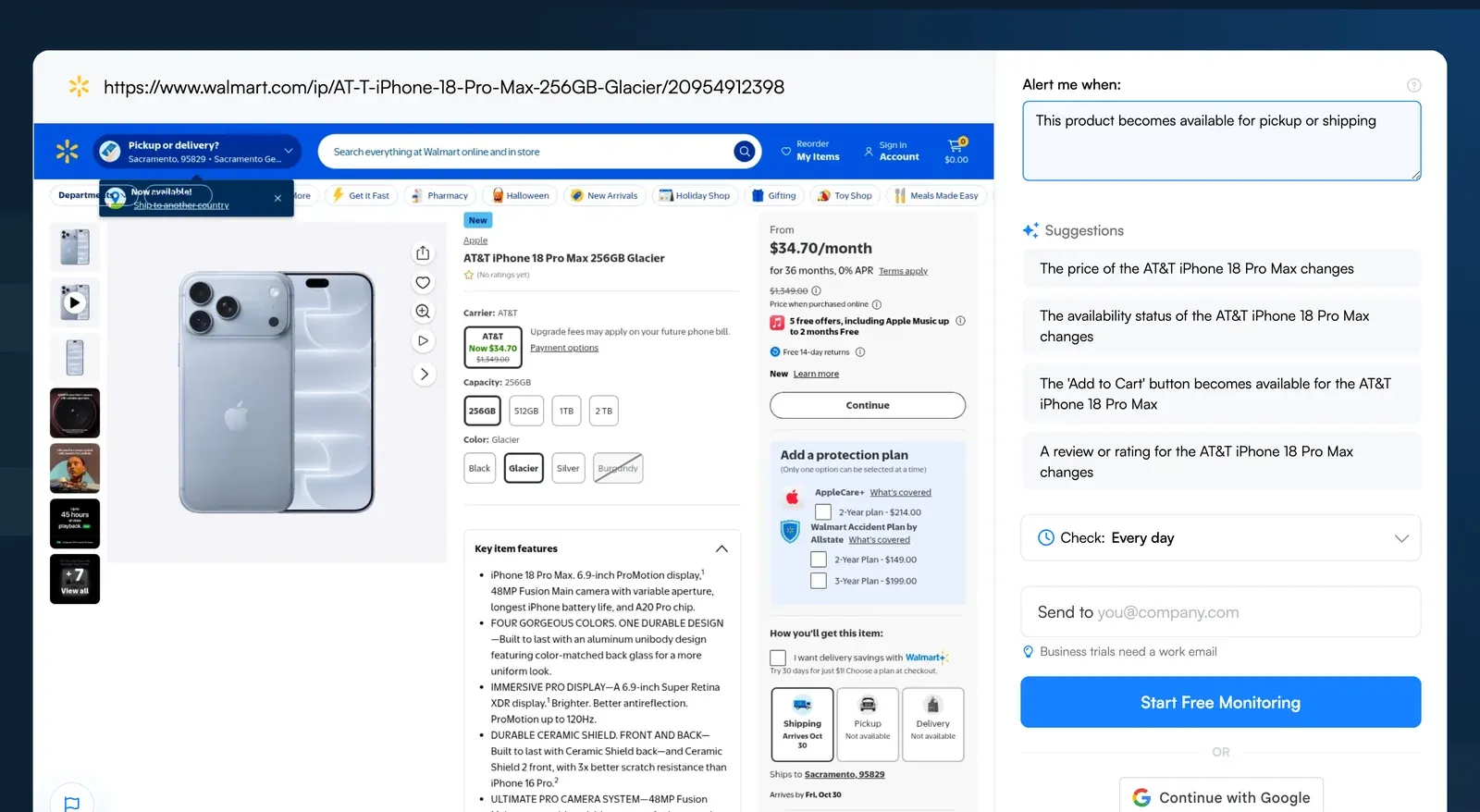
Visualping monitor creator on a Walmart product page (October 2026). Check Walmart for current prices and availability; the displayed offer is not a current stock report.
- Open the exact Walmart product page and select your intended store or shipping destination.
- In your Visualping dashboard, choose Start monitoring, paste the full URL, and click Go. See the monitor setup guide for the account setup steps.
- Review the captured preview. Confirm the product, variant, seller, store and availability information that matter to your purchase.
- If the preview needs a store selection or another interaction, configure Actions to reproduce it before capture. Verify the resulting preview before saving.
- In default AI Mode, select the availability area and write an "Alert me when" prompt. For example: "This product becomes available for pickup at the selected store." Area selection focuses attention on captured content; it does not guarantee perfect filtering.
- Choose a cloud check frequency within your plan and monthly allowance. The calculations below assume one page checked continuously for 30 days.
| Cloud interval | Minimum plan for this interval | Checks in 30 days |
|---|---|---|
| Every 5 minutes | Personal 5K | 8,640 |
| Every 15 minutes | Personal 1K | 2,880 |
| Hourly | Free | 720 |
| Daily | Free | 30 |
The Free plan includes five pages and 150 monthly checks. That covers five pages checked daily over 30 days, or 6.25 days of hourly checks for one page. Five pages checked daily over 31 days use 155 checks, which exceeds the Free allowance of 150. Personal 1K includes 1,000 checks and Personal 5K includes 5,000; their fastest intervals also exceed those budgets if run continuously for 30 days. Failed checks also consume quota. Monitoring pauses when checks are exhausted, until the allowance resets or you upgrade.
- Enable email notifications and save. Your prompt guides which changes are classified as IMPORTANT. To receive only important-change notifications, select that setting as well as enabling the delivery channel.
- When notified, review the change and reopen Walmart to check the current seller, price and availability before purchasing.
Every detected change event includes an AI summary and a binary IMPORTANT flag. Email is included on every plan.
Store pickup vs. shipping alerts
- Shipping availability: Confirm that the preview shows the intended product, seller and shipping destination. Describe the shipping status you want in the prompt.
- Store pickup: Configure the intended store and verify its pickup information in the preview. Check this again after changing page actions or location settings.
- Size or color variants: Verify the exact variant in the captured page. Use a distinct URL or configure the necessary selection actions where supported.
Use separate shipping and pickup monitors when you want to watch both fulfillment options. Each uses your plan's page and check allowance.
Walmart inventory checker: 4 ways to check stock
Use these methods for a one-off lookup. For repeated checks, set up a monitor only after confirming it can capture the product and location you need.
Walmart.com product page
Search for the product, select your location and inspect the available Pickup, Delivery or Shipping options. Walmart's site and app guide explains these selections. For monitoring, verify the same information in Visualping's preview.
Walmart app
Search for the exact product in the Walmart app and review availability for your selected location. In-store, Walmart's Store map feature can help locate an item by aisle. Verify the current offer before ordering.
BrickSeek (third-party)
BrickSeek offers a Walmart Inventory Checker with product and location inputs. Check whether it returns useful information for your item, then confirm the current offer directly with Walmart.
In-store item search
Use Walmart's app store map to look up the item's aisle. If you cannot find it, ask a store associate for help. An aisle location alone does not confirm that an item is on the shelf.
Troubleshooting Walmart in-stock alerts
If you miss a restock, first review whether the monitor successfully checked the page and captured the intended availability. Then consider a shorter interval within your plan and remaining check allowance. Even frequent checks can miss availability that appears and disappears between captures.
For irrelevant alerts, check the selected area and make the prompt specific to the product and fulfillment option. Review the Important-only notification setting separately. A layout change or a different product variant can alter what the saved area covers.
For store-specific results, verify the store shown in the captured preview. A ZIP code chosen in your own browser may need to be reproduced through Actions before Visualping captures the page. Copying a URL alone is not proof that the monitor has the same selection.
If an item becomes unavailable, follow Walmart's current listing and order status. Walmart warns about stockouts during processing; a monitoring alert does not reserve stock.
Want to do this without leaving ChatGPT? Connect Visualping in ChatGPT and sign in to your Visualping account. Select the app, then ask: Monitor [the URL you want to track]. Review the monitor's capture, schedule and notification settings.
Frequently asked questions
When does Walmart restock shelves?
Walmart says it restocks items as quickly as possible in its stock guidance. That page gives no nationwide shelf-stocking hours. Check the exact product for your selected store and contact the store for item-specific questions.
What day does Walmart restock?
Walmart's published stock guidance does not identify a best weekday. Check your chosen item and store before ordering or making a trip.
How do I check if Walmart has something in stock?
Search Walmart.com or the Walmart app, select the intended store or address, and inspect the available fulfillment options. Recheck the current offer before ordering. To monitor a page with Visualping, first confirm that its captured preview shows the same product and location.
Does Walmart notify you when something is back in stock?
Some listings may offer an in-stock alert option, according to Walmart's category guidance. If the button appears on your product, follow its opt-in instructions. For Visualping monitoring, confirm that the product's availability appears in the preview and choose a schedule your plan can cover.
Can I track Walmart store pickup availability?
You can monitor pickup information when Visualping successfully captures it for the intended store. Use Actions if a store selection is required, verify the resulting preview, and describe the pickup status in your prompt. Separate store monitors each need a verified preview and use your page and check allowance.
How often does Walmart restock online?
Walmart's stock help page gives no fixed item-level restock interval. Check the listing for the product you want. Scheduled monitoring can detect captured availability changes, but it can miss stock that appears and disappears between checks.
What are the best items to set restock alerts for?
Choose products you intend to buy and would otherwise check repeatedly. Examples include a specific console model, collectible or household item. Confirm the exact variant, seller and fulfillment option before creating each monitor.
Can I also track Walmart price drops?
Yes, when the price appears in the captured preview. Use a monitor whose selected area includes the price. If your stock monitor's area covers only availability, create a separate monitor. Write an "Alert me when" prompt such as "The price of this product falls below $X." A separate monitor uses another page and draws from the same monthly check allowance. Check the seller, variant and price shown in the preview. Related guide: Walmart price tracking.
Related guides
Want to get back in stock alerts?
Sign up with Visualping to get back in stock alerts for any product you've got your eye on.
Eric Do Couto
Eric Do Couto is the Head of Marketing at Visualping. He leads content strategy, growth operations, and brand positioning for website change detection.
More articles by Eric Do Couto