Zara Restock Alerts That Tell You When Your Size Is Back
By Anika Gupta
Updated July 8, 2024

Out of Stock in Zara Again!
To get a Zara restock alert, select the sold-out size marked “Coming soon” and leave your email. Zara only emails you if that size returns within 15 days, then the request expires. For an alert that doesn’t expire, paste the product URL into Visualping. It checks the page on a schedule and emails you when your size is back in stock.
Zara releases new styles constantly and produces them in small batches, so popular sizes sell out fast. Zara’s help center doesn’t publish a restock schedule, and not every sold-out item comes back.
What happens if you weren’t able to get your hands on the latest linen pants or dress you’ve been eyeing?
Visualping can help. Visualping monitors any Zara product page you choose and emails you when your size comes back in stock.
Go deeper: Best Buy Stock Alerts: Get Restock Notifications Free
Does Zara Have a Restock Notification?
Currently, if an item is to be restocked, the Zara website will display a “coming soon” message next to the sold-out size. You can add your email address to get notified when it comes back in stock.
That request lasts 15 days. If the size isn’t restocked in that window, it expires and you have to sign up again. It also isn’t a reservation, so a popular size can sell out again before you open the email.
Checking the page by hand every day gets old fast, too.
Visualping fills both gaps. It can alert you when a size switches to “Coming soon”, and it can email you when your size is back in stock, with no 15-day expiry.
Visualping can monitor website changes based on your criteria and then send an alert straight to your inbox. Never miss out on a product restock again!
How to Set Up a Zara Restock Alert
To track a Zara restock, paste the product URL into the Visualping homepage and click Go. In the “Alert me when” box, describe the change you want, such as your size coming back in stock. Pick how often Visualping should check the page, enter your email, and click Start Free Monitoring.
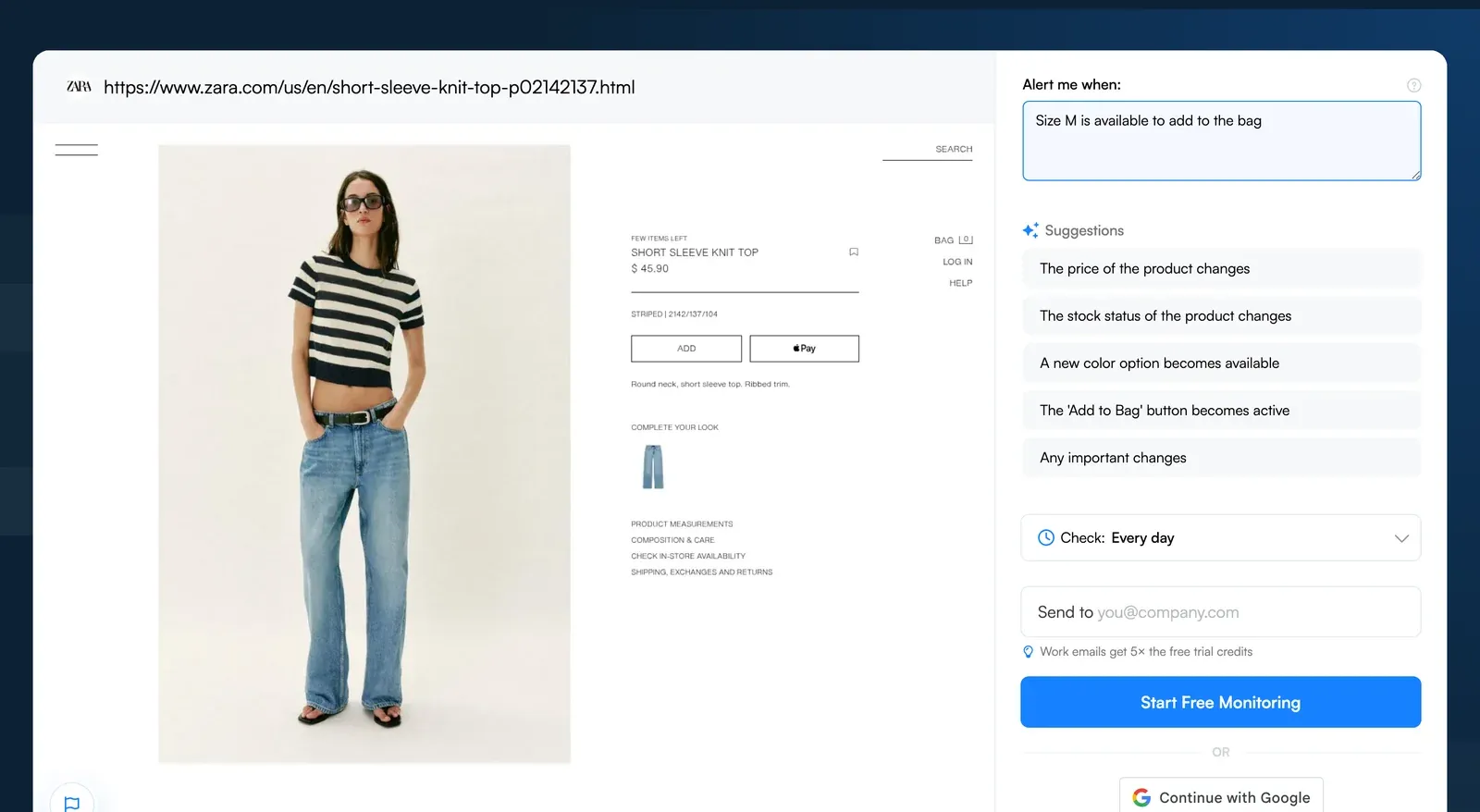
Step-by-Step Breakdown of How to Track Out of Stock Products
Step 1: Input the Zara Product URL into Visualping’s Homepage Search Bar
Say you want this top in a medium, and that size shows “Coming soon”. Copy the product URL from the Zara site, open the Visualping homepage, paste it into the URL field, and click Go. A preview of the page loads.
Step 2: Tell Visualping What to Alert You About
Below the preview, type your condition in the “Alert me when” box or pick one of the AI suggestions. New monitors use AI Mode, which checks both how the page looks and what its text says. Two conditions work well on Zara:
- Back in stock: “Alert me when size M is available to add to the bag” covers a straight restock.
- Coming soon: “Alert me when any size changes to Coming soon” means a restock may be on the way, so you can also join Zara’s own email list.
Step 3: Set Monitoring Frequency with Visualping
Use the “Check:” dropdown to choose how often Visualping looks at the page, from monthly to as often as every 2 minutes on Personal 10k and Business plans. The Free plan includes 150 checks a month, which covers a daily check on up to 5 pages. An hourly check uses about 720 checks a month, so it needs Starter (1,000 checks) or higher. Compare our affordable subscription plans.
Step 4: Provide Notification Email Address
Enter an email address you check often in the “Send to” field, so the alert reaches you while the size is still available. On Personal plans and up, you can add SMS alerts too.
Step 5: Verify Your Account
Click “Start Free Monitoring”, then create and verify your account. Verification gives you a dashboard where you can see and manage all your monitors.
Want to do this without leaving ChatGPT? Open ChatGPT and type: Visualping, monitor [the URL you want to track]. Our app handles the rest. Open Visualping in ChatGPT →
Never Miss a Zara Restock Again!
With Visualping watching the product page, you don’t have to keep refreshing Zara or re-register every 15 days.
Stay in the know about restocked products with other brands too such as Walmart, Etsy and many more.
Want to get back in stock alerts?
Sign up with Visualping to get back in stock alerts for any product you've got your eye on.
Anika Gupta
Anika Gupta is a former Marketing Intern who wrote about competitive intelligence and marketing strategy for the Visualping blog.
More articles by Anika Gupta