In Stock Alert: How to Track Product Availability
Updated September 9, 2026

Manually checking product pages and scouring for the "add to cart" option is joyless work. You can track product availability and receive an in stock alert, via email, when the item becomes available. Visualping monitors product pages so you don't have to.
Why in stock alerts matter
Whether it's a limited-edition sneaker drop, a sold-out GPU, a refurbished Steam Deck restock, or the latest gaming console, high-demand products disappear in seconds. Scalpers and bots snap up inventory before most shoppers even see the restock notification.
Right now the clearest example is computer memory. Through 2026, scalper bots have overwhelmed DDR5 RAM listings: DataDome researchers found bots outnumbering human shoppers roughly 10 to 1 on one retailer's pages, polling individual listings about once every 6.5 seconds, while 32GB kits climbed from roughly $72 to $392. A single bot operation generated more than 10 million blocked requests.
Trading cards are seeing the same thing. The Pokemon TCG 30th Celebration set launches worldwide on a single day in September 2026, the first simultaneous global release in the game's history, and Elite Trainer Boxes carrying a $69.99 MSRP were already listed at $175 to $200 on the secondary market before launch. Our Pokemon restock tracker guide covers that drop specifically.
None of this is new. The PlayStation 5 launch in 2020 set the template when Walmart opened pre-orders a day early and every restock sold out in seconds for two years. The NVIDIA RTX 5090 repeated it in 2025, selling out in under three minutes with bots completing purchases in milliseconds. Whatever the product, the shape is identical: allocation sells out faster than a human can refresh a page.
But there's a better approach. You can track product availability and receive a restock notification when the product returns with Visualping.
Visualping monitors product availability at pre-set intervals. When there's a change to the area of the page you're tracking (such as a "back in stock" message replacing the "sold out" tag), Visualping sends you an email alert with a screenshot of the highlighted changes.
Fun fact: Over 60,000 people across the US used Visualping to track the availability of the Covid-19 vaccine in 2021. The Wall Street Journal and NBC covered Visualping as a way to receive an availability alert when shots became available.
 High-demand products vanish across every retailer at once
In stock alerts from the retailer: why they fall short
Before we talk about how Visualping can help, let's talk about your first option: retailer alerts.
Inconsistent availability
Many retailers offer email notifications for when a product returns. Just select the Alert Me When In Stock option (or similar) on the product page.
But major retailers, like Walmart, Target, and Amazon, don't always let you track product availability for high-demand or limited items. (For Amazon-specific workarounds, see our guide to Amazon in stock alerts.)
Walmart's website says "some" product pages offer back in stock alerts, and that "this option may not be available for all items." Amazon, for many of its high-demand products, replaced the alert option with the message "We don't know when or if this product will be back in stock."
Delayed notifications
Even when a retailer does send you a restock notification, it's often delayed. Despite frantically navigating to the page for the purchase, the product is, once again, out of stock. Mass surges of consumer traffic can slow the website down and, in some cases, cause it to crash. Delayed alerts are usually part of an effort to stagger the traffic.
Many retailers batch their restock notifications to stagger traffic, which means your notification can arrive hours after the product is actually available. By the time you click through, it's gone again.
Spam
Retailers' notifications also go hand-in-hand with unsolicited messages for commercial advertisements: spam. When you click the button that lets you track product availability, sometimes you're also opting in to their email advertisements, whether that's being made clear to you or not.
Even if you're presented with a pop-up asking for your permission, it's usually littered with cute words like "special offers" and "discounts." Your strength wavers. You resort to the I Agree button just to make it go away. A week passes, and your inbox is full of marketing messages.
 Retailer alerts arrive late and buried under marketing email
Get an in stock alert from Visualping
Visualping is a free and easy way to track product availability and receive a restock alert for any product you've got your eye on.
Over 2 million people use it, and 85% of Fortune 500 companies are among them. Across the platform, Visualping's AI classifies over 240,000 active monitors as tracking pricing and availability content. When users set up stock alerts, they don't just watch for "any change." The most common custom triggers include "The 'Add to Cart' button becomes available," "The product is back in stock," and "The availability status of the product changes." That specificity is what separates Visualping from generic page monitors.
Visualping will track product availability for you by checking the web page at pre-set intervals. When it detects a change (i.e., the product is available), you receive an alert with a screenshot attached. The changes are highlighted for you.
The alert is instant and 100% spam-free. You don't have to worry about delayed emails, nor being pummelled with marketing campaigns you don't remember agreeing to. The only email you'll receive is of your available product.
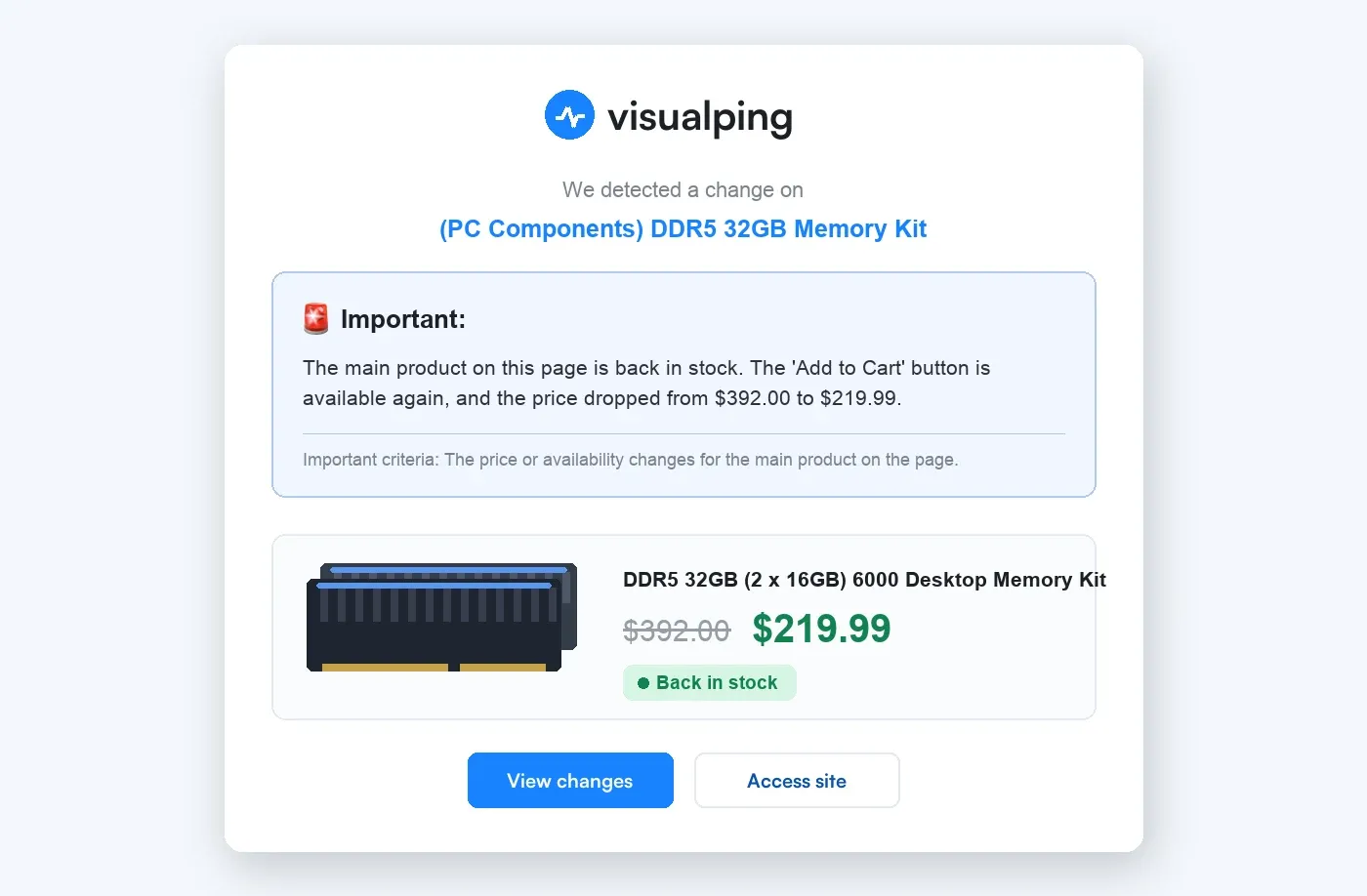 The Important summary leads: back in stock first, price change second
Visualping is used for many website monitoring purposes. As well as sending you restock alerts, it's often used as a price tracker by monitoring product pages and sending you price drop alerts when there's a sale on a product you're thinking of purchasing.
Other ways to track product availability
Visualping isn't the only option for stock monitoring. Here's how the alternatives compare:
Browser extensions like Distill Web Monitor or Visualping's Chrome extension can check pages on a set schedule. The downside: they only work while your browser is open and your computer is running. If you close your laptop at night, you miss overnight restocks.
Price tracking tools like CamelCamelCamel and Honey focus specifically on Amazon. They're great for tracking price drop alerts, but most don't offer in stock alerts for items that are completely unavailable. They also only work on Amazon, not across all retailers.
Social media and Discord groups dedicated to restocks (like sneaker bot communities or GPU tracker channels) rely on volunteers to post alerts. These can be fast, but they're noisy, unreliable, and limited to whatever products the community cares about.
Visualping's advantage is that it works on any website, runs 24/7 in the cloud (no open browser required), and checks pages as often as every 2 minutes on higher-tier plans. You choose the exact area of the page to monitor, so you get alerts for the specific change you care about, not generic product updates.
 Browser extensions collapse, generic trackers hold up, cloud monitoring stands on its own
How to track product availability: tutorial
Visualping takes automatic screenshots of the product page at regular intervals (every 5 minutes, 30 minutes, hourly, daily, etc.) and compares each image to the last to check for changes. You set the frequency when you set up your alert. Higher frequency monitoring is available through several subscription options.
You also set the area of the page you want Visualping to monitor. You can monitor the entire page, or just parts of a page, such as the area surrounding the Alert Me When Available button.
When Visualping detects a page change, it sends you a restock notification, via email. Attached is a screenshot of all the highlighted changes.
With Visual-compare, the monitoring type Visualping recommends for tracking product availability, changes that were added to the page are highlighted in red.
When you receive an email, click the Access Site link at the bottom of the message. Visualping takes you straight to the product page, where you can promptly make your purchase.
Here's how to set it up:
Step 1: Copy and paste the URL of the product page you want to monitor into the search field on visualping.io. You don't need to first sign up. Click Go.
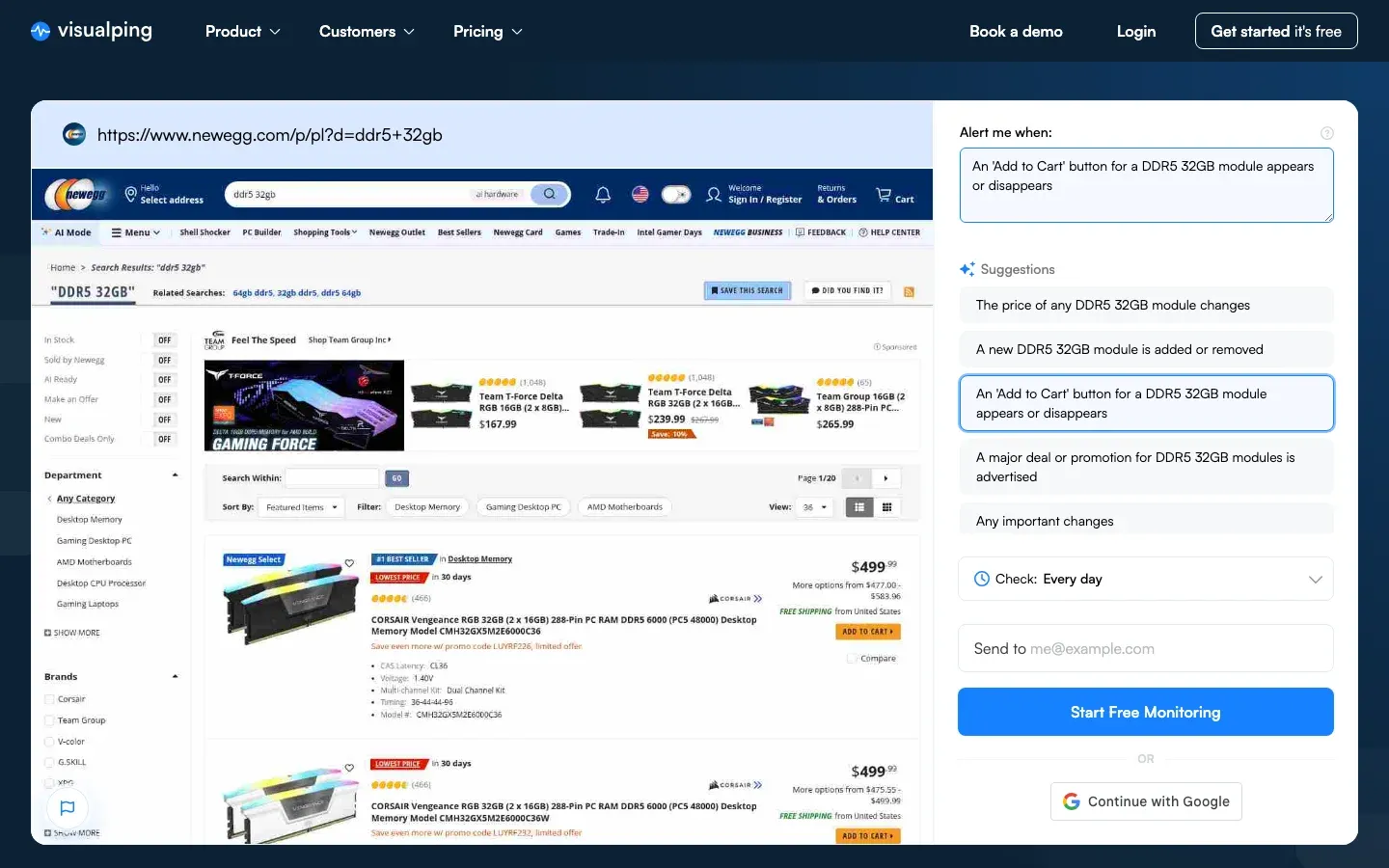 Paste any product or search page, then pick the exact stock change you want to be told about
Step 2: Once the page appears in the viewport, select the part of the page you want monitored. For restocked products, this is usually the part of the page surrounding the Not in Stock label.
Step 3: Specify the frequency you want Visualping to check the page: every 5 minutes, 30 minutes, hourly, daily, etc.
Step 4: Type the email address you want the alerts to be sent to. Click Start Monitoring, and that's it!
Step 5: Visualping will send you an email, asking you to make a password for your account. Don't forget to do this. The password completes your account, and allows you to log in to your user dashboard, where you can view all your Visualping monitors and email alerts in one location.
Go deeper: How to Get Notified When Products Are Back in Stock
Tips for getting the fastest in stock alerts
To maximize your chances of grabbing a restocked product before it sells out again:
- Monitor the specific element, not the whole page. Select just the "Add to Cart" or "Sold Out" button area. This reduces false alerts from unrelated page changes like banner ads or layout updates. (Our data confirms this: among the 8,000+ users who monitor purchase availability, the most popular alert target is the "Add to Cart" button state, not the full product page.)
- Set the highest frequency you can. Every 5 minutes is ideal for high-demand products. The faster Visualping catches the change, the sooner you can act. Across 35,000 retail product monitors, only 7% currently check hourly or faster, so raising your frequency puts you ahead of most other shoppers watching the same page.
- Use keyword triggers. Visualping lets you set text-based triggers. Add keywords like "Add to Cart" or "In Stock" so you only get alerts when those exact words appear on the page.
- Enable SMS or Slack alerts. Visualping can send restock alerts via SMS text messages, Slack, or Microsoft Teams, so you get notified instantly even when you're away from your inbox.
- Monitor multiple retailers. Set up Visualping monitors on Amazon, Walmart, Best Buy, and the manufacturer's site. The product might restock on one retailer before the others. Visualping users run 35,004 active monitors across the eight largest US retailers alone.
Which retailers actually restock most often
Not every retailer moves at the same speed. This is what Visualping's own monitoring data shows across 35,004 active product monitors, updated September 2026, ranked by how many of those pages recorded a change in the last 30 days:
| Retailer | Active VP monitors | Pages that changed in 30 days |
|---|---|---|
| Walmart | 3,878 | 62% |
| Amazon | 9,725 | 54% |
| GameStop | 857 | 49% |
| Target | 2,808 | 47% |
| Best Buy | 5,128 | 40% |
| Costco | 7,081 | 36% |
| Home Depot | 1,437 | 31% |
| Pokemon Center | 4,090 | 22% |
Two things worth reading off that table. Walmart and Amazon change most often, so they reward high check frequency. Pokemon Center changes least often at 22%, which is exactly why it frustrates collectors: when stock does appear it is rare and it disappears fast, so a monitor matters more there than anywhere else on the list.
Go deeper: Costco In Stock Alerts | Walmart In Stock Alerts
A real Visualping detection you can drag: a Texas Instruments TI-84 calculator listing at Staples went from $89.99 to $129.99. Slide the divider to compare the current and previous captures.
Frequently asked questions
How fast do Visualping in stock alerts arrive?
Visualping checks the product page at whatever frequency you set, from every 2 minutes to once daily depending on your plan. The moment it detects a change, it sends the alert immediately. Unlike retailer notifications that can be delayed by hours, Visualping alerts arrive within minutes of a restock.
Is Visualping free for stock alerts?
Yes. Visualping offers a free plan that includes a limited number of page checks per month. For shoppers tracking a few products, the free plan is often enough. If you need higher frequency monitoring or want to track many products at once, paid plans start at affordable rates.
Can I track product availability on any website?
Visualping works on virtually any public website. Whether you're monitoring Amazon, Nike, Best Buy, a small boutique retailer, or even a regional store's website, you can set up an in stock alert. The tool is not limited to specific retailers the way browser extensions or price trackers often are.
What's the difference between Visualping and retailer in stock alerts?
Retailer alerts are controlled by the retailer. They may be delayed by hours to manage traffic, they don't always exist for high-demand items, and they often come bundled with marketing emails. Visualping is independent. You control the monitoring frequency, you get alerts the moment the page changes, and you never receive spam.
Can I track availability from my phone?
Yes. Visualping runs entirely in the cloud, so your monitors work 24/7 regardless of whether your phone or computer is on. You can manage monitors from any mobile browser, and alerts can be delivered via email, SMS text messages, Slack, or Microsoft Teams, so you'll get notified wherever you are.
Start with one product page
Retailers don't always offer an in stock alert, especially for the in-demand items you actually want. When they do, the alert is often batched hours behind the real restock and arrives bundled with marketing email.
Availability monitoring is the single most common thing people use Visualping for: over 223,000 active monitors sit on product and stock pages right now. You do not need to set up that many. Pick the one product you keep checking manually, paste its URL, select the area around the "Add to Cart" button, and set the highest frequency your plan allows.
Visualping monitors the product page, so you don't have to.
Want to monitor web changes that impact your business?
Sign up with Visualping to get alerted of important updates from anywhere online.
Eric Do Couto
Eric Do Couto is the Head of Marketing at Visualping. He leads content strategy, growth operations, and brand positioning for website change detection.
More articles by Eric Do Couto