Q1 2026 Release Recap: Reports, Zapier, API Keys, and More
Updated March 26, 2026

In Q1 2026, we shipped Reports, a feature that turns 50 individual alerts into one AI-written briefing. We also launched a native Zapier app with 12 workflow templates, self-serve API keys, and upgraded the AI models behind Important Alerts. Here's everything that's new.
Reports: one briefing, every change, your schedule
Launched March 12, 2026 | Included free with all Business plans | Reports product page
Before, Visualping sent a separate alert for every change. If you tracked 50 pages, you received 50 notifications. Across 1.7 million active monitors on the platform, about 1 in 3 detect a change each month, so the volume adds up. Now, Reports combines all those updates into one summary.
Choose the monitoring jobs you want, set a date range, and create a report. Visualping's AI reviews every change and writes a summary at the top, highlighting things like competitor pricing changes, messaging updates, or regulatory shifts. Each change below includes an AI description, an importance flag, and side-by-side screenshots.
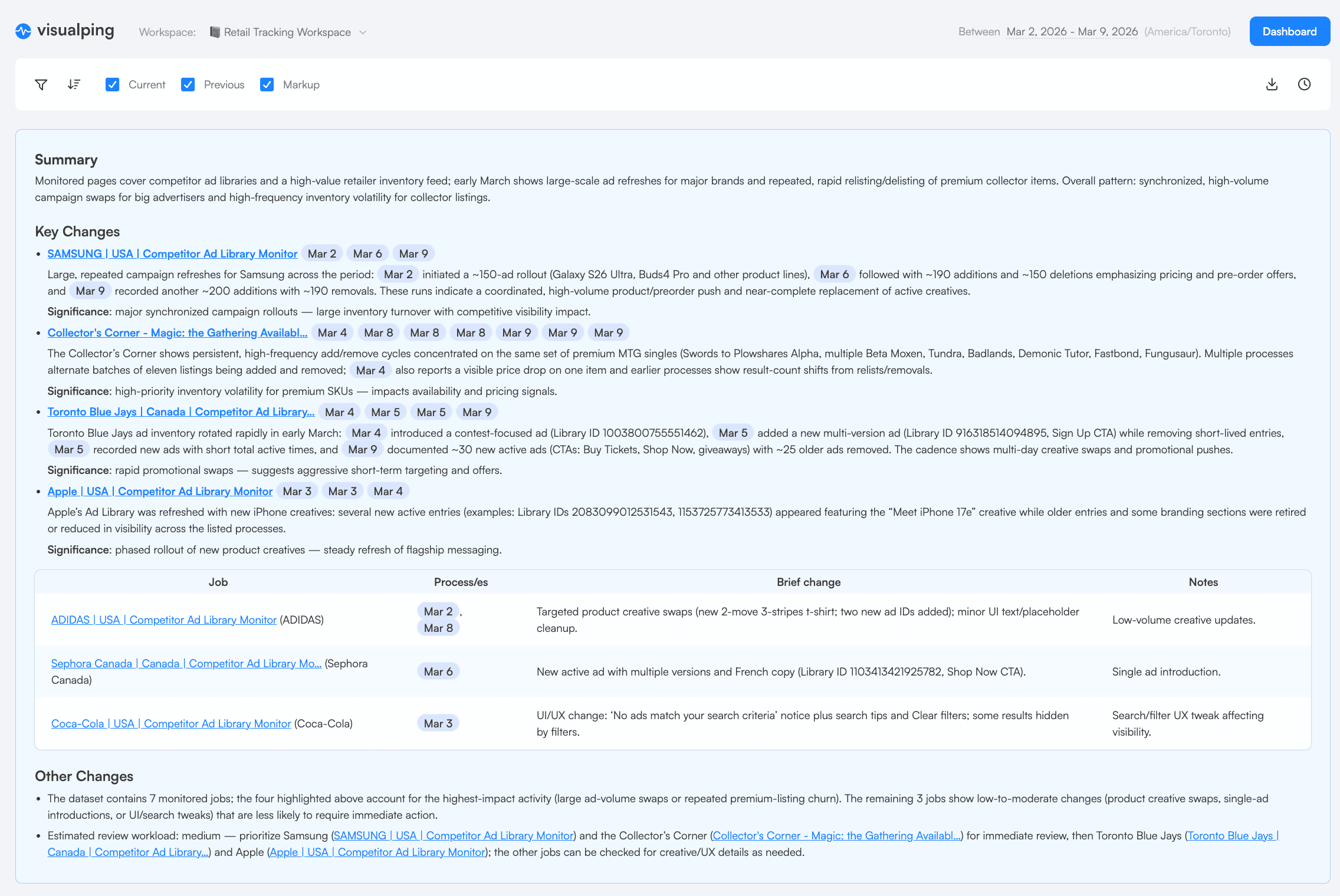
You can create reports anytime or set them to run on a schedule (daily, weekly, or custom). Scheduled reports go straight to your inbox. You can export them as PDF, Excel, or CSV, share a link, or email them to people who don't use Visualping.
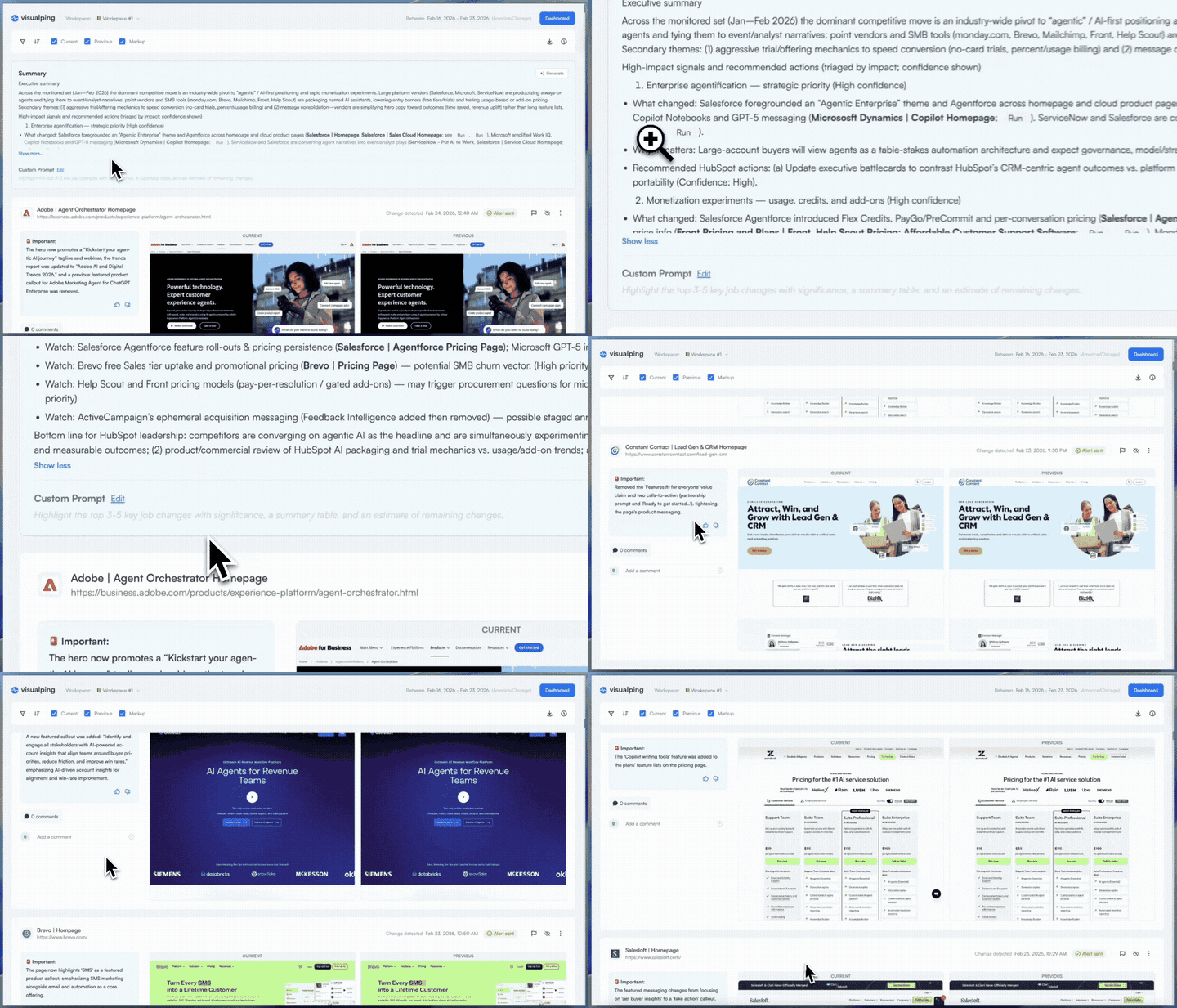
Inside a report, your team can comment, flag changes, and respond to AI summaries. Everything is tracked for your records.
This feature is for teams who've outgrown single alerts but don't need a $16,000/year enterprise CI platform like Klue or Crayon. Nearly 60% of active Visualping monitors are run by business teams, and over 15,000 users signed up specifically for competitive monitoring, making it one of the top use cases on the platform. Product marketers who used to spend Monday mornings piecing together updates from 50 competitor pages can now open one report.
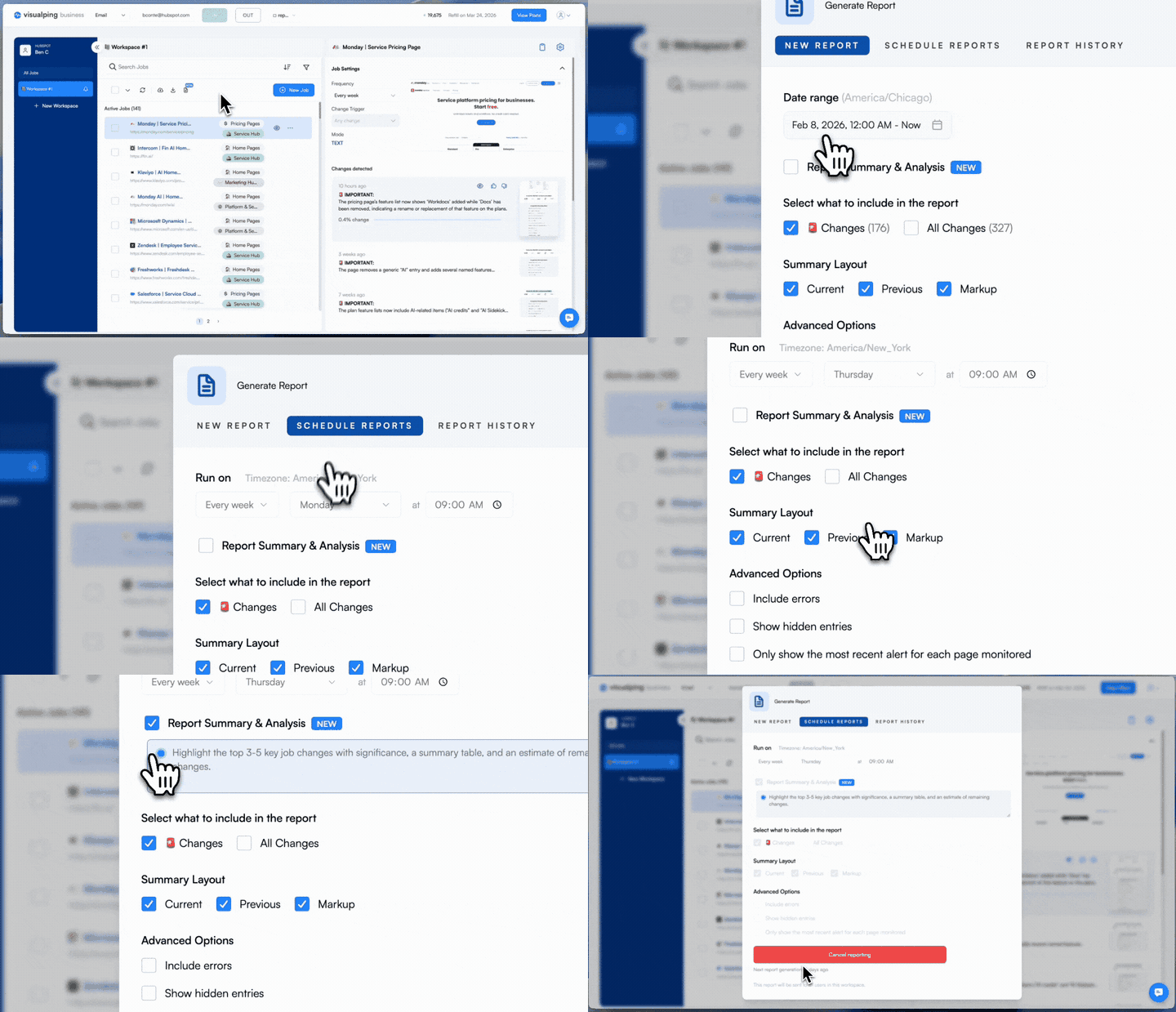
If you're on a Personal plan, you can try Reports free for 14 days with a Business trial, no credit card needed.
Go deeper: Introducing Visualping Reports | Visualping Reports Help Guide | AI-Powered Competitor Monitoring
Want a guided walkthrough? Join our live demo on April 25 at 3:00 PM EST →
Native Zapier app with 12 workflow templates
Launched January 2026 | Available on all plans
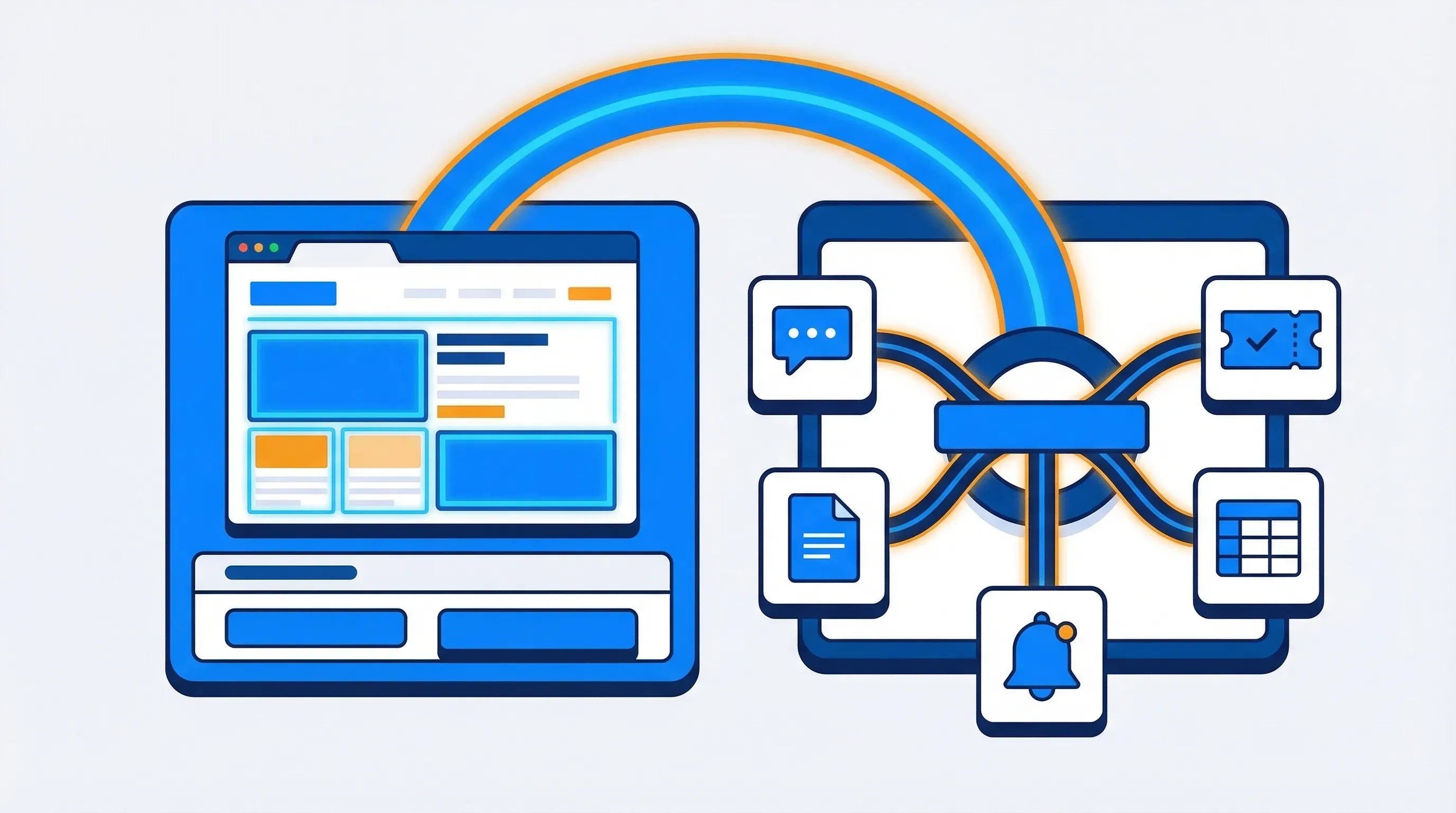
Visualping used to connect to Zapier with webhooks. Now, there's a native app, so you don't need to set up webhooks manually. Just connect your account, pick a template, and you're ready to go.
The app comes with 12 ready-made templates, which you can find in the Zapier template directory and in the Visualping dashboard. Each template works the same way: Visualping spots a change, Zapier's AI analyzes it, and the results go to the tools your team already uses.
| Template | What it does | Destination apps |
|---|---|---|
| SEC filing alerts | AI extracts sales-relevant insights from new filings | Salesforce + Slack |
| Competitor pricing tracker | Extracts tier names, prices, and feature changes | Airtable + Slack |
| Hiring expansion signals | Spots growth patterns from careers page changes | HubSpot |
| Content response briefs | Generates editorial briefs from competitor blog updates | Google Sheets |
| Competitive positioning alerts | Analyzes messaging shifts on product pages | Slack |
| G2 review sentiment digest | Extracts ratings and switching signals from new reviews | Slack |
| Integration ecosystem tracker | Spots new partner listings and tech signals | Google Sheets |
| Partner program changes | Monitors tier, benefit, and qualification changes | Google Sheets + Slack |
| API changelog triage | Flags breaking vs. non-breaking documentation changes | Jira |
| Feature release tracker | Compares competitor updates against your capabilities | Google Sheets + Slack |
| Developer docs severity triage | Categorizes SDK/doc changes by engineering priority | Jira |
| Terms of service risk alerts | Classifies legal changes by risk level | Slack + Google Sheets |
Each template includes a pre-written AI prompt that tells Zapier what to extract from each page change. Templates like API Changelog Triage and Feature Release Tracker reflect real demand: nearly 5,900 users signed up specifically to track software releases. You can adjust the prompts, change the destination apps, or add steps, but most teams won't need to make changes.
If you've been using Visualping automations with webhooks, switching to the native app only takes a few minutes and gives you structured trigger data instead of raw payloads. For step-by-step instructions, check out the Visualping Zapier integration guide.
Go deeper: 12 Automation Workflows Triggered by Website Changes
Self-serve API keys
Launched March 2026 | Available on Personal and Business plans
Before, you had to submit a support ticket and wait to get a Visualping API key. Now, you can create, set permissions, and manage keys right from your dashboard in Account Settings → Developer.
Each key has four settings: a name (any label you want), a scope (for your whole organization or just one workspace), an access level (read-only or read-write), and an expiration (from 1 month to never). Click Create, copy the key (it's shown only once, so save it somewhere safe), and you're done. Each organization can have up to 5 active keys.
We suggest starting with read access and limiting the scope to a workspace. You can always add more permissions later if your integration needs it.
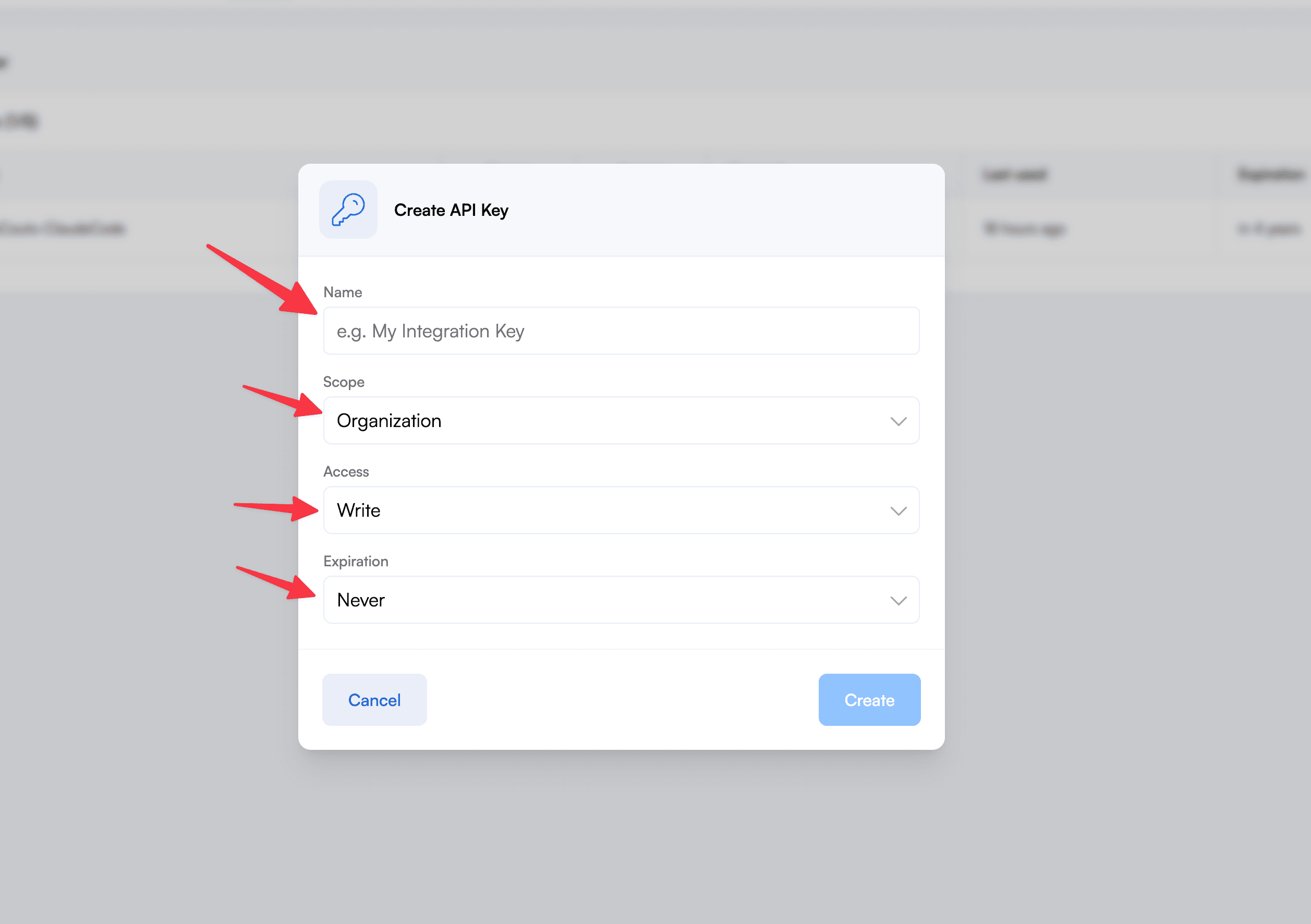
We also updated our API documentation with new endpoint examples and authentication guides.
Important Alerts AI: Q1 model upgrades
Updated through Q1 2026 | Originally launched May 2025
With Important Alerts, you can write a simple prompt in plain English to tell Visualping what matters to you. The AI checks every change against your criteria and only notifies you when there's a match. We launched this in May 2025 and upgraded the models in Q1 2026. The system now classifies over 1.19 million active monitors by content type, from pricing pages to regulatory documents, so it can tailor suggestions and filter noise more effectively.
The main improvement is fewer false positives, especially on pages that change often for cosmetic reasons like banner rotations, footer tweaks, or cookie consent popups. The AI now handles complex prompts better. For example, a prompt like "alert me when pricing changes but ignore banner rotations and footer updates" works more reliably than before. (If your team uses Slack, you can also send these alerts there with the Slack integration.)
Auto-suggestions are smarter now. When you add a new monitoring job, the AI suggests prompts that fit the page type. For example, a pricing page gets a pricing-focused prompt, and a careers page gets a hiring-focused one.
The summaries have also improved. When a change matches your criteria, the AI now explains why it matched and what triggered the alert.
If you set up Important Alerts last year and haven't updated your prompts, it's a good time to review them. The same prompt will work better with the new models, and you might be able to make your criteria even more specific.
Important Alerts works on every plan, including Free.
Go deeper: Making a Strong Prompt for Important Alerts | Navigating Alerts | How to Monitor Any Web Page with AI
Checkout, diff comments, and smarter alerts
Here are three more updates you should know about.
Embedded Stripe checkout (March). We rebuilt the upgrade and payment flow. Taxes and coupons are now calculated automatically, you can switch between monthly and annual plans, PayPal works natively, and the mobile checkout is much better. If you've upgraded your plan recently, you've already seen these changes.
Inline commenting on the diff page (March). You can now comment directly on screenshot comparisons. Just click a change, add a note, and your team will see it in context. This works alongside the annotation features in Reports: one is for single changes, the other for batches.
Smarter cookie and popup blocking (February). Cookie banners, consent popups, and overlays used to cause a lot of false alerts. We've added automated rules to block these cosmetic changes before they reach your inbox. If you've seen fewer unnecessary alerts this quarter, that's why.
Help center refresh (in progress)
We're updating our help center to cover the features shipped this quarter. Reports documentation is now live. See Creating Visualping Reports, Navigating Reports, and How to Create a Basic Monitoring Job. More articles covering the native Zapier app, self-serve API keys, and Important Alerts will roll out through Q2 2026.
What's next
In Q2, we're improving AI change detection, expanding integrations beyond Zapier, and adding more ways for teams to use Visualping data.
To stay updated, follow us on LinkedIn or check this blog for new posts.
FAQ
Is Reports free? Yes. Reports are included at no extra cost with all Business plans (starting around $100/month). If you're on a Personal plan, you can try it with a free 14-day Business trial.
Do I need to reconfigure my existing Zapier webhooks? No. Existing webhook-based Zaps keep working. The native app is a new option, not a replacement. That said, migrating gives you structured trigger data and access to the 12 pre-built templates.
Can I use Important Alerts on a free plan? Yes. Important Alerts are included with every Visualping plan, including Free.
How many API keys can I create? Each organization can hold up to 5 active keys. You can delete and recreate keys at any time from the Developer tab.
When will the new help center articles go live? Reports articles are live now: Creating Reports and Navigating Reports. Additional articles covering Zapier, API keys, and Important Alerts are publishing on a rolling basis through Q2 2026.
Can I see Reports in a live demo? Yes. We're hosting a live walkthrough on April 25 at 3:00 PM EST. We'll build a report from scratch and show the AI summary in real time. Register here.
Want to monitor web changes that impact your business?
Sign up with Visualping to get alerted of important updates from anywhere online.
Eric Do Couto
Eric Do Couto is the Head of Marketing at Visualping. He leads content strategy, growth operations, and brand positioning for website change detection.
More articles by Eric Do Couto