8 Best Competitor Price Tracking Tools (Free & Paid, 2026)
Updated September 28, 2026

TL;DR. Pick by job, not by ranking:
Job Category Best tools What the free tier gets you Paid starts at Fast price alerts with visual proof Change monitoring Visualping, Fluxguard Visualping: 5 pages, 150 checks/mo, AI summaries, API. Fluxguard: 3 sites $10/mo (Visualping, annual); $110/mo (Fluxguard) Catalog price monitoring with product matching Ecommerce price monitors Pricefy, Prisync, Price2Spy Pricefy: 50 SKUs, 5 competitors, daily updates. Prisync and Price2Spy: 14-day trials $37/mo (Pricefy, billed annually; $49 monthly); $99/mo (Prisync); Price2Spy quotes after the trial Managed daily price intelligence Managed intel Skuuudle None (demo only) Custom quotes Automated repricing at retail scale Dynamic repricing Competera, Omnia Retail None (demo only) Omnia from €399/mo (single shop); Competera custom quote Pricing and free-tier limits were re-verified on vendor sites on September 25, 2026. Quote-only figures are estimates from public references.
One data point to set the stakes. In a September 2026 Visualping sample of 9,985 monitors watching pricing or plan pages at any check frequency, 40% sent at least one change alert in 30 days (changes can include non-price edits). On HubSpot's pricing page, 93% of monitors caught a change; on Klaviyo's, 97%. The same pages also go quiet without warning: Monday.com's pricing page went from 69% of monitors catching a change in April to 14% in September. A quarterly review samples each page four times a year. Jump to the tool comparison matrix or the scenario-based decision guide.
 Eight platforms compared across four ways to track competitor prices
Disclosure & Editorial Standards
This article is written by Eric Do Couto, Head of Marketing at Visualping. Visualping is one of the tools evaluated here, so I have a conflict of interest. Feature and pricing claims were checked against linked vendor pages on September 25, 2026, and G2 ratings are cited only where shown, with dates. We did not independently test every platform. Verify features and pricing yourself before buying. Visualping and Pricefy have ongoing self-serve free plans, Fluxguard has a free plan plus paid-plan trials, Prisync and Price2Spy run 14-day trials, and Skuuudle, Competera, and Omnia are demo-led. A competitor may be a better fit for you. See the limitations and trade-offs for every tool.
How We Evaluated
The eight tools were chosen to span the four workflow categories teams actually buy (change monitoring, dedicated ecommerce price monitoring, managed intelligence, and automated repricing) rather than to rank the whole category. The September 2026 update added three dedicated ecommerce monitors: Prisync, Price2Spy, and Pricefy. Each was then assessed on five criteria: monitoring speed (how fast it detects price changes), catalog scalability (how many SKUs it handles before breaking down), setup complexity (time to first useful alert), pricing transparency (publicly available vs. "contact sales"), and whether it offers automated repricing or monitoring only. G2 review data was used for user sentiment. Feature claims were verified against vendor documentation and, where possible, hands-on testing. When a competitor outperformed Visualping on a criterion, we said so.
Quick Overview
Competitor price tracking tools range from simple website change monitoring to enterprise-scale dynamic repricing. This guide compares eight platforms across use cases and price points, with honest assessments of when each works best (including when competitors outperform Visualping).
How widespread is price tracking? Over 40,000 Visualping users selected price tracking as their primary monitoring use case during onboarding, with another 73,000 tracking stock availability. Across the platform, more than 240,000 active monitors are AI-classified as tracking pricing and availability changes. Nearly half (47%) of those monitor jobs run under team workspaces, not individual accounts. One caution on units: onboarding figures count users, platform figures count monitor jobs, and the cohorts can overlap. This isn't a niche activity either way.
Not covered here: Commodity pricing, stock tickers, or API-level price feeds. Those need different solutions.
In this guide:
- What is competitor price intelligence?
- Understanding your price tracking needs
- Tool comparison matrix
- When each tool makes sense
- Setup walkthroughs
- Honest limitations and trade-offs
- Best practices that actually work
- FAQs
- Summary recommendations
What is competitor price intelligence?
Competitor price tracking is the automated monitoring of the prices competitors publish: a tool checks their product or plan pages on a schedule, detects when a price changes, and alerts you with the evidence. Competitor price intelligence is the systematic analysis layered on top of that tracking. It goes one step past the raw feed. Price tracking tells you what the number is. Price intelligence tells you what the number means: how it compares to yours, how often it moves, which competitor leads the category, and whether the pattern looks like a promotion, a permanent shift, or a pricing error.
Most teams start with tracking and move to intelligence once they have enough data to see patterns. The tools in this guide cover both ends of that spectrum. Visualping and Fluxguard lean toward change detection and monitoring. Prisync, Price2Spy, and Pricefy match your products to competitor listings and track prices across a catalog, with repricing on higher tiers or as an add-on. Skuuudle leans toward managed daily intelligence. Competera and Omnia Retail operate at the full intelligence plus automated repricing layer used by enterprise retailers.
A few other names you may see in search results for this category that we did not evaluate: Minderest, Intelligence Node, and Competitor Monitor. Ask any of them for a demo on your own catalog before comparing them with the tools below. If you need competitor tracking that goes beyond just pricing, like marketing pages, ad libraries, SEC filings, or product launches, pair a tool from this guide with our broader competitor intelligence tools guide.
Understanding Your Price Tracking Needs
Before comparing tools, figure out what you actually need:
How often do monitored pricing pages trigger change alerts?
This is the question most teams get wrong at the cadence-planning stage. The honest answer: pricing pages change far more often than a quarterly review would sample them, and in bursts that a single snapshot misses.
In September 2026, 9,985 active Visualping monitors watched pricing or plans pages (URLs containing /pricing, /plans, or /prices), set up by 1,387 customer accounts. In the 30 days to September 24, 40% of those monitors sent at least one change alert, and 14% caught a change that Visualping AI marked important. Most checks on these monitors (78%) run on a daily or faster schedule. Changes can include non-price edits, and several monitors can watch the same page, so read these as page-activity rates rather than counts of price changes.
The share of monitors catching a change varies sharply by page, and it moves from month to month. Here are the ten most-watched SaaS pricing pages from our April 2026 sample, measured again in September:
| SaaS pricing page | Active monitors (Sep 2026) | Monitors with ≥1 change in 30 days (Apr 2026) | Monitors with ≥1 change in 30 days (Sep 2026) |
|---|---|---|---|
| HubSpot | 91 | 96% | 93% |
| Klaviyo | 34 | 73% | 97% |
| Stripe | 24 | 80% | 79% |
| Zoom | 19 | 100% | 74% |
| Twilio | 57 | 77% | 67% |
| Datadog | 97 | 89% | 62% |
| Constant Contact | 22 | 96% | 55% |
| Salesforce | 60 | 76% | 33% |
| DocuSign | 28 | 83% | 29% |
| Monday.com | 35 | 69% | 14% |
The takeaway: a page that changed for almost every monitor in April can go quiet by September, and the reverse. Klaviyo climbed from 73% to 97% while Monday.com fell from 69% to 14%. If you sell into MarTech, CRM, observability, or developer tools categories, these pages move often and unevenly, so a quarterly snapshot tells you little about what happened between visits. Ecommerce platforms show the same pattern: every one of the 23 monitors on Shopify's pricing pages caught a change in the September window.
At the per-check level, 11.9% of checks on these pricing-page monitors sent an alert in the same window. Across all Visualping monitors, comparing alert rates per check by AI content tag: price-tagged pages sent alerts on 13.2% of checks, news-tagged pages on 14.5%, and investor-relations pages on 7.9%. Same caveat throughout: an alert is a page change, not a confirmed price change.
One more data point that shapes tool selection: 77% of the monitors in this pricing-page sample are owned by workspaces rather than individual accounts. That is where the monitored volume sits. Team-level features like shared monitors, role permissions, and Slack or Teams routing belong on the evaluation list for that reason.
Visualping data pulled September 25, 2026, covering the 30 days to September 24, 2026.
For a broader view of competitor monitoring beyond pricing, see our competitor intelligence tools guide.
Speed Requirements
| Alert Speed | Best For | Example Use Cases |
|---|---|---|
| Real-time (30 seconds -30 min) | Flash sales, MAP violations | Consumer electronics, limited drops |
| Daily | Most retail, stable categories | Apparel, CPG, general merchandise |
| Weekly | Long-tail inventory | Slow-moving SKUs, niche products |
Catalog Size Considerations
Rough starting points, not rules. Change-monitoring tools meter pages, sites, checks, or credits; catalog platforms may price by products, data scope, and custom requirements. What actually decides the tier is how much you watch and how often:
| SKU Count (rough) | Common Starting Approach |
|---|---|
| Under ~100 | Simple monitoring tools usually cover it |
| ~100–1,000 | Dedicated monitoring platform |
| 1,000+ | Enterprise tooling with automation earns evaluation |
Monitoring vs. Repricing
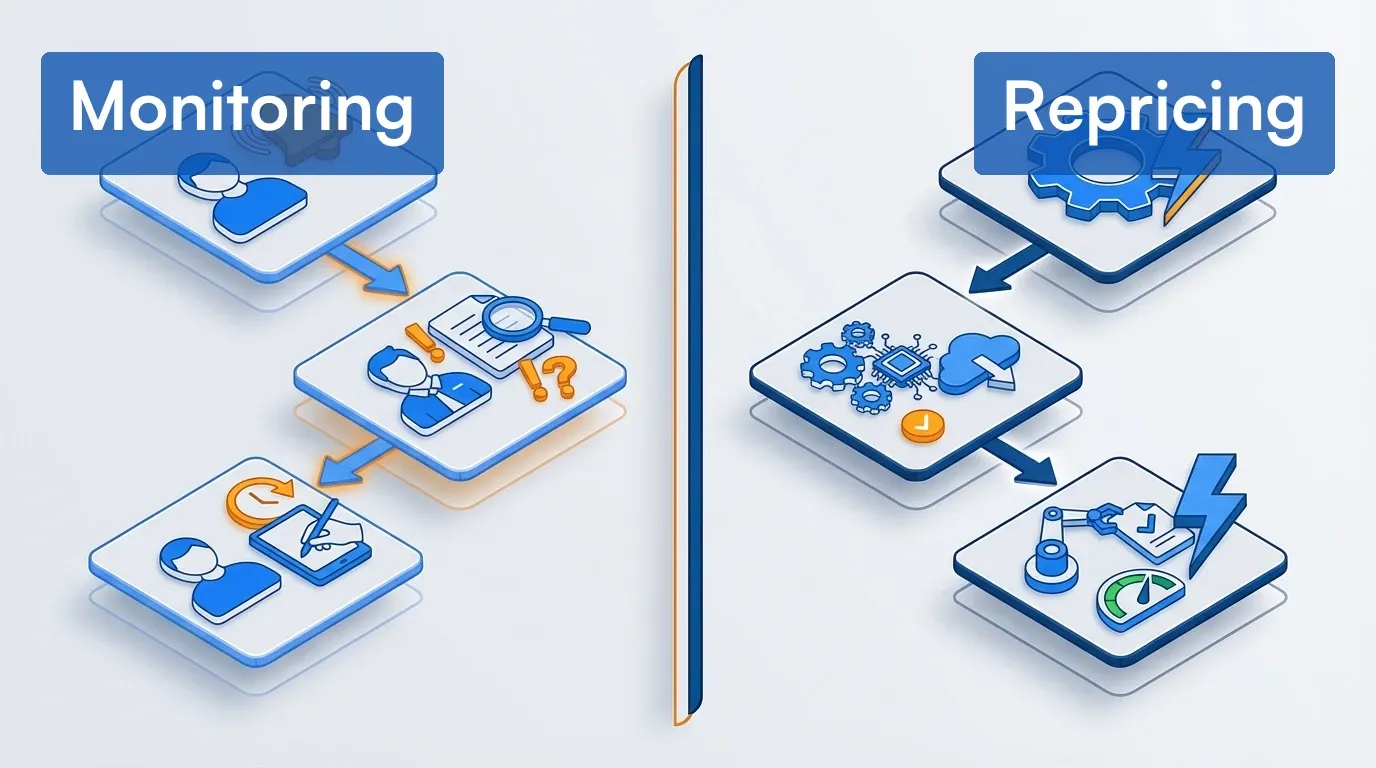 Two approaches to competitor pricing, each with different resource needs
| Need | Solution Type |
|---|---|
| Monitoring only | Change detection tools |
| Manual repricing | Monitoring + alerts to team |
| Automated repricing | Full dynamic pricing platform |
Tool Comparison Matrix
Pick by job, not by ranking. The eight tools below split cleanly into four categories based on what they actually do. Start with the category that matches your primary use case.
Change monitoring and alert-focused tools
Lightweight, fast, self-serve. Best for teams that need price alerts and visual proof without repricing.
| Tool | Best For | Monitoring Speed | Price Point | Technical Level | Automated Repricing |
|---|---|---|---|---|---|
| Visualping | Fast alerts, visual proof, AI analysis | Every 2 min (top tiers) to monthly | Free–$250+/mo, billed annually | Low–Medium | No |
| Fluxguard | Technical audits, compliance | Scheduled (5-min fastest on top tier) | Free–$550/mo | High | No |
Dedicated ecommerce price monitors
Built around a product catalog: you add your SKUs, the tool matches them to competitor listings, and it tracks price changes across every matched store. Best for ecommerce teams watching hundreds or thousands of products.
| Tool | Best For | Monitoring Speed | Price Point | Technical Level | Automated Repricing |
|---|---|---|---|---|---|
| Pricefy | Small catalogs, AI product matching | 1–2 price updates a day | Free–$499/mo ($37–$374/mo billed annually) | Low | Yes (Pro and up) |
| Prisync | Catalog tracking with stock availability | 3 price updates a day (URL-based plans) | $99–$399/mo (100 to 5,000 products) | Low–Medium | Yes (Premium and up) |
| Price2Spy | MAP and marketplace monitoring | Daily alerts on Starter; up to 8 checks a day on Premium | Quoted by URL volume | Medium | Add-on module |
Managed intelligence services
Human-curated daily price intelligence. Best for teams with budget but without internal CI headcount.
| Tool | Best For | Monitoring Speed | Price Point | Technical Level | Automated Repricing |
|---|---|---|---|---|---|
| Skuuudle | Managed daily intel | Daily–hourly | Custom ($$$) | Low | No |
Enterprise dynamic repricing platforms
Full pricing intelligence plus ML-driven automated repricing with approval workflows. Best for retailers operating at catalog scale.
| Tool | Best For | Monitoring Speed | Price Point | Technical Level | Automated Repricing |
|---|---|---|---|---|---|
| Competera | Enterprise optimization, demand modeling | Scheduled + feeds | Custom ($$$$) | Medium–High | Yes |
| Omnia Retail | Multi-channel retail, marketplace focus | Scheduled + real-time | From €399/mo; enterprise custom | Medium | Yes |
Pricing note: Enterprise pricing varies by SKU count, features, and contract terms. Always get custom quotes. For the AI-native angle on these categories, see our 10 best AI tools for competitor analysis.
Pricing Breakdown
| Tool | Free Tier | Entry Paid | Mid-Tier | Enterprise | Pricing Model |
|---|---|---|---|---|---|
| Visualping | Yes (150 checks/5 pages) | $10/mo billed annually ($14 month-to-month) | $50/mo billed annually ($70 month-to-month) | Business from $100/mo billed annually ($140 month-to-month); Solutions custom | Self-serve, per check volume |
| Competera | No | Custom | Custom | Custom (no public floor) | Custom contract, priced per catalog scope |
| Omnia Retail | No | €399/mo (single shop) | Custom | Custom | Subscription; enterprise varies by assortment and markets |
| Skuuudle | No | Custom | Custom | $10K–$1M/yr (vendor-published range) | Managed service, custom quote |
| Fluxguard | Yes (3 sites) | $110/mo | $220/mo | $550/mo | Self-serve, credit-based |
| Pricefy | Yes (50 SKUs, 5 competitors) | $49/mo ($37 billed annually) | $99/mo ($74 billed annually) | $189–$499/mo ($142–$374 billed annually) | Self-serve, by SKU count |
| Prisync | No (14-day trial) | $99/mo (100 products) | $199/mo (1,000 products) | $399/mo (5,000 products); channel-based plans $199–$599/mo | Self-serve, by product count; API adds 20% |
| Price2Spy | No (14-day trial) | Quoted (Starter) | Quoted (Basic) | Price on request (Premium) | By monitored URLs and websites; repricing is an add-on |
Pricing and free tiers re-verified against vendor sites on September 25, 2026. Price2Spy and the enterprise vendors quote prices rather than list them. Enterprise figures are estimates from public references. Get custom quotes for exact numbers.
Free competitor price tracking: what $0 actually gets you
Three tools in this comparison have a real free tier. Visualping Free monitors 5 pages with 150 shared checks a month and includes AI change summaries, email and webhook alerts, and API access. Hourly is the fastest selectable interval, but the math matters: 150 checks works out to about 5 checks a day across your pages, so daily cadences fit the quota and continuous hourly monitoring does not. Fluxguard Free covers 3 sites on its credit system. Pricefy Free tracks up to 50 SKUs against 5 competitors with one price update a day. Everything else in the category is trial-based or demo-gated: Prisync and Price2Spy run 14-day trials with no card required, and Skuuudle, Competera, and Omnia Retail start with a sales conversation. Within their plan limits (5 pages on Visualping, 3 sites on Fluxguard, 50 SKUs on Pricefy), the free tiers genuinely cover the job. Larger catalogs or frequent schedules exhaust the quota, so multiply pages by checks per month before assuming fit.
Honest Limitations and Trade-offs
Every tool here has a catch. The short list, one per tool:
- Visualping does not do repricing or automated product matching, and it shows page-change history as snapshots rather than price-history graphs. You pick the URLs; it watches them.
- Fluxguard is built for technical users, and its credit-based metering means the advertised site counts assume roughly 10 pages per site checked daily. Heavier crawling costs more.
- Prisync prices by product count, and price history and instant email alerts only arrive on the $399 Platinum plan. API access costs 20% extra, and the product-based setup fits catalogs better than one-off pages like a competitor's plan page.
- Price2Spy doesn't list prices publicly. Plans are sized by monitored URLs and websites and quoted after the trial, and repricing is a separately priced module.
- Pricefy updates prices once or twice a day on every plan, so it won't catch intraday flash-sale moves, and repricing starts on the $99 Pro plan.
- Skuuudle has no self-serve path and no repricing. You are buying a managed service; confirm contract length, renewal terms, and minimum spend in the quote.
- Competera is an enterprise implementation measured in weeks to months, with data-feed and integration work before the first recommendation lands.
- Omnia Retail publishes a €399/month single-shop entry and quotes enterprise custom; North America-only retailers should confirm coverage for their required channels and markets.
Ready to set up a monitor on a competitor's pricing page? Start with Visualping's free plan and paste your first URL in under 2 minutes. No credit card, 150 checks per month, API access on every tier.
When Each Tool Makes Sense
 Start with your catalog size, end with the right tool
Scenario 1: You need fast alerts with visual proof
Strong options: Visualping, Fluxguard
If catching price changes fast with screenshot evidence is the priority, Visualping checks as frequently as every 2 minutes on Business and top Personal plans, and every alert ships with an AI summary and a binary IMPORTANT flag on every plan, including free. Webhooks and API access are included on the free tier too. Its AI filtering summarizes changes so you're not sifting through noise. Screenshots double as proof for MAP enforcement and competitive pricing analysis. Setup takes minutes, not days.
Visualping is used by more than 2 million people, including teams at 85% of the Fortune 500. On G2, it ranks #1 in Website Change Monitoring and in the top five in Competitive Intelligence, per Visualping's company facts page; G2 restates rankings each reporting period.
When to consider Fluxguard instead: If you need HTML/DOM comparison, network traffic capture, or compliance audit trails, Fluxguard goes deeper technically ($110–$550/month).
When to consider other alternatives: If you need repricing, neither tool helps. Look at Pricefy, Prisync, or Price2Spy for rule-based repricing on a catalog, or Competera and Omnia for enterprise optimization.
Scenario 2: You track a product catalog against competitor stores
Best fit: Pricefy, Prisync, or Price2Spy
If you sell hundreds or thousands of SKUs and need every competitor price for each one in a single dashboard, a dedicated ecommerce monitor fits better than page-by-page change alerts. These tools match your products to competitor listings, then report price position and changes across the whole catalog.
Pricefy is the lowest-cost way in. Its free plan covers 50 SKUs against 5 competitors, and paid plans run from $49 a month (100 SKUs) to $499 a month (25,000 SKUs), or $37 to $374 billed annually. AI product matching is included on every plan, and dynamic repricing starts on Pro.
Prisync prices URL-based monitoring by product count: $99 a month for 100 products, $199 for 1,000, and $399 for 5,000, with prices updated three times a day and stock availability tracked on every plan. Its dynamic pricing engine arrives on Premium, and price history and MAP monitoring for suppliers on Platinum.
Price2Spy suits brands policing MAP and marketplace sellers. Its Basic tier adds MAP monitoring, marketplace monitoring, historical pricing reports, and instant alerts, and a screenshot module captures price changes as evidence. Plans are sized by URLs and websites and quoted after a 14-day trial.
When to consider alternatives: If you only need to watch a handful of competitor pages, or pages that aren't product listings (plan pages, promotions, policy pages), a change monitor like Visualping is simpler and cheaper. If you need demand-based price optimization across channels, look at Competera or Omnia.
Scenario 3: You need enterprise repricing with demand modeling
Best fit: Competera or Omnia Retail
If you need to automate price changes based on competitive position, demand elasticity, and margin rules, and the decision volume has outgrown manual review, monitoring tools won't cut it. You need a repricing platform.
Competera leans into deep learning: recommendations built on demand elasticity and cross-product effects, what-if simulations, and approval workflows with guardrails. Competera says its models predict portfolio-level business outcomes with 95%+ accuracy; treat that as a vendor claim to validate on your own catalog. Strong fit for retailers with short product life cycles.
Omnia Retail has strong European marketplace integrations (Amazon, eBay, bol.com, Kaufland, idealo, Google Shopping) and multi-channel price synchronization. Their Pricing Strategy Tree shows exactly why each price recommendation was made, which helps when category managers want to understand the logic rather than trust a black box.
Bottom line: Visualping, Skuuudle, and Fluxguard don't compete here. They don't do repricing. Pricefy, Prisync, and Price2Spy offer rule-based repricing tied to competitor prices, a lighter option than demand-based optimization. If that's what you need, evaluate Competera and Omnia directly. For monitoring-only competitor price tracking, keep reading.
Scenario 4: You want managed competitive intelligence
Best fit: Skuuudle
If you'd rather have someone else handle setup, maintenance, and data quality, Skuuudle is a managed service. They deliver daily price and stock level reports (hourly available), handle onboarding and catalog mapping, and run a human QA team that verifies data accuracy. They've been at this since 2007.
Pricing context: Skuuudle prices by custom quote; its pricing page books a demo rather than listing tiers. Skuuudle's own FAQ says customers pay between $10K and $1M per year, with first-time customers typically in the low tens of thousands and typical large enterprise retailers spending six figures annually. That's significantly more than self-serve tools, but you're paying for human-verified data quality and far less internal upkeep.
When to consider alternatives: If you need intraday alerts for flash sales, Visualping is faster. If you have the internal resources to run tools yourself, self-serve options cost a fraction of the price. And note: Skuuudle monitors competitors but does not do repricing.
Scenario 5: You need technical-grade audits and compliance
Best fit: Fluxguard
For compliance teams, QA engineers, or anyone who needs precise HTML/DOM comparison, Fluxguard is built for developers. You get side-by-side HTML diffs, network traffic capture, detailed change logs for audits, geo-specific monitoring via proxy network, and form submission tracking for gated content. It's particularly useful for regulatory compliance (GDPR, CCPA monitoring).
Pricing: Free tier (3 sites), then $110/mo for about 25 sites, $220/mo for 50, and $550/mo for 100, each with a 7-day trial. Fluxguard meters usage on a credit system, so actual capacity varies with crawl frequency (verified on Fluxguard's pricing page, September 25, 2026).
When to consider alternatives: If non-technical team members need to use the tool, Visualping is more accessible. If visual diffs are sufficient and you don't need HTML-level analysis, Fluxguard is probably more tool than you need.
Scenario 6: General competitive monitoring beyond just pricing
Strong options: Visualping, Fluxguard
If competitor price tracking is just one part of broader competitive monitoring (content changes, feature launches, policy updates), generalist tools handle the range better than specialized repricing platforms. You get broader monitoring beyond just prices (see how to analyze competitor websites), side-by-side visual comparisons, historical archives with timestamps, and simpler setup.
Setup Walkthrough: Visualping
Time required: 10–15 minutes for initial setup
Step 1: Account Setup
- Sign up at visualping.io/sign-up
- Choose plan based on check frequency needs
- Install browser extension (optional but helpful for selection)
Step 2: Add Your First Monitor
- Enter competitor product page URL
- Use visual selector to highlight just the price region, or use "Full Page" monitoring with AI context
Here's the setup screen with a competitor product page loaded and an "Alert me when" condition for price drops. Visualping AI suggests product-specific conditions, like price and availability changes, as soon as the page loads.
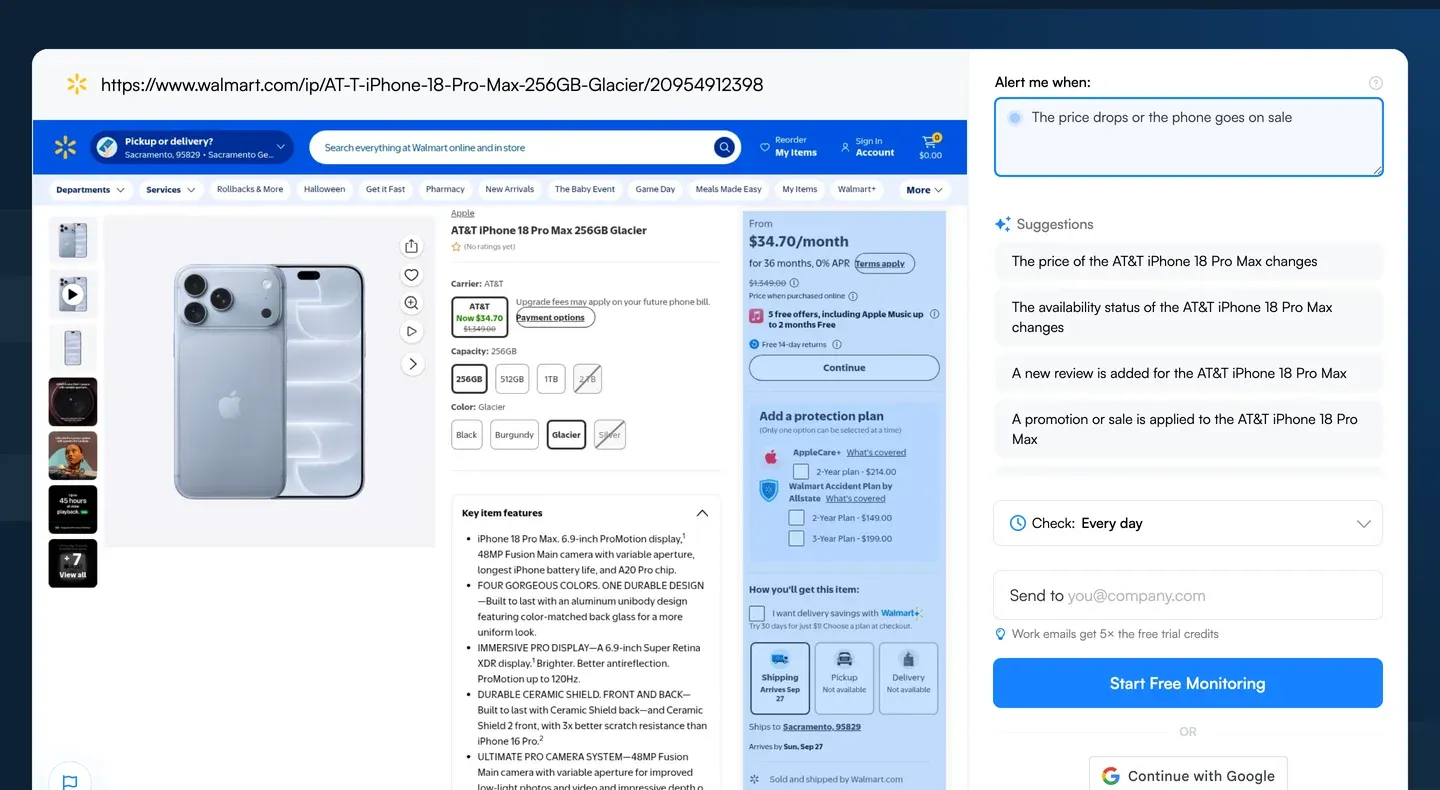 Paste a competitor product URL, then describe the price change you want to hear about
Step 3: Configure Check Frequency
| Product Category | Recommended Frequency |
|---|---|
| Consumer electronics, flash sales | 15–30 minutes |
| Standard retail | 30–60 minutes |
| Stable categories | Daily |
Sub-hourly intervals are paid-tier features. The free plan checks hourly at fastest, within its 150-check monthly quota.
Step 4: Set Up AI-Powered Alerts
Example AI prompt for the "Alert me when" field:
Alert me when:
- Price decreases by any amount
- Price increases by more than 5%
- Product shows as "out of stock"
- Free shipping is added or removed

Ignore:
- Small formatting changes
- Review count updates
- Timestamp changes
Step 5: Configure Notifications
- Email: Immediate for critical changes
- Slack: Team channel for visibility (native Slack is a Business-plan integration; integration guide)
- Webhook: Custom integrations
Here's what a Visualping competitor price tracking alert looks like (fictional price increase):
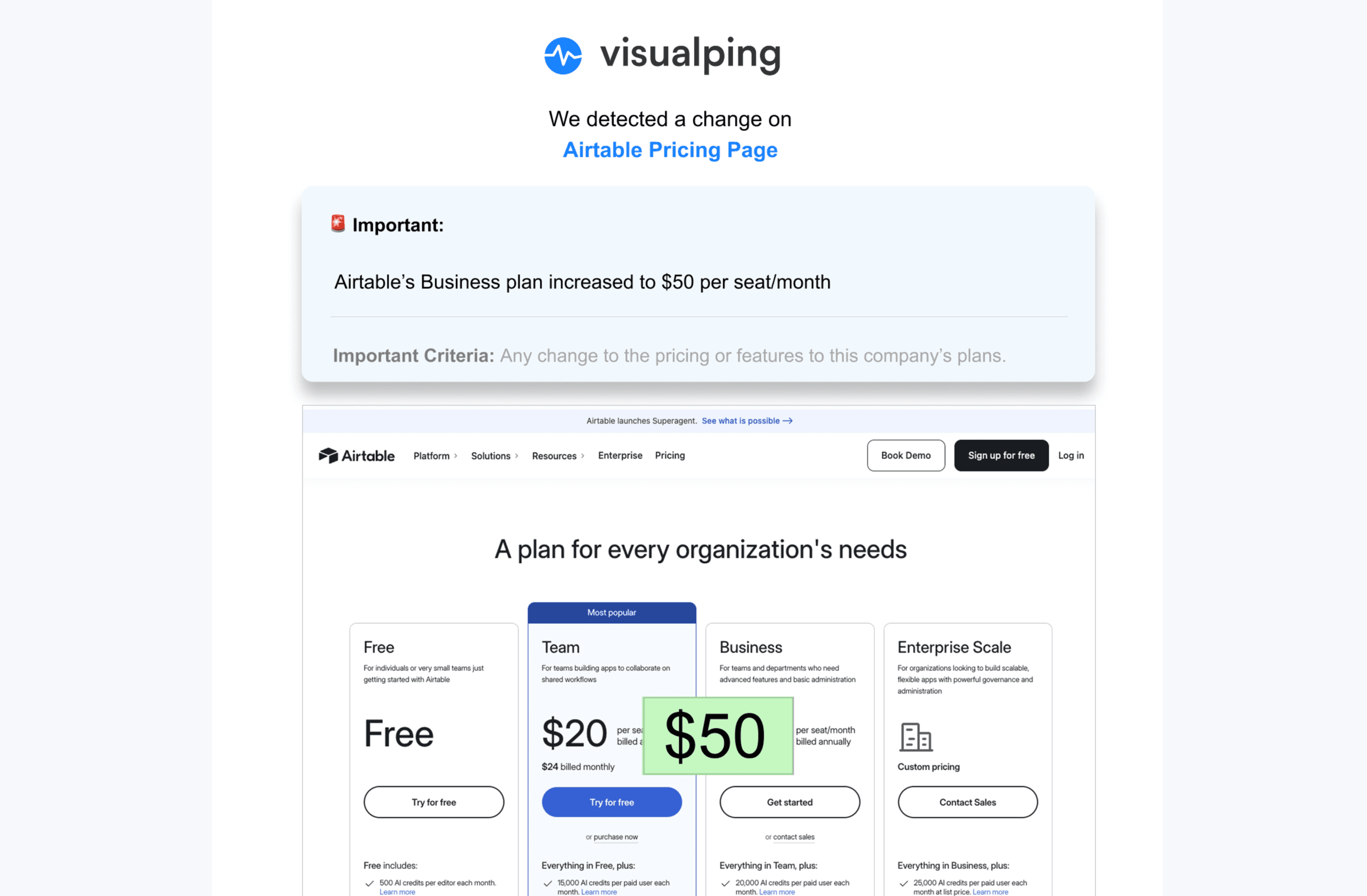
Step 6: Scale with bulk import For monitoring multiple SKUs, use bulk import (every plan, up to your page limit) and labels (Business plans):
- Prepare your URL list with names and check frequencies
- Use the bulk import feature
- Apply labels for category-level management
Common mistakes to avoid:
- Using same check frequency for all items (wastes resources on stable products)
- Forgetting to tag monitors (hard to manage at scale)
Setup Overview: Competera
If you're evaluating enterprise repricing, here's the shape of a typical Competera evaluation. Treat the specifics below as questions to confirm with the vendor rather than a documented playbook:
Time required: Several weeks to months (varies by project scope)
Phase 1: Discovery
- Catalog audit and SKU mapping
- Competitor identification
- Define matching logic (UPC, EAN, manual equivalence)
- Set business rules and constraints
Phase 2: Integration
- Connect pricing system via API or FTP
- Set up competitor data feeds
- Configure matching algorithms
- Build approval workflows
Phase 3: Training
- Historical data analysis (2+ years ideal, 6 months minimum)
- Demand curve modeling
- Elasticity calculation
- Rule refinement
Phase 4: Launch
- Shadow mode testing
- Gradual rollout by category
- Monitor results vs. expectations
- Algorithm tuning
Resource requirements:
- Dedicated project manager
- IT team for integrations
- Category managers for rules
- Executive sponsor for governance
For detailed implementation guidance, contact Competera directly.
Setup Overview: Omnia Retail
Time required: Varies by project complexity
Omnia Retail uses a consultative deployment model. As with Competera, confirm the specifics below with the vendor:
Onboarding Phase
- Catalog mapping workshop
- Competitor selection
- Portal access and training
Data Setup
- Product feed configuration
- Competitor scraping setup
- Marketplace connections (Amazon, eBay, bol.com, etc.)
Strategy Building
- Pricing strategy workshops
- Rule configuration using Pricing Strategy Tree™
- Approval workflow design
Testing & Launch
- Test pricing scenarios
- Monitor mode deployment
- Gradual automation increase
Worth noting: Omnia's Pricing Strategy Tree shows exactly why each price recommendation was made. Category managers can trace the logic rather than trust a black box.
For detailed implementation guidance, request a demo from Omnia.
Best Practices That Actually Work
 Best practices from teams running price tracking operations daily
These are editorial recommendations shaped by common price-monitoring workflows on our platform. Nearly 15,000 users selected competitor monitoring during onboarding, and their setups inform what scales:
1. Match products precisely
Tracking "similar" items creates bad data. Match exact SKUs when possible (UPC, EAN, GTIN (Global Trade Item Number)), document equivalence rules (Size L vs. Size 12, etc.), track regional variants separately, and note packaging differences that affect price.
How each tool handles this: Visualping is manual matching (you control quality). Pricefy includes AI matching on every plan, Price2Spy sells automatic matching as a module and matching as a service, and Prisync offers a paid competitor matching service. Competera and Omnia automate matching but can get it wrong (spot-check critical SKUs). Skuuudle has a human QA team that handles matching for you.
2. Monitor the total landed price
Customers buy based on final price, not list price. Track the full picture: base price, shipping costs, promotional discounts, membership pricing (Amazon Prime, etc.), bundle pricing, and volume discounts. A competitor who looks $10 more expensive on list price might be $5 cheaper after free shipping kicks in.
3. Tier your monitoring cadence
Checking everything every 5 minutes wastes resources. Tier by priority:
| Priority Level | Check Frequency | Examples |
|---|---|---|
| Critical | 5–15 min | Consumer electronics, MAP (Minimum Advertised Price)-protected brands, flash sale windows |
| High | 30–60 min | Best sellers, seasonal items, promotional periods |
| Standard | Daily | Fashion, apparel, general catalog |
| Low | Weekly | Long-tail, slow-moving inventory |
4. Create response SOPs
Alerts without action plans create alert fatigue. Build playbooks before you need them:
Competitor drops price by 5–10%:
- Alert category manager (Slack)
- Review within 2 hours
- Match if margin > 15%
- Escalate if margin would drop below 15%

Competitor drops price by 10%+:
- Alert VP Merchandising (SMS)
- Emergency pricing meeting
- Decision within 1 hour
Routing note: native Slack alerts are a Business-plan integration, and SMS starts on the Personal plan ($25/mo billed annually, $35 month-to-month).
5. Review and refresh quarterly
Quarterly checklist:
- Add new competitors that entered market
- Remove competitors that exited
- Update product URLs (pages change with redesigns)
- Refine monitoring regions
- Review tag/category structure
- Audit alert effectiveness
Want to apply these practices to your first competitor in under 5 minutes? Visualping's free plan covers the monitoring core of all five on a daily cadence, with AI change summaries on every alert and 150 automated checks per month across 5 pages. Slack routing needs a Business plan. Bulk import works on every plan.
Frequently Asked Questions
How accurate is automated price matching?
Honest answer: It depends on product complexity, and no vendor publishes comparable accuracy numbers. Matching quality varies with catalog structure, identifier coverage, attribute completeness, and how aggressively the tool's confidence threshold is set. Exact UPC, EAN, or GTIN matches are the easy case. Apparel size and color variants are harder. Private-label and ambiguous descriptions are hardest, and usually need human review.
Recommendation: Start with manual matching for your top 20% of revenue-driving SKUs. Use automated matching for long-tail with spot-check validation, and ask any vendor how they measure match accuracy on catalogs like yours before trusting a number.
Should I monitor marketplaces differently than retailer sites?
Yes. Marketplaces are messier: multiple sellers for the same product, pricing that changes every few minutes, fluctuating stock levels, and shipping costs that vary by seller.
Best approach: use API connections when available (Amazon SP-API, Walmart Marketplace API) and track the "winning buy box" price rather than every seller. See our guides on Amazon price tracking and Walmart price tracking for retailer-specific setups. If you sell on marketplaces yourself, Omnia and Competera have marketplace-specific features for managing your own listings.
How do I avoid alert fatigue?
Four things that actually help: First, monitor specific page elements (the price box) rather than full pages. Use region selection and AI context filtering to cut out the noise. Second, set minimum change thresholds (only alert if >$5 or >5%). Third, aggregate non-critical items into a daily digest and save immediate alerts for high-priority SKUs only. Fourth, route alerts to the right people. Different teams get different alerts, ideally via separate Slack channels by product category.
When do I need full repricing vs. just monitoring?
Monitoring is enough while your team can review alerts and act within the cadence your market demands. Consider repricing automation when pricing decisions outrun the people making them: multi-channel competition, daily price movement, or a catalog too large to reprice by hand. Catalog size alone does not decide it.
The cost gap is real but starts lower than most roundups claim. Self-serve monitoring starts free, with paid plans from $10 per month billed annually. Self-serve catalog repricing starts at $99 a month on Pricefy's Pro plan ($74 billed annually), and Omnia publishes a €399 per month single-shop repricing entry. Managed intelligence and enterprise repricing are custom-quoted and can run to six or seven figures a year at the top of the market.
Can I monitor competitors legally?
This isn't legal advice (consult counsel for your situation). Laws vary by jurisdiction and enforcement is evolving. In the United States, a federal appellate court held that accessing public pages without bypassing an authorization gate likely falls outside the Computer Fraud and Abuse Act, but that ruling does not resolve contract, copyright, privacy, or non-US law (more on monitoring legality). Automated scraping at scale gets into gray areas depending on jurisdiction and terms of service. Creating accounts under false pretenses or circumventing technical protections is where things get risky.
Safer approaches: use official APIs where available, use tools that respect robots.txt (prudent crawler practice, though robots.txt is not legal permission or a safe harbor), monitor at reasonable frequencies, and don't impersonate users or bypass authentication.
How do I track competitor prices for free?
Most monitoring tools offer free tiers with limited checks. Visualping's free plan covers 150 shared checks a month across 5 pages, which supports daily-cadence tracking of a handful of products. Fluxguard offers 3 free sites, and Pricefy's free plan tracks up to 50 SKUs against 5 competitors with one price update a day. Google Alerts can surface newly indexed pages and mentions for a brand or product, but it does not check pages on a schedule or detect price edits, so use it for mentions rather than as a price monitor. The broader limitation: free tools cap check frequency and page count, so you'll outgrow them once you're tracking more than a handful of SKUs.
What's the difference between price tracking and competitive intelligence?
Price tracking is one input into competitive intelligence, not the whole picture. Competitor price tracking focuses specifically on pricing changes, stock levels, and promotional activity. Competitive intelligence is broader: it includes product launches, content changes, hiring patterns, messaging shifts, and strategic moves. Most teams start with price tracking because the ROI is immediate and measurable, then expand monitoring as they see the value.
How often should I check competitor prices?
It depends on your market velocity. Consumer electronics and flash-sale categories need checks every 5 to 30 minutes. Standard retail and apparel can get away with hourly or daily. Stable B2B categories might only need weekly checks. The most common mistake is checking everything at the same frequency. Tier your catalog by priority (see the best practices section above) and match check frequency to how fast prices actually move in each category.
Related reading
- MAP Pricing Compliance: Key Strategies for Retail Success
- Retailer Price Monitoring Guide
- How to Conduct a Competitive Pricing Analysis
- How to Monitor Executive Leadership Changes
- Monitoring Competitor Facebook and Instagram Ad Libraries: How...
- Best Intent Data Providers for B2B Teams in 2026
- The 4 Types of B2B Intent Data (and the One Most Teams Miss)
- Competitor Monitoring Study 2026: What 12,000 Tracking Jobs Re...
Summary Recommendations
For monitoring-focused use cases (no repricing):
| Your Situation | Consider | Why |
|---|---|---|
| Need fast alerts, easy setup | Visualping | 4.6/5 on G2 across 415 reviews (April 2026), AI summaries, accessible pricing |
| Need technical audits, compliance | Fluxguard | HTML diffs, compliance features, proxy network |
| Want managed service, have budget | Skuuudle | Human QA, less internal work, monitoring since 2007 |
| Track a product catalog against competitor stores | Pricefy, Prisync, or Price2Spy | Automated product matching and catalog-wide price position; repricing optional on higher tiers |
For repricing use cases:
| Your Situation | Consider | Why |
|---|---|---|
| Enterprise, demand modeling focus | Competera | Deep-learning price optimization with approval workflows |
| Multi-channel, marketplace focus | Omnia Retail | G2 Leader badge (per its site, July 2026), strong European marketplace integrations |
Our honest recommendation: Compare the self-serve tools hands-on and demo the enterprise platforms before committing. Every business is different. If you're unsure whether you need monitoring or repricing, start with monitoring. It's lower cost, lower risk, and you'll learn what data you actually use before investing in automation. Our free price tracker guide walks through setup. Upgrade to repricing when manual decisions become a bottleneck. And yes, we'd suggest considering Visualping if speed and ease of use matter to you, but that recommendation comes from a biased source.
Contact: LinkedIn | press@visualping.io
Want to monitor web changes that impact your business?
Sign up with Visualping to get alerted of important updates from anywhere online.
Eric Do Couto
Eric Do Couto is the Head of Marketing at Visualping. He leads content strategy, growth operations, and brand positioning for website change detection.
More articles by Eric Do Couto