Website Monitoring for Journalists: Why the Audit Trail Matters More Than the Alert | Visualping Blog
Updated January 22, 2026
By the Visualping Content Team
Last Updated: January 2025
Disclosure: This article is published by Visualping on our company blog. Visualping develops page monitoring agents (also known as website monitoring tools), and we have a commercial interest in this topic. While we have aimed to provide genuinely useful information about journalist verification workflows, readers should be aware that our perspective reflects our product experience. We encourage journalists to evaluate multiple solutions based on their specific needs and budget.
The Alert Is the Beginning, Not the End
For most website monitoring use cases, an alert is the finish line. Something changed, you got notified, you acted on it. Done.
Journalism works differently.
When a government agency quietly updates its leadership page, when a company revises its terms of service, when a public figure edits their social media biography, the notification is where your work begins. You need to verify what changed. You need to document when it changed. And you need evidence that holds up when your story publishes.
This creates a specific requirement that separates journalistic monitoring from general website tracking: the need for a verifiable chain of documentation.
What Verification Actually Requires
The Society of Professional Journalists' Code of Ethics establishes clear standards for verification. The code instructs journalists to "take responsibility for the accuracy of their work" and to "verify information before releasing it" while using "original sources whenever possible." These principles apply directly to documenting digital sources.
Standard website alerts tell you something happened. Verification requires proof of what happened. These are not the same thing.
A complete verification workflow demands three elements:
Timestamped Documentation Every change needs a precise timestamp. Not "sometime last week" but "2025-01-21 at 14:32 UTC." This matters when you are reconstructing timelines, correlating events, or establishing that a change preceded a specific news development.
Visual Evidence Screenshots capture what the page looked like before and after. This is essential when content disappears entirely. If a press release vanishes from a company website, your screenshot may be the only evidence it existed. Preserving internet content becomes particularly important when sources may have incentive to alter or remove information.
Change History A single snapshot shows you one moment. A history shows you patterns. Was this the first edit to this page, or the fifth this month? Did changes accelerate after a news event? The sequence matters.
Investigative Reporters and Editors (IRE), the nonprofit organization dedicated to improving investigative journalism quality, emphasizes "excellence in documentation" as a core criterion for outstanding reporting. Their training programs specifically address digital verification techniques, recognizing that web pages can change or disappear without notice.
Visualping stores this documentation automatically. When a monitored page changes, you receive an alert with a screenshot showing the specific modifications highlighted. The change history remains accessible in your dashboard for later reference.
Practical Monitoring Scenarios for Newsrooms
The value of website monitoring depends heavily on what you track. Here are applications where the audit trail proves particularly useful.
Government and Regulatory Pages Agencies update policies, release guidance, and publish reports on their websites. Monitoring government agency pages lets you catch these updates as they happen, with documentation of exactly what changed. This applies to regulatory filings, FOIA portals, meeting agendas, and legislative tracking. For journalists covering regulatory beats, understanding how to monitor regulatory changes can surface stories before official announcements.
Corporate Communications Executive team pages, investor relations content, terms of service, and privacy policies all provide signals worth watching. When a company promotes, demotes, or removes an executive from its leadership page, that documented change can anchor a story. These signals form part of what competitive intelligence professionals track systematically.
Press Releases and Announcements Organizations sometimes revise press releases after publication. Tracking press release pages preserves the original version alongside any modifications.
Social Media and Public Profiles Key figures frequently update their public profiles. Monitoring these pages captures biography changes, role updates, and other modifications. A documented screenshot with capture time provides attribution that "I saw this on their profile" cannot match.
Wikipedia and Reference Sources Wikipedia change alerts can reveal when pages about specific people, companies, or events undergo significant edits. While Wikipedia edits are publicly logged, monitoring alerts you immediately rather than requiring you to remember to check.
The Citation Problem
Journalistic standards require attribution. When you write that a company changed its pricing page, your editor will ask how you know. When you report that an agency removed a document, your fact-checker will want proof.
The SPJ Code of Ethics states that journalists should "identify sources clearly" because "the public is entitled to as much information as possible to judge the reliability and motivations of sources." This applies equally to digital sources. A screenshot with a timestamp serves as verifiable documentation in ways that memory or notes cannot.
"I got an alert" is not a citation.
A screenshot showing the before state, the after state, and a visible timestamp of when the page was captured is a citation. Visualping records when changes are detected in your dashboard, but adding a visible timestamp overlay to screenshots requires a simple configuration step covered below.
This becomes particularly important when:
- The original content is no longer accessible
- The source may dispute your characterization of what changed
- Legal review requires documentation of your reporting basis
- Your story runs days or weeks after the initial change
One practical feature for editorial workflows: Visualping allows you to share an embeddable visual diff showing exactly what changed between two versions of a page. Rather than forwarding screenshot attachments or describing changes verbally, you can send editors and fact-checkers a direct link to the documented change. This streamlines the verification conversation and creates a reference point that multiple team members can access independently. The same link can travel beyond your desk: the Miami Herald and The Guardian both linked one public diff in their September 2026 coverage of a Florida campaign website update.
Setting Up a Monitoring Workflow
Effective monitoring balances comprehensiveness against noise. Tracking every page on the internet would generate overwhelming alerts. Tracking nothing leaves you reactive rather than proactive.
Start with high-priority targets. Identify the government agencies, companies, individuals, and organizations relevant to your beat. Focus on pages likely to contain newsworthy information: leadership pages, press sections, policy documents, public filings.
Configure smart alerts to filter changes. Visualping's AI features let you describe what matters in plain language using the "Alert me when" field (for example, "Alert me when there's a change to the executive team" or "Alert me when pricing changes"). Select "Only alert me when the condition is met" to ensure you receive notifications solely for changes matching your criteria. This eliminates noise from footer updates, date changes, or other irrelevant modifications. For simpler filtering, keyword alerts let you specify specific terms or phrases to watch for.
Set check frequencies based on urgency. Breaking news situations may warrant frequent checks. Ongoing investigations can use daily or weekly monitoring. Visualping offers monitoring intervals ranging from every five minutes to monthly, depending on your needs and plan tier.
Integrate alerts into your existing workflow. Email alerts work for many journalists. Those working in collaborative newsroom environments may prefer Slack integration to keep the team informed.
Choosing the Right Approach for Your Workflow
Different monitoring methods suit different needs. Here is an honest assessment of options, including where Visualping fits and where alternatives may serve you better.
Manual Checking Best for: Highest-priority sources requiring human judgment; situations where context matters more than speed; journalists with only a handful of critical pages to track. Strengths: No cost, human judgment applied to every check, no risk of false positives. Limitations: Does not scale beyond a handful of sources; relies on memory to maintain consistency; you will inevitably miss changes that happen between checks. Cost: Free (your time)
Internet Archive / Wayback Machine Best for: Historical research; finding past versions of pages; situations where you need to see what a page looked like months or years ago; free archival needs. Strengths: Captures billions of pages, provides historical depth no active monitoring tool can match, completely free, widely recognized as a legitimate source. Limitations: No alerting; capture timing is outside your control; may miss short-lived changes; not designed for proactive monitoring. Cost: Free Note: For many journalists, combining Wayback Machine for historical research with active monitoring tools for current tracking provides comprehensive coverage. The archive alternatives page discusses when each approach is appropriate.
RSS Feeds Best for: Sites that maintain feeds; tracking new content publication rather than modifications to existing pages; journalists already using feed readers. Strengths: Free, reliable for sites that support RSS, integrates with existing news consumption workflows. Limitations: Many organizations no longer maintain RSS feeds; RSS does not capture content modifications, only new posts; declining support across the web. Cost: Free (with reader apps)
Dedicated Monitoring Tools (Including Visualping) Best for: Tracking modifications to existing content; scaled monitoring across many sources; automated documentation with screenshots and change detection logs. Strengths: Automated scheduling, screenshot archiving, change highlighting, configurable alert thresholds. Limitations: Subscription costs for full features; learning curve for configuration; may generate noise from irrelevant changes without proper filtering (AI-powered alert conditions can mitigate this); limited functionality on pages requiring authentication. Cost: Free tiers available with limited checks; paid plans start around $10/month for expanded monitoring.
Where Visualping Fits: Visualping works well for journalists who need automated screenshot documentation of webpage changes with logged detection times (visible timestamps can be added via a free script). Our free Journalist Plan provides the Starter tier at no cost (valued at $120/year), which allows monitoring up to 25 pages daily or checking one page hourly. However, Visualping is not a replacement for archival research tools like the Wayback Machine, and journalists with extensive monitoring needs may find the free tier insufficient for their requirements.
When Visualping May Not Be the Best Choice
Transparency requires acknowledging limitations. Consider alternatives if:
You primarily need historical research: The Internet Archive's Wayback Machine offers deeper historical coverage than any active monitoring tool. For investigating what a page looked like months or years ago, start there. Active monitoring tools like Visualping track changes going forward from when you set up monitoring.
Your sources publish via RSS: If the sites you track maintain RSS feeds and you only need notification of new posts (not modifications to existing content), a free feed reader may provide everything you need without subscription costs.
You need monitoring behind complex authentication: While Visualping can monitor some authenticated pages with configuration, complex login systems, multi-factor authentication, or pages requiring interaction may need specialized tools or manual approaches.
Budget is a primary constraint: The free Journalist Plan has usage limits (25 pages daily or 1 page hourly). Journalists with extensive monitoring needs but limited budgets should evaluate whether the free tier meets their requirements before relying on it for critical coverage.
You need true real-time monitoring: Visualping checks pages at intervals you configure (minimum five minutes on paid plans, less frequent on free tiers). For genuinely real-time needs where minutes matter, different approaches may be necessary.
You are monitoring highly dynamic pages: Pages with constantly changing elements (live stock tickers, social feeds, rotating advertisements) may generate excessive alerts. The "Alert me when" AI feature with "Only alert me when the condition is met" can help filter to meaningful changes, but some pages are simply not well-suited to automated monitoring.
What Journalists Say About Website Monitoring
Azmat Khan, investigative journalist at The New York Times, has described her approach: "This is a tool I really liked. You can easily customize it to alert you to specific site changes you're interested in."
Malina McLennan, data journalist at the Organized Crime and Corruption Reporting Project (OCCRP), uses website monitoring to track sources: "I also use Visualping, which sends you an alert when a website has been updated. Useful for those websites of interest that update infrequently enough for it not to make sense to check them every day."
These use cases illustrate the practical application: monitoring pages that change infrequently enough that manual checking is inefficient, but importantly enough that missing updates would impact reporting.
Documentation Best Practices
Even with automated monitoring, maintaining good records requires attention.
Organize by Source Group your monitored pages logically. Separate government sources from corporate targets. Create dedicated folders or labels for active investigations versus general beat coverage.
Preserve Context When you receive an alert that becomes relevant to a story, note why it matters. Six months later, the connection may not be obvious from the screenshot alone.
Export Critical Evidence For changes directly supporting a story, export the documentation. Do not rely solely on cloud storage. Print screenshots. Save local copies. If the monitoring service experiences problems, your evidence should survive.
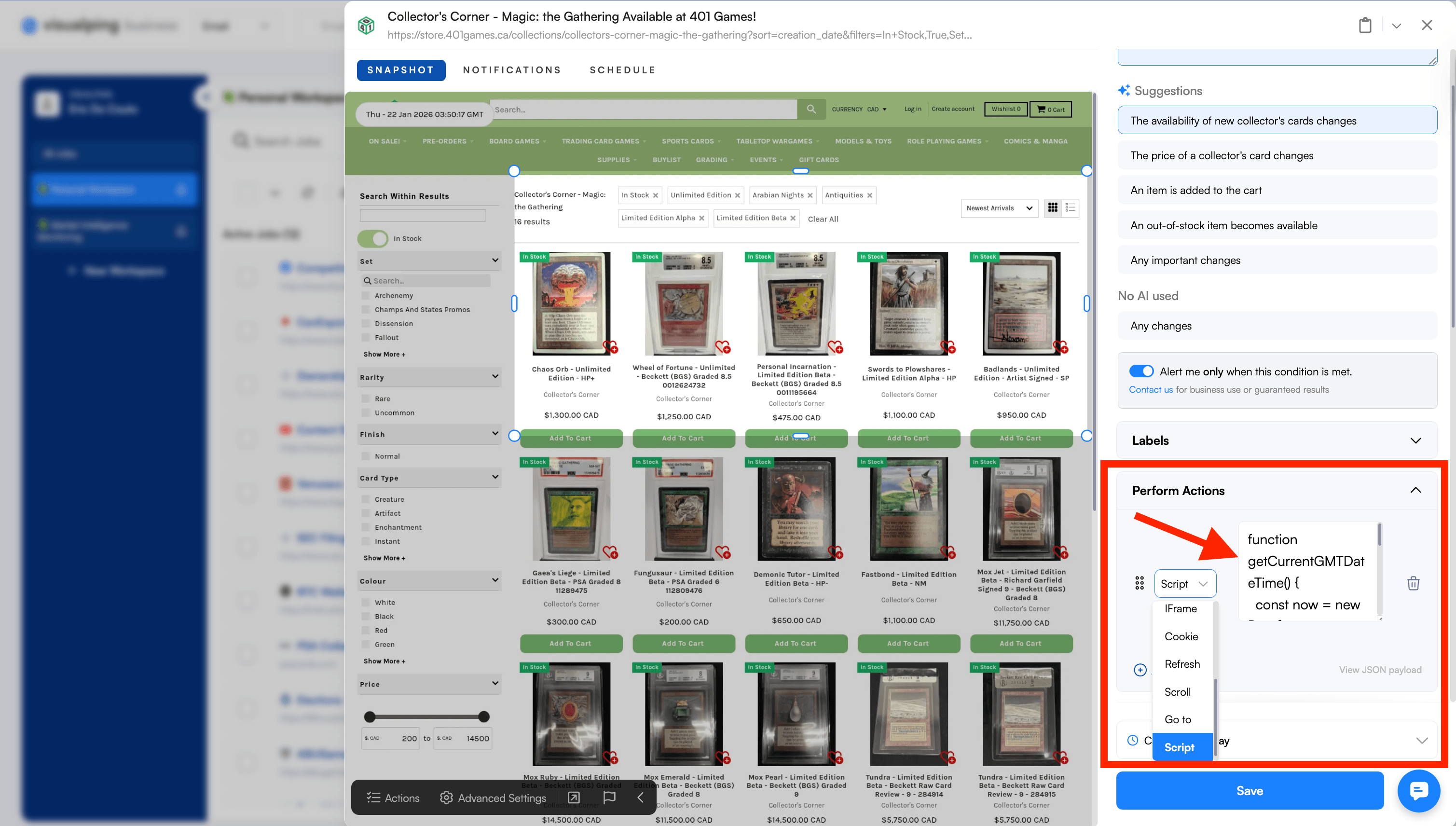
Add Visible Timestamps to Screenshots Visualping records when changes are detected, but the screenshots themselves do not include a visible timestamp by default. For journalists who need a timestamp displayed directly on the captured image, you can add a free JavaScript action to your monitoring job. This script overlays the current GMT date and time on every screenshot:
function getCurrentGMTDateTime() {
  const now = new Date();
  const gmtString = now.toGMTString();
  const formattedDateTime = gmtString.replace(", ", " - ");
  return formattedDateTime;
}
const timestampDiv = document.createElement('div');
timestampDiv.classList.add('timestamp');
timestampDiv.textContent = getCurrentGMTDateTime();
timestampDiv.style.position = 'fixed';
timestampDiv.style.top = '20px';
timestampDiv.style.left = '20px';
timestampDiv.style.zIndex = '1000';
timestampDiv.style.padding = '10px 20px';
timestampDiv.style.backgroundColor = 'white';
timestampDiv.style.borderRadius = '80px';
timestampDiv.style.border = '1px solid #ddd';
document.body.appendChild(timestampDiv);
Add this as a custom action in your Visualping monitoring settings. The timestamp will appear in the top-left corner of each screenshot, providing visible documentation of capture time that persists when you export or share the image.
Maintain Audit Trails for Auditable Stories High-stakes investigative work may require demonstrating the integrity of your evidence chain. Document when you started monitoring each source and maintain records of your methodology.
What Monitoring Does Not Replace
Website monitoring augments traditional journalism. It does not replace verification, sourcing, or editorial judgment.
A screenshot proves what a page displayed at a specific time. It does not prove why the change was made, who authorized it, or whether the change reflects underlying reality. That still requires reporting.
The SPJ Code of Ethics reminds journalists to "gather, update and correct information throughout the life of a news story." Monitoring can surface leads worth pursuing. Deciding which leads merit investigation remains human work.
Getting Started
For journalists interested in website monitoring, Visualping provides a free Journalist Plan that includes the Starter tier at no cost. This offers up to 25 pages monitored daily or one page checked hourly, sufficient for tracking key sources on a beat.
To qualify, you need to be a working journalist (staff or freelance) at a recognized publication or media organization. The plan provides lifetime access with no strings attached.
Begin with a focused list of targets. Government agencies and corporate pages relevant to your regular coverage make sensible starting points. Expand monitoring as you identify additional sources worth tracking.
For journalists whose needs exceed the free tier, paid plans start at approximately $10/month for individual users, with team plans available for newsrooms.
The goal is not to monitor everything. The goal is to ensure that when something newsworthy changes on a page that matters to your reporting, you have screenshot-documented proof with verifiable capture times.
Because in journalism, an alert without evidence is just a rumor you cannot print.
Related Resources
- Website Monitoring for Journalists - Free monitoring plan for working journalists
- AI Tools for Journalists - Overview of technology resources for newsrooms
- Regulatory Intelligence Monitoring - Tracking policy and compliance changes
- Competitive Monitoring - Tracking organizational and market changes
Visualping is a page monitoring agent used by journalists, researchers, and organizations to monitor web content. This article describes functionality available across Visualping plans, including the free Journalist Plan. Visualping has a commercial interest in journalists adopting our tools; we have aimed to provide balanced information to help you make an informed decision. For questions about journalist eligibility or features, visit the journalists page.
FAQ
How often should journalists monitor government websites? Monitoring frequency depends on urgency. For breaking stories, checks every 15 to 30 minutes may be appropriate (available on paid plans). For ongoing beat coverage, daily monitoring typically suffices. Weekly checks work for lower-priority sources unlikely to produce time-sensitive changes. The free Journalist Plan allows daily checks on up to 25 pages.
Can website monitoring capture pages behind paywalls or logins? Standard monitoring captures publicly accessible pages. Password-protected content requires authentication configuration, which may raise terms of service considerations. Visualping offers some authenticated monitoring capabilities, but complex login flows may not work reliably. Always verify that your monitoring complies with the site's policies.
How long does Visualping retain change history? Visualping retains change history and screenshots in your account dashboard. Retention periods vary by plan tier. For long-term investigations, we recommend exporting documentation periodically to maintain your own archive independent of any third-party service.
Is website monitoring legal for journalism? Monitoring publicly accessible web pages is generally lawful. However, automated access may implicate terms of service, and certain jurisdictions have specific rules around computer access. The SPJ Code of Ethics advises that "legal access to information differs from ethical justification to publish." When in doubt, consult your newsroom's legal team.
What file formats can Visualping monitor? Visualping monitors web pages and can track changes to online PDFs and documents. Text-based monitoring extracts content changes, while visual monitoring captures layout and design modifications. Some complex file formats may have limited support.
How do I reduce noise and get alerts only for important changes? Visualping's AI-powered filtering is the most effective way to eliminate irrelevant alerts. Use the "Alert me when" field to describe what matters in plain language, such as "Alert me when there's a leadership change" or "Alert me when the policy document is updated." Then select "Only alert me when the condition is met" to ensure you only receive notifications for changes matching your description. For simpler needs, keyword alerts let you specify exact terms or phrases to watch for, notifying you only when those words appear or disappear from the monitored area.
What alternatives to Visualping should journalists consider? For historical research, the Internet Archive's Wayback Machine is indispensable and free. For tracking new content on RSS-enabled sites, free feed readers work well. Other dedicated monitoring tools include ChangeTower, Distill.io, and Hexowatch, each with different pricing structures and feature sets. We encourage journalists to evaluate options based on their specific needs.
How does Visualping compare to free monitoring tools? Free tools like browser extensions or basic RSS readers work for simple use cases. Visualping's advantages include screenshot archiving, AI-powered change summaries, team collaboration features, and API access. Whether these features justify the cost depends on your monitoring volume and documentation requirements. The free Journalist Plan offers a middle ground for those who need more than basic tools but cannot justify paid subscriptions.
Want to monitor the web with AI?
Sign up with Visualping to track web changes with AI and save time, while staying in the know.
Eric Do Couto
Eric Do Couto is the Head of Marketing at Visualping. He leads content strategy, growth operations, and brand positioning for website change detection.
More articles by Eric Do Couto