Competitive Matrix Examples and a Free Template
Updated October 21, 2026
TL;DR: A competitive matrix is a grid that compares your product with competitors on the criteria buyers care about. This guide walks through 5 competitive matrix examples (feature comparison matrix, competitive positioning matrix, competitive profile matrix, competitive advantage matrix and price matrix), gives you a copy-ready template, and shows how to keep it accurate. In Visualping's H1 2026 data, 84.5% of monitored competitor pricing pages changed within six months, so every cell needs a source and a monitor.
A competitive matrix is a table or chart that lines up your product next to your competitors on the same set of criteria, such as features, price, target customer or support. Rows hold the criteria, columns hold the companies, and each cell answers one question: how does this company compare on this point? The result shows where you lead, where you trail and where nobody competes yet. Product marketing and competitive intelligence teams use it to decide what to build, how to price and what to say on sales calls.
The hard part is keeping a matrix true after you build it. Competitors rename plans, move features between tiers and rewrite their homepage. A matrix built in March can be wrong by May, and nobody notices until a prospect points it out on a sales call. This guide covers both halves: which matrix to build, and how to keep it current.
What goes into a competitive matrix
Every competitive matrix has three parts.
- Companies. Your product plus three to six competitors. Include direct and indirect competitors if buyers weigh them against you, such as a spreadsheet your product replaces.
- Criteria. The points a buyer uses to decide: features, price, integrations, support, ease of setup, target market. Pick the ones that come up in real deals rather than the ones your product happens to win.
- Evidence. The value in each cell, plus where it came from and when you checked it. This is the part most matrices skip, and it is the reason most matrices drift out of date.
You will also see the terms competitor matrix, competitive grid and competitive analysis matrix. They describe the same idea. The format changes with the job the matrix has to do, which is what the next section covers.
Which competitive matrix should you build?
Start with the decision the matrix has to support. A product team deciding what to build next needs a different grid from a sales rep heading into a renewal call.
| You want to... | Build this matrix | Best for |
|---|---|---|
| Show which product has which features | Feature comparison matrix | Product and product marketing |
| See where each brand sits in the market | Competitive positioning matrix | Strategy and positioning |
| Rank competitors with a single score | Competitive profile matrix | Leadership and planning |
| Understand how companies in your market can win | Competitive advantage matrix | Strategy and leadership |
| Compare plans, limits and list prices | Price matrix | Pricing and sales |
Most teams end up with two: an internal matrix for strategy, and a sales-facing one that sits inside a battlecard.
5 competitive matrix examples
The examples below use made-up companies ("You", "Competitor A", "Competitor B", "Competitor C") so the format stays the focus. Swap in your own market.
Feature comparison matrix
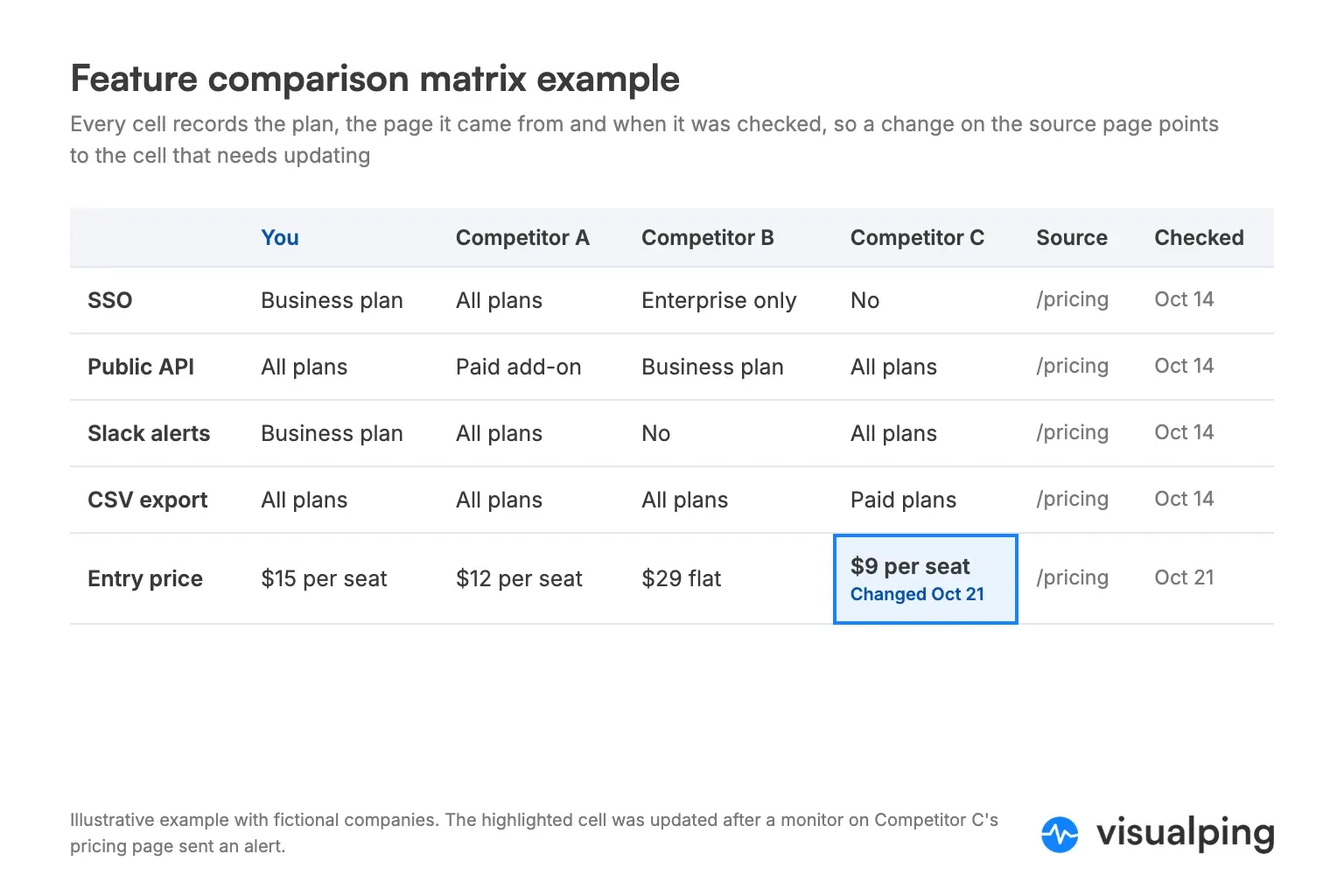
The feature comparison matrix is the most common competitive matrix. Rows are capabilities, columns are companies, and cells say whether each company offers the capability and on which plan.
| Feature | You | Competitor A | Competitor B | Competitor C | Source | Checked |
|---|---|---|---|---|---|---|
| Single sign-on (SSO) | Business plan | All plans | Enterprise only | No | Pricing pages | Oct 21, 2026 |
| Public API | All plans | Paid add-on | Business plan | All plans | Docs pages | Oct 21, 2026 |
| Native Slack alerts | Business plan | All plans | No | All plans | Integrations pages | Oct 21, 2026 |
| Data export to CSV | All plans | All plans | All plans | Paid plans | Help center | Oct 21, 2026 |
| Free plan | Yes, 5 seats | No, 14-day trial | Yes, 1 seat | No | Pricing pages | Oct 21, 2026 |
Two columns on the right do most of the work: Source and Checked. "All plans" means nothing six months later unless you know which page said so and when. Plain "Yes" and "No" cells hide the detail that matters most in a sale, so record the plan or tier instead of a checkmark wherever it applies.
Competitive positioning matrix
A competitive positioning matrix, also called a positioning map or perceptual map and often drawn as a 2x2 grid, plots companies on two axes so you can see clusters and empty space. Pick two dimensions buyers trade off against each other, such as price against breadth of features, or ease of use against depth of customization.
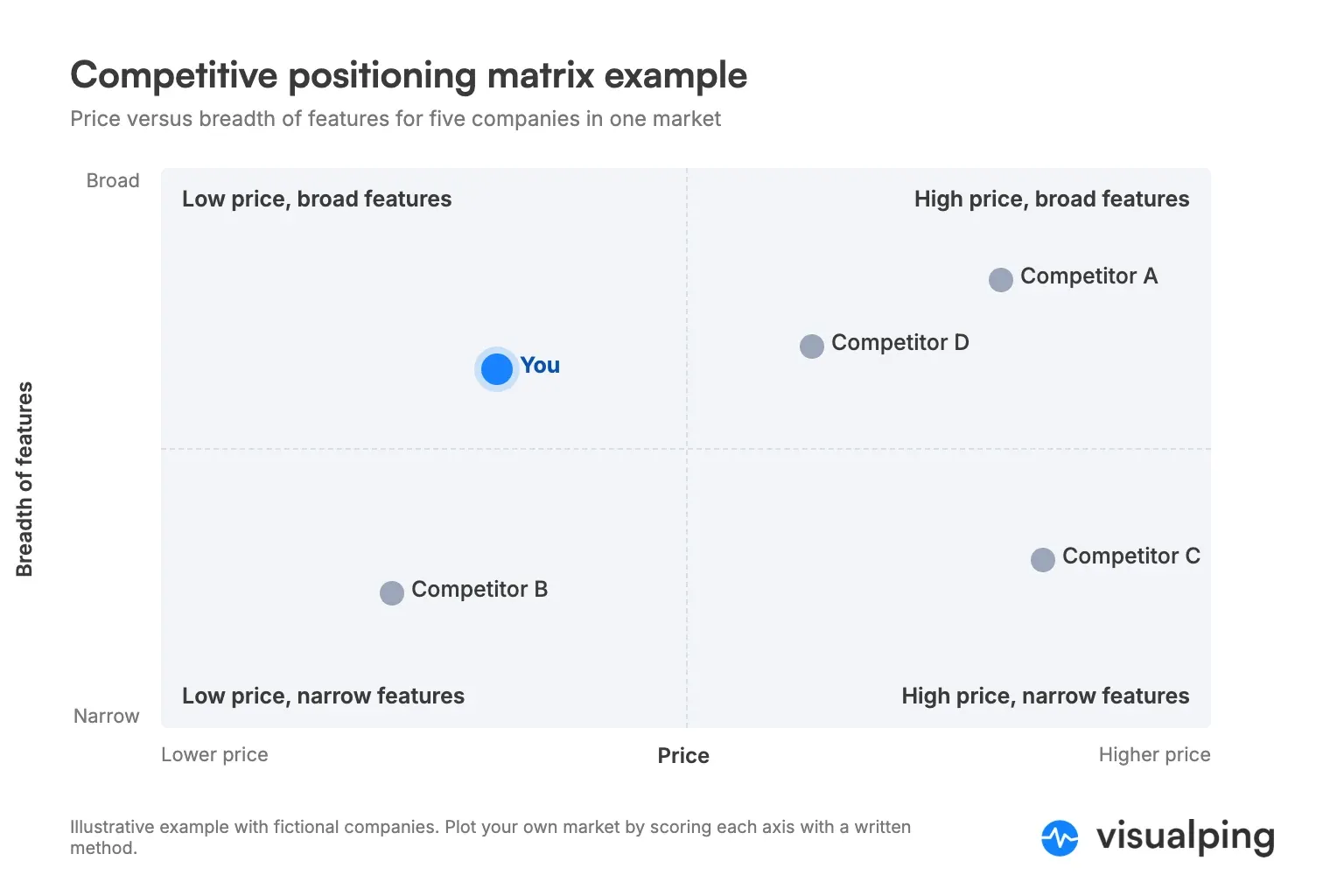
The two best-known public versions are the Gartner Magic Quadrant, which plots vendors on ability to execute and completeness of vision, and the G2 Grid, which plots products on Satisfaction and Market Presence scores. Both look simple, and both rest on a published scoring method. Yours needs the same discipline. Write down how you scored each axis, or the chart turns into an argument about where the dots go.
A 2x2 is the best format for spotting open territory. If every competitor sits in the high-price, broad-feature corner, a focused low-price product has room to move.
Competitive profile matrix
A competitive profile matrix (CPM) turns the comparison into a weighted score. You list the critical success factors in your market, give each a weight between 0.0 and 1.0 so the weights add up to 1.0, and rate every company on each factor from 1 (major weakness) to 4 (major strength). Multiply weight by rating and add up the results. Think Insights documents the same method.
| Critical success factor | Weight | You (rating / score) | Competitor A | Competitor B |
|---|---|---|---|---|
| Breadth of features | 0.25 | 3 / 0.75 | 4 / 1.00 | 2 / 0.50 |
| Price for a 10-person team | 0.20 | 4 / 0.80 | 2 / 0.40 | 3 / 0.60 |
| Integrations | 0.20 | 2 / 0.40 | 4 / 0.80 | 3 / 0.60 |
| Customer support | 0.15 | 3 / 0.45 | 2 / 0.30 | 3 / 0.45 |
| Ease of setup | 0.20 | 4 / 0.80 | 2 / 0.40 | 3 / 0.60 |
| Total | 1.00 | 3.20 | 2.90 | 2.75 |
The total is useful for a leadership slide. The rows are more useful for planning. In this example, You beats Competitor A overall but trails badly on integrations, which carries a 0.20 weight. That row makes the case for building integrations next.
Ratings are judgment calls, so attach the evidence behind each one. "Integrations: 2" should point to the integrations page you counted from.
Competitive advantage matrix
The competitive advantage matrix, also known as the BCG Advantage Matrix, comes from Boston Consulting Group, where Richard Lochridge published it in 1981. Instead of comparing features, it describes how companies in a market can win. One axis counts how many ways there are to gain an advantage. The other measures how large that advantage can be.
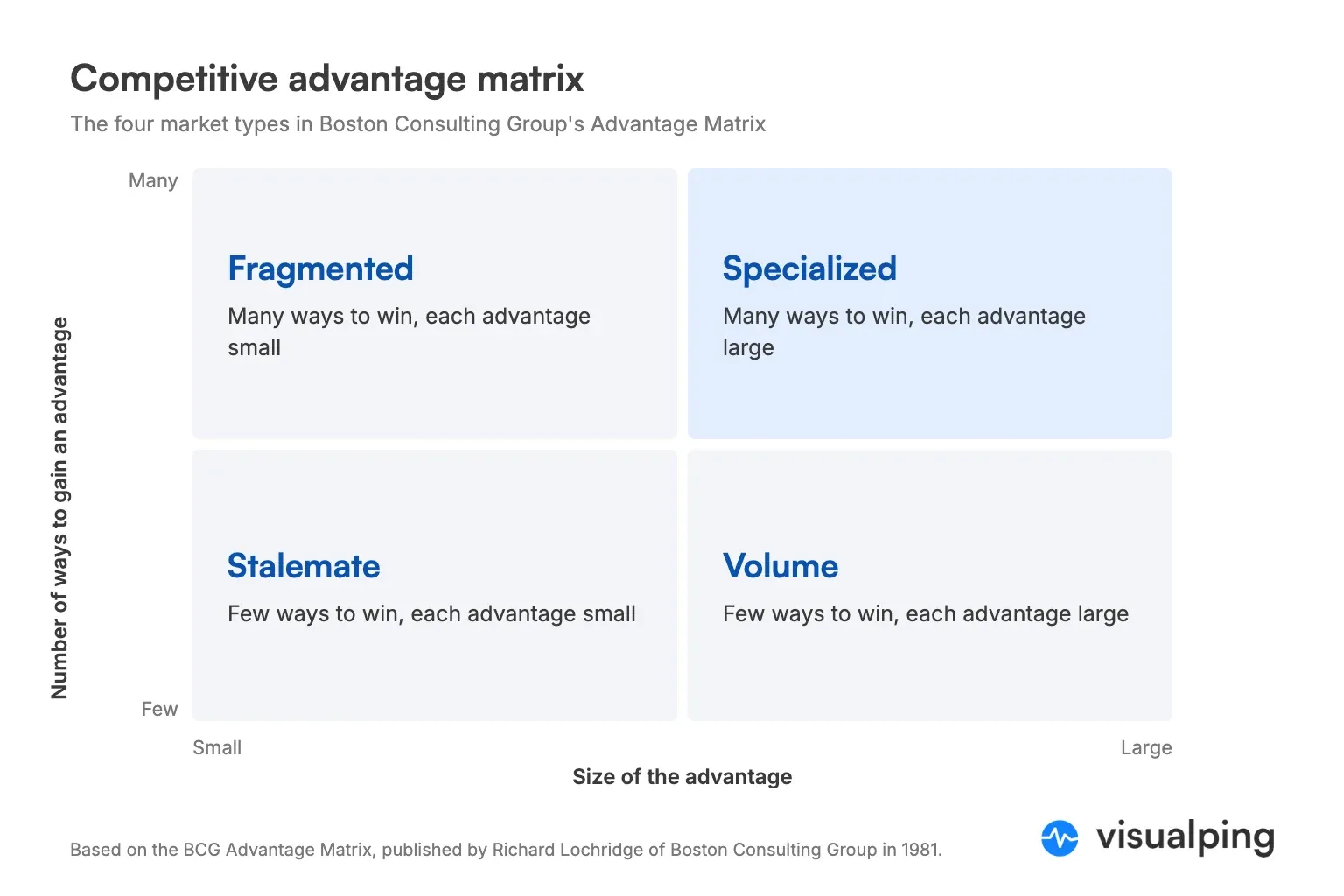
| Quadrant | Ways to gain an advantage | Size of the advantage | What it usually means |
|---|---|---|---|
| Volume | Few | Large | Scale wins, and the biggest players tend to dominate |
| Stalemate | Few | Small | Little room to differentiate, so competition comes down to cost and price |
| Specialized | Many | Large | Companies that differentiate well can earn strong margins |
| Fragmented | Many | Small | Many niche players, and no single advantage takes the market |
Plot your competitors and yourself, then use the result to choose the next matrix. In a stalemate market, the price matrix matters most. In a specialized market, the feature comparison and positioning matrices carry more weight.
Price matrix
A price matrix (also called a pricing matrix) compares plans, list prices, limits and billing terms. It is the matrix sales teams quote from most, and the one most likely to be wrong.
| You | Competitor A | Competitor B | |
|---|---|---|---|
| Free plan | Yes | No | Yes |
| Entry plan, billed monthly | $15 per seat | $12 per seat | $20 flat |
| Annual discount | 20% | 15% | None |
| Seat minimum | None | 3 seats | None |
| Usage limit on entry plan | 10 projects | Unlimited | 5 projects |
| Source | /pricing | /pricing | /pricing |
| Checked | Oct 21, 2026 | Oct 21, 2026 | Oct 21, 2026 |
Record the monthly price and the annual price separately. Many pricing pages show the annual per-month figure by default, and a matrix that mixes the two overstates or understates the gap. Our competitor pricing alerts guide covers what to watch on pricing pages in more detail.
Sales teams often condense a feature or price matrix into a battlecard: one page per competitor covering where they win, where you win and how to answer common objections. Our free sales battlecard template has the layout.
How to build a competitive matrix in 6 steps
- Pick the decision. Write one sentence about what the matrix is for, such as "decide which integrations to build in Q1" or "help reps win against Competitor A". The decision sets the format.
- Choose the competitors. List the three to six companies that show up in deals, on review sites and in search results for your category. Skip the long tail.
- Choose the criteria. Pull them from lost-deal notes, sales call recordings and review sites rather than your own feature list. Five to ten criteria is plenty.
- Find a source for every cell. Use the competitor's own pricing page, docs, changelog, help center or terms. Our list of 27 competitive intelligence sources maps where each kind of fact lives.
- Fill in values with a date. Record the value, the URL and the date you checked it. If a page doesn't say, write "Not published" instead of guessing.
- Set a refresh trigger. Decide what will tell you a cell has gone stale. A calendar reminder works for a while. A monitor on each source page works better, as the next sections show.
Free competitive matrix template
Copy this table into a doc or spreadsheet. The Source and Checked columns are deliberate; keep them.
| Criterion | Weight (optional) | You | Competitor A | Competitor B | Competitor C | Source URL | Checked |
|---|---|---|---|---|---|---|---|
| Criterion 1 | |||||||
| Criterion 2 | |||||||
| Criterion 3 | |||||||
| Criterion 4 | |||||||
| Criterion 5 |
For a spreadsheet version with source and revision columns already set up, download our competitor analysis template for Excel. It holds the raw facts (prices, features, plan limits) that any of the matrices above can be built from.
Why competitive matrices go stale
Competitor pages change more often than most teams update their matrix. Visualping's H1 2026 competitor monitoring report looked at 14,678 active competitor monitors between January 1 and June 30, 2026. The share of monitors that detected at least one change in that window, by page type:
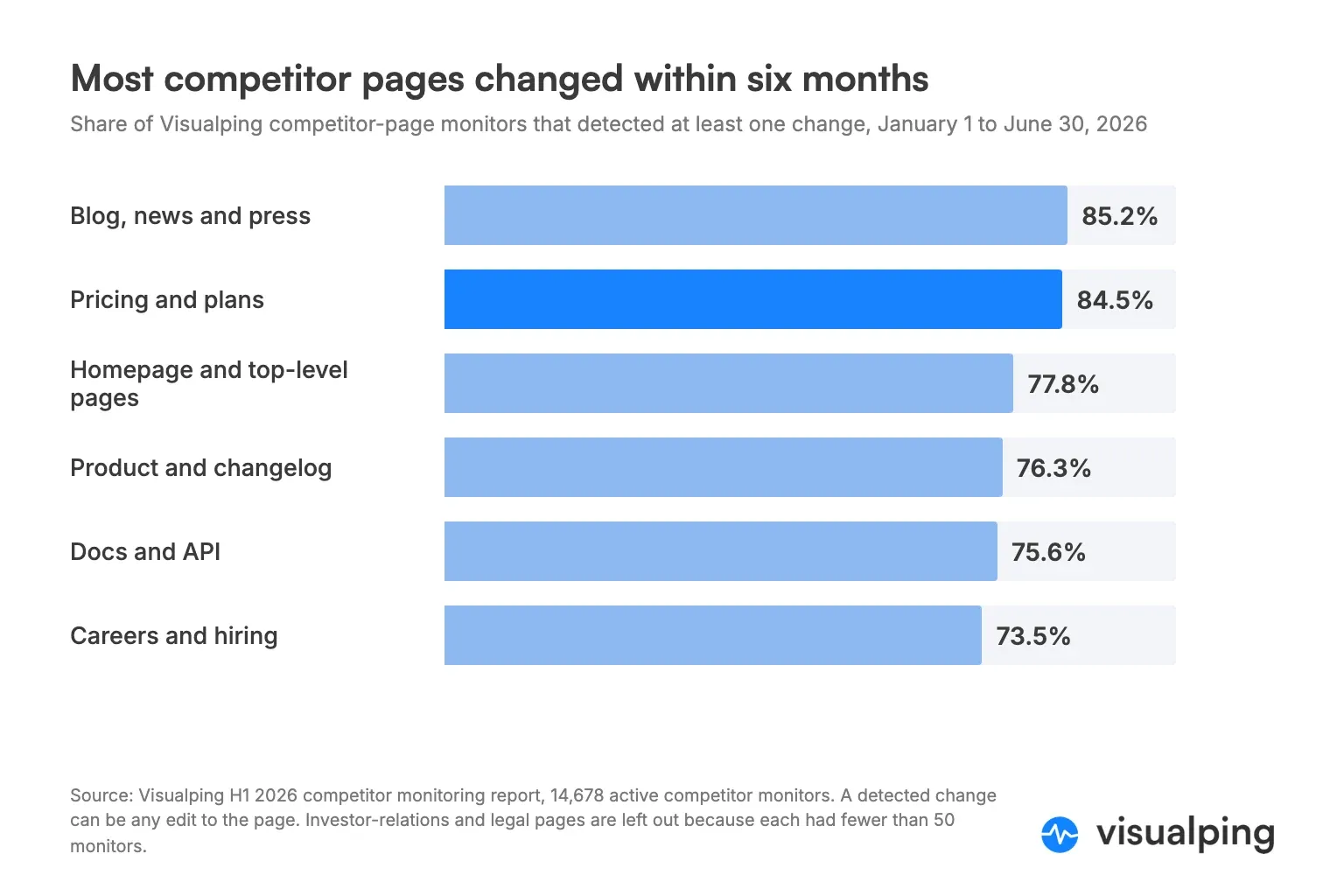
| Competitor page type | Monitors detecting at least one change (H1 2026) | Matrix columns it feeds |
|---|---|---|
| Blog, news and press | 85.2% | Positioning, messaging |
| Pricing and plans | 84.5% | Price matrix, plan gating |
| Homepage and top-level pages | 77.8% | Positioning, target customer |
| Product and changelog | 76.3% | Feature matrix |
| Docs and API | 75.6% | Integrations, technical features |
| Careers and hiring | 73.5% | Strategy signals |
A detected change can be as small as a new line of copy, so these figures count pages that moved at all. A pricing page can change its copy and keep every price. The figures still make the point. If 84.5% of the pricing pages in the sample changed at least once in six months, a pricing matrix reviewed once a quarter is likely carrying at least one stale cell at any given moment.
Here is what one of those changes looks like. On October 21, 2026, a Visualping monitor on Riverside's pricing page caught two price increases on the annual-billing view: the Pro plan went from $24 to $29 a month and the Grow plan from $34 to $36. Any pricing matrix that listed Riverside the week before was already wrong in two cells.
Visualping alert for riverside.fm/pricing, October 21, 2026: Pro rose from $24 to $29 per month and Grow from $34 to $36 per month, billed yearly.
Stale cells cost more than embarrassment. A rep who quotes last quarter's price against a competitor who just cut theirs loses credibility on the call. A product team that ranks a feature gap that closed two months ago builds the wrong thing.
How to keep a competitive matrix current
The fix is to monitor the pages your cells cite instead of re-checking every cell on a schedule. When a source page changes, you review the cells that depend on it and leave the rest alone.
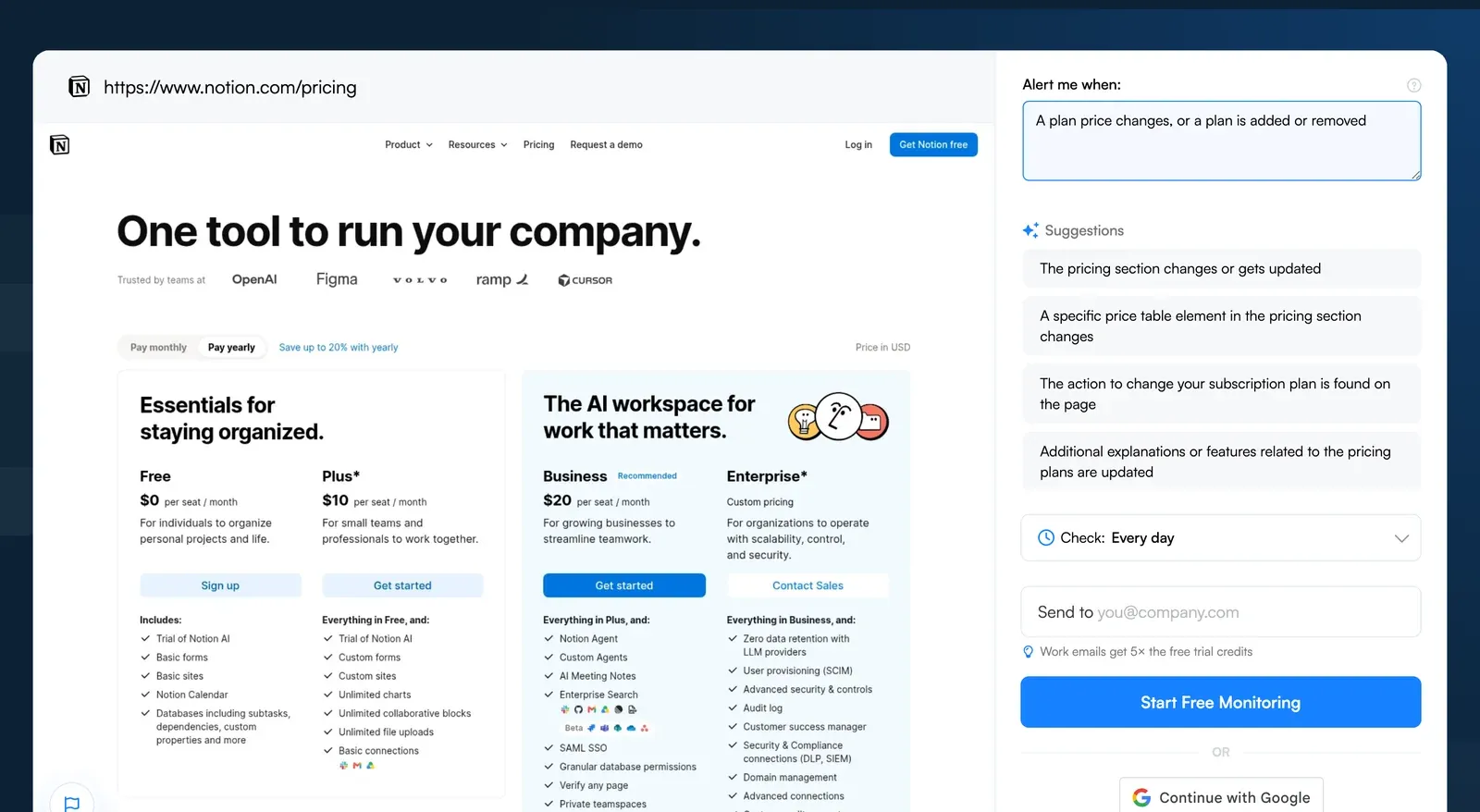
Here is the setup in Visualping, using a competitor pricing page as the example:
- Paste the pricing page URL into the Visualping homepage and click Go. A preview of the page loads.
- In the "Alert me when" box, describe the change that would make a cell wrong, such as "A plan price changes, or a plan is added or removed". Visualping AI uses that condition to decide which changes deserve an alert.
- Pick a check frequency from the "Check:" dropdown. Daily suits most pricing and feature pages.
- Enter your email under "Send to" and click Start Free Monitoring.
Repeat for each source page. This table maps matrix columns to the page and condition to monitor:
| Matrix column | Page to monitor | Example "Alert me when" condition |
|---|---|---|
| Price and plans | /pricing | A plan price changes, or a plan is added or removed |
| Feature availability | Changelog or release notes | A new feature or integration is announced |
| Integrations | /integrations | An integration is added or removed |
| Positioning and target customer | Homepage | The main headline or the target customer changes |
| Terms and limits | Terms of service, fair-use policy | Usage limits or contract terms change |
| Customer sentiment | The competitor's G2 or Capterra review page (see G2 review monitoring) | A new review mentions pricing, support or a missing feature |
The Free plan covers 5 pages with 150 checks a month, which is enough to check five source pages once a day. That covers the pricing pages of five competitors, a reasonable starting point. Paid plans add more pages and faster checks, as often as every 2 minutes on Personal 10k and Business plans, though daily is plenty for a matrix. On Business plans, the Google Sheets integration appends one row per detected change to a tab you choose, so a change log can sit next to the matrix itself. Our guide to monitoring competitor websites covers larger setups, and the feature release tracker and messaging change tracker guides go deeper on changelogs and homepages.
Ready to keep your matrix current? Paste a competitor's pricing page into Visualping, describe the change you care about, and get an email when it happens. It takes one URL and one sentence, and the Free plan needs no credit card.
When an alert arrives, update the cell, change its Checked date and note what changed. After a few months you have a revision history for each competitor, which is useful in its own right: it shows how often a rival reprices and which features they move between tiers.
Competitive matrix mistakes to avoid
Choosing criteria your product wins. Buyers notice a matrix where you have a checkmark in every row. Include the criteria that decide deals, even the ones you lose. An honest matrix gets used, and a flattering one gets ignored.
Checkmarks without tiers. "Yes" for a feature that only exists on the enterprise plan misleads your own team. Record the plan.
No source, no date. A cell without a source can't be checked, and a cell without a date can't be trusted.
Too many competitors. Ten columns turn into a wall of cells nobody reads. Keep the main matrix to the competitors who show up in deals and move the rest to an appendix.
Building once and filing it away. A matrix is a snapshot. Monitor the pages behind it, or schedule the review in the same calendar as your pricing and product planning meetings.
Frequently asked questions
What is a comparative matrix?
A comparative matrix, or competitive matrix, is a grid that compares several companies or products on the same criteria. Rows hold the criteria, such as features or price, and columns hold the companies being compared. It is used in competitive analysis, product planning and sales enablement.
How do you do a competitive profile matrix?
List the critical success factors in your market and weight each between 0.0 and 1.0 so the weights add up to 1.0. Rate each company on each factor from 1 (major weakness) to 4 (major strength). Multiply each weight by the rating, then add the scores per company. The highest total marks the strongest overall position, and the individual rows show where each company leads or trails.
What is the difference between a competitive matrix and a SWOT analysis?
A SWOT analysis looks at one company's strengths, weaknesses, opportunities and threats. A competitive matrix compares several companies side by side on the same criteria. Teams often build the matrix first and then use it to fill in the strengths and weaknesses in a SWOT.
How often should you update a competitive matrix?
Update each cell when the page it cites changes. In Visualping's H1 2026 data, 84.5% of monitored competitor pricing pages and 76.3% of product and changelog pages changed at least once in six months, so a quarterly review alone leaves gaps. Monitoring the source pages tells you which cells need attention and when.
What should a competitive matrix include?
Your product and three to six competitors, five to ten criteria buyers use to decide, and for each cell a value, a source URL and the date it was checked. Add weights if you want a single score per company.
Is there a free competitive matrix template?
Yes. Copy the table in the template section above, or download Visualping's free competitor analysis template for Excel, which includes source and revision columns.
Want to monitor web changes that impact your business?
Sign up with Visualping to get alerted of important updates from anywhere online.
Eric Do Couto
Eric Do Couto is the Head of Marketing at Visualping. He leads content strategy, growth operations, and brand positioning for website change detection.
More articles by Eric Do Couto